
The Gap Between 'Free' Marketing and Actual Free Utility
Every note-taking app on the market advertises a free plan. The marketing copy reads the same: "Start for free," "Free forever," "No credit card required." What those landing pages don't tell you is that most free plans are designed to introduce you to a workflow, then ask you to pay once you've hit a hard limit — a storage cap, a note count, a device restriction, or a feature gate. You discover these limits not during signup, but three months later when you can't add a new note or your files stop syncing.
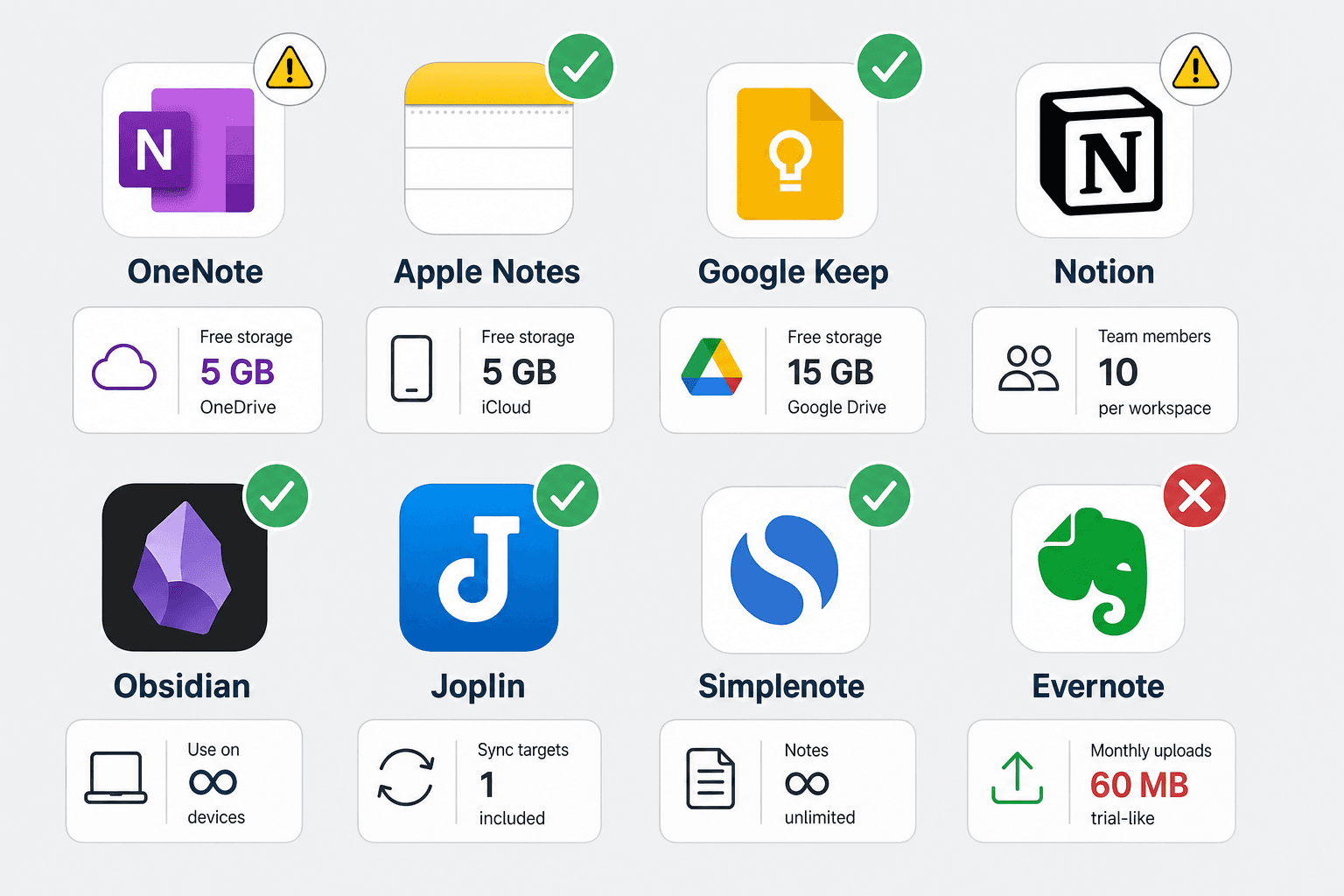
This article exists to close that information gap. Below you'll find the exact, verified limits for the free plans of eight major note-taking apps: Microsoft OneNote, Apple Notes, Google Keep, Notion, Obsidian, Joplin, Simplenote, and Evernote. Every number — storage cap, note limit, device restriction, file upload size — comes from official sources or verified third-party testing. The goal is simple: let you choose a free plan with your eyes open, not discover the catch later.
Free-Plan Limits at a Glance: Side-by-Side Data Table
The table below compresses the most important limits for all eight apps into a single scannable view. Use it to quickly eliminate apps that don't meet your baseline requirements — then read the deep-dive section for the nuances that a table can't capture.
| App | Note Limit | Storage Cap | Device Limit | Max File Upload | Offline Access | Encryption | Key Missing Feature |
|---|---|---|---|---|---|---|---|
| OneNote | Unlimited | 5 GB (OneDrive) | Unlimited | 100 MB | Yes (full) | No E2EE | No Markdown |
| Apple Notes | Unlimited | 5 GB (iCloud) | Apple devices only | Unlimited (within storage) | Yes (full) | No E2EE by default | No Android / Windows |
| Google Keep | Unlimited | 5–15 GB (Google account) | Unlimited | Limited (image size) | Yes (mobile only) | No E2EE | No rich formatting |
| Notion | Unlimited blocks (solo) | Unlimited (blocks) | Unlimited | 5 MB | Limited | No E2EE | No true offline editing |
| Obsidian | Unlimited | Your own storage | Unlimited | Unlimited (local) | Yes (full) | Optional (via Sync) | No built-in cloud sync |
| Joplin | Unlimited | Your own storage | Unlimited | Unlimited (local) | Yes (full) | E2EE (built-in) | Dated interface |
| Simplenote | Unlimited | Unlimited (text only) | Unlimited | No attachments | Yes (full) | No E2EE | No images or files |
| Evernote | 50 notes | 1 GB total | 1 device | 200 MB | Yes (limited) | No E2EE | 1 notebook only |
Deep Dive: What Each Free Plan Actually Includes (and Where It Hurts)
The table gives you the numbers. This section tells you what those numbers mean in practice — where each free plan works well, where it pinches, and who should think twice before adopting it.
Microsoft OneNote: The Best All-Rounder Free Plan
OneNote's free plan is the most generous among the major cloud-based apps. You get unlimited notes, unlimited devices, and full offline access across Windows, Mac, iOS, Android, and the web. The 5 GB OneDrive storage cap is the main constraint — it's shared with your other Microsoft files, so if you also store photos and documents in OneDrive, you'll hit the limit faster. File uploads are capped at 100 MB per file, which is fine for most documents but restrictive for PDFs with embedded media or large images.
The biggest practical limitation is the lack of end-to-end encryption. Microsoft can access your notes, which matters if you're storing sensitive personal information. OneNote also lacks native Markdown support, which may frustrate users who want to write in plain text and export cleanly.
Apple Notes: Best for Apple-Only Users, But Locked to the Ecosystem
Apple Notes offers unlimited notes with no per-note size limit beyond your 5 GB iCloud storage. It supports handwriting, sketches, document scanning, and basic tables. Offline access is full and seamless — notes sync across iPhone, iPad, and Mac automatically.
The catch is the platform lock. There is no official Apple Notes app for Android or Windows. If you ever switch to a non-Apple device, your notes are trapped unless you export them manually — and the export options are limited. End-to-end encryption is not enabled by default; you must turn on Advanced Data Protection in iCloud settings to get it.
Google Keep: Simple and Fast, but Limited in Scope
Google Keep is designed for quick capture — short notes, checklists, voice memos, and reminders. It's not a full note-taking system. Notes are unlimited, but they're limited to text and images; there's no rich formatting, no Markdown, no file attachments, and no notebooks or folders (only labels).
Storage is shared with your Google account. As of May 2026, new Google accounts without a linked phone number receive only 5 GB of free storage, down from the previous 15 GB. Existing accounts with a phone number linked still get 15 GB. This storage is shared across Gmail, Google Drive, Google Photos, and Keep — so if you use any of those services heavily, Keep's usable storage shrinks fast.
Notion: Powerful for Solo Users, but File Uploads and Team Limits Bite
Notion's free plan is excellent for a single user. You get unlimited blocks — which means unlimited pages, databases, and content — as long as you're the only workspace owner. The 5 MB file upload limit is the most restrictive among the major apps; you cannot attach a single high-resolution photo or a typical PDF without hitting the cap.
The confusion point is the team limit. If your workspace has two or more workspace owners, the entire workspace is capped at 1,000 blocks. That's roughly 10–20 pages of moderate complexity. Deleting blocks does not restore your count — the limit is based on total blocks ever created. Notion provides a 3-day grace period when you hit the limit, after which you cannot add new content until you upgrade or remove a workspace owner.
Offline access is limited. You can view recently opened pages offline, but you cannot create or edit notes without an internet connection. For users who work on planes, trains, or in areas with spotty connectivity, this is a meaningful constraint.
Obsidian: Unlimited Local Notes, But You Bring Your Own Sync
Obsidian's core app is free forever for personal use with no limits on note count, storage, or features. You get full offline access, a plugin ecosystem of over 1,500 community plugins, and complete control over your data because everything lives in a local folder of plain Markdown files.
The trade-off is that Obsidian does not include cloud sync. To access your notes on multiple devices, you must either use Obsidian Sync (paid, $4–5/month with student/nonprofit discounts available) or set up your own sync solution using iCloud, Dropbox, Syncthing, or a Git repository. For non-technical users, DIY sync can be frustrating to configure. There is no built-in collaboration, no native AI features, and no web client — it's a local-first tool through and through.
Joplin: The Privacy Champion with a Clunky Interface
Joplin is a free, open-source note-taking app that offers unlimited notes, end-to-end encryption built in, and full offline access. You can sync your notes across devices using your own cloud storage — Dropbox, OneDrive, Nextcloud, or WebDAV — which means you control where your data lives.
The main downside is the interface. Joplin uses a Markdown editor that feels dated compared to modern apps like Notion or Obsidian. There's no WYSIWYG editing, no rich text mode, and no web clipper. For users who prioritize privacy and are comfortable with Markdown, Joplin is a strong choice. For anyone who wants a polished, modern UI, it will feel like a step backward.
Simplenote: Fast, Free, and Text-Only
Simplenote lives up to its name. It offers unlimited text notes with instant sync across every major platform — iOS, Android, Mac, Windows, Linux, and the web. There's no storage cap because there are no attachments: no images, no files, no audio. It's text and tags only.
Simplenote includes version history, so you can restore any previous version of a note. It's fast, lightweight, and genuinely free with no paid tier. The lack of encryption means your notes are stored in plain text on Automattic's servers. If you need to store sensitive information, Simplenote is not the right tool.
Evernote: A Free Plan That's Really a Trial
Evernote's free plan is the most restricted of any major note-taking app. You are limited to 50 notes, 1 notebook, 1 device, and 1 GB of total storage. Monthly uploads are capped at 250 MB, and individual file uploads cannot exceed 200 MB. Notes in the trash count toward your 50-note limit.
When you hit the 50-note limit, you can still view, edit, share, and export existing notes, but you cannot create new ones until you delete enough notes to fall below the cap or upgrade to a paid plan. For anyone who takes more than a few dozen notes — which is most people — this is not a viable long-term free option. It functions as an extended trial for Evernote's paid plans, which start at $14.99 per month.
Decision Matrix: Which Free Plan Fits Your Priority?
If you don't want to read all eight deep dives, use this matrix to match your primary need to the best free app. Each row represents a common user priority. The app listed in the "Best Match" column is the one whose free plan best serves that priority, based on the hard limits above.
| Your Priority | Why It Matters | Best Free App | Runner-Up |
|---|---|---|---|
| Maximum storage for notes and files | You take lots of notes with images, PDFs, and attachments | OneNote (5 GB OneDrive) | Obsidian (your own storage) |
| Privacy and data ownership | You want end-to-end encryption and control over where data lives | Joplin (E2EE, DIY sync) | Obsidian (local-first, optional E2EE) |
| Cross-platform access | You switch between Windows, Mac, Android, and iOS regularly | Simplenote (all platforms, instant sync) | OneNote (all platforms) |
| Rich features and databases | You need databases, templates, and project management in your notes | Notion (unlimited blocks solo) | Obsidian (plugins add similar power) |
| Offline-first workflow | You work without internet access frequently | Obsidian (full offline, local files) | Joplin (full offline) |
| Apple-only ecosystem | You use only Apple devices and want seamless sync | Apple Notes (iCloud sync, handwriting) | OneNote (also works well on Mac/iOS) |
| Simplicity and speed | You want a fast, distraction-free text note app | Simplenote (instant sync, no clutter) | Google Keep (quick capture) |
| Budget (truly $0 long-term) | You cannot or will not pay for a note-taking app | Simplenote (100% free, no paid tier) | Obsidian (free core, optional paid add-ons) |
How to Avoid Free-Plan Traps: What to Check Before You Commit
The apps above are the most popular, but the same principles apply to any free note-taking plan you evaluate. Before you invest time in a new app, run through this checklist to avoid discovering a hard limit after you've already built your workflow.
- Check the storage cap, not just the note limit. "Unlimited notes" means little if each note can only hold a few KB and your total storage is capped at 1 GB. Look for the total storage number, not the per-note claim.
- Verify the device limit. Some free plans restrict you to one device (Evernote) or to devices within a single ecosystem (Apple Notes). If you use both a phone and a laptop, a single-device limit is a dealbreaker.
- Test offline mode before you need it. Not all apps offer full offline editing. Notion, for example, only lets you view recently opened pages offline. Open the app in airplane mode and try to create a new note — if it fails, you'll know before you're stuck on a flight.
- Understand what happens when you hit a limit. Some apps give you a grace period (Notion: 3 days). Others lock you out of creating new content immediately (Evernote). A few let you keep using the app but block uploads until you free up space. Read the help center article on limits before you commit.
- Look for export options. A free plan is only as good as your ability to leave it. Check whether the app supports export to Markdown, HTML, PDF, or plain text. Apps with open formats (Obsidian, Joplin, Simplenote) make it easy to migrate. Apps with proprietary formats (Evernote, Notion) make it harder.
- Check whether the storage is shared with other services. OneNote's 5 GB is shared with OneDrive. Google Keep's storage is shared with Gmail, Drive, and Photos. Apple Notes' 5 GB is shared with iCloud backups, photos, and mail. If you use those services heavily, your note-taking storage shrinks accordingly.
The Bottom Line: Best Free Pick by Use Case
No single free plan is best for everyone. The right choice depends on your device ecosystem, your need for offline access, your tolerance for DIY setup, and whether you need to store images and files or just text. Here are the clearest verdicts based on the data above.
- Best for students on a budget: OneNote. Unlimited notes, cross-platform, full offline, and a generous 5 GB storage cap make it the safest choice for a student who needs to take notes across multiple devices. Apple Notes is a strong alternative if you're in the Apple ecosystem.
- Best for privacy and data ownership: Obsidian or Joplin. Both are local-first, open-source, and give you full control over your data. Obsidian has a richer plugin ecosystem and a more modern interface. Joplin has built-in end-to-end encryption. Choose Obsidian if you want power and flexibility; choose Joplin if encryption is non-negotiable.
- Best for cross-platform simplicity: Simplenote. It works on every platform, syncs instantly, and is 100% free with no paid tier. The trade-off is text-only notes with no attachments. If you only need to capture and sync text, nothing beats Simplenote for speed and simplicity.
- Best for power features without paying: Notion (solo user). Unlimited blocks, databases, templates, and a web clipper make Notion's free plan the most feature-rich option for a single user. The 5 MB file upload limit is the main constraint. If you work with large files, look elsewhere.
- Not recommended as a free plan: Evernote. With a 50-note limit, 1 notebook, and 1 device, the free plan is not a viable long-term option for anyone who takes notes regularly. Treat it as a trial for Evernote's paid plans, not as a free note-taking app.
For a broader comparison that covers paid plans, AI features, and use-case-specific recommendations, see our full note-taking apps comparison. If you're interested in how the market has shifted and why old advice about free plans may no longer hold, read our analysis of market shifts and pricing changes in 2026.


Comments
Join the discussion with an anonymous comment.