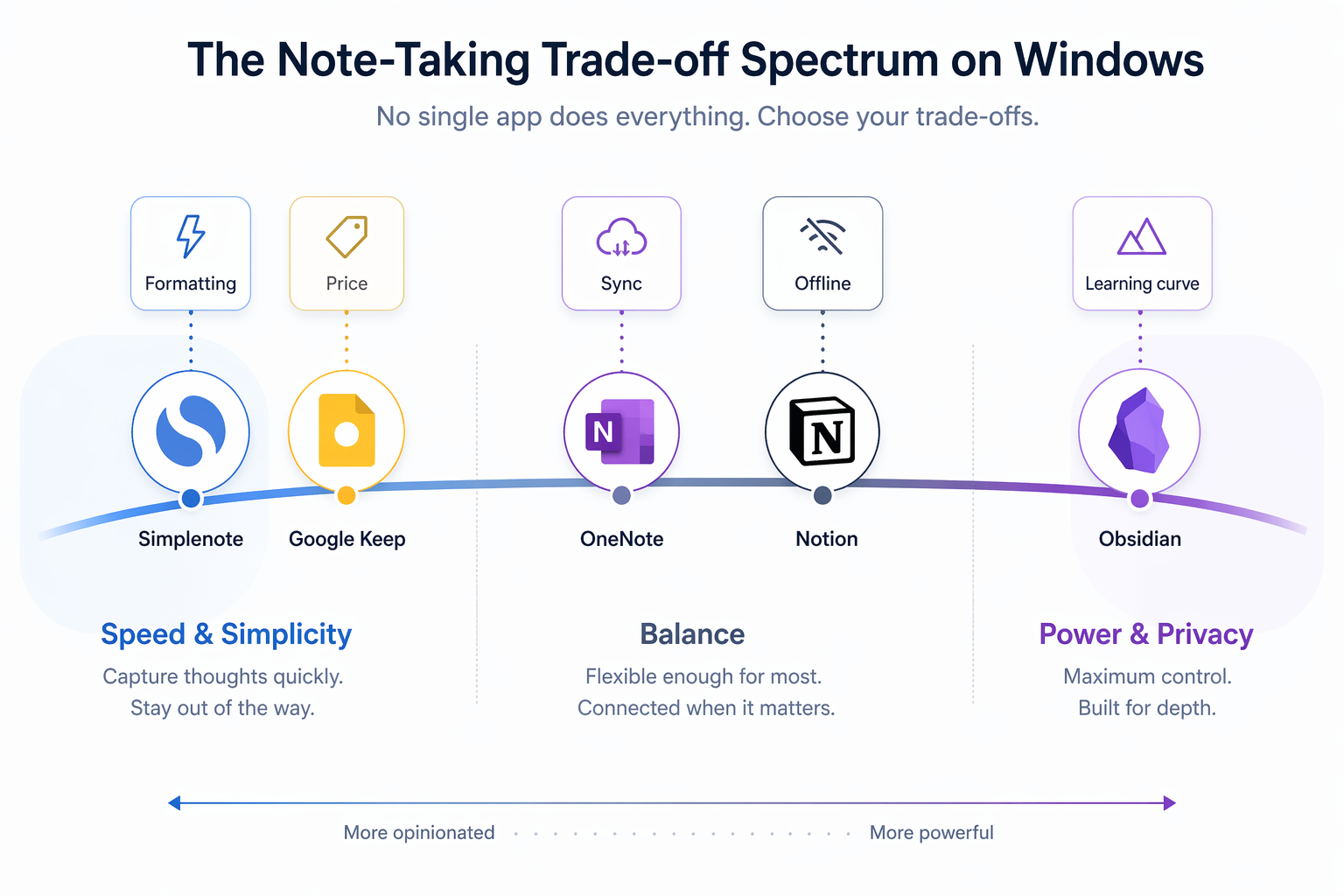
Most "best of" roundups treat Windows as just another platform. They list features, slap on a winner badge, and move on. The problem is that every top note-taking app has a critical flaw on Windows — and those flaws are rarely the same. OneNote syncs unreliably despite deep Microsoft integration. Notion feels heavy for quick capture and its offline mode is limited. Obsidian demands you learn Markdown and manage sync yourself. Evernote's free plan is essentially unusable, and its paid plans have tripled under Bending Spoons.
This guide is built around a different question: which trade-off can you live with? We tested ten apps on Windows 11 — from OneNote's ecosystem lock-in to Simplenote's bare-bones speed — and organized the results by use case. If you are a student, a knowledge worker, a privacy-focused researcher, or someone who just needs to capture a thought in under three seconds, there is an app here that fits. But none of them are perfect.
How We Tested: Our Methodology for Windows 11 Note-Taking Apps
We evaluated each app on a Dell XPS 15 running Windows 11 (23H2) with 16GB RAM and a 512GB SSD. The testing criteria covered the full note-taking lifecycle:
- Setup speed: How long from download to first note?
- Note creation: How fast can you capture a thought, format text, and insert media?
- Search: Can you find a note from six months ago in under five seconds?
- Organization: Notebooks, tags, folders, bidirectional links — what structure is available?
- Cross-device syncing: Do notes appear on your phone within a reasonable time?
- Offline access: Can you read, edit, and create notes without an internet connection?
- Export: Can you get your data out in a usable format?
- Collaboration: Can you share a note or notebook with someone else?
- AI features: Does the app offer transcription, summarization, or smart search?
- Pricing: What does the free tier include, and what do you pay for?
Quick Comparison Table: 10 Note-Taking Apps for Windows at a Glance
The table below summarizes the key dimensions for each app. Use it to narrow your options before diving into the detailed trade-offs.
| App | Free Tier | Paid Plan (Monthly) | Offline Support | Sync Method | Best For | Critical Windows Flaw |
|---|---|---|---|---|---|---|
| OneNote | Free (5GB OneDrive) | Microsoft 365 $9.99/mo (100GB) | Full | OneDrive | Students, Surface users | Sync speed and reliability |
| Obsidian | Free (core app) | Sync $4–$5/mo | Full | Manual / Obsidian Sync | PKM, privacy-focused users | Steep learning curve, manual sync |
| Notion | Free (personal) | Plus $10/user/mo | Limited | Notion Cloud | All-in-one workspace | Limited offline, feels heavy |
| Evernote | 50 notes, 1 device | Personal $14.99/mo | Full | Evernote Cloud | Web clippers, legacy users | Expensive, free plan unusable |
| Joplin | Free | Cloud €2.99/mo | Full | Joplin Cloud / Nextcloud | Open-source users | No built-in sync without cloud plan |
| Simplenote | Free (unlimited) | None | Full | Simplenote Cloud | Quick capture | No formatting, no organization |
| UpNote | Free (limited) | $1.99/mo or $39.99 lifetime | Full | UpNote Cloud | Budget users | Smaller ecosystem, fewer integrations |
| Google Keep | Free (15GB shared) | None | Limited | Google Drive | Quick capture, reminders | No rich formatting, no notebooks |
| Krisp | 7-day trial | Pro $8/mo (annual) | No | Krisp Cloud | Meeting transcription | Not a general note-taking app |
| Standard Notes | Free (basic) | Premium $9/mo | Full | Standard Notes Cloud | Privacy, encryption | Limited features on free plan |
Deep Dives: The Honest Trade-Offs of Each App on Windows
OneNote: The Best Free All-Rounder, If Sync Cooperates
OneNote remains the best free note-taking app for Windows, earning an Editors' Choice 4.5/5 rating from PCMag. Its free tier includes all core features and 5GB of OneDrive storage — upgrade to 100GB for $1.99/month or get Microsoft 365 Personal for $9.99/month. The app is deeply integrated with the Microsoft ecosystem: you can embed Excel spreadsheets, draw with a Surface Pen, and clip web pages directly into notebooks.
The critical flaw is sync reliability. As XDA notes, "my only issue with OneNote is sync speed. Sometimes, it fails to sync the latest changes across devices." In our testing, a note created on a Windows desktop took anywhere from 30 seconds to 5 minutes to appear on an Android phone. For users who work across multiple devices throughout the day, this delay can be frustrating.
Obsidian: Local-First Knowledge Management with a Learning Curve
Obsidian is free for personal use and stores all notes locally as plain Markdown files. PCMag gives it 4.0/5, noting it is "free to use (with optional payments)." The optional Obsidian Sync add-on costs $4–$5/month and provides end-to-end encrypted syncing across devices. For users who want to avoid cloud dependency entirely, you can sync manually via Dropbox, Git, or a USB drive.
The trade-off is the learning curve. Obsidian uses Markdown for formatting, and its core concepts — bidirectional links, graph view, vaults — require upfront investment. As XDA puts it, "it uses markdown language to take notes, and it requires a learning curve." For users who want a simple place to dump text, Obsidian will feel like overkill. For knowledge workers building a personal knowledge management (PKM) system, it is unmatched.
For a deeper look at the data ownership trade-off, see our guide on Local-First vs. Cloud PKM: The Data Ownership Tradeoff in 2026.
Notion: The All-in-One Workspace That Feels Heavy on Windows
Notion is free for personal use, with the Plus plan starting at $10/user/month. It combines notes, tasks, databases, and wikis into a single workspace — a powerful proposition for users who want to replace multiple tools. The Notion AI add-on is available on the Business plan at $24/user/month.
On Windows, the experience has two notable weaknesses. First, offline mode is limited — you can view cached pages but cannot create or edit notes without an internet connection. Second, the Windows app is an Electron wrapper, which means it consumes more RAM and feels slower than native apps like OneNote. As XDA notes, Notion "doesn't offer an offline mode" and its "mobile apps are web-wrappers." For quick capture — opening the app, typing a thought, closing it — Notion is noticeably slower than Simplenote or Google Keep.
If you are torn between Notion and a dedicated note-taker, read our comparison: Notion vs. Dedicated Note-Taking Apps: Do You Need a Workspace or a Note-Taker?.
Evernote: Expensive and Shrinking — Only for Legacy Users
Evernote's free plan is essentially unusable: 50 notes, 1 notebook, and 1 device. As Zapier puts it, it is "not really worth using." Paid plans start at $14.99/month for the Personal plan (formerly $7.99/month) and go up to $249.99/year for the Professional tier under Bending Spoons' ownership. PCMag gives it 4.0/5, but that rating reflects the app's feature set, not its value proposition.
Evernote's remaining strength is web clipping. Its browser extension is the most reliable way to save full articles, emails, and PDFs. If you have a large archive of clipped content and are willing to pay the premium, Evernote still works. For everyone else, the price-to-value ratio no longer makes sense.
Joplin: Open-Source and Offline-First
Joplin is free and open-source, earning an Editors' Choice 4.5/5 from PCMag. It stores notes locally by default and supports Markdown, notebooks, tags, and end-to-end encryption. The optional Joplin Cloud starts at €2.99/month and provides syncing across devices.
The trade-off is that Joplin's interface feels dated compared to Obsidian or Notion. It lacks real-time collaboration, and its mobile apps are functional but not polished. For users who want a free, offline-first, open-source alternative to Evernote, Joplin is the strongest option.
Simplenote: The Fastest Way to Capture a Thought
Simplenote is completely free with unlimited storage. PCMag gives it 3.5/5, noting it is "completely free" with "unlimited" storage. The app opens instantly, syncs across devices in seconds, and supports tags and version history. There is no formatting toolbar, no notebooks, and no rich media — just plain text.
This is not a flaw; it is the point. Simplenote is designed for users who want to capture a thought in under three seconds and find it later. If you need formatting, organization, or collaboration, look elsewhere. If you need speed, nothing beats it.
UpNote: The Budget Powerhouse
UpNote offers a free version with basic features, and Premium costs $1.99/month or $39.99 for a lifetime license. PCMag gives it 3.5/5. It supports Markdown, notebooks, tags, and rich formatting — a surprising amount of depth for the price.
The catch is that UpNote's ecosystem is small. There are no third-party integrations, no web clipper, and no collaboration features. For an individual user on a tight budget who wants a capable note-taking app without a subscription, UpNote's lifetime license is the best deal on this list.
Google Keep: Free, Fast, and Shallow
Google Keep is free and includes 15GB of storage shared across all Google apps. It excels at quick capture — you can create a note from the Windows taskbar, add a reminder, or set a location-based alert. It also supports drawing, voice notes, and basic collaboration.
The limitation is organizational depth. There are no notebooks, no folders, no tags (only labels), and no rich formatting. Keep is a digital sticky note pad, not a knowledge management system. For users who need to organize hundreds of notes into a structured system, Keep will feel insufficient.
Krisp: AI-Powered Meeting Notes, Not General Note-Taking
Krisp is an AI meeting assistant that transcribes, summarizes, and action-items your calls. The Pro plan costs $8/month (billed annually) with a free 7-day trial. It integrates with Zoom, Microsoft Teams, and Google Meet.
Krisp is not a general note-taking app. You cannot use it to write a grocery list, organize research notes, or build a knowledge base. It serves a specific use case: capturing meeting notes automatically. If that is your primary need, Krisp is excellent. If you need a general note-taker, look elsewhere.
Standard Notes: Privacy-First, Feature-Limited
Standard Notes offers a free plan with basic note-taking and end-to-end encryption. The Premium plan costs $9/month and adds Markdown support, file attachments, and version history. It is designed for users who prioritize privacy above all else.
The trade-off is that the free plan is very limited — no Markdown, no file attachments, no folders. For most users, the Premium plan is necessary to get a usable experience, and at $9/month, it competes directly with Notion and Obsidian Sync.
Best Note-Taking App for Windows by Use Case
The following recommendations are based on the trade-offs discussed above. Each pick acknowledges the flaw you will have to accept.
- Best for students: OneNote — It is free, deeply integrated with Office, and supports handwriting on Surface devices. Accept that sync may occasionally lag.
- Best for knowledge workers: Notion — If you need notes + tasks + databases in one place, Notion is unmatched. Accept that offline mode is limited and the app feels heavy for quick capture.
- Best for privacy-focused users: Obsidian — Local-first storage, plain Markdown files, and end-to-end encrypted sync. Accept the learning curve and manual sync setup.
- Best for quick capture: Simplenote or Google Keep — Both are free, fast, and sync instantly. Accept that you get no formatting, no notebooks, and no deep organization.
- Best for AI-powered meeting notes: Krisp — Automatic transcription and summarization for calls. Accept that it is not a general note-taking app.
- Best for budget users: Joplin or UpNote — Joplin is free and open-source; UpNote's lifetime license is $39.99. Both offer solid features for a fraction of the cost of Evernote or Notion.
How to Choose Your Note-Taking App on Windows: A Decision Framework
If you are still unsure, use this simple decision tree based on your primary need:
- Do you need deep Microsoft integration? → OneNote. It is free, works with Office, and supports Surface Pen input.
- Do you need local-first privacy? → Obsidian. Your data stays on your machine, and you control the sync method.
- Do you need an all-in-one workspace? → Notion. It replaces notes, tasks, databases, and wikis.
- Do you need fast, free capture? → Simplenote or Google Keep. Both are instant and free.
- Do you need AI transcription? → Krisp. It handles meeting notes automatically.
- Do you want the cheapest capable app? → UpNote's lifetime license at $39.99 is the best value on this list.
Frequently Asked Questions
- Is OneNote really free on Windows? Yes. The Windows app is free to download and includes all core features. You get 5GB of free OneDrive storage; upgrading to 100GB costs $1.99/month.
- Can I use Obsidian without paying for Sync? Yes. The core app is free. You can sync your vault manually using Dropbox, Git, or a USB drive. Obsidian Sync ($4–$5/month) is optional and provides end-to-end encrypted syncing.
- Is Evernote worth the price in 2026? For most users, no. The free plan is limited to 50 notes and 1 device. Paid plans start at $14.99/month. Only consider Evernote if you have a large archive of clipped content and are willing to pay the premium.
- Does Notion work offline on Windows? Partially. You can view cached pages offline, but you cannot create or edit notes without an internet connection. Notion is not suitable for users who need full offline access.
- Which app has the best handwriting support on Surface? OneNote. It has native stylus support, palm rejection, and the ability to draw directly on the page. Other apps like Obsidian and Notion have limited or no handwriting support.