
Quick Picks: Best iPad Note-Taking App by Use Case
If you already know your workflow, here are the clearest picks for each persona. Pricing verified June 2026 from official sources.
| Use Case | Best Pick | Starting Price | Core Reason |
|---|---|---|---|
| Best overall (handwriting + PDF) | GoodNotes 6 | Free / $11.99/yr | Unlimited notebooks, nested folders, cross-platform sync, flexible AI add-on |
| Best for lecture audio sync | Notability | Free / $19.99/yr | Audio-to-note sync, real-time AI transcription on Pro tier |
| Best free Apple-ecosystem option | Apple Notes | Free | Pre-installed, iCloud sync, Apple Intelligence features on compatible hardware |
| Best one-time purchase | Noteshelf | $9.99 one-time | Solid handwriting app, no subscription required |
| Best cross-platform / Windows | OneNote | Free | Works on Windows, Android, Mac, and iOS with a Microsoft account |
| Best for PKM / knowledge workers | Notion or Obsidian | Free tier available | Notes-plus-databases (Notion) or local-first plain-text vault (Obsidian) |
How We Compared These Apps
This roundup was built around four decision dimensions that actually matter to iPad users: workflow type (handwriting vs. typed/PKM), platform needs (Apple-only vs. cross-platform), pricing model preference (subscription vs. one-time), and AI feature requirements (basic vs. advanced). Pricing was pulled directly from official app pricing pages in June 2026 — not from third-party roundups, which frequently carry outdated or inconsistent figures.
All apps were assessed for Apple Pencil support, free tier usability, AI feature gating, and platform availability. One deliberate editorial choice: this roundup bridges handwriting-first apps (GoodNotes, Notability, Noteshelf) and typed/PKM apps (Notion, Obsidian, OneNote) in a single framework. iPad users increasingly consider both categories before deciding, and most roundups treat them as completely separate conversations.
- Pricing verified June 2026 from official app pricing pages
- Assessed on iPad with Apple Pencil across handwriting, PDF annotation, and typed note workflows
- AI features evaluated by tier — what's included in the base plan vs. what requires an upgrade
- Platform availability checked for iOS, Mac, Android, Windows, and Web
- Each app includes explicit not-for-you-if language to help you disqualify quickly
Master Comparison Table
| App | Best For | Free Tier | Paid Starting Price | Apple Pencil Support | AI Features | Platforms | Not For You If |
|---|---|---|---|---|---|---|---|
| GoodNotes 6 | Handwriting, PDF markup, students | Yes (3 notebooks, 100MB) | $11.99/yr (Essential) | Full native support | Basic on paid plans; full AI requires +$10/mo AI Pass | iOS, Mac, Android, Windows | You want advanced AI without paying extra on top of the base plan |
| Notability | Lecture audio sync, students | Yes (web editing only) | $19.99/yr (Plus) | Full native support | AI quizzes on Plus; Smart Notes + unlimited transcription on Pro ($99.99/yr) | iOS, Mac, Web | You need Android or Windows, or want AI summaries without paying $99.99/yr |
| Apple Notes | Free Apple-ecosystem users | Yes (fully functional) | Free | Scribble handwriting-to-text | Apple Intelligence (summarization, smart folders) on compatible hardware | iOS, Mac, Web (iCloud) | You use Windows or Android, or want deep notebook organization |
| Noteshelf | Subscription-avoiders | No | $9.99 one-time | Full native support | Limited compared to GoodNotes/Notability | iOS, Mac | You need frequent feature updates or cross-platform sync beyond Apple |
| OneNote | Cross-platform, Windows users | Yes (full-featured) | Free (Microsoft account) | Basic Scribble / ink support | Microsoft Copilot (requires separate add-on) | iOS, Mac, Android, Windows, Web | You want Apple Pencil-native handwriting depth or offline-first use |
| Notion | PKM, notes + databases | Yes | $10/mo (Plus) | Scribble support | Notion AI on iPad (add-on) | iOS, Mac, Android, Windows, Web | You primarily want handwriting or PDF annotation |
| Obsidian | Local-first PKM, developers | Yes (personal use) | Free for personal use | Plugin-dependent | None native; plugin ecosystem | iOS, Mac, Android, Windows, Linux | You want a polished handwriting or audio experience out of the box |
GoodNotes 6: Best Overall for Handwriting and PDF Markup
GoodNotes 6 remains the strongest all-around choice for iPad users who write by hand, annotate PDFs, or want a notebook that behaves like a physical one — but with search, sync, and structure. The 2025–2026 plan restructuring changed what you get at each price point, and it's worth understanding before you buy.
Current pricing from the official GoodNotes pricing page (verified June 2026): Free ($0, up to 3 notebooks, 100MB storage), Essential ($11.99/yr, unlimited notebooks, unlimited audio recording, 5GB storage, basic AI), Pro ($35.99/yr, adds Drive integration, private link sharing, real-time collaboration, cross-platform sync). An optional AI Pass add-on costs an additional +$10/month on top of any paid plan and unlocks the full AI experience: Create mode, Image Generation, cloud transcription, and live meeting summaries.
What makes GoodNotes stand out in 2026 is the organizational depth: unlimited nested folders, per-page template switching inside notebooks, a Whiteboard infinite canvas for brainstorming, and an Elements tool for managing reusable stickers and assets. The Android and Windows apps (separate purchase) give it broader reach than Notability.
- Strengths: Unlimited nested folders, Whiteboard canvas, Elements sticker tool, Android and Windows apps, flexible AI add-on structure
- Weaknesses: AI costs escalate quickly for power users; the full AI experience requires both a Pro plan and a separate AI Pass
- Not for you if: You want comprehensive AI features without paying above the base subscription price, or you primarily type rather than write by hand
Notability: Best for Lecture Audio Sync and AI Summaries
Notability has one feature that no other app matches cleanly: tap any word in your transcript and the audio jumps back to the moment you wrote it. For students recording lectures, this alone justifies the subscription. The 2026 plan structure, however, means the full AI experience now costs considerably more than the Plus tier suggests.
Verified June 2026 from the official Notability pricing page: Starter ($0, unlimited note editing via web only, access to 20,000+ templates), Plus ($19.99/yr, adds audio recording and transcription, handwriting search, up to 400 AI quizzes/flashcards per month, up to 100 YouTube link-to-note conversions per month), Pro ($99.99/yr, adds Smart Notes with real-time AI transcription and summaries, unlimited live audio transcription, unlimited YouTube conversions, unlimited quizzes, AI chat with notes).
- Strengths: Audio-sync-to-notes workflow, native multi-note split-screen, fast PDF text highlighting with snap-to-text behavior
- Weaknesses: Apple and Web only — no Android or Windows app; no one-time purchase option; full AI requires the $99.99/yr Pro tier
- Not for you if: You need Android or Windows access, you want to avoid a high annual cost for AI features, or you primarily annotate PDFs rather than take lecture notes
Apple Notes: Best Free Option for Apple-Ecosystem Users
Apple Notes is the obvious starting point for anyone already inside the Apple ecosystem. It is free, pre-installed, syncs via iCloud across iPhone, iPad, and Mac, and in 2026 it has meaningfully improved with Apple Intelligence features — provided your hardware qualifies.
Apple Intelligence in Notes includes text summarization, smart folder organization, and handwriting search via Scribble. These features require iPhone 15 Pro or later, or an iPad with an A17 Pro or M1 chip or later. If your iPad is older, you get a capable basic notes app but not the AI layer.
- Strengths: Completely free, pre-installed, iCloud sync, solid Scribble handwriting-to-text, no subscription pressure
- Weaknesses: No Android or Windows support, limited organizational depth compared to GoodNotes, AI features require compatible hardware
- Not for you if: You use Windows or Android regularly, you need structured notebook organization with nested folders, or your iPad does not have an A17 Pro or M1 chip
Noteshelf, OneNote, Notion, and Obsidian: The Rest of the Field
Noteshelf: Best One-Time Purchase for Subscription-Avoiders
Noteshelf is the clearest answer for users with subscription fatigue who still want a dedicated handwriting app. At $9.99 as a one-time App Store purchase (verify current App Store price before purchasing — pricing may vary by region), it offers a solid handwriting experience with Apple Pencil support, PDF annotation, and basic audio recording.
The honest caveat: Noteshelf is less actively developed than GoodNotes or Notability. It does not match either app's AI feature set or organizational depth. If you need frequent feature updates or cross-platform sync beyond Apple devices, it is not the right choice. But for a user who wants a reliable, no-subscription handwriting notebook, it holds up.
OneNote: Best Cross-Platform Option for Windows and Android Users
OneNote is free with a Microsoft account and runs on every major platform: iOS, Mac, Android, Windows, and Web. For users whose primary machine is a Windows PC or who share notes with Android users, no other option on this list matches its cross-platform reach at zero cost.
Microsoft Copilot integration is available in OneNote but requires a separate Copilot add-on — it is not included in the free tier or standard Microsoft 365 plans. Apple Pencil support works via ink input, but the experience is not as refined as GoodNotes or Notability for handwriting-heavy workflows.
Notion: Best for Notes Plus Databases
Notion on iPad supports Apple Pencil input via Scribble and includes Notion AI as an add-on. Its real strength is not handwriting — it is the combination of notes, databases, task lists, and linked pages in a single workspace. For knowledge workers who want to manage projects and capture notes in the same tool, Notion holds a unique position.
The free tier is genuinely usable; the Plus plan runs $10/month. If you want a full breakdown of Notion's features, pricing tiers, and use cases, see the Notion Review: Features, Pricing, and Best Use Cases (2026) on this site.
Obsidian: Best for Local-First PKM and Data Portability
Obsidian is free for personal use and stores your notes as plain Markdown files — on your device, not in a proprietary cloud. On iPad, handwriting support depends on third-party plugins rather than native integration, so it is not a replacement for GoodNotes or Notability for ink-heavy work. Where it excels is data ownership: your notes are always portable, and no pricing change can lock you out.
For a complete look at Obsidian's plugin ecosystem, PKM features, and iPad-specific setup, see the Obsidian Review: The Best Local-First Note-Taking App for PKM.
Buyer's Guide: How to Choose Based on Your Workflow
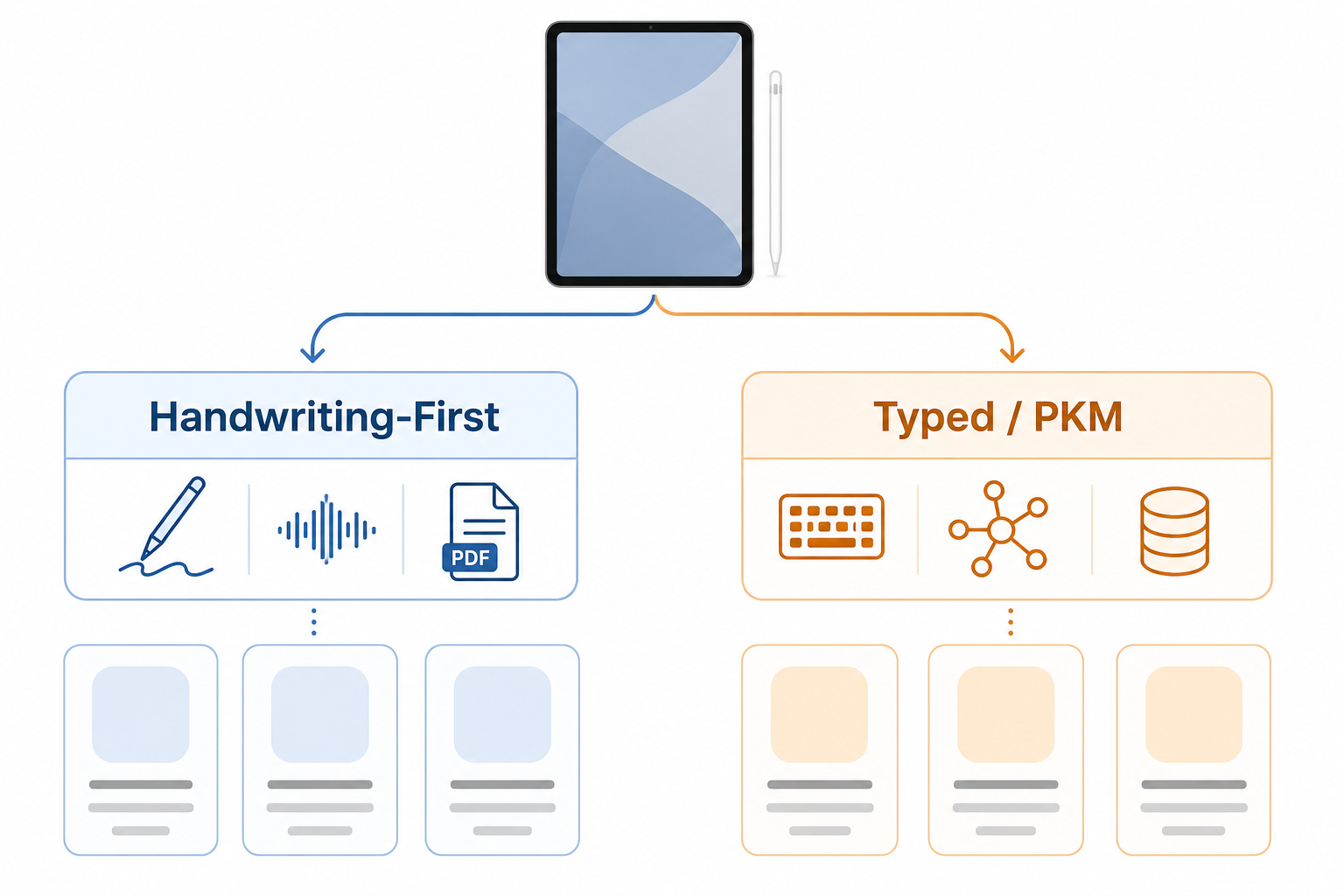
Most iPad note-taking decisions come down to three questions. Answer them in order and you will have a clear shortlist.
1. Handwriting-First or Typed / PKM?
This is the most important split. Handwriting-first users — students annotating lecture slides, professionals marking up PDFs, anyone who thinks better with a stylus — belong in GoodNotes, Notability, or Noteshelf. These apps are built around ink input, and no amount of Scribble support in Notion or OneNote replicates that experience.
Knowledge workers who primarily type, link notes together, and build structured knowledge bases belong in Notion or Obsidian. The workflows rarely overlap cleanly on iPad. If you are trying to decide between a notebook app and a PKM tool, that is a deeper question covered in the Notion vs. Obsidian comparison on this site.
2. Apple-Only or Cross-Platform?
GoodNotes and Notability are Apple-centric. Notability has no Android or Windows app at all. GoodNotes has Android and Windows apps, but they are separate purchases and the experience is not identical to the iOS version. If you regularly switch between an iPad and a Windows PC or Android phone, OneNote, Notion, or Obsidian will serve you better — all three sync cleanly across all platforms.
3. Subscription or One-Time Purchase?
If you want a handwriting app with no ongoing subscription, Noteshelf at $9.99 one-time is your only strong option in this category. Apple Notes is free with no subscription, but it is not a dedicated handwriting app. GoodNotes does have a Special Edition one-time purchase in the App Store, but it is only shown when you have no active subscription — it is not a standard purchasing path.
| Priority | Best Choice | Why |
|---|---|---|
| Handwriting + organization | GoodNotes 6 | Unlimited notebooks, nested folders, cross-platform |
| Lecture audio + AI summaries | Notability Pro | Audio sync, Smart Notes, real-time transcription |
| Free, Apple-only | Apple Notes | Pre-installed, iCloud, Apple Intelligence on compatible iPads |
| No subscription, handwriting | Noteshelf | $9.99 one-time, solid ink experience |
| Cross-platform, Windows primary | OneNote | Free, works everywhere |
| Notes + databases, knowledge work | Notion | Structured workspace, iPad Scribble, Notion AI |
| Local-first, data portability | Obsidian | Plain-text vault, free personal use, full portability |
2026 Pricing Changes: What's New and What It Means for You
The two most significant pricing shifts in 2026 affect GoodNotes and Notability — and most roundups have not yet caught up to either of them.
GoodNotes restructured its plans in September 2025, splitting into Essential ($11.99/yr) and Pro ($35.99/yr) and introducing the AI Pass as a separate monthly add-on (+$10/month). This decouples AI from the base subscription — a meaningful change for users who saw GoodNotes as an all-in-one purchase. Both Essential and Pro include only 525 AI credits per month. If you want the full AI experience (Create mode, Image Generation, cloud transcription, live meeting summaries), you are looking at Pro plus the AI Pass: roughly $156/yr total.
Notability added a Pro tier ($99.99/yr) on top of its existing Plus tier ($19.99/yr), gating Smart Notes and unlimited live transcription behind the higher plan. Students who see "$19.99/yr" in a headline and assume that includes AI summaries will be surprised when they hit the paywall for Smart Notes.
- GoodNotes full AI cost: Pro ($35.99/yr) + AI Pass (+$10/mo) = ~$156/yr for power users
- Notability full AI cost: Pro tier at $99.99/yr — Smart Notes and unlimited transcription are not available on Plus
- The practical implication: the base plan price is not the effective cost for users who want comprehensive AI features from either app
Frequently Asked Questions
Which iPad note-taking app is best for students?
GoodNotes 6 (Essential, $11.99/yr) is the strongest choice for most students — it handles lecture notes, PDF annotation, and organized notebooks in one app. If you record lectures and want audio-to-note sync, Notability Plus ($19.99/yr) is worth the extra cost. For students on a tight budget, Apple Notes is free and covers the basics if you have a compatible iPad.
Do I need an Apple Pencil to use these apps?
No, but handwriting-first apps (GoodNotes, Notability, Noteshelf) are significantly less useful without one. Typed apps — Notion, OneNote, Obsidian, Apple Notes — work fully with a keyboard or finger input. If you are considering a handwriting app, an Apple Pencil is effectively required for a good experience.
Is GoodNotes or Notability better in 2026?
It depends on your workflow. GoodNotes is better for long-term notebook organization, PDF markup, and users who want cross-platform access to Android or Windows. Notability is better for lecture audio sync and students who want Smart Notes AI summaries (on the Pro tier). At comparable price points, GoodNotes offers more organizational flexibility; Notability offers a more focused lecture-capture workflow.
Can I use these apps on Windows or Android?
Notability is Apple and Web only — no Android or Windows app. GoodNotes has Android and Windows apps, but they are separate purchases. Notion, OneNote, and Obsidian all sync cleanly across iOS, Android, Mac, Windows, and Web. If cross-platform access is a hard requirement, those three are your options.
Is Apple Notes good enough?
For casual note-taking within the Apple ecosystem, yes. Apple Notes handles typed notes, Scribble handwriting, checklists, and iCloud sync without any cost. The Apple Intelligence features (summarization, smart folders) are genuinely useful on compatible hardware. Where it falls short is organizational depth — there are no nested notebooks, no PDF annotation tools, and no audio sync. If you need any of those, a dedicated app is worth the cost.
What is the cheapest viable note-taking setup for iPad?
The cheapest viable setup depends on your needs. For Apple-only users: Apple Notes (free) covers the basics. For handwriting without a subscription: Noteshelf at $9.99 one-time. For knowledge workers who want PKM: Obsidian is free for personal use. The combination of Apple Notes plus Obsidian free gives you a capable typed-notes and PKM setup at zero ongoing cost.