
Most people do not need another list of AI tools. They need a sorting rule. The uncomfortable part of “how to use AI to be more productive” is that the same tool can save twenty minutes on a meeting recap and waste an afternoon on a strategy draft that sounds polished but says nothing. That is not a prompting problem first. It is a routing problem.
That explains why the enterprise AI story looks so uneven. A Fast Company article discussing MIT research reported that 95% of enterprise generative AI pilots produced no measurable profit-and-loss impact.[1] That figure should not be read as “AI does not work.” It is more useful as a warning that access to AI and productivity from AI are different things.
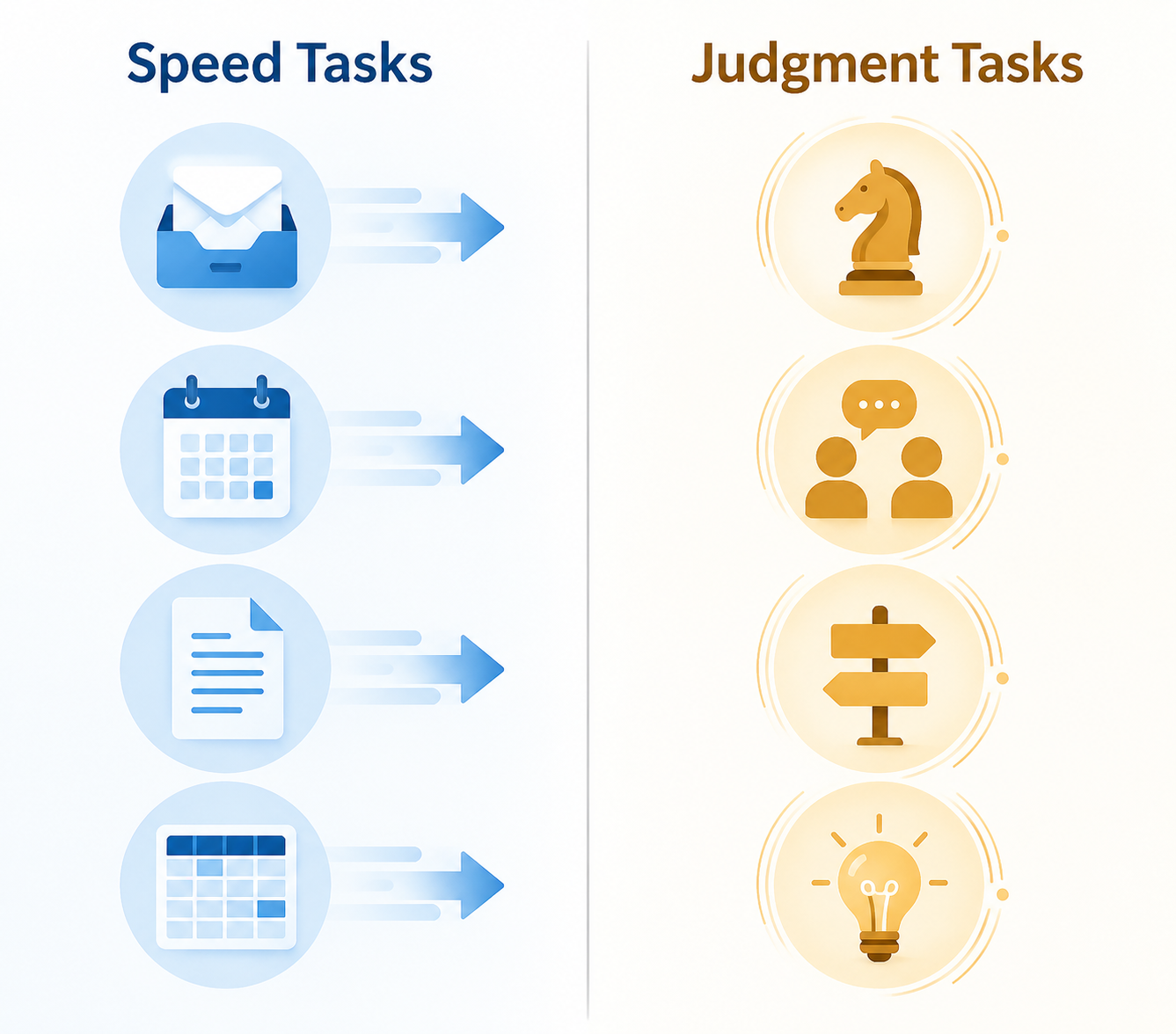
The practical answer is to classify the work before choosing the tool or writing the prompt. Split your work into two categories: speed tasks and judgment tasks. Speed tasks are repetitive, time-intensive, and easy to verify. Judgment tasks involve taste, trust, context, strategy, relationships, or consequences that are expensive to get wrong.

The Speed vs. Judgment Test
Before asking AI to do anything, ask one question: if the output is only 80% right, what happens next?
If the answer is “I can check it quickly,” the work probably belongs in the speed lane. If the answer is “someone may make a bad decision, feel misunderstood, approve the wrong direction, or lose trust,” AI should not own the work. It can help you think, draft, compare, and structure, but the human decision stays with you.
| Work type | Good AI role | Human role | Examples |
|---|---|---|---|
| Speed tasks | Do most of the processing | Verify, correct, approve | Email triage, meeting summaries, table cleanup, document previews, calendar audits |
| Judgment tasks | Prepare drafts, options, questions, and structure | Decide, edit, prioritize, take responsibility | Strategy memos, client messaging, performance feedback, product tradeoffs, hiring decisions |
This distinction also matches the better evidence on AI productivity. Harvard Business School Online summarized research showing that, when AI was used appropriately, users completed knowledge work tasks 25.1% faster and produced work rated more than 40% higher in quality.[2] The important phrase is “used appropriately.” A productivity gain from one kind of task does not automatically transfer to every task on your calendar.
Speed Tasks: Let AI Remove the Administrative Sludge
Speed tasks are where AI feels least magical and most useful. The work is often boring, scattered, and necessary: sorting messages, cleaning notes, extracting action items, reformatting rows, finding conflicts, or turning a messy document into something readable before a call.
A Click2App guide to AI productivity workflows in 2026 highlights exactly this kind of work: email triage, meeting catch-up summaries, document reads, data formatting, and calendar audits.[3] Treat its time-saving estimates as workflow-specific, not universal proof that every employee gets the same result. The more durable lesson is the pattern: AI works well when the job is repetitive, the source material is available, and a person can inspect the result quickly.
Email triage
Do not ask AI to “handle my inbox” as a vague productivity wish. Give it a narrow job: group messages by urgency, identify senders waiting on you, extract deadlines, draft short replies for low-risk threads, and flag anything that requires your decision. The value is not that AI writes a perfect reply. The value is that you stop rereading the same twelve messages to remember what matters.
Meeting catch-up
For meetings you missed, AI can turn transcripts or notes into a useful catch-up packet: decisions made, open questions, assigned owners, dates mentioned, and topics that need your review. The verification step is clear. You check the original notes where the summary touches your work, then move on.
Long document previews
AI is also useful before a call with a long report, policy document, vendor proposal, or customer brief. Ask for the main claims, assumptions, risks, named stakeholders, and questions you should ask. That does not replace reading the document when the stakes are high. It changes the first read from “Where am I?” to “What needs scrutiny?”
Data formatting and cleanup
This is one of the cleanest speed-lane uses: standardizing labels, splitting columns, converting notes into a table, cleaning inconsistent capitalization, or producing formulas. The task is annoying, the desired format is usually explicit, and errors are visible if you sample the output. AI should not invent missing data, but it can save you from hand-editing the same pattern fifty times.
Calendar audits
A calendar audit is not a personality exercise. Export or summarize your meetings, then ask AI to categorize them by recurring status updates, decision meetings, one-on-ones, deep work blocks, and optional sessions. The useful output is a list of meetings to shorten, combine, decline, or convert into async updates. You still decide what politics, relationships, and timing allow.
For these speed tasks, tool choice comes after the workflow. A general assistant such as ChatGPT, Claude, or Gemini may be enough for one-off work; connectors or automation software matter when the same task repeats across inboxes, calendars, documents, and project tools. If you are still choosing a starting point, use an AI productivity app decision framework before adding another subscription. If the workflow needs to run without manual copy-paste, compare workflow automation software or look at how ChatGPT connectors affect productivity.
Judgment Tasks: Use AI as a Draft Partner, Not the Finisher
Judgment tasks are where sloppy AI enthusiasm creates cleanup work. These are the tasks where a bland answer can be worse than no answer because it looks complete enough to pass along. Strategy, positioning, performance feedback, client escalation, prioritization, hiring, negotiation, and product tradeoffs all require context that is partly written down and partly carried by the people involved.
This is the lane where AI should help you get to a better first draft, not make the final call. It can organize scattered thinking, pressure-test options, produce alternate framings, identify missing stakeholders, and turn raw notes into a memo shape. It should not decide what promise you make to a customer, which employee concern matters most, or which tradeoff your team can live with.
Harvard Business School Online quotes Professor Karim Lakhani warning against fully automating tasks that require human judgment.[2] That caution is not anti-AI. It is basic operational hygiene. The more expensive the wrong answer, the more AI belongs in preparation, not approval.
Why examples change the output
When people complain that AI produces generic work, they often gave it a generic situation. Judgment work depends on standards. If you want a useful memo, give AI a good memo. If you want a sharper customer update, show it a previous update that handled tension well. If you want strategic options, include examples of what your organization considers too vague, too risky, or too operational.
Andy Yasutake’s LinkedIn article on an AI productivity framework reports that providing examples improved output quality by about 70% and introduces the BUILD structure: Background, Use case, Instructions, Length, and Deliverable.[4] Treat the improvement figure as the author’s reported result rather than a universal benchmark. The underlying practice is still sound: examples give AI a target shape and reduce the amount of interpretation it has to invent.
| BUILD element | What to provide | Why it matters for judgment work |
|---|---|---|
| Background | The situation, audience, constraints, and relevant history | Prevents generic advice that ignores context |
| Use case | What the output will be used for | Helps AI distinguish notes, a draft, a recommendation, or an executive-ready artifact |
| Instructions | Criteria, tone, exclusions, examples, and what to avoid | Defines the standard instead of leaving taste to the model |
| Length | Expected size or level of detail | Keeps the output from becoming either thin or bloated |
| Deliverable | The exact format you need | Makes the result easier to review and use |
A better prompt for a judgment task
A weak prompt says: “Make a strategy for improving customer retention.” That asks AI to supply the judgment you have not done yet.
A better prompt gives AI a bounded role:
Background: We are a small B2B team reviewing customer retention after several renewal conversations. The audience is our leadership team. We have limited engineering capacity this quarter.

Use case: I need a working memo to prepare for a decision meeting, not a final strategy.

Instructions: Organize the notes into 3 possible retention priorities. For each, include the customer problem it addresses, the operational burden, likely objections, and what evidence we still need. Do not invent metrics. Flag assumptions clearly.

Length: Keep it under 900 words.

Deliverable: Return a memo with sections for context, options, tradeoffs, open questions, and a final section titled “Decisions humans need to make.”
That prompt does not magically create strategy. It creates a reviewable artifact. The team can now argue about priorities instead of arguing with a blank page.
Use different AI roles for different levels of judgment
A Geeky Gadgets guide frames AI roles across levels such as assistant, specialist, and strategist.[5] That is useful if you do not turn it into theater. The role should match the decision risk.
- Assistant: “Summarize these notes and extract action items.” Use this for speed work.
- Specialist: “Review this draft against our stated criteria and identify gaps.” Use this when you have standards.
- Strategist: “Generate options, tradeoffs, and questions for a human decision.” Use this when the output feeds a decision, not when it replaces one.
The trap is letting “strategist” mean “decider.” AI can be a useful sparring partner because it is fast, patient, and good at producing alternatives. It does not own the consequences. The person sending the memo, making the recommendation, or managing the relationship does.
A Simple Classification Routine
The framework works best when it becomes a small habit at the beginning of a task, not a quarterly AI initiative. Before you open an AI assistant, classify the work in under a minute.
- Name the output: reply, summary, table, memo, recommendation, plan, decision, presentation, analysis.
- Identify the risk of being wrong: low, medium, or high.
- Check the verification cost: can you review the output quickly against source material?
- Decide the AI role: processor, drafter, critic, option generator, or automation trigger.
- Define the human review point before the work starts.
A status update can often be a speed task. AI turns messy bullets into a clean update, you check the facts, and it is done. A reorganization announcement is a judgment task. AI may help you draft versions for different audiences, but a person needs to decide what is honest, what is premature, and what people will hear between the lines.
A spreadsheet cleanup is usually a speed task. A forecast built from that spreadsheet is not automatically one. AI can find anomalies, summarize assumptions, or generate scenarios, but someone still needs to understand the business reality behind the numbers.
A meeting transcript summary is a speed task. A recommendation about what to do after the meeting is a judgment task. Keeping those two outputs separate prevents a common failure mode: a summary quietly turns into advice, and nobody notices where the evidence ended.
Where Tool Choice Fits
Once the work is classified, tool choice becomes less confusing. You are no longer asking which AI tool is “best.” You are asking what kind of work the tool needs to support.
For one-off speed and judgment tasks, a primary assistant may be enough. If you are deciding between the major assistants, a ChatGPT, Claude, and Gemini comparison is more useful after you know whether you care most about document handling, writing support, reasoning style, integrations, or everyday speed.
For recurring speed tasks, integrations matter more than clever prompting. Inbox routing, calendar review, CRM updates, document intake, and reporting workflows need reliable access to the right systems. That is where a narrower list of AI tools you actually need is better than a giant directory.
For judgment tasks, the differentiator is often less about the brand name and more about your input quality: examples, source material, constraints, review criteria, and a clear stopping point. If a tool makes it easy to attach the right context and compare drafts without losing the thread, it will feel more productive than a tool with a longer feature list.
The Review Step Is Part of the Productivity Gain
People sometimes treat review as proof that AI failed. That is backwards. Review is part of the workflow design. The question is whether the review is smaller, clearer, and less exhausting than doing the whole task manually.
For speed tasks, review should be fast and source-based: compare a sample of rows, check extracted deadlines, confirm names, verify action items, scan for missing attachments or dates. If review takes as long as the original work, the task may be too ambiguous, the source material may be poor, or the prompt may have given AI too much discretion.
For judgment tasks, review should be decision-based: What assumptions did AI make? What stakeholder did it ignore? What option is politically neat but operationally impossible? What sentence sounds confident without evidence? This is where the human earns the productivity gain by spending attention on the consequential parts instead of formatting the entire artifact from scratch.
This also explains why AI can feel productive while making some work slower. If you are highly experienced in a familiar domain, especially one with a lot of local context, reviewing mismatched AI output can become its own job. The framework does not promise that AI speeds up every task. It tells you where to expect leverage and where to keep the tool on a shorter leash.
The Controlled Promise
AI productivity is not guaranteed by using AI more often. It comes from giving AI the right kind of work. Let it accelerate low-judgment, high-friction tasks where the answer can be checked quickly. Use it to strengthen high-judgment work by producing drafts, options, critiques, and structure. Keep humans responsible for categorizing the task, reviewing the output, and making the decision.
References
- How to use AI to be more productive, Fast Company
- AI Workplace Productivity, Harvard Business School Online
- How to Use AI for Productivity in 2026: 15 Real Workflows, Click2App
- The AI Productivity Framework That's Changing How I Work, LinkedIn
- How to Become Highly Productive With AI in 2026, Geeky Gadgets
Comments
Join the discussion with an anonymous comment.