
The collapse usually starts with a reasonable wish: one place for everything. One app for bookmarks, meeting notes, reading highlights, project plans, stray ideas, PDFs, clipped articles, recipes for future essays, and the task you promised to finish by Friday. For a while, the fantasy holds. Then the app becomes a drawer. Search replaces memory. Tags multiply. The inbox has emotional weight.
The opposite failure looks more sophisticated but feels similar. A read-it-later app catches articles. A notes app stores highlights. A task manager holds deadlines. A spreadsheet tracks projects. A whiteboard contains strategy. A journal contains the private reasons any of this matters. Each tool may be good. The system still feels bad, because nobody has decided what is supposed to move where.
That is the real question behind a personal knowledge management system: not which app is best, but how information should flow after it enters your life.
PKM is a flow problem before it is a tool problem
A useful baseline definition is plain enough: personal knowledge management is the process of collecting, organizing, retrieving, and sharing information in support of personal work and learning.[1] That definition steadies the conversation because it avoids pretending that PKM is just note-taking. It includes capture, structure, retrieval, and eventual use.
The pressure behind the problem is not imaginary. GoLinks’ 2026 PKM software guide cites the familiar knowledge-work estimate that workers spend 9.3 hours per week searching for information.[2] Bloomfire’s 2026 knowledge-management trends report says 80% of workers report information overload.[3] Those numbers do not prove that one framework fixes the issue. They do explain why a scattered notes system can feel less like a hobby problem and more like a tax on attention.
The market around this anxiety is large, though even the estimates do not line up neatly. Bloomfire places the knowledge-management market at $26.4 billion in 2026, while SpeakWise cites a $23.2 billion figure for 2025 from Fortune Business Insights.[3][4] The direction is clear enough: more organizations and individuals are buying tools to manage knowledge. The exact figure is less important for a person staring at five inboxes and wondering why none of them feels trustworthy.

The PKM Stack: four jobs, not one giant container
The PKM Stack, developed by Mike Schmitz at The Sweet Setup, is useful because it describes a system architecturally rather than cosmetically. It separates personal knowledge management into four layers: Information, Ideas, Actions, and Philosophy.[5] It comes from Schmitz’s own system, so it should be treated as a thoughtful design model, not as empirical proof that every mind works this way. Still, the distinction is clarifying.
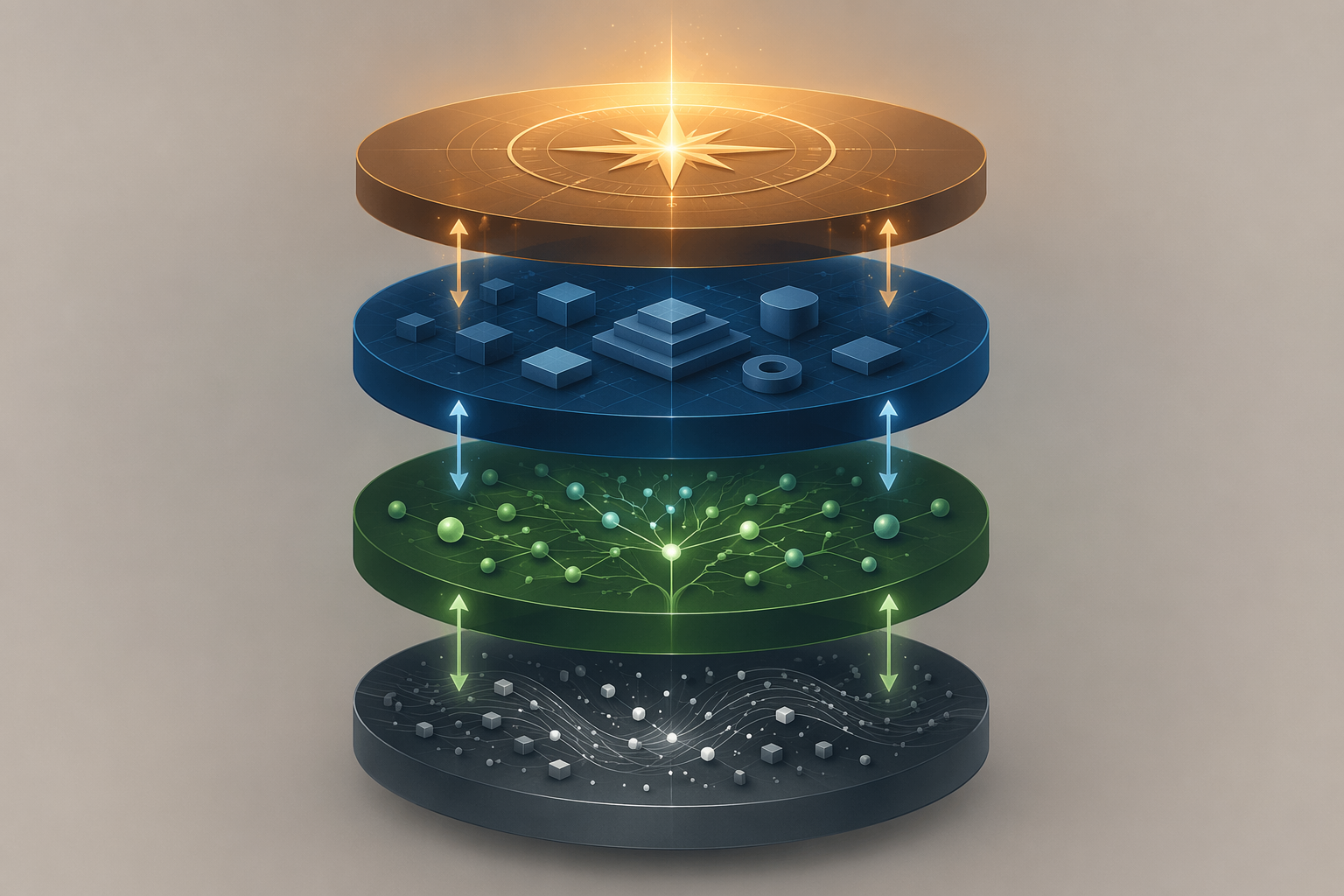
| Layer | Job in the system | What belongs there |
|---|---|---|
| Information | Capture, consume, and archive inputs | Articles, highlights, PDFs, bookmarks, meeting notes, transcripts, source material |
| Ideas | Develop, link, compare, and connect material | Atomic notes, outlines, concept maps, drafts, arguments, synthesis notes |
| Actions | Turn selected material into commitments | Tasks, projects, habits, deadlines, next actions, review queues |
| Philosophy | Hold vision, values, reflection, and criteria | Principles, goals, life areas, decision rules, review notes, long-range priorities |
The important move is not naming the layers. It is refusing to let one layer quietly impersonate the others.
A capture app is usually good at catching things quickly. It may be less good at helping you develop an argument across months. A notes app may be excellent for linking thoughts but clumsy as a deadline-bearing task manager. A task manager can tell you what is due tomorrow, but it is rarely the right place to decide what kind of work deserves the next year of your attention. A journal may hold that deeper reflection, but it cannot safely act as the only archive for every research source.
This is why the line from The Sweet Setup that each app was “hired” to do a job lands so well.[5] A tool is not a lifestyle declaration. It is an employee. If it was hired to capture, judge it by capture. If it was hired to manage actions, judge it by whether the right commitments appear at the right time. If it was hired to support reflection, do not punish it for being bad at web clipping.
Information: the place where inputs enter
The Information layer is where outside material lands before you know what it means. This includes saved articles, book highlights, meeting notes, research PDFs, screenshots, voice memos, and anything else that arrives faster than you can think about it.
A healthy Information layer should reduce the fear of losing something without pretending that everything captured deserves future attention. Its job is intake and storage. It is not required to turn every saved article into a polished thought. It is especially not required to become a complete project-management environment.
This matters more as capture gets easier. AI summaries, browser extensions, transcription tools, and read-it-later apps can lower friction at the front door. That is useful, but a wider front door also lets more unprocessed material in. If you are thinking through how AI changes the capture and retrieval side of PKM, How AI Is Rewriting the Rules of Personal Knowledge Management is a better next stop than another generic app roundup.
Ideas: where material becomes yours
The Ideas layer is where you stop collecting and start thinking. A highlight becomes a note. A note becomes a question. Two unrelated sources sit close enough together that a pattern appears. This is the layer where Zettelkasten-style linking, evergreen notes, outlines, maps of content, and draft fragments can make sense.
The handoff from Information to Ideas is selective. Not every captured item needs to move upward. A saved article may remain an archive item. A meeting note may only produce one decision. A book may produce three durable ideas and a dozen highlights that never need to be touched again. The system becomes lighter the moment promotion is treated as a choice rather than an obligation.
This is also where many method arguments become less dramatic. PARA, Zettelkasten, and Building a Second Brain do not have to compete as totalizing identities. They can be understood as methods that serve different jobs within the stack. If you are choosing among them, Which PKM Framework Should You Use? is the more appropriate comparison.
Actions: where knowledge accepts consequences
The Actions layer contains the commitments that can actually make demands on your calendar, energy, and reputation. Tasks, projects, habits, deadlines, waiting-for lists, and next actions belong here. This layer should not have to infer urgency from a beautiful note. It should show what needs to be done, by whom, and when.
A common failure is letting ideas masquerade as actions. “Write about distributed teams” is not yet an action. It might become “draft outline for distributed teams essay,” “pull three source notes into the draft,” or “send proposal to editor.” Until that translation happens, the thought sits in a vague zone: too important to ignore, too undefined to complete.
The opposite failure is letting the task manager swallow the thinking process. A task app is usually bad at holding the messy middle of an idea. It wants completion states. It wants dates. It wants checkboxes. Those are virtues when you are acting; they are distortions when you are still developing the thought.
Philosophy: the layer that decides what deserves gravity
The Philosophy layer is easy to skip because it looks less productive from the outside. It may contain values, principles, long-range goals, life areas, decision criteria, review notes, or a short statement of what kind of work you are trying to protect. It is where the system keeps its reasons.
Without this layer, the lower layers become democratic in the worst sense: every input can argue for itself. The newest article, loudest client request, most recent meeting, and most emotionally charged idea all compete on the same surface. A Philosophy layer does not eliminate conflict. It gives you a place to judge conflict from.
Why one app usually breaks under all four jobs
The dream of one app for everything is understandable. Fewer subscriptions, fewer interfaces, fewer places to check. The problem is that the four layers ask for different behaviors.
- Information wants speed, low friction, and reliable search.
- Ideas want space, connection, revision, and ambiguity.
- Actions want clarity, dates, ownership, and visible completion.
- Philosophy wants reflection, distance, and a slower rhythm.
A tool optimized for quick capture can become noisy when used for reflection. A tool optimized for deep linking can be too slow for a meeting inbox. A tool optimized for tasks can flatten research into checkboxes. A tool optimized for journaling may bury commitments where no reminder will ever find them.
This does not mean one app can never serve multiple layers. Some people can make a flexible notes app cover Information and Ideas. Others can use the same environment for Ideas and Philosophy. The danger is not overlap. The danger is unclear employment: a tool hired for everything is rarely accountable for anything.
If your system already feels broken, the useful question is not “What should I replace?” It is “Which layer is this tool serving, and what handoff is it responsible for?” That question is less exciting than a migration project. It is also kinder to the person who will have to maintain the system next Thursday.
The handoffs matter more than the containers
A stack is not a set of sealed boxes. Information has to move. The Sweet Setup makes this explicit: when information stops flowing between the layers, overwhelm and anxiety return.[5] That observation is not a clinical diagnosis; it is a useful description of what a stagnant system feels like from the inside.
The handoffs can be simple. A highlighted passage becomes a permanent note. A permanent note becomes part of an outline. An outline becomes a project. A project is accepted, delayed, or deleted because it either does or does not fit the current season of work.
A hypothetical example: suppose you save five articles about remote collaboration after a tense team meeting. In the Information layer, they are just sources. In the Ideas layer, you notice that the same issue keeps appearing: decisions are being made in chat before the right people can respond. In the Actions layer, that becomes a concrete project to draft a decision-making protocol. In the Philosophy layer, you test whether this is actually the kind of operational work you should own right now.
Nothing in that example requires an elaborate setup. What matters is that the material changes state. It does not sit forever as five saved links generating a faint sense of obligation.
Default Life vs. Intentional Life
The most useful turn in the PKM Stack is its distinction between bottom-up and top-down flow. In Schmitz’s framing, moving from Information to Ideas to Actions is associated with the Default Life, while moving from Philosophy to Actions to Ideas to Information is associated with the Intentional Life.[5]
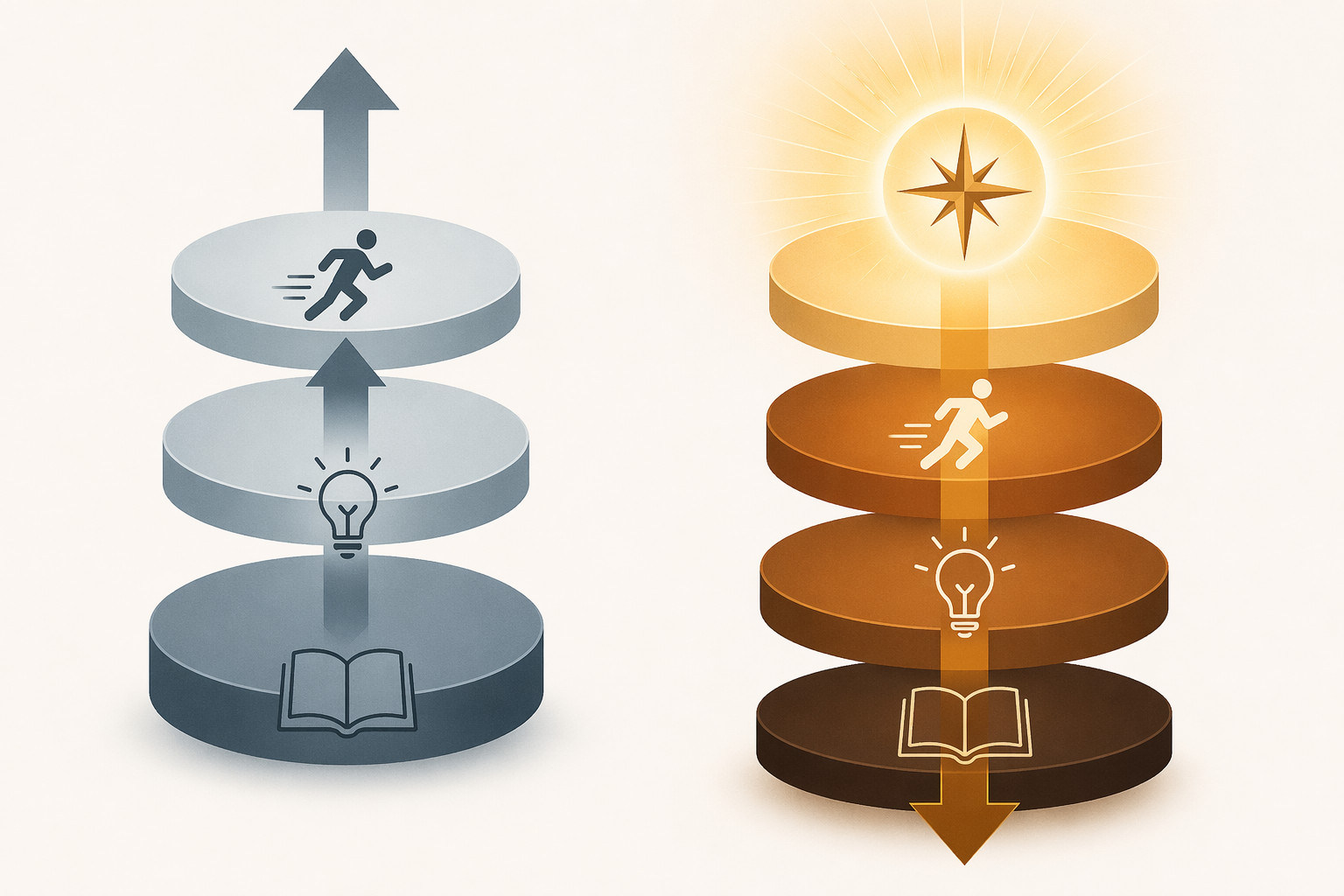
Bottom-up flow is not bad. Most of us discover useful things because the world interrupts us. A client asks a strange question. A book changes the shape of a problem. A meeting exposes a hidden dependency. Information arrives first, and thinking follows.
But a system that only moves bottom-up becomes reactive. The inbox decides what matters. The newest input receives the freshest attention. The task list becomes a record of other people’s claims. Even good ideas start to feel like assignments because they entered through capture rather than choice.
Top-down flow changes the design question. Philosophy clarifies what matters this season. Actions translate that into projects and habits. Ideas develop in service of those commitments. Information capture becomes more discriminating because the system has criteria before the next wave of inputs arrives.
This is where reflection becomes maintenance, not decoration. A weekly review is not just a productivity ritual for tidying loose tasks. It is the moment when you check whether the Actions layer still reflects the Philosophy layer. A quarterly retreat, even a modest one, gives enough distance to ask whether the projects you are feeding still deserve to be fed.
A practical audit of your current system
Before changing tools, map the ones you already use. Do it without shame. Most messy systems were assembled under real pressure: deadlines, jobs, family logistics, research, creative work, and the occasional optimistic Sunday night.
- Information: Where do new inputs land? What captures articles, highlights, meeting notes, files, and references?
- Ideas: Where do you develop thoughts over time? Where do notes connect, arguments form, and drafts begin?
- Actions: Where do commitments become visible? Where are deadlines, next actions, projects, and habits reviewed?
- Philosophy: Where do you keep values, goals, decision criteria, and review notes?
- Handoffs: What has to move between layers, and where does that movement currently break?
The answer may reveal that you do not need a new app. You may need a rule. For example: meeting notes stay in the Information layer unless they create a decision, task, or project. Reading highlights are reviewed once a week, and only the useful ones become idea notes. Projects must have a visible next action. Quarterly goals must be visible during weekly review.
If the audit shows that a tool truly is wrong for its job, then tool selection becomes easier. You are no longer asking for the best PKM app in the abstract. You are asking for a better capture tool, a better thinking environment, a better task manager, or a better reflection space. Readers who want that layer-by-layer tool view can use Personal Knowledge Management Apps: A 2026 Field Guide or Choosing the Right PKM App after the architecture is clear.
Where the stack helps beginners most
The PKM Stack is especially helpful if you are early enough in rebuilding that everything looks equally broken. It gives you permission to fix one layer at a time.
If capture is unreliable, start with Information. If you capture too much but never synthesize, work on the Ideas layer. If notes are interesting but nothing changes in your week, repair the Actions layer. If your task list is full and somehow still feels beside the point, go to Philosophy before adding another project.
For a staged implementation path, The 30-Day PKM Starter System is more useful than trying to redesign every layer at once. Large migrations are seductive because they feel decisive. The less glamorous work is making sure tomorrow’s inputs, ideas, and commitments have somewhere honest to go.
The point of the PKM Stack is not to turn personal knowledge management into a new orthodoxy. It is an architectural map. It helps you see whether each tool has a job, whether each layer is doing its own work, and whether information is moving toward action and reflection instead of pooling into another private reservoir of guilt.
References
- Personal knowledge management, Wikipedia
- 10 Best Personal Knowledge Management Software 2026, GoLinks
- Knowledge Management Trends 2026, Bloomfire
- Knowledge Management Statistics 2026, SpeakWise
- The PKM Stack: A Simple Framework for Making More of Your Notes & Ideas, The Sweet Setup
Comments
Join the discussion with an anonymous comment.