
Most personal knowledge management failures do not begin with a bad app. They begin with a very good weekend.
You install a new personal knowledge management app, import a few highlights, create folders or tags, maybe build a dashboard, maybe admire a graph view. For a few days, it feels like the missing layer between your reading, meetings, ideas, and projects. Then the week gets crowded. Notes pile up in an inbox. Search feels less reliable than memory. Reviews slip. Two or three months later, another app looks cleaner, smarter, more flexible, or more “native” to the way you think.
That cycle is common enough that it deserves to be treated as the main problem, not a side effect. GoLinks’ 2026 guide cites the familiar McKinsey-derived estimate that knowledge workers spend 9.3 hours per week searching for information; because the original research dates back to 2012, it is better read as a directional warning than as a precise 2026 measurement.[1] Even so, the workday pain is recognizable: the document exists, the meeting note exists, the quote exists, but finding it at the moment of use costs too much attention.
Atlas Workspace puts the failure pattern more bluntly: people “overthink which app, underthink how to use it,” and its 2026 PKM guide treats tool-hopping every few months as one of the most reliable ways to abandon the system before it compounds.[2] Matthias Frank makes the same point from the beginner side: tools are secondary; behavior change is primary.[3]

So the useful question is not “What is the best PKM app in 2026?” It is: which app fits your natural workflow well enough that you can stop switching, use it for at least 90 days, and build a 30-day capture-and-retrieval habit before you redesign anything?
Choose for fit, not for maximum possibility
A PKM app has to do a few unglamorous things reliably. It has to let you capture notes during real work, retrieve them without ceremony, connect them when connections matter, and export or control the data at the level your work requires. Everything else is a bonus until those basics survive a busy week.
That is why “best app” lists are useful only up to a point. Tool Finder’s 2026 PKM roundup and Storyflow’s 2026 knowledge management testing both give helpful app-level views, but their comparisons also show why one winner is the wrong shape for the decision: Notion, Obsidian, Logseq, Tana, Capacities, Anytype, and similar tools make different tradeoffs around structure, collaboration, local files, databases, AI, and linking.[4][5]
One XDA Developers account of years spent switching knowledge management apps reads like a familiar case study: the author kept moving between tools until the workflow finally matched the way they wanted to collect and use information.[6] It is only one person’s story, not evidence that everyone should choose the same product. Its value is in the pattern. The app started working when it reduced friction in the person’s actual routine.
A short selection lens before you install anything
You do not need a long self-assessment. You need enough self-knowledge to avoid choosing a tool that fights you every day. Start with four practical questions.
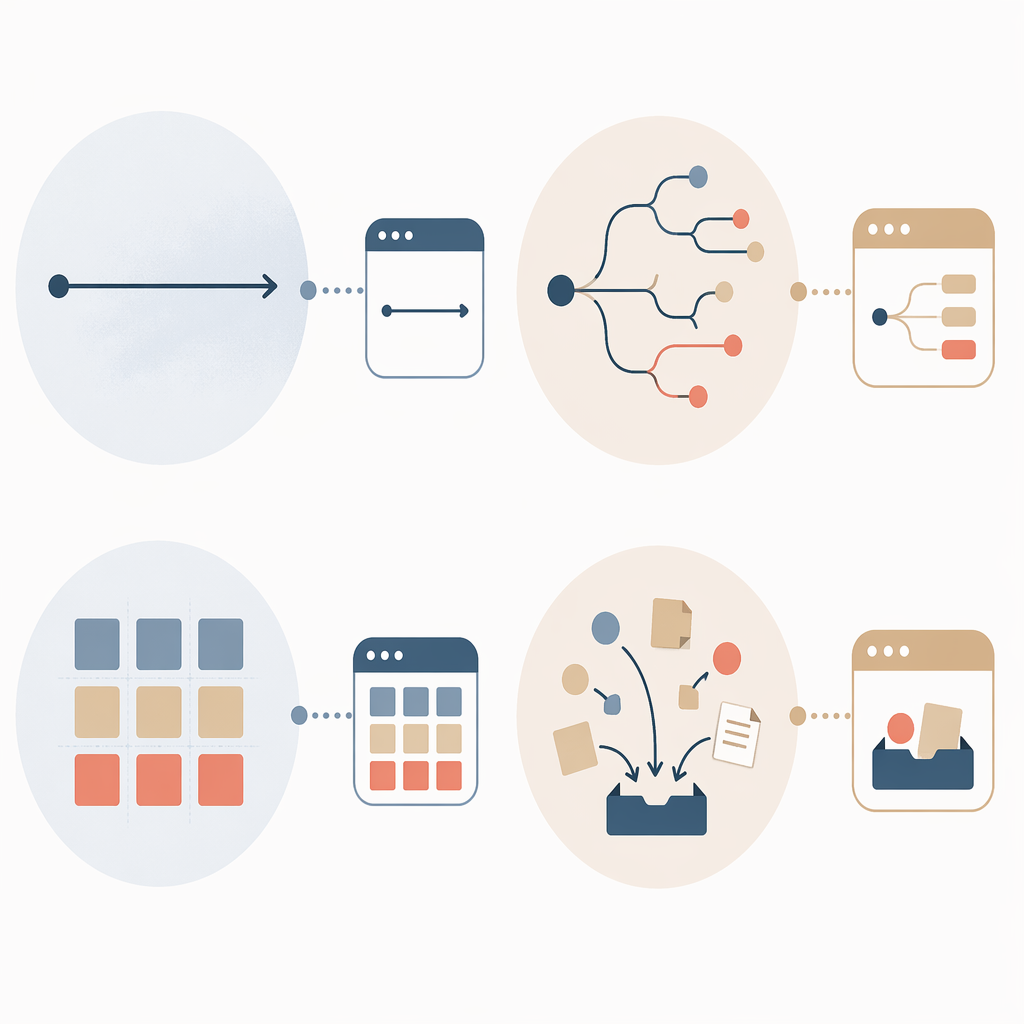
| If your work usually feels like this | Start by looking at | Be careful with |
|---|---|---|
| Linear: meeting notes, project logs, decisions, writing drafts | Notion, Obsidian, Bear-style markdown workflows, other document-first systems | Overbuilding databases before your notes are useful |
| Visual: maps, relationships, research trails, concept exploration | Obsidian graph/linking, Logseq outlines, visual canvas tools, Capacities-style object views | Mistaking a beautiful map for a reliable retrieval system |
| Structured: projects, areas, resources, clients, repeatable templates | Notion, Anytype, Capacities, database-forward systems | Creating a schema so rigid that quick capture becomes annoying |
| Capture-heavy: clips, highlights, voice notes, ideas, references from many places | Tana, Capacities, Readwise-connected setups, AI-assisted inbox workflows | Letting the inbox become a permanent landfill |
If you want a deeper version of that match, use the thinking-style guide. But do not turn this into another three-week research project. If two tools both fit, pick the one you can imagine opening ten times on an ordinary Tuesday.
Decide how much data control you actually need
The privacy and portability choice is real, but it is not a moral ranking. Local-first tools such as Obsidian, Logseq, and Anytype appeal to people who care about file ownership, offline access, and long-term control. Cloud-dependent tools such as Notion, Tana, and Capacities often reduce setup friction and make collaboration, syncing, or AI-supported organization easier. Tool Finder and Storyflow both surface these tradeoffs in their app profiles rather than showing one universal model.[4][5]
If your notes include sensitive client research, unpublished IP, or material you may need outside a vendor platform, give export and local access more weight. If your main failure mode is that you never capture anything unless the interface is pleasant and available everywhere, ease may matter more than theoretical control. The bad choice is not cloud or local. The bad choice is ignoring the consequence until migration becomes the next excuse to start over.
Pick one spine method
A method gives your app a default path when you are tired. PARA is useful when your notes serve active projects and responsibilities. Zettelkasten is useful when you develop ideas over time and need atomic notes with links. BASB/CODE is useful when your immediate pain is capture: collect, organize, distill, express. Atlas and Tool Finder both frame method fit as part of tool fit, not as a separate productivity identity.[2][4]
Choose one spine for the first month. Do not run PARA, Zettelkasten, a full tag taxonomy, and AI auto-classification all at once. If you want to compare frameworks before choosing, use the PKM framework comparison. Then stop comparing and start collecting evidence from your own work.
Treat AI as a workflow choice, not a magic layer
AI-native PKM tools are improving quickly. Frevana’s 2026 view of AI productivity and PKM software highlights tools that use AI for organization, retrieval, summarization, and synthesis.[7] That can help, especially for capture-heavy users who need a first pass through messy inputs.
The caution is simple: AI can reduce sorting effort, but it cannot decide what your system is for. If the app can summarize every note but you never review the outputs, the system still fails. If AI readiness is a major part of your decision, read the AI-native PKM discussion after you have narrowed your shortlist to two or three tools.
A practical shortlist for your first PKM app
The following shortlist is not a ranking. It is a starting map. Pricing and feature details change often in this category, and the source comparisons used here were current as of May–June 2026, so re-check pricing before you commit to an annual plan.[4][5]
| App family | Good first fit when | Tradeoff to notice |
|---|---|---|
| Obsidian | You want local markdown files, strong linking, plugins, and long-term portability | Setup choices can multiply quickly if you start with plugins instead of notes |
| Logseq | You think in outlines, daily notes, backlinks, and research trails | Outliner logic may feel awkward if you prefer polished documents |
| Notion | You want structured workspaces, databases, templates, and collaboration | Personal thinking can become over-modeled if every note needs a property |
| Tana | You want fast capture, structured nodes, and AI-supported organization | The model can be powerful but may be too much if you only need simple notes |
| Capacities | You like object-based organization for people, books, meetings, topics, and projects | Its structure is useful only if the object model matches your work |
| Anytype | You want a local-first, object-based system with more data-control emphasis | Collaboration and ecosystem expectations may differ from mainstream cloud tools |
If your real question is still whether you need a PKM tool or a simpler note-taking app, compare against the broader note-taking software guide. If your constraint is budget, use the note-taking app pricing comparison before paying. The first 30 days should not depend on a complicated paid setup unless the tool is already clearly right for your work.
The 30-day setup: build retrieval before architecture
Atlas recommends a staged 30-day ramp that can produce a 100-plus-note system by the end of the first month, with the compounding value beginning after that initial capture and review base exists.[2] The number matters less than the sequence. Capture first. Add light structure second. Normalize daily use third. Review weekly before you redesign.
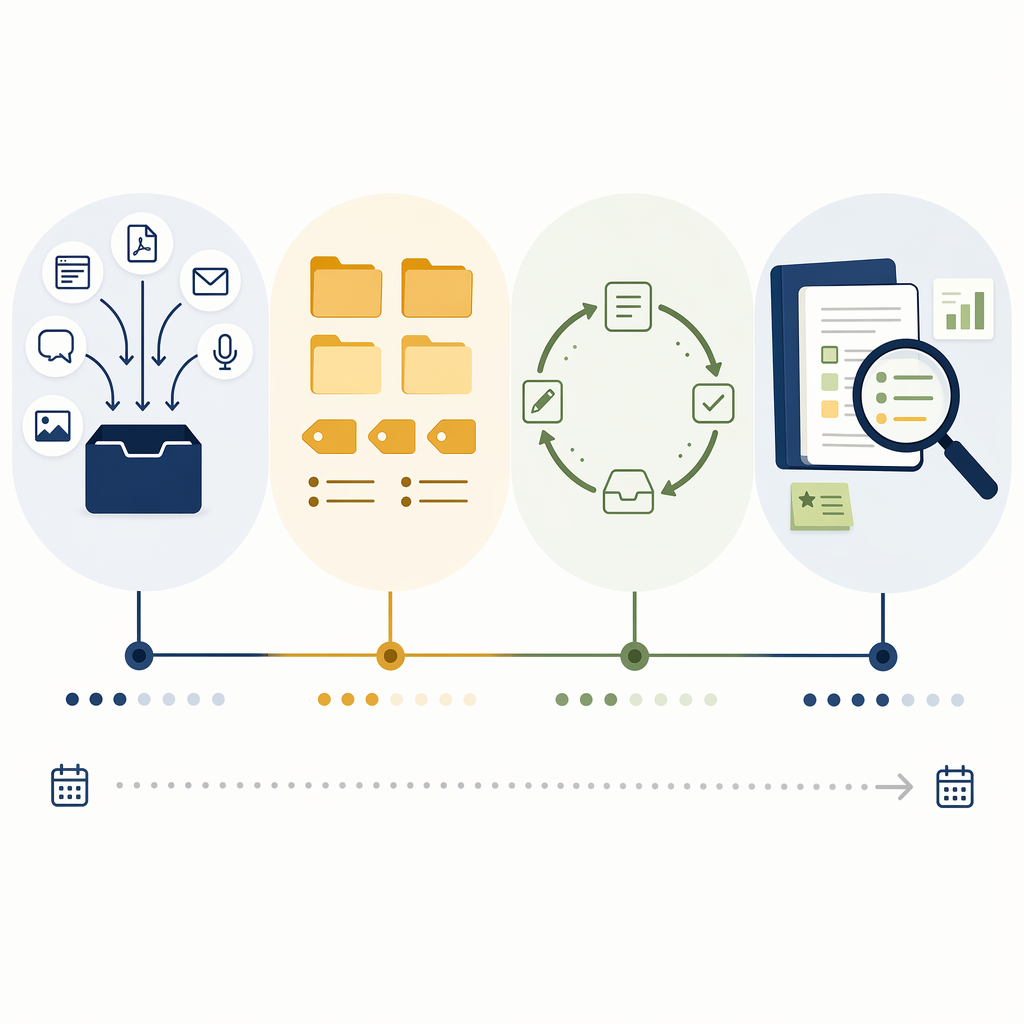
| Timeframe | Main job | What to avoid |
|---|---|---|
| Days 1–7 | Capture real material with almost no structure | Designing the perfect taxonomy |
| Days 8–14 | Add a light spine and a few retrieval paths | Moving every note into a complex system |
| Days 15–21 | Make daily capture automatic and searchable | Switching apps because the first mess appears |
| Days 22–30 | Run weekly review, prune friction, and decide what stays | Judging the whole system by novelty instead of use |
Days 1–7: capture volume, not elegance
Install one app. Create one inbox. Create one place for daily notes or quick captures. Then spend the first week collecting the material you already touch: meeting notes, project decisions, useful links, quotes from articles, questions you need to answer, fragments from calls, and ideas you would otherwise leave in chat messages or browser tabs.
The rule for week one is that capture must be faster than avoidance. If a note takes too long to file, it goes into the inbox. If a tag feels uncertain, skip it. If you find yourself watching tutorials about advanced dashboards, stop and capture the next real thing from your day.
- Create: Inbox, Daily Notes, Projects or Active Work.
- Capture: at least a few real notes per workday, not sample content.
- Search-test: once per day, look for something you captured earlier.
- Delay: templates, plugin stacks, dashboards, elaborate tags.
Days 8–14: add just enough structure to find things
The second week is where many systems get overbuilt. Resist the urge to reorganize everything you captured. Instead, add the smallest structure that helps retrieval.
If you chose PARA, create top-level spaces for active Projects, ongoing Areas, useful Resources, and Archive. Move only notes that clearly belong. If you chose a Zettelkasten-style workflow, begin turning a few raw captures into permanent notes with one idea per note and links to related notes. If you chose a CODE-style capture workflow, start distilling the most useful captures with short summaries or highlights. The method should reduce decisions, not add a second job.
This is also the week to create two or three retrieval habits. Search by project name. Search by person. Search by question. A system that cannot recover last Tuesday’s decision is not ready for a more elegant architecture.
Days 15–21: make the app part of the workday
By the third week, the novelty is usually gone. That is useful. You are no longer testing whether the app is exciting; you are testing whether it can sit inside ordinary work.
Attach capture to existing triggers. Open the app before your first meeting. Add decisions before closing a project call. Save research notes when you stop reading, not at the end of the day when the context is gone. Put one recurring review block on the calendar, even if it is short. If the app is mobile-friendly, test one real mobile capture. If it is local-first, confirm sync or backup before you trust it with important notes.
This is the point where switching temptation often returns. The inbox is imperfect. Some notes are thin. A few tags are inconsistent. That is normal evidence from use, not proof that the tool is wrong. Only consider switching during week three if the app blocks a core workflow you identified before starting, such as offline access, export, collaboration, or fast capture.
Days 22–30: review, prune, and keep the system small
The final stretch is not for a redesign. It is for a weekly review that tells you what the system is actually doing.
- Empty or triage the inbox: move, summarize, link, archive, or delete.
- Find three notes you captured earlier and use them in current work.
- Mark notes that were hard to retrieve and identify why.
- Remove one structure that added friction without improving retrieval.
- Write a short operating note: where things go, when you review, what you do not track.
A useful week-four review produces a few plain decisions. Maybe project notes need a standard template. Maybe article highlights need summaries before they become useful. Maybe people notes matter more than topic tags. Maybe your beautiful graph view has not helped once. Keep what reduces search and decision time. Remove what only proves you know how the app works.
What counts as success after 30 days
Do not grade the first month by how complete the system looks. Grade it by whether it changed a few ordinary moments.
- You captured notes on most workdays without needing a special session.
- You found something later that would otherwise have been lost.
- You used at least one older note in a meeting, draft, decision, or project.
- You know which structure helps and which structure is decoration.
- You have a weekly review that is small enough to repeat.
Wikipedia’s broad definition of personal knowledge management emphasizes collecting, classifying, storing, searching, retrieving, and sharing knowledge in support of personal work.[8] That definition is useful because it keeps the app in its place. A PKM system is not a museum for notes. It is a working loop between what you notice, what you keep, what you can find, and what you can use.
If you already chose a tool and want a more detailed implementation path, move next to The 30-Day PKM Starter System. If you are still comparing by method fit, data control, and AI readiness, use the PKM app comparison guide and make the decision quickly.
Then give the system enough time to be judged fairly: one app, one spine method, 30 days of staged setup, a weekly review, and no switching until you can tell whether the workflow failed or the novelty simply wore off.
References
- The Best Personal Knowledge Management Software, Tools & Apps (2026 Guide), GoLinks
- Personal Knowledge Management (2026): The Honest Guide, Atlas Workspace
- Personal Knowledge Management for Beginners, Matthias Frank
- Best PKM Apps in 2026 – Knowledge Management Tools, Tool Finder
- The 12 Best Knowledge Management Tools in 2026 (Tested), Storyflow
- I finally found the perfect knowledge management app after years of switching, XDA Developers
- The Best AI Productivity & Personal Knowledge Management (PKM) Software in 2026, Frevana
- Personal knowledge management, Wikipedia
Comments
Join the discussion with an anonymous comment.