The hard part of moving to a cheaper city is not deciding that rent is too high. Most people reach that conclusion before they open a spreadsheet. The harder moment comes after: when the cheaper apartment, the job market, the internet connection, the client calendar, the portfolio folder, the manager feedback, the meeting notes, and the half-broken note app all have to keep working at the same time.
That is why useful advice about career growth, productivity, and affordable cities is not a list of sunny metros with low rent. It is a migration problem. You are moving a career, not just a body. You may also be moving the system that proves your career happened: notes from calls, job-search records, project decisions, writing drafts, learning logs, references, receipts, and the small pieces of context that are hard to recreate once they are gone.

A relocation and a notes-app migration have the same shape. Audit what you have. Identify what is portable. Execute the move. Verify that nothing important was lost. The sequence sounds dull because it is. That is also why it works. The inspirational version of moving usually stops at lower overhead. The operational version asks what breaks after the moving truck leaves.
Start With The Audit, Not The Destination
Before comparing cities, write down what your current location and current productivity system are doing for you. Some of it will be obvious: salary, rent, taxes, commute, internet, health care access. Some of it will be quieter: the old coworker who forwards roles, the local meetup that produced two clients, the habit of reviewing notes every Friday because your current apartment has a decent desk and no one else is home.
The same audit belongs inside your note archive. Count the systems you actually use, not the ones you intended to use. Meeting notes may live in one app, clipped research in another, tasks in a project manager, writing drafts in cloud documents, PDFs in a drive, and career evidence in email. A beautiful new app will not fix that by itself. It may only make the mess harder to inspect.
The audit should answer these questions before you fall in love with any city or tool:
- What income do you need after the move, and which parts of your compensation depend on being near a specific market, client base, or office?
- What kind of role are you protecting: fully remote, hybrid, freelance, job-searching, early-career, management-track, or niche specialist?
- What internet reliability, upload speed, quiet space, and time-zone overlap do your calls and deliverables require?
- Which contacts, referrals, portfolio artifacts, performance reviews, and project notes prove your value?
- Which parts of your note system are exportable, and which are trapped in proprietary formats, fragile links, undocumented workflows, or memory?
This is where city data starts to matter, but only as input. Raleigh is useful to examine because Checkr ranked it No. 1 in its 2025 employment-and-earnings study, with a score of 84.2, citing tech and biotech growth from the Research Triangle as part of the employment picture.[1] That does not make Raleigh universally better than every cheaper city. It means a remote worker who may need a local job market as backup has something concrete to test.
Boise and Chattanooga test different parts of the same audit. PadSplit lists Boise with a 92.1 cost-of-living index against a national average of 100, median one-bedroom rent of $1,138 per month, and 300 Mbps internet; the same PadSplit analysis lists Chattanooga with a 91.8 cost-of-living index, median one-bedroom rent of $1,275 per month, and 1 Gbps fiber internet associated with its “Gig City” reputation.[2] Because PadSplit is a housing marketplace, those figures are better treated as directional planning inputs than as a final authority on household cost. Still, they are the kind of inputs that change daily work: rent, bandwidth, and whether video calls become a recurring source of stress.
| Audit item | What to test before moving | Why it matters |
|---|---|---|
| Career market | Local hiring depth, remote-job backup options, industry concentration | Lower rent helps less if one lost job forces a rushed second move |
| Work infrastructure | Internet speed, backup connection, quiet workspace, coworking availability | Remote work fails in small daily interruptions before it fails in a dramatic way |
| Professional network | Local peers, alumni, meetups, clients, recruiters, mentors | A cheaper city can still be expensive if it isolates your next opportunity |
| Note archive | Exports, attachments, backlinks, tags, notebooks, search, permissions | Career evidence loses value when context disappears |
| Review habits | Weekly planning, project retrospectives, learning logs, job-search tracking | A system that cannot be reviewed becomes storage, not infrastructure |
Decide What Is Actually Portable
Portability is where both moves become less romantic. A salary is portable only if your employer allows the location, keeps the same pay band, and does not quietly reduce your access to projects. A network is portable only if people still answer when you are no longer nearby. A workflow is portable only if it survives a different room, schedule, and set of interruptions.
Notes have the same test. Plain text, PDFs, images, and standard exports are usually easier to move than database-only views, app-specific automations, or links that work only inside one vendor’s interface. If your career archive depends on a tool you are no longer confident in, use a migration plan before the relocation starts. FlowDesk’s notes-app migration guide is useful here because it treats migration as a controlled process rather than a weekend of dragging files and hoping search still works.
For legacy archives, the audit may need to become more specific. If Evernote is part of the stack, the safer first move is not choosing a replacement app; it is understanding what the export contains, what it omits, and how attachments, notebooks, and metadata behave. The Evernote export pitfalls guide belongs early in the process, before you discover during a move that your “archive” was mostly confidence, not verification.
The city equivalent is asking which advantages travel with you. Remote employment may travel. A professional license may not. A client base may travel if relationships are already digital. A manager’s trust may travel if you have a record of shipping without supervision. The lower the local backup market, the more proof you need that your current work is truly portable.
Execute The Move In Batches
Do not move your entire life and your entire digital brain in one blind cutover if you can avoid it. The cleanest version is staged: stabilize income, test the city, export the archive, migrate a representative sample, then move the rest once the sample has survived review. Not everyone gets that luxury, but even a rushed move benefits from separating irreversible choices from reversible ones.
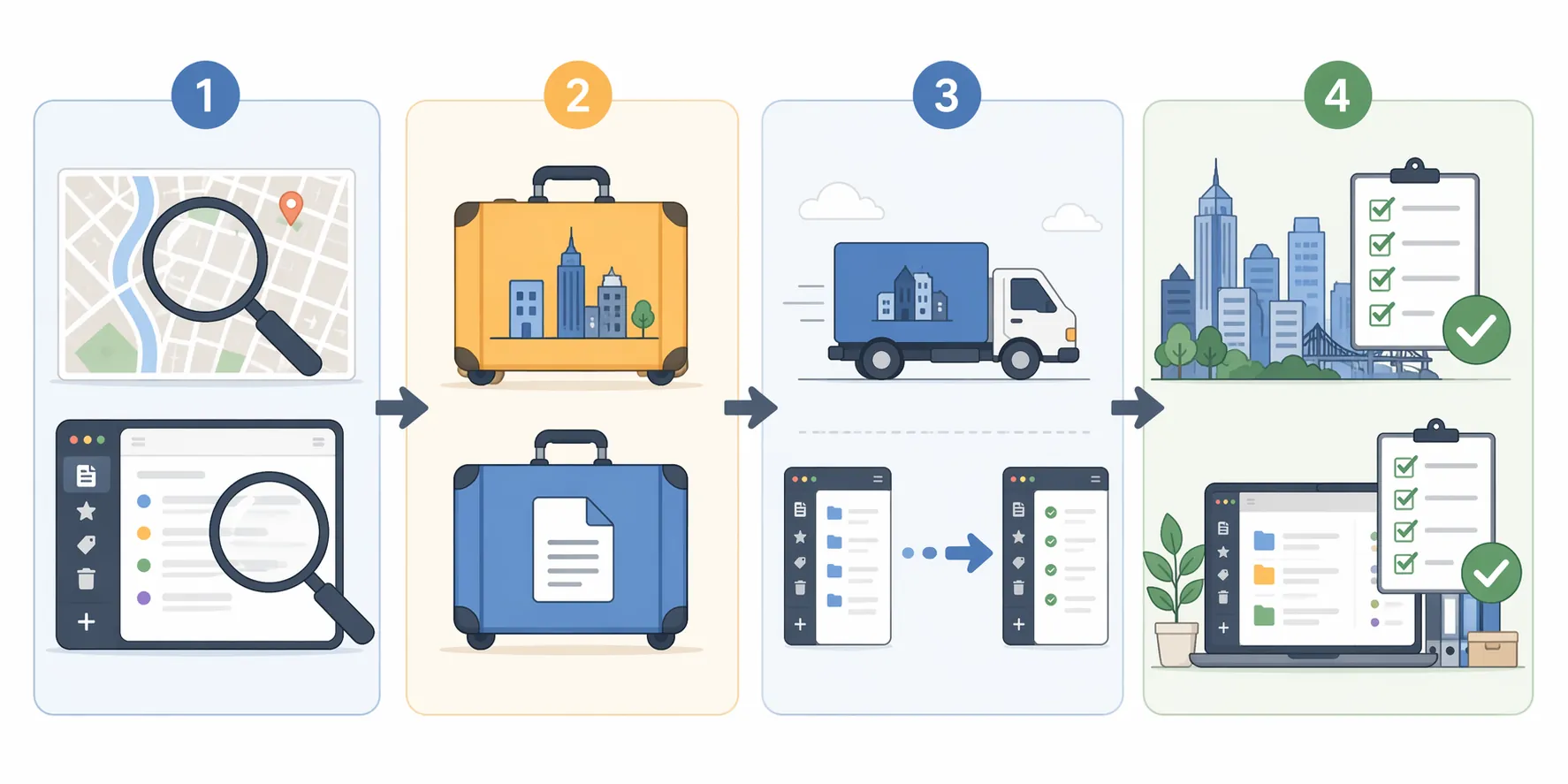
A practical sequence looks like this:
- Freeze the current state: export key notes, back up documents, save job-search records, and capture a list of recurring workflows.
- Run a sample migration: move one active project, one old project, one meeting-heavy folder, and one attachment-heavy folder into the target setup.
- Test the new city as a work environment: verify internet installation windows, backup connection options, call quality, time-zone rhythm, and workspace noise.
- Move only after the sample works: finish the digital migration, then rebuild review habits before the first full workweek in the new location.
The tool choice should serve the work pattern. A local-first system can be appealing if you want files you can inspect, back up, and move again. A cloud-first system may be better if you switch devices constantly, collaborate with clients, or need frictionless capture from meetings. The point is not to crown one model. It is to choose a failure mode you understand. FlowDesk’s local-first vs. cloud PKM comparison is a better fit for this decision than a generic feature checklist because relocation changes the value of offline access, sync reliability, and device independence.
If the move is from Evernote to a file-based setup such as Obsidian, a concrete migration walkthrough can reduce guesswork. The Evernote to Obsidian migration guide is useful not because everyone should make that exact switch, but because it shows the level of specificity a serious migration requires: exporter choice, file conversion, attachments, notebook structure, and post-import checks.
Use Productivity Data As A Prompt, Not A Promise
Relocation can create room for career growth by lowering overhead, but the freed-up money and attention need somewhere to go. That is where productivity claims are tempting. Quartz, citing a 2025 Software Finder study, reported that frequent AI note-taking users were promoted at 28% compared with 15% for non-users, and that average salary was $86,034 for frequent AI note-taking users versus $67,709 for non-users.[3] Those figures are interesting. They are not proof that an AI note taker caused the promotion or salary difference. From the Quartz article alone, the full methodology, sample size, industry mix, and causal direction are not verifiable.
The narrower lesson is still worth using: if meetings, decisions, and follow-ups are part of your job, losing that record during a relocation is expensive. AI transcription or summarization may help, but only if the output lands somewhere reviewable, searchable, and connected to projects. A folder of automated meeting summaries can become another junk drawer if no one decides what gets promoted into tasks, evidence, or decisions.
Upskilling deserves the same treatment. Quartz, citing a Gallup-Amazon study, reported that workers who complete upskilling programs see an average 8.6% income boost, roughly $8,000 per year.[4] That does not mean every online course pays back, and it does not tell you which skill fits your market. It does make one point hard to ignore: if lower rent creates budget, time, or mental space, some of that margin should be routed into a learning system you can maintain.
That learning system should have a place for course notes, practice work, feedback, credentials, before-and-after portfolio examples, and a simple log of what changed in your work because of the training. The evidence matters when you ask for a raise, apply for a role, or explain why a relocation did not slow your momentum.
Verify The Move After The First Month
Verification is the part most moving advice skips. The apartment is signed, the desk is assembled, the app opens, and everyone wants to declare success. That is too early. A move works only after the new setup has carried real work: a difficult client call, a deadline, a job lead, a performance conversation, a week of recurring tasks, and a search through old notes when you are tired.
Start with the city. If Raleigh attracted you because of its employment-and-earnings profile, check whether that strength applies to your role type, seniority, and industry, not just to the metro as a whole. If Boise attracted you because the directional cost inputs looked workable, compare your actual rent, utilities, insurance, transportation, coworking, flights, and income taxes against the pre-move estimate. If Chattanooga attracted you because fiber internet changes the remote-work experience, verify not only advertised speed but installation reliability, upload performance, backup options, and how the connection behaves during the calls that matter.
Then test the job-market downside. In expert commentary for CoworkingCafe, Sean Walker, Ph.D., cautioned that niche professions can run into supply-and-demand bottlenecks in smaller cities, while Dr. Ashley Hicks of Northwestern University noted that early-career professionals may find limited advancement options in smaller communities and may need another relocation.[5] Those are not reasons to reject smaller markets. They are reasons to verify the market you actually need, especially if your next move depends on a narrow specialty or fast early-career progression.
Verification for the note system should be just as concrete. Open old projects and confirm that links still resolve. Search for a person, a client, a decision, and a phrase you remember from an old meeting. Check whether attachments survived. Confirm that tags, folders, or notebooks still mean something. Review the last two weeks of work and ask whether decisions moved from capture to action, or whether the new tool only made capture feel cleaner.
A simple verification pass can use this order:
- Search: Can you find active projects, old decisions, people, receipts, and meeting notes without remembering the exact folder?
- Links: Do internal links, backlinks, saved URLs, and file references still lead somewhere useful?
- Attachments: Did PDFs, images, audio files, exports, and scans move with their surrounding context?
- Workflow: Can you capture, process, review, and retrieve notes during a normal workweek, not just during a setup session?
- Evidence: Can you still assemble proof of results for a promotion case, client renewal, portfolio update, or job interview?
If the answer is no, decide whether the problem is the app, the migration, or the workflow. The Evernote migration decision tree is helpful here because it separates export strategy from app preference. That distinction matters. Many failed migrations are blamed on the destination app when the real issue was an incomplete export, an untested workflow, or a pile of notes that had never been organized enough to move cleanly.
The Combined Checklist
The final decision is not “Which affordable city is best?” or “Which notes app is best?” It is whether one combined system can support the work you are trying to keep and the growth you are trying to create.
| Phase | City question | Productivity-system question |
|---|---|---|
| Audit | What cost structure, job market, network, and infrastructure are you actually leaving? | What notes, files, decisions, tasks, and career evidence are you actually moving? |
| Identify portable | Which income, relationships, credentials, and work habits travel with you? | Which formats, links, attachments, automations, and review habits survive outside the current app? |
| Execute | Can you stage the move, protect work continuity, and test internet and workspace before the first full week? | Can you export, sample-migrate, inspect, and only then complete the cutover? |
| Verify | Does the new city still support your role, advancement path, backup market, and day-to-day work? | Can you retrieve context, preserve evidence, run reviews, and keep learning without rebuilding from memory? |
Lower overhead is real leverage when it survives contact with the work. Raleigh’s employment signal, Boise’s cost inputs, and Chattanooga’s connectivity profile are all worth examining for different reasons. None of them removes the need to verify your own role, network, infrastructure, and archive. An affordable city becomes a career upgrade only when the math, the market, the connection, and the second brain all keep working after the move.
References
- 2025's Best US Cities for Jobs and Earning Potential, Checkr
- Remote work cities analysis: Top 10 affordable destinations in 2025, PadSplit
- AI note-taking is a shortcut to a promotion. Here's why, Quartz
- 3 low-cost ways to level up your career growth in 2026, Quartz
- The Smart Move: Big On Career Opportunities Outside the Big Cities, CoworkingCafe, January 2026