
The short verdict
The useful test for Google Gemini Spark in a note-taking workflow is not whether the demo looks clever. It is whether Spark removes a place you have to maintain. As of Q3 2026, Spark matters if Gmail, Calendar, Drive, and Keep are already the center of your work. If your real system lives in Apple Notes, Notion, or Obsidian, Spark is not yet a migration reason.
That judgment is narrower than the launch excitement, and it needs to stay narrow. Google describes Spark as a persistent workflow system running on dedicated Google Cloud virtual machines, organized around Tasks, Schedules, and Skills, with a 15-task parallel limit and compute-based usage caps. It is also tied to Google AI Ultra access at $100/mo and is in US-only beta as of the July 2026 pricing check used for this comparison.[1][2]
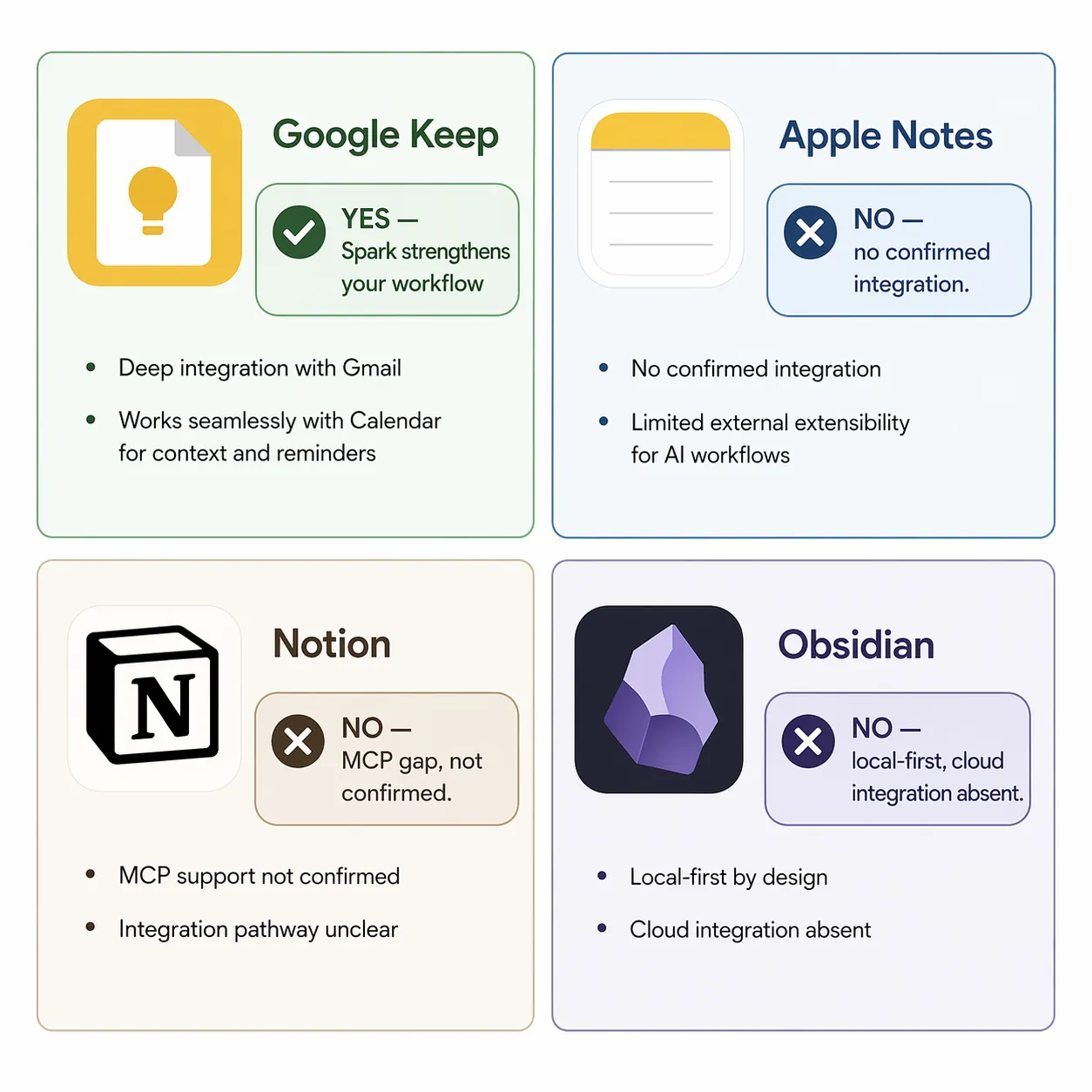
| Current primary note app | Should Spark change your app decision? | Why | Q3 2026 move |
|---|---|---|---|
| Google Keep | Yes, if you already live in Google Workspace | Spark can strengthen the inbox-to-notes pipeline around Gmail, Calendar, Drive, Docs, and Keep. | Stay with Keep, or consolidate more deliberately into Google, if AI Ultra is already justified. |
| Apple Notes | No | Spark has no confirmed Apple Notes integration, and Apple Notes’ value is still fast capture inside Apple devices. | Do not migrate for Spark. |
| Notion | No | Google’s confirmed Spark integrations do not include Notion; third-party claims are not enough to plan a migration. | Keep Notion unless your real problem is leaving Notion for a Google-centered workflow anyway. |
| Obsidian | No | Spark’s cloud-agent model does not replace local-first files, backlinks, and graph-centered knowledge work. | Do not migrate for Spark. |
Why Spark is different from ordinary AI inside a notes app
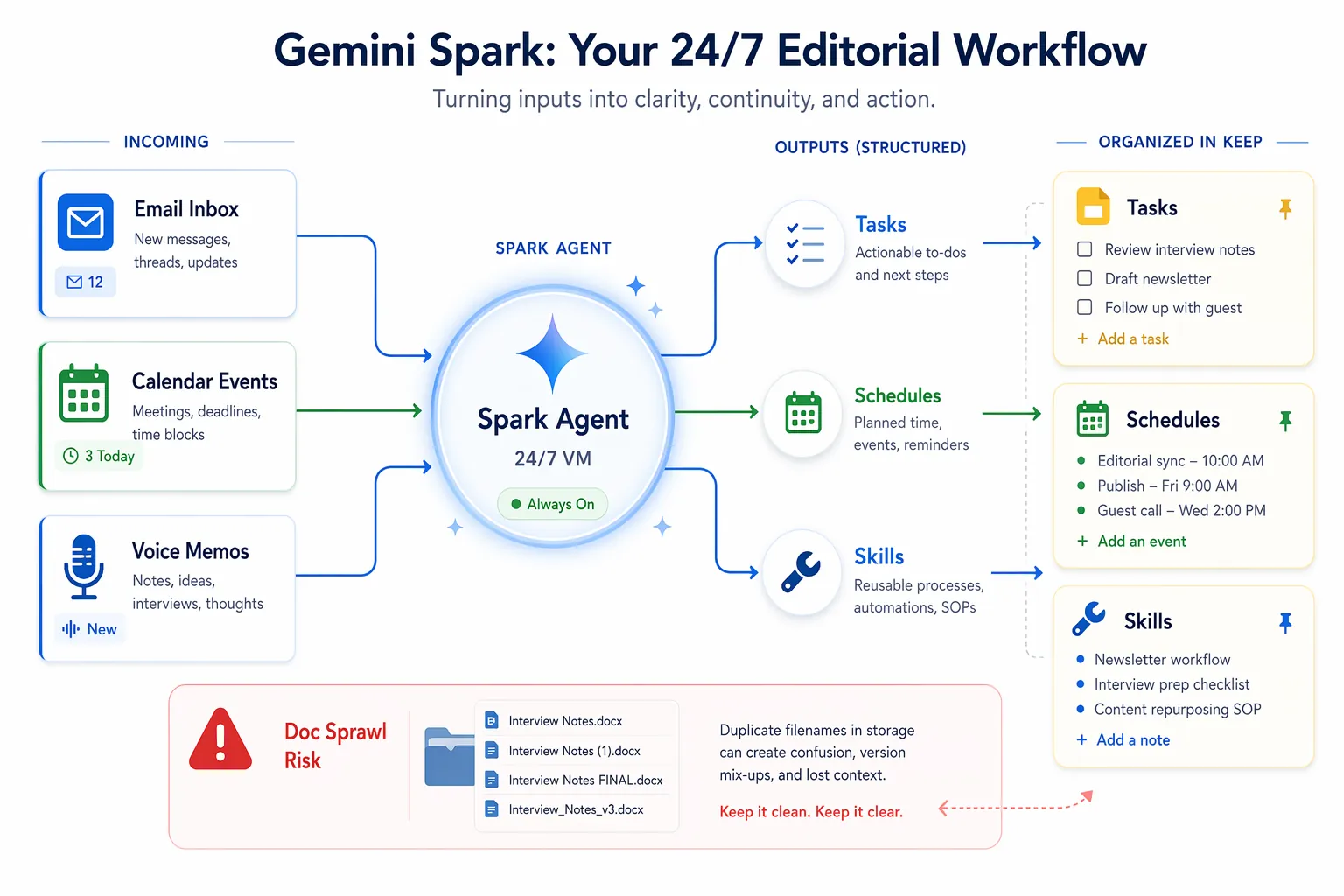
Most AI note features sit inside the note app. They summarize a page, rewrite a paragraph, answer questions over a workspace, or generate a template. Spark is more interesting because it is meant to keep working when the note app is not open. Google’s support documentation frames it as a task-and-workflow layer: Tasks for one-off work, Schedules for recurring work, and Skills for reusable workflows.[1]
That distinction matters for note-taking because many notes are not born inside note apps. They start as email follow-ups, calendar context, meeting fragments, reminders, shared documents, and quick lists. A normal AI sidebar can help once you arrive at the note. Spark’s promise is earlier in the chain: notice the work, extract the next step, put it somewhere useful, and repeat that pattern without asking every time.
The catch is obvious once you map the route. A workflow agent is only as useful as the systems it can touch safely. Google’s official Spark materials confirm integrations such as Canva, OpenTable, and Instacart, but not Notion, Obsidian, Slack, or Apple Notes.[1] For note-app migration decisions, that missing list is more important than the agentic architecture.
The Keep case is where Spark can actually change the decision
Google Keep is the one scenario where Spark deserves more than a dismissive “wait and see.” Keep is already plain in the right way: fast capture, cards, lists, reminders, labels, and proximity to Gmail and Calendar. It is also plain in the limiting way. Published Keep tests and replacement experiments still describe it as a flat capture tool rather than a full knowledge system with folders, backlinks, or graph views.[3][4]
That is the exact shape where Spark helps. It does not need Keep to become Notion. It needs Keep to become a better landing zone for the small pieces of work that currently leak out of Gmail, Calendar, and Drive.
A practical Keep workflow looks like this: Gmail produces a request, Calendar supplies the deadline or meeting context, Spark turns the repeatable handling into a Task or Schedule, and Keep receives the lightweight checklist or reminder. If the follow-up needs more room, the output can move into Docs. Android Police’s June 2026 Keep test called Gemini’s ability to create Keep notes a “game-changer” for Keep users, but the important part is not the phrase; it is the reduced handoff between capture and action.[3]
This is also where existing Keep users should avoid overcorrecting. If your complaint is “I forget to turn email into a checklist,” Spark may be relevant. If your complaint is “Keep cannot manage a research archive, relational database, writing wiki, or long-term second brain,” Spark does not erase that ceiling. FlowDesk’s Google Keep profile and Keep vs Notion comparison still apply: Keep is excellent capture, weak structure.
What gets better for a Keep user
- Recurring capture can become less manual. Spark’s Schedules are designed for recurring workflows, so a repeated weekly review, follow-up list, or prep routine can be handled as a pattern rather than rebuilt each time.[1]
- Small action lists can land closer to where you already check them. Keep remains a better destination for quick reminders and shopping-style lists than for deep project knowledge.
- Reusable workflows can be saved as Skills. That matters if you repeatedly turn similar inputs into the same kind of note, list, or draft.[1]
- The system can keep running outside a single chat session because Spark is built around persistent cloud execution, not a one-time prompt window.[1]
The maintenance question is whether those gains justify the subscription and the new review surface. Spark’s 15-task parallel limit is generous enough for many individual workflows, but it is still a limit, and Google also describes compute-based caps rather than unlimited background automation.[1] If you are buying AI Ultra only for note capture, the bar should be high. If AI Ultra is already justified by other work, Keep becomes more attractive as the light capture layer inside a bigger Google system.
What does not get better
Keep does not gain a real folder hierarchy, bidirectional linking, graph navigation, database views, or the kind of long-form project structure that makes people choose Notion or Obsidian. XDA’s experiment replacing Notion and Obsidian with NotebookLM and Gemini is useful here because it documents both the appeal of Google’s AI layer and the ceiling of Keep as the capture endpoint.[4]
So the Keep decision is not “Spark turns Keep into a second brain.” It is “Spark may make Keep good enough that you stop pretending you need a heavier system for lightweight work.” That is a real win for the right user, especially the one whose notes are mostly reminders, meeting prep, email follow-ups, and short lists.
The Drive sprawl problem is not a footnote
Automation often fails in the cleanup layer. Spark can make capture easier and still leave behind a mess if the outputs are scattered across Drive, Docs, Keep, and Calendar without naming discipline. That is not a theoretical worry. tl;dv’s review of Google Gemini meeting notes describes meeting docs generated from Calendar event titles, with recurring meetings producing multiple identically named documents in Drive—the familiar “Final Final FINAL” problem in a different costume.[5]
For a Keep-centered workflow, this is the part to test before declaring victory. Create a deliberately boring migration notebook with the source app, destination app, date checked, what broke, and whether the move still felt worth it two weeks later. Spark should reduce the number of places you check. If it creates Keep cards, Drive docs, and calendar artifacts that all require separate review, it has moved the mess rather than removed it.
- Before enabling a recurring Spark workflow, decide where the final reviewed item lives: Keep, Docs, Drive, or Calendar.
- Use naming rules for generated Docs, especially recurring meetings.
- Keep a weekly review of generated artifacts until you know the workflow is not multiplying cleanup.
- Treat Keep as the action surface, not the permanent archive, unless the note is genuinely disposable.
Apple Notes users should not migrate for Spark
Apple Notes is usually chosen for a different reason than Keep. It is already on the device, it is fast, it handles mixed personal notes well, and it does not ask the user to design a workspace. Spark does not currently change that decision because Google’s confirmed Spark integration list does not include Apple Notes.[1]
That leaves only an ecosystem-switching argument: move more of your life into Gmail, Calendar, Drive, and Keep so Spark can operate around it. Some people should do that. But it is a Google consolidation decision, not an Apple Notes feature comparison. If Apple Notes works because your capture happens on iPhone, iPad, and Mac with almost no ceremony, Spark is not a reason to rebuild the system in July 2026.
Notion users should wait for official integration, not a rumor
Notion is the easiest place to get fooled by Spark optimism. A third-party article has referred to Notion integration as if it were confirmed for summer 2026, but Google’s own Spark materials do not confirm Notion integration; the official list names Canva, OpenTable, and Instacart instead.[6][1]
That difference is not pedantry. A migration plan based on an unconfirmed integration becomes maintenance debt the moment the integration ships late, ships partially, or does not ship at all. Notion users often depend on databases, templates, permissions, dashboards, and project views. Spark may eventually become useful around that system, but as of Q3 2026 it is not a confirmed layer over it.
If Notion already feels too heavy, there is a separate decision to make: whether you should split capture and structure, perhaps with Keep as the inbox and Notion as the organized workspace. That is the workflow covered in FlowDesk’s Google Keep vs Notion guide. Spark can make the Google side of that split more interesting. It does not make Notion obsolete.
For broader second-brain decisions, compare Notion against Obsidian and AI-native tools on structure, retrieval, privacy, and ownership rather than on a future Spark bridge. FlowDesk’s Notion vs Obsidian vs AI-native comparison is the more relevant frame.
Obsidian users have even less reason to move
Obsidian is not just another notes database waiting for an AI layer. People choose it because notes live as local files, links are durable, the graph can reveal relationships, and the system can survive outside a vendor workspace. Spark’s official architecture runs as a cloud workflow layer on Google infrastructure.[1] That is useful for automation, but it is not the same promise.
There is also no confirmed Obsidian integration in Google’s Spark materials.[1] Without that bridge, Spark cannot preserve the main reason Obsidian users tolerate the setup work: local-first control. If your notes are a personal knowledge base, research archive, Zettelkasten-style link system, or Markdown file library, Spark belongs outside the core note system unless Google confirms a meaningful integration later.
A Google AI stack may still help with adjacent work: drafting from source material, summarizing documents, or preparing meeting follow-ups. But that is not an Obsidian migration argument. It is an auxiliary workflow argument. For the local-first side of the decision, start with FlowDesk’s local-first note-taking apps guide before treating Spark as a replacement.
Where Evernote fits
Evernote does not need a fifth full scenario here because Spark does not directly solve the usual Evernote question either: whether the product still justifies its cost and complexity for your archive. If Evernote pricing pressure is what started your review, compare the actual replacement paths in FlowDesk’s Evernote in 2026 profile. Spark should be counted only if you are also willing to move the surrounding workflow into Google.
That distinction keeps the budget honest. Spark is not a cheap Evernote alternative. It is an expensive Google automation layer that may make Google’s simpler note stack feel more complete if the rest of the work already happens there.
Q3 2026 decision rule
Stay with Keep, or consolidate further into Google, if your working day already runs through Gmail, Calendar, Drive, Docs, and Keep; if AI Ultra is already defensible at the July 2026 price; and if your test workflow reduces the number of places you check after two weeks.
Do not migrate from Apple Notes, Notion, or Obsidian for Spark in Q3 2026. Google has not confirmed the integrations that would make those migrations technically relevant, and the cleanup burden in Drive and generated docs is not yet boring enough to ignore.
References
- Use Gemini Spark to manage your tasks & workflows, Google Support
- The Gemini app becomes more agentic, Google Blog, May 19, 2026
- I started using Gemini to create notes in Google Keep, Android Police, June 2026
- I replaced Notion and Obsidian with NotebookLM and Gemini, XDA
- Honest Review of Google Gemini Meeting Notes, tl;dv
- Gemini Spark: 3 Workflows, SUCCESS



Comments
Join the discussion with an anonymous comment.