
Various → Various
Free vs. Freemium vs. 'Free Enough': What Note-Taking Apps' Free Plans Don't Tell You
Not all free note-taking plans are created equal. This guide categorizes free plans by their real limitation type — truly free, generous freemium, storage-capped, or near-trial — so you can pick the one whose pain point you can live with, before you hit an unexpected wall.
⚠ Data loss risk: Low
Steps last verified: 2026-06-16
By Editorial Team
- note-taking
- free-plan
- students
- knowledge-workers
- cross-platform
The 'Free' Trap: Why 'Free' Means Very Different Things
You download a note-taking app because it says "Free." You spend an afternoon organizing your class notes, dumping in PDFs, and setting up a tagging system. Then, three weeks later, you hit a wall: a pop-up says you've used 50 notes, or your sync has stopped because you're on a second device, or you can't upload that 6 MB lecture slide. The app was free — until it wasn't.
This experience is so common that it has its own name in productivity circles: the free-tier trap. The problem isn't that apps charge for premium features. The problem is that the word "free" conceals four very different realities. Some free plans are genuinely unlimited. Some are generous indefinitely but have specific hard caps. Some are complete apps limited only by cloud storage. And some are essentially trials dressed up as free tiers.
This article categorizes every major note-taking app's free plan by its real breaking point — not by marketing label. Once you know which type of limitation you're choosing, you can pick the free plan whose pain point you can actually live with, and avoid the surprise migration that comes from picking the wrong one.
The Four Types of Free Plan: A New Taxonomy
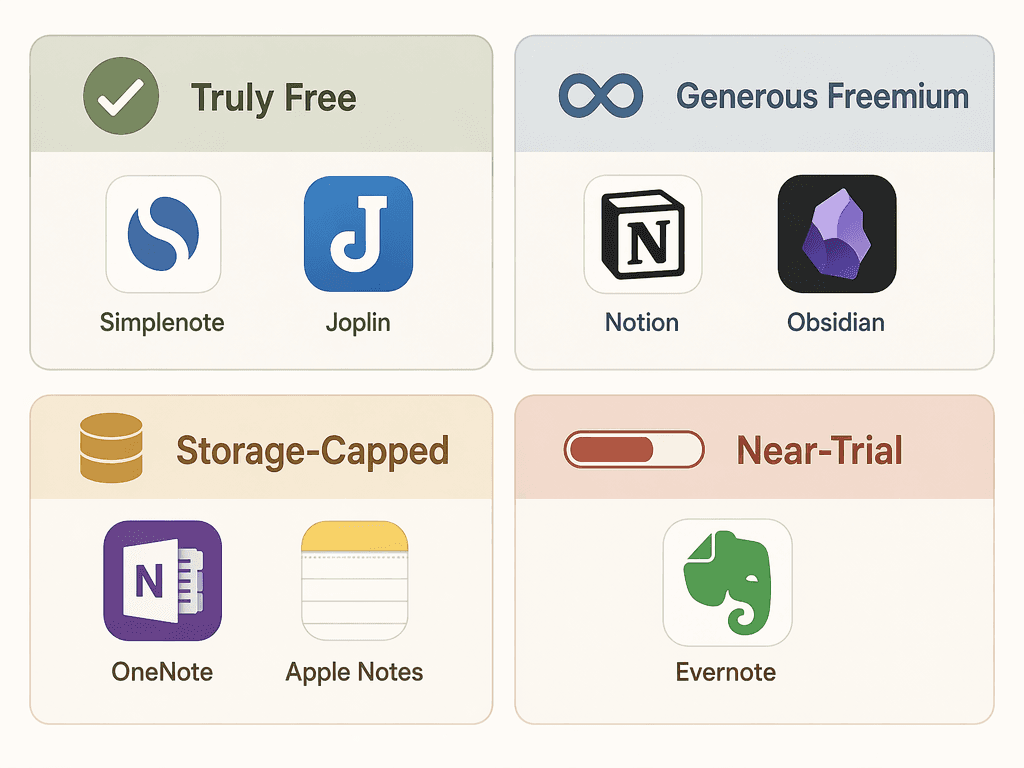
After examining the free tiers of every major note-taking app, a clear pattern emerges. Free plans fall into four distinct categories based on what breaks first:
- Truly Free — No limits on notes, devices, storage, or core features. You can use the app indefinitely without ever seeing a paywall. Only two major apps qualify: Simplenote and Joplin.
- Generous Freemium — The core app is complete and free forever. Paid features are strictly optional add-ons (sync, publishing, AI). You never lose access to your notes if you don't pay. Obsidian and Notion fit here.
- Storage-Capped — The app itself is fully functional, but your total note volume is limited by a cloud storage quota. OneNote (5 GB OneDrive) and Apple Notes (5 GB iCloud) are the prime examples.
- Near-Trial — The free tier is so restrictive that it functions as a limited demo rather than a usable long-term tool. Evernote's current free plan — 50 notes, 1 notebook, 1 device — is the benchmark for this category.
The rest of this article walks through each category in detail, then provides a decision matrix to help you match your usage patterns to the right free plan.
Truly Free: Simplenote and Joplin
Only two major note-taking apps offer genuinely unlimited free plans with no storage caps, no device limits, and no feature gates. Both come with trade-offs that explain why they aren't more popular.
Simplenote: Unlimited Everything, Plain Text Only
Simplenote is exactly what its name promises: a simple, cross-platform note-taking app with no subscription model. It offers unlimited notes, unlimited storage, and syncs across every major platform — iOS, Android, Mac, Windows, Linux, and the web — all for free. There is no paid tier. There is no storage meter. As PCMag notes, it is completely free with unlimited storage.
The trade-off is that Simplenote is plain-text only. You cannot embed images, attach PDFs, draw diagrams, or format text beyond basic markdown. If your note-taking consists of quick capture, lists, and plain text — and you don't need rich formatting — Simplenote is the only app that will never ask you to pay.
Joplin: Open Source, Unlimited Local, Bring Your Own Sync
Joplin is a fully open-source note-taking app that offers unlimited local storage, no file upload limits, and support for all major platforms. According to PCMag, it is free and open-source with no maximum file upload size and a "bring your own" storage model.
Unlike Simplenote, Joplin supports rich formatting, attachments, notebooks, tags, and even end-to-end encryption. The catch is that syncing is not automatic out of the box. You can sync via Dropbox, OneDrive, Nextcloud, or the optional Joplin Cloud service (which starts at roughly €1.99/month and adds 2 GB of storage). For users comfortable with a small amount of setup, Joplin is the most powerful truly free option available.
Generous Freemium: Obsidian and Notion
Obsidian and Notion represent the most common free-plan model among modern productivity apps: the core application is complete and free to use indefinitely, but optional paid features exist for power users. Neither plan is a trial — you can use both forever without paying — but each has specific limits that heavy users will eventually encounter.
Obsidian: Free Core, Optional Sync at $4/Month
Obsidian's core app is free for personal use, and as of 2025 that includes commercial use. The free tier covers unlimited notes and vaults, graph view, Canvas whiteboard, and access to a community plugin library of well over a thousand extensions, according to Tech Insider. You can build a complete personal knowledge management system without ever spending a dollar.
The paid features — Sync at $4/month and Publish — are strictly optional add-ons. Sync encrypts and syncs your vault across devices. If you're comfortable using a third-party sync service like iCloud, Dropbox, or Git, you can avoid the subscription entirely. This makes Obsidian one of the most generous free plans available for knowledge workers who want local-first, markdown-based note-taking.
Notion: Unlimited Pages, but 5 MB Uploads and 7-Day History
Notion's free personal plan offers unlimited pages and blocks for individuals — a genuinely generous offer for text-based note-taking and project management. However, the free tier has two specific limits that power users will notice: file uploads are capped at 5 MB per file, and version history is trimmed to seven days, as confirmed by both Drawboard and Tech Insider.
The 5 MB upload limit means you cannot attach lecture slides, high-resolution images, or PDFs directly into your notes. The 7-day version history means you cannot recover a version of a page from more than a week ago. For most students and individual knowledge workers, these limits are manageable. For teams or users who regularly work with large files, they become friction points.
Storage-Capped: OneNote and Apple Notes
OneNote and Apple Notes take a different approach: the app itself is fully functional with no artificial limits on notes, notebooks, or devices, but your total storage is capped by the cloud service it uses. These are excellent free options for light to moderate users, but heavy media users will hit the storage ceiling faster than they expect.
| App | Free Storage | Storage Cost to Expand | Key Limitation |
|---|---|---|---|
| OneNote | 5 GB OneDrive | $1.99/month for 100 GB | No artificial note/device limits; storage is the only cap |
| Apple Notes | 5 GB iCloud (shared) | $0.99/month for 50 GB | Shared across all Apple services; no Android/Windows |
OneNote: Complete App, 5 GB Ceiling
OneNote's free plan includes all core features — rich formatting, audio recording, drawing, OCR search, and unlimited notebooks — with no artificial limits on notes or devices, according to Zapier and PCMag. The only constraint is the 5 GB of OneDrive storage included with your free Microsoft account. For text-heavy note-taking, 5 GB is ample. For users who regularly attach PDFs, lecture recordings, or high-resolution images, that ceiling can be reached within a single semester.
Expanding to 100 GB costs $1.99/month. Notably, OneNote does not gate core features behind a paywall — even advanced features like optical character recognition and audio recording are free. The only feature locked behind a paid Microsoft 365 Copilot license is the AI assistant, which can summarize pages and turn audio into structured notes.
Apple Notes: 5 GB Shared iCloud, No Cross-Platform
Apple Notes is free and included with every Apple device, with 5 GB of free iCloud storage. That 5 GB is shared across all iCloud services — device backups, photos, mail, and notes. A user with a large photo library may find that only a fraction of that 5 GB is available for notes. Expanding to 50 GB costs $0.99/month.
The more significant limitation is platform lock-in. Apple Notes has no official Android or Windows app. If you use a Windows laptop or an Android phone, Apple Notes is not a viable primary note-taking app. For users fully within the Apple ecosystem who take text-light notes, it remains one of the simplest free options.
Near-Trial: Evernote and the Restrictive Free Tier
Evernote's current free plan is the clearest example of a near-trial tier. As of mid-2026, the free plan is capped at 50 notes, 1 notebook, and 1 device, with a 250 MB monthly upload limit. Both Zapier and PCMag describe it as "not really worth using" and "utterly useless" for any serious note-taking.
To put that in perspective: 50 notes is roughly two weeks of class notes for a typical university student. One device means you cannot sync between your phone and laptop. One notebook means no subject-level organization. This is not a free plan — it is a trial disguised as one.
Evernote's Starter plan ($15/month or roughly AUD 13/month) raises the limits to 1,000 notes, 3 devices, and 1 GB monthly uploads. The Advanced plan (roughly AUD 22/month) increases those further. But the gap between the free tier and the first paid tier is so large that Evernote's free plan functions primarily as an on-ramp to a subscription.
Other apps with restrictive free tiers include Bear, whose free tier limits features and is essentially a preview of the $2.99/month Bear Pro subscription. The key distinction is that Bear's free tier is clearly positioned as a trial, whereas Evernote's free tier still carries the branding of a "free plan" despite being functionally unusable.
Storage Limits Comparison: What 5 GB, 15 GB, and 'Unlimited' Actually Mean
Storage limits are the most common source of free-tier frustration, but they are rarely presented in a way that allows direct comparison. The table below shows what each app's storage limit actually means in practice.
| App | Free Storage | Type | Real-World Note Capacity | Shared With Other Services? |
|---|---|---|---|---|
| Simplenote | Unlimited | Truly free | No practical limit | No |
| Joplin | Unlimited (local) | Truly free | No practical limit (local) | No (bring your own sync) |
| Obsidian | Unlimited (local) | Generous freemium | No practical limit (local) | No (bring your own sync) |
| Notion | Unlimited pages | Generous freemium | Unlimited text notes; 5 MB per file upload | No |
| OneNote | 5 GB OneDrive | Storage-capped | ~5,000 text-heavy pages or ~50 PDFs | No (dedicated to OneDrive) |
| Apple Notes | 5 GB iCloud | Storage-capped | Varies; shared with photos/backups | Yes — iCloud Drive, Photos, backups |
| Google Keep | 15 GB Google | Storage-capped | Varies; shared with Gmail/Photos | Yes — Gmail, Google Photos, Drive |
| Evernote | 250 MB/month | Near-trial | ~50 notes before hitting note cap | No |
Device, Sync, and Feature Restrictions: What You Lose at $0
Storage is not the only limit. Device restrictions, sync limitations, and feature gates can be equally frustrating — and they are harder to discover before you commit.
| App | Device Limit | Sync Method | Key Feature Gate | Offline Access |
|---|---|---|---|---|
| Simplenote | Unlimited | Automatic cloud sync | None | Yes (full) |
| Joplin | Unlimited | Bring your own (Dropbox, OneDrive, etc.) | None | Yes (full) |
| Obsidian | Unlimited | Bring your own or $4/month Sync | Sync, Publish | Yes (full) |
| Notion | Unlimited | Automatic cloud sync | 5 MB uploads, 7-day history, AI | Limited (recently improved) |
| OneNote | Unlimited | Automatic OneDrive sync | Copilot AI requires paid license | Yes (full) |
| Apple Notes | Apple devices only | iCloud sync | No Android/Windows | Yes (full) |
| Google Keep | Unlimited | Automatic Google sync | No organization beyond labels | Yes (limited) |
| Evernote | 1 device | Automatic cloud sync | 50 notes, 1 notebook | Yes (limited) |
The most painful restrictions are device limits and platform lock-in. Evernote's single-device limit means you cannot use the same account on your phone and laptop. Apple Notes' lack of Android and Windows support means it is not an option for users with mixed-device ecosystems. Google Keep's lack of a real organization system (no notebooks, no folders, only labels and color-coding) makes it unsuitable for managing more than a few dozen notes.
When You Should Expect to Pay (and What You Get)
No free plan is perfect. The question is not whether you will eventually hit a limit — it is whether that limit matters for your specific use case. Here is when each free plan's breaking point becomes a real problem:
- Heavy PDF and audio users: OneNote's 5 GB storage cap will fill up within a semester if you attach lecture slides and recordings. Consider upgrading to 100 GB ($1.99/month) or switching to Joplin (unlimited local storage).
- Power users who need version history: Notion's 7-day version history is fine for daily use but insufficient for long-term projects. If you regularly need to revert changes from weeks ago, Notion's Plus plan ($10/month) extends history to 30 days.
- Cross-platform users: Apple Notes is not an option if you use Windows or Android. OneNote, Simplenote, Joplin, and Obsidian all offer full cross-platform support.
- Users who need AI features: Notion AI is bundled only into the Business plan (roughly AUD 30/user/month). OneNote's Copilot requires a paid Microsoft 365 Copilot license. Neither is available on the free tier.
- Users currently on Evernote's free plan: If you have more than 50 notes, you are already over the limit. The Starter plan ($15/month) is the minimum viable upgrade, but at that price point, Obsidian (free) or Notion (free) offer far more value.
Decision Matrix: Which Free Plan Should You Pick?
The right free plan depends on your note-taking volume, device ecosystem, and tolerance for specific limitations. Use the matrix below to match your profile to the best free option.
| Your Profile | Best Free Plan | Limitation You Must Accept |
|---|---|---|
| Quick capture, lists, plain text | Simplenote | No images, attachments, or rich formatting |
| Student with mixed devices (laptop + phone) | OneNote or Notion | OneNote: 5 GB storage cap. Notion: 5 MB upload limit, 7-day history |
| Knowledge worker building a PKM system | Obsidian | Sync requires third-party service or $4/month |
| Heavy PDF/audio user with unlimited storage needs | Joplin | Sync setup required; no native cloud sync |
| Apple-only user who wants simplicity | Apple Notes | 5 GB shared iCloud; no cross-platform access |
| User who needs organization beyond labels | Notion or Obsidian | Notion: 5 MB uploads. Obsidian: no native sync |
| User currently on Evernote free tier | Migrate to Obsidian or Notion | Migration effort; see Evernote migration guide |
Pick the Free Plan Whose Pain Point You Can Live With
Every free note-taking plan has a breaking point. The goal is not to find a perfect free plan — none exists — but to choose the one whose specific limitation you can tolerate. If you never attach files, Simplenote's lack of rich formatting is irrelevant. If you need unlimited attachments, Joplin's sync setup is a one-time inconvenience. If you want a polished cross-platform experience and can live with a 5 MB upload cap, Notion's free plan will serve you well for years.
The worst outcome is choosing a free plan without understanding its breaking point, building a system around it, and then being forced to migrate when you hit an unexpected wall. That is the free-tier trap this article is designed to help you avoid.
If you decide that Evernote's free plan is too restrictive, our Evernote Migration Guide 2026 provides step-by-step instructions for exporting your notes and moving to a better option. For a broader price-tier comparison spanning all plans from free to enterprise, see Free vs. Paid Note-Taking Apps in 2026: What You Actually Get at Each Price Tier.
Comments
Join the discussion with an anonymous comment.