
The worst first question is “What are the best note taking devices?” It sounds sensible until the comparison chart puts a Kindle Scribe, a reMarkable Paper Pro, a Boox Note Air5 C, and an iPad Air in the same row and asks you to care equally about pen latency, bookstore access, app support, battery life, cloud sync, and keyboard cases. Those are not equal-weight details. They are clues about what the device expects your workday to be.
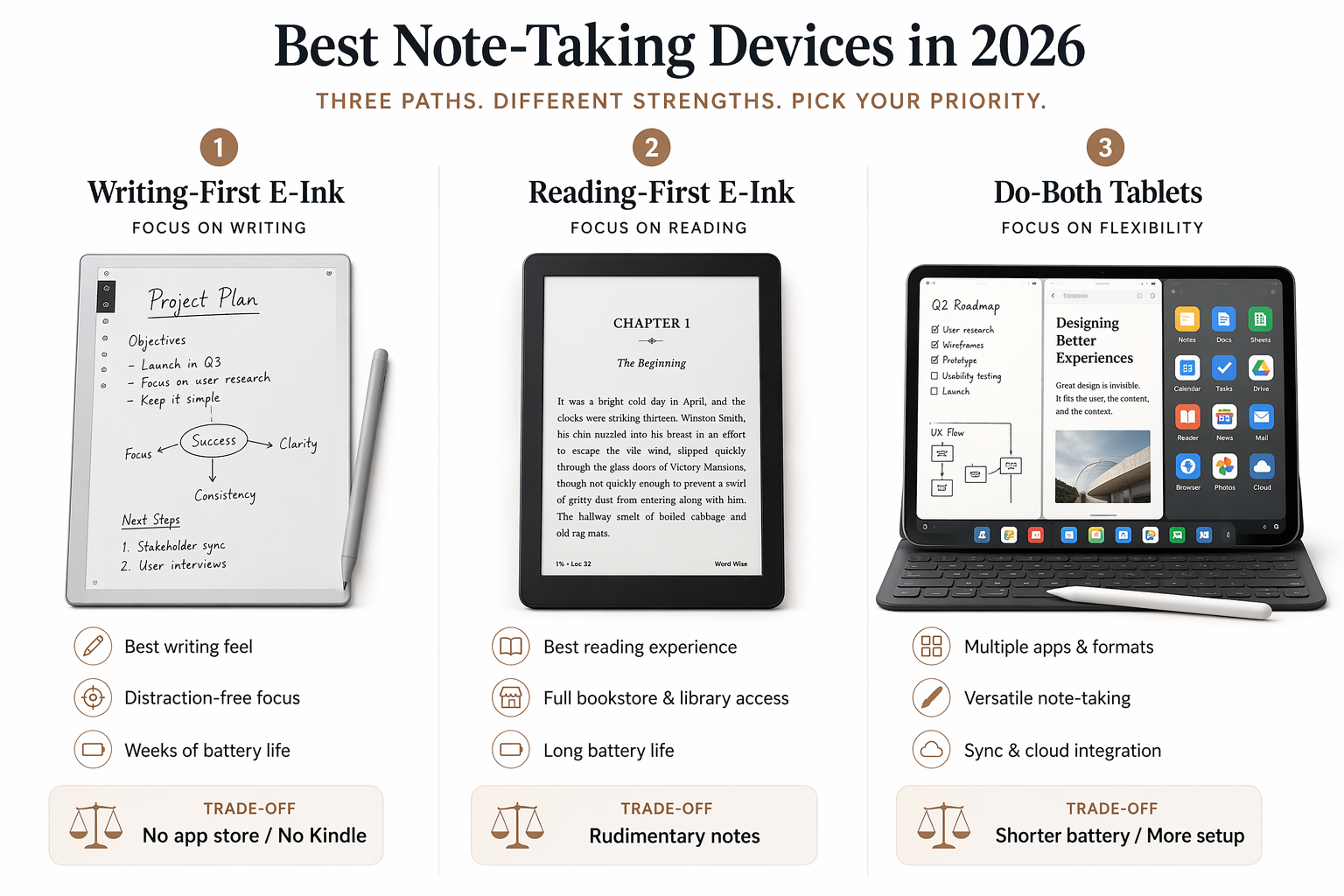
In 2026, the market is easier to understand if you stop looking for one winner and start by choosing a lane. Writing-first e-ink devices are built around the page. Reading-first e-ink devices are built around the library. Do-both tablets are built around app access and integration. Some devices blur the edges, especially Boox, but the lanes are still useful because they reveal the compromise you will live with every weekday.

The three lanes before the device names
The lane framework is not an industry standard, and it should not be treated like a law of physics. It is a sorting tool. Its value is that it keeps you from buying a beautiful writing tablet and then resenting it for not behaving like a Kindle, or buying a strong reading device and then discovering that its notebook tools are too shallow for your meeting notes.
| Lane | Best for | Representative devices | The compromise you must accept |
|---|---|---|---|
| Writing-first e-ink | Longhand notes, PDF markup, focused drafting, meeting notebooks | reMarkable Paper Pro, reMarkable Paper Pure, Supernote A5 X2 Manta | Limited app access; Kindle and general tablet workflows are not the point |
| Reading-first e-ink | Books, library borrowing, light annotation, occasional notebooks | Kindle Scribe Colorsoft, Kobo Elipsa 2E | Notebook depth is secondary to the reading ecosystem |
| Do-both tablets | Notes plus apps, Obsidian, OneNote, Kindle, browser research, keyboard work | Boox Note Air5 C, iPad Air with Apple Pencil Pro | More setup, more distraction risk, higher real cost or shorter battery |
That table does more useful work than a dozen spec columns. If your first task at 9:15 a.m. is opening a project notebook and writing for forty minutes, the writing lane deserves your attention. If your first task is reading a borrowed library book or a Kindle title, the reading lane is probably where you belong. If your notes need to land in Obsidian, OneNote, email, a learning-management system, or a browser-based workflow, you are already asking for the do-both lane.
Lane 1: Writing-first e-ink
Writing-first e-ink devices are for people who want the device to disappear under the pen. The interface should not invite you to check Slack. The notebook should open quickly, the page should feel stable, and your hand should not spend the whole meeting negotiating lag, glare, or palm rejection.
The reMarkable Paper Pro is the obvious premium example. Forbes Vetted’s 2026 testing highlights its writing feel, roughly 12 ms pen latency, and 11.8-inch canvas, which makes it one of the strongest choices if the main job is handwriting and marking up documents on a larger e-ink surface.[1] That strength is also its boundary. It has no app store and no Kindle support, so it should not be bought as a disguised general-purpose tablet.
The pricing matters because the reMarkable line now gives buyers several ways into the same general writing world. The Paper Pro has been cited at $579 to $679 depending on configuration and source timing, while the lower-cost reMarkable Paper Pure is listed at $399 with the same writing OS, a 10.3-inch monochrome display, no frontlight, and a reported three-week battery.[1] That makes Paper Pure the more disciplined choice for someone who wants the reMarkable writing system but does not need color or the larger illuminated canvas.
The Supernote A5 X2 Manta belongs in the same lane, but it appeals to a different kind of writer. It is less about the theatrical pleasure of a premium canvas and more about maintaining a durable knowledge notebook over years. eWritable’s coverage emphasizes the Manta’s ceramic nib, user-replaceable battery, and microSD expansion, with pricing around $505 to $580 depending on configuration.[2] Those are not decorative specs. They change what the owner has to replace, charge, expand, or work around after the purchase.
Supernote also earns attention from knowledge workers because of its linking, keyword, and heading-based organization tools. If your notes are not just pages but a growing body of project material, those features can matter more than a brighter screen or a prettier industrial design. A notebook that lets you find the argument you wrote six weeks ago is doing a different job from a notebook that merely makes today’s page feel good.
This lane is the right place to start if your notes are the work product: client meeting notes, research logs, lecture notes, field observations, manuscript planning, handwritten outlines, or PDF review. It is the wrong place to start if the device must run your favorite apps. That is not a failure of the category. It is the cost of its focus.
Who should pick reMarkable, and who should pick Supernote?
Choose reMarkable first if writing feel, page spaciousness, and a low-friction interface are the deciding factors. Choose Paper Pure instead of Paper Pro if monochrome is acceptable and the lower price matters more than color, frontlight, or the larger canvas. Choose Supernote Manta if the notebook is meant to become a structured archive and you care about hardware longevity as much as the first week’s writing feel.
Also account for ownership costs before treating a lower purchase price as the whole story. reMarkable’s Connect subscription, cited at $3 to $4 per month, is tied to unlimited cloud sync and desktop editing.[2] If you need a fuller cost model across several years, this site’s hidden-costs comparison is the better next stop.
Lane 2: Reading-first e-ink
Reading-first e-ink devices should be judged by the library they put in your hand. That sounds obvious, but it is where many note-taking comparisons go wrong. A Kindle Scribe Colorsoft is not trying to be a reMarkable with a bookstore attached. It is a reading device with note-taking added, and that order of operations shows.
The Kindle Scribe Colorsoft is the anchor device for people whose books, documents, and habits already live inside Amazon’s ecosystem. ZDNET lists the Kindle Scribe Colorsoft at $629.99, while WIRED emphasizes Kindle’s bookstore strength and the Scribe’s long reading battery, reported around eight weeks for reading use.[3][4] That is a meaningful advantage if the device’s main job is to be ready when you want to read.
The catch is note-taking depth. WIRED’s 2026 digital notebook coverage describes Kindle Scribe note-taking as comparatively rudimentary next to stronger digital notebook competitors.[4] That does not make it a bad product. It makes it a poor fit for someone who expects their handwritten notes to become a serious project-management or research system.
Kobo Elipsa 2E sits in this lane for a different reader: the library borrower and epub owner. WIRED highlights Kobo’s native OverDrive and Libby integration, along with native epub support without conversion, and lists the Kobo Elipsa 2E at $399.99.[4] If your reading life is less Amazon-centered and more public-library-centered, that ecosystem difference is more important than a small handwriting-feature comparison.
The reading-first lane is the right answer when marginalia, highlights, book notes, and occasional handwritten pages are enough. It is not the right answer if you regularly build client notebooks, annotate dense PDFs for hours, or need a structured note archive with links, headings, and export routines. If the notebook is secondary, this lane can be wonderfully calm. If the notebook is central, it will feel underbuilt.
Lane 3: Do-both tablets
The do-both lane is for the buyer who keeps saying, “I just need everything in one place.” That sentence usually means something very specific: Kindle, PDFs, handwritten notes, OneNote, Obsidian, a browser, maybe a keyboard, maybe email, maybe a classroom portal. A sealed writing tablet will not satisfy that person for long, no matter how lovely the pen feels.
Boox Note Air5 C is the most interesting e-ink answer to that problem. Lifehacker’s coverage describes it as running Android 15 with Google Play access, a color Kaleido 3 display, keyboard folio support, and the ability to run apps such as Kindle, Obsidian, and OneNote on the same device.[5] eWritable lists the Note Air5 C at $530 and frames it as one of the more flexible current e-ink tablets.[2]
That flexibility has a maintenance cost. Boox asks more of the owner: more setup, more app decisions, more display-mode tweaking, and a shorter heavy-use battery profile than simpler e-ink notebooks. eWritable cites about five days of heavy-use battery for the Note Air5 C.[2] For some people, that is a small price for keeping the Kindle app, Obsidian, and handwritten notes on one e-ink screen. For others, it is exactly the kind of fiddling they were trying to escape.
The iPad Air is the more powerful do-both answer, but the real entry price needs to be stated honestly. The 7th-generation iPad Air is listed at $599, and Apple Pencil Pro adds $129, making the practical note-taking entry point $728 before cases, keyboards, apps, or storage upgrades.[3] At that point, it should be compared not only with e-ink notebooks but with the laptop-adjacent role it may begin to play.
The iPad is not calm in the way an e-ink notebook is calm. It is bright, fast, app-rich, and easy to overextend. If your work benefits from that—lecture slides, PDFs, browser research, diagrams, video calls, handwritten notes, and typed documents—then the distraction risk may be worth managing. If you are torn between the focus of e-ink and the reach of an iPad, read the deeper iPad vs. e-ink tablet comparison before treating either side as the obvious grown-up choice.
Software choice matters most in this lane. A Boox or iPad buyer is not only buying hardware; they are choosing a note app, an export habit, and usually a sync system. If you already know you need handwriting to become searchable text or flow into other tools, the next question is pipeline design, not screen size. This site’s guide to an automated handwriting-to-text pipeline is a better follow-up than another hardware table. If you are choosing between Goodnotes, Notability, OneNote, Nebo, or Android-friendly options, use the stylus note-taking app comparison after you have picked the device lane.
The buyer mistake: crossing lanes without admitting it
Most disappointment comes from buying in one lane while expecting another lane’s strengths. The device may be doing exactly what it was designed to do, and still be wrong for the work.
- Buying a reMarkable Paper Pro because it feels wonderful, then expecting it to run Kindle, Obsidian, or OneNote.
- Buying a Kindle Scribe Colorsoft because the bookstore is excellent, then expecting the notebook system to behave like a serious writing-first device.
- Buying a Boox Note Air5 C because it can run almost everything, then being irritated that it requires setup and charging habits closer to a tablet than a simple notebook.
- Buying an iPad Air because it is powerful, then discovering that the same power keeps pulling the device away from quiet writing.
Color e-ink makes this easier to misunderstand. Color now appears across the lanes, so it is no longer a simple marker of a premium writing device or a tablet-like device. The better question is what color is for. If you mark up diagrams, review slides, or separate project notes visually, color may be worth paying for. If you mainly write black text on a blank page, monochrome may buy you better contrast, lower cost, or longer battery life.
Best-fit picks by actual behavior
A good device recommendation starts with the verb. Reading, writing, reviewing, sketching, exporting, searching, and typing are different jobs. The same person may do all of them, but one of them usually causes the purchase.
| If your weekday work looks like this | Start in this lane | Best-fit device to examine first |
|---|---|---|
| You sit through meetings and produce handwritten notes that must stay organized over months | Writing-first e-ink | Supernote A5 X2 Manta |
| You want the smoothest premium handwriting surface and a large e-ink canvas | Writing-first e-ink | reMarkable Paper Pro |
| You want the reMarkable writing system at a lower price and can live without color or a frontlight | Writing-first e-ink | reMarkable Paper Pure |
| You mainly read Kindle books and want notes as an added convenience | Reading-first e-ink | Kindle Scribe Colorsoft |
| You borrow library books and prefer native epub support | Reading-first e-ink | Kobo Elipsa 2E |
| You need Kindle, Obsidian, OneNote, PDFs, and a keyboard option on one e-ink device | Do-both tablet | Boox Note Air5 C |
| You want the strongest app ecosystem and can tolerate a higher real entry price | Do-both tablet | iPad Air with Apple Pencil Pro |
Students have a special version of the weight problem. Forbes Vetted identifies the reMarkable Paper Pro Move as a lighter color e-ink option at about 250 g and $449.[1] That matters if the device is going into a backpack every day, but it does not erase the same lane question. A lighter writing-first tablet is still a writing-first tablet.
Creative and research-heavy users often drift toward Boox because the work does not stay politely inside one notebook. A sketch becomes a reference image, the reference image becomes a web search, the web search becomes an Obsidian note, and the note needs to sit beside a PDF. That is exactly where Android e-ink earns its keep. It is also where buyers should be honest about whether they enjoy configuring tools or merely tolerate it.
What to ignore until after you choose the lane
Ignore tiny differences in storage until you know whether you are buying a notebook, a reader, or an app platform. Ignore stylus button placement until you know whether the device can open the material you use every day. Ignore a beautiful keyboard case if your actual notes are handwritten meeting records. Ignore bookstore integration if your library is a folder of PDFs and your project notes live in Markdown.
Battery life deserves the same treatment. Eight weeks of reading battery is wonderful on a Kindle-style device because reading standby time is central to the product.[4] It is less meaningful if the device cannot do the note work you bought it for. A shorter battery on Boox is annoying, but it may be acceptable if the alternative is carrying a second device for apps.[2] Specs matter after the job is defined.
The same goes for price. The cheapest device is not cheap if it misses the workflow and lands in a drawer. The most expensive device is not justified just because it can do the most. The useful calculation is narrower: what will this device require me to maintain, subscribe to, replace, charge, export, or work around for the next few years?
The decision rule
Choose the lane first, then the device. If handwriting is the center of the work, start with reMarkable Paper Pro, Paper Pure, or Supernote Manta. If reading is the center, start with Kindle Scribe Colorsoft or Kobo Elipsa 2E. If app access and integration are the center, start with Boox Note Air5 C or iPad Air with Apple Pencil Pro.
Then look for the missing capability that would irritate you every day. No Kindle support. Rudimentary notes. Too much setup. A subscription. A higher real entry price. Shorter battery under heavy use. If that missing capability sits at the center of your daily workflow, no amount of beautiful hardware or impressive battery life will make it the best note-taking device for you.
References
- The 6 Best Writing Tablets, Tested With Hundreds Of Digital Pages — Forbes Vetted, Jun 2026.
- Best E-Ink Tablets: My Recommendations — eWritable.
- Best tablets for note-taking 2026: Expert tested and reviewed — ZDNET.
- 6 Best Digital Notebooks (2026): ReMarkable, Kobo, Kindle — WIRED, Jun 2026.
- Best E-Ink Tablet 2026: Six Devices Ranked by Use Case — Templacity.