
If you are considering NotebookLM data tables for research notes, the practical question is probably not whether the feature is clever. It is. The question is whether it can replace the spreadsheet, Notion database, or Elicit workflow you already trust when the work has to be checked, reused, or defended later.
The short answer: use NotebookLM Data Tables when you need a fast first-pass synthesis from a bounded set of documents you already control. Do not treat it as a replacement for a maintained research database, a carefully designed spreadsheet, or a systematic review extraction tool. The difference matters most after the impressive first table appears.
| Tool | Best use | Main strength | Where it breaks down |
|---|---|---|---|
| NotebookLM Data Tables | Quick synthesis from uploaded documents | Zero-setup extraction and pattern finding from a bounded source set | Weak table-level traceability, fresh-start generations, isolated notebooks |
| Spreadsheets | Controlled extraction, audit trails, scoring, cleanup | Manual control over columns, formulas, filters, and review status | Slow setup; no automatic understanding of source documents |
| Notion databases | Long-lived research databases and team knowledge bases | Structured properties, views, tags, relations, and templates | Manual population; not built for document-grounded extraction tables |
| Elicit | Paper discovery, screening, and systematic extraction | Custom extraction columns and large paper-set workflows | Less natural for synthesizing arbitrary documents you already collected |
What Data Tables actually adds
Google introduced Data Tables as a NotebookLM feature that generates structured tables from the sources inside a notebook, rather than asking the user to design every column and row manually first.[1] That changes the starting point. In a spreadsheet, the researcher has to decide the schema before the evidence has fully shown its shape. In NotebookLM, the model can suggest a structure from the documents themselves.
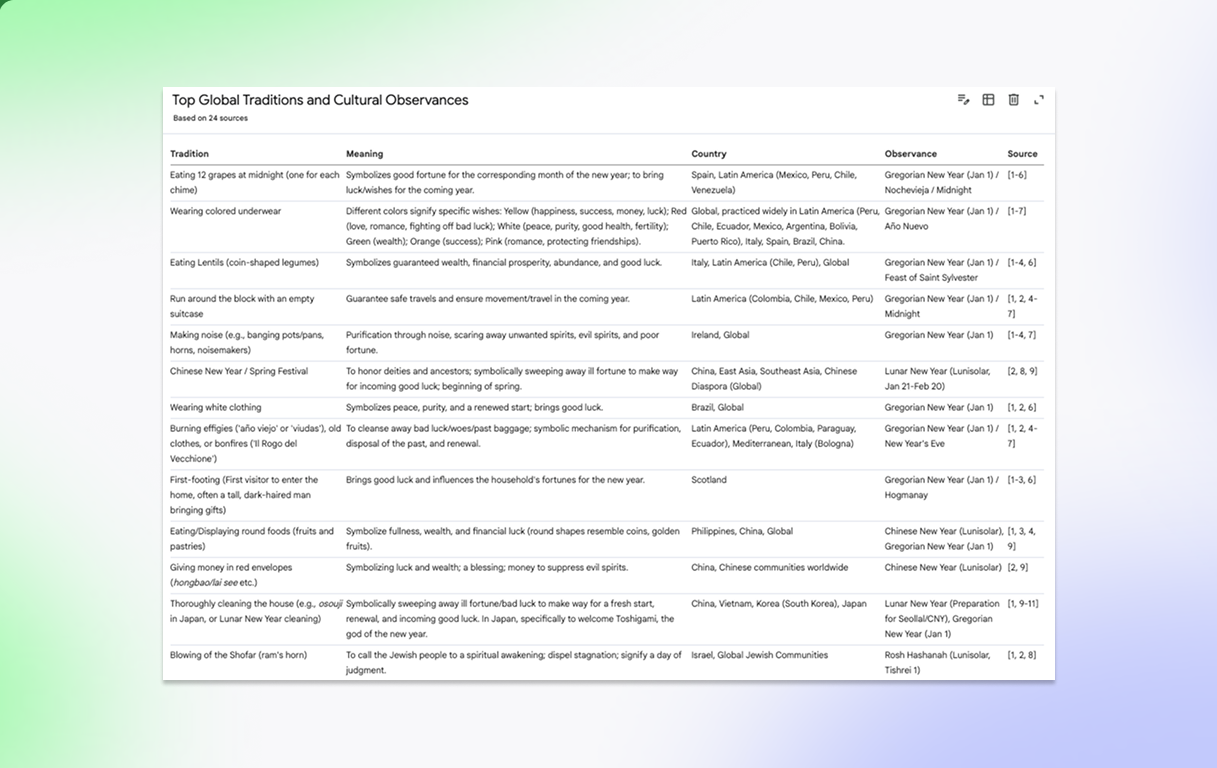
That is the feature’s appeal. Give it reports, transcripts, policy documents, interview notes, or program materials, and it can often produce a usable matrix before a human would have finished arguing with column names. For the researcher trying to understand a pile of documents by lunchtime, that is not a minor convenience.
The free-tier allowance also makes the experiment unusually low-friction. DigitalOcean’s 2026 overview lists NotebookLM’s free tier at 50 sources per notebook and 100 notebooks, which is generous enough for many class projects, desk research tasks, and small qualitative synthesis jobs.[2] By contrast, Paperguide’s comparison lists Elicit’s free tier as 2 extraction columns and 2 reports per month, while its broader extraction workflow supports 2–40 custom extraction columns and systematic screening across up to 40,000 papers.[3]
Those numbers point to the real boundary. NotebookLM is not a smaller Elicit. It is a different kind of tool: source-grounded synthesis inside a notebook, not paper discovery and systematic extraction across a literature set.
The Science Talk test is the useful case
The most concrete test in the available material comes from The Science Talk, which used NotebookLM Data Tables on more than 230 podcast transcripts and 259 pages of EU funding documents, specifically ERC and EIC work programme materials.[4] That is exactly the sort of bounded, messy, mixed-format collection where a table generator can be more than a novelty.
In that test, Data Tables performed well at pattern extraction and structured synthesis across the source set.[4] That is the part worth taking seriously. A human researcher could build a spreadsheet for the same job, but the first hours would likely go into deciding categories, scanning examples, revising labels, and copying fragments into cells. NotebookLM can collapse that scaffolding phase.
The same test also shows why the output should not be mistaken for finished evidence. When The Science Talk tried to extract quotes from the transcript set, NotebookLM returned only 5 quotes from more than 230 transcripts, and verification remained a problem.[4] That is not a small edge case. Quote extraction is one of the places where researchers need the opposite of a smooth-looking table: they need exact wording, location, context, and confidence that nothing important was silently skipped.
So the case supports a narrower and more useful claim: Data Tables can be very good at surfacing patterns from a known document pile. It is much less safe as the final home for quotations, claims, or anything that will later require line-by-line defense.
Why the first table feels so persuasive
The first persuasive moment is usually not accuracy. It is relief. A pile of PDFs and transcripts becomes rows and columns. Repeated themes become visible. Differences between documents stop being trapped in paragraphs. Android Police described the feature as easier than a spreadsheet in hands-on use, which captures the immediate experience well even if it should not be stretched into a replacement claim.[5]
For bounded synthesis, that speed changes the research rhythm. Instead of spending the first session inventing a table, a researcher can ask: What does the model think the relevant dimensions are? Which rows look underdeveloped? Which categories are too broad? Which documents are outliers? The table becomes a diagnostic object, not just a place to store notes.
That is especially useful when the source set is mixed but finite: a grant call plus guidance notes, an archive of meeting transcripts, a set of stakeholder interviews, a folder of product documentation, or a cluster of policy reports. The documents are already selected. The job is not discovery at web scale; it is making sense of what is in front of you.
The problem starts when the table begins to look finished
A clean table has a bad habit: it looks more settled than it is. NotebookLM’s normal chat and report outputs can provide citation chips, but the limitation noted in reviewed 2026 coverage is that Data Table output itself does not include clickable source citations inside the table cells.[6] For a casual overview, that may be tolerable. For research notes that will feed an article, thesis chapter, policy memo, or client deliverable, it creates cleanup work.
The missing table-level citation trail changes how the output should be handled. A row can suggest a pattern, but the researcher still has to go back to the source documents and verify the underlying passage. If a table cell says that several interviewees emphasized a barrier, the next step is not to paste that cell into a literature review. The next step is to locate the supporting passages, decide whether the synthesis is fair, and record the citation or source location somewhere more durable.
There is also a workflow control issue. Atlasworkspace’s limitations review describes Data Table generation as starting fresh rather than supporting progressive refinement of an existing table, and notes that notebooks remain isolated with no cross-notebook querying.[6] That matters once the table becomes part of a longer project. Researchers rarely extract once and walk away. They merge sources, revise categories, split ambiguous codes, flag low-confidence rows, and rerun only part of the work. A fresh generation can be useful, but it is not the same as an evolving extraction sheet.
The isolation between notebooks is another practical ceiling. If one notebook holds interviews, another holds policy documents, and another holds background reports, NotebookLM does not become a cross-project research warehouse. You can work around that by reorganizing sources, but the workaround is itself a sign: this is a notebook-level synthesis tool, not a database layer.
Where spreadsheets still win
Spreadsheets are tedious in exactly the ways that make them dependable. They force the researcher to decide what counts as a row, what each column means, which values are allowed, which cells are uncertain, and which entries have been checked. That friction is not glamorous, but it keeps the research process visible.
A spreadsheet is still the better place for maintained extraction when you need formulas, filters, validation columns, reviewer initials, inclusion decisions, confidence ratings, deduplication, or a stable audit trail. It is also better when the structure is already known. If you need columns for population, intervention, outcome, method, sample, and limitation, you do not need an AI tool to invent a table shape. You need careful extraction and review.
The sensible workflow is often sequential: let NotebookLM generate a first table from the bounded source set, then move the useful structure into a spreadsheet once the categories are worth preserving. At that point, the spreadsheet is not competing with Data Tables. It is absorbing the parts that need to survive verification.
Where Notion still wins
Notion databases solve a different problem: they give research notes a long-lived structure. A Notion database can hold projects, sources, tags, reading status, themes, people, organizations, and linked notes. It can become the place where a research team returns over weeks or months.
The tradeoff is that Notion does not do what Data Tables does. Fabric’s comparison describes Notion as strong for structured databases and workflows, while NotebookLM is stronger for source-grounded analysis of uploaded materials; it also notes that Notion AI can summarize or analyze but is not the same as automatic structured extraction from a document set.[7] That distinction is easy to blur in tool comparisons, but it is the whole decision.
Use Notion when the research object needs to keep living: a reading database, expert interview tracker, case library, source inventory, or project knowledge base. Use NotebookLM when the question is still exploratory and the source pile needs to be made legible quickly. If the Data Table produces a useful set of categories, those categories may become Notion properties later.
Obsidian sits a little farther from this comparison. Its table support is mostly Markdown-based, and the research materials here do not support a deep head-to-head claim. For researchers using Obsidian as a personal knowledge base, NotebookLM Data Tables may still be useful upstream, but Obsidian is not the most direct substitute for this feature.
Elicit is the boundary case, not just another note app
Elicit should enter the decision when the task shifts from “make sense of these documents” to “find, screen, and extract from a research literature.” Paperguide’s comparison places Elicit in the systematic research workflow: custom extraction columns, screening, and scale up to 40,000 papers.[3] NotebookLM’s free 50-source-per-notebook cap is generous for many bounded projects, but it is the wrong center of gravity for large literature review work.[2]
The column difference is also important. Elicit supports user-defined extraction columns in the 2–40 column range described by Paperguide.[3] Data Tables can generate structure, but the available materials do not support treating it as a systematic, user-controlled extraction-template engine. If the work depends on consistent fields across hundreds or thousands of papers, that difference is decisive.
That does not make Elicit the universal winner. If you already have a folder of program documents, internal transcripts, meeting notes, or non-academic reports, Elicit may be solving the wrong problem. NotebookLM is stronger when the source set is already chosen and the immediate task is synthesis rather than discovery.
A practical decision rule
- Use NotebookLM Data Tables when you have a bounded set of documents and need a fast structured overview, theme map, comparison matrix, or first-pass extraction.
- Use a spreadsheet when the extracted data must be checked, filtered, scored, cleaned, reviewed, or preserved with explicit decisions.
- Use Notion when the research material needs to become a durable database with properties, tags, views, links, and team-facing structure.
- Use Elicit when the work is closer to systematic paper discovery, screening, and extraction at literature-review scale.
In practice, treat Data Tables as the beginning of structured research notes, not the end. Generate the table, inspect the categories, ask which rows look plausible but unsupported, and return to the sources for claims, quotes, and edge cases.
This is also where plan limits and pricing deserve a cautious footnote in the actual workflow. NotebookLM’s allowances and paid tiers have changed quickly, and reviewed sources report conflicting Ultra pricing figures. Treat any exact paid-plan price as something to verify directly before budgeting a project around it.[2][6]
For readers comparing this choice with broader AI research assistants, a phase-based view can help: discovery, extraction, synthesis, and knowledge management are not the same job. The site’s AI research assistants compared by research phase guide is the more useful next stop if the real question is where NotebookLM, Elicit, and adjacent tools belong in a full research pipeline.
The workflow I would trust
Start in NotebookLM Data Tables when the documents are already in your hands and you need to see the shape of the material quickly. Let it propose columns, cluster patterns, and expose comparisons you might not have scaffolded manually at the start.
Move the results into a spreadsheet or Notion when the table starts becoming an asset: something you will update, cite, share, filter, defend, or revisit. Keep the original sources close, because the Data Table itself is not the citation trail.
Choose Elicit instead when the center of the work is systematic paper discovery and extraction across a large literature set. That is not a failure of NotebookLM. It is a sign that the project has moved from bounded synthesis into a different research phase.
References
- Introducing Data Tables in NotebookLM, Google Blog, https://blog.google/innovation-and-ai/models-and-research/google-labs/notebooklm-data-tables/
- What Is NotebookLM?, DigitalOcean, Feb 2026, https://www.digitalocean.com/resources/articles/what-is-notebooklm
- Elicit vs NotebookLM, Paperguide.ai, https://paperguide.ai/blog/elicit-vs-notebooklm/
- NotebookLM Data Tables: An Experiment for SciComm Scientists, The Science Talk, https://thesciencetalk.com/news/notebooklm-data-tables-scicomm-scientists/
- NotebookLM's new feature makes research easier than any spreadsheet, Android Police, https://www.androidpolice.com/notebooklm-feature-easier-than-any-spreadsheet/
- NotebookLM Limitations and Pitfalls 2026, Atlasworkspace.ai, https://www.atlasworkspace.ai/blog/notebooklm-limitations
- NotebookLM vs Notion, Fabric.so, https://fabric.so/comparison/notebooklm-vs-notion