
Verdict first: upgrade only if the 17 Pro is already hitting a wall
For daily capture, transcription, and moving notes into a real knowledge system, the iPhone 18 Pro is not an automatic productivity upgrade over the iPhone 17 Pro. It makes sense if your 17 Pro already overheats, slows down, or runs too close to empty during long recording and AI-transcription days. If your problem is mostly getting meeting notes out of Apple Notes and into Obsidian, Logseq, Notion, or a writing app, the 17 Pro already gets the more important upgrade: iOS 27.
That matters because the expected price pressure is real. The iPhone 18 Pro is rumored to start at $1,299, compared with $1,099 for the iPhone 17 Pro, and as of July 2026 it is still a pre-release phone with reported specifications rather than tested retail hardware.[1] A $200 jump is not outrageous if it saves a heavy note-taker from dead batteries and throttled transcription. It is very annoying if the everyday workflow feels the same by Wednesday.
The uncomfortable fact for upgrade marketing: iOS 27 gives both phones the important note features
The most useful note-taking change in this comparison is not exclusive to the iPhone 18 Pro. iOS 27 brings Markdown clipboard conversion and a Copy as Markdown option to Apple Notes, and those features work on both the iPhone 17 Pro and iPhone 18 Pro.[2] For anyone who uses Apple Notes as a fast capture bucket, that is the point where the workflow usually stops being clean: the note is captured, but moving it into Obsidian, Logseq, Notion, or another long-term system creates formatting mess.
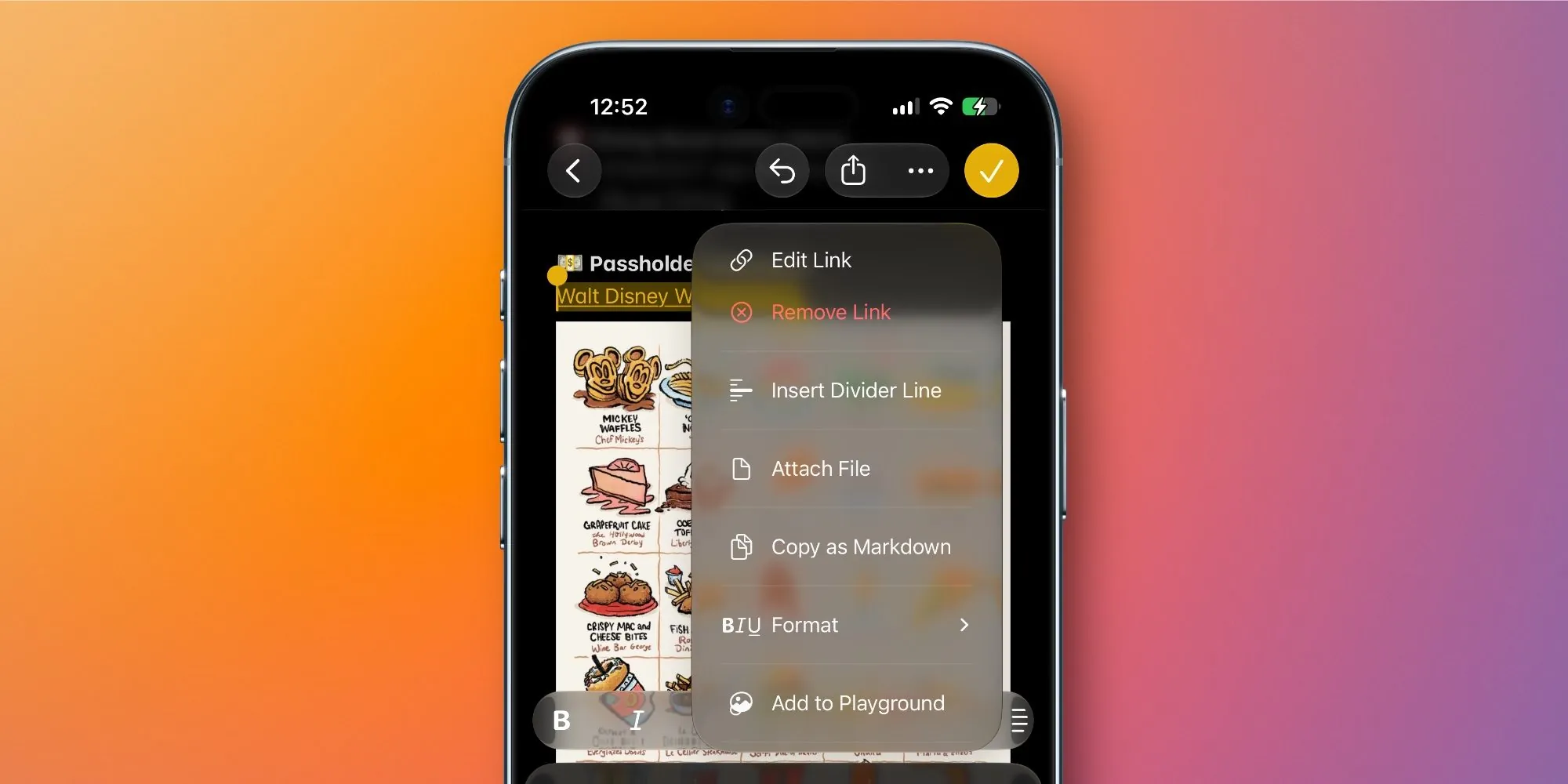
Copy as Markdown changes a tiny but constant action. A meeting note with headings, bullets, links, and emphasis can leave Apple Notes in a format that makes sense to Markdown-based systems. That is more concrete than an “AI-ready” label because it removes a cleanup step after capture. If your current irritation is that Apple Notes is fast but your second-brain app is where the note needs to live, iOS 27 is already doing the job on the 17 Pro.
The same software-parity point applies to Apple Intelligence and Siri AI. Apple’s Siri AI features include Write with Siri, onscreen awareness, personal context, and auto-proofreading, and the A19 Pro in the iPhone 17 Pro qualifies for Apple Intelligence support.[3] The 18 Pro may respond faster under heavier compound workloads, but the feature list itself is not the upgrade case.
| Part of the note workflow | iPhone 17 Pro on iOS 27 | iPhone 18 Pro difference |
|---|---|---|
| Quick text and voice capture | Already strong for ordinary notes, voice memos, Apple Notes capture, and app switching | No clear feature advantage unless long sessions expose battery or heat limits |
| Apple Intelligence, Siri AI, and Writing Tools | Supported through iOS 27 and A19 Pro eligibility | Potentially faster under heavier workloads, but not a separate feature set |
| Apple Notes to Obsidian, Logseq, or Notion | Gets Copy as Markdown and Markdown clipboard conversion | Same iOS 27 Markdown movement |
| Multiple note apps open | 12GB RAM and a 6.3-inch OLED display match the reported 18 Pro baseline | Basically unchanged multitasking capacity and screen space |
| Long AI transcription or summarization | Good until sustained load causes heat, slowdown, or battery anxiety | The one place A20 Pro efficiency, Neural Engine changes, and packaging may matter |
| All-day capture over cellular | Depends on your current battery headroom and sync habits | Possible advantage from efficiency and modem changes, not from a large battery jump |
This is why the iPhone 17 Pro vs iPhone 18 Pro upgrade for productivity should not start with the chip name. It should start with the exact step that is slow, hot, or fragile in your day. If that step is “copy this formatted note into Obsidian without rebuilding it,” the answer is software. If that step is “transcribe and summarize a two-hour session while I’m still away from a charger,” hardware starts to matter.
Where the A20 Pro could matter: sustained AI work, not ordinary note-taking
The reported A20 Pro changes are interesting for one reason: they target the kind of sustained workload that makes a phone feel worse after the first few minutes. Supply-chain reports point to a 2nm process with roughly a 15% performance uplift and around 30% better power efficiency, along with WMCM packaging that separates DRAM from the system-on-chip to reduce thermal throttling.[4][5] Those numbers are not Apple retail benchmarks, and they should not be treated as a guaranteed productivity result. They are still the most relevant hardware claims in the whole comparison.
A normal note-taking session rarely stresses a recent Pro iPhone. Typing in Apple Notes, opening Notion, checking a PDF, dictating a short thought, and pasting a cleaned paragraph into Obsidian are not the kind of tasks that justify replacing a one-year-old flagship. The 18 Pro case starts when capture becomes continuous: a lecture recorded end to end, back-to-back interviews, a day of walking voice notes, live transcription, AI summaries, and cellular sync all happening before dinner.
That is where the enlarged Neural Engine implications, faster memory path, and thermal packaging become more than spec-sheet furniture. If the A20 Pro can keep on-device AI inference moving without backing off as aggressively, a heavy user may see fewer stalls while generating summaries, cleaning transcripts, or asking Siri AI to work with the current screen and personal context. The narrower, more honest claim is this: the 18 Pro is likely to be better under compound AI load, but there is no clean public A/B test yet showing identical Siri AI or transcription workloads on A19 Pro versus A20 Pro.
The upgrade test is heat and waiting
A useful way to judge your own 17 Pro is to ignore synthetic benchmarks and watch the ugly moments. Does transcription lag after a long recording? Does the phone get warm enough that performance drops while you are still trying to summarize? Do Writing Tools or Siri AI feel quick for the first task and slower by the fourth? Do you stop using on-device features because you are protecting battery for the commute home?
If the answer is no, the A20 Pro is probably an improvement you would admire more than feel. If the answer is yes, the iPhone 18 Pro has a real job to do: reduce waiting during the same capture session, not merely finish a benchmark faster.
RAM and screen size are basically a wash
Both devices are listed with 12GB of RAM and 6.3-inch OLED displays in the available comparison material.[6] For note-taking, that removes two common upgrade arguments. You are not getting a roomier canvas for Apple Notes, Notion, GoodNotes-style review, or side-by-side reference work on the phone. You are also not getting a clear RAM jump that changes the basic experience of keeping Notes, Safari, a recorder, and a knowledge app alive in the background.
That does not mean app switching will always feel identical. Storage speed, chip behavior, iOS scheduling, and thermal state can still affect the feel of a phone. But for the specific productivity question, identical RAM and display size make the middle of the workflow look familiar: same pocketable screen, same practical limits for reviewing dense notes, same need to finish serious structuring on an iPad, Mac, or external keyboard if the note becomes a document.
Battery: do not overread the extra 36 mAh
The reported battery-capacity difference on the standard Pro model is small: about 4,288 mAh for the U.S. iPhone 18 Pro versus about 4,252 mAh for the iPhone 17 Pro, a gain of only 36 mAh.[6][7] Apple does not publish official mAh ratings, so these figures come from filings and third-party reporting rather than Apple’s own spec pages. Either way, the raw capacity difference is not the reason to upgrade.
The better battery argument is efficiency. If the A20 Pro’s reported 2nm efficiency gains hold up, and if display and modem improvements reduce drain during real mixed use, the 18 Pro could last meaningfully longer during a capture-heavy day. Available reporting supports a cautious expectation of roughly one extra hour of continuous transcription or note-taking under heavy load, not a guarantee that everyone will end the day with dramatically more battery.[4][6][7]
For mobile note-takers, that hour can matter. The person recording a seminar, syncing notes over cellular, searching cloud documents, and asking AI to summarize between sessions does not need a prettier battery graph. They need the phone to stay fast enough and alive enough that capture does not become a planning problem.
The Pro Max story is different because the reported capacity jump is much larger: about 5,567 mAh for the iPhone 18 Pro Max in the U.S. versus 5,088 mAh for the 17 Pro Max.[6][7] But that is not the same purchase as moving from 17 Pro to 18 Pro. If you are staying with the smaller Pro body, the battery case depends much more on efficiency than size.
If Markdown movement is your pain, buy nothing first
The easiest upgrade trap here is confusing a workflow problem with a hardware problem. If your captured notes are scattered, half-cleaned, or stuck in the wrong app, the iPhone 18 Pro will not automatically fix that. iOS 27’s Apple Notes changes help because Markdown export reduces friction at the handoff point, but you still need to decide where notes go after capture.
If Apple Notes is your inbox and Obsidian, Logseq, or Notion is your archive, the better move may be to redesign the flow on the phone you already own. Start with a capture default, a cleanup habit, and one destination for notes that deserve a longer life. If your phone setup itself is creating upgrade pressure, this iPhone productivity setup guide is the more honest first stop than a checkout page.
If the problem is app fit, not phone speed, compare the systems instead of the silicon. A student who thinks in notebooks, a researcher who thinks in backlinks, and a project manager who thinks in databases will not be rescued by the same device upgrade. The better decision may come from choosing between OneNote, Notion, Obsidian, and Apple Notes by thinking style, or from tightening the handoff between iPhone and desktop with a Mac note-taking app that matches your work style.
The practical split
- Upgrade to the iPhone 18 Pro if your 17 Pro regularly heats up, slows down, or threatens battery life during long AI transcription, summarization, recording, and cellular-sync days.
- Keep the iPhone 17 Pro if you mainly want iOS 27’s Markdown movement, Apple Notes improvements, Siri AI assistance, Writing Tools, ordinary voice capture, and cross-app note cleanup.
- Do not upgrade for RAM, screen space, or a new feature badge. The available material does not support a meaningful note-taking difference there.
- Do not upgrade just because your note system feels messy. Fix capture defaults, export paths, and app choice first.
The iPhone 18 Pro is not a bad productivity upgrade. It is a narrow one. It is for the person whose phone is already being used like a pocket recorder, transcription engine, AI cleaner, cellular sync device, and all-day capture tool. If your iPhone 17 Pro is not failing at those jobs, the most productive move is to take iOS 27, set up the Markdown handoff properly, and keep the expensive phone you already bought.
References
- iPhone 18 Pro Rumors — PCMag
- iOS 27 Notes App Features — GadgetHacks
- Apple introduces Siri AI — Apple Newsroom
- iPhone 18 Pro: Three Ways Apple's Chip Redesign Boosts Performance — MacRumors
- iPhone 18 Pro's new A20 chip — 9to5Mac
- Apple Documents Confirm Powerful iPhone 18 Pro Specs — Forbes
- iPhone 18 Pro battery comparison — Technology.org