
The real price of a handwriting-to-text tool shows up after the first successful scan. The app says it can convert handwritten notes to text, and technically it does. Then you spend the next half hour fixing “client budget” into “climbet budgel,” restoring bullets, and checking whether a date was read as a 3, an 8, or a lowercase B.
For occasional neat handwriting, that tradeoff is fine. If you convert fewer than about 10 clean printed pages a month, free tools are usually the sensible default. Use Google Keep, Google Lens, Microsoft Lens, OneNote, or Apple Scribble before you add another subscription. If you process notes every week, write in cursive, have messy pages, or handle client and medical material, “free” can become a correction queue or a privacy compromise rather than a bargain.
That distinction matters because the category is improving quickly. DataIntelo estimated the handwriting recognition market at $2.43 billion in 2025 and projected double-digit annual growth through 2034, which helps explain why better recognition is showing up in note apps, document tools, and AI services at the same time.[1] But market growth does not fix your page tonight. The practical question is still: how many pages, how difficult is the handwriting, and how much correction can you tolerate?
If you only want no-cost options, start with free methods that actually work. This article is for the next decision: when does staying free stop being rational?
The Quick Decision Rule
| Your situation | Best starting point | Why |
|---|---|---|
| Under about 10 neat printed pages per month | Free tools | The correction load is usually tolerable, and paying may not save enough time. |
| Regular weekly notes, study batches, or meeting notebooks | Low-cost paid note app or specialized OCR trial | Repeated cleanup time starts to cost more than the tool. |
| Cursive, slanted, inconsistent, or crowded handwriting | Specialized AI OCR or LLM-based transcription test | Generic free OCR accuracy drops sharply on harder handwriting. |
| Live stylus notes on iPad or touchscreen | Apple Scribble, OneNote Ink to Text, Nebo, or GoodNotes | These tools work best when handwriting is captured digitally from the start. |
| Client, medical, legal, HR, or confidential business documents | Paid tool with clear privacy terms | The privacy risk can outweigh the page-volume calculation. |
The 10-page line is not a law. It is a workload estimate. A student with spare time and tidy block print may stay free well beyond it. A freelancer who bills by the hour may hit the upgrade point after five messy client-meeting pages because every correction minute is coming out of paid work or sleep.
Where Free Tools Are Actually Enough
Free tools are good at a narrow but common job: capture a readable page, extract enough text to search or paste, and let the user clean up the rest. For a class handout with margin notes, a short to-do list, or a few pages of neat print, that is often all anyone needs.
Google Keep and Google Lens are the easiest no-cost starting points because they do not require a paid note-taking setup. They are useful for quick capture and casual search, but they are weaker on cursive and inconsistent handwriting. DigiParser’s comparison places Google Keep around 65–75% accuracy on cursive, which is enough to create a rough draft but not enough to trust without line-by-line review.[2]
Microsoft Lens and OneNote make more sense if your notes already live in a Microsoft workflow. OneNote Ink to Text can be very strong for stylus input, with reported accuracy around 95–98% in benchmark-style comparisons, but that strength is easy to misunderstand: it applies best when the ink was created digitally, not when you photograph old notebook pages under uneven light.[3]
Apple Scribble is similar in spirit. It is free once you have the iPad and Pencil setup, and it can turn live handwriting into text inside iPad text fields. It is not a scanning solution for a semester’s worth of paper notes. That makes it excellent for preventing a future digitizing chore, not for cleaning up a shoebox of old notebooks.[4]
For low-volume users, the right response is usually not to buy something better. It is to choose the free tool that matches the input: Google tools for quick phone capture, Microsoft tools for OneNote users, Apple Scribble for live iPad entry, and manual cleanup when the page count is low enough that the cleanup is still cheaper than the upgrade.
The Accuracy Gap Shows Up Fast on Cursive and Messy Pages
The free-versus-paid question gets much less philosophical once cursive enters the page. According to industry benchmark summaries from HandwritingOCR.com, generic free OCR averages roughly 60–70% accuracy on handwriting, with a cited 64% figure for cursive, while specialized AI handwriting OCR services can exceed 95% on supported documents.[5] Those numbers should be treated carefully because the original test methodology is not independently verifiable from the crawled source material. Still, they match the pattern most users notice quickly: neat printed words are manageable; connected, slanted, abbreviated handwriting becomes repair work.
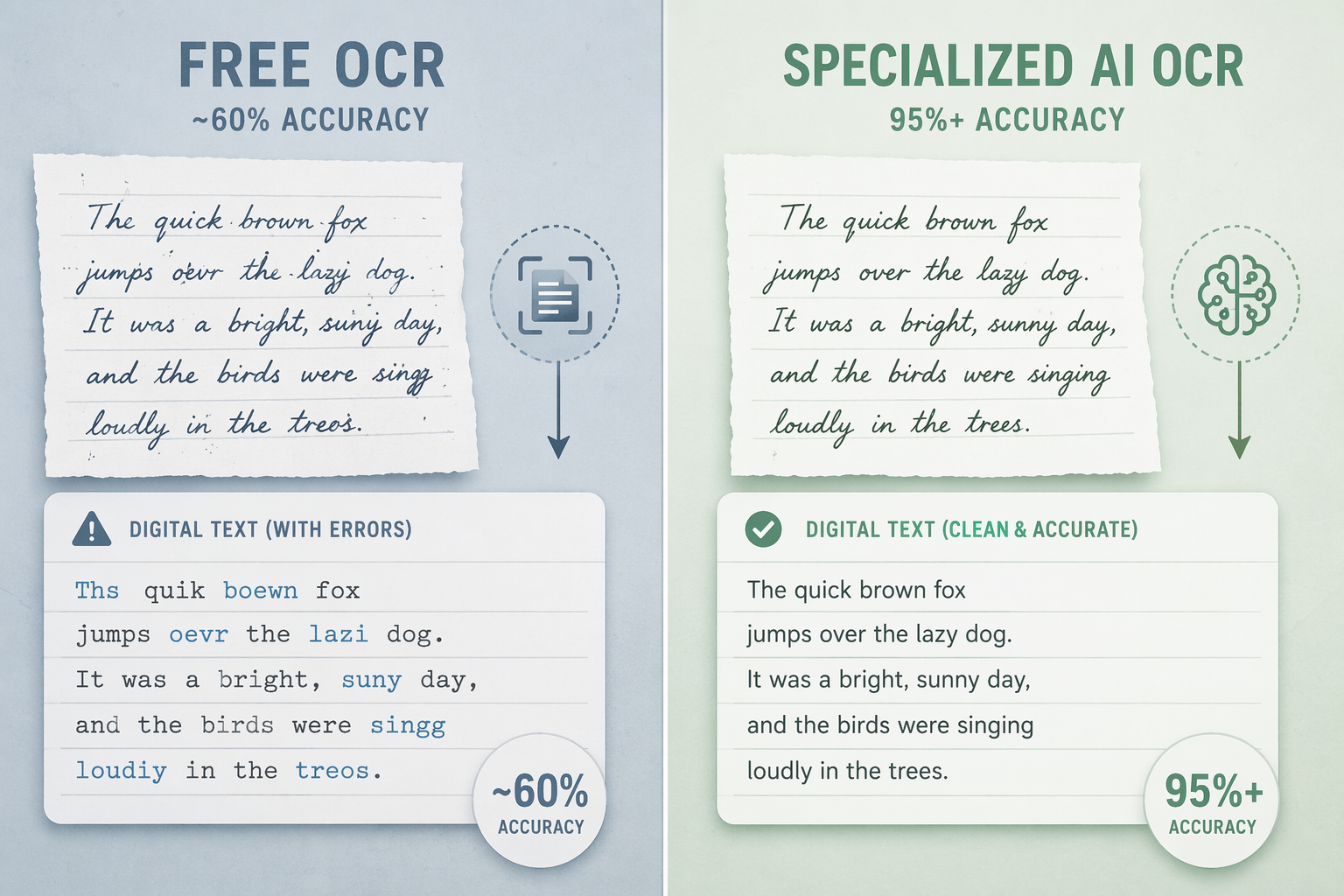
A 70% result can look impressive in a demo and still be miserable in a workflow. If three words out of ten need attention, the user cannot skim for errors. They have to compare the digital text against the image, line by line. That is where a student loses the evening before an exam, or an admin turns a searchability project into a retyping project.
Specialized tools do not magically understand every notebook. They still struggle with crossed-out words, arrows, cramped margins, diagrams, and personal abbreviations. But the difference between “fix a few words” and “audit every sentence” is the difference that matters. Accuracy is not just an abstract score; it decides whether proofreading is a quick pass or the main task.
Correction Time Is the Hidden Subscription
Some source guides estimate that free OCR users may spend 20–30 minutes correcting a difficult handwritten page.[5] That is not a universal benchmark. A clean printed page might take two minutes. A dense cursive meeting page with names, dates, and decisions can take much longer. But even as a realistic estimate rather than a fixed rule, it changes the math.
| Pages per month | If cleanup takes 5 minutes/page | If cleanup takes 20 minutes/page | What the time cost suggests |
|---|---|---|---|
| 3 pages | 15 minutes | 1 hour | Free is still reasonable unless the content is sensitive or urgent. |
| 10 pages | 50 minutes | 3 hours 20 minutes | This is the point where many users should test a paid option. |
| 20 pages | 1 hour 40 minutes | 6 hours 40 minutes | Correction time is now the main cost, not the software. |
| 50 pages | 4 hours 10 minutes | 16 hours 40 minutes | A paid workflow is usually easier to justify than manual cleanup. |
This is why a cheap paid app can beat a free one without being objectively “better” for everyone. Nebo has been commonly positioned as a low-cost one-time purchase for handwriting recognition, and GoodNotes has offered an annual subscription around $30 per year, though pricing should be checked before purchase because app-store and plan details change.[6] If a tool prevents even a few hours of monthly correction, the budget case is not hard.
The calculation is different for someone who has more time than money. A student digitizing a few pages on a weekend may rationally choose free cleanup. A consultant preparing client notes before sending a recap may not have that luxury. The same OCR error has a different cost depending on who is waiting for the finished text.
When Paying Makes Sense
Paid handwriting-to-text tools are not one category. They solve different annoyances. The useful way to choose is to name the annoyance first.
- For regular digital note-takers: Nebo, GoodNotes, OneNote Ink to Text, and similar apps are strongest when handwriting starts as stylus input rather than as a photographed page.
- For scanned handwritten pages: Specialized AI OCR services are a better match because they are built around image and document ingestion, not just live note-taking.
- For archives and repeat document types: Tools with free credits or trainable models are worth testing because they can reveal whether your own handwriting is learnable before you pay.
- For very difficult handwriting: LLM-based transcription may outperform traditional OCR, especially when the model can reason from context, but the test page still matters more than the marketing page.
HandwritingOCR.com offers free credits that let users test the same AI accuracy available in paid plans before committing, and Transkribus also offers free credits for users who want to test or train recognition on their own material.[5][7] That trial step is more useful than reading another generic accuracy claim. Run three real pages: one neat page, one average page, and one ugly page. If the ugly page is still a mess, you have learned that before paying.
Per-page services and APIs also need a little caution. Specialized OCR pricing can range from low per-page fees to much higher rates depending on volume, features, and provider, and source comparisons from June 2026 note that cloud and AI pricing changes frequently.[6] A workflow that is affordable for 30 pages may look different at 3,000 pages, especially if you need layout preservation, batch processing, export formats, or human review.
Privacy Can Override the Page Count
A low page count does not automatically make free tools appropriate. If the notes contain client strategy, health information, employee records, legal details, or confidential business decisions, the upload destination matters. Some comparisons warn that free consumer tools such as Google Keep or Google Lens may use uploaded content in ways that are unsuitable for sensitive documents, including potential model-improvement uses depending on account settings and terms.[6]
The practical standard is simple: if you would not paste the note into a general consumer cloud service, do not photograph it into a free OCR tool just because the button is convenient. Look for clear data-retention terms, enterprise controls, local processing, a business agreement where required, or a workflow approved by the organization that owns the information.
This is also where some paid tools earn their keep without winning an accuracy contest. A slightly less glamorous product with clearer privacy controls may be the better choice for a small clinic, agency, school office, or legal support team than a slick free app with vague data handling.
LLMs Are Getting Stronger, but Benchmarks Are Not Notebooks
Large language models are changing the top end of handwriting transcription. CodeSOTA’s June 2026 IAM benchmark reported character error rates of about 1.22% for GPT-5, 1.31% for Claude Opus 4.7, and 1.44% for Gemini 3 on clean segmented handwriting lines.[8] Those results are strong enough that LLM transcription belongs in the conversation for hard handwriting, especially where context helps resolve ambiguous words.
The caveat is important: IAM benchmark lines are not the same as a phone photo of a notebook page with arrows, coffee shadows, margin notes, equations, and half-finished words. A clean benchmark can show model capability without proving that your weekly staff-meeting notebook will come back clean. Treat LLMs as a test-worthy option, not as a guaranteed escape from proofreading.
LLM-based workflows also raise the same pricing and privacy questions as other cloud tools, sometimes more sharply. API costs can move, model availability can change, and sensitive documents may require stricter controls than a casual upload allows. If the content is difficult and confidential, test accuracy and governance together rather than in separate decisions.
A Practical Test Before You Upgrade
Before paying, build a tiny test set from your own notes. Do not use the cleanest page in the notebook. Pick the pages that represent the work you actually avoid: one normal page, one messy page, and one page with names, numbers, abbreviations, or layout you need preserved.
- Run the same pages through your best free option.
- Run them through a paid trial, free-credit OCR service, or LLM workflow.
- Time the correction pass, not just the upload.
- Count serious errors separately: names, dates, dollar amounts, tasks, medical terms, and client decisions.
- Check export friction: can you get clean text into Word, Google Docs, Notion, your CRM, or your filing system without another round of formatting?
The result should make the decision less emotional. If free OCR produces text you can fix in a few minutes and your monthly volume is low, keep the money. If a paid tool turns a 30-minute repair job into a five-minute review, the upgrade is not a luxury; it is a way to stop paying with your evening.
For a broader tool-by-tool ranking, use the full 2026 handwriting-to-text app comparison. For the pay-or-stay-free decision, the rule is narrower: free is a good default for occasional neat print, especially under about 10 pages a month; paid becomes sensible when you are repeatedly paying in correction time, accuracy frustration, or privacy exposure.
References
- Handwriting Recognition Market, DataIntelo, 2025.
- Google Keep OCR Accuracy Comparison, DigiParser.
- OneNote Ink to Text Benchmarks, Brainsteam.
- Apple Scribble Walkthrough, Branden Bodendorfer.
- Handwriting OCR Accuracy and Free Credits, HandwritingOCR.com, June 2026.
- Handwriting OCR Comparison and Privacy Notes, Suparse, June 2026.
- Transkribus Free Credits and Custom Models, Transkribus.
- IAM Handwriting Recognition Benchmark, CodeSOTA, June 2026.