
How Handwriting Recognition Works in 2026: HTR vs. OCR vs. AI/VLM
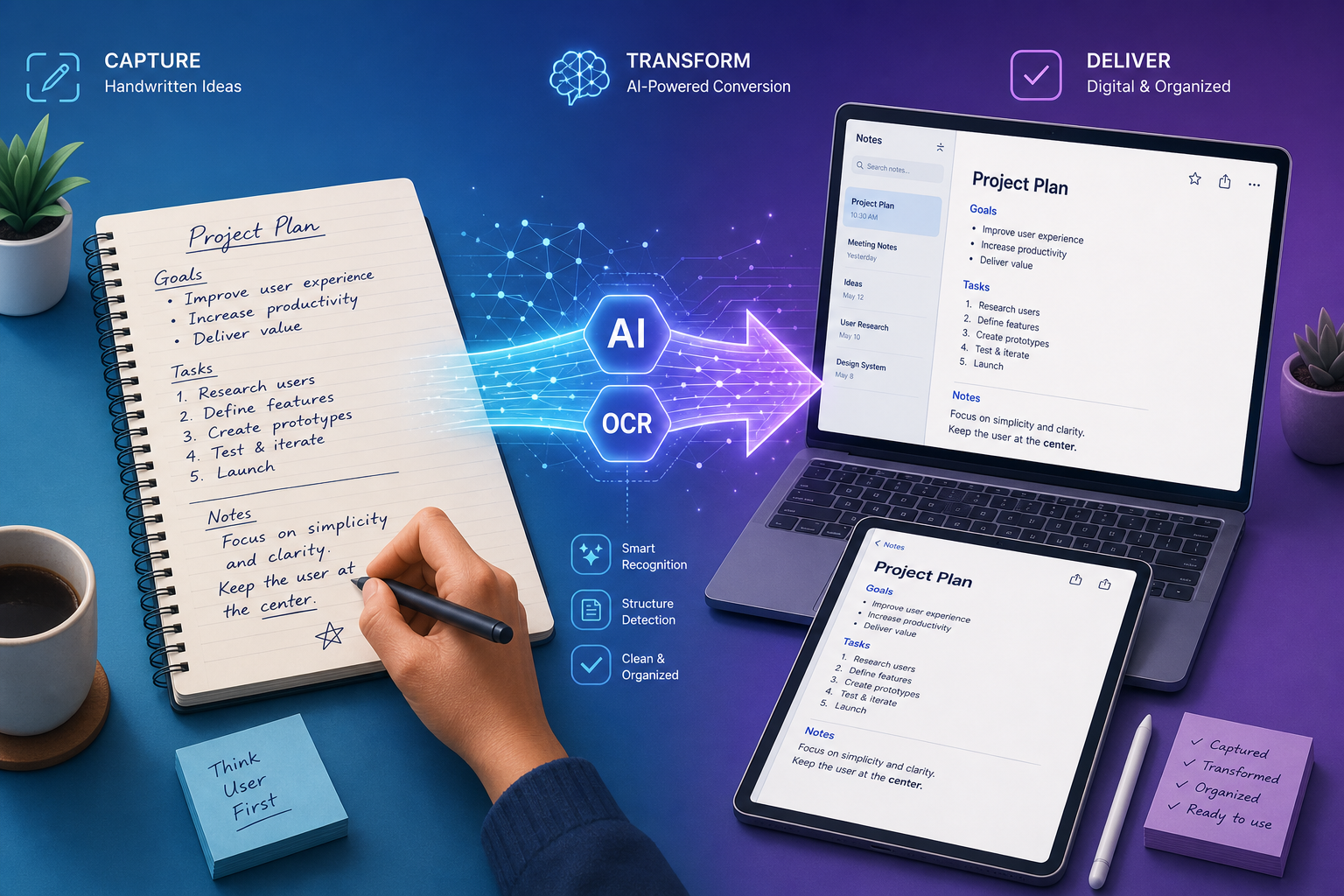
Not all handwriting-to-text conversion is created equal. The technology stack behind the apps you use today falls into three distinct categories, and understanding the difference is the first step to picking the right tool.
Traditional OCR: The Baseline That Couldn't Read Cursive
Optical Character Recognition (OCR) was designed for printed text — think scanned book pages, typed documents, and form fields. When applied to handwriting, traditional OCR engines like Tesseract average around 64% accuracy, according to benchmarks cited across multiple industry sources. That number drops below 50% on cursive or messy handwriting. If you've ever tried scanning a handwritten page and gotten back a string of gibberish, you've experienced the limits of traditional OCR on handwriting.
Handwriting Text Recognition (HTR): Purpose-Built for the Problem
HTR engines are trained specifically on handwriting data rather than printed characters. MyScript, the engine powering Nebo, is the most widely deployed example. These systems use neural networks trained on thousands of handwriting samples to recognize characters, ligatures, and common cursive patterns. HTR engines typically achieve 85–95% accuracy on clear handwriting and handle structured content like math equations and diagrams better than general-purpose AI models. The tradeoff: they are often tied to specific apps and ecosystems.
AI/Vision-Language Models (VLM): The 2026 Breakthrough
The biggest shift in 2026 is the arrival of large vision-language models — GPT-5, Gemini 2.5 Pro, and their peers — that treat handwriting recognition as a visual understanding task rather than a character-by-character decoding problem. These models achieve approximately 93–95% accuracy on clear handwriting in controlled benchmarks, with GPT-5 reported at roughly 95% and Gemini 2.5 Pro at approximately 93%. They excel at context: if a word is smudged, the model can infer it from the surrounding sentence. The catch: they are cloud-dependent, slower than on-device HTR, and less reliable for preserving document structure like tables, bullet lists, and margin notes.
| Technology | Typical Accuracy (Clear Handwriting) | Strengths | Weaknesses |
|---|---|---|---|
| Traditional OCR (Tesseract, etc.) | ~64% average | Fast, offline, free | Fails on cursive, messy writing, low contrast |
| HTR (MyScript, Pen to Print) | 85–95% | Handles structure, math, diagrams; often on-device | App-specific, limited context understanding |
| AI/VLM (GPT-5, Gemini 2.5 Pro) | 93–95% | Context-aware, handles messy writing, high accuracy | Cloud-dependent, slower, weaker on document structure |
The practical takeaway: if you write in neat print and need occasional conversion, any of these tiers will work. If you write in cursive, need math recognition, or process large volumes of notes, the choice between HTR and AI/VLM matters significantly.
Quick Comparison: Top Handwriting-to-Text Apps at a Glance
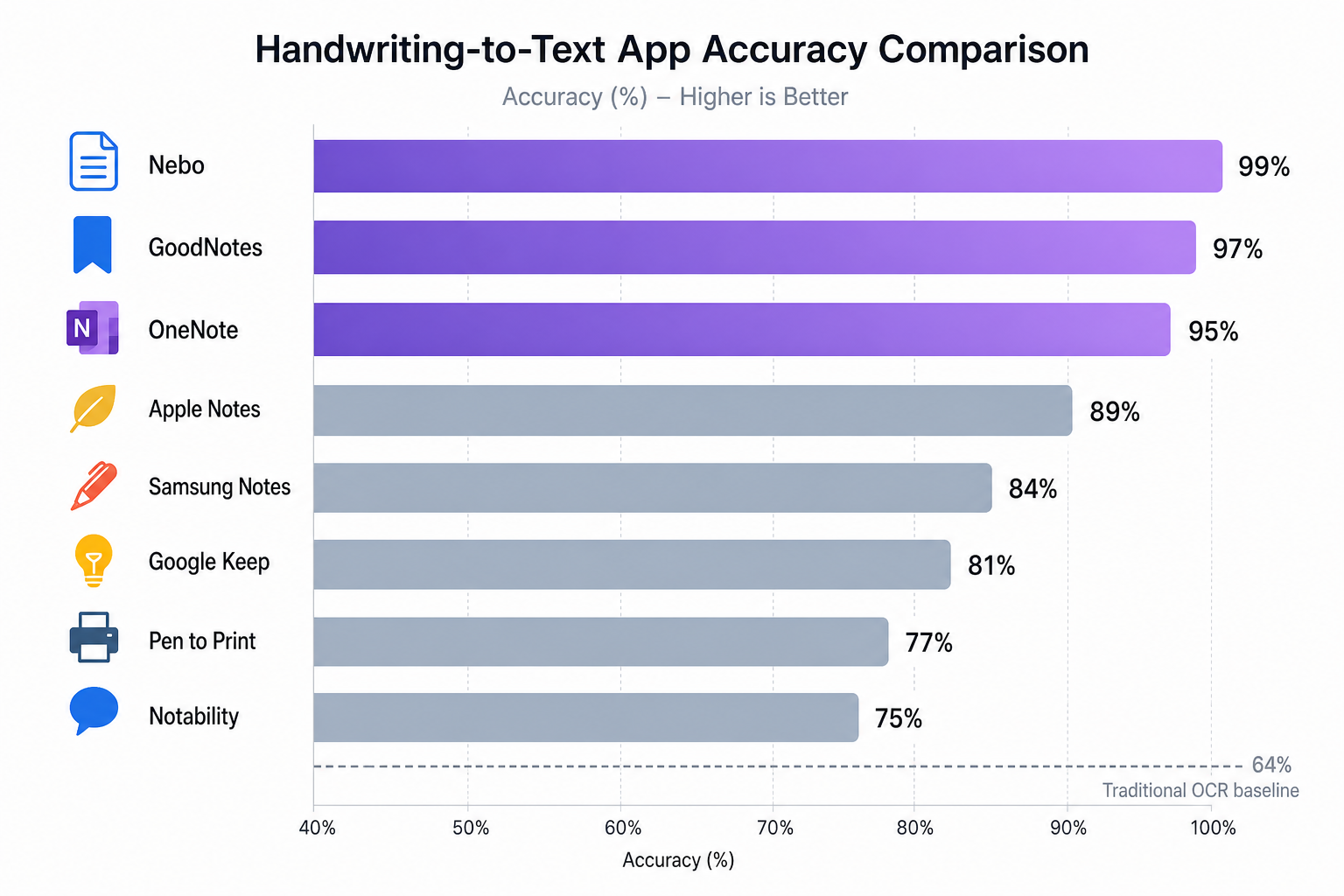
The table below compiles the key specs for the eight most relevant tools in 2026. Accuracy figures are drawn from independent tests, vendor claims, and third-party benchmarks — treat them as directional signals, not purchase guarantees.
| Tool | Accuracy (Clear Print) | Pricing Model | Platforms | Best For |
|---|---|---|---|---|
| Nebo | ~95% (HTR) | Free + one-time purchase ($9.99) | iOS, Android, Windows | Structured note-takers, math, diagrams |
| GoodNotes 6 | ~90% (HTR + AI) | Subscription ($9.99/yr) | iPad, iPhone, Mac | Apple ecosystem users, handwritten annotations |
| Microsoft OneNote | ~75–80% (HTR) | Free (with M365 basic) | Windows, Mac, iOS, Android, Web | Cross-platform users, existing M365 subscribers |
| Apple Notes + Scribble | ~85% (on-device AI) | Free (built-in) | iPad, iPhone, Mac | Apple users, real-time inline conversion |
| Samsung Notes | ~80% (HTR) | Free (Galaxy devices) | Samsung Galaxy (Android) | Samsung ecosystem users, S Pen owners |
| Pen to Print | 98.2% claimed (vendor) | Free trial + credit-based | Web, iOS, Android, Desktop | Digitizing existing physical documents |
| Google Lens / Keep | ~75% (AI) | Free | Android, iOS, Web | Quick captures, neat print, budget users |
| Transkribus | ~90% (custom HTR) | Free tier + credits | Web, Windows, Mac, Linux | Historical documents, messy cursive, researchers |
Detailed Reviews: How Each Tool Performs in Practice
Nebo: The Gold Standard for Structured Note-Takers
Nebo, powered by MyScript's HTR engine, consistently ranks at the top for accuracy among dedicated handwriting apps. It handles legible cursive and print with equal competence, and its standout feature is structured document preservation: math equations, bullet lists, diagrams, and tables survive the conversion intact. Exports to DOCX, PDF, HTML, TXT, and even LaTeX. The free version is generous, and the one-time purchase ($9.99) unlocks full export capabilities. Available on iOS, Android, and Windows.
- Best for: Students and professionals who write structured notes with headings, lists, and diagrams.
- Limitation: No cloud sync ecosystem — you manage files manually or via third-party storage.
GoodNotes 6: The Apple Ecosystem Champion
GoodNotes 6 combines a polished handwriting experience with AI-powered spellcheck and handwriting-to-text conversion. Its accuracy on print and cursive is strong, though it trails Nebo on structured content like math. The conversion feature is limited to iPad and iPhone — no Mac or web version for text export. The subscription model ($9.99/year) is reasonable, but users who want a one-time purchase may prefer Nebo.
- Best for: iPad-first note-takers who want a seamless handwriting-to-text workflow within the Apple ecosystem.
- Limitation: No Android or Windows support; conversion is a premium feature.
Microsoft OneNote: The Cross-Platform Workhorse
OneNote's Ink to Text feature (available in the desktop and tablet apps, but not the web version) offers solid accuracy for neat print — roughly 75–80% based on user reports and benchmarks. It is free with a Microsoft account and syncs across Windows, Mac, iOS, and Android. The handwriting conversion is not as polished as Nebo or GoodNotes, but for users already in the Microsoft ecosystem, the convenience is hard to beat.
Apple Notes + Scribble: The Free Built-In Option
Apple's Scribble feature converts handwriting to text in real time in any text field on iPad with an Apple Pencil. It is free, built-in, and surprisingly accurate for print handwriting — roughly 85% in practice. It works system-wide, not just in Apple Notes, so you can handwrite into search bars, forms, and third-party apps. The limitation: it is iPad-only, and it struggles with cursive and non-standard letterforms.
- Best for: iPad users who want instant, no-fuss conversion for short notes and form entries.
- Limitation: No batch conversion, no document-level export, cursive accuracy is lower.
Samsung Notes: Free for Galaxy Users
Samsung Notes comes pre-installed on Galaxy devices with S Pen support and offers handwriting-to-text conversion that exports to DOCX, PDF, and PPTX. Accuracy is decent for neat print, but the tool struggles with imported handwritten documents — it works best when you write directly in the app. Features vary by device, software version, and region, so consistency is not guaranteed.
- Best for: Samsung Galaxy users who want a free, integrated handwriting-to-text solution.
- Limitation: Ecosystem-locked; inconsistent feature set across devices.
Pen to Print: Specialized for Physical Document Digitization
Pen to Print is designed specifically for digitizing existing handwritten documents via photo or scan, rather than converting notes you write in-app. It claims 98.2% word accuracy and supports exports to TXT, DOCX, and searchable PDF. It also handles math equations, tables, and structured form extraction. The free trial gives you 10 pages; after that, it operates on a credit-based or subscription model.
Google Lens / Keep: The Free Quick-Capture Option
Google Lens, integrated with Google Keep, offers free OCR for handwriting captured via camera. In an independent test by Machow2 using a child's handwriting sample, Google Keep captured most of the text correctly, missing only a few words. Accuracy on neat print is roughly 75%, but it drops significantly on cursive, low-light images, or smudged writing. It is the best free option for occasional use, but not reliable for regular or high-volume conversion.
- Best for: Quick captures of whiteboard notes, to-do lists, and printed handwriting.
- Limitation: Low accuracy on cursive and messy writing; no batch processing.
Transkribus: The Researcher's Tool for Historical and Messy Cursive
Transkribus is an AI-powered HTR platform designed for challenging handwriting — historical manuscripts, 19th-century cursive, and heavily stylized scripts. It allows users to train custom models on their own document sets, which makes it uniquely powerful for archival research. Accuracy on clear modern handwriting is around 90%, but its real value is on documents where every other tool fails. It uses a credit-based system with a free tier.
- Best for: Researchers, historians, and anyone working with historical or extremely messy cursive documents.
- Limitation: Steeper learning curve; credit-based pricing can add up for large volumes.
Free vs. Paid: A Decision Framework for Every Budget
The free tools — Google Keep, Apple Scribble, OneNote — are genuinely useful for one specific scenario: occasional conversion of neat, print-style handwriting. If you write in all-caps block letters on lined paper and only need to digitize a page or two per week, you may never need to pay. But the moment your handwriting gets messy, your volume increases, or you need to preserve document structure, the paid tools justify their cost quickly.
| Your Situation | Free Tool That Works | When to Upgrade |
|---|---|---|
| Occasional neat print, <5 pages/week | Google Keep or Apple Scribble | When accuracy drops below acceptable (e.g., cursive, low light) |
| Cross-platform, existing M365 user | OneNote Ink to Text | When you need batch conversion or structured document export |
| iPad user, moderate volume | Apple Notes + Scribble | When you need batch conversion, searchable PDFs, or math support |
| High volume, messy handwriting, cursive | None — free tools won't suffice | Nebo (structured) or Pen to Print (document digitization) |
| Historical documents or archival research | None — free tools fail entirely | Transkribus with custom model training |
Platform-Specific Recommendations: iPad, Android, Windows, and Cross-Platform
Your device ecosystem is the single biggest constraint on which tool you can use. Here are the clear picks for each platform.
| Platform | Top Pick | Runner-Up | Free Alternative |
|---|---|---|---|
| iPad / iPhone | GoodNotes 6 | Nebo | Apple Notes + Scribble |
| Android (non-Samsung) | Nebo | Google Lens / Keep | Google Lens / Keep |
| Samsung Galaxy | Samsung Notes | Nebo | Samsung Notes |
| Windows | Nebo | OneNote | OneNote |
| Mac | GoodNotes 6 | Nebo | Apple Notes |
| Cross-Platform | OneNote | Nebo | OneNote |
iPad users should also consider which iPad model best suits their note-taking workflow. For a detailed comparison of iPad Air, Pro, Mini, and base models for handwriting-first users, see our Best iPad for Note-Taking in 2026 guide.
Setup Workflow: From Paper to Digital Text in Minutes
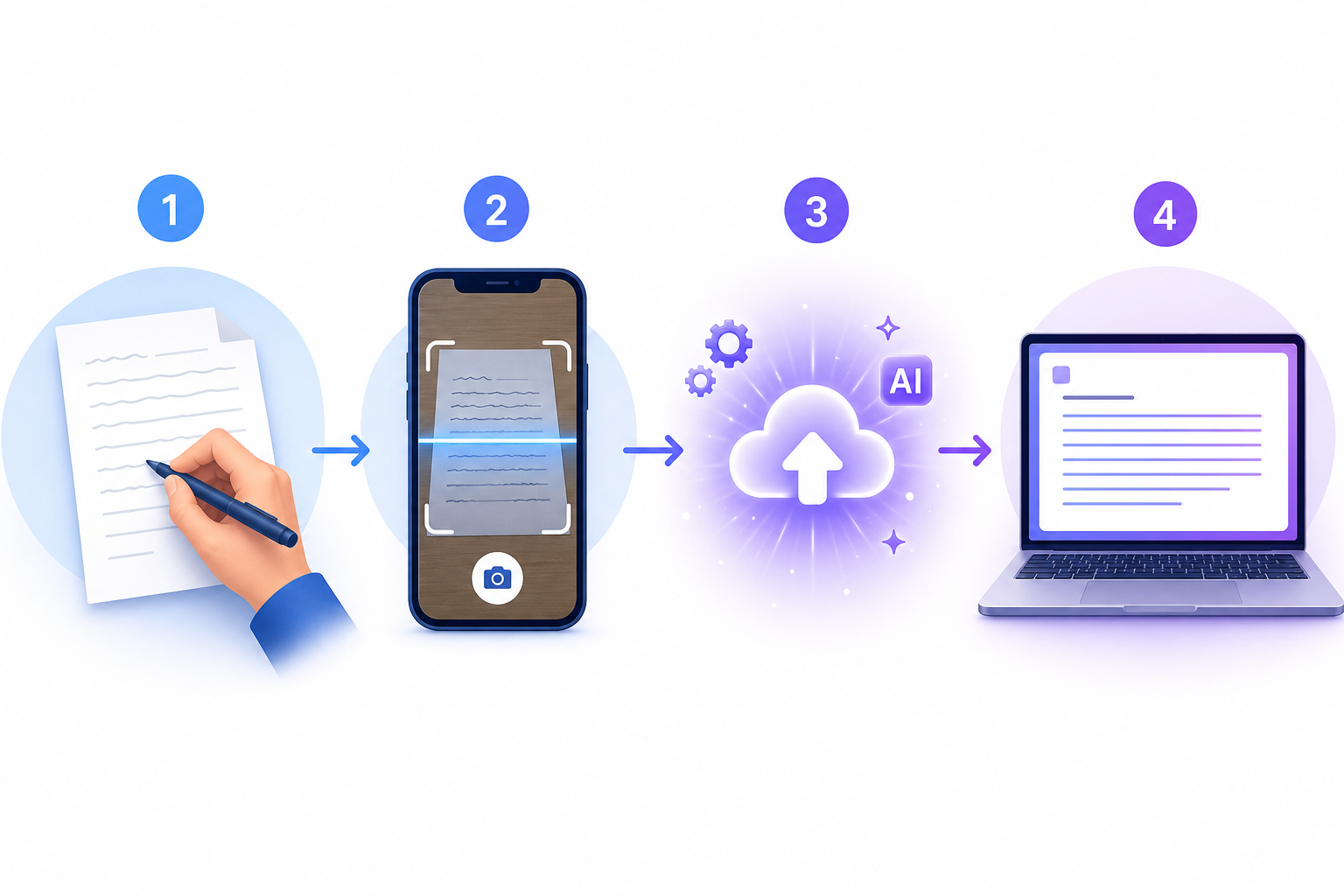
Once you have chosen your tool, the actual conversion process follows a repeatable workflow. These steps apply whether you are using Nebo, Pen to Print, or Google Keep.
- Capture the image at 300 DPI minimum. Use a flatbed scanner or a phone camera with good lighting. Low-resolution images reduce accuracy by 20–30% across all tools. Avoid shadows, glare, and curled page edges.
- Choose the right tool for your handwriting style. If you write in neat print, any tool will work. If you write in cursive, prioritize Nebo (HTR) or Pen to Print (AI cloud). If the handwriting is historical or extremely messy, use Transkribus.
- Run the conversion. In Nebo, select the handwritten text and tap "Convert." In Pen to Print, upload the image and select output format. In Google Keep, tap the image and select "Grab image text."
- Review and edit the output. Even the best tools make errors. Read through the converted text, correct any mistakes, and verify that document structure (headings, lists, tables) was preserved. Most tools allow you to edit directly in the app before exporting.
- Export to your destination format. Common export targets: DOCX for Word, TXT for plain text, searchable PDF for archiving, or Markdown for note-taking apps like Obsidian or Notion. Nebo offers the widest format support, including LaTeX.
Accuracy Tips: How to Get the Best Results from Any Tool
Regardless of which tool you choose, these practices will improve your conversion accuracy consistently.
- Use 300+ DPI scans. High-resolution capture improves accuracy by 20–30% compared to low-quality phone photos. This is the single highest-impact change you can make.
- Write in print style when possible. Print-style handwriting scores 10–15% higher accuracy than cursive across all tools. If you are writing notes specifically for digitization, consider switching to print.
- Use lined paper. Guidelines help keep letters uniform in size and baseline, which improves recognition. Grid paper is even better for structured notes with tables or diagrams.
- Avoid smudges, low light, and shadows. These degrade image quality and confuse recognition engines. Use a desk lamp or natural light from a window when photographing notes.
- Understand writer-dependent vs. writer-independent accuracy. Tools that learn your handwriting over time (writer-dependent) can reach up to 97.8% accuracy, while writer-independent accuracy drops to approximately 80% on the IAM benchmark across 657 writers. If you use the same tool daily, its accuracy will improve.
The handwriting-to-text landscape in 2026 is genuinely good — good enough that the question is no longer "can this work?" but "which tool fits my specific combination of platform, handwriting style, and workflow?" Use the comparison table, platform picks, and setup workflow above to make that decision, and you will spend less time retyping and more time using your notes.
Comments
Join the discussion with an anonymous comment.