
Why do small businesses keep buying $2,500/month approval tools?
I have watched it happen more times than I can count. A 50-person company signs up for Kissflow at $2,500 a month, spends two months getting IT to configure it, and ends up using it for exactly two approval flows: purchase orders and time-off requests. They could have gotten the same job done with a tool that costs $20 a month and took a day to set up.
The global approval workflow software market is valued at $7.4 billion in 2025, and the SME segment is growing at a compound rate of 13.1% – faster than large enterprises. But most vendors still pitch the same enterprise-grade solution to every buyer. The result is predictable overspend. The real gap between SMB and enterprise approval tools is not features; it is complexity and pricing structure.
What that $2,500/month actually costs you
The sticker price on enterprise tools is high, but the hidden costs are worse. Enterprise platforms charge per seat. For a 50-person team at $15–30 per user per month, the annual bill lands between $9,000 and $18,000. Add a handful of external approvers – clients, contractors, part-time staff – and the number climbs further.
Then there is implementation. Enterprise tools take 8 to 12 weeks to deploy. SMB-focused tools are self-service – sign up, configure a template, go live in a day. That delay is not merely inconvenient; it is a real cost in lost productivity and delayed savings. According to IDC data cited by DataIntelo, organizations that automate core approval workflows see a 34% reduction in cycle times within twelve months. Every month you spend on an enterprise rollout is a month those gains are postponed.
And while you wait, manual approvals are eating time. Employees spend an average of 3.6 hours per week on approval-related administrative tasks (McKinsey research cited by DataIntelo). For a team of 50, that is 180 hours a week – the equivalent of four and a half full-time employees. The same study notes that 55% of approval actions now happen on mobile devices, meaning your team is likely chasing approvals from anywhere, but still manually. Automating just a few high-volume flows can reclaim a large share of that time – and because SMB tools deploy quickly, you start saving weeks earlier than with enterprise systems.
For a deeper look at the numbers behind workflow automation ROI, see Document Workflow Automation ROI: The Business Case with Real Numbers for 2026.
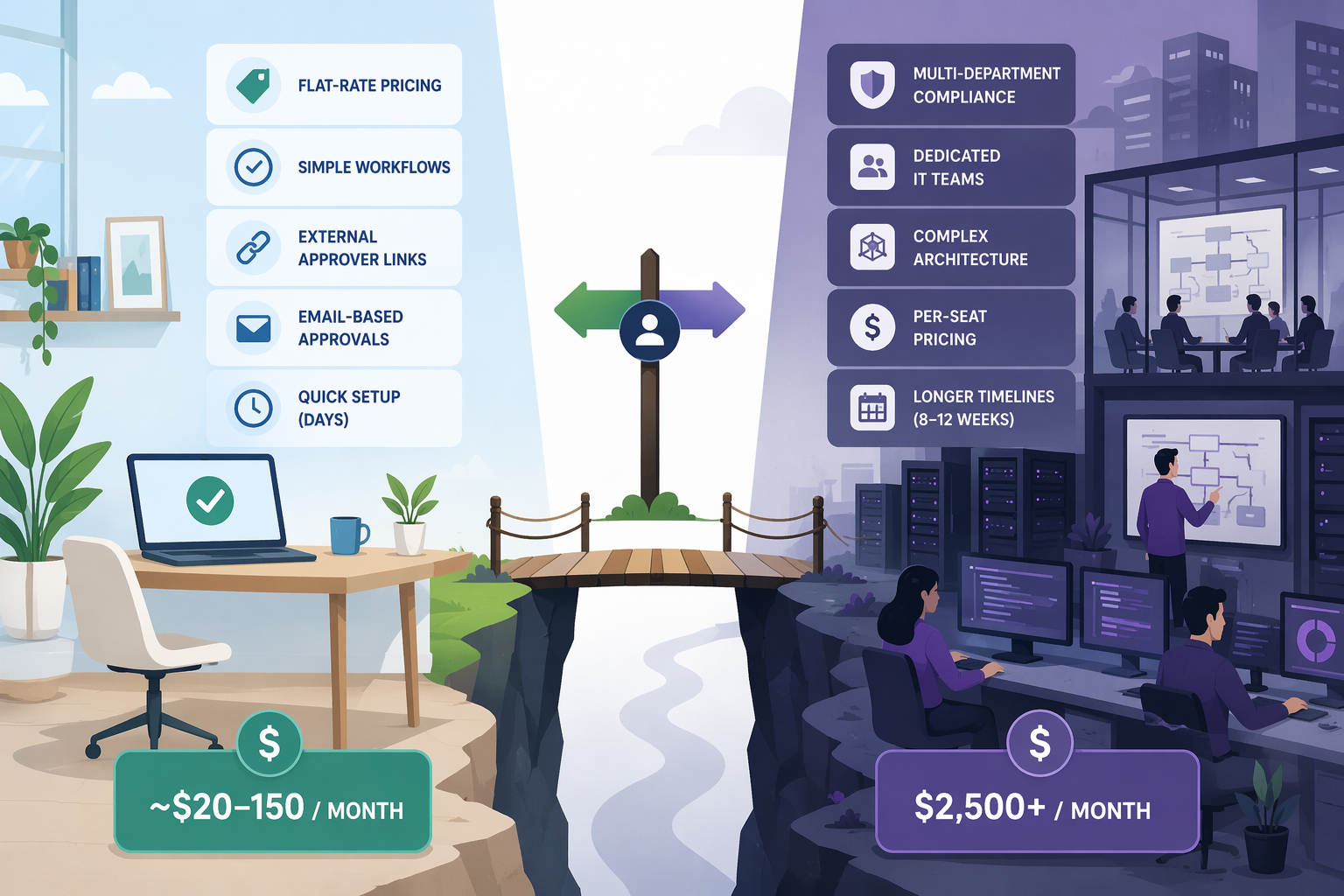
Do enterprise tools really have more features?
Most SMB decision-makers assume enterprise tools must have more features. In practice, the core approval capabilities – conditional routing, audit trails, mobile approval, email-based approvals – are available in both camps. The difference lies in compliance depth and integration breadth.
| Feature | SMB Tools (e.g., Jotform, ApproveThis, Hive, monday.com, Zite) | Enterprise Tools (e.g., Kissflow, ProcessMaker, Nintex, Adobe Workfront) |
|---|---|---|
| Typical pricing | $7–20/user/month or flat-rate $19–150/month | $2,500–3,000/month base |
| Implementation timeframe | Days | 8–12 weeks |
| Conditional logic (if-this-then-that) | Yes | Yes, with advanced branching |
| Audit trails | Basic event logs | Full compliance-ready audit |
| Mobile approvals | App or email-based | App-based |
| External approver (no-login) | Common (branded links) | Rare (usually requires account) |
| Pre-built templates | Many (invoice, PO, expense, time-off) | Fewer, often industry-specific |
| Self-service setup | Full (no IT needed) | Requires IT or admin |
| Compliance certifications | Optional add-ons | Built-in SOC 2, HIPAA, etc. |
| ERP integration | Via Zapier or API | Native connectors (SAP, Oracle) |
For a typical small or mid-size business, the only enterprise features that matter are advanced compliance certifications and direct ERP connectors – and those are irrelevant unless you handle PHI, run SAP, or have a dedicated compliance officer. Everything else is available in tools priced under $20–150/month.
If you are still evaluating where your team fits, Best Enterprise Workflow Management Software in 2026 covers the enterprise side in detail. For the difference between lightweight workflow automation and formal BPM, see BPM Workflow vs. Workflow Automation: A Decision Guide.
What to look for that most demos won't show you
Enterprise demos love showing audit trails and compliance dashboards. What they seldom demonstrate is how an external client approves a document without creating yet another account. That is the feature that actually saves time for a small team.
- External approver no-login links. A client, contractor, or freelancer receives an email with a link; they click it, see the request, and approve or reject without signing up. This alone eliminates the biggest friction point in cross-organization approvals.
- Email-based approvals. The approver can reply 'approved' directly from their inbox. No need to open a separate app. This is simple but missing from many enterprise tools that require login.
- Flat-rate pricing. Predictable cost regardless of how many workflows you run or how many external approvers you add. No surprise overage bills.
- Self-service setup without IT. Your operations lead should be able to build a workflow in an afternoon, not submit a ticket to IT and wait two weeks.
What the case studies actually claim (and what to make of them)
ApproveThis’s 2026 buyer’s guide includes three case studies that illustrate the impact of SMB-focused approval tools. They are worth reading, but I want to be clear about where they come from.
- Marketing agency: 65% faster approval cycles – used external approver workflows with branded no-login portals for client reviews.
- E-commerce company: 80% reduction in PO approval time – applied conditional routing: orders under $500 auto-approved, $500–5K went to a manager, $5K+ to an executive.
- Consulting firm: 90% faster reimbursement cycles – deployed mobile expense forms with receipt photography.
When you actually need to upgrade: three triggers
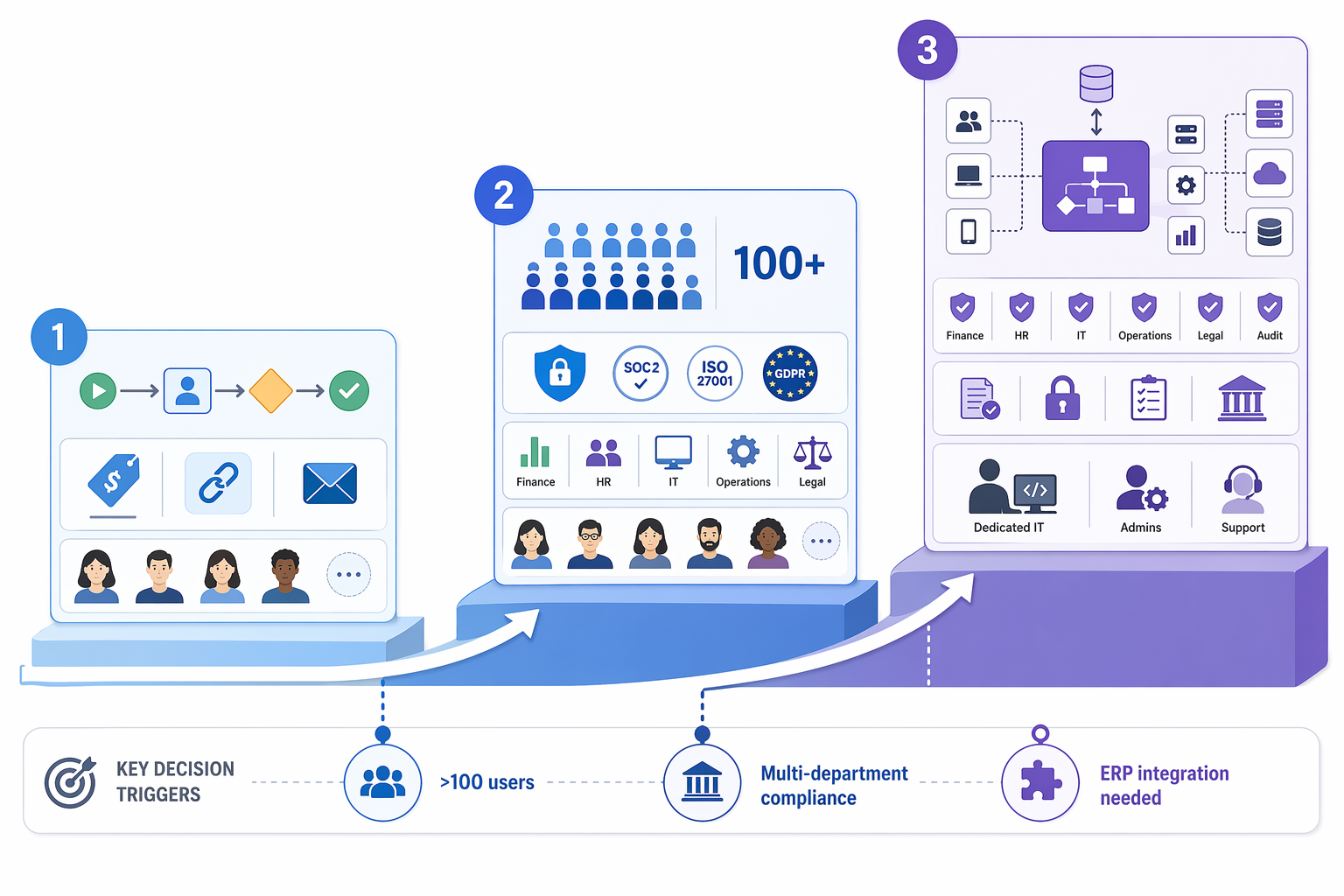
- User count exceeds 100. At this point per-seat pricing on SMB tools may still be cheaper than enterprise, but volume discounts start to matter. Some SMB tools cap flat-rate plans at a certain user count; check if yours does. If you are paying per seat and the total exceeds $1,000/month, it is worth comparing enterprise bundled pricing.
- Multi-department compliance requirements. If you need SOC 2 Type II, HIPAA BAA, or SOX-compliant audit trails that are certified rather than self-reported, most SMB tools cannot provide that. Enterprise platforms offer compliance modules as a built-in feature, not an add-on.
- Direct ERP integration is required. SMB tools typically integrate via Zapier or generic APIs. If you need native connectors to SAP, Oracle, or Microsoft Dynamics, enterprise tools like Kissflow and ProcessMaker have pre-built adapters. If you are only using QuickBooks or Xero, a Zapier link is perfectly fine.
These triggers are specific. If none applies to you, an SMB tool will serve you well for years.
Quick answers: when to start, when to switch
Can I migrate later if I outgrow it? Yes. Most SMB tools allow export to CSV or via API. Your workflows are simple enough that manual re-creation in a new system is feasible. Data portability is not a lock-in risk for small teams.
At what price ceiling does enterprise make sense? When your total monthly approval tool cost exceeds $1,500–2,000, or when you need a compliance certification that your SMB tool cannot provide (SOC 2 Type II, HIPAA BAA). Below that threshold, the complexity of enterprise tools will likely cancel out any marginal feature gains.
The decision is not about features. It is about whether you need the overhead. For most small and mid-size teams, the answer is clear: stick with tools that get out of your way and let you approve things in a click, not a project.