
The impact of iOS 26.6 on note-taking apps is easy to miss because Apple did not give Notes a dramatic new interface. Apple released iOS 26.6 on July 27, 2026, and the visible Notes story was not a redesign, a database view, or a GoodNotes-style handwriting overhaul. The important change is quieter: iOS 26.6 adds Spotlight semantic pre-indexing, and it arrives after iOS 26’s Markdown import and export support made Apple Notes less of a one-way door for typed notes.[1]
The security side deserves a brief note, not a victory lap. Apple’s security content for iOS 26.6 lists 78 patches, including fixes in system components such as Kernel, CoreAudio, and ImageIO.[2] Those are components note apps may rely on when handling attachments, audio, or rendered content, but Apple has not said this release makes note apps more reliable. For a note-taking decision, the stronger evidence is portability and retrieval.
So the verdict, as of July 29, 2026, is narrower than an Apple Notes comeback story and more useful than a feature checklist: Apple Notes is now a serious primary notes app for people whose notes are mostly typed, whose devices live in iCloud, and whose main fear was being trapped. It is still the wrong replacement if your workflow depends on handwriting-heavy review, PDF margins, audio-synced lectures, backlinks, structured databases, dependable version history, or full non-Apple platform coverage.
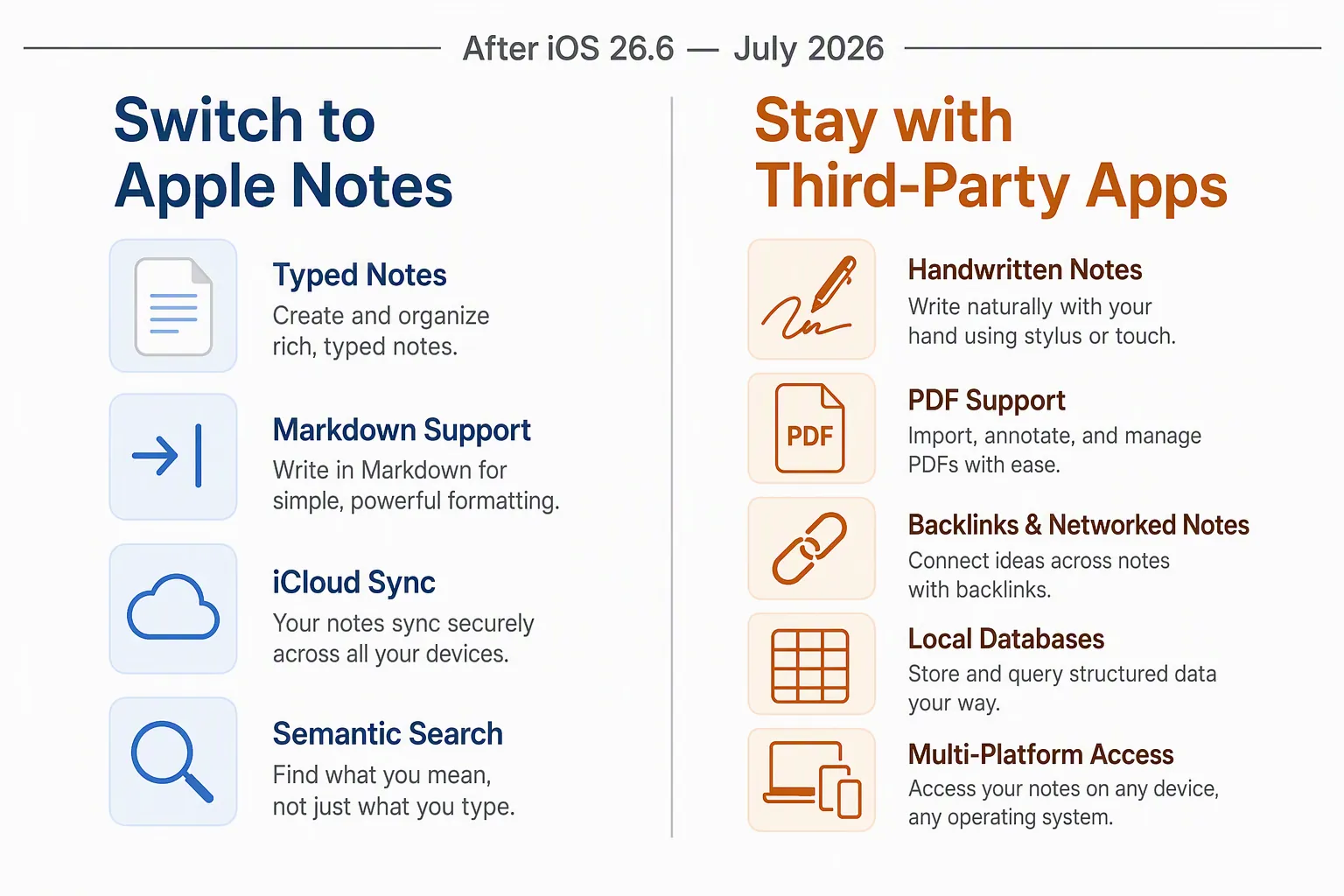
| Your workflow | After iOS 26.6, the safer choice |
|---|---|
| Typed notes, quick captures, meeting notes, basic research snippets, iCloud devices | Apple Notes is now credible, mainly because Markdown export lowers the cost of leaving later. |
| Handwritten notebooks, PDF annotation, searchable pen strokes, stylus-first iPad work | Stay with a handwriting-focused app. |
| Lecture notes tied to recordings | Stay with an app built around synced audio review. |
| Backlinks, graph relationships, local Markdown vaults, durable personal knowledge systems | Stay with a backlink-first app. |
| Databases, status fields, team-ish project tracking, repeatable views | Stay with a structured workspace app. |
| Work spread across Windows, Android, Linux, or locked-down work machines | Do not switch unless iCloud web access is enough for your actual day. |
Markdown export changes the cost of trying Apple Notes
For years, the hard part of Apple Notes was not that it lacked every feature. It was that the app was pleasant enough to accumulate important material and awkward enough to make leaving feel punitive. A few pasted source notes become a semester of research. A few meeting bullets become a year of decisions. Screenshots, receipts, half-formed drafts, and quick captures settle into iCloud because Notes is fast and already on the phone.
That is why Markdown export matters more than a decorative Notes update would have. Apple’s current support documentation describes importing or sharing notes using Markdown, and MacRumors’ iOS 26 Notes guide identifies Markdown export/import as one of the Notes changes in the iOS 26 cycle.[3][4] The practical effect is not that Apple Notes has become Obsidian. It is that typed Apple Notes are no longer as obviously trapped inside Apple’s format.
Markdown is a modest format, which is exactly why it helps here. It carries headings, lists, links, and plain text structure in a form many other writing and note apps can understand. If your archive is mostly meeting notes, project notes, class outlines, saved instructions, travel planning, or personal logs, Markdown export turns a future migration from a dreaded cleanup project into something closer to a planned move.
That does not mean every Apple Notes object should be treated as perfectly portable. Rich attachments, sketches, scans, tables, and odd formatting can still require inspection after export. The point is more limited and more important: the typed-note user now has an exit path that can be tested before committing. Export a representative folder, open the files somewhere else, and see whether the notes still make sense. If they do, Apple Notes becomes much easier to choose as the default capture app.
This is the part that changes the switching math. A user who already pays for iCloud and mostly writes text no longer has to maintain a Notion workspace, an Obsidian vault convention, and a quick-capture inbox just to avoid feeling locked in. Apple Notes can be the quiet place where the note starts, with Markdown as the escape hatch if the system outgrows it.
Spotlight semantic pre-indexing is promising, but it is not an iOS 27 Siri feature yet
The iOS 26.6 change that sounds more futuristic is Spotlight semantic pre-indexing. Reports on the release describe iOS 26.6 as beginning to build an on-device meaning-based index separately from traditional keyword indexing, so the phone is preparing content for more semantic retrieval rather than waiting for a future upgrade to start from zero.[5]
That could matter a lot for notes, because notes are often retrieved by meaning rather than exact wording. People search for “the restaurant Mark suggested,” “the warranty note,” or “that idea about onboarding,” even if none of those phrases appear cleanly in the original note. A semantic index is aimed at that kind of retrieval problem. If Apple gets the layer right, Apple Notes benefits from being close to the system search surface instead of living as a separate island.
But this is where the comparison needs discipline. iOS 26.6 is preparing an index; it is not delivering the full iOS 27 Siri AI experience inside Notes today. Apple announced Siri AI on June 8, 2026, describing a more capable assistant with personal context understanding and third-party app reach through Spotlight integration.[6] That announcement is relevant to where Apple is going. It is not evidence that a user can rely on future Siri behavior in Apple Notes on iOS 26.6.
The timing also remains unsettled in the way unreleased software always is. iOS 27’s September 2026 arrival is still a projection, not an Apple-confirmed shipping date. TechTimes also reported that early iOS 27 beta testers saw indexing take “a week or longer,” which is a useful reminder that semantic search improvements may have a warm-up cost even when they arrive.[5]
There is a third-party angle too, but it should stay qualified. WWDC26’s App Schemas work has been analyzed as a way for apps to expose structured actions and content to Siri and the system.[7] That could help note apps beyond Apple Notes participate in future AI retrieval. What has not been confirmed, based on the materials here, is adoption by specific note apps such as Obsidian, Bear, GoodNotes, or Notability. It would be premature to score iOS 26.6 as if Apple Notes already has a permanent AI-search monopoly.
The third-party apps still win where the note is more than text
Apple Notes is strongest when the note is a unit of text with a few supporting objects. Many third-party apps are strongest when the note is not really a text note at all: it is a marked-up PDF, a handwriting surface, a lecture replay tool, a linked knowledge object, or a database row with views and properties.
Handwriting is the first hard stop. If your iPad notes are mostly pen strokes, page templates, diagrams, annotated slides, and marginal comments, Apple Notes can feel convenient but still not central enough. The decision is less about whether Apple Notes can accept a sketch and more about whether it can carry the review process afterward: finding handwritten material, moving through PDFs, preserving page context, and making stylus work feel like the primary mode rather than an inserted object.
That is where GoodNotes and Notability still deserve their place. A student reviewing lecture slides, a lawyer marking up case packets, a designer iterating on sketches, or an iPad-first worker living in margins is not choosing a generic notes app. They are choosing a writing surface and review environment. If that is your fork, FlowDesk’s 2026 Handwritten Note-Taking Apps Compared and iPad note-taking app guide are better verification paths than a general Apple Notes comparison.
Audio-synced lecture review is another disqualifier. A class recording attached to a note is not the same as a note system where written marks and audio playback reinforce each other during review. If your learning process depends on returning to the exact moment a concept was explained, Apple Notes should not be treated as a replacement just because it can store nearby material.
Backlink-heavy systems fail for a different reason. In Obsidian or Logseq-style workflows, links are not decoration. They are the structure. A note about a client, a concept, or a book becomes useful because it participates in a network: it points to other notes, receives backlinks from them, and can be reorganized without losing its relationships. Apple Notes has folders, tags, search, and links, but it does not replace a system where bidirectional linking is the retrieval model.
This is the easiest migration mistake to underestimate. A backlink user may look at Apple Notes, see faster capture and cleaner sync, and think the system can be simplified. The cost appears later, when a note that used to surface through relationships now depends on memory, search terms, or folder placement. If your notes work because the links do the remembering, Markdown export alone is not enough safety.
Notion sits in a separate category. It is often used for notes, but the reason many people stay is not prose. It is databases, views, fields, templates, and shared operating surfaces. A reading list with status fields, a content calendar with owners, or a lightweight CRM is not improved by becoming a pile of clean text notes. Apple Notes may be faster for writing down the thought. It is not trying to be that kind of structured workspace.
Version history is the quieter risk. Forum complaints are not a measurement, and they should not be treated as proof of frequency. Still, the persistence of version-history frustration around Apple Notes is a meaningful warning signal for one kind of user: anyone who needs to recover yesterday’s wording, audit changes, or undo a mistaken edit after sync has already propagated it. If a note is a live working document with consequences, keeping the only copy in Apple Notes is still uncomfortable.
The final disqualifier is platform reality. Apple Notes is at its best when the hardware, account, and habits are all Apple-shaped. That is not a moral flaw; it is the reason the app feels so quiet. But if your day includes a Windows workstation, Android phone, Linux laptop, employer restrictions, or collaborators outside Apple hardware, “it syncs beautifully for me” is not enough. A primary notes app has to be reachable at the moment the note is needed.
A switch test that is more useful than a feature checklist
The cleanest way to evaluate Apple Notes after iOS 26.6 is to test the behavior that would hurt if it failed. Do not start by asking whether Apple Notes has enough features in the abstract. Start with the note type you actually retrieve under pressure.
- If you need to find a typed meeting decision from three months ago, Apple Notes plus Spotlight is increasingly persuasive.
- If you need to export a folder of typed notes and open the archive somewhere else, Markdown support now gives you a practical test.
- If you need to re-listen to the moment a professor explained a formula, stay with an audio-synced lecture app.
- If you need a PDF margin note to remain part of a page-based review workflow, stay with a handwriting/PDF app.
- If you need a concept note to be found because five other notes link back to it, stay with a backlink-first system.
- If you need database views, owners, statuses, and repeatable templates, Apple Notes is not the replacement target.
A practical trial can be small. Move one real folder into Apple Notes. Keep the original system intact. Use Notes for new capture for two weeks. Then export the same folder as Markdown and inspect it in the app you would flee to if Apple Notes stopped fitting. The export result matters more than a promise about openness. Search matters more than a screenshot of a clean sidebar. Retrieval is the test.
For stylus-first users, the equivalent test is different: take one real lecture, meeting packet, or PDF-heavy session through the whole cycle. Import, annotate, search, review, and revise. If the friction shows up during review rather than capture, believe the review. FlowDesk’s GoodNotes vs Notability comparison and stylus note-taking apps comparison are the more relevant next reads if that trial fails.
The switch line after iOS 26.6
Switch to Apple Notes, or consolidate into it, if your notes are mostly typed, your devices are already in iCloud, and Markdown export is enough safety for your archive. In that case, iOS 26.6 makes Apple Notes easier to trust because the app now combines low-friction capture, a real text exit path, and a system-level search direction that looks more meaningful than keyword matching alone.
Stay with third-party apps if the thing you value is not plain-note capture. Handwriting search, PDF review, synced audio, backlinks, graph structure, databases, version history, and reliable non-Apple access are not minor preferences. They are the parts of the workflow that decide whether the system survives after the novelty of consolidation wears off.
The update reduces the risk of choosing Apple Notes. It does not erase the reasons specialized note apps exist.
References
- iOS 26.6 now available, here’s what’s new — 9to5Mac, July 27, 2026
- About the security content of iOS 26.6 and iPadOS 26.6 — Apple Support
- Import or share notes — Apple Support
- iOS 26: What's New With Notes and Reminders — MacRumors
- iOS 26.6 Rolls Out July 27 With Spotlight Pre-Index That Cuts iOS 27 Siri Wait — TechTimes, July 23, 2026
- Apple introduces Siri AI, a profoundly more capable and personal assistant — Apple Newsroom, June 8, 2026
- App Schemas + Siri in iOS 27 — Blake Crosley