
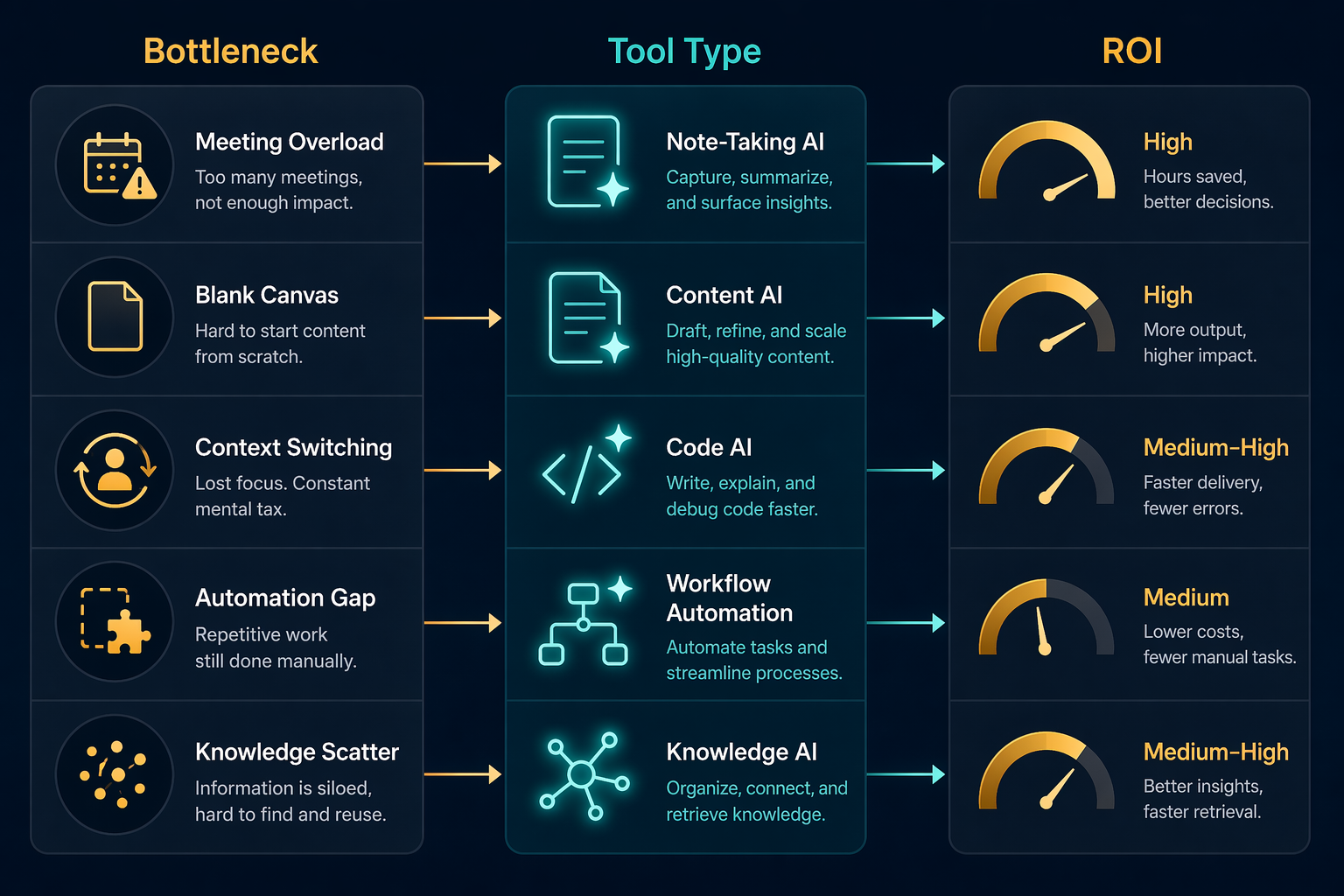
The fastest way to waste money on AI productivity apps is to buy the tool with the best demo instead of the one that removes your recurring bottleneck. A developer losing three hours to context switching has a different ROI equation than a manager buried in meeting notes, a marketer starting campaigns from a blank page, or a student trying to avoid paying for five overlapping subscriptions.
If you already know your role, start here. If you are less sure where your week is actually leaking, use a diagnostic first: Match AI Tools to Your Productivity Bottleneck.
| Role | Primary bottleneck | Pay for this first | Likely monthly cost | Likely time recovered | Not worth it if… |
|---|---|---|---|---|---|
| Developer | Code context switching, boilerplate, debugging loops | Cursor or Claude Code; ChatGPT as secondary research/debugging support | Cursor anchor: $20/month; ChatGPT anchor: $8–20/month, with a free tier available [1] | Potentially high when the tool stays inside the coding workflow; Cursor users are reported as seeing 2–3× faster feature development [1] | You only need occasional explanations, not daily code generation or refactoring |
| Manager / team lead | Meeting residue, scattered decisions, follow-up drift | Granola for meeting notes, Notion AI for shared knowledge, Motion or Reclaim for scheduling if calendar load is real | Granola anchor: $14/user/month; Notion AI add-on anchor: $10/member/month [1][2] | Granola is estimated to eliminate about 2 hours/week of manual note-taking per team member [1] | Meetings are few, decisions are already captured cleanly, or the team will not read the notes |
| Solo founder / freelancer | Too many small repeatable tasks across sales, delivery, admin, and meetings | ChatGPT plus Granola plus n8n if you can maintain automations | ChatGPT anchor: $8–20/month; Granola: $14/user/month; n8n can be self-hosted free or managed from €20/month [1] | Moderate to high if automations replace recurring handoffs rather than create a maintenance queue | You will not document the workflow or revisit broken automations |
| Marketer | Blank-page campaign work, design iteration, research synthesis | Canva Magic Studio first for design-heavy work; Jasper if content volume is the bottleneck; Perplexity for research | Canva Magic Studio anchor: $15/month; Jasper and Perplexity pricing should be verified before purchase [1][2] | High when it replaces repeat design/content setup work; weaker when approvals and positioning, not production, are the delay | Your main blocker is stakeholder feedback, brand strategy, or legal review |
| Student | Notes, study planning, first-draft help, schedule slippage | ChatGPT free tier first; add Notion AI only if notes live there; use Reclaim’s free tier for scheduling | ChatGPT has a free tier; Notion AI anchor: $10/member/month [1][2] | Usually modest but worthwhile when it prevents missed planning and repetitive summarization | You mostly need accountability, tutoring, or course-specific feedback rather than another app |

The table is deliberately unfair to generic “best AI app” rankings. ChatGPT, Canva, Cursor, Granola, Notion AI, and n8n are not interchangeable productivity pills. They sit in different parts of the workday, and the return depends on whether the saved time can actually be reused.
Why the role filter matters in 2026
The market is now large enough that “try a few AI tools” has become bad advice. Grand View Research projects the AI productivity tools market at $14.1 billion in 2026, growing at a 14.5% compound annual growth rate to $36.4 billion by 2033; it also identifies virtual assistants as the largest segment, with 25.6% share [3]. That explains the flood of subscriptions competing for the same budget line. It does not prove that the average worker should subscribe to all of them.
The adoption story is real, but it is easy to overread. Slack cites Workforce Labs research saying daily AI users report 64% higher productivity and 81% higher job satisfaction [4], while Microsoft’s Work Trend Index reports that 93% of power users say AI boosts productivity. Useful signals, yes. A purchasing calculator, no. Self-reported productivity is not the same as audited output, and vendor-sponsored research should not be treated as proof that every AI subscription pays back in every workflow.
A better buying question is narrower: where does your role lose valuable time every week, and which tool removes that specific loss at a price you can defend?
Developers: coding assistance has the cleanest ROI when it stays in the editor
For developers, the strongest ROI usually comes from tools that reduce context switching inside the coding loop. That is why Cursor or Claude Code belongs ahead of a general chatbot in the stack. The valuable unit is not “one answer generated.” It is a smaller interruption between reading code, changing code, testing, and shipping.
Cursor’s $20/month pricing anchor is easy to evaluate against even one recovered engineering hour, and reports cited in productivity tool roundups describe 2–3× faster feature development for developers using it [1]. Treat that as a directional claim, not a promise. The real test is whether it shortens your own recurring loop: understanding an unfamiliar file, generating a first pass, refactoring, writing tests, or explaining an error without opening six tabs.
ChatGPT still earns a place, but usually as a support tool: quick debugging hypotheses, API comparisons, architecture tradeoffs, and translation between unfamiliar concepts. Notion AI can help when engineering documentation already lives in Notion; if documentation is in GitHub, Linear, Confluence, or nowhere at all, paying for a Notion add-on just because it sounds organized is wishful procurement.
The developer stack is not worth paying for if the work is mostly maintenance review, low-volume scripting, or learning fundamentals. In those cases, a free general assistant and disciplined code review may do more than another editor subscription.
Managers and team leads: meeting notes only matter if decisions move
Meeting-heavy roles are where note-taking AI can look boring in a demo and excellent on a calendar. Granola’s pricing anchor is $14/user/month, and it is estimated to eliminate about 2 hours per week of manual note-taking per team member [1]. If that time is currently spent cleaning notes, reconstructing decisions, or writing follow-ups after calls, the payback is straightforward.
The catch is that meeting AI does not fix a team that ignores written decisions. A manager gets ROI only when notes become inputs to the next action: decisions copied into the project tracker, risks escalated, owners named, open questions moved out of the transcript and into the system where work is assigned.
Notion AI is strongest here when the team already uses Notion as a shared workspace. At a $10/member/month add-on price, it can help summarize pages, extract action items, and make existing knowledge easier to query [2]. But if the team’s actual work happens in Slack threads, Google Docs, Jira, and private notebooks, Notion AI may become a polished library that nobody visits.
Scheduling tools such as Motion or Reclaim should be considered only if calendar contention is a real constraint. Reclaim notes that only 53.5% of planned tasks are completed each week, which is the kind of problem AI scheduling claims to address [5]. Still, a scheduling app cannot create priority discipline. It can protect blocks, move tasks, and reduce calendar Tetris; it cannot decide which meetings should not exist.
Solo founders and freelancers: automation pays back, but only if someone owns it
A solo founder or freelancer usually does not have one clean productivity problem. The week is a messy blend of prospecting, proposals, delivery, invoices, support, meetings, and follow-up. That makes the best stack less glamorous: one general assistant, one meeting capture tool if calls are frequent, and one automation layer for repeatable handoffs.
ChatGPT is the obvious low-friction starting point because it can help draft, outline, compare, rewrite, and reason across many small tasks. With a free tier available and paid pricing anchored at $8–20/month in the source material, it is usually easier to justify than a specialized tool before the workflow is stable [1].
Granola becomes attractive when calls produce obligations: client requests, scope changes, product feedback, investor questions, hiring notes. n8n becomes attractive when the same obligation keeps moving between tools. Its free self-hosted option offers unlimited workflows, while managed cloud starts from €20/month [1]. That pricing can be excellent for someone technical enough to maintain it and frustrating for someone who just wants automations to work without thinking.
This is also where integration pain shows up early. Zapier reports that nearly 80% of enterprises struggle to integrate AI with current tech stacks [1]. Solo operators feel a smaller version of the same problem: the bot can draft the email, but the workflow still breaks if the CRM, calendar, inbox, payment tool, and project board do not agree. If you are choosing between automation systems, the comparison between AI and traditional business process automation is often more useful than another list of chatbots.
Marketers: buy production leverage, not generic creativity
Marketers should be suspicious of any AI app that promises “better ideas” without reducing a visible production step. The practical bottlenecks are usually first drafts, visual variants, campaign repurposing, research synthesis, and speed from brief to asset.
Canva Magic Studio is often the first paid upgrade to test for design-heavy marketers because its pricing anchor is $15/month and the source material positions it as replacing alternatives in the $49–200/month range, such as AdCreativeAI [1]. The value is not that it makes everyone a designer. It is that it can shorten the distance between campaign concept and usable draft assets.
Jasper makes more sense when the recurring bottleneck is content volume: ad variations, landing page drafts, email sequences, product descriptions, or campaign spin-offs. Perplexity fits a different job: research and source-gathering before a brief takes shape. Those are adjacent tasks, not the same subscription decision.
The honest caveat is that many marketing delays are not production delays. If approvals, positioning, legal review, or unclear audience strategy are the real blockers, AI will create more drafts for the same queue. In that case, a marketer may need a better brief and approval workflow before another content generator. Readers comparing task-level options can use Beyond Chatbots: 8 AI Productivity Apps That Actually Solve Real Problems in 2026 as a cross-check.
Students: start free, then pay only where the semester repeats the pain
Students are especially vulnerable to subscription creep because the individual prices look small and the use cases overlap. The sensible starting stack is conservative: ChatGPT’s free tier for explanations, outlines, and practice prompts; Notion AI only if notes and course material already live in Notion; Reclaim’s free tier if scheduling is the recurring failure point.
Notion AI’s $10/member/month add-on can be reasonable for a student who already keeps lecture notes, reading summaries, project plans, and revision lists in one workspace [2]. It is much less compelling if notes are scattered across PDFs, slides, handwritten notebooks, and messaging apps. AI search is only as useful as the material it can reach.
The student ROI test should be shorter than a professional one: does the tool reduce a repeated weekly chore before the next billing cycle? If not, cancel. A semester is too short to carry a marginal subscription out of guilt.
How to calculate ROI without pretending the math is cleaner than it is
The cleanest ROI calculation is still basic: monthly subscription cost divided by reusable time saved or valuable output improved. The harder part is being honest about the word “reusable.” If AI saves an hour of writing and that hour becomes another meeting, the worker may feel busier without gaining capacity.
| Question | Good sign | Bad sign |
|---|---|---|
| Does the app sit where the work already happens? | Cursor in the editor, Granola in meetings, Notion AI inside an active workspace | A separate dashboard people must remember to check |
| Is the saved step recurring? | Daily coding loop, weekly meeting cleanup, repeated campaign variants | Occasional novelty use or one-off brainstorming |
| Can the saved time be reused? | Faster shipping, fewer after-hours notes, quicker handoff to the next person | More drafts, more review queues, more messages |
| Who owns maintenance? | A named person reviews inputs, automations, notes, and permissions | Everyone assumes the tool will organize itself |
For deeper payback-period math, use Best AI Tools for Productivity: Which Ones Actually Deliver ROI?. If the question is mainly budget—free tier, paid upgrade, or team plan—use Best AI Tools for Productivity in 2026: Free Tiers vs. Paid Upgrades instead.
A practical buying order
When a team is starting from zero, do not buy a full stack in one week. Pick the role with the most expensive recurring bottleneck and test one tool against that bottleneck. Developers should usually test coding assistance first. Managers should test meeting capture first. Marketers should test design or content production first, depending on where assets stall. Students should start with free tools and upgrade only after repeated use. Founders and freelancers should buy automation last unless they can maintain it.
A simple two-week trial is enough for most individual tools: define the task, track how often it appears, record whether the tool reduced the step, and cancel if usage depends on willpower. For team tools, run the test through an actual workflow rather than a demo project. Meeting AI should be judged on whether follow-ups improve. Notion AI should be judged on whether people find and reuse knowledge. Automation should be judged on whether fewer handoffs need human nudging.
There is also a real downside to watch: AI can create new supervision work. Someone has to check outputs, repair automations, clean transcripts, manage permissions, and decide when an AI-generated draft is good enough to move forward. That is the AI productivity paradox in plain operational form: the tool that saves time can also create a layer of babysitting if the workflow around it is weak.
The final buying rule is blunt: do not subscribe to the “best” AI productivity app. Subscribe to the cheapest reliable tool that removes the most expensive recurring bottleneck in your role. Re-check pricing, usage, and actual workflow impact after a short trial, because mid-2026 pricing and product packaging are moving too quickly for any verdict to stay permanent.
References
- The best AI productivity tools in 2026, Zapier
- Best AI Tools for Productivity, DataCamp
- AI Productivity Tools Market Size, Share & Trends Analysis Report, Grand View Research, June 2026
- The best AI productivity tools to transform your workday, Slack
- Productivity apps: The best tools to help you get more done, Reclaim.ai