
Voice Note Apps vs. Meeting Transcription Tools: Why You're Probably Using the Wrong One (and How to Fix It)
Many professionals use Otter.ai or Fireflies to capture personal ideas, but these meeting transcription tools are overbuilt and overpriced for simple voice notes. This article helps you diagnose the category mismatch, compare the two tool types across key dimensions, and switch to the right app — saving up to $480/year.
Category: Note-Taking App
Pricing model: Freemium
Free plan: Yes
Best for: Knowledge Workers
Pricing last verified: 2026-06-16
- note-taking
- AI-tools
- meeting-notes
- free-plan
- students
The $480 Mistake: Using a Meeting Tool for Personal Ideas
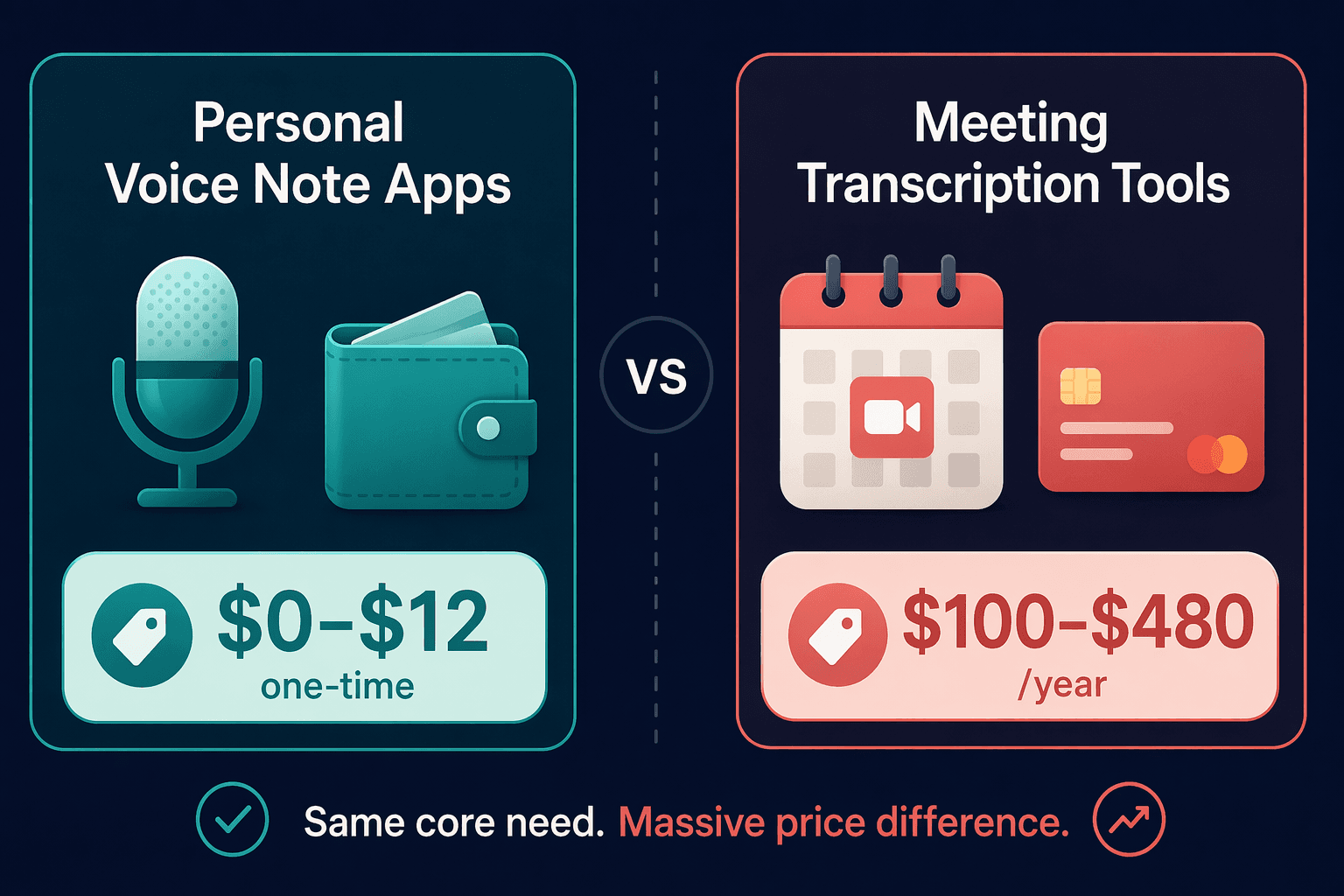
If you are paying for Otter.ai Pro or Fireflies to capture thoughts while walking the dog or brainstorming in the shower, you are spending money on features you will never touch. Otter.ai Pro costs roughly $100 per year (billed annually at $8.33/month), and Fireflies Pro runs $10/month — that is $120 annually. Stack them against a personal voice note app like Flint, which costs a one-time $12, and the gap becomes hard to ignore.
The real problem is not the price tag alone. It is that these meeting transcription tools are engineered for a completely different job: recording video calls with multiple speakers, identifying who said what, syncing with Salesforce or HubSpot, and generating conversation analytics. When you use them to dictate a single stream of personal ideas, you are paying for a CRM integration you will never configure and a speaker-ID system that has nothing to identify.
Two Categories, One Confusion: Personal Voice Note Apps vs. Meeting Transcription Tools
The market has quietly split into two distinct product categories that look similar on the surface — both take audio and produce text — but serve fundamentally different workflows.
Personal Voice Note Apps
These are built for one speaker: you. You open the app, tap record, speak your idea, and get back a clean note — often with an AI-generated summary. Examples include Flint, Aiko, Apple Voice Memos (with its built-in transcription), Voicenotes, and AudioPen. They assume a single audio stream, no need for speaker labels, and no requirement to integrate with a CRM. The best ones process audio on-device, meaning your thoughts never leave your phone.
Meeting Transcription Tools
These are designed to join your calendar calls as a bot, record the entire conversation, transcribe it with speaker attribution, and push the results into your team's workflow. Otter.ai, Fireflies, and Fathom belong here. They support integrations with Salesforce, HubSpot, Asana, and Trello. They track who spoke, when, and for how long. They are indispensable for teams that need searchable meeting archives — but they are overkill for a single person recording a fleeting thought.
- Personal voice note apps: one speaker, on-the-go capture, local or simple cloud sync, low cost.
- Meeting transcription tools: multiple speakers, call recording, CRM integrations, team dashboards, higher cost.
The confusion arises because both categories market themselves as "AI note-taking." But the underlying architecture — and the price — reflects a completely different target user.
Feature Comparison: 8 Dimensions That Matter for Personal Capture
The table below maps the two categories across eight dimensions that directly affect the personal capture experience. If you are using a meeting tool for individual dictation, the mismatches become obvious.
| Dimension | Personal Voice Note Apps | Meeting Transcription Tools |
|---|---|---|
| Recording method | Tap to record; single audio stream | Bot joins calendar calls; multi-stream |
| Speaker identification | Not needed (one speaker) | Core feature; labels who said what |
| CRM integrations | None or minimal | Salesforce, HubSpot, Asana, Trello |
| AI summary quality | Designed for single-idea summarization | Designed for conversation minutes |
| Pricing model | $0–$12 one-time or ~$99/year max | $100–$480/year per user |
| Recording limits | None (Flint) or 15 min (AudioPen) | Monthly minute caps (e.g., 300 min free) |
| Privacy approach | On-device processing (Aiko, Flint) or encrypted cloud | Cloud-first by default; audio uploaded to servers |
| Platform support | iOS, Android, Web, Wear OS | Web, Zoom, Google Meet, MS Teams |
Notice the recording limits. Otter.ai's free plan caps you at 300 minutes per month, and its dictation mode has a roughly 30-second limit per clip — fine for short reminders, frustrating for longer reflections. AudioPen, a personal app, allows up to 15 minutes per recording. Flint has no recording limit at all. The meeting tool's design assumes you will record a 45-minute call, not a 3-minute idea.
The Cost of Confusion: Pricing Breakdown
The price difference between the two categories is not marginal — it is an order of magnitude. The table below shows what you actually pay for each type of tool.
| Tool | Category | Plan / Price | Annual Cost |
|---|---|---|---|
| Flint | Personal | $12 one-time | $12 (first year, $0 thereafter) |
| Aiko | Personal | $2.99 one-time | $2.99 (first year, $0 thereafter) |
| Just Press Record | Personal | $4.99 one-time | $4.99 (first year, $0 thereafter) |
| Apple Voice Memos | Personal | Free (built-in) | $0 |
| Voicenotes | Personal | $99.99/year | $99.99 |
| AudioPen | Personal | $99/year | $99 |
| Otter.ai Pro | Meeting | $8.33/month (annual) | $100 |
| Fireflies Pro | Meeting | $10/month | $120 |
| Otter.ai Business | Meeting | $20/month (annual) | $240 |
| Fireflies Business | Meeting | $19/month | $228 |
If you are an individual using Otter.ai Pro strictly for personal dictation, you are spending $100 per year for features you do not use. Switching to Flint saves $88 in the first year and $100 every year after that — and you get unlimited, on-device recording with no monthly caps.
Who Should Switch — and to What?
You should switch from a meeting transcription tool to a personal voice note app if you answer "yes" to all three of these questions:
- Do you never use the tool to join or record a meeting with other people?
- Do you never use CRM integrations (Salesforce, HubSpot) or project-management syncs (Asana, Trello)?
- Do you only capture your own thoughts, ideas, or reminders?
If the answer to all three is yes, you are in the wrong category. Here is how to choose the right personal app based on your priorities.
Budget-First: Free or One-Time Purchase
If you want to spend nothing, Apple Voice Memos now includes on-device transcription on iOS — it is free, built-in, and requires no subscription. For a one-time purchase, Flint ($12) offers unlimited recording with local-first privacy and on-device processing. Aiko ($2.99) is even cheaper and runs 100% offline using Whisper-powered transcription on iOS and macOS. Just Press Record ($4.99) is another solid iOS-only option with offline transcription.
Platform-First: Cross-Device or Android
If you need Android support, Voicenotes ($99.99/year) covers Android, Wear OS, and even accepts input via WhatsApp. It supports over 100 languages and mixed-language recordings. AudioPen ($99/year) works on the web and mobile browsers, making it platform-agnostic, but it has a 15-minute recording limit per note.
Privacy-First: On-Device Processing
If you do not want your audio touching a cloud server, Aiko and Flint both offer on-device transcription. Apple Voice Memos also processes transcriptions locally on recent iPhones. Meeting tools like Otter and Fireflies upload audio to their servers by default — a fundamental privacy difference that matters if you record sensitive or proprietary ideas.
Real-World Migration Scenarios
Here are three common situations where switching makes immediate financial and practical sense.
Scenario 1: Otter.ai Pro User → Flint
You pay $100/year for Otter.ai Pro but only use it to dictate ideas on your phone. You never join meetings with it, never use the speaker labels, and have never opened the integrations page. Flint costs $12 once, offers unlimited recording with no time limits, and processes everything on-device. Export your existing Otter transcripts via its built-in export (TXT or PDF) and import them into Flint's local storage. You save $88 in year one and $100 every year after.
Scenario 2: Fireflies User → Aiko
You use Fireflies Pro ($10/month) to record personal notes, but you are uncomfortable with your audio being processed on cloud servers. Aiko costs $2.99 one-time and runs entirely offline on iOS and macOS using Whisper-powered transcription. No audio ever leaves your device. The tradeoff: Aiko lacks real-time transcription (it processes after you finish recording), and it is iOS-only. If you need Android, Flint is the better offline alternative.
Scenario 3: AudioPen User Considering Voicenotes
AudioPen ($99/year) is a solid personal voice-to-polished-writing tool, but its 15-minute recording limit can be restrictive for longer brainstorming sessions. Voicenotes ($99.99/year) removes that limit, supports over 100 languages, and works on Android, Wear OS, and even WhatsApp. If you frequently record notes longer than 15 minutes or need multilingual support, the $0.99 annual difference is negligible for the added flexibility.
Quick-Reference Decision Table
Use this table to make your final decision at a glance.
| Your Use Case | Recommended Tool Type | Top Pick | Price | Key Tradeoff |
|---|---|---|---|---|
| Personal idea capture, unlimited recording, local-first | Personal voice note app | Flint | $12 one-time | No Android support yet |
| Personal capture, maximum privacy, iOS only | Personal voice note app | Aiko | $2.99 one-time | No real-time transcription |
| Personal capture, free, already on iPhone | Personal voice note app | Apple Voice Memos | Free | Limited to Apple ecosystem |
| Personal capture, Android + Wear OS, multilingual | Personal voice note app | Voicenotes | $99.99/year | Subscription cost |
| Personal capture, web-based, short notes only | Personal voice note app | AudioPen | $99/year | 15-minute recording limit |
| Team meeting recording, CRM sync, speaker ID | Meeting transcription tool | Otter.ai or Fireflies | $100–$480/year | Overbuilt and overpriced for solo use |
Still Need a Meeting Tool? Here's Where to Go
Not everyone reading this article belongs in the personal voice note category. If you regularly record team standups, client calls, or multi-speaker workshops — and you need searchable transcripts with speaker attribution — then a meeting transcription tool is the correct choice. The key is making that decision deliberately, not by default.
If you have diagnosed your needs and concluded that you genuinely require meeting transcription, the site has two dedicated resources to help you choose the right tool:
- Our bot-free vs. bot-based voice note apps comparison explains the architectural difference between tools that join your calls as bots and those that work without joining.
- Our best AI meeting note-taking apps guide covers 10+ tools with pricing, compliance notes, and platform support.
Comments
Join the discussion with an anonymous comment.