
Why Most PKM Advice Fails You (And How This Guide Is Different)
If you have spent any time researching personal knowledge management apps in 2026, you have likely seen the same pattern: a list of 10 tools, a pricing column, a paragraph about features, and a vague "best for" label. That approach assumes you already know what you need. The problem is that most people do not. They know they feel overwhelmed by information — and they are not alone. Research cited by Atlassian indicates that 80% of global workers experience information overload daily, and knowledge workers spend an average of 2.5 hours every day searching for information, with 47% spending over an hour just looking for files. The global PKM software market, valued at $1.8 billion in 2025, is projected to reach $4.9 billion by 2034 — a sign that the demand for better systems is real, but the supply of good advice is not keeping pace.
This guide takes a different approach. Instead of ranking features, it introduces a three-axes framework that treats your thinking style, your data ownership preference, and your tolerance for AI-assisted organization as interdependent factors — not separate checkboxes. Existing articles on this site cover thinking-style matching in depth, and another covers methodology-fit comparisons. This is the first article to combine all three axes into a single decision matrix, because in practice, you do not choose a tool based on one factor alone. You weigh them together.
The Three-Axes Framework: A New Way to Think About PKM Tools
Every PKM tool makes implicit tradeoffs. A tool that excels at visual mapping may be weak at structured database queries. A tool that guarantees your data lives on your hard drive may offer no real-time collaboration. A tool that uses AI to auto-tag your notes may not let you export them cleanly. The three-axes framework makes these tradeoffs explicit so you can decide which compromises you are willing to make.
| Axis | Question It Answers | Spectrum |
|---|---|---|
| Thinking Style | How does your brain naturally organize information? | Visual (canvas) ↔ Text/Link (networked) ↔ Structured (database) |
| Data Ownership | Who controls your notes after you stop paying? | Local-first (you own the files) ↔ Cloud (vendor hosts and syncs) |
| Organization Approach | Do you want to tag and file manually, or let AI do the retrieval work? | Manual (folders, tags, links) ↔ AI-assisted (semantic search, auto-synthesis) |
Most people start by asking "Which tool has the most features?" That is the wrong question. The right question is: Where do I fall on each of these three axes, and which tool best matches my combination? The sections below walk through each axis in detail, then show you how to combine them into a decision.

Axis 1: Matching Your Thinking Style to the Right Tool
The first axis is the most personal. How you naturally process information determines which tool category will feel intuitive rather than forced. The Kosmik guide categorizes PKM apps into five types based on thinking style, and the three most common patterns map directly to tool categories.
- Visual thinkers prefer spatial arrangement. They think in maps, boards, and canvases. Tools like Heptabase and Kosmik let you place notes on an infinite canvas, draw connections visually, and see your knowledge as a spatial map rather than a list of files.
- Text/link-based thinkers thrive on connections between ideas. They write atomic notes and link them into networks. Obsidian, Logseq, and Roam Research are built for this — bidirectional links, graph views, and daily notes that grow into interconnected knowledge bases.
- Structured/database thinkers want to organize information into fields, properties, and relational databases. Notion, Capacities, and Anytype treat every note as an object with typed properties — ideal for project tracking, CRM-like knowledge bases, and structured reference systems.
Axis 2: Local-First vs. Cloud — The Privacy and Ownership Tradeoff
The second axis is about control. Local-first tools store your notes as plain files on your device. Cloud tools store them on a vendor's server. This distinction matters more in 2026 than it did five years ago, because the PKM market has seen pricing changes, feature degradation, and even shutdowns that left users scrambling to export their data.
| Dimension | Local-First (Obsidian, Logseq, Anytype) | Cloud-First (Notion, Roam, Mem) |
|---|---|---|
| Data ownership | You own the files. No vendor can lock you out. | Vendor hosts your data. Access depends on subscription status. |
| Offline access | Full offline by default — no internet required. | Limited offline mode; most features require a connection. |
| Sync and collaboration | Manual sync (Obsidian Sync, Git, third-party tools). Real-time collaboration is limited. | Seamless multi-device sync. Built-in real-time collaboration. |
| Longevity risk | Your notes survive even if the vendor disappears. Files are standard Markdown or plain text. | If the vendor shuts down or changes pricing, you must export and migrate. |
| AI features | Plugin-based or external AI (e.g., Obsidian Copilot). Less integrated. | Native AI features (Notion AI, Mem AI synthesis). Tighter integration but vendor-dependent. |
Local-first tools like Obsidian store everything as plain Markdown files on your computer. You can open them with any text editor, back them up with Dropbox or Git, and walk away from the tool at any time without losing a single note. Obsidian's plugin ecosystem, which exceeds 1,400 community plugins as of 2025, adds functionality on top of this foundation without compromising data portability. Logseq and Anytype follow the same philosophy — Logseq is fully open-source, and Anytype offers E2E encrypted sync.
Cloud tools, by contrast, offer convenience at the cost of control. Notion's 30 million users benefit from instant sync across devices, real-time collaboration, and a built-in AI assistant. But your notes live on Notion's servers. If you stop paying for Plus at $10 per month, you lose access to features — and if Notion ever changes its business model, your data is subject to that decision. The same applies to Roam Research at $165 per year and Mem at $10 per month.

Axis 3: AI-Assisted vs. Manual Organization in 2026
The third axis is the most recent addition to the PKM decision framework. Before 2024, organizing notes meant creating folders, applying tags, and building manual links. In 2026, AI has fundamentally changed what is possible — and what is expected.
According to a Dataintelo market report, AI-enhanced PKM tools improve individual information retrieval efficiency by up to 47% and reduce search time by an estimated 35% compared to traditional folder-based systems. That is a significant productivity gain. But the way AI is implemented varies dramatically between tools, and the tradeoffs matter.
- Tools with strong native AI (Notion AI, Mem, Reflect) offer semantic search, auto-tagging, AI-powered summarization, and even synthesis across your entire knowledge base. You write notes, and the AI surfaces connections you did not explicitly create. The cost: these features typically command a 40-80% premium over base subscription tiers, and your data passes through the vendor's AI models.
- Tools that rely on plugins or manual workflows (Obsidian, Logseq) give you full control over how AI is used. You can install community plugins like Obsidian Copilot for local AI assistance, or connect to external APIs. The tradeoff: setup is more technical, and the AI integration is less seamless than native implementations.
The Atlas guide offers a useful warning about AI in PKM: "AI without citations is a confident hallucination engine, AI with citations is a research assistant." If you plan to rely on AI for synthesis and retrieval, choose a tool that provides source attribution for its AI outputs — or be prepared to verify every suggestion manually.
Pricing Comparison for 2026: What You Actually Pay
Pricing is the final filter. The table below shows the current plans for the tools discussed across all three axes. All figures were last verified against official sources in June 2026 and may change.
| Tool | Free Tier | Paid Tier | AI Pricing | Data Model |
|---|---|---|---|---|
| Obsidian | Free (personal use) | $50/yr Commercial (Sync add-on) | Plugin-based (Copilot, etc.) | Local-first (Markdown files) |
| Notion | Free (personal) | $10/mo Plus | $10/mo add-on | Cloud-first |
| Logseq | Free (open-source) | N/A | Plugin-based | Local-first (open-source) |
| Roam Research | No free tier | $165/yr | Built-in | Cloud-first |
| Heptabase | No free tier | $8.99/mo | Built-in | Cloud-first (visual canvas) |
| Capacities | Free | €9/mo Pro | Built-in | Cloud-first (object-based) |
| Anytype | Free (beta, up to 1GB) | $99/yr Builder | Plugin-based | Local-first (E2E encrypted) |
Decision Flowchart: Which App Should You Choose?
The three axes are useful individually, but their real power comes from combining them. The flowchart below maps five common user personas to tool recommendations based on where they fall on each axis.
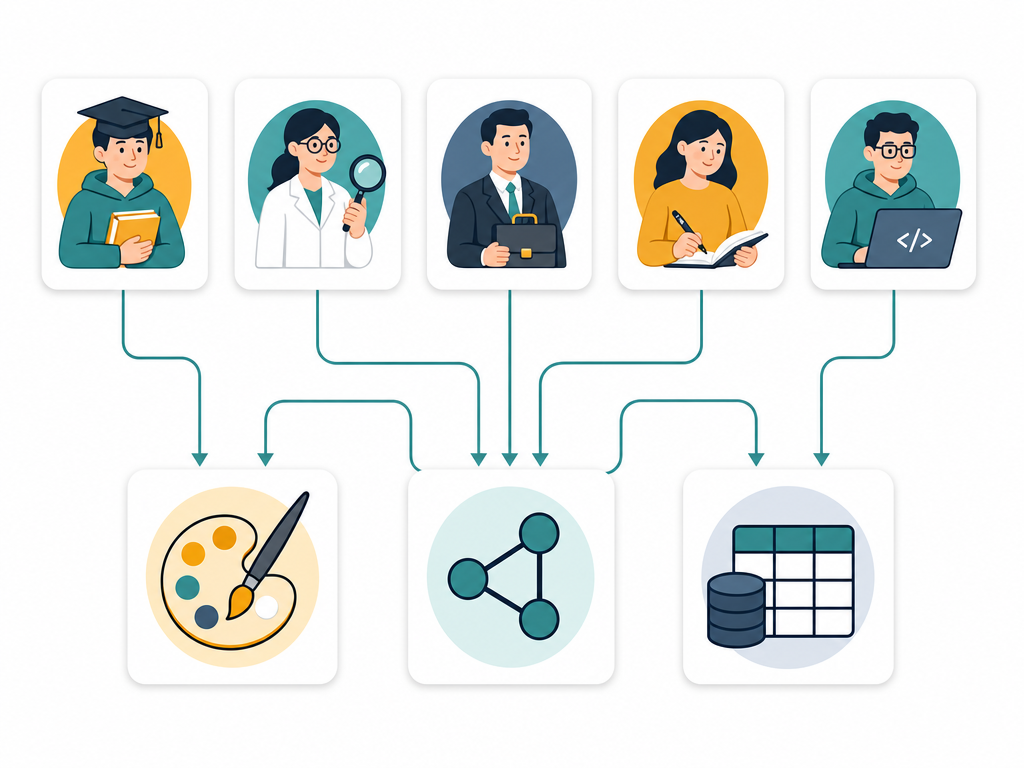
- Student (budget-conscious, needs free plan) → You likely fall on the text/link-based or structured side of Axis 1, and you need free or low-cost options. Logseq (free, open-source) or Obsidian (free for personal use) are strong choices. If you prefer structured databases, Notion's free tier is generous enough for personal use.
- Researcher (needs citations, local-first) → You need local-first data ownership and strong linking. Obsidian with its 1,500+ plugin ecosystem is the top choice — you can add citation management, Zotero integration, and local AI. Logseq is a strong alternative if you prefer outliner-style note-taking.
- Professional (needs collaboration, cloud) → You need real-time sync and team features. Notion is the default choice for teams, with its database-driven structure and built-in AI. Roam Research works well for teams that think in networked notes.
- Writer (distraction-free, text-first) → You want a clean, fast writing environment with minimal UI. Obsidian in its minimal theme mode, or Logseq as an outliner, both provide distraction-free Markdown editing with local file storage.
- Developer (open-source, self-hosted) → You want full control. Logseq is fully open-source. Obsidian is not open-source but stores plain Markdown files that integrate with any version control system. Anytype offers E2E encrypted local-first storage with a builder plan for advanced users.
Your Next Step: Build Your System (Without Falling Into the Five Traps)
Choosing the right app is only the first step. The second — and harder — step is building a system that actually works for you over time. The Atlas guide identifies five common traps that kill PKM systems, and they are worth keeping in mind as you start:
- Tool-hopping: Switching apps every few weeks because the next one looks shinier. Pick one tool based on this framework and commit to it for at least 30 days.
- Over-tagging: Starting with 10 tags and ending up with 500. Tags should be broad categories, not metadata for every possible attribute.
- Capture without distill: Accumulating thousands of highlights and saved articles that you never re-read. A knowledge base is built on synthesis, not collection.
- Public-system bias: Copying someone else's elaborate template because it looks impressive. Your system should fit your thinking style, not a YouTuber's.
- Optimizing organize at the cost of retrieve: Spending hours perfecting folder structures and property schemas, while ignoring whether you can actually find what you need.
The best way to avoid these traps is to start small and build iteratively. The 30-day starter workflow guide walks you through setting up a minimal viable system in your chosen app — starting with a simple capture habit, adding structure only when you need it, and reviewing your system weekly to see what is working.