
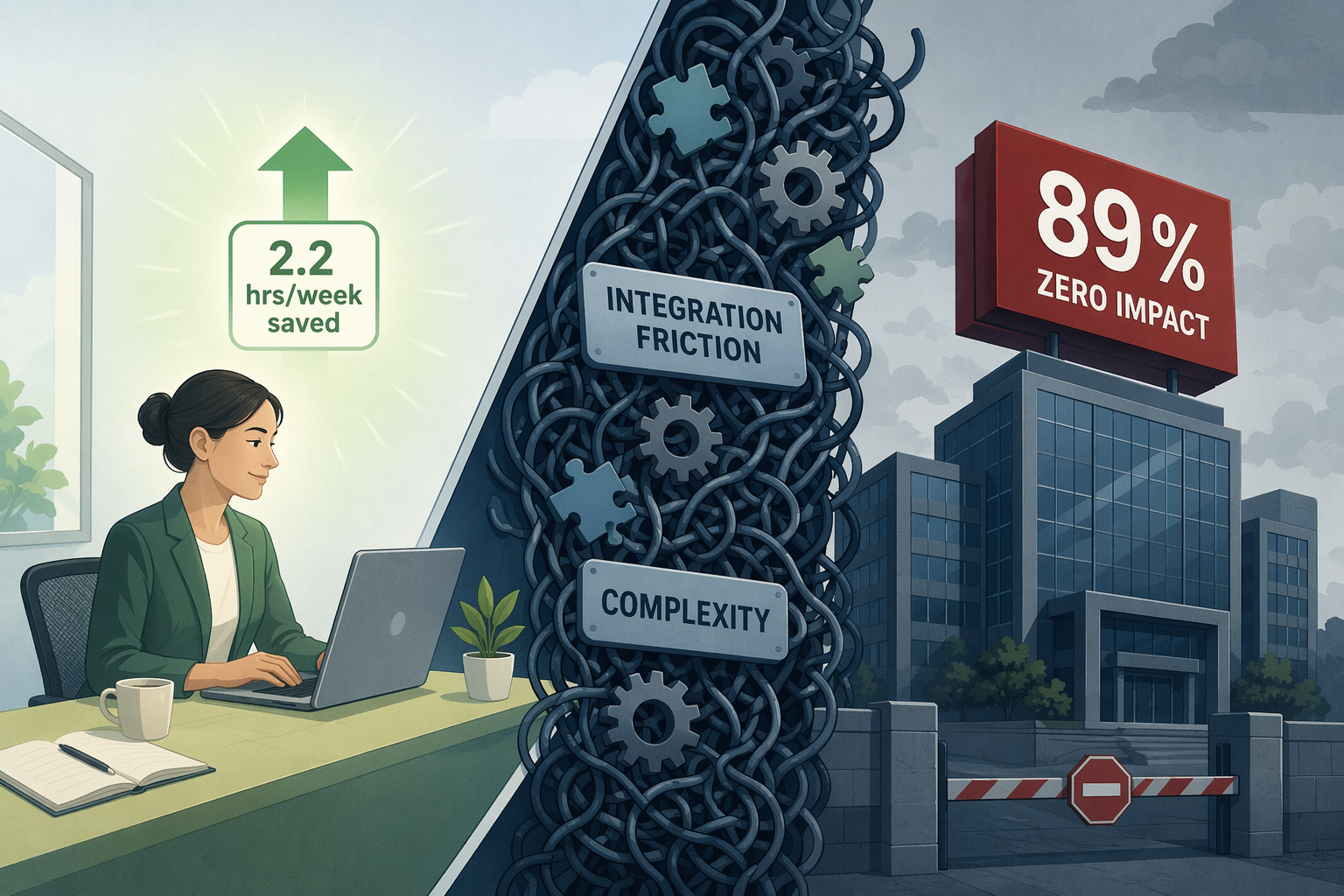
The Contradictory Data: $644 Billion Spent, 89% Zero Impact
The numbers paint a picture of two parallel realities. On one side, global spending on generative AI hit $644 billion in 2025 — a 76% year-over-year increase according to Gartner. On the other, a landmark NBER study of 6,000 CEOs, CFOs, and senior executives across the U.S., U.K., Germany, and Australia, published in February 2026, found that 89% of firms report zero measurable productivity impact from their AI investments.
This is not a story about AI failing. It is a story about a massive gap between potential and execution. Consider these five data points that define the paradox:
- 75% of knowledge workers now use AI at work, and 46% started within the last six months (Microsoft 2025 Work Trend Index). Adoption is accelerating, not slowing.
- AI users report saving an average of 2.2 hours per week — a 5.4% time reduction — and are approximately 33% more productive during the specific hours they spend with the tools (Federal Reserve Bank of St. Louis).
- Yet 56% of companies say they are 'getting nothing out of AI' (PwC 29th Annual Global CEO Survey, Davos 2026).
- Only 6% of organizations qualify as 'AI high performers' with measurable financial returns (McKinsey 2025 State of AI).
- Executives themselves predict AI will boost productivity by just 1.4% over the next three years (NBER study).
The individual worker is saving time. The organization is not. That contradiction is the central puzzle of AI productivity in 2026, and understanding it is the first step toward actually benefiting from these tools.
Why the Gap Exists: Three Root Causes
If individual workers are saving 2.2 hours per week, why aren't those savings accumulating at the organizational level? The research points to three structural reasons that prevent micro-level gains from scaling into macro-level productivity.
1. Workflow Redesign Before Tool Adoption
McKinsey's 2025 global survey found that AI high performers — the ~6% of organizations reporting earnings impact of 5% or more — are more than 3x more likely to have redesigned end-to-end workflows before selecting AI tools. The majority of companies do the opposite: they buy the tool first and try to fit it into existing processes. The result is a tool that automates a broken workflow, producing faster errors rather than faster results.
2. Integration Friction with Existing Tech Stacks
78% of enterprises report struggling to integrate AI with their current tech stacks, according to Zapier's AI Resistance Survey. The same survey found that 44% of AI practitioners identify integration challenges as the top obstacle to scaling AI. When a new AI tool cannot pull data from the CRM, the calendar, or the knowledge base without manual intervention, the friction cost cancels out the time savings. The NBER study confirms this indirectly: AI leaders average just 1.5 hours of AI usage per week — suggesting that even in organizations that have adopted AI, usage remains too sporadic to produce measurable impact.
3. Complexity Overwhelms the User
90% of AI users say the tools save them time, yet 48% say their work feels chaotic and fragmented (Microsoft). This apparent contradiction reveals a deeper problem: feature-rich AI platforms promise everything but deliver cognitive overhead. Workers spend time managing the tool rather than doing the work. The complexity of multi-purpose AI platforms — each with its own interface, configuration, and learning curve — creates a new layer of friction that offsets the productivity gains from any single feature.
What the Winners Do Differently
The ~6% of AI high performers and the individual workers who actually capture the 2.2 hours/week time savings share three behaviors that distinguish them from the rest. These are not about choosing better tools — they are about choosing a different approach to adoption.
Simplicity Over Feature Count
High performers are more than 3x more likely to use AI for transformative change, but they do not chase the most feature-dense platforms. Instead, they select single-purpose tools that solve one specific problem well. A tool that does one thing with zero configuration time beats a platform that does fifty things but requires a week to set up. The 280-fold drop in AI inference costs over two years (Stanford HAI 2025 AI Index) means that even simple, focused tools now have access to powerful models — there is no performance penalty for choosing simplicity.
Daily Habits Over Occasional Deep Sessions
The Federal Reserve data shows that workers using AI are approximately 33% more productive during the specific hours they spend with the tools. But the NBER study found that AI leaders average just 1.5 hours of AI usage per week — meaning most users are not using AI frequently enough to build a habit. Winners integrate AI into their daily workflow: a 5-minute task that gets automated every day saves more time over a month than a 2-hour deep session once a quarter.
One Workflow at a Time
Organizations that try to transform multiple workflows simultaneously fail. High performers redesign one end-to-end workflow, measure the impact, and then move to the next. This incremental approach is the opposite of the 'AI transformation' narrative sold by vendors, but it is the only approach that produces measurable results.
| Behavior | Typical Organization | AI High Performer |
|---|---|---|
| Tool selection | Buys feature-rich platform first | Selects single-purpose tool for one task |
| Workflow approach | Fits AI into existing processes | Redesigns workflow before tool selection |
| Usage pattern | Sporadic deep sessions (1.5 hrs/week avg) | Daily micro-habits (multiple short sessions) |
| Scale strategy | Attempts multi-workflow transformation | One workflow at a time, measured before next |
| Integration priority | Assumes AI will connect automatically | Verifies native integration before adoption |
A Practical Framework for Individual Adoption
You do not need to wait for your organization to figure out AI adoption. The data shows that individual workers can capture the 2.2 hours/week time savings today — regardless of whether their company is in the 89% or the 6%. The following four-step framework is designed for a single person, not a department.
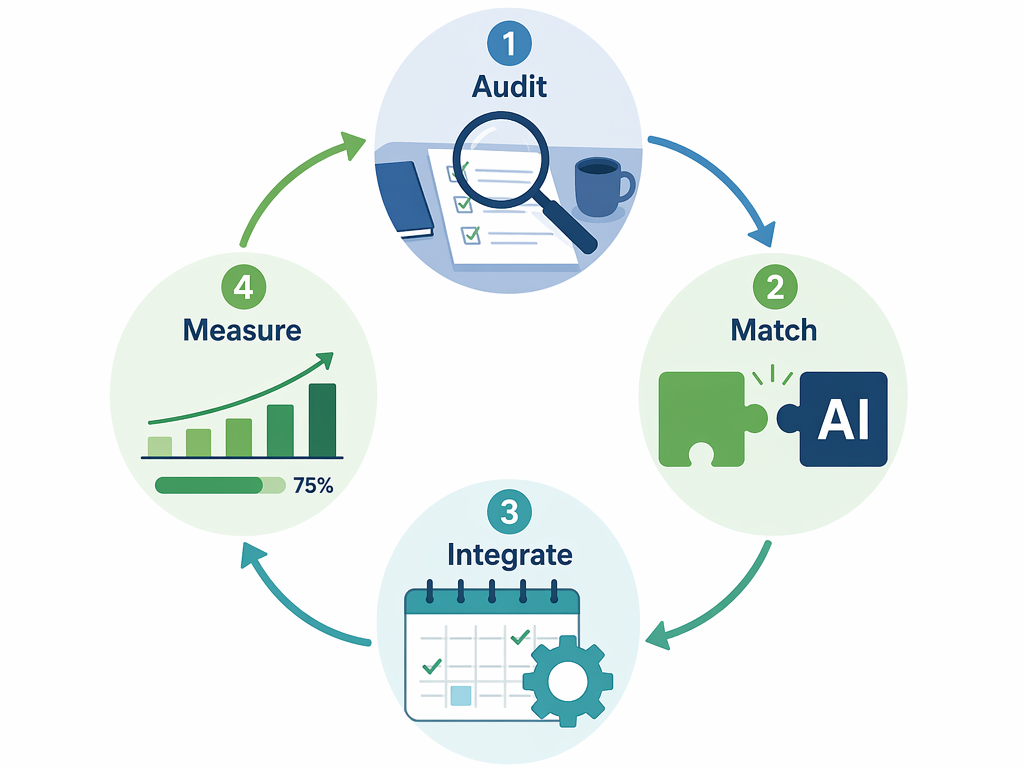
Step 1: Audit — Identify Your Most Repetitive Tasks
For one week, keep a simple log of tasks that feel mechanical: drafting routine emails, summarizing meeting notes, reformatting data, scheduling follow-ups, or transcribing voice memos. Do not try to automate everything. Look for the one task that appears at least three times per week and takes more than 10 minutes each time. That is your candidate.
Step 2: Match — Select a Simple AI Tool for That Specific Task
Once you have identified the task, find a tool that does only that task well. The criteria are simple: setup time under 15 minutes, a free or low-cost trial, and native integration with the tools you already use. Avoid platforms that require you to learn a new system before they save you time. If the tool cannot be configured in a single sitting, it is too complex.
Step 3: Integrate — Set Up with Minimal Friction
Install the tool, connect it to the one app it needs access to, and test it with a real task immediately. Do not configure advanced settings, do not read the full documentation, do not explore additional features. The goal is to complete one successful cycle — input to output — within 30 minutes. If you cannot, the tool is not simple enough.
Step 4: Measure — Track Time Saved Over Two Weeks
Use a timer or a simple log to record how much time the tool saves you per use. After two weeks, calculate the weekly average. If you are saving less than 30 minutes per week, either the task was not worth automating or the tool is not the right fit. If you are saving more, the tool becomes a permanent part of your workflow. This measurement step is what separates the 89% from the 6% — most people stop after integration and never verify whether the tool actually delivers.
Data-Driven Tool Selection Criteria
The research points to five specific criteria that predict whether an AI productivity tool will actually save you time. Use the scoring table below to evaluate any tool before committing to it.
| Criterion | Why It Matters | Score (0–2) |
|---|---|---|
| Setup time under 15 minutes | If setup takes longer than a single sitting, most users never complete it. The NBER study found AI leaders average only 1.5 hrs/week usage — high setup friction is a primary cause. | |
| Single-purpose focus | Tools that do one thing well have lower cognitive overhead. 48% of AI users report fragmented work (Microsoft); multi-purpose platforms contribute to this fragmentation. | |
| Native integration with existing tools | 78% of enterprises struggle with AI integration (Zapier). A tool that requires manual data transfer between apps adds friction that cancels time savings. | |
| Free or low-cost trial (≤ $20/month) | The 280x drop in AI inference costs (Stanford HAI) means cheap tools can be powerful. A low-cost trial reduces the risk of investing in a tool that does not fit. | |
| Evidence of daily-use habit formation | Tools designed for daily micro-tasks outperform tools designed for occasional deep work. Look for features like templates, shortcuts, or recurring automation triggers. |