
The Reclaim AI vs Motion calendar decision is less about which app is “smarter” and more about how much authority you want to hand over. Reclaim behaves like a scheduling layer: it protects habits, focus time, task blocks, and buffers around the calendar system you already use. Motion behaves more like a command center: it wants your calendar, tasks, and projects in one place so it can continuously rebuild the day.
That difference matters before pricing, before feature lists, and definitely before productivity claims. If your work already lives in Asana, Jira, ClickUp, Linear, Todoist, Google Tasks, or another system your team depends on, Reclaim is usually the cleaner fit. If your current setup is a pile of calendar events, half-finished task lists, and project notes nobody trusts, Motion’s heavier approach can make more sense.

Quick Verdict
| Decision point | Reclaim AI | Motion |
|---|---|---|
| Best fit | People who want to defend an existing calendar and task stack | People who want one system to schedule tasks, projects, and meetings |
| Scheduling philosophy | Calendar defense: protects habits, focus time, breaks, and task blocks | Full orchestration: auto-schedules and reshuffles the workday |
| Pricing last verified | Free Lite tier with no credit card; paid tiers run $10-$22 per seat/month as of July 2026 [1] | No free plan; 7-day credit-card trial; paid pricing runs $19-$29/month depending on billing as of July 2026 [2] |
| Project management | No built-in project management center | Built-in project management, including Gantt, Kanban, and AI Employees according to third-party comparison [3] |
| Integrations | Native integrations with 6+ PM/task tools, including Asana, ClickUp, Jira, Linear, Todoist, and Google Tasks [3] | Primarily calendar connections and Zapier, according to third-party comparison [3] |
| Platform availability | Web-only, a limitation Reclaim itself acknowledges in its Motion comparison [4] | iOS, Android, and desktop apps, according to Reclaim’s comparison page [4] |
| Not for you if | You want one app to replace your task manager and project manager | You already have a working PM system and do not want another operational hub |
The Real Split: Calendar Defense vs. Full Day Orchestration
Reclaim starts from the assumption that your calendar is already under attack. Meetings take the cleanest hours. Habits slide into whatever space remains. Tasks sit outside the calendar until they become urgent enough to steal an afternoon. Reclaim’s job is to negotiate space for that work without asking you to move the whole operation into a new project system.
Motion starts from a different frustration: the problem is not just that the calendar is crowded, but that tasks, deadlines, meetings, and projects are split across too many places. Its answer is to bring more of that work inside Motion, then use auto-scheduling to decide what should happen next. That can be liberating if your current setup is weak. It can also be a lot of governance to accept if your team already has a reliable source of truth elsewhere.
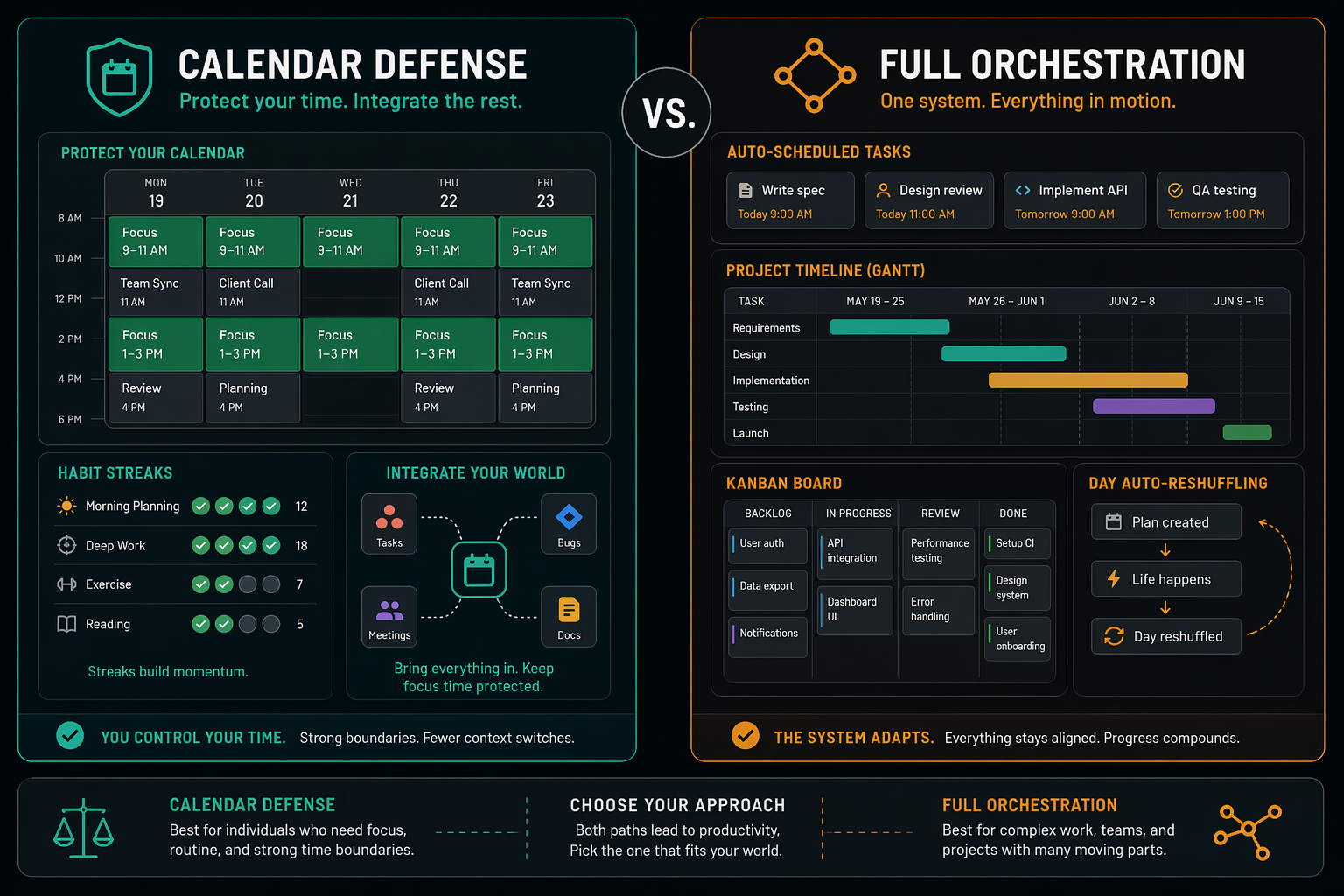
This is where a lot of AI scheduling comparisons get mushy. They treat automation as a single spectrum: more automation means a better product. In daily work, more automation is only better when the tool is operating at the right layer. A scheduler that protects two hours for deep work is helpful. A scheduler that asks you to rebuild your project workflow before it can help may be overkill. The reverse is also true: a polite calendar assistant will feel underpowered if what you really need is a system that assigns work, sequences deadlines, and reshuffles priorities when the day breaks.
If You Already Have a Project System, Reclaim Fits More Naturally
Many teams are not shopping for a new project manager. They already have one, even if they complain about it. Engineering may live in Jira or Linear. Marketing may live in Asana or ClickUp. Personal tasks may sit in Todoist or Google Tasks. In that environment, the calendar problem is not “Where should all work live?” It is “How do I stop my calendar from ignoring the work that already exists?”
Reclaim is better aligned with that situation because its role is additive. Third-party comparison work from Morgen describes Reclaim as offering native integrations with Asana, ClickUp, Jira, Linear, Todoist, Google Tasks, and other tools, while Motion connects mainly through calendars and Zapier [3]. Morgen is itself a competitor in the scheduling space, so its comparison should not be treated as neutral gospel. Still, the integration distinction is consistent with the practical product split: Reclaim meets existing systems; Motion wants to become more of the system.
For someone with a functioning stack, that matters more than it sounds. If a task already has comments, assignees, acceptance criteria, dependencies, or sprint context somewhere else, duplicating it into another tool creates a second inbox. At first, that feels like setup. Later, it becomes maintenance. The calendar tool starts asking for project hygiene it was never hired to manage.
A cleaner Reclaim use case looks like this: the project work stays in the project tool, while Reclaim finds defensible time to execute it. It can protect recurring habits, focus blocks, breaks, and flexible task time around meetings. The user is not asking Reclaim to become the organization’s planning brain. They are asking it to make the calendar behave like work takes time.
That is also why Reclaim belongs in the broader category of scheduling tools rather than full productivity operating systems. If you are comparing where scheduling fits in a larger setup, a practical AI productivity tool landscape is more useful than asking every app to replace every other app.
Motion Makes More Sense When You Want the Tool to Own the Plan
Motion’s stronger case appears when the existing system is not worth preserving. Freelancers, founders, consultants, and small-team leads often carry the entire planning burden themselves: sales calls, client deadlines, admin, follow-ups, internal projects, recurring work, and the actual work that pays the bills. For that person, a calendar defense layer may still leave too much deciding to do.
Motion’s pitch is that the tool can take more of that burden. Its built-in project management scope includes Gantt, Kanban, and AI Employees according to Morgen’s comparison [3]. That is a much broader surface area than Reclaim offers. It is not just placing a task somewhere on the calendar; it is trying to manage the relationship between tasks, projects, deadlines, and available time.
That can be exactly right for a solo operator or small team that has never gotten lasting value from a separate project management tool. If the alternative is a scattered mix of calendar reminders, sticky notes, Slack messages, and stale task lists, Motion’s center of gravity is a feature, not a liability. The user is not duplicating a working system. They are replacing a weak one.
The caution is that Motion’s value depends on giving it enough of the work. If only meetings live there, it is too expensive and too ambitious for the job. If tasks and projects live there but the team still treats another tool as the real source of truth, Motion becomes another place to reconcile. Its auto-scheduling is most defensible when the user is willing to let Motion carry the planning context.
Cost Is Not Just Price; It Is Scope
As of July 2026, Reclaim is much easier to trial lightly. It offers a free Lite tier with no credit card required, and paid tiers run from $10 to $22 per seat per month [1]. Motion has no free plan; it offers a 7-day trial that requires a credit card, with pricing listed at $19 to $29 per month depending on billing [2].
That difference changes the buying risk. Reclaim can be tested as a guardrail: connect the calendar, protect a few habits, schedule task time, and see whether the week feels less porous. If it does not stick, the experiment has a low ceiling. Motion asks for a more serious trial because the product is not only a calendar assistant. To evaluate it fairly, you need to move enough task and project work into Motion for the system to make meaningful scheduling decisions.
Motion’s premium is easier to justify when it replaces multiple tools or a messy manual process. If it becomes the place where projects are planned, tasks are prioritized, deadlines are tracked, and the calendar is rebuilt around that work, the higher entry point has a rationale. If you keep your project manager, task manager, and team planning rituals elsewhere, you are mostly paying Motion to sit beside a system it cannot fully control.
There is also a possible overage issue to watch. Morgen’s analysis, citing Reddit reports, says Motion AI credit overages can increase monthly bills by 20% to 40% for heavy users [3]. That is not an official pricing guarantee or an independent billing audit, so it should be treated cautiously. But it is enough to make heavy users check plan limits before assuming the subscription price is the full monthly cost.
This is the same reason free-versus-paid comparisons can be misleading if they stop at the monthly number. A free or cheaper tool can still be the wrong buy if it leaves the main workflow untouched. A more expensive tool can be reasonable if it actually replaces operational drag. For a broader buying lens, see what is actually worth paying for in AI productivity apps.
Platform Availability Can Decide the Workflow
Reclaim’s web-only setup is not a small footnote for everyone. Reclaim’s own Motion alternative page describes Motion as offering iOS, Android, and desktop apps, while Reclaim is web-only [4]. If you live at a laptop and treat calendar planning as a desk activity, that may be fine. If you frequently triage tasks from a phone, review the day between meetings, or adjust plans away from a browser, Motion has the more flexible footprint.
This does not automatically make Motion the better scheduler. It means Reclaim’s fit is strongest when calendar protection can happen in the background and occasional web-based adjustment is enough. Motion’s apps matter more when the tool becomes the place you actively manage the day, not just the layer that protects it.
What to Do With Productivity Claims
Both products make impressive-sounding productivity claims. Motion claims users get 137% more work done, while Reclaim claims users gain 7.6 more productive hours per week [2][4]. Those are vendor claims, not independent benchmark results. The research materials for this comparison do not include independent evidence that one tool reliably produces those outcomes across comparable users.
The safer way to use those numbers is as a clue to product ambition, not proof of personal results. Motion is promising a bigger transformation because it wants more of the workflow. Reclaim is promising reclaimed time because it focuses on defending calendar space. Neither claim tells you whether your team will maintain the setup after the first enthusiastic week.
Scale, Compliance, and Trust Signals
Neither tool is a tiny experiment. Reclaim says it serves more than 550,000 people across 65,000 companies [5]. Motion reports more than 1 million users [6]. Those figures show adoption, not effectiveness. They can reduce concern that either product is obscure, but they do not answer whether the scheduling model fits your work.
Compliance may matter for teams buying through IT or operations. Reclaim’s pricing page lists SOC II compliance, GDPR compliance, and SCIM user provisioning on Enterprise [1]. Motion also offers SOC II compliance according to the research materials. For most individual buyers, compliance will not decide the comparison; for companies, it belongs in procurement review rather than the productivity debate.
Choose Reclaim AI If...
- You already trust another project or task system and mainly need calendar time protected around it.
- You want to test AI scheduling without a credit card or a high upfront commitment.
- Your main pain is meetings, habits, focus time, breaks, and task blocks getting crowded out.
- You prefer an assistant layer over an all-in-one project management replacement.
- You do most planning from the web and do not need a full mobile or desktop app experience.
The best Reclaim buyer is not trying to make scheduling dramatic. They want fewer calendar leaks. They want routines to survive meeting creep. They want task time to exist before the deadline turns ugly. That is a narrower job than Motion’s, and that narrowness is often the point.
Choose Motion If...
- You want one tool to manage calendar, tasks, projects, and daily prioritization.
- Your current project system is weak, scattered, or mostly personal rather than team-enforced.
- You want aggressive auto-scheduling and rescheduling when priorities change.
- You will actually use built-in project management features such as Kanban or Gantt views.
- You need mobile and desktop apps because planning happens throughout the day.
Motion is the better bet when the user is willing to let the tool become the operating layer. It is not the lighter choice, and that is not automatically a flaw. The flaw would be buying a command center while continuing to run the real command center somewhere else.
Final Take
Reclaim AI is the better complementary scheduler for people who already have a working system and want lower-risk calendar defense. It is cheaper to try, less demanding to adopt, and better aligned with workflows where projects and tasks already live elsewhere.
Motion is the better fit for people who want to replace more of their workflow with a single auto-orchestrated hub. Its premium makes sense when the project management layer is part of the purchase, not when it is treated as an expensive calendar add-on.
So the practical answer is simple enough: choose Reclaim if your calendar needs protection; choose Motion if your whole workday needs a new control system.
References
- Reclaim AI Pricing, Reclaim AI
- Motion Pricing, Motion
- Motion vs Reclaim, Morgen
- Motion Alternative, Reclaim AI
- Reclaim AI, Reclaim AI
- Motion, Motion