
If you are searching for the best note taking app for iPad, start with the thing you repeat every week. A lecture recording, a handwritten problem set, a 90-page PDF, and a pile of meeting notes all look like “notes” on an App Store page. They become very different problems three months later, when you need to find, review, quote, or explain them.
| Primary workflow | Best fit | Why it fits | Pricing / availability note |
|---|---|---|---|
| Handwritten class notes and study organization | GoodNotes 6 | Strong notebook structure, nested folders, handwriting tools, and Study Sets make it easier to manage a semester’s worth of material. | $35.99 one-time purchase option or $11.99/year subscription reported in Jan. 2026; verify current App Store pricing before buying. [1] |
| Lecture notes with audio | Notability | Synced audio recording lets you tap written notes and replay what was being said at that moment. | Pricing changes often enough that the current App Store listing should be checked before committing. [1] |
| Academic PDF reading and source-heavy research | LiquidText | Built around pulling excerpts, linking ideas, and working across documents rather than simply writing on top of one PDF. | Best treated as a specialized research tool, not a general notebook replacement. [2] |
| AI synthesis across notes, PDFs, and handwriting | Atlas | Searchable mind maps and cited AI answers make it useful when the job is asking questions across a knowledge base. | Promising AI-native option; its strongest claims come from a commercially interested source and should be read that way. [3] |
| Free Apple-native notes | Apple Notes | Fast, already installed, strong enough for lightweight handwritten and typed notes inside the Apple ecosystem. | Free with Apple devices; limited when you want free placement of handwriting beside typed text. [2] |
| Free cross-platform notebooks | OneNote | Infinite canvas, broad platform support, and Microsoft Copilot integration make it practical for mixed-device work. | Free core app; especially useful if your school or workplace already runs on Microsoft 365. [2] |
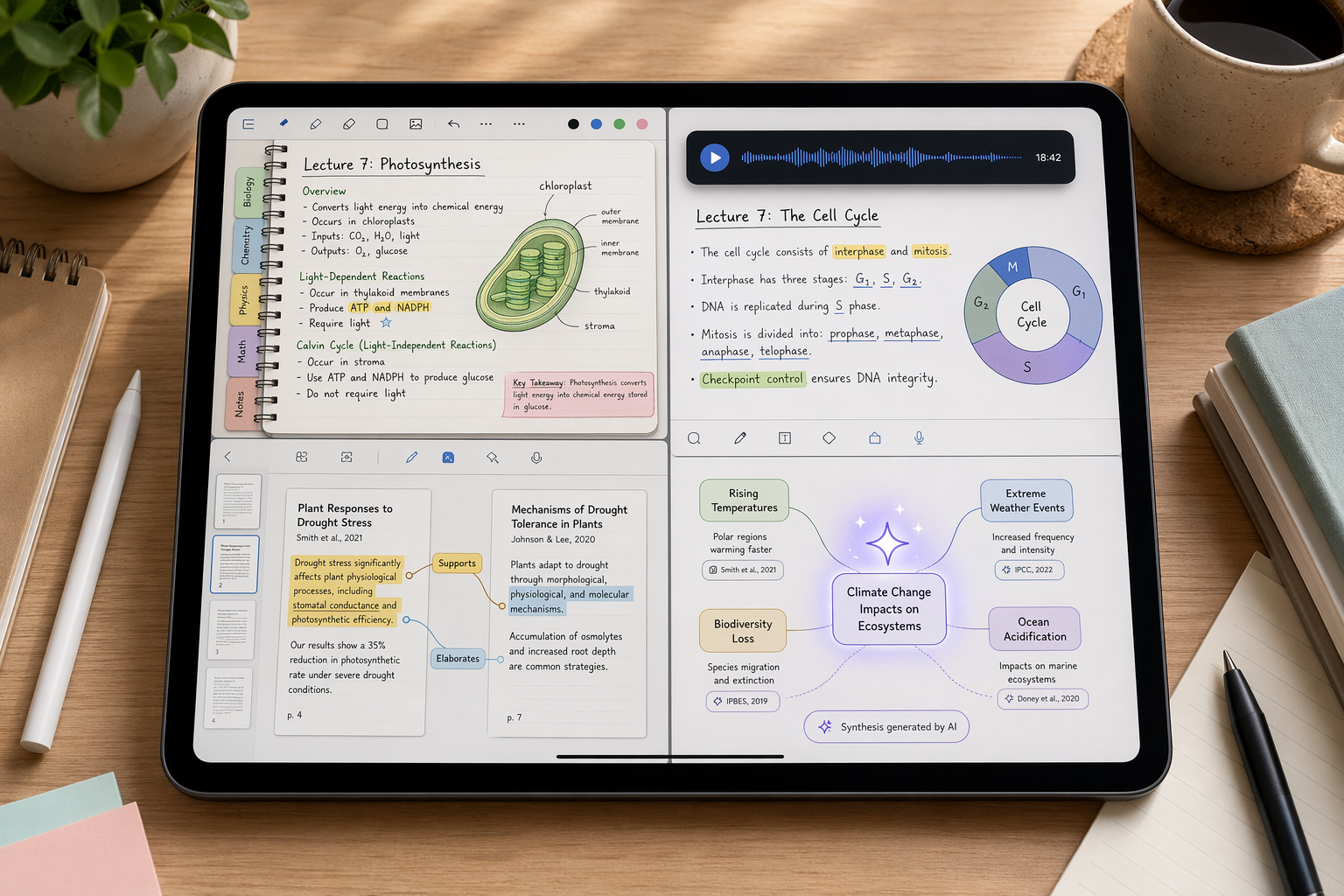
The Wrong Question Is “Which App Is Best?”
The safer question is: which app creates the least cleanup for the notes you will actually revisit? That is where many polished apps separate from useful ones. A beautiful blank page matters for the first week. Folder depth, search, export behavior, PDF handling, audio replay, and citation visibility matter when the notebook has become a working archive.
Current expert roundups largely agree on the broad shape of the category: there is no universal iPad note-taking winner, only stronger fits for different workflows. ZDNET’s 2026 tested roundup and Zapier’s iPad note-taking guide both frame app choice around use case rather than one feature checklist that applies equally to everyone. [4][2]
That matters because the iPad is unusually good at making different kinds of note-taking feel similar at the start. Handwriting with Apple Pencil, marking up PDFs, typing beside a meeting agenda, and asking an AI assistant to summarize a folder can all happen on the same slab of glass. The downstream work is where the differences show.
GoodNotes 6 Is the Best Default for Organized Handwriting
GoodNotes 6 is the easiest app to recommend when the main job is building a durable handwritten notebook system. It is not just that the handwriting experience is smooth. The reason it holds up for students is that it gives structure somewhere to go: notebooks, folders, nested organization, templates, and Study Sets.
That structure sounds ordinary until a class stops being ordinary. A biology student may begin with one notebook, then need separate places for lecture diagrams, lab procedures, exam review, and flashcard-style recall. A loose pile of attractive pages becomes a problem fast. Paperlike’s 2026 GoodNotes vs. Notability comparison gives GoodNotes the edge for users who care about organization and study tools, while noting its one-time purchase option of $35.99 and subscription option of $11.99/year as of Jan. 2026. [1]
The Sweet Setup also favors GoodNotes for handwritten note-taking on iPad, especially where notebook management and handwriting-focused tools are the center of the workflow. [5] That is the right kind of praise to pay attention to: not “productive,” not “beautiful,” but good at the repeated mechanics of handwritten study.
GoodNotes is not the automatic answer for every student. If lectures are the source of truth and your written notes are more like timestamps into what the instructor said, Notability is usually the better fit. If most of your work is reading academic PDFs, GoodNotes can annotate them, but it is not built around the kind of cross-document thinking LiquidText supports. The point is narrower and more useful: for organized handwriting that needs to survive a semester, GoodNotes 6 is the first app to try.
Notability Wins When the Audio Is Part of the Note
Notability’s defining advantage is synced audio. In a lecture-heavy workflow, that can matter more than folder elegance. The app can record audio while you write, then let you tap a word or mark in your notes to hear what was being said at that point. Paperlike identifies this as the area where Notability remains especially strong against GoodNotes. [1]
That feature changes the job. You do not have to transcribe every explanation in real time. You can mark the slide, write the formula, circle the confusing step, and return to the exact moment later. For students in fast lectures, legal or medical training, interviews, or meeting-heavy work, that reduces a very specific kind of failure: staring at a phrase you wrote and no longer remembering what it meant.
Notability’s own 2026 blog also promotes Notability Learn, including AI quizzes and summaries. Because that is a first-party source, it is useful as a product disclosure rather than independent proof that the feature improves learning outcomes. [6] The practical question is still simple: if the recording is central to your notes, Notability deserves priority. If audio is occasional, GoodNotes’ stronger organization may matter more over time.
GoodNotes vs. Notability: the Decision Point
| Choose GoodNotes 6 if... | Choose Notability if... |
|---|---|
| You organize by semester, subject, notebook, folder, and review set. | You regularly record lectures, interviews, or meetings. |
| You want handwritten notes to become study material later. | You need to replay what was said when a note was written. |
| You care about a one-time purchase option, subject to current App Store verification. | You are willing to prioritize capture over deeper notebook organization. |
| Your future problem is finding the right page. | Your future problem is reconstructing the spoken explanation. |
This is the split that most “best app” lists blur. GoodNotes and Notability are both excellent Apple Pencil apps. They are not interchangeable once the workload grows.
LiquidText Is for Research, Not Just PDF Markup
LiquidText belongs in a different mental category. If your idea of PDF work is highlighting a reading and writing a few margin notes, several apps can do that. LiquidText is for the messier research problem: pulling passages out of documents, connecting them, comparing sources, and keeping the relationship between an excerpt and its origin visible.
Apple named LiquidText “Most Innovative iPad App of the Year,” and Zapier’s guide highlights it for PDF-focused research workflows. [2] The distinction is not cosmetic. A graduate student building a literature review, a lawyer comparing documents, or a policy analyst tracing claims across reports has a different job from a student filling a digital notebook. The unit of work is not a page; it is an argument across sources.
That also means LiquidText can feel excessive if all you want is a clean class notebook. It is not the app to install because someone said it is powerful. Install it when the repeated task is source comparison and cross-document reasoning. Otherwise, the extra machinery becomes another system to maintain.
Atlas Is the AI-Native Pick, with a Real Caveat
Atlas is the most interesting choice for knowledge workers whose main problem is no longer capturing notes, but asking useful questions across them. Its 2026 guide describes an AI-native workflow that builds searchable mind maps from handwritten notes, PDFs, and typed notes, then returns answers with citations back to source material. [3]
The citation piece matters. AI summaries that cannot show where an answer came from create a new cleanup job: checking the machine’s confidence against the actual material. For a product manager synthesizing customer calls, a consultant reviewing project notes, or a researcher scanning prior reading, cited answers are not a luxury feature. They are the difference between useful synthesis and a polished guess.
Still, Atlas should not be treated as the safest default just because AI workflows are becoming more common. The strongest source for its AI differentiation is Atlas’s own guide, which has an obvious commercial interest. [3] That does not make the claim worthless. It does mean the recommendation should stay precise: Atlas is the best fit here when the primary workflow is AI-powered synthesis across notes and documents, not when someone simply wants a stable handwritten notebook.
Apple Notes Is the Free Choice for Simple Apple-Only Notes
Apple Notes is easy to underestimate because it is already there. For quick handwritten notes, typed lists, scanned documents, sketches, and everyday Apple-device capture, that is exactly its advantage. There is no subscription decision, no import project, and no new account to manage.
Zapier identifies Apple Notes as a strong free option for Apple users, while noting a limitation that matters for serious handwritten workflows: it cannot freely place handwriting alongside typed text in the same flexible way as more specialized apps. [2] That limit is easy to ignore during a quick demo and annoying when your notes become mixed-media study material.
Use Apple Notes when the note is lightweight, temporary, or naturally Apple-native: a meeting reminder, a quick sketch, a scanned receipt, a list that should appear on your iPhone later. Do not force it to become a semester archive or research workspace unless its limits match your patience.
OneNote Is Still the Practical Free Cross-Platform Notebook
OneNote remains the app to take seriously when your iPad is only one device in the chain. Its infinite canvas, free core app, and cross-platform availability make it a sensible fit for students and professionals moving between iPad, Windows, Mac, and the web. Zapier highlights OneNote as a free cross-platform option, and the current product direction includes Microsoft Copilot integration. [2]
The infinite canvas is both its charm and its cleanup risk. It gives you room to think spatially, drop content anywhere, and expand a page without worrying about page boundaries. It can also become a sprawling board where no one remembers where the final answer lives. OneNote is strongest when the team or institution already lives in Microsoft’s ecosystem and when cross-device access matters more than the most refined Apple Pencil notebook experience.
A Quick Way to Choose
- Install GoodNotes 6 first if your notes become organized study material.
- Install Notability first if lecture or meeting audio is part of the record.
- Install LiquidText first if your real work is reading and connecting PDFs.
- Install Atlas first if you need AI synthesis with visible source citations.
- Use Apple Notes if you want free, simple Apple-native capture.
- Use OneNote if free cross-platform access matters more than a specialized iPad-first notebook.
Before paying, check the current App Store listing for pricing, device requirements, subscription terms, and storage behavior. The research available for this comparison comes from March through June 2026 sources and Jan. 2026 pricing for the GoodNotes and Notability head-to-head, so the exact purchase screen deserves one last look. [1][2][4]
No app dominates every use case. The safest choice is the one that matches the notes you will need to retrieve, review, replay, or cite later.
References
- Goodnotes vs Notability: App Review [Updated 2026], Paperlike
- The 10 best note-taking apps for iPad, Zapier
- Best Note-Taking Apps for iPad (2026): 8 Apps Tested, Atlas
- The best note-taking apps for iPad of 2026: Expert tested, ZDNET
- The Best App for Taking Handwritten Notes on an iPad, The Sweet Setup
- The 5 Best Note-Taking Apps in 2026, Notability Blog