
The surprising part of a Samsung Galaxy Watch Ultra 2 vs Watch 9 comparison is how quickly the premium model runs out of everyday advantages. The Galaxy Watch 9 and Galaxy Watch Ultra 2 use the same Snapdragon Wear Elite processor, run Wear OS 7, support Gemini with Raise to Talk, use the same BioActive sensor suite, and get Samsung's new AI health metrics, including Fitness Index, Heart Health Score, Daily Cardio Load, and Vitals.[1]
That means the part of the watch most people touch 50 times a day - notifications, quick replies, assistant capture, app switching, health glances, and calendar nudges - should feel nearly the same. The Ultra 2 is not a faster, smarter version of the Watch 9. It is a bigger, tougher, longer-lasting version of the same core watch.
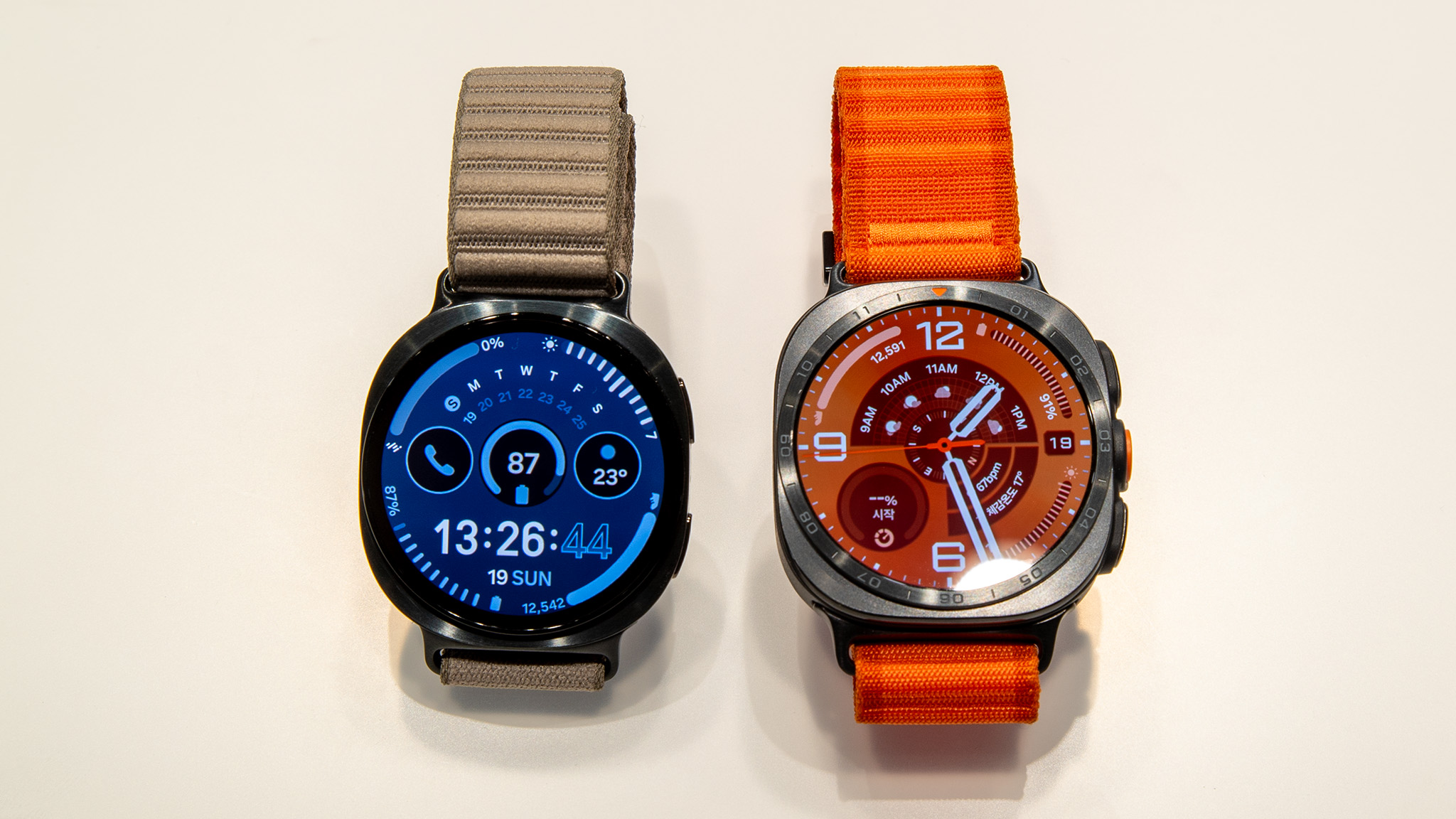
| Category | Galaxy Watch 9 | Galaxy Watch Ultra 2 | What it means |
|---|---|---|---|
| Processor | Snapdragon Wear Elite | Snapdragon Wear Elite | Daily performance should be effectively equal |
| Software | Wear OS 7 | Wear OS 7 | Same app platform and Samsung watch experience |
| Assistant | Gemini with Raise to Talk | Gemini with Raise to Talk | Same quick voice capture and wrist interaction |
| Health platform | BioActive sensor suite, Fitness Index, Heart Health Score, Daily Cardio Load, Vitals | BioActive sensor suite, Fitness Index, Heart Health Score, Daily Cardio Load, Vitals | Same main AI health layer |
| Battery estimate | About 30 hours with always-on display | About 60 hours with always-on display | Ultra 2 is the clear endurance pick |
| Durability | 5ATM/IP68 | 10ATM/IP69K/EN13319 | Ultra 2 is built for harsher water, dust, and pressure conditions |
| Weight | 34g for 44mm model | 61.5g | Watch 9 is much easier to forget on your wrist |
| Thickness | 8.6mm | 10.7mm | Watch 9 has the better sleep-tracking shape |
| Storage | Not positioned as the high-storage model | 64GB | Ultra 2 has more room for offline media and apps |
| LTE | $50 extra | Included | Narrows the gap slightly if you want cellular |
| US launch price | $380 | $700 | Ultra 2 costs $320 more before adding LTE to Watch 9 |
The Same Daily Watch, Before The Ultra Stuff Starts
For a productivity-minded Android user, the shared platform matters more than the case material. If a Slack message, calendar alert, timer, phone call, or Gemini voice note lands on your wrist, both watches are working from the same chip and software base. There is no separate Ultra-only processor tier hiding in the expensive model.[1]
That is the first reason the Watch 9 is hard to dismiss as the "lesser" choice. A smartwatch either interrupts you cleanly or sends you back into your phone. It either lets you capture a thought before it disappears or makes you unlock a larger screen and drift into something else. Since both models support Gemini with Raise to Talk, wrist-based voice capture is not an Ultra 2 privilege.[1]
The same is true for Samsung's new health layer. Fitness Index, Heart Health Score, Daily Cardio Load, and Vitals are available across both watches, so the morning dashboard that tells you how your sleep, strain, and recovery are trending does not require the $700 model.[1] Some of these features may need consistent overnight wear to become useful, which makes comfort part of the health feature, not a separate luxury.
The Ultra 2 can still be the better device for a specific person. It has a larger battery, tougher certifications, a brighter 5,000-nit display, titanium construction, 64GB of storage, included LTE, and outdoor features the Watch 9 does not match.[2] But those are not advantages you feel every time you triage a notification in the middle of a work block.
Battery Is The Ultra 2's Best Argument
The Ultra 2's strongest case is endurance. Samsung's estimate for the Ultra 2 is about 60 hours with the always-on display enabled, while the Watch 9 is estimated at about 30 hours with AOD.[2][3] If you travel often, forget chargers, use LTE away from your phone, or hate managing battery before bed, that difference is not cosmetic.
It is still an estimate, not a promise. PCMag noted that the previous Galaxy Watch 8 fell short of Samsung's battery estimate in its testing context, so the sensible reading is "the Ultra 2 should last much longer," not "everyone will get exactly 60 hours."[4] Display brightness, workout GPS, LTE, sleep tracking, app use, and notification volume can all pull real-world results away from a clean spec-sheet number.
Even with that caveat, the battery gap is real enough to drive the decision. The Ultra 2 has an 800mAh battery, compared with 445mAh on the Watch 9.[1] If your current smartwatch dies before dinner or forces you into awkward charging windows, the Ultra 2 solves a concrete problem.
The question is whether that problem happens often enough to justify the rest of the watch. A bigger battery comes inside a bigger object, and that trade-off is where the Watch 9 starts to look less like the budget compromise and more like the practical default.
Weight Matters More Than It Looks In A Spec Table
The 44mm Galaxy Watch 9 weighs 34g. The Galaxy Watch Ultra 2 weighs 61.5g.[5] That is the kind of difference you may not care about during a store demo and may care about very much at 1:30 a.m., when a watch is pressing into your wrist against a pillow.
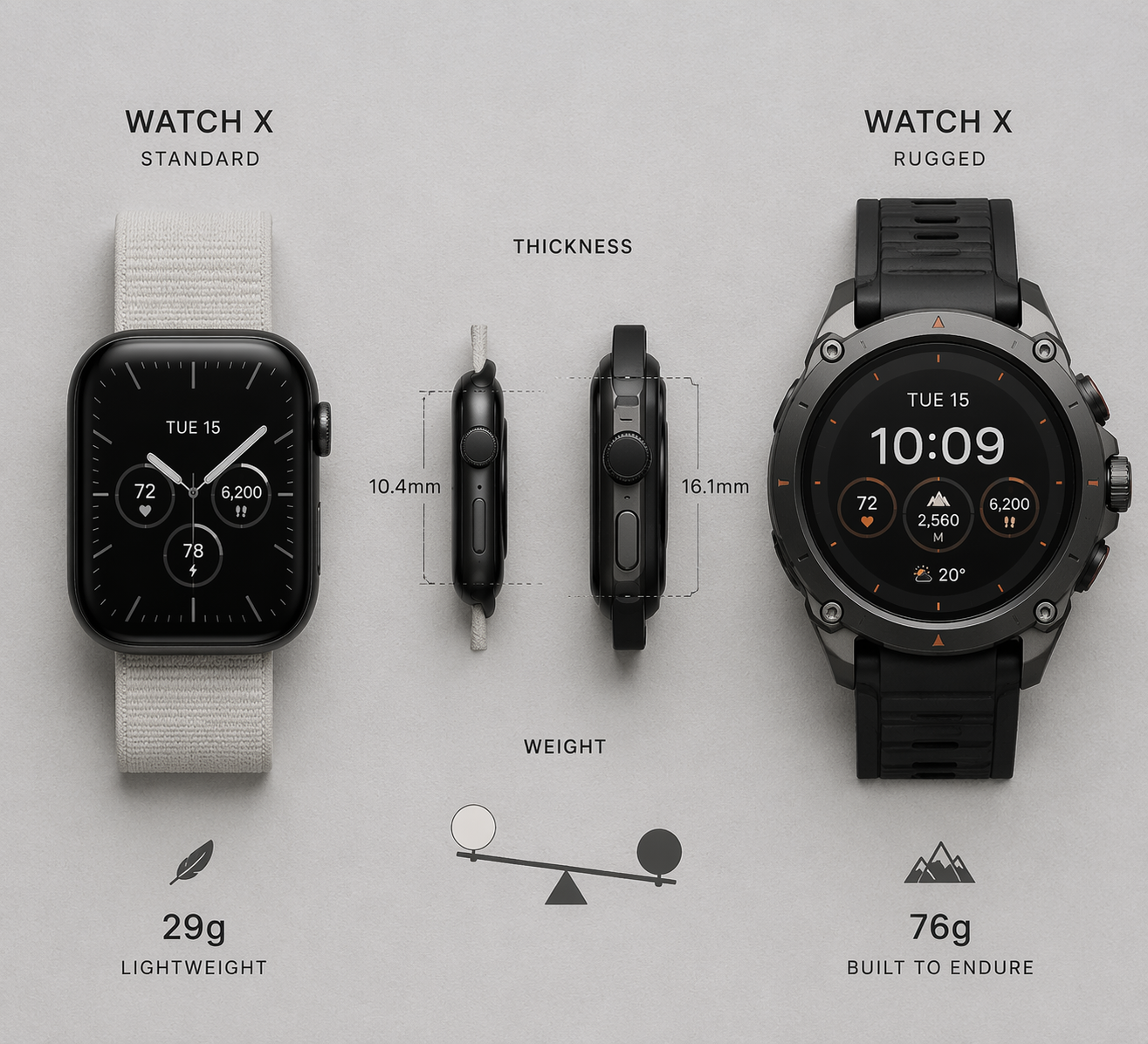
Sleep tracking only works if you actually sleep in the watch. Health trends only become useful if the device collects enough nights to separate a bad evening from a real pattern. For that use, the Watch 9's lighter 34g body and thinner 8.6mm profile are not minor comfort details; they are what make the health platform easier to use consistently.[5]
This is also where the Ultra 2's premium language can get a little loud. Titanium, rugged styling, and a bigger display presence are appealing, and plenty of buyers enjoy a watch that looks substantial. But if the watch comes off before sleep because it feels too bulky, the heavier build has quietly weakened one of the most useful parts of Samsung's health system.
Battery-first users may reasonably rank this differently. If you would rather wear a heavier watch than think about charging every day, the Ultra 2's body is the cost of getting the endurance you want. Just be honest about which annoyance you are trying to remove: charging anxiety or wrist fatigue.
The $320 Premium Needs A Job
The Galaxy Watch 9 starts at $380 in the US, while the Galaxy Watch Ultra 2 starts at $700.[6] LTE adds $50 to the Watch 9, while LTE is included on the Ultra 2.[6] If you were already buying cellular, that narrows the practical gap, but it does not erase it.
What the extra money buys is specific: tougher 10ATM/IP69K durability, EN13319 dive certification, titanium, a 5,000-nit display, 64GB of storage, Trail Run mode with GPX navigation, Nutrition Alert hydration guidance, and support for a Mares diving app that was announced but was not available for testing at launch.[2][7]
Those are real upgrades. They are not equally real for every buyer. A brighter display can help outdoors. More storage is useful if you keep music, maps, or apps on the watch. Stronger water and dust protection matters if the watch will be exposed to harsher conditions than commuting, office work, gym sessions, and sleep tracking. EN13319 certification is meaningful if diving is part of your life, not if you occasionally swim laps.
The Mares app deserves special caution because it was announced but not testable in the hands-on coverage available at launch.[7] That makes it a potential future advantage for divers, not something an everyday buyer should treat as proven value today.
Who Should Buy The Galaxy Watch 9
Buy the Galaxy Watch 9 if you want Samsung's best mainstream smartwatch experience for workdays, sleep, health trends, and notification control. It gives you the same processor, Wear OS 7 base, Gemini interaction, BioActive sensor suite, and new AI health metrics as the Ultra 2, while costing far less and sitting much lighter on the wrist.[1]
- You mainly use a watch to screen notifications, answer calls, check calendar nudges, and avoid unnecessary phone pickups.
- You want Gemini on your wrist for quick reminders, voice notes, and low-friction capture.
- You care about sleep tracking and are more likely to wear a lighter, thinner watch overnight.
- You do not need dive certification, GPX trail features, or the most rugged Samsung watch case.
- You would rather keep the $320 difference for earbuds, a charger, apps, or simply not spend it.
This is the safer recommendation for most Android knowledge workers. The Watch 9 is not missing the core 2026 Samsung watch experience. It is mostly missing the Ultra 2's endurance, rugged envelope, and adventure-specific extras.
Who Should Buy The Galaxy Watch Ultra 2
Buy the Galaxy Watch Ultra 2 if the larger battery or rugged build solves a problem you already have. The estimated 60-hour AOD battery life is the cleanest reason to move up, especially if you use LTE, take long outdoor workouts, travel without predictable charging time, or want a watch that can survive more demanding conditions.[2]
- You need substantially longer battery life and are willing to wear a heavier watch to get it.
- You want LTE included and would have paid extra for it on the Watch 9 anyway.
- You regularly hike, trail run, dive, or train outdoors in conditions where the stronger build matters.
- You want 64GB of storage for more offline media, apps, or watch-only use.
- You prefer a large, rugged watch and will not remove it at night because of the size.
There is nothing wrong with choosing the Ultra 2 because you genuinely like bigger, tougher hardware. The problem is buying it because it sounds like the more complete smartwatch, when the performance, software, assistant, and core health platform are shared with the Watch 9.
What The Launch Enthusiasm Does And Does Not Prove
Early enthusiast interest appears tilted toward the Ultra 2. In an Android Authority poll cited in launch coverage, 55% of respondents said they would buy the Ultra 2, compared with 22% for the Watch 9.[8] That sounds like a landslide until you look at what people said they wanted improved most: 53% chose better battery.[8]
That distinction matters. The poll supports the idea that battery is a major pain point for Samsung watch buyers. It does not prove that most buyers need EN13319 dive certification, Trail Run with GPX navigation, Nutrition Alert, or a titanium outdoor case. Enthusiast launch polls also measure stated interest, not long-term comfort, charging habits, or whether someone keeps wearing a 61.5g watch to bed after the first week.
The Buying Decision
For most Android users choosing between the Galaxy Watch 9 and Galaxy Watch Ultra 2, the Galaxy Watch 9 is the better buy. It delivers the same core smartwatch platform, the same assistant experience, and the same main AI health features for $380 instead of $700, with a lighter body that is easier to wear all day and overnight.[1][6]
Choose the Galaxy Watch Ultra 2 only if the premium has a recurring job: multi-day battery, included LTE, harsher durability needs, dive certification, outdoor navigation features, 64GB of storage, or a rugged design you will actually keep on your wrist. If those are occasional fantasies rather than weekly use cases, the Watch 9 is the more disciplined purchase.
If you choose the standard model, the next useful step is setup rather than more comparison shopping. Start with the same notification, assistant, and focus-oriented ideas in our Galaxy Watch 8 productivity settings guide; the habits matter more than the case material.
References
- Android Authority — full spec and pricing leak, Android Authority
- The Verge — hands-on battery and chip details, The Verge
- CNET — hands-on highlighting quiet upgrades, CNET
- PCMag — first look with battery caveats, PCMag
- The Shortcut — hands-on with weight/feel comparison, The Shortcut
- How-To Geek — pricing and release, How-To Geek
- SamMobile — Ultra 2 detailed overview, SamMobile
- Android Authority — hands-on impressions with Fitness Index demo, Android Authority