
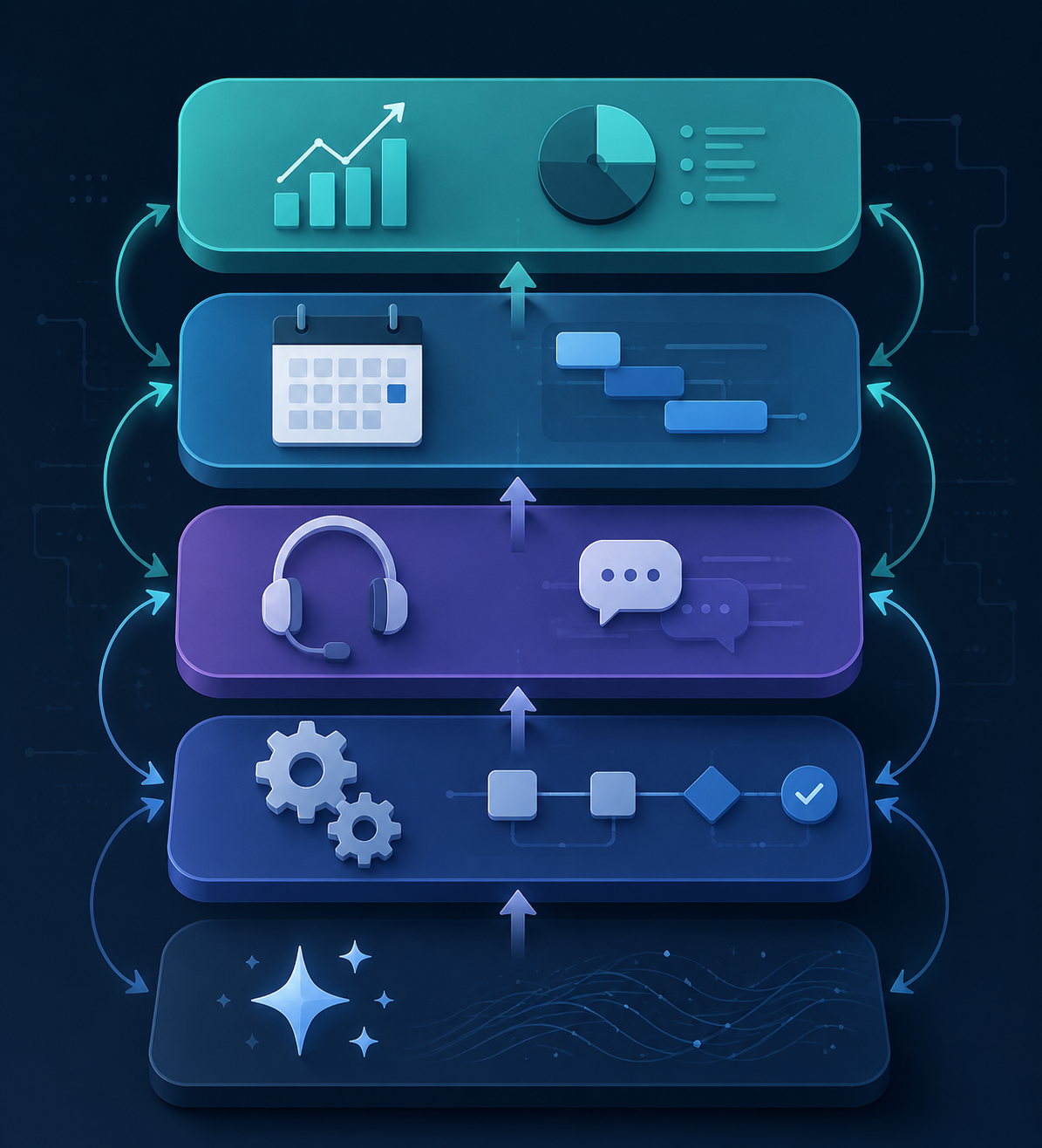
A useful AI stack for entrepreneurs is not a trophy shelf of clever demos. It is five business layers bought in a sensible order: a general assistant, automation, customer support, meetings, and analytics or design. Kept disciplined, that stack usually lands around $65–$300 per month, with the starter version much closer to the low end than the high end.[1][2]
Pricing and feature fit were last checked on July 5, 2026. The point is not to crown one permanent winner in each category. The point is to decide what deserves a subscription before another app starts quietly billing the company.
| Stack layer | Buy first when | Wait until | Typical monthly cost signal | What it should remove |
|---|---|---|---|---|
| General assistant | You draft emails, proposals, job posts, SOPs, research notes, or sales copy every week | Almost never; this is usually the first paid AI tool | About $20 for a strong individual plan; Kathryn Finney estimates this can replace 8–12 weekly hours of drafting and research labor.[3] | Blank-page work, first-pass research, rewriting, summarizing |
| Automation | The same information is copied between forms, inboxes, spreadsheets, CRM records, invoices, or project tools | Your process is still changing every few days | Often free to low-cost at first, then rises with task volume and complexity | Manual handoffs, duplicate entry, follow-up reminders |
| Customer support | The same questions come in repeatedly and slow down sales or delivery | Your support volume is low or every answer still needs judgment | Usually worth paying for after the FAQ, refund, scheduling, and order-status patterns are visible | Repeated replies, missed inbox messages, slow first response |
| Meetings | Calls create follow-up work that nobody captures cleanly | You have few calls or already leave every meeting with clear owners and due dates | Low-cost per user plans are common; choose based on where notes must land | Manual note-taking, action-item drift, CRM or project-update gaps |
| Analytics/design | You need regular reporting, spreadsheet cleanup, landing-page assets, pitch visuals, or campaign analysis | You are still guessing which metric matters | Highly variable; many teams start with built-in AI inside existing sheets, design, or reporting tools | Dashboard busywork, spreadsheet cleanup, simple creative production |
AI Is Already in the Small-Business Stack
The buying question has changed. Entrepreneurs are not deciding whether AI tools exist or whether other small businesses are testing them. In a March 2026 SBE Council survey, 82% of small business employers said they had adopted at least one AI tool, and the median business was using five tools.[4]
That 82% figure is useful, but it should not be stretched into proof that every tool is working. It includes broad adoption, including free and casual use. JPMorgan Chase Institute data gives a narrower spending view: by late 2025, 26.1% of employer firms had paid AI service subscriptions.[5] Those numbers are not contradictions. Together, they describe a market where experimentation is widespread, while paid commitment is still being sorted out.
SBE Council also found marketing and content to be the top AI use case among small businesses, while administrative automation was the fastest-growing use case.[4] That matches the stack order. Most owners first feel the drag in writing and research, then in the repetitive operating tasks that keep returning every week.
The same survey found that 93% of small businesses using AI planned to continue investing, and 62% planned to increase spending.[4] That is a warning as much as a signal. More spending can mean better throughput, or it can mean the company has created a subscription junk drawer with a login for every annoyance.
The Stack Should Stay Smaller Than the Temptation
The most useful benchmark in this category is not the biggest model release or the longest feature list. Salesforce reports that businesses running 3–5 well-integrated tools see roughly twice the productivity gains of businesses running more than 10 fragmented apps.[6]
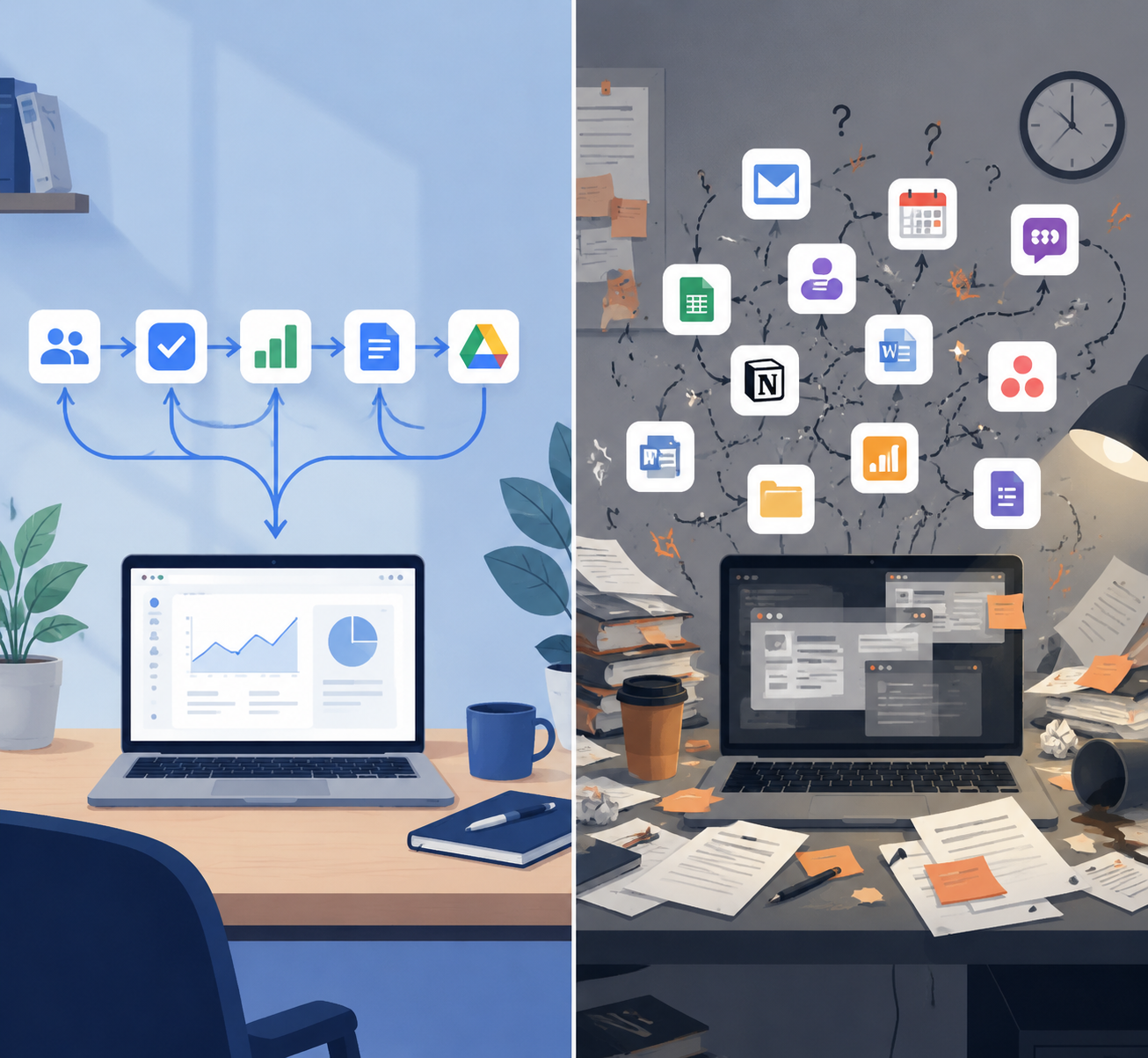
That finding should shape the buying rule. A tool that saves an hour inside its own window but creates a new place to check, update, reconcile, and train may not have saved the business an hour. It may have moved the work from one person’s inbox to everyone’s memory.
For a very small company, integration does not have to mean an enterprise architecture diagram. It can be as plain as this: the assistant can see the files it needs, the automation tool can update the CRM or sheet where work is actually tracked, the meeting notes land where follow-up happens, and the support tool does not answer from a knowledge base nobody maintains.
A good stack makes fewer people ask, “Where did that go?” A bad stack produces more places where the answer might be hiding.
Layer 1: Start With the General Assistant
The general assistant is usually the first paid AI tool because it touches the most work before the company has to redesign anything. It can help draft a proposal, tighten a sales email, compare vendor options, summarize a call transcript, turn messy notes into an SOP, or produce a first version of a job description.
Kathryn Finney estimates that a single $20/month assistant can replace 8–12 hours of weekly drafting and research labor.[3] That does not mean every entrepreneur gets those hours back cleanly. Some of the saved time becomes review time. Some becomes better output rather than less work. But as a first subscription, the risk is low and the surface area is wide.
This is also where entrepreneurs should learn their own standards before buying more. If the assistant cannot reliably help with the company’s real documents, offers, customer language, and operating notes, the problem may not be the model. The company may not have enough clean source material yet.
- Buy it first if you personally write, research, summarize, or rewrite work every week.
- Keep it if it becomes part of the daily operating rhythm, not just a novelty tab.
- Upgrade the surrounding setup only when the assistant needs reliable access to company files, calendars, CRM notes, or project systems.
- For a deeper look at assistant ecosystems, compare ChatGPT connectors and apps for productivity.
Layer 2: Add Automation Only After the Process Is Stable
Automation is where a small business can compound the value of AI, and it is also where owners create brittle messes. The danger is automating a process that the team has not agreed on yet. A shaky handoff between a form, inbox, spreadsheet, and CRM does not become less shaky because an automation tool moves it faster.
This layer earns its keep when the same motion happens often enough to be boring: lead capture into a CRM, intake answers into a project brief, invoice status into a spreadsheet, missed-call details into a follow-up task, support tags into a weekly issue report. If a person is copying the same field from one system to another every day, automation deserves a look.
The test is not whether the automation works once in a demo. The test is whether someone knows what happens when it fails. Who receives the error? Where does the half-finished record go? Can the owner see whether the automation reduced work, or only that another tool now has a green checkmark?
| Automation candidate | Good sign | Bad sign |
|---|---|---|
| Lead intake | Every lead needs the same fields, routing, and first response | The team still debates what counts as a qualified lead |
| Client onboarding | The same forms, folders, invoices, and kickoff tasks repeat | Every new client gets a custom scramble |
| Reporting | The same data is pulled weekly from known sources | Nobody agrees which number matters |
| Follow-up | Missed replies, renewals, or approvals are predictable | The process depends on private judgment sitting in one person’s head |
Entrepreneurs comparing this layer should look first at the systems they already use. If the business lives in Google Sheets, Gmail, Stripe, QuickBooks, HubSpot, Notion, Airtable, Slack, or a project tool, the automation product has to connect there cleanly. If it cannot update the place where work is trusted, it becomes another side ledger.
For task-by-task comparisons, see AI task automation tools and AI workflow automation without Zapier.
Layer 3: Customer Support Becomes Worth Paying For When Repetition Shows Up
Customer support AI is easy to overbuy early. A company with a handful of high-touch clients may need better notes and faster follow-up, not a chatbot. The layer becomes more valuable when the inbox starts repeating itself: pricing questions, scheduling questions, refund policies, shipping updates, login issues, service-area questions, or “where do I send this?” messages.
The first support job is usually not full replacement. It is triage. Tag the issue, find the likely answer, draft the reply, route the edge case, and surface the pattern at the end of the week. That kind of support AI helps the owner see what customers keep asking before hiring, rewriting the website, or changing the offer.
The knowledge base matters more than the bot interface. If policies are out of date, prices live in someone’s head, and exceptions are handled by memory, the support tool will expose the mess. That can still be useful, but it should not be mistaken for a finished support system.
Layer 4: Meeting Tools Should Create Follow-Through, Not Archives
Meeting AI looks productive because it creates visible output: transcripts, summaries, action items, searchable histories. The business value depends on where that output lands. A beautiful call summary that never becomes a task, CRM note, proposal update, or client recap is just another archive.
This layer is most useful for sales calls, client check-ins, hiring interviews, implementation calls, and internal meetings where decisions are easy to lose. The buyer should ask three questions before adding it: who reviews the notes, where do action items go, and what should never be recorded or shared?
If calls are already few and follow-up is clean, this tool can wait. If the founder is spending Friday afternoon reconstructing promises from memory, it probably cannot.
For a closer comparison of this layer, see AI meeting notes apps.
Layer 5: Analytics and Design Should Support Decisions Already Being Made
Analytics and design often get grouped together because they sit near the top of the stack: they turn operating data and market messages into something the business can use. That might be a weekly performance snapshot, a cleaned-up spreadsheet, a campaign visual, a pitch deck, a landing-page draft, or a quick explanation of why revenue moved.
The trap is buying this layer before the business has a decision rhythm. If nobody reviews the weekly numbers, AI-generated dashboards will not fix that. If the offer is still changing every day, AI-generated creative may produce volume without clarity.
This is where built-in AI inside existing tools can be enough. A founder may not need a separate analytics platform if the real need is to clean a spreadsheet, summarize trends, or turn a simple data table into a weekly operating note. For spreadsheet-heavy teams, start with Google Sheets AI workflows before adding another reporting subscription.
What a Starter, Lean, and Fuller Stack Can Cost
The $65–$300/month range is a practical planning band, not a guaranteed quote. Builts AI places a small-business stack around $65–$300/month, while MindStudio’s small-business guide points to a lower $50–$150/month range for many owners.[1][2] The difference usually comes from how many paid seats, automation runs, support conversations, and specialized tools the company adds.
| Stack size | Likely monthly spend | What is included | Who it fits |
|---|---|---|---|
| Starter | $20–$65 | General assistant plus free or built-in AI inside existing tools | Solo operators and very early teams still proving their workflow |
| Lean operating stack | $65–$150 | General assistant, one automation layer, and one workflow-specific add-on such as meetings or support | Owners with repeat lead, delivery, or admin work |
| Fuller five-layer stack | $150–$300 | Assistant, automation, support, meetings, and analytics/design, with enough integration to avoid duplicate tracking | Small teams with recurring customer volume and weekly reporting needs |
Finney’s broader estimate is that a complete AI stack can replace $10,000–$15,000 per month in equivalent labor across marketing, operations, and support.[3] That figure is useful as a way to compare software cost against part-time functional help. It should not be read as a promise that every small business will cut that amount from payroll or instantly convert it into growth.
Pricing comparisons from The Crunch and PE Collective are helpful for checking plan limits, free tiers, and current subscription bands, especially because AI pricing changes quickly.[7][8] The owner’s job is to resist turning “free to try” into “permanent clutter.”
Stage the Stack by Business Phase
A one-person business can run surprisingly far on a compact AI setup. Entrepreneur.com profiled a one-person business operated entirely with seven AI tools, which is a useful case, but still a case rather than proof that every solo company needs seven subscriptions.[9]
The better lesson is sequencing. A solo operator needs relief from drafting, research, scheduling, follow-up, and simple production. A five-person service firm needs shared handoffs and fewer dropped balls. A 25-person company needs permissioning, reporting, support coverage, and integration discipline. The same category can be right at one stage and wasteful at another.
| Business phase | Buy now | Delay | Main test |
|---|---|---|---|
| Solo or pre-hire | General assistant; built-in AI in existing tools; one simple automation if the task repeats weekly | Standalone support bots, complex analytics suites, multi-seat platforms | Does this remove work the founder personally repeats? |
| 2–5 people | General assistant for core roles; automation for intake and handoffs; meeting notes if calls drive delivery | Any tool that creates a second source of truth | Does this make work visible to the next person? |
| 6–15 people | Support triage, documented automations, shared knowledge base, basic reporting rhythm | Point tools that only one employee understands | Does this reduce waiting, rework, and inbox dependency? |
| 16–25 people | Integrated stack with admin controls, privacy review, reporting ownership, and clear tool retirement rules | New AI pilots without an owner and success measure | Does this improve throughput without multiplying systems? |
Cheap experimentation still has a place. A founder should be able to test a tool for a week, run real work through it, and cancel it without turning the decision into a committee project. The discipline is in what happens next: if the tool stays, it needs an owner, a workflow, and a reason to be reviewed again.
Privacy-sensitive teams should add one more gate before connecting tools to customer data, financial records, call transcripts, or employee information. A related review of privacy-safe AI productivity tools can help narrow that evaluation.
A Practical Buying Rule
Start with the layer that removes the most repeated work. For most entrepreneurs, that is the general assistant. For a business drowning in copy-paste handoffs, it may be automation. For a company losing revenue in the inbox, support triage may move up the list.
Add the next tool only when the workflow is stable enough to connect. If the process cannot be described, assigned, and reviewed, an AI subscription will usually make the confusion faster rather than smaller.
Judge the stack by fewer handoffs, cleaner follow-up, faster first drafts, better support coverage, and more usable reporting. The number of AI tools is not the score. The work moving through the business is.
References
- Best AI Tools for Small Business 2026, Builts AI.
- Best AI Tools for Small Business Owners 2026, MindStudio.
- AI Tools for Entrepreneurs, Kathryn Finney.
- The AI Tools Small Businesses Are Using, SBE Council, April 25, 2026.
- Small Business and AI Adoption, SBE Council, June 5, 2026.
- Best AI Tools for Startups, Salesforce.
- AI Software Price, The Crunch.
- AI Free Tiers Compared, PE Collective.
- 7 AI Tools That Run a One-Person Business in 2026 — No Employees Needed, Entrepreneur.com.