
Why Mac Hardware Specs Matter for Your Note-Taking App
If you use a MacBook for work or study, your note-taking app is likely one of the most frequently running applications on your machine. It launches at startup, sits in the background all day, and syncs data whenever you switch devices. On a MacBook Pro with 32GB of unified memory, the performance cost of any app is negligible. But on a base-model MacBook Air with 8GB of RAM — still a common configuration for students and budget-conscious professionals — the difference between a native app and an Electron-based one can be the difference between a responsive system and one that constantly swaps memory to the SSD.
This guide is built around a simple premise: the "best" note-taking app for your Mac is the one that keeps your system responsive while meeting your note-taking needs. We are not ranking apps by feature count or popularity. Instead, we are organizing the comparison around real-world performance data — RAM usage, launch speed, battery impact, and offline reliability — so you can make a decision based on how the app actually behaves on your hardware.
Performance Tiers: How We Tested and What We Found
The Atlas Workspace team measured three metrics on each app: cold launch time (how long the app takes to open from a fully quit state), idle RAM usage (memory consumed when the app is open but not actively being used), and sync latency (time for a note to appear on another device after creation). The results reveal a clear performance hierarchy that maps almost perfectly to the underlying technology stack.
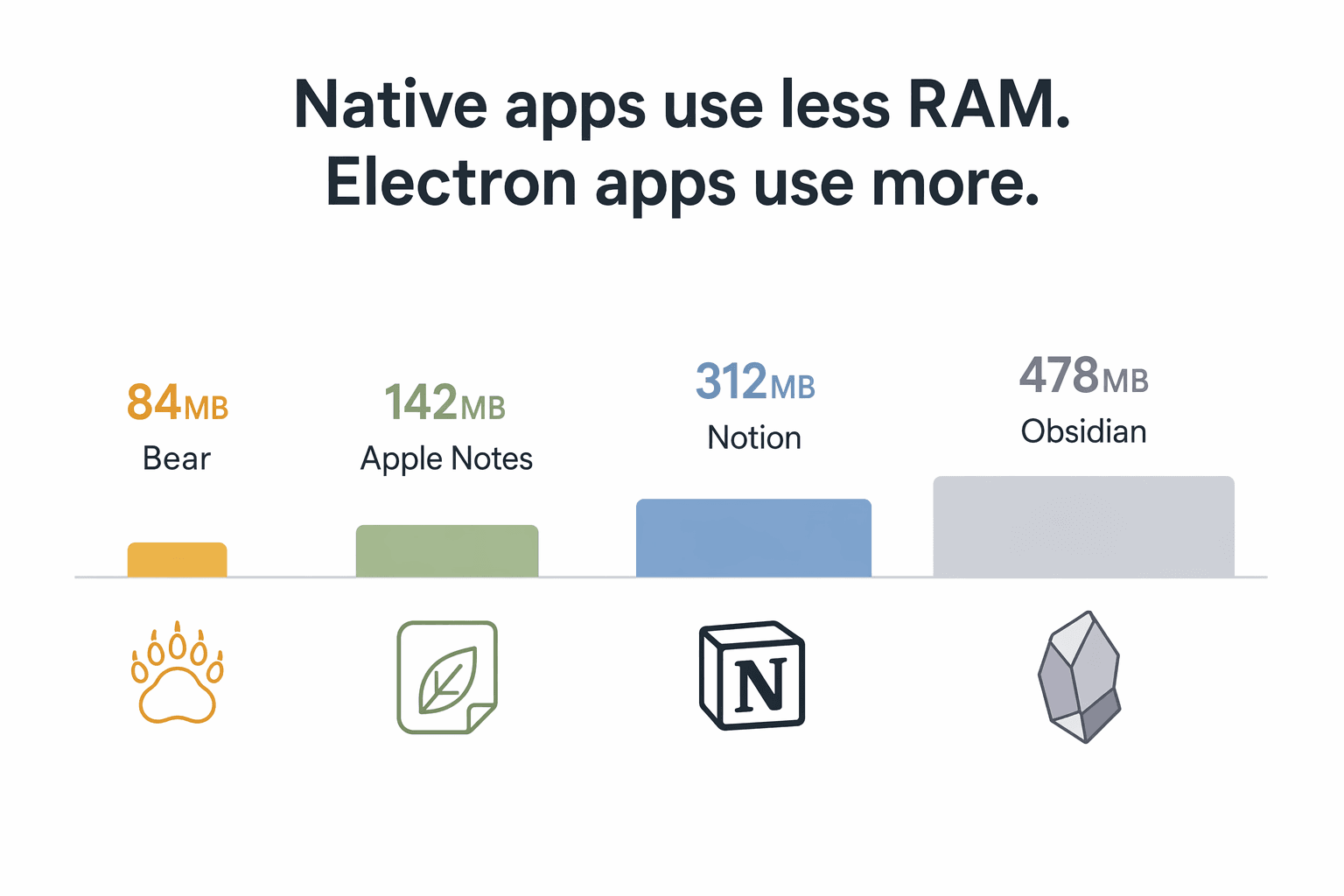
| Performance Tier | Apps | Idle RAM Range | Cold Launch Time | Technology |
|---|---|---|---|---|
| Lightweight Native (<200MB) | Apple Notes, Bear, Craft | 84MB – 142MB | 0.3s – 0.6s | SwiftUI / Native macOS |
| Medium (200–500MB) | Obsidian, Logseq, Reflect | 312MB – 478MB | 1.2s + plugin warm-up | Electron / Web-based |
| Heavy Electron (500MB–1GB) | Notion, Evernote | 500MB+ | 2.7s (Notion desktop client) | Electron / Chromium-based |
The gap between the lightest and heaviest apps is dramatic. Bear uses just 84MB of RAM at idle — less than a single browser tab with a complex web app. Apple Notes is close behind at 142MB. Notion consumes 312MB at idle, and Obsidian sits at 478MB — though Obsidian's RAM usage can climb significantly higher depending on the number and complexity of community plugins installed.
Launch speed follows the same pattern. Apple Notes opens in 0.3 seconds. Bear takes 0.6 seconds. Obsidian takes 1.2 seconds plus additional time for plugin warm-up. Notion's desktop client takes 2.7 seconds to become usable. These differences compound throughout a workday: every time you switch apps or restart your machine, the heavier apps cost you more waiting time.
Battery Impact: What Running Each App Costs You
RAM usage and battery drain are directly correlated on Apple Silicon Macs. Unified memory architecture means the CPU and GPU share the same pool of RAM. When an app consumes more memory, the system has less available for other tasks, which forces the memory controller to work harder and increases overall power draw. On an 8GB MacBook Air, this effect is amplified because the system begins swapping to the SSD much sooner.
The Atlas Workspace test categorized apps by their real-world battery impact:
- Lightweight native apps (Apple Notes, Bear, Craft): No measurable battery drain on an 8GB M2 MacBook Air. These apps use so little memory that they do not meaningfully affect the system's power profile.
- Medium-tier apps (Obsidian, Logseq, Reflect): Acceptable for all-day use. You will see a small increase in power consumption, but not enough to change your charging habits.
- Heavy Electron apps (Notion, Evernote): Measurable battery drain on 8GB MacBook Airs. Running Notion or Evernote as a daily driver on a base-model MacBook Air can cost you an hour or more of battery life over a full workday.
Offline Reliability: Full Offline vs. Cached vs. Online-Only
Offline capability is one of the most underrated factors in choosing a note-taking app — until you lose connectivity on a plane, in a subway tunnel, or during a conference with spotty Wi-Fi. The apps in this comparison fall into three distinct categories of offline behavior.
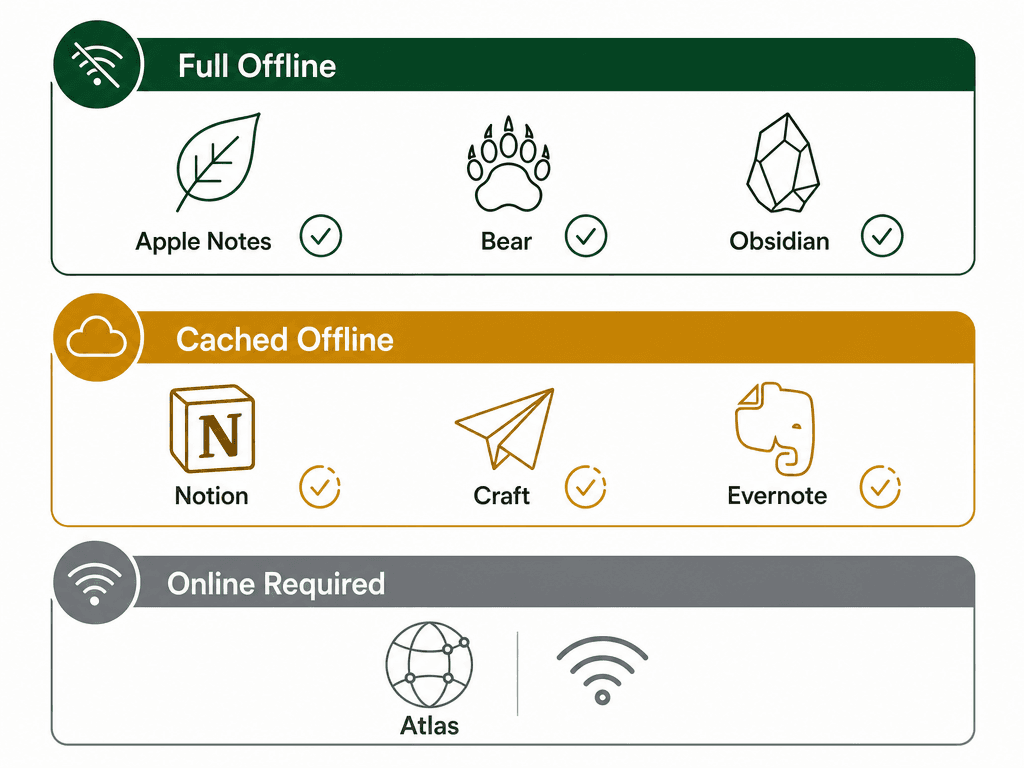
| Offline Category | Apps | What Happens Offline | Risk |
|---|---|---|---|
| Full Offline by Default | Apple Notes, Bear, Obsidian, Logseq | All notes are stored locally. Full read, write, and search work without any network connection. | Low — you never lose access to your data. |
| Cached Offline | Notion, Craft, Evernote | Recently opened notes are available offline. New notes sync when connectivity returns. Search may be limited to cached content. | Medium — if you haven't opened a note recently, it may be unavailable offline. |
| Online Required for AI Features | Atlas, Notion AI, Reflect | Core note storage may work offline, but AI features (Q&A, summarization, writing assistance) require an active internet connection. | High for AI-dependent workflows — these features are unavailable without connectivity. |
For users who frequently work offline — travelers, commuters, or anyone in areas with unreliable internet — the choice is straightforward. Apple Notes, Bear, and Obsidian store all data locally by default and sync when a connection is available. Notion and Evernote cache recently accessed notes but may leave older or unopened notes inaccessible. If your workflow depends on AI features like Q&A or summarization, be aware that these features will not work offline regardless of which app you choose.
AI Features Compared: Which Apps Actually Add Value?
AI features have become a major differentiator in the note-taking space, but not all implementations are equally useful. The key trade-off is that AI features often require connectivity and may increase resource usage when active. Here is how the major players compare.
| App | AI Features | Pricing for AI | Connectivity Required | Best For |
|---|---|---|---|---|
| Apple Notes | Apple Intelligence: copy editing, formatting, summarization, transcription from iPhone call recordings | Free with macOS Sequoia and Apple Silicon | Yes (on-device processing for some features) | Users who want basic AI writing assistance without paying extra. |
| Notion AI | Q&A over your workspace, writing assistance, summarization, translation | $24/user/month (Business plan includes AI) | Yes | Teams that need AI-powered search across shared knowledge bases. |
| Reflect | AI Q&A, daily summaries, writing suggestions | $10/month or $100/year (no free tier, 14-day trial) | Yes | Knowledge workers who want AI-powered daily briefings and note synthesis. |
| Atlas | AI Q&A, automated note linking, meeting note summarization | Pricing not publicly detailed (beta) | Yes (AI features online-only) | Users who want AI to actively connect related notes across their workspace. |
Apple Intelligence is the most accessible option for Mac users. It is free, runs on-device for many tasks (which means it works offline for some features), and integrates directly into Apple Notes. The copy editing and summarization features are genuinely useful for everyday writing. However, Apple Intelligence is limited to Apple's ecosystem and does not offer the kind of cross-workspace Q&A that Notion AI or Reflect provide.
Notion AI is the most powerful option for teams, but it comes at a significant cost — $24/user/month on the Business plan. For individual users, Reflect's $10/month plan offers a compelling middle ground with AI Q&A and daily summaries. Atlas is the newest entrant and focuses on automated note linking, but its AI features are online-only and its long-term pricing is not yet established.
Pick by Hardware Spec: What to Use on 8GB vs. 16GB+ Macs
Your Mac's hardware configuration should be the primary factor in your decision. Here are specific recommendations based on the benchmark data.
For 8GB MacBook Air and Pro Users
If you are on an 8GB MacBook Air or Pro, avoid using Notion or Evernote as your primary daily note-taking app. The battery and performance cost is measurable, and on a machine with limited memory, every megabyte counts. Instead, consider this stack:
- Apple Notes (free) — for quick capture, grocery lists, and anything that needs to sync instantly across your Apple devices. It launches in 0.3 seconds and uses 142MB of RAM.
- Bear Pro ($2.99/month or $29.99/year) — for long-form writing, Markdown-based notes, and anything that benefits from Bear's beautiful typography and organization system. It uses just 84MB of RAM.
- Obsidian (free core) — for personal knowledge management, research notes, and any system that requires bidirectional linking and a local-first vault. Be mindful of plugin usage, as heavy plugin configurations can increase RAM consumption significantly.
This three-app stack costs $14.99 per year (Bear Pro only) and covers every note-taking use case from quick capture to deep PKM. All three apps are fully offline by default, meaning you never lose access to your notes.
For 16GB+ MacBook Pro Users
If you have 16GB or more of unified memory, the performance cost of any note-taking app is effectively invisible. The system has enough headroom to keep Notion, Obsidian, and Evernote running alongside your other applications without noticeable slowdown or battery drain. On these machines, choose by features and workflow fit:
- Notion — if you need a flexible workspace with databases, project management, and team collaboration.
- Obsidian — if you want a local-first PKM system with a vast plugin ecosystem and full control over your data.
- Reflect — if you want AI-powered daily summaries and Q&A over your notes.
- Evernote — if you are already invested in its ecosystem and find value in its OCR and document scanning features. However, be aware that its free plan is now extremely limited (50 notes, 1 notebook, 1 device) and paid plans start at $15/month.
Final Verdict: The Best Mac Note-Taking App Depends on Your Hardware
The note-taking app market in 2026 offers more choice than ever, but the "best" app is not the one with the most features or the lowest price. It is the one that keeps your Mac responsive while meeting your specific note-taking needs. For 8GB MacBook Air users, that means prioritizing native apps like Apple Notes, Bear, and Craft that use under 200MB of RAM and have no measurable battery impact. For 16GB+ MacBook Pro users, the performance cost is invisible, so you can choose by features, AI capabilities, and ecosystem fit.
The key takeaway is simple: do not let a heavy Electron app turn your MacBook Air into a sluggish, battery-draining machine. The $14.99/year Apple Notes + Bear Pro + Obsidian stack gives you every note-taking capability you need without sacrificing system performance.
- For quick capture and Apple ecosystem sync: Apple Notes (free)
- For long-form writing and beautiful Markdown notes: Bear Pro ($29.99/year)
- For personal knowledge management and local-first PKM: Obsidian (free core)
- For team collaboration and databases: Notion (free for personal use; Plus from $10/user/month)
- For AI-powered note synthesis: Reflect ($10/month) or Notion AI ($24/user/month)
For a more traditional feature and pricing comparison across all major platforms, see our Best Note-Taking Software 2026: 10+ Apps Compared by Use Case, Price, and Platform. And if you are an Evernote user considering a switch due to recent price increases, our Evernote's Price Tripled: What Went Wrong and Where Should You Move Your Notes in 2026? guide covers the best migration paths.


Comments
Join the discussion with an anonymous comment.