
The fastest way to pick a free AI meeting minutes tool is to stop asking which product has the longest feature list and ask where the first hard limit appears. For Zoom-heavy solo users, Fathom is the strongest free starting point because it allows unlimited Zoom recordings, while AI summaries are capped at 5 per month and no credit card is required.[1][2][3] For people who move between Zoom, Google Meet, and Microsoft Teams, tl;dv is the better $0 fit because it supports unlimited recordings across those platforms, though free recordings are retained for 3 months and AI usage is limited.[4][5][3] Fireflies is useful when raw transcript storage matters more than AI summaries, while Otter, Granola, MeetGeek, and Fellow need more caution because their free limits arrive quickly for ordinary meeting habits.[6][1][2][4][7][5]
Pricing and free-tier details below were last verified on July 5, 2026. Free plans in this category change often, especially around AI summaries, retention, and storage.
| Tool | Best free use case | Meeting platform support | Recording or transcription allowance | AI summary allowance | Storage or retention limit | Credit card requirement | Not for you if |
|---|---|---|---|---|---|---|---|
| Fathom | Zoom-heavy individuals who need a few AI summaries | Zoom on the free tier | Unlimited Zoom recordings[1][2][3] | 5 AI summaries per month[1][2][3] | No major free recording cap cited in reviewed sources | No credit card required[1][2][3] | You regularly use Google Meet or Microsoft Teams |
| tl;dv | Cross-platform recording at $0 | Zoom, Google Meet, Microsoft Teams[4][5][3] | Unlimited recordings[4][5][3] | Limited AI features on the free tier[4][5][3] | Recordings auto-delete after 3 months[4][5][3] | Not specified in reviewed sources | You need long-term free storage |
| Fireflies | Raw transcription storage | Major meeting platforms, with sales-oriented integrations noted by reviewers[6] | Limited by storage rather than a simple meeting count | No AI summaries on the free plan[6] | 800 minutes of storage[6] | Not specified in reviewed sources | You need AI-written minutes without paying |
| Otter | Very light transcription use | Common meeting transcription workflows | 300 transcription minutes per month[1][2] | No AI summaries on the free tier, per cited comparisons[1] | Monthly minute cap | Not specified in reviewed sources | You have more than roughly 10 half-hour meetings per month |
| Granola | Trying the workflow before paying | Mac-focused, with Windows support noted in 2026 comparisons[4] | 25 meetings lifetime[4][2] | Included within the lifetime free allowance | Lifetime meeting cap | Not specified in reviewed sources | You want a durable free plan |
| Krisp | Light daily transcription | Meeting transcription with noise-cancellation roots | 60 minutes of transcription per day[7][8] | Limited by daily usage model | Daily reset rather than monthly pool | Not specified in reviewed sources | Your meetings cluster into long call-heavy days |
| Fellow | Task and meeting management with a small AI recording allowance | Team meeting workflows | 5 AI recordings per user[1][5] | 5 AI recordings per user[1][5] | Recording allowance is the practical cap | Not specified in reviewed sources | You mainly need transcription volume |
| MeetGeek | A short test, not ongoing free use | Meeting assistant workflows | 3 total hours of transcription[7] | Limited by the total free allowance | 3 total hours[7] | Not specified in reviewed sources | You expect the free plan to last beyond a few meetings |
The Fathom vs. tl;dv Decision
Fathom and tl;dv are the two free tiers most people should compare first, but they are generous in different ways. Fathom gives more comfort if your meetings already happen in Zoom. Unlimited recording means you are not counting minutes before every client call, class discussion, or founder interview. The catch is that AI summaries are capped at 5 per month, so the free plan works best when you only need polished AI minutes for the meetings that matter most.[1][2][3]
That cap is not automatically a dealbreaker. A freelancer who has several Zoom calls a week may only need AI summaries for client-facing sessions, while using recordings and transcripts for the rest. A student may save the 5 summaries for seminars or group projects. The plan becomes frustrating when every meeting needs a clean AI-generated recap, action-item extraction, and follow-up notes.
tl;dv solves a different problem: platform sprawl. If Monday’s call is in Google Meet, Tuesday’s sales chat is in Teams, and Wednesday’s workshop is in Zoom, Fathom’s free Zoom focus starts to look narrow. tl;dv’s free tier supports unlimited recordings across Zoom, Google Meet, and Microsoft Teams, which is unusually useful at $0.[4][5][3]
The word “unlimited” needs its footnote, though. tl;dv’s free recordings auto-delete after 3 months, and AI features are limited.[4][5][3] That makes it a strong capture tool, not a permanent free archive. If you review meetings within a few weeks, export what matters, and do not expect the product to become your long-term knowledge base for free, the limit is manageable. If you want to search last year’s meetings without paying, it is the wrong constraint.

Match the Free Plan to Your Actual Meeting Habit
A free AI meeting minutes tool fails when its limit hits the part of your workflow you cannot compromise on. The right choice depends less on the product category and more on the shape of your calendar.
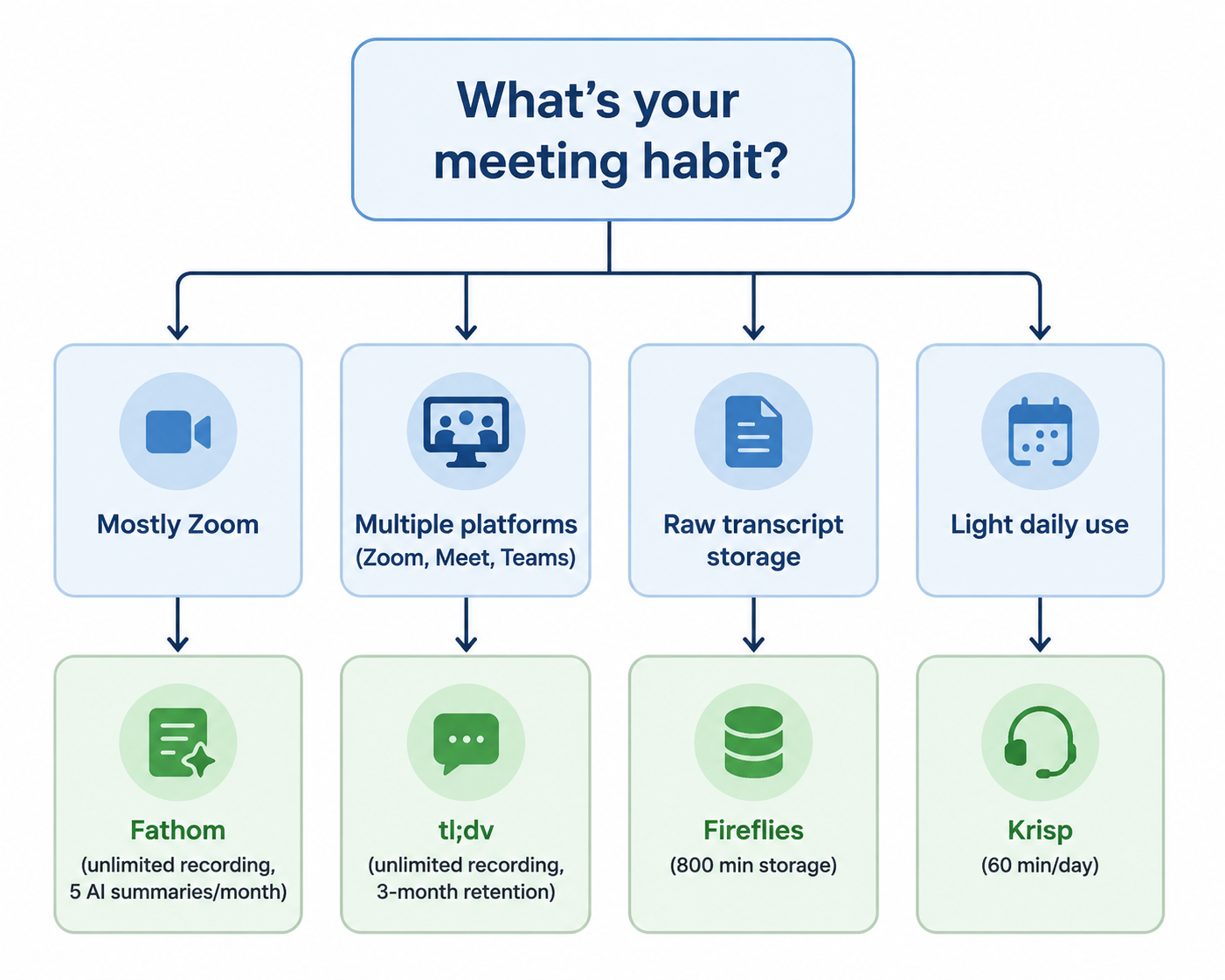
- Mostly Zoom, with only a few meetings that need polished summaries: start with Fathom.
- Multiple meeting platforms, with recordings more important than long-term storage: start with tl;dv.
- Raw transcript storage, with little need for AI-written summaries: consider Fireflies.
- Short calls spread across many days: Krisp’s daily reset may fit better than a monthly cap.
- A one-time evaluation before paying: Granola or MeetGeek can be reasonable tests, but not durable free systems.
- Meeting agendas, tasks, and team follow-through matter more than transcription volume: Fellow may be relevant, but its free AI recording allowance is small.
If You Mostly Use Zoom
Choose Fathom first. Unlimited Zoom recording removes the most annoying free-plan behavior: watching a minute meter run down during a normal workweek. The AI summary cap still matters, but it is easier to manage than a hard transcription ceiling because you can decide which meetings deserve one of the 5 monthly summaries.[1][2][3]
The upgrade trigger is clear: you start needing AI summaries for nearly every Zoom call, not just the important ones. Until then, Fathom’s free tier has enough room for real use rather than a weekend test.
If Your Meetings Jump Between Zoom, Meet, and Teams
Choose tl;dv first. A tool that is generous on one platform but absent on the other two will make you reorganize your work around the software, which is exactly the wrong bargain for a free plan. tl;dv’s cross-platform recording support is the main reason it belongs near the top of this comparison.[4][5][3]
The tradeoff is retention. Three-month auto-delete is fine for people who process notes quickly, move decisions into a task manager, and do not treat recordings as permanent records.[4][5][3] It is risky for anyone who routinely says, “We can look that up later,” and means six months later.
If You Only Need Transcripts
Fireflies belongs in the conversation when AI-written minutes are not the main requirement. Its free plan offers 800 minutes of storage but does not include AI summaries, according to cited comparisons.[6] That is a usable boundary if your workflow is: record, transcribe, search or skim, then move the important details somewhere else.
It is not a good match for someone who expects the tool to produce polished meeting minutes automatically. Without AI summaries on the free plan, the labor shifts back to you.
If Your Usage Is Light but Regular
Krisp’s 60 minutes per day is a different kind of free limit.[7][8] It can work well for a student with one lecture discussion, a freelancer with a short daily client check-in, or a founder who wants a transcript of a standup. It works poorly when your meetings arrive in clumps. A quiet Tuesday does not save unused minutes for a four-call Thursday.
This is where daily caps can look friendlier than they feel. They reward consistency, not total monthly restraint.
The Free Plans That Need a Warning Label
Otter’s 300 transcription minutes per month sounds usable until it is translated into meetings. That is roughly 10 half-hour meetings before the cap arrives, and cited comparisons do not support treating its free tier as an AI-summary plan.[1][2] For a casual user, it may be enough. For anyone taking regular client calls, classes, interviews, or team meetings, it is a tight ceiling.
Granola’s free tier is even easier to misread. A 25-meeting lifetime allowance is not the same as 25 meetings per month.[4][2] That can be perfectly fair as an evaluation path, but it should not be sold to yourself as a long-term free meeting minutes system. If you like Granola’s workflow, assume you are testing whether to pay.
MeetGeek’s 3 total hours of transcription sits in the same trial-like category.[7] Three hours can disappear in one workshop, a few interviews, or a week of ordinary project calls. It is enough to understand the product, not enough to build a habit around it.
Fellow is slightly different because its center of gravity is meeting management, tasks, and follow-through rather than maximum free transcription. The free tier’s 5 AI recordings per user makes it a poor fit if your main need is recording volume.[1][5] It may still make sense if your bigger problem is keeping agendas and action items from drifting, especially in a small team context.
What Not to Overvalue on a Free Tier
AI meeting minutes tools like to advertise summaries, action items, speaker insights, integrations, and searchable knowledge bases. Those features matter once a tool survives your basic usage pattern. On a free plan, the first-order questions are simpler: Can it join the meetings you actually attend? Can it record enough of them? Can you access the notes long enough to use them? Does the free tier include AI summaries, or only transcription?
Advanced collaboration, CRM sync, admin controls, and compliance posture may matter a lot for a sales team or regulated organization. They are just not the deciding factors for a solo operator trying to avoid losing decisions from a Tuesday call. If privacy architecture is the main concern, that deserves a separate evaluation from free-tier generosity.
The same goes for return on investment. The paid plan may become worth it the moment missed follow-ups cost more than the subscription. But that is a different question from whether the free tier is honest enough to use for real work.
A Practical Free-Tier Pick
Start with Fathom if most of your meetings are in Zoom and 5 AI summaries per month cover the meetings where polished minutes actually matter.[1][2][3] Start with tl;dv if platform flexibility matters more than keeping a free recording archive beyond 3 months.[4][5][3] Use Fireflies if raw transcription storage is the point and you are willing to write or assemble the summary yourself.[6] Consider Krisp if your transcription needs fit inside a light daily rhythm.[7][8]
Be more skeptical of Otter, Granola, MeetGeek, and Fellow if you expect a durable free AI meeting minutes system. Their limits may still be useful for testing, but they are easier to exhaust before the habit has time to pay off.[1][2][4][7][5]
Choose the free plan whose first constraint is the one you can live with, not the one with the most impressive AI branding.
References
- The 10 best AI meeting assistants in 2026, Zapier
- Best AI Meeting Note Takers in 2026, Simular
- Top 12 Meeting Minutes Apps, Lindy
- Best AI Meeting Notetakers 2026, Alfred
- Otter vs Fireflies vs Fathom, Convo
- The 12 best AI meeting note takers in 2026, CirrusInsight
- AI Meeting Assistant Comparison 2026, Meetily
- Top 12 AI notetakers in 2026, AssemblyAI