

What Is Document Workflow Automation? (And Why It Matters in 2026)
Document workflow automation is the use of software to route, approve, generate, and archive documents with minimal human intervention. Think of it as a four-stage pipeline: a trigger event (an invoice arrives, a contract is signed, a form is submitted) initiates a routing path (send to the right person or system), passes through approval gates (manager signs off, compliance checks pass), and produces an output (a PDF is generated, a record is saved to a CRM, a payment is released).
In 2026, this is not a nice-to-have. The global workflow automation market was valued at $26.5 billion in 2024 and is projected to exceed $78 billion by 2030, according to Grand View Research data cited by Cflow. Already, 66% of organizations have automated at least one business function, and 58% use automation specifically for data, reporting, and planning processes (McKinsey via Cflow and DocuClipper). The shift is not just about efficiency — it is about accuracy and speed. Automated document workflows reduce processing time by up to 90% and cut error rates by 50% (SenseTask). For a mid-sized company processing hundreds of invoices or contracts each month, those numbers translate directly into bottom-line savings.
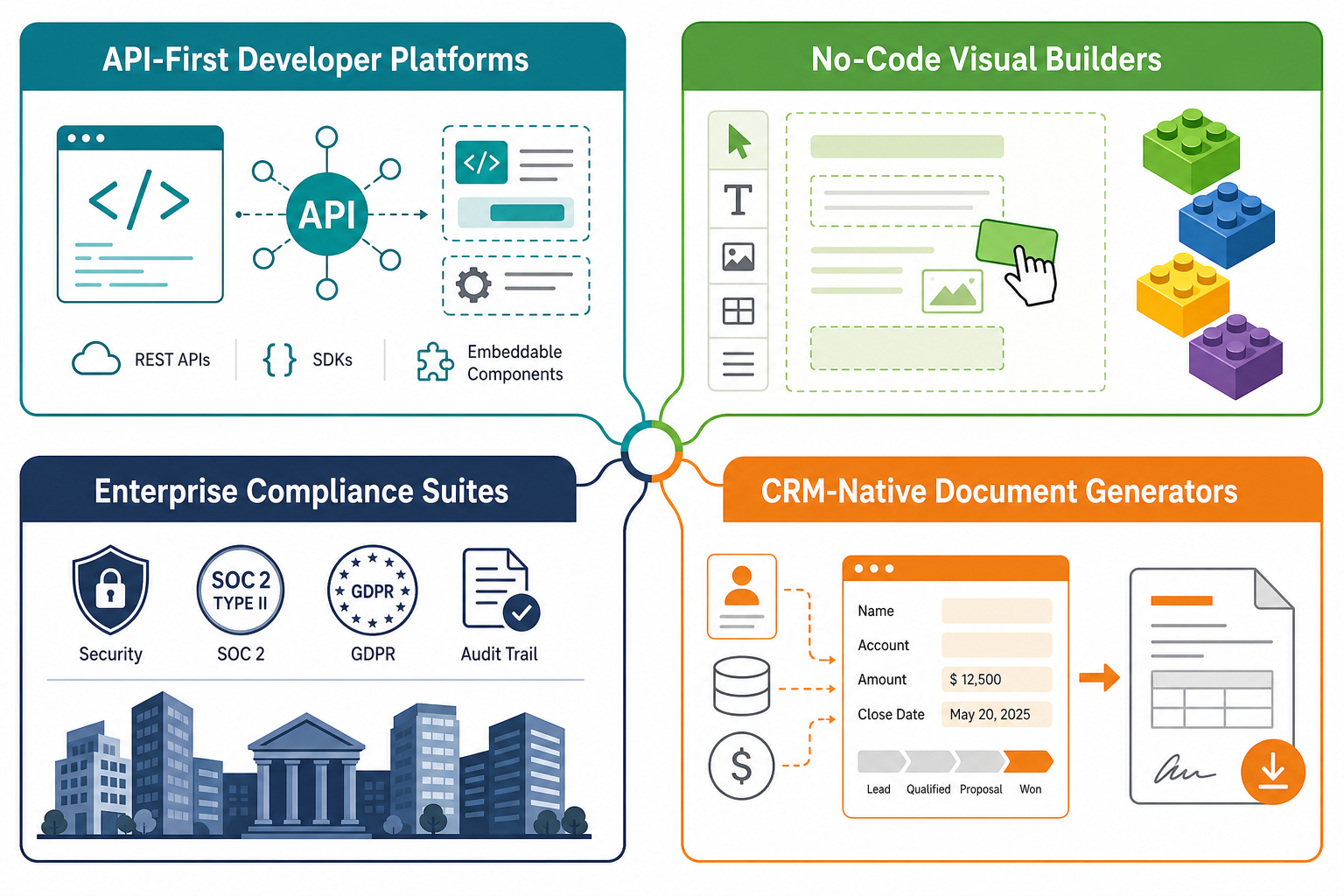
The real story in 2026, however, is that document workflow tools have diverged into four distinct categories. The platform that works for a 5-person sales team generating proposals is not the same platform a regulated enterprise needs for compliance routing. Understanding these categories — and where your team fits — is the difference between a successful deployment and an expensive shelfware project.
Comparison Table: 8 Document Workflow Automation Tools at a Glance
The table below covers eight tools across the four categories. Pricing was last verified in June 2026. Where a tool uses custom or "upon request" pricing, that is noted explicitly — a transparency gap worth flagging before you start a sales cycle.
| Tool | Category | Starting Price | Best For | Key Features | Platform |
|---|---|---|---|---|---|
| Anvil | API-First Developer | Free tier (limited); paid plans start ~$49/mo | Engineering teams building custom document pipelines | PDF filling, PDF generation (HTML/CSS), embedded e-signature, multi-step Workflows via REST API | Web, API |
| Dropbox Sign | API-First Developer | Free tier (3 signatures/mo); paid from $15/mo | Developers needing a reliable e-signature API with audit trails | E-signature API, 100 req/min rate limit, IP tracking, tamper detection, detailed audit logs | Web, API, Mobile |
| Jotform Workflows | No-Code Visual Builder | Free (10 docs/mo); Bronze $39/mo (100 docs); Silver $49/mo (250 docs); Gold $129/mo (1,000 docs) | Small teams and operations managers who need to build forms and approvals without coding | Drag-and-drop builder, 800+ templates, conditional logic, parallel approvals, automated reminders | Web, Mobile |
| Make | No-Code Visual Builder | Free (1,000 ops/mo); paid from $9/mo | Teams needing visual document routing between apps | Visual scenario builder, 2,000+ apps, conditional routing, document transformation modules | Web, API |
| Zapier | No-Code Visual Builder | Free (100 tasks/mo); paid from $19.99/mo | Teams that need the broadest integration ecosystem for document triggers | 7,000+ app integrations, multi-step Zaps, document parsing, formatter tools | Web, API |
| DocuWare | Enterprise Compliance Suite | Custom pricing (typically $10K+/year) | Regulated industries needing AI-powered classification and 500+ integrations | AI document classification, drag-and-drop workflows, built-in e-signature, cloud on Azure, on-premises option | Web, Mobile, On-Premises |
| DocuSign | Enterprise Compliance Suite | Personal $10/mo; Standard $25/mo; Business Pro $40/mo; Enterprise custom | Organizations requiring certified e-signature with global compliance | E-signature in 44 languages, 400+ integrations, ISO 27001:2022/27017/27018/PCI DSS certified, templates | Web, Mobile, API |
| Conga | CRM-Native Document Generator | Custom pricing | Salesforce-native teams needing document generation and e-signature within CRM workflows | Salesforce integration, document generation, clause library, e-signature, contract lifecycle management | Web (Salesforce-native) |
Tool-by-Tool Analysis: Honest Pros, Cons, and 'Not for You If'
API-First Developer Platforms
These tools are built for teams that have engineering resources and need to embed document workflows directly into their own applications or customer-facing portals.
Anvil
Anvil provides a full REST API for PDF filling, PDF generation (rendering HTML/CSS into PDFs), and embedded e-signatures. Its multi-step Workflows feature lets you chain document generation, signing, and data collection into a single pipeline. The embedded signing component supports iframes and React components with event hooks, making it a strong fit for SaaS products that need to offer document features to their own users.
- Not for you if: You do not have a developer who can work with REST APIs. Anvil is not a drag-and-drop tool — it requires coding to set up and maintain.
Dropbox Sign
Dropbox Sign (formerly HelloSign) offers a developer-focused e-signature API with published rate limits of 100 requests per minute on the standard plan. Its key differentiator is the depth of its audit trail: IP tracking, tamper detection, and detailed signing logs make it suitable for legal and compliance use cases. The free tier allows three signatures per month, which is enough for testing but not for production.
- Not for you if: You need full document generation (PDF filling, HTML-to-PDF) in addition to e-signatures. Dropbox Sign is primarily an e-signature API — for document creation, you would pair it with a separate tool.
No-Code Visual Builders
These platforms let operations managers and small teams build document workflows through visual interfaces — no engineering required.
Jotform Workflows
Jotform Workflows combines form building with document approval routing. Its drag-and-drop builder supports conditional logic, parallel approvals, and automated reminders. With over 800 ready-made templates, it is one of the fastest tools to get started with. The free tier (10 documents per month) is genuinely usable for micro-businesses or testing. Paid plans range from $39/month (Bronze, 100 docs) to $129/month (Gold, 1,000 docs), with enterprise custom pricing above that.
- Not for you if: You need to generate complex, branded PDF documents from scratch. Jotform excels at form-based approvals but is not a document generation engine.
Make
Make (formerly Integromat) is a visual automation builder that connects apps through a scenario editor. For document workflows, it excels at routing documents between systems: when a new file appears in Dropbox, Make can extract data, send it to a Google Sheet for approval, and then generate a PDF via a connected API. Its 2,000+ app integrations make it flexible, but it requires more setup than a purpose-built document workflow tool.
- Not for you if: You want an out-of-the-box document approval interface with e-signature. Make is a general automation platform — you will need to build the document-specific logic yourself.
Zapier
Zapier's strength is its ecosystem: 7,000+ app integrations make it the most likely tool to connect whatever stack you already use. For document workflows, common patterns include: when a new form submission is received, generate a document and send it for signature; or when a contract is signed, save it to a CRM and notify the team. The free tier (100 tasks per month) is useful for testing, but production document workflows typically require a paid plan starting at $19.99/month.
- Not for you if: You need complex conditional routing or parallel approval paths. Zapier's linear step-by-step model becomes unwieldy for multi-branch document workflows.
Enterprise Compliance Suites
These platforms are built for regulated industries — finance, healthcare, legal, government — where compliance, audit trails, and security certifications are non-negotiable.
DocuWare
DocuWare uses AI-powered document classification to automatically sort and route incoming documents. Its drag-and-drop workflow builder supports conditional logic, and the platform includes a built-in e-signature module. With 500+ integrations and deployment options including cloud (on Microsoft Azure) and on-premises, it is a strong choice for organizations that need to digitize high-volume document processes like accounts payable or HR records. Pricing is custom — expect to engage with sales.
- Not for you if: You are a small team with simple document needs. DocuWare's power comes with complexity and cost that are justified only at scale.
DocuSign
DocuSign is the market leader in e-signature, supporting documents in 14 languages and e-signatures in 44 languages. Its 400+ integrations cover most major business applications, and its security certifications — ISO 27001:2022, 27017, 27018, PCI DSS — make it the default choice for regulated environments. Beyond e-signature, DocuSign's contract lifecycle management features include templates, clause libraries, and automated workflows. Pricing starts at $10/month for Personal and scales to custom Enterprise tiers.
- Not for you if: You need document generation (creating PDFs from data) as part of your workflow. DocuSign is primarily an e-signature and contract management platform — you will need a separate tool for document creation.
CRM-Native Document Generators
These tools live inside your CRM and are designed for sales and proposal workflows where speed and template consistency matter most.
Conga
Conga (formerly Apttus) is deeply integrated with Salesforce, allowing users to generate quotes, proposals, contracts, and invoices directly from CRM data. Its document generation engine pulls data from Salesforce objects and populates templates, while its clause library ensures legal compliance. Conga also includes e-signature capabilities. Pricing is custom and typically starts at enterprise levels.
- Not for you if: You do not use Salesforce as your primary CRM. Conga's value is tightly coupled to the Salesforce ecosystem.
Decision Framework: Which Category Fits Your Team?
Rather than asking "which tool is best?", start by asking "which category fits our team's technical capability, document volume, and compliance requirements?" The table below maps the four categories to the teams they serve best.
| Category | Best For | Technical Requirement | Typical Document Volume | Example Tools |
|---|---|---|---|---|
| API-First Developer Platforms | Engineering teams building custom document pipelines into their own products or portals | In-house development team comfortable with REST APIs | Variable — scales with API usage | Anvil, Dropbox Sign |
| No-Code Visual Builders | Operations managers, small teams, and SMBs who need to build workflows without coding | No coding required; visual interface literacy | Low to medium (10–1,000 docs/month) | Jotform Workflows, Make, Zapier |
| Enterprise Compliance Suites | Regulated industries (finance, healthcare, legal) with compliance and audit requirements | IT support for deployment; compliance team involvement | High (1,000+ docs/month) | DocuWare, DocuSign, OpenText |
| CRM-Native Document Generators | Sales teams that need to generate proposals and contracts directly from CRM data | CRM administrator; minimal technical setup | Medium (50–500 docs/month) | Conga, PandaDoc |
Use this checklist to narrow your options:
- Do you have developers who can work with APIs? If yes, consider API-first platforms (Anvil, Dropbox Sign) for maximum flexibility. If no, skip to no-code or CRM-native categories.
- Do you need compliance certifications (ISO, SOC 2, HIPAA, PCI DSS)? If yes, enterprise suites (DocuWare, DocuSign) are your starting point.
- Is your primary workflow sales proposals from a CRM? If yes, CRM-native tools (Conga, PandaDoc) will give you the fastest time-to-value.
- Are you a small team with basic form-to-approval needs? If yes, no-code builders (Jotform Workflows, Make, Zapier) offer the best balance of speed and cost.
- Do you use Microsoft 365 extensively? If yes, Power Automate (covered in our dedicated setup guide) deserves a close look — it is the most natural fit for Microsoft-centric organizations.
Pricing Ranges: From Free Tiers to Enterprise Custom Quotes
Pricing for document workflow automation spans a wide range, from genuinely useful free tiers to enterprise contracts that require a sales conversation. The table below summarizes the pricing landscape across the tools covered in this comparison.
| Tier | Price Range | What You Get | Example Tools |
|---|---|---|---|
| Free | $0 | Limited document volume (3–100 docs/month), basic features, community support | Jotform Sign (10 docs/mo), Dropbox Sign (3 signatures/mo), Zapier (100 tasks/mo), Make (1,000 ops/mo) |
| Starter / Individual | $9–$40/month | Higher document limits, basic integrations, email support | Jotform Bronze ($39/mo), Zapier ($19.99/mo), Make ($9/mo), DocuSign Personal ($10/mo) |
| Team / Business | $40–$130/month | Multiple users, advanced integrations, conditional logic, parallel approvals | Jotform Gold ($129/mo), DocuSign Standard ($25/mo) and Business Pro ($40/mo) |
| Enterprise | Custom (typically $10K+/year) | AI-powered classification, compliance certifications, dedicated support, on-premises options | DocuWare (custom), OpenText (custom), Conga (custom), DocuSign Enterprise (custom) |
To frame the ROI conversation: organizations using workflow automation save an average of $46,000 annually per organization (DocuClipper, Cflow). Accounts payable automation alone cuts processing cost from approximately $10 per invoice to roughly $2. Forrester's 2024 Total Economic Impact study documented a 248% three-year ROI for enterprises deploying workflow automation platforms (Cflow). Even a modest deployment — automating one or two document processes — typically pays for itself within the first year.
Top Picks: Best for Developers, Small Teams, Enterprises, and Microsoft Shops
Based on the analysis above, here are our recommendations for four common scenarios. Each pick includes a brief justification and a "not for you if" caveat to help you self-qualify.
Best for Developers: Anvil
Anvil offers the most complete API-first document workflow toolkit: PDF filling, HTML-to-PDF generation, embedded e-signatures, and multi-step Workflows — all accessible through a single REST API. If your team needs to embed document features into a SaaS product or build a custom document pipeline, Anvil gives you the building blocks without forcing you into a pre-built interface.
- Not for you if: You do not have development resources or you need a turnkey document approval interface.
Best for Small Teams: Jotform Workflows
Jotform Workflows combines a genuinely usable free tier (10 documents per month) with a drag-and-drop builder that requires no training. Its 800+ templates mean most teams can go from zero to a working approval workflow in under an hour. The paid plans scale reasonably to 1,000 documents per month, covering the needs of most small to mid-sized teams.
- Not for you if: You need to generate complex PDF documents from data, or you need compliance certifications like HIPAA or SOC 2.
Best for Enterprises: DocuSign
DocuSign's combination of global compliance certifications (ISO 27001:2022, PCI DSS), 400+ integrations, and support for 44 languages makes it the safest choice for organizations that operate across regulated industries or international markets. Its contract lifecycle management features go beyond e-signature to cover the full document lifecycle.
- Not for you if: You need document generation (creating PDFs from data) as a core feature — DocuSign is not a document generation platform.
Best for Microsoft Shops: Power Automate
If your organization runs on Microsoft 365 — SharePoint for document storage, Teams for communication, Outlook for email — Power Automate is the most natural choice for document workflow automation. Its deep integration with SharePoint document libraries, Excel, and Dataverse means you can build document approval workflows that trigger from SharePoint, route through Teams for approval, and archive signed documents back to SharePoint — all without leaving the Microsoft ecosystem.
For a step-by-step walkthrough of setting up your first document workflows in Power Automate, see our Power Automate Workflow Setup Guide.
- Not for you if: You do not use Microsoft 365 as your primary productivity suite — Power Automate's value diminishes significantly outside the Microsoft ecosystem.
Frequently Asked Questions About Document Workflow Automation
What is the difference between document workflow automation and general workflow automation?
General workflow automation covers any repetitive business process — sending emails, updating databases, posting to Slack. Document workflow automation is a sub-category focused specifically on document-centric processes: generating PDFs from data, routing documents for approval, collecting e-signatures, and archiving completed documents. The tools in this comparison are selected specifically for document workflows, not general task automation.
How much does document workflow automation cost?
Costs range from free (Jotform Sign: 10 documents per month; Zapier: 100 tasks per month) to enterprise custom pricing starting around $10,000 per year (DocuWare, OpenText). Mid-range plans for small teams typically fall between $20 and $130 per month. The average organization saves $46,000 annually by automating document workflows, so even paid plans usually deliver positive ROI within the first year.
Can I automate document approval without coding?
Yes. No-code visual builders like Jotform Workflows, Make, and Zapier allow you to build document approval workflows through drag-and-drop interfaces. Jotform Workflows, in particular, offers 800+ ready-made templates that cover common approval scenarios — expense reports, leave requests, purchase orders — without any coding required.
What is the ROI of document workflow automation?
The ROI is substantial and well-documented. Forrester's 2024 Total Economic Impact study found a 248% three-year ROI for enterprises deploying workflow automation platforms (Cflow). Specific documented benefits include: 90% reduction in processing time, 30% faster approvals, 50% fewer errors, and 21% increase in productivity (SenseTask). Accounts payable automation alone cuts processing cost from ~$10 per invoice to ~$2 (Cflow).
How do I choose between an API-first and a no-code platform?
The decision comes down to three factors: technical resources, customization needs, and timeline. If you have developers who can work with REST APIs and you need deep customization (embedding document features into your own product, building complex conditional pipelines), an API-first platform like Anvil or Dropbox Sign gives you maximum flexibility. If you need a working solution this week and do not have engineering bandwidth, a no-code platform like Jotform Workflows or Zapier will get you there faster — albeit with less customization. A common pattern is to start with a no-code tool to prove the workflow, then migrate to an API-first platform as requirements grow.