
Most buyers comparing AI agents for email triage workflow are not comparing equivalent products. One tool is trying to take the triage loop away from you. Another is trying to make you faster while you still perform the loop yourself. Both can be useful, but they solve different problems.
That distinction matters more than whether the homepage says AI, assistant, copilot, agent, smart inbox, or automation. If the product reads the message, learns what matters, drafts or prepares the response, extracts the work, and remembers the follow-up without being prompted for each move, it belongs in the autonomous agent category. If it sorts, summarizes, filters, highlights, searches, or speeds up reply writing while you still decide what deserves action, it is an assisted sorter.
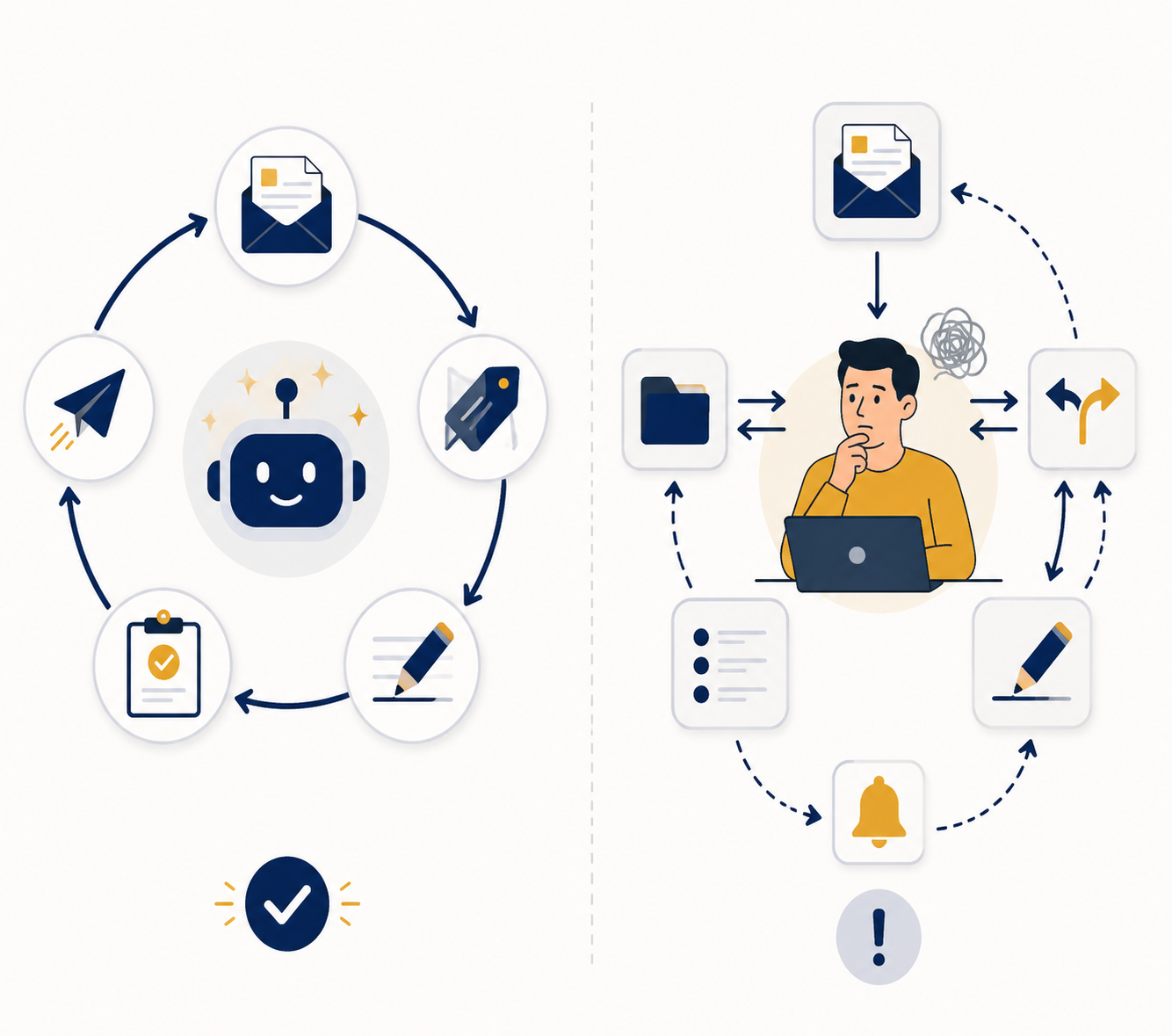
The practical split in 2026 is fairly clear. alfred_, Inbox Zero, and Lindy sit closer to autonomous agents when configured for full triage. Superhuman, Shortwave, SaneBox, Spark, and similar tools are usually better understood as assisted sorters unless a specific setup closes the whole loop. That is not an insult to the second group. A fast, controlled inbox can be exactly right for someone who wants to stay in every decision. It is just not the same as delegation.
Where Email Triage Actually Starts and Ends
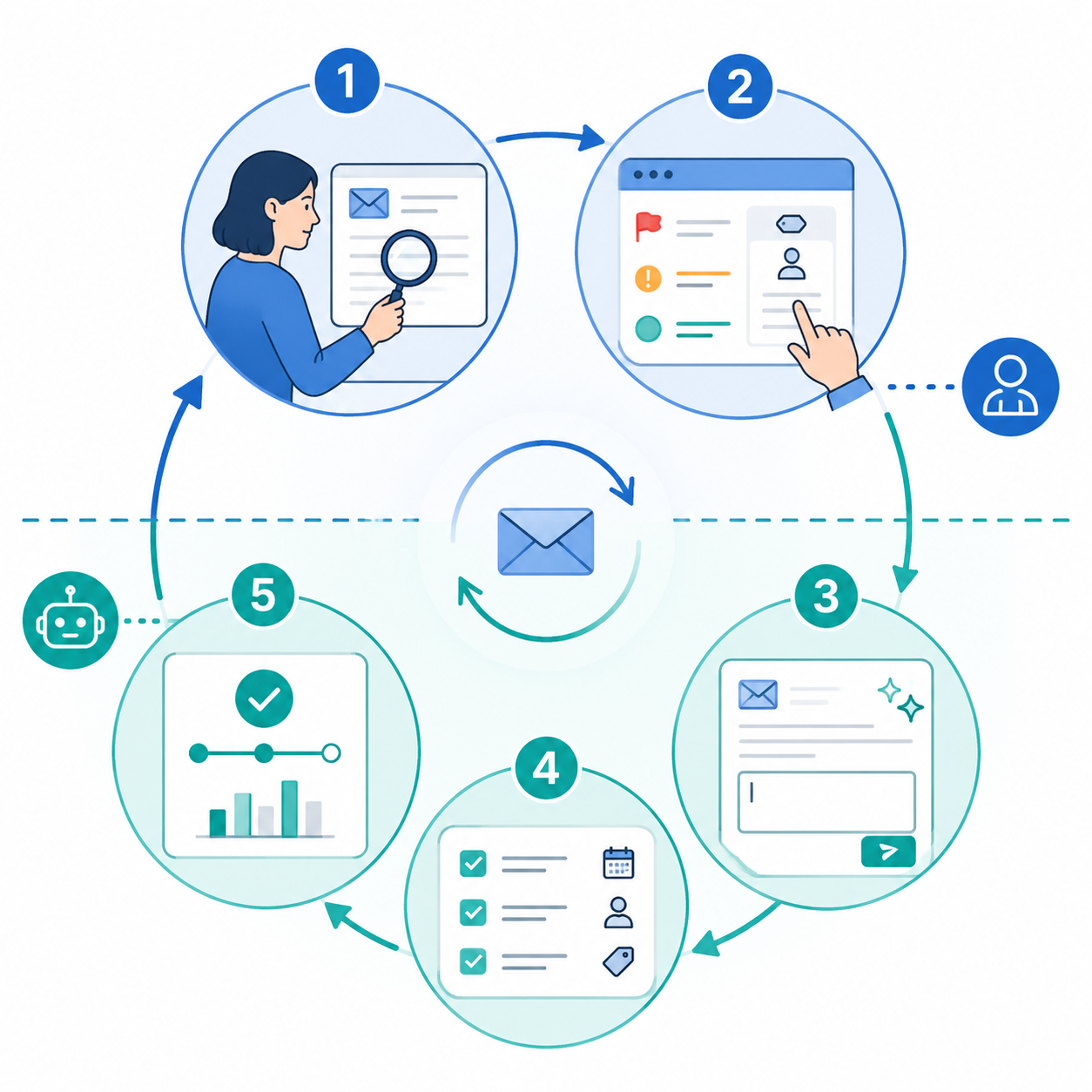
Email triage is often described as sorting, but sorting is only the first visible piece. The real loop has five jobs, and the handoff point between human and AI decides whether the product is automation or merely acceleration.
| Triage job | What has to happen | Assisted sorter role | Autonomous agent role |
|---|---|---|---|
| Read the message | Understand sender, thread context, content, and implied urgency | Surfaces, summarizes, or groups messages | Reads enough content to decide what should happen next |
| Classify priority and intent | Separate urgent work, waiting items, FYIs, sales, support, recruiting, finance, and noise | Applies labels, folders, reminders, or importance signals | Learns the user's priority criteria and applies them without manual prompting |
| Draft or prepare the response | Turn the decision into an answer, question, approval, decline, or handoff | Suggests text when the user asks or opens the composer | Prepares a response as part of the triage flow |
| Extract the work | Capture tasks, deadlines, owners, documents, calendar needs, and CRM or project updates | May expose the relevant text for the user to copy or act on | Creates or routes the next action into the appropriate workflow |
| Track follow-up and closure | Remember who owes what and when the thread needs to be reopened | Offers reminders or snooze controls | Tracks open loops and brings them back without relying on user memory |
The first two jobs can make an inbox feel cleaner. The last three are where the week changes. A tool that gets newsletters out of the way and highlights VIP senders may save clicks. A tool that drafts the client reply, extracts the task, and watches for the answer removes a recurring obligation.
This is why two people can both say an AI email tool saved time and mean very different things. One person may have shaved an hour from manual processing because the interface is faster. Another may have stopped personally managing routine follow-ups. Those are different outcomes, and they justify different budgets.
Autonomous Agents: alfred_, Inbox Zero, and Lindy
The better autonomous agents behave less like a redesigned inbox and more like a junior operator who needs training before being trusted. The learning period matters. The strongest claims in this category usually assume that the tool has had time to observe priorities, sender patterns, response preferences, and recurring work. A typical one-to-two-week learning window is a fairer test before judging an agent, especially for users with messy founder, sales, recruiting, or client-service inboxes.
alfred_ is positioned around full email triage rather than inbox decoration: reading inbound email, classifying what matters, preparing replies, extracting tasks, and managing follow-up behavior. Its own comparison material emphasizes this agentic distinction, so the claim should be read as vendor-published positioning rather than independent proof of savings. Still, the product belongs in the autonomous group because its stated workflow is built around taking responsibility for the loop, not simply making the user faster inside the loop.[4]
Inbox Zero is also relevant because its 2026 assistant framing draws a useful line between inbox cleanup and actual assistant behavior. It covers AI email assistant capabilities such as classifying, drafting, unsubscribing, organizing, and reducing repetitive inbox work. The important question for a buyer is not whether Inbox Zero can make the inbox look smaller; it is whether the configured workflow reaches response preparation and follow-up management for the classes of mail that consume the most time.[5]
Lindy is a slightly different case because it is not only an email product. It is closer to a general AI automation platform that can be connected to email and adjacent tools. That can be powerful for teams whose email work spills into calendars, CRM records, recruiting pipelines, support queues, or project tools. It also means setup discipline matters more. A broad automation agent can close more loops, but only if the workflow is specified well enough that the agent knows where the loop ends.[6]
If Lindy raises the larger question of whether email triage should be handled by a dedicated inbox agent or by a cross-app automation layer, compare that against an AI automation platform comparison before committing the whole workflow to one product.
What Makes the Savings Believable
The commonly cited autonomous-agent saving of five to ten hours per week is plausible only under certain conditions: high message volume, repeated categories of work, enough trust to review rather than rewrite every draft, and willingness to let the agent manage follow-ups after the training period. If every inbound email is novel, sensitive, political, or legally delicate, the agent may still help, but the user will keep more of the decision load.
The most useful early test is not whether the agent writes beautifully. It is whether the number of messages requiring a fresh human decision goes down. A merely decent draft attached to the correct priority and next action is often more valuable than a polished paragraph that still leaves the user deciding what the thread means.
Assisted Sorters: Superhuman, Shortwave, SaneBox, Spark, and Similar Tools
Assisted sorters are not failed agents. They are a different trade: more control, less delegation. They can be excellent for people who want to move faster through email without letting software decide what deserves action.
Superhuman is the cleanest example. Its value is speed, focus, keyboard-driven processing, reminders, snippets, AI writing help, and a premium client experience. For some users, that is worth the price because they enjoy staying close to the inbox and want fewer seconds between decisions. But if the user still opens, evaluates, chooses, writes, and follows up, the product is not removing the triage loop. It is compressing it.
Shortwave sits in a similar assisted zone when used primarily for summaries, bundles, search, AI-assisted understanding, and faster handling inside the inbox. Those features are helpful, especially for long threads and noisy team communication. They still leave a human in charge of the main judgment unless the workflow is extended into autonomous drafting and follow-up.
SaneBox and Spark often appeal to people who want less inbox clutter without inviting a full agent into the workflow. SaneBox is strongest as intelligent filtering and prioritization; Spark is stronger as a modern mail client with collaboration and AI assistance. Both can reduce friction. Neither should be bought on the assumption that it will independently read, decide, draft, extract, and chase every important thread.
That distinction is especially important for anyone already good at triage. If you process quickly but receive more than 100 emails a day, the limiting factor is usually not the location of the archive button. It is the number of small decisions that must be made before a thread can be safely forgotten.
The 2026 Data Supports the Category, Not Every Vendor Claim
There is enough adoption data to take AI email seriously, but not enough independent evidence to treat every product claim as a guaranteed outcome. Qualtir reported in 2026 that 68% of enterprise teams use AI email features, up from 31% in 2023, and projected the AI email automation market to reach $4.2 billion by 2027.[1] That shows momentum. It does not tell you whether your inbox needs an agent or a faster client.
The productivity claims are more interesting when they describe the size of the load being removed. Mailbird's 2026 executive case study reported AI triage reducing email processing from 2.6 hours per day to under 45 minutes, with 81% of users reporting reduced email-related stress.[2] That is the kind of change a high-volume user notices immediately. It is still a case-study result, not a universal benchmark.
Beam AI reports that its email triage agent categorizes 85% of inbound emails automatically and reduces follow-up loops by 48%.[3] The second number matters more than the first. Auto-categorization is useful, but follow-up-loop reduction gets closer to the part of email that follows people into evenings, weekends, and half-remembered notes.
Most of the detailed tool comparisons available in 2026 are vendor-published or vendor-adjacent, including material from alfred_, Inbox Zero, Lindy, Missive, and Read AI.[4][5][6][7][8] They are still useful for mapping features and pricing, but they should not be read like neutral lab tests. The safer approach is to use them to identify what a tool claims to own in the workflow, then test that claim against your actual inbox.
Pricing: The Monthly Fee Is Less Important Than Who Owns the Decision
Pricing is volatile in this category, and the available comparison data from May through July 2026 should be rechecked before purchase. Broadly, AI email agents cluster around roughly $7 to $50 per month, while premium assisted clients such as Superhuman are commonly benchmarked around $30 per month.[4][5][6][7][8]
That overlap is what makes misclassification expensive. Paying $30 a month for a sorter can be perfectly rational if the user wants speed, interface quality, and control. Paying a similar amount while expecting the software to remember the follow-up, draft the reply, and extract the work is where disappointment starts.
A rough payback test is simple: if an autonomous agent saves even a few hours a month, the subscription is easy to defend for a founder, executive, sales lead, recruiter, or client operator. If the tool only makes manual handling feel nicer, the calculation depends on how much the user values focus and speed. For a fuller calculator-style view, use an AI productivity apps cost-benefit analysis rather than treating the subscription price alone as the decision.
Privacy and Trust Are Workflow Questions, Not Fine Print
Email contains contracts, hiring discussions, customer problems, invoices, investor notes, personal messages, passwords someone should not have sent, and internal arguments that were never meant to become training material. A tool that only filters headers has a different privacy profile from one that reads full content, drafts replies, and connects to task or CRM systems.
The trade is unavoidable: the agent cannot understand priority without seeing enough context, and the user should not grant that access casually. Before choosing an autonomous product, check what data it reads, whether it stores content, how it uses model providers, what admin controls exist, how deletion works, and whether the tool can be limited to specific mailboxes or labels during testing.
For privacy-sensitive users, an assisted sorter or native inbox feature may be the better first move. If you are still working inside Gmail's built-in AI and filtering features, a Gmail-native setup guide is a sensible detour before connecting a third-party agent to full mailbox content.
Which Type Fits Your Inbox
Choose an autonomous agent if the painful part of email is not reading, but remembering and executing. High-volume founders, executives, sales leads, recruiters, agency operators, account managers, and team leads usually feel this first. Their inbox is full of partial commitments: send the deck, approve the intro, ask finance, schedule the call, check back Friday, nudge the candidate, confirm the client's blocker.
- Pick an autonomous agent when the same categories of email recur often enough for the system to learn patterns.
- Pick an autonomous agent when follow-up failures cost more than occasional review overhead.
- Pick an autonomous agent when draft review is acceptable, but writing every first response is not.
- Pick an autonomous agent when email work needs to become tasks, calendar events, CRM updates, or routed handoffs.
Choose an assisted sorter if the painful part is inbox noise, context switching, or interface drag. Lower-volume professionals, individual contributors with sensitive internal mail, people who enjoy manual control, and users who mainly need better search, summaries, labels, and writing help may be happier with a sorter. They will still own the decisions, but the decisions may become less annoying.
- Pick an assisted sorter when you want to approve every priority call yourself.
- Pick an assisted sorter when privacy concerns outweigh the benefit of full-content automation.
- Pick an assisted sorter when the inbox is irritating but not consuming enough hours to justify agent setup.
- Pick an assisted sorter when speed, keyboard control, and a cleaner client matter more than delegation.
The first week with an autonomous agent should feel supervised, not magical. Review its classifications. Read its drafts. Watch which follow-ups it creates and which it misses. The question after that period is whether review becomes lighter. If the user still has to inspect every message from scratch, the tool has not earned agent status in that workflow.
For a broader category-by-category view beyond email, see the best AI productivity apps in 2026. Email triage is only one workflow, but it is often the one that reveals whether a tool is actually taking work away or just giving work a nicer surface.
A Shortlist by Job, Not by Feature Count
| If your real need is... | Start with... | Why |
|---|---|---|
| Stop personally managing routine triage and follow-ups | alfred_, Inbox Zero, or Lindy | These are closer to autonomous agents when configured to read, classify, draft, extract work, and track closure. |
| Move faster while keeping every decision | Superhuman or Shortwave | These are better fits for users who value speed, summaries, search, and a premium manual workflow. |
| Reduce clutter without full mailbox delegation | SaneBox or Spark | These can improve filtering, focus, and inbox organization without requiring the same level of agent trust. |
| Connect email triage to broader workflows | Lindy or another automation platform | This makes sense when email decisions need to trigger work across calendars, CRMs, project tools, or operations systems. |
| Stay conservative on access and cost | Native Gmail or Outlook features first | Built-in tools may not close the loop, but they can reduce noise before a third-party agent is justified. |
The cleanest buying question is this: after the learning period, who owns the next decision in the thread? If the answer is still you, buy the fastest assisted sorter you like. If the answer can safely become the agent for a meaningful share of inbound mail, shortlist autonomous agents and judge them on how much of the loop they actually close.
References
- AI Email Automation Trends 2026, Qualtir, 2026.
- Email Triage for Professionals: Productivity, Mailbird, 2026.
- Email Triage Agent, Beam AI.
- Best AI Email Triage Tools, alfred_.
- Best AI Email Assistants, Inbox Zero.
- AI Email Assistant, Lindy.
- AI Email Assistant, Missive.
- The 7 Best AI Email Tools in 2026, Read AI, 2026.