
Why Use a Pre-Built Vault Template Instead of Starting from Scratch?
Obsidian’s flexibility is its greatest strength — and its biggest obstacle. A blank vault offers infinite possibilities, but that freedom often leads to two weeks of tinkering, six plugin experiments, and a folder structure that gets abandoned by day four. For anyone who has moved past the "what is a second brain" phase and wants a working system now, the question shifts from "how do I build this?" to "which pre-built vault template saves me the most time without locking me into someone else’s thinking style?"
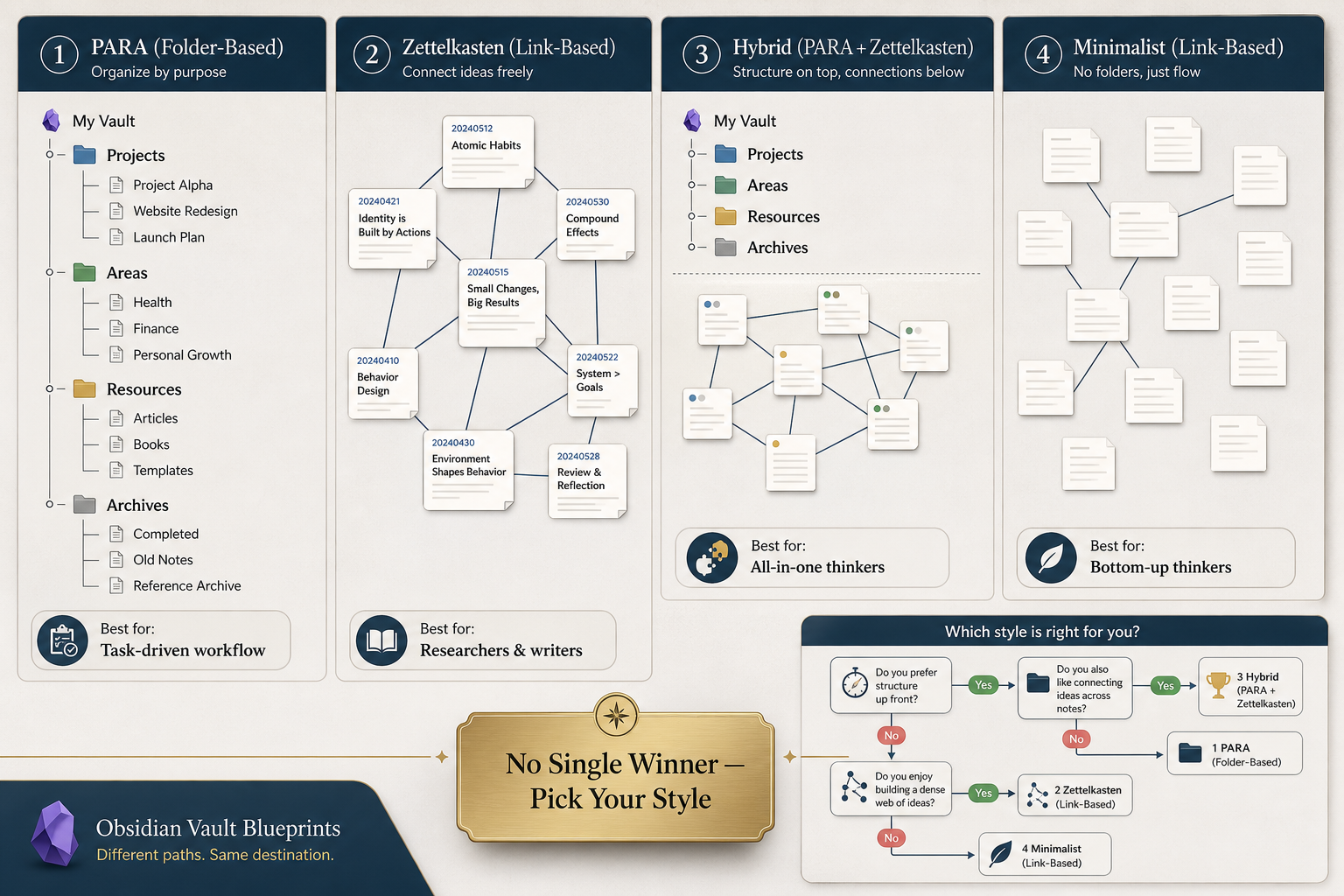
The answer, as you might suspect, is not one-size-fits-all. Over the past year, the Obsidian community has produced dozens of starter vaults, each rooted in a different productivity philosophy — PARA, Zettelkasten, hybrid frameworks, and link-first minimalism. This guide compares six of the most popular templates across four distinct categories, so you can match the system to your workflow — not the other way around.
How We Evaluated the Templates: Our Criteria
Every template here was assessed on six dimensions that matter most to a knowledge worker choosing a daily driver:
- Methodology compatibility — Does the vault follow a recognizable framework (PARA, Zettelkasten, hybrid) or a custom philosophy? How strictly does it enforce that structure?
- Plugin dependency — How many community plugins does the template require? A high plugin count can improve functionality but also increase maintenance, startup time, and the risk of breakage after Obsidian updates.
- Learning curve — How long does it take to understand the vault’s conventions and feel productive? Templates with complex Dataview queries or custom CSS may require more ramp-up.
- Mobile support — Does the template work well on Obsidian Mobile? Heavy plugin loads, custom scripts, and complex dashboards often degrade on phones and tablets.
- Maintenance burden — Will you need to update templates, plugin configurations, or folder structures regularly? Some vaults are self-contained; others require ongoing attention.
- Price — Most templates are free, but a few paid options offer turnkey convenience. We note the cost and what it covers.
GitHub star counts and community activity are included as directional signals — they indicate popularity and maintenance health, not quality. All data was captured in June 2026.
Tier 1: Pure PARA — byarbrough Obsidian-PARA and Obsibrain
If you already subscribe to Tiago Forte’s PARA method — Projects, Areas, Resources, Archives — these two templates give you a strict, no-frills implementation without philosophical drift.
byarbrough/obsidian-para (free, 117 ★)
This vault is the closest thing to a reference implementation of PARA in Obsidian. It uses exactly four top-level folders — Projects, Areas, Resources, Archives — with only one level of subfolders beneath each. The creator explicitly advises against nested folders below those four. It recommends the built-in Templates plugin and Obsidian Sync for mobile access. With only 117 GitHub stars, it is the least popular template in this roundup, but that’s partly because it prioritizes simplicity over features.
- Pros: Minimal plugin footprint, ultra-low learning curve for PARA veterans, easy to audit and maintain, free.
- Cons: No built-in dashboards, Dataview queries, or task management; requires manual discipline to keep PARA clean; less helpful for newcomers who want hand-holding.
Obsibrain ($49 one-time)
Obsibrain is the only major paid template in this comparison. For a one-time fee of $49, it promises a complete PARA + GTD system with task management, habit tracking, daily planning, periodic reviews (daily/weekly/monthly/quarterly/yearly), meeting and CRM management, and a one-click update engine. The product claims a 30-minute setup and a 4.7/5 rating from user testimonials.
- Pros: Truly turnkey — no Dataview coding or plugin configuration required; includes GTD workflows like inbox processing and weekly reviews; mobile-optimized per the site.
- Cons: Expensive relative to free alternatives; product page is primarily in Japanese; English-language support is claimed but not independently verified; fewer GitHub-style community reviews to assess long-term maintenance.
Tier 2: Hybrid PARA + Zettelkasten — Dusk Obsidian Vault and SoRobby Starter Vault
Hybrid vaults combine the folder discipline of PARA with the note-link richness of Zettelkasten. They are the most popular category on GitHub because they promise the best of both worlds — a place for everything and a web of connections.
Dusk Obsidian Vault (free, 447 ★)
The Dusk vault has garnered 447 stars, making it one of the most popular free templates. It fuses PARA with Zettelkasten using six top-level folders: HUB, PARA, ZETA, DAILY, STICKY, and SYSTEM. It includes a homepage, Map of Content, floating action button, focus mode with Pomodoro, and QuickAdd integration. The vault relies heavily on Datacore (a newer alternative to Dataview) and requires 49 active community plugins.
That many plugins comes with a performance cost. On a Windows 11 machine, the vault’s startup time was measured at 4,100 ms, with Todoist Sync alone consuming 2,116 ms and Excalidraw another 634 ms. Users with vaults exceeding 15,000 files reported that disabling Omnisearch and the Tasks plugin improved responsiveness.
- Pros: Extremely feature-rich; includes task management, note creation workflows, and focus tools; active community behind the Discord.
- Cons: 49 plugins → 4+ second startup time; high maintenance burden; mobile performance likely poor; legacy version on GitHub means you may not get the latest improvements.
SoRobby ObsidianStarterVault (free, 371 ★)
SoRobby’s starter vault takes a dashboard-driven approach. Its structure includes folders for _data_, Concept Board, Journal, Learning, Notes, Personal, Projects, Resources, Spaces, plus a home Dashboard and an Inbox. It uses the Minimal theme and ships with pre-built templates for courses, projects, journal entries, and callouts. Notable plugins include Advanced Tables, Banners, Book Search, Excalidraw, Image Toolkit, Omnisearch, and Tasks. A navigation bar is generated via DataviewJS based on tags and YAML properties.
- Pros: Dashboard-first navigation makes it easy to see everything at a glance; 12+ templates reduce note-creation friction; moderate plugin count compared to Dusk.
- Cons: Still plugin-heavy (Omnisearch, Excalidraw, Tasks); the dashboard approach may feel rigid for users who prefer a more organic note flow; some plugin overlap with Dusk.
Tier 3: Zettelkasten and Academic Focus — masonlr Starter Templates
For researchers, academics, and anyone who thinks in atomic, highly linked notes, the masonlr/obsidian-starter-templates repository (1,000+ stars) provides three distinct vault flavors: a Technology Radar, a Researcher vault, and a Researcher vault with pre-installed plugins.
The Researcher template prefers a flat folder structure with scratch (daily notes), concepts (evergreen notes), projects, people, books, and meta folders. It relies on tags like #next, #backlog, and #priority for distributed task tracking rather than a dedicated task manager. The built-in Citations plugin integrates with .bib files for reference management, and Kanban-style boards can be created via embedded queries.
- Pros: Designed for academic workflows; flat folder structure avoids deep nesting; Citations plugin is a game-changer for .bib users; three vault variants let you choose your plugin load.
- Cons: Not optimized for daily task management or project tracking; the flat structure can feel unstructured for PARA-trained users; less community support than the hybrid vaults.
Tier 4: Minimalist and Link-Based — Steph Ango Vault and Matt Giaro Starter Vault
At the opposite end of the spectrum from the PARA folder tree lies the link-driven philosophy: folders are optional, structure emerges from connections, and the vault should “embrace chaos and laziness.” Two prominent voices champion this approach.
Steph Ango’s Vault (free)
Steph Ango, the former CEO of Obsidian, practices what he preaches. His personal vault uses a bottom-up organization: only five folders (References, Clippings, Attachments, Daily, Templates), and all other notes live in the vault root. Categories are handled via the Obsidian Bases feature (a YAML-based attribute system), and a 7-point integer rating scale (1–7) prioritizes ideas. Daily notes are fractal journal entries named YYYY-MM-DD. The vault makes heavy use of internal links and unresolved links as breadcrumbs for future thinking.
- Pros: Extremely lightweight; excellent mobile performance; forces link-based thinking over filing; scales naturally without folder restructuring.
- Cons: Steep conceptual learning curve for users accustomed to folder hierarchies; no built-in task or project management; requires comfort with YAML and Bases.
Matt Giaro’s Starter Vault (free)
Matt Giaro, a six-figure online writer, takes the anti-folder philosophy even further. He uses zero folders for organization in a vault containing 4,819 notes. His system relies entirely on links, source metadata, and a small set of note templates (Atomic Note, Book Note, Content Idea). He recommends a maximum of 3 to 5 plugins and actively advises against using PARA inside Obsidian, arguing that “PARA requires monkey work” — constant folder maintenance that distracts from thinking.
“PARA requires monkey work. I don’t recommend using PARA inside Obsidian.”
Giaro claims his system powers a six-figure writing business and that the time to assemble an article dropped from 3–4 hours to 37 minutes using his link-based workflow.
- Pros: Minimal plugin load (3–5); extremely fast performance; free downloadable templates; proven for content creation workflows.
- Cons: Not suitable for task management or project tracking; requires strong link discipline; the anti-PARA stance may feel dismissive to users who value folder structure; no built-in review or dashboard systems.
Quick-Reference Comparison Table
| Template | Price | Methodology | GitHub Stars | Plugins | Learning Curve | Best For |
|---|---|---|---|---|---|---|
| byarbrough obsidian-para | Free | Pure PARA | 117 | Minimal (Templates plugin) | Low | Task-driven PARA adherents |
| Obsibrain | $49 one-time | PARA + GTD | N/A (paid) | Pre-installed suite | Low | Turnkey seekers, non-coders |
| Dusk Obsidian Vault | Free | Hybrid PARA+Zettelkasten | 447 | 49 | Medium-High | All-in-one feature seekers |
| SoRobby ObsidianStarterVault | Free | Hybrid PARA+Zettelkasten | 371 | ~12+ (included) | Medium | Dashboard lovers |
| masonlr obsidian-starter-templates | Free | Zettelkasten / Academic | 1,000+ | Minimal + Citations | Medium | Researchers, academics |
| Steph Ango vault | Free | Minimalist, link-based | N/A (direct download) | Minimal | Medium (conceptual) | Bottom-up thinkers |
| Matt Giaro starter vault | Free | Anti-PARA, link-driven | N/A (free templates on site) | 3–5 recommended | Low-Medium | Writers, conceptual note-takers |
Which Template Should You Start With? A Simple Decision Framework
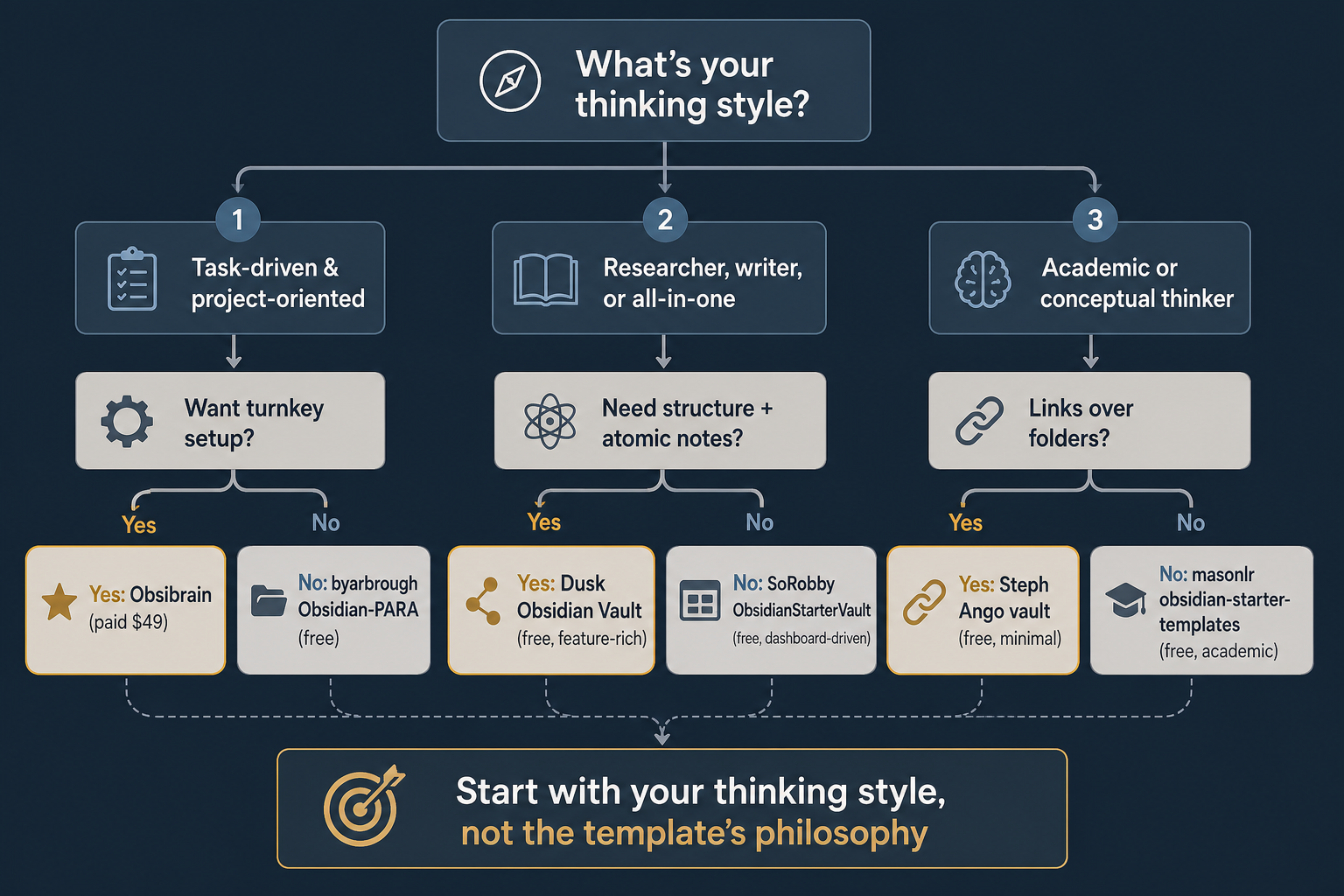
Rather than listing pros and cons indefinitely, use these three questions to decide:
- Are you task-driven and value clear folder structure? Start with byarbrough/obsidian-para if you want a free, pure PARA vault. If you prefer a turnkey solution with GTD workflows and don’t mind paying, choose Obsibrain.
- Do you want everything in one vault — tasks, notes, dashboards, and a Map of Content? The Dusk Obsidian Vault offers the richest feature set, but be prepared for the plugin overhead. SoRobby’s starter vault is a slightly lighter alternative with a dashboard-driven layout.
- Are you a researcher, academic, or conceptual thinker who prefers links over folders? Try masonlr’s academic templates for citation integration and atomic note-taking. If you want to go all-in on link-based minimalism, Steph Ango’s vault (for conceptual thinkers) or Matt Giaro’s vault (for writers) are excellent starting points.
Next Steps: Migrating to Your Chosen Template
Once you’ve picked a template, the adoption process is straightforward:
- Clone or download the vault from GitHub (for free templates) or the Obsibrain site.
- Open the downloaded folder as a new vault in Obsidian (do not merge it into an existing vault).
- Install the recommended plugins when Obsidian prompts you. Pay attention to the plugin list — some vaults depend on specific versions.
- Spend 20–30 minutes exploring the vault’s default notes and folder structure. Most templates include a README or onboarding note.
- Start creating new notes using the provided templates. Avoid importing your old notes until you understand the vault’s conventions.
- After a week, decide whether to migrate your existing notes or start fresh.
Comments
Join the discussion with an anonymous comment.