
Zapier, n8n, and Make are no longer separated by the simple question of “which one has AI?” All three now claim AI automation in some form. The better question is more operational: who will build the workflow, who will maintain it after the first version works, and what happens to the bill when the workflow runs hundreds or thousands of times.
That matters because AI productivity tools are spreading faster than most teams’ operating habits. Grand View Research estimated the AI productivity tools market at $11.2 billion in 2025 and projected it to reach $14.1 billion in 2026, while WalkMe reported that the average organization moved from 2 AI tools in 2023 to 7 in 2025.[1][2] Automation platforms sit in the middle of that sprawl. They are often the glue between the form, CRM, project board, chat app, spreadsheet, calendar, and AI model.
Pricing and feature information in this article was last verified between June 22 and June 26, 2026. Re-check the current plan pages before committing, especially if your workflows will run at high volume.

Fast verdict
Choose Zapier if the person building the automation is non-technical, the workflow is common, and integration breadth matters more than deep customization. Zapier’s main advantage is still that a manager, founder, or ops generalist can usually get a useful workflow running without becoming a part-time automation engineer. Its library includes 8,000+ app integrations, and its natural-language building experience is designed around describing the workflow you want rather than constructing every branch by hand.[3]
Choose n8n if control, self-hosting, custom JavaScript or Python, and scale economics are worth technical ownership. n8n is the least “set it and forget it” option for a non-technical team, but it gives technical teams the most room to design, inspect, and control how workflows run.[4]
Choose Make if your team wants a powerful visual workflow builder with more structure than Zapier but less infrastructure burden than n8n. Make’s visual canvas, 3,000+ integrations, and conversational Maia AI builder put it in the middle: more expressive than a simple linear Zap, usually less technical than running n8n yourself.[5][6]
If you are still comparing categories, a broader overview of business process automation solutions for knowledge workers can help place these three tools alongside lighter and heavier automation options.
| Question | Zapier | n8n | Make |
|---|---|---|---|
| Core philosophy | Make automation easy and widely accessible | Give technical teams control over workflow logic and deployment | Let teams design detailed workflows visually |
| Best builder | Non-technical operator, founder, marketer, RevOps generalist | Developer, technical ops lead, data/automation engineer | Ops builder comfortable with visual logic and scenarios |
| AI approach | Zapier Agents and natural-language workflow building | Customizable AI agent builder with model and tool flexibility | Maia AI for conversational workflow creation |
| Integration count | 8,000+ apps | Lower than Zapier, with self-hosting and custom nodes as offsets | 3,000+ integrations |
| Pricing unit to watch | Tasks | Executions on cloud; self-hosting available | Operations |
| Scale risk | High-volume workflows can hit task ceilings quickly | Technical ownership becomes the real cost | Operation counts can rise inside complex scenarios |
| Control level | Lowest of the three, but easiest to operate | Highest of the three | Middle: strong visual control without full infrastructure ownership |
The same workflow built three ways
A feature checklist can make these platforms look almost interchangeable. A workflow exposes the real differences faster. Use this representative flow:
- A new form submission arrives.
- A task is created in a project management tool.
- A Slack notification is sent to the right channel.
- A spreadsheet row is updated for tracking.
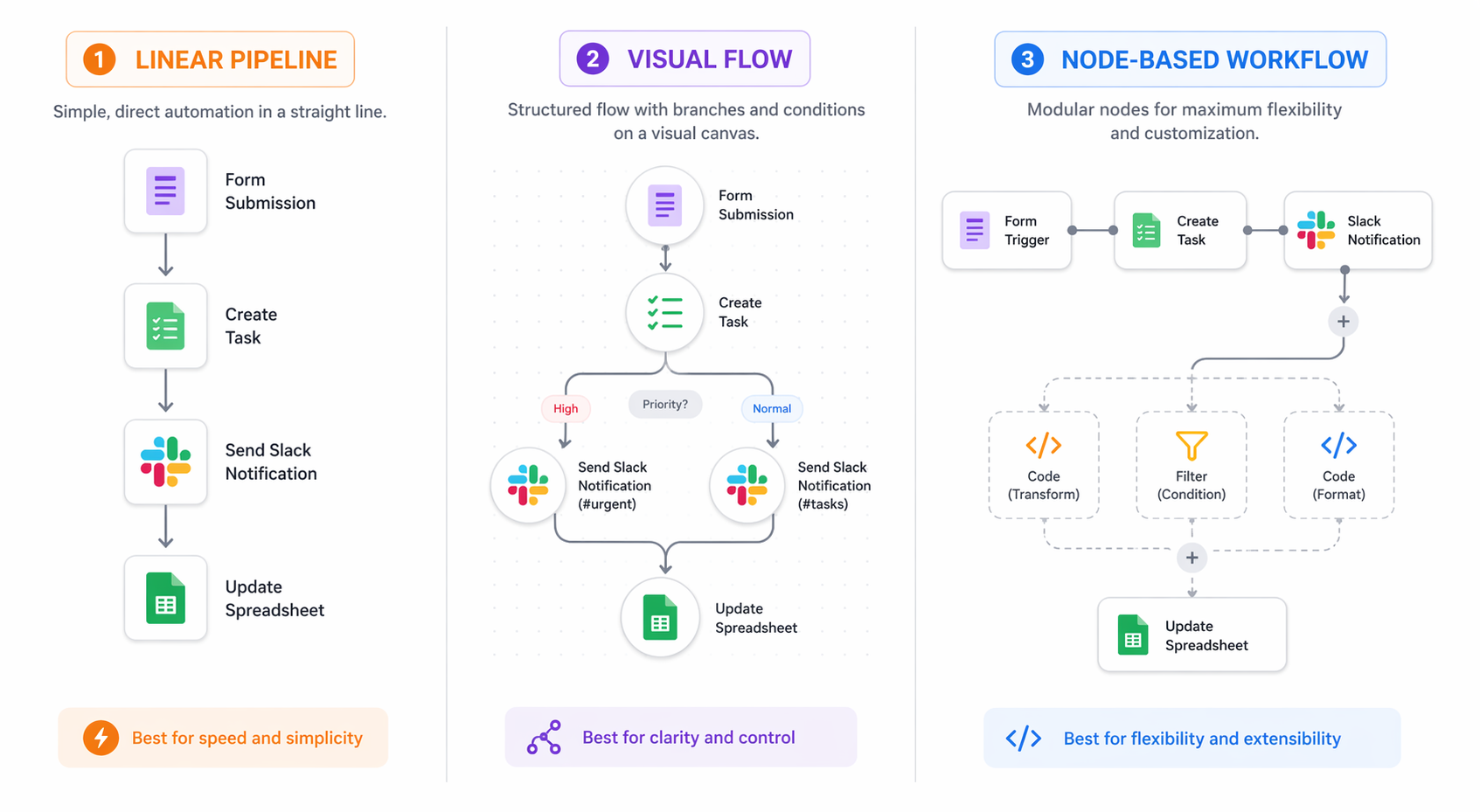
In Zapier, the workflow is a clean handoff chain
In Zapier, this workflow will usually be built as a Zap: trigger on the form submission, map fields into the task, post a Slack message, then update the sheet. The interface is built for guided configuration. The builder spends most of the time choosing apps, authenticating accounts, selecting fields, and testing each step.
That is Zapier’s strength. A non-technical team member can often understand the workflow later because the steps read like a recipe. When something breaks, the maintainer checks the task history, sees which app step failed, reconnects a credential, adjusts a field mapping, or reruns the failed task.
The tradeoff appears when the workflow stops being a clean line. If the form has several possible paths, if Slack messages depend on account tier, if the spreadsheet update needs deduplication, or if the task creation needs custom transformation logic, Zapier can still handle more than a basic flow. But the workflow may become a chain of filters, paths, formatter steps, and helper actions. It is still approachable, but each additional step can also become another billed task.
In Make, the same workflow becomes a visible scenario
Make turns the workflow into a scenario on a visual canvas. The form trigger connects to modules for task creation, Slack, and the spreadsheet. If there are branches, routers, filters, or error paths, they are visible on the canvas rather than hidden in a mostly linear setup.
That visual debugging is the reason many operations teams like Make. You can see where data moves, where a branch splits, and which module failed. For someone who thinks in process maps, Make can feel more honest than a long vertical automation where complexity accumulates step by step.
The maintenance burden does not disappear. A large Make scenario can become its own kind of maze, especially if one canvas holds too many exceptions. But for teams that need more structured logic than Zapier without taking on self-hosting, Make is often the most practical middle.
In n8n, the workflow becomes a system someone owns
In n8n, the same flow is built as connected nodes. The form trigger passes data into a task node, Slack node, and spreadsheet node, with optional code, conditional branches, transformations, and external API calls along the way. n8n’s fair-code model, self-hosting option, and JavaScript/Python code nodes are the point: it lets technical teams go beyond what a packaged no-code flow comfortably supports.[4]
That control is useful when the workflow is not just a convenience but part of the operating system of the business. A technical owner can version logic, design custom error handling, connect internal systems, and avoid paying per tiny action in the same way a task-priced platform might require.
It also means the team needs an owner. If n8n is self-hosted, someone is responsible for setup, credentials, backups, updates, security posture, and incident response. “Cheaper” can be true on the invoice and false on the calendar.
The maintainer matters more than the builder demo
The first version of an automation is usually built by the most motivated person in the room. The sixth-month version is maintained by whoever receives the failure notification, the confused Slack ping, or the invoice question. That second person should decide more of the tool choice than they usually do.
Zapier is forgiving when ownership is distributed. A small business owner, marketing manager, or RevOps generalist can often open a Zap and understand the intent. That does not make it immune to decay. App permissions expire, fields get renamed, people change Slack channels, and someone still has to review the run history. But Zapier generally keeps the maintenance surface closer to the user who understands the business process.
Make asks for more process literacy. The builder needs to understand modules, routes, filters, data bundles, and scenario scheduling. In return, the maintainer gets a clearer map of how the workflow branches. For a team with one strong operations builder, this can be a better long-term fit than a pile of separate linear automations.
n8n asks for technical accountability. That can be exactly right for a developer-led startup, an internal tools team, or an automation engineer who wants custom logic and deployment control. It is a poor fit when the actual maintainer is a non-technical manager who was told the tool is “free” because it can be self-hosted.
Pricing: tasks, operations, and executions are not the same thing
This is where many comparisons get lazy. A $19.99 plan, a $20 plan, and a $9 plan are not comparable unless you know what each platform counts.
| Platform | Pricing unit to watch | Representative paid-plan detail verified June 22–26, 2026 | Why it matters |
|---|---|---|---|
| Zapier | Tasks | Pro at $19.99/month covers 750 tasks | Each action step can consume tasks, so multi-step workflows can scale cost quickly |
| Make | Operations | $9/month plan covers 10,000 operations | Operation usage depends on how many modules run inside each scenario |
| n8n | Executions on cloud; self-hosting available | Cloud at $20/month counts each run as one execution; self-hosting is available as a free alternative | High-frequency workflows may be economical, but self-hosting shifts cost into technical labor |
For the four-step form workflow, Zapier may be the fastest and least risky starting point. But if the form fires thousands of times a month and each run creates a task, sends Slack, updates a sheet, and performs formatting or filtering, task consumption becomes the budget conversation.
Make’s operation allowance can look much more generous at the same entry-level price band. The catch is that “one workflow run” and “one operation” are not the same thing. A scenario with routers, searches, iterators, multiple updates, and error handling may consume several operations per form submission.
n8n changes the math again. On cloud, executions are the unit to watch. With self-hosting, the platform cost can drop, but the organization takes on infrastructure and maintenance. That may be an excellent trade for a technical team running frequent workflows. It is much less attractive when the only available maintainer is already doing ops after hours.
Before choosing, model one real workflow at expected volume. Count the steps or modules that actually run, not the number of automations listed on a pricing page. AI-heavy workflows also need a second cost check: model usage, token consumption, and retries can add another layer. For that specific issue, see the AI workflow automation token cost trap.
User sentiment in public discussion tends to line up with this split: Zapier users often praise speed but complain when volume pushes them into higher pricing, n8n users value self-hosting and control while warning about the learning curve, and Make users often like the visual debugging while noting that very large scenarios can become hard to manage. Treat that as directional texture, not statistical evidence.
AI agents are useful only when the workflow needs judgment
All three platforms now have an AI story. That should not automatically move AI to the top of the decision. Many valuable automations do not need autonomous reasoning. They need reliable routing, clean field mapping, predictable error handling, and someone who checks failed runs.
Zapier Agents is the most accessible version for non-technical teams. It fits the platform’s broader pattern: describe what you want, connect the tools, and let the system help build or perform the workflow. That can be useful for sales, support, marketing, and admin work where the agent needs to coordinate across familiar SaaS tools and the team does not want to write code.
n8n’s AI agent builder is the most customizable, with support for multiple LLMs, tool-calling, and memory. That makes it better suited to technical teams that want to design agent behavior rather than accept a packaged experience. That flexibility is meaningful if the workflow needs custom tools, private systems, or carefully controlled logic. It is extra surface area if the workflow only needs to copy a form response into a task.
Make’s Maia AI is closer to conversational workflow creation. It helps users build scenarios through natural-language instructions while keeping the resulting automation in Make’s visual environment. For teams that like Make’s canvas but want faster setup, that is a practical direction.[5][6]
The deciding question is whether the workflow needs an agent at all. If the job is “when a lead form arrives, create the right task and notify sales,” a deterministic automation is usually safer and easier to audit. If the job is “read the request, decide which department owns it, draft a response, and escalate only ambiguous cases,” then AI agent capability becomes more relevant.
Integration libraries: breadth, depth, and escape hatches
Zapier’s 8,000+ integrations remain a major advantage when the team uses a long tail of SaaS tools.[3] If your workflow depends on a niche form tool, a newer CRM, a specific scheduling product, and a finance app, Zapier is often the first place to check. Integration breadth reduces the number of custom workarounds the maintainer has to inherit.
Make’s 3,000+ integrations are enough for many teams, especially when the workflow benefits from visual routing and transformation.[5] The question is not whether Make has fewer integrations than Zapier. It is whether Make has the integrations you actually need and whether its scenario builder makes the end-to-end process easier to reason about.
n8n’s integration count is not its strongest argument. Its escape hatches are. Custom code nodes, API flexibility, and self-hosting matter when the workflow touches internal systems or when the team wants to control more of the automation stack.[4] That is valuable only if the team has someone who can use those escape hatches responsibly.
When each platform is probably wrong for you
Zapier is probably wrong if cost predictability at high volume is the main constraint
Zapier is easy to recommend for teams that need a dependable starting point. It is harder to recommend when the workflow will run constantly, has many action steps, and sits inside a tight operating budget. In that situation, convenience may still be worth paying for, but the team should model task usage before building too much around it.
n8n is probably wrong if nobody owns the technical burden
n8n can be the best choice for teams that want control and can support it. It is a bad bargain when self-hosting is chosen mainly because the subscription line looks smaller. Someone has to secure it, update it, monitor it, and explain it when a business-critical workflow fails.
Make is probably wrong if your team dislikes visual systems
Make’s canvas is a strength for people who want to see the process. It can be a liability for teams that prefer simple linear recipes or code-first workflows. If the future maintainer finds visual branching confusing, Make’s power will not help much.
A practical adoption rule
Pick based on the maintainer first. If the maintainer is non-technical and the workflow uses common SaaS apps, start with Zapier. If the maintainer is technical and the workflow needs custom logic, self-hosting, or better scale economics, evaluate n8n. If the maintainer is an operations builder who wants visible branching and stronger workflow design without owning infrastructure, test Make.
Then pick based on the billing model. Build one representative workflow, estimate monthly runs, and count the tasks, operations, or executions that will actually occur. If AI steps are involved, include model costs and retry behavior. A plan that looks cheaper on a pricing page can become expensive inside the workflow.
Only then should the AI layer decide the tie. Zapier Agents, n8n’s AI agent builder, and Make’s Maia AI are meaningful additions, but they should support a maintainable workflow rather than distract from one. For a broader purchasing lens, use an ROI framework for evaluating AI productivity tools before rolling the platform out across a team.
Re-check pricing and limits before committing. In this category, the plan you evaluated last quarter may not be the plan you buy this quarter.
References
- AI Productivity Tools Market Size, Grand View Research, Grand View Research
- 50 AI Adoption Statistics 2026, WalkMe
- The 18 Best AI Tools for Productivity 2026, DataCamp
- n8n vs. Zapier, DataCamp
- Zapier vs Make vs n8n, Parseur
- n8n vs. Make, Zapier blog
Comments
Join the discussion with an anonymous comment.