
If you leave the YouTube app and the video keeps playing in a small floating window, Picture-in-Picture is working. If the audio keeps going but the window never appears, or the video simply stops, you are probably looking at one of four things: eligibility, a missing setting, a music-content restriction, or the current July 2026 PiP bug.
The short answer in Q3 2026: YouTube Picture-in-Picture is now free globally on iPhone, iPad, and Android for most non-music videos, after a rollout announced in spring 2026 and described as continuing through mid-2026.[1][2] Desktop browser PiP is not tied to a YouTube subscription. But on mobile, the feature still needs two separate switches turned on: one in the operating system and one inside the YouTube app.
That two-toggle setup is the part people miss. It is also why YouTube picture in picture multitasking can feel randomly broken: one device works, another does not, and both appear to be signed into the same account.
First, Check Whether Your Video Is Eligible
For free users, the practical rule is simple: try PiP with a regular non-music video first. A tutorial, product review, lecture, livestream, or recorded meeting is the cleanest test. If that works, your setup is probably fine.
Music content is still different. YouTube continues to reserve PiP for music videos, Art Tracks, covers, and remixes for YouTube Premium subscribers. Premium Lite, listed at $8.99 per month in 2026 coverage, also excludes music PiP, while Premium was listed at $15.99 per month after the June 2026 increase; treat both prices as publication-time figures that should be checked against YouTube’s current pricing before you decide anything financial.[3][4]
The gray area is not always obvious from the thumbnail. YouTube’s system decides what counts as music content, so a remix, cover, or official-looking audio upload may behave differently from a normal video even when PiP works everywhere else.
| Situation | What it usually means |
|---|---|
| Non-music video opens in a floating window | PiP is enabled and available on that device |
| Music video will not use PiP on a free account | Likely a Premium restriction, not a device problem |
| Audio continues but no floating window appears | Could be the July 2026 bug, especially on iOS app v21.28 or some Android devices |
| Nothing happens when you leave the app | Check both the device-level PiP permission and the YouTube app PiP setting |
| Desktop browser PiP works but mobile does not | Mobile setup, rollout timing, or the current app bug is the likely issue |
Set Up YouTube Picture-in-Picture on iPhone and iPad
On iPhone and iPad, do the device setting first. YouTube’s own Help instructions put this outside the YouTube app: open Settings, go to General, choose Picture in Picture, and turn on Start PiP Automatically.[5]
- Open the iPhone or iPad Settings app.
- Tap General.
- Tap Picture in Picture.
- Turn on Start PiP Automatically.
Then open YouTube and turn on the app-level setting. In the YouTube app, tap your profile picture, open Settings, choose Playback, and turn on Picture-in-Picture.[5]
- Open the YouTube app.
- Tap your profile picture.
- Tap Settings.
- Tap Playback.
- Turn on Picture-in-Picture.
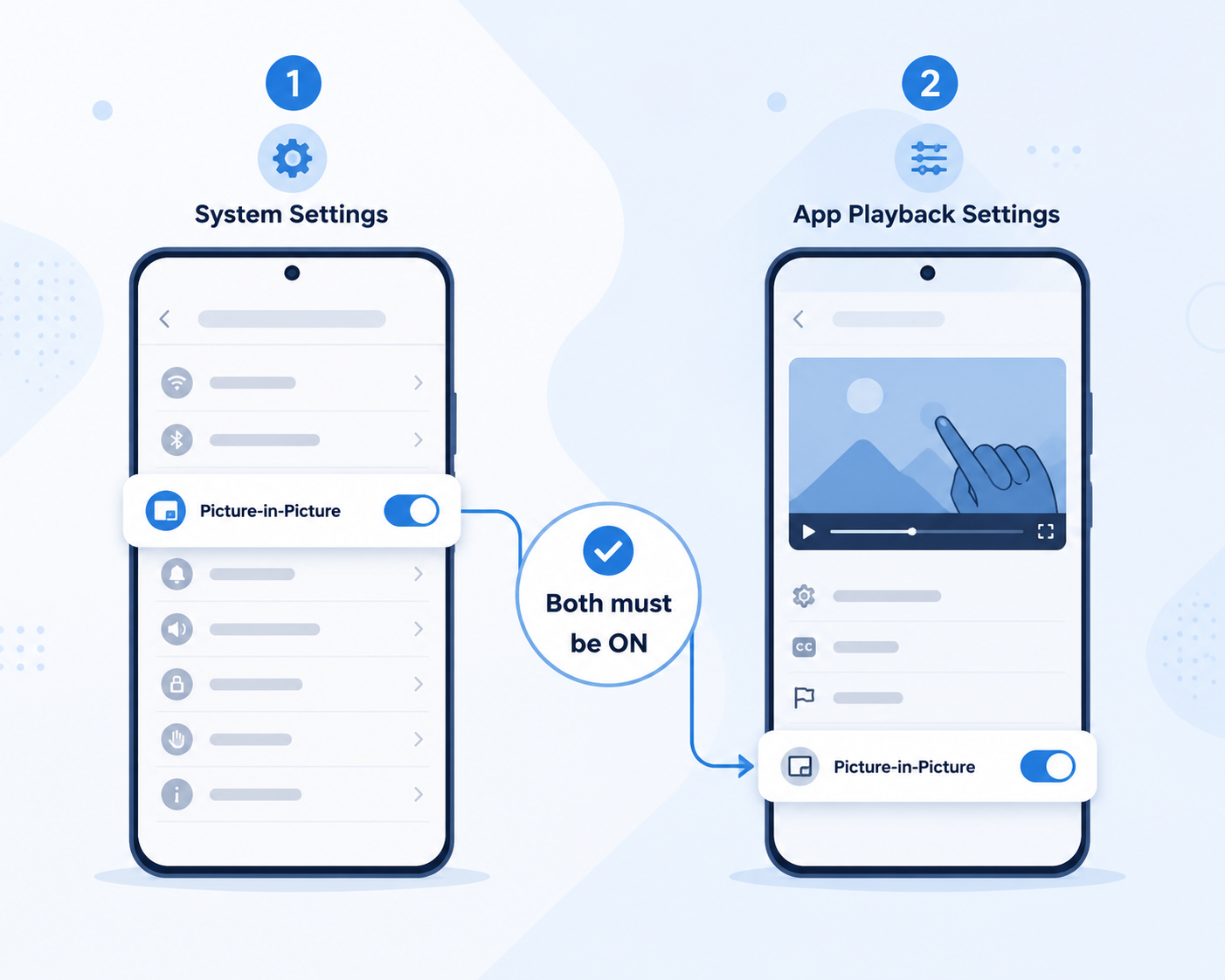
After both toggles are on, start a non-music YouTube video and leave the app by swiping up to the Home Screen. The video should shrink into a floating player. You can drag it to a corner, resize it with a pinch gesture, or move it out of the way while you answer a message, edit a note, or follow a tutorial.
If you only turned on one of these settings, PiP may still fail. That is not a character flaw; it is just a strangely easy setup to half-complete. The operating system must allow PiP, and YouTube must be allowed to trigger it.
Set Up YouTube Picture-in-Picture on Android
Android uses the same two-layer idea, but the first switch lives under special app permissions. YouTube Help lists the path as Settings, Apps, Special app access, Picture-in-picture, YouTube, then Allow picture-in-picture.[6]
- Open Android Settings.
- Tap Apps.
- Open Special app access.
- Tap Picture-in-picture.
- Select YouTube.
- Turn on Allow picture-in-picture.
Now check the YouTube app setting. Open YouTube, tap your profile picture, go to Settings, open Playback, and turn on Picture-in-Picture.[6]
- Open YouTube.
- Tap your profile picture.
- Open Settings.
- Tap Playback.
- Turn on Picture-in-Picture.
To test it, play a non-music video and go to your home screen. A small YouTube window should remain on top of other apps. This is the version of PiP that makes the most everyday sense: a coding tutorial next to your editor, a lecture while you take notes, a meeting recording while you clear low-stakes admin work, or a livestream kept in the corner while you look something up.
Android settings labels can vary slightly by manufacturer, so use the Settings search bar if you do not see Special app access immediately. Search for “picture-in-picture” or “PiP,” then make sure YouTube is allowed.
Use YouTube Picture-in-Picture on Desktop
Desktop is cleaner because it does not depend on YouTube Premium and does not require the same mobile app toggles. In major browsers, the common move is the double right-click: right-click once on the YouTube video to open YouTube’s own menu, then right-click again to open the browser’s native menu and choose Picture in Picture.[7][8]
- Open a YouTube video in Chrome, Edge, Safari, or Firefox.
- Right-click the video once.
- Right-click the video a second time, usually slightly away from the first menu.
- Choose the browser’s Picture in Picture option.
Google also offers an official Chrome Picture-in-Picture Extension that adds a toolbar control and an Alt+P keyboard shortcut.[9] That can be easier if you use PiP constantly or dislike the double right-click dance.
Desktop PiP is often the best fallback when your phone is being stubborn. If the same video opens in a floating desktop window but refuses to do so in the mobile app, you have narrowed the problem to mobile setup, mobile rollout status, mobile content rules, or the current mobile bug.
What To Do If Audio Plays but the Floating Window Never Appears
As of July 18, 2026, Google has confirmed a YouTube PiP failure affecting iOS with YouTube app v21.28 and some Android devices: audio continues after leaving the app, but the floating video window does not appear. Google is investigating the issue.[10]
That symptom matters. If you hear the video but do not see the window, you may not have misconfigured anything. You may be hitting a live app or server-side problem that ordinary settings changes cannot fully fix.
- Check the device-level PiP permission again; it is easy to assume it is on when only the YouTube app toggle is on.
- Check YouTube’s in-app Picture-in-Picture setting under Profile, Settings, Playback.
- Test with a clearly non-music video, such as a tutorial or lecture.
- Update the YouTube app if an update is available, then fully close and reopen it.
- Restart the phone or tablet as a limited troubleshooting step, not as a guaranteed cure.
- Use desktop browser PiP while the mobile issue is unresolved.
If those checks do not change anything, look for updates in the YouTube Help Community or wait for Google’s fix rather than repeatedly tearing apart a setup that is already correct. With live platform bugs, there is a point where more local tinkering just wastes the same ten minutes in a different order.
Why PiP Still May Not Work Even After You Turn It On
The most common explanation is still the boring one: one of the two mobile toggles is off. On iPhone and iPad, Start PiP Automatically must be enabled in iOS or iPadOS, and Picture-in-Picture must be enabled in YouTube. On Android, YouTube must have system-level PiP permission, and the YouTube Playback setting must also be on.[5][6]
The next possibility is content. A free account can use PiP for most non-music videos during the 2026 global rollout, but YouTube still draws a line around music videos, Art Tracks, covers, and remixes.[3][4] If one video fails and another normal video works, the device is not the problem.
Rollout timing can also explain inconsistent access. The free global expansion was announced in late April 2026 and described as rolling out over the following months, so some regional or account-level delays may still show up during mid-2026.[1][2]
Then there is the current bug. If your settings are correct, the video is not music content, and the only missing piece is the floating window, the July 2026 issue is a realistic explanation, especially on iOS app v21.28 or affected Android devices.[10]
A Practical Way To Diagnose Your Setup
Use one ordinary non-music video as your test video and keep it constant while you troubleshoot. Changing the video, device, app version, and account all at once makes it harder to tell what actually changed.
| Check | If yes | If no |
|---|---|---|
| Does desktop browser PiP work with the same video? | The video itself is probably eligible. | Try another non-music video or another browser. |
| Is the device-level PiP permission on? | Move to the YouTube app setting. | Turn it on, then retest. |
| Is YouTube’s Playback PiP setting on? | Move to content and bug checks. | Turn it on, then retest. |
| Is the video music, an Art Track, a cover, or a remix? | Free mobile PiP may be restricted. | The video should be a fair PiP test. |
| Does audio play without a floating window? | The July 2026 bug may be involved. | Look again at permissions or rollout access. |
Once PiP works, the feature is pleasantly unglamorous. Start the video, leave YouTube, move the window away from the thing you are trying to read, and keep working. The point is not to pretend every floating video makes you productive. It is that a lecture, walkthrough, livestream, or meeting recording no longer has to occupy the whole screen just to remain visible.
YouTube PiP is finally useful enough to treat as a normal multitasking tool, but the reliable path is specific: use a non-music video if you are on a free account, turn on both mobile settings, keep desktop browser PiP in your back pocket, and do not mistake the July 2026 mobile bug for your own mistake.
References
- YouTube Bringing Free Picture-in-Picture to iPhone Users Outside the U.S. - MacRumors - April 29, 2026
- YouTube's picture-in-picture goes global for free, but there's still an annoying catch - Mashable
- YouTube just made one of its most-requested Premium features free for everyone - 3DVF
- YouTube Premium Lite 2026: Cost, Features & Comparison - Metricool
- Using picture-in-picture on your mobile device - iPhone & iPad - YouTube Help - YouTube Help
- Using picture-in-picture on your mobile device - Android - YouTube Help - YouTube Help
- How to use Picture-in-Picture mode on YouTube videos in Chrome for desktop - Chrome Unboxed
- How to watch videos using picture-in-picture in Microsoft Edge - Microsoft Edge Learning Center
- Picture-in-Picture Extension (by Google) - Chrome Web Store
- YouTube picture-in-picture (PiP) mode is broken on iPhone, Android - 9to5Google - July 18, 2026
Comments
Join the discussion with an anonymous comment.