
The bad version of working alone on a trip usually starts after the travel part is technically over. You reach the hotel, open the laptop, and then discover the outlet is behind the bed, the charger is wrong for one of your devices, the desk puts your neck at a laptop-hinge angle, and the room next door has decided now is the time for speakerphone. The laptop made it. The workspace did not.
That is why the most useful solo travel packing tips for productivity are not about squeezing one more clever gadget into a bag. They are about building a carry-on office that can survive bad outlets, small tables, noisy rooms, weak posture, and the daily cable hunt. If a piece of gear does not make power, posture, focus, connectivity, or retrieval easier, it has to justify its weight.

Start With the Wall Outlet, Not the Laptop
Most mobile work failures begin with power. A laptop battery can look generous at breakfast and feel fragile by the second video call. A phone becomes the backup hotspot. Earbuds need charging just when the cafe gets loud. If every device depends on its own wall brick, the packing problem turns into an outlet negotiation.
A compact GaN charger is the first high-return switch because it replaces the brick pile with one small power hub. TechRadar’s 2026 work-travel list highlights options such as the Rolling Square Supertiny 65W and Anker Prime 150W as major upgrades for business trips, with the core benefit being that one charger can cover multiple devices instead of forcing several bulky adapters into the bag.[1]
For most solo workers, the practical standard is simple: pack one charger that can power the laptop and at least one smaller device at the same time. Then pair it with cables that are rated for the loads they need to carry. A high-wattage USB-C cable is boring until the moment the laptop refuses to charge at full speed because the cable, not the wall charger, is the bottleneck.
The second power item is less glamorous and often more useful in bad rooms: a short-cord power strip. Wirecutter’s solo-travel packing advice calls out the Anker 341 USB Power Strip with a 5-foot cord because hotel rooms often do not put usable outlets where the work actually happens.[2] That detail matters. A great charger cannot help if the only reachable socket is behind furniture or across the room from the desk.
| Power Item | What It Prevents | Packing Standard |
|---|---|---|
| GaN charger | Multiple bulky charging bricks and outlet competition | Enough wattage and ports for the laptop plus smaller devices |
| USB-C cables | Slow charging, cable swapping, and mystery failures | Clearly chosen cables for laptop power, phone charging, and data needs |
| Short-cord power strip | Hotel outlets that are hidden, distant, or already occupied | Compact strip with a cord long enough to move power to the desk |
| Power bank | Airport-seat and transit work sessions that outlast wall access | At least 10,000 mAh if it is meant to be real insurance |
The power bank is insurance, not decoration. PackHacker and Wirecutter both include portable power in travel kits, and the sources point to 10,000 mAh as the minimum worth treating seriously for work travel.[2][3] Smaller emergency batteries can be fine for topping up a phone, but they do not change the workday. The point is to keep the phone, hotspot, headphones, or tablet alive when the seat has no outlet and leaving your bag unattended to hunt for one is not an option.
Turn the Laptop Into a Workstation
A bare laptop is portable, but it is not a good workstation for long sessions. The screen is too low, the keyboard is attached to the screen, and the better your focus gets, the longer you stay in a position your neck will remember later. For a quick email check, that is tolerable. For several hours of writing, analysis, coding, design review, or client work, it becomes a productivity tax.
The fix is not a full ergonomic fantasy packed into a carry-on. It is a foldable laptop stand plus a compact external keyboard, with a mouse or trackpad if your work benefits from one. TechRadar recommends a Roost V3 Plus-style foldable stand and compact keyboard for work travel, while PackHacker and ZEAL Remote also treat the laptop stand and external input setup as a serious remote-work upgrade rather than a luxury accessory.[1][3][4]
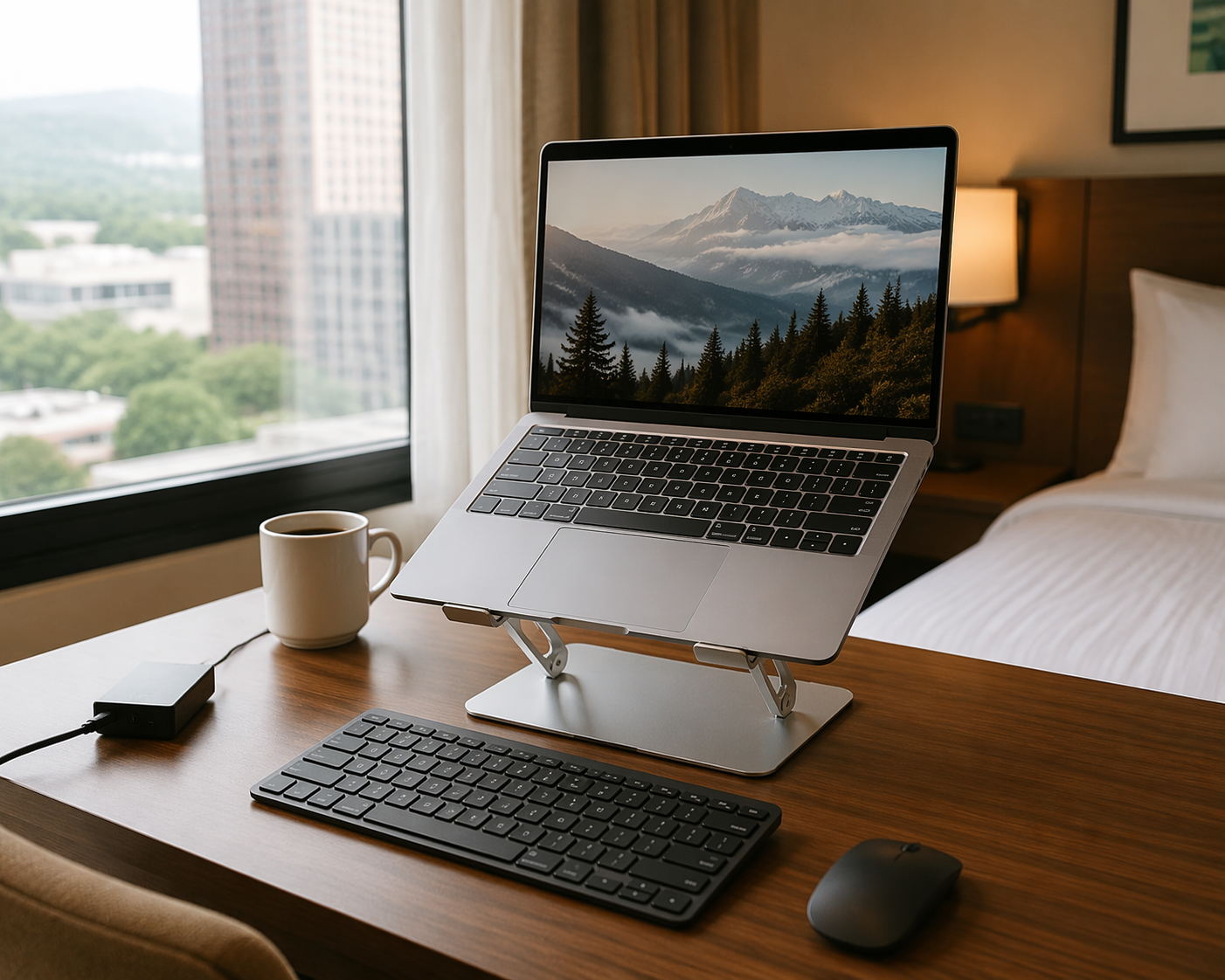
This is the part of the kit that changes how the day feels. The stand lifts the screen. The keyboard lets your hands stay on the table. The laptop stops being a hunched-over compromise and becomes the center of a small workstation. On a cramped hotel desk, that setup may be the difference between one usable work block and a day of postponing anything that requires concentration.
Choose the stand for stability first and cleverness second. It should hold your actual laptop without bounce, fold flat enough to disappear into the laptop sleeve or tech pouch area, and set up without a small construction project. The keyboard should be compact but not so compressed that every paragraph becomes a typo cleanup session. If you work mainly in spreadsheets, design tools, or timelines, a travel mouse may earn its space faster than another novelty adapter.
Pack Noise Control Like It Is Infrastructure
Noise-canceling headphones are easy to underestimate until the room turns hostile. Airports, cafes, hotel hallways, lobbies, shared apartments, and thin-walled rooms all create the same problem: you can technically work, but part of your attention keeps monitoring the environment. That is not a motivation issue. It is an input problem.
TechRadar, PackHacker, and RentRemote all include noise-canceling headphones in their work-travel or digital-nomad packing recommendations.[1][3][5] That agreement is more persuasive than a single product pick because the need shows up across different travel styles. The brand matters less than the role: create a predictable sound boundary when the physical space is not yours.
Over-ear ANC headphones usually give the strongest isolation and better comfort for long calls, but they take more room. Noise-canceling earbuds are easier to keep in a small kit and can be enough for short work blocks. If calls are part of the trip, microphone quality matters as much as cancellation. Blocking noise for yourself while sounding terrible to everyone else simply moves the productivity failure onto the meeting.
Connectivity: Bring Fewer Things, But Remove Single Points of Failure
Connectivity gear should be judged by failure recovery. The best version is not a pouch full of adapters for imaginary emergencies. It is a small set of items that keeps work moving when the room Wi-Fi is unstable, the display cable at the coworking space is wrong, or the international outlet does not match anything you own.
- Universal travel adapter: essential for international trips, especially when paired with a charger you already trust.
- USB-C hub or adapter: useful if your work regularly involves HDMI, USB-A accessories, SD cards, or wired peripherals.
- Phone hotspot plan or local data option: worth arranging before departure if work depends on real-time calls or uploads.
- One spare critical cable: not five duplicates, just a backup for the cable that would stop the workday if it failed.
Travel + Leisure’s 2026 travel tech guide includes universal adapters among its gear recommendations, which is the right level of seriousness for this category: not exciting, but trip-saving when the destination requires it.[6] The adapter should not become a substitute for checking the destination’s plug type and voltage expectations before leaving. It is a bridge, not a research exemption.
The Portable Monitor Is Conditional
A portable monitor is the most tempting item in the mobile-office kit because the benefit is obvious. More screen space makes many kinds of work easier: comparing documents, keeping a reference visible while writing, reviewing dashboards, editing presentations, monitoring chat during a call, or separating a video meeting from notes. Travel + Leisure describes a 1.6-pound, 0.36-inch portable monitor as transformative for multitaskers.[6]
That does not make it essential. A second screen earns its place when the trip includes enough deep work to repay the extra weight, cable management, desk space, and setup time. It is much harder to justify for short trips built around meetings, writing, email, or work that already fits well on one laptop display.
| Pack It If | Skip It If |
|---|---|
| You regularly need two visible work surfaces to avoid constant window switching. | You mostly write, answer messages, join calls, or review documents one at a time. |
| You will have hotel desks, coworking tables, or stable surfaces. | You expect to work mainly from cafes, airport seats, trains, or very small tables. |
| Your carry-on has room after power, ergonomics, headphones, and cables are solved. | You are already fighting weight limits or prefer a fast one-minute setup. |
The honest test is whether the portable monitor prevents real work friction or just recreates the home-office feeling in a bag that is already full. For some people, it is the difference between productive and cramped. For others, it is an expensive rectangle that gets unpacked once.
The Tech Pouch Is the System
A cable organizer looks like the least important item until the first morning you are late, half-packed, and digging through a backpack pocket for the only adapter that makes the monitor or charger work. The pouch is not about neatness. It is about retrieval speed and certainty.
PackHacker’s digital-nomad list puts heavy emphasis on modular organization, including tech pouches and packing systems, and ZEAL Remote’s remote-worker checklist also supports the idea that the work kit should be grouped instead of scattered through luggage.[3][4] That is the right instinct. A solo traveler cannot ask someone else to watch the laptop while they search the room for a missing dongle. The gear has to be where the hand expects it to be.
A good tech pouch does three jobs. It separates work-critical items from toiletries, snacks, and clothing. It makes absence visible; an empty loop or pocket tells you something is missing before checkout. It also lets the whole office move from backpack to hotel desk to cafe table without rebuilding the kit every time.
- Laptop charger and wall adapter, if the charger is small enough to live in the pouch
- Two USB-C cables: one primary high-wattage cable and one backup or shorter device cable
- USB-C hub or small adapter set, limited to ports your work actually uses
- Earbuds backup, if your main ANC headphones are bulky or battery-dependent
- Small repair items such as zip ties or tape when the trip is long enough to justify them
Wirecutter’s solo-travel advice includes small emergency-fix thinking, such as tape and zip ties, alongside the more obvious travel items.[2] That belongs in a productivity kit only when it prevents predictable interruption: securing a cable, labeling a charger, temporarily fixing a loose strap, or keeping a failing accessory usable until the work is done.
Clothing and Comfort Only Matter Here When They Protect the Workday
A productivity packing list does not need to become a wardrobe guide, but clothing logistics can still break a work trip. If every clean layer is buried, if laundry becomes a midweek emergency, or if the bag is so overpacked that the tech kit has to be unpacked at security and repacked under pressure, the workday is already absorbing avoidable friction.
Business Insider’s solo-traveler packing advice includes packing cubes and a portable laundry system, which is useful here for one reason: they keep non-work items from invading the work system.[7] The laptop stand should not be tangled with socks. The charger should not disappear under a rain shell. A clean separation between work gear and living gear makes the bag less elegant perhaps, but much easier to operate.
A Carry-On Office Packing Standard
The strongest kit is not the largest one. It is the kit that lets you sit down, find power, raise the screen, control noise, connect what needs connecting, and retrieve the right cable without unpacking your life. Product names can help with research, but prices and availability move quickly in 2025 and 2026 gear lists, so treat specific recommendations as examples to verify rather than permanent answers.
| Priority | Pack | Why It Earns Space |
|---|---|---|
| Essential | GaN charger | Replaces multiple bricks and makes limited outlets easier to use |
| Essential | Foldable laptop stand plus compact keyboard | Turns a laptop into a workstation for longer sessions |
| Essential | ANC headphones | Makes noisy rooms and transit spaces usable |
| Essential | Tech pouch | Stops the cable and adapter hunt before it starts |
| Insurance | Power bank and universal adapter | Keeps work possible when outlets or plug types fail you |
| Conditional | Portable monitor | Worth it for screen-dependent work, unnecessary for many minimalist setups |
Before a solo work trip, lay the kit out once and ask what each item protects. Power. Posture. Focus. Connectivity. Retrieval. If it does not improve one of those, it belongs in the general luggage pile, not the productivity kit.
References
- 14 work travel essentials I'll be packing in 2026, TechRadar
- What Solo-Travel Experts Always Pack, NYT Wirecutter
- 90 Items: The Ultimate Digital Nomad Packing List, PackHacker
- Ultimate Remote Worker Packing Checklist, ZEAL Remote
- Digital Nomad Packing List: The Minimalist and Productive Setup, RentRemote
- The 36 Best Travel Tech Gifts of 2026, Travel + Leisure
- Things Solo Traveler Always Brings on Trips, Business Insider
Comments
Join the discussion with an anonymous comment.