
Summer break removes the timetable that quietly does much of the work during the school year. When every weekday can unfold differently, the best screen time limit app for kids is the one that lets a parent rebuild that structure without recreating every rule whenever camp ends early, relatives visit, or a child reasonably needs another half-hour.
Last verified: August 27, 2026. FlowDesk did not conduct original device tests for this article. “Tested” refers to a dated synthesis of independent testing and official setup documentation. Wirecutter’s October 2025 retest of 14 parental-control options provides the main device-and-age comparison.[1] Apple instructions and behavior described here apply before iOS 27, which is due in fall 2026.
The short answer by device and age
| Family setup | Best fit | Price status | Useful summer controls |
|---|---|---|---|
| Child uses an iPhone | Apple Screen Time | Included with Apple devices; no separate parental-control subscription.[1][2] | Per-app limits, customizable Downtime, time-extension requests and family management |
| Child uses Android and is under 13 | Google Family Link | Free.[1][3] | Daily limits, weekly schedules, per-app limits, immediate lock or unlock and bonus time |
| Child uses Android and is 13 or older | Qustodio | Paid; PCMag listed plans from $54.95 to $104.95 per year on its page updated July 6, 2026.[1][4] | Per-app enforcement, schedules and an immediate device lock |
Phone access starts well before the teen years: Wirecutter cites the 2025 Common Sense Census in reporting that one-quarter of US children have their own smartphone by age 8 and half do by age 11.[1] A separate 2023 Common Sense Media study measured a median of four and a half hours of daily phone use among participating teens.[5] Those figures establish the size of the management problem, but they do not prove that use rises by a particular percentage during summer.
Why the free controls hold up when the school schedule disappears
A summer rule needs more than a daily total. A single allowance treats a video call with a grandparent, a drawing app and an endless short-video feed as interchangeable minutes. Per-app limits let a parent preserve access to useful or low-conflict apps while putting a firmer boundary around the ones that repeatedly consume the afternoon.
Scheduling flexibility matters for the same reason. A school-year block that begins at bedtime may still be useful, but the weekday restriction covering class hours becomes dead weight. During summer, the practical replacement may be a later weekend window, a stricter camp-night schedule and a different plan for unstructured weekdays. The control should accommodate those variations without requiring the parent to delete the underlying rules.
Apple Screen Time: the default for an iPhone household
Apple Screen Time combines App Limits with Downtime, and its current settings allow Downtime to run every day or on a customized schedule. Parents managing a child through Family Sharing can configure the controls from their own Apple device. A Screen Time passcode prevents the child from casually changing the limits, while requests for more time give the parent a way to grant an exception without dismantling the schedule.[2]
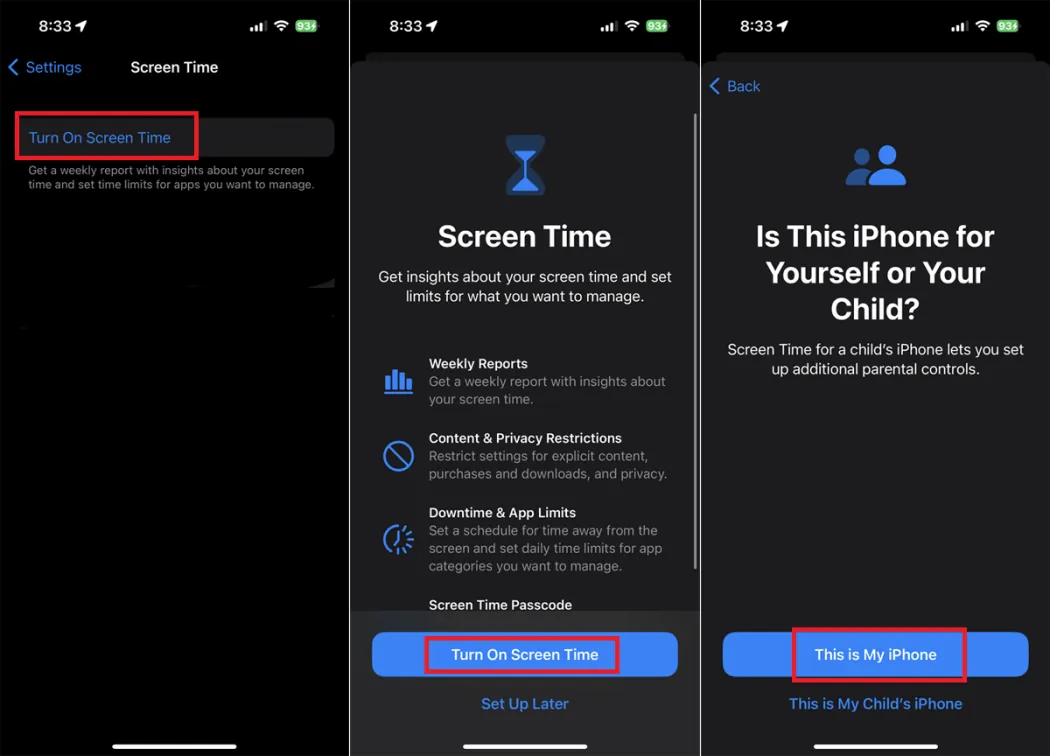
For summer, start with the parts of the day that remain predictable rather than attempting to schedule every hour. Downtime can cover sleep and any regular device-free period. App Limits can then target the small number of apps that cause most negotiations. Keep essential communication available where appropriate, and use a time-extension request for an unusual day instead of raising the permanent allowance.
That exception workflow is easy to underestimate. A rule that cannot bend makes the parent open settings repeatedly, and repeated manual edits invite mistakes. A child-requested extension keeps the original boundary visible: the extra time is an exception approved by the parent, not a newly negotiated default.
Apple is the sensible first choice here because it already sits inside the family’s device-management system. Installing a third-party suite solely to reproduce app limits and scheduled downtime adds another account, another configuration layer and another company handling child-related data. It may be worth doing for a broader monitoring need, but basic summer enforcement does not establish that need.
Google Family Link: stronger day-to-day handling for younger Android users
Google Family Link gives a parent a daily limit, a weekly schedule, controls for individual apps, remote lock and unlock, and bonus time. Google notes an important boundary: daily limits apply to each device rather than pooling a child’s use across every supervised device.[3] If a child has both a phone and another Android device, the parent must account for that when setting allowances.
:max_bytes(150000):strip_icc()/google-family-link-one-8cbe51d7477645618826685af9be52e2.jpg)
The weekly schedule is useful when Monday through Friday no longer share a school-day pattern. The parent can set different allowances by day, then lock the device immediately when an unscheduled transition calls for it. Unlocking does not require abandoning the schedule, and bonus time covers a one-off extension without permanently increasing the daily limit.[3]
A workable setup might give a child a general daily allowance while separately limiting the most absorbing entertainment apps. If the family’s plans change, bonus time is cleaner than editing the regular allowance and trying to remember to restore it later. The immediate lock is equally practical when the issue is not the total number of minutes but whether the phone needs to be put away now.
Wirecutter’s recommendation is specifically Google Family Link for Android children under 13.[1] That age boundary should guide the buying decision, but it should not be misread as a claim that Family Link becomes technically unusable on a child’s thirteenth birthday. Google can support ongoing supervision in some teen account arrangements; the issue is which product independent testing found to be the better fit for enforcement at that age.
The condition that makes Qustodio worth paying for
For an Android user aged 13 or older, the recommendation changes to Qustodio. Wirecutter selected it for that device-and-age combination after its 14-option retest, highlighting controls that include individual app management and the ability to pause access.[1] In summer terms, the important advantages are per-app enforcement and an immediate lock: the parent can distinguish between apps and can act when the schedule changes unexpectedly.
This is a concrete reason to subscribe, not a general claim that paid software is better for every family. The purchase makes sense when Family Link’s fit for a teen account is no longer sufficient and the household still needs enforceable app-level limits. It makes less sense if the parent mainly wants usage reports that will be reviewed once and then ignored.
Check the checkout page before buying. Published prices do not line up neatly: PCMag listed Qustodio at approximately $54.95 to $104.95 per year on a page updated July 6, 2026, while All About Cookies displayed a $4.99 monthly starting price.[4][8] These may reflect different plan presentations or billing terms, so they should not be blended into a supposedly exact universal price.
Why other testers name different winners
There is no genuine contradiction in one publisher naming Bark, another Aura and another Qustodio. “Best parental-control app” can reward a broad mix of monitoring, filtering, location and reporting features. This comparison asks a narrower question: which tool most reliably lets a parent create and adjust enforceable screen-time boundaries during summer.
| Publisher | Result | How to use the result here |
|---|---|---|
| Wirecutter | Apple Screen Time for iOS, Family Link for Android under 13 and Qustodio for Android 13+ after retesting 14 options.[1] | Directly matches the device-and-age decision in this article |
| PCMag | Stopped rating third-party parental-control products and recommends platform controls, including Apple Screen Time and Google Family Link.[4] | Supports trying the built-in option before adding another vendor |
| SafeWise | Bark named best overall after reviewing 30 apps over more than 250 hours; Qustodio named best free plan.[6] | A broad suite verdict, not proof that Bark is the best summer limiter for every device |
| TechRadar | Aura named best overall after testing more than 30 apps for roughly 10 hours.[7] | Another broad-suite result using a different evaluation |
| All About Cookies | Qustodio named best overall after testing more than a dozen options.[8] | Useful corroboration for Qustodio, while the Android 13+ recommendation remains the narrower case |
Wirecutter, PCMag, SafeWise, TechRadar and All About Cookies all use affiliate links. That does not invalidate their testing, but it does mean no “best overall” badge should carry the decision by itself. The recommendation here cross-checks independent conclusions against official Apple and Google instructions, then limits the verdict to screen-time enforcement.
Privacy and workarounds belong in the buying decision
PCMag stopped rating third-party parental-control products because of concerns that include children circumventing controls and the collection of family data by outside services. It now points readers toward built-in controls from Apple, Google and Microsoft.[4] That is not evidence that a built-in tool is impossible to bypass, nor that every third-party service handles data improperly. It is a reason to avoid adding a vendor unless the paid product solves a specific problem.
Parents should also protect the administrative layer: use a passcode the child does not know, confirm that the child account and device are properly supervised, and test a blocked app before relying on the rule. Teens can be expected to probe browser access, alternate devices and account settings. A polished dashboard does not compensate for an unenforced device configuration.
A note for iPhone families about iOS 27
Apple announced a redesigned Screen Time experience with Time Allowances and daily Schedules for iOS 27, scheduled for fall 2026.[9] Those changes are not available for summer 2026 and are not part of this verdict. Families setting controls now should follow the current Screen Time workflow and reassess after their devices actually receive the update.
The deployable choice
For an iPhone, start with Apple Screen Time. For Android under 13, start with Google Family Link. For Android at 13 or older, use Qustodio when reliable per-app enforcement and an immediate lock justify the subscription. Set the recurring windows first, limit the handful of apps that cause the most friction, and preserve bonus time or extension requests for days that genuinely differ.
Not for you if
This verdict is not for a family primarily choosing among message analysis, web filtering, location tracking, content alerts or other broad monitoring functions. Bark, Aura and other suites may deserve a separate comparison for those needs. Here, the judgment stops at whether a parent can maintain app limits, changing schedules, locks and exceptions through an entire summer break.
References
- The Best Apps to Manage Your Kid’s Phone — Wirecutter, October 2025
- Use Screen Time on your iPhone or iPad — Apple Support, July 1, 2026
- Manage your child’s screen time — Google Families
- The Best Parental Control Software — PCMag, July 6, 2026
- Constant Companion: A Week in the Life of a Young Person’s Smartphone Use — Common Sense Media, 2023
- Best Parental Control Apps — SafeWise
- Best parental control app of the year — TechRadar
- Best Parental Control Apps — All About Cookies
- Apple previews new child safety features — Apple Newsroom, June 8, 2026
Comments
Join the discussion with an anonymous comment.