
The problem usually shows up at the worst possible moment: a client needs a fast answer, Slack is filling up, and the swipe that should take half a second sends a hot little warning through your thumb. You can ignore it for a while, but then the work starts changing around the pain. Replies get shorter. Notes stay uncaptured. You move the phone to the other hand, type badly, switch back, and keep going.
Relieving thumb pain from phone use does not mean disappearing from your phone. For most people with early or moderate irritation, the better starting point is a small operating system: reduce thumb load today, keep messages moving, and give the irritated tissues a few weeks of consistent help.
That system has three parts: 3-5 minutes of daily thumb and tendon exercises, immediate grip changes that stop forcing one thumb to do everything, and voice-to-text swaps for repetitive typing. None of those is glamorous. That is the advantage. They fit inside the workday instead of demanding a new personality.

Treat It Like a Workload Problem, Not a Willpower Problem
Thumb pain from texting and scrolling is common enough that it should not be treated as a personal failure. Hinge Health cites research in which about 20% of frequent texters reported thumb pain, and it notes that many adults spend 4-6 hours a day on their phones.[1] That does not prove every sore thumb comes from phone use, and the cited prevalence data should be read as directional rather than a precise estimate for remote workers. It does show why this keeps showing up in normal workdays.
The useful shift is mechanical: stop asking the same small joint pattern to carry calls, scrolls, one-handed typing, reactions, email triage, and late-night note capture. A study of 213 university students found that 41% of heavy smartphone users used a right-hand-only grip, a posture that concentrates work into one hand and often one thumb.[2] The population is not a perfect match for every knowledge worker, but the posture pattern is familiar.
One-handed phone use feels efficient because the other hand stays free. In practice, it can turn the thumb into a cursor, keyboard, scroll wheel, and stabilizer at once. The first goal is not to eliminate phone use. It is to stop making the sore thumb be the entire interface.
The First 24 Hours: Keep Working, Remove the Repetition
If your thumb is already flaring, the fastest productivity win is not an exercise. It is rerouting the next few hours of phone work so the thumb stops repeating the same motion.
- Use two hands for active phone sessions: one hand supports the phone while the other taps, swipes, or types.
- Use an index finger for longer replies instead of stretching the thumb across the screen.
- Move long drafting to a laptop when one is available, especially for email, project updates, and client explanations.
- Dictate low-stakes replies, notes, and first drafts instead of thumb-typing them.
- Stop one-handed scrolling as the default background activity; if you are reading, hold the phone in a way that does not keep the thumb hovering under tension.
This is also where the 20-20-20 hand rule helps. After 20 minutes of phone use, take about 20 seconds for hand movement: open and close the hand, make a fist and fan the fingers, circle the wrists, or gently move the thumb through a comfortable range. Highbar Health describes this kind of adapted phone-use break as a way to interrupt static load, and it fits cleanly beside Pomodoro timers or calendar blocks.[4]
Twenty seconds is not a recovery program. It is a pressure release valve. The value is that it stops a work block from becoming 45 uninterrupted minutes of the same grip.
Change the Grip Before You Buy a Gadget
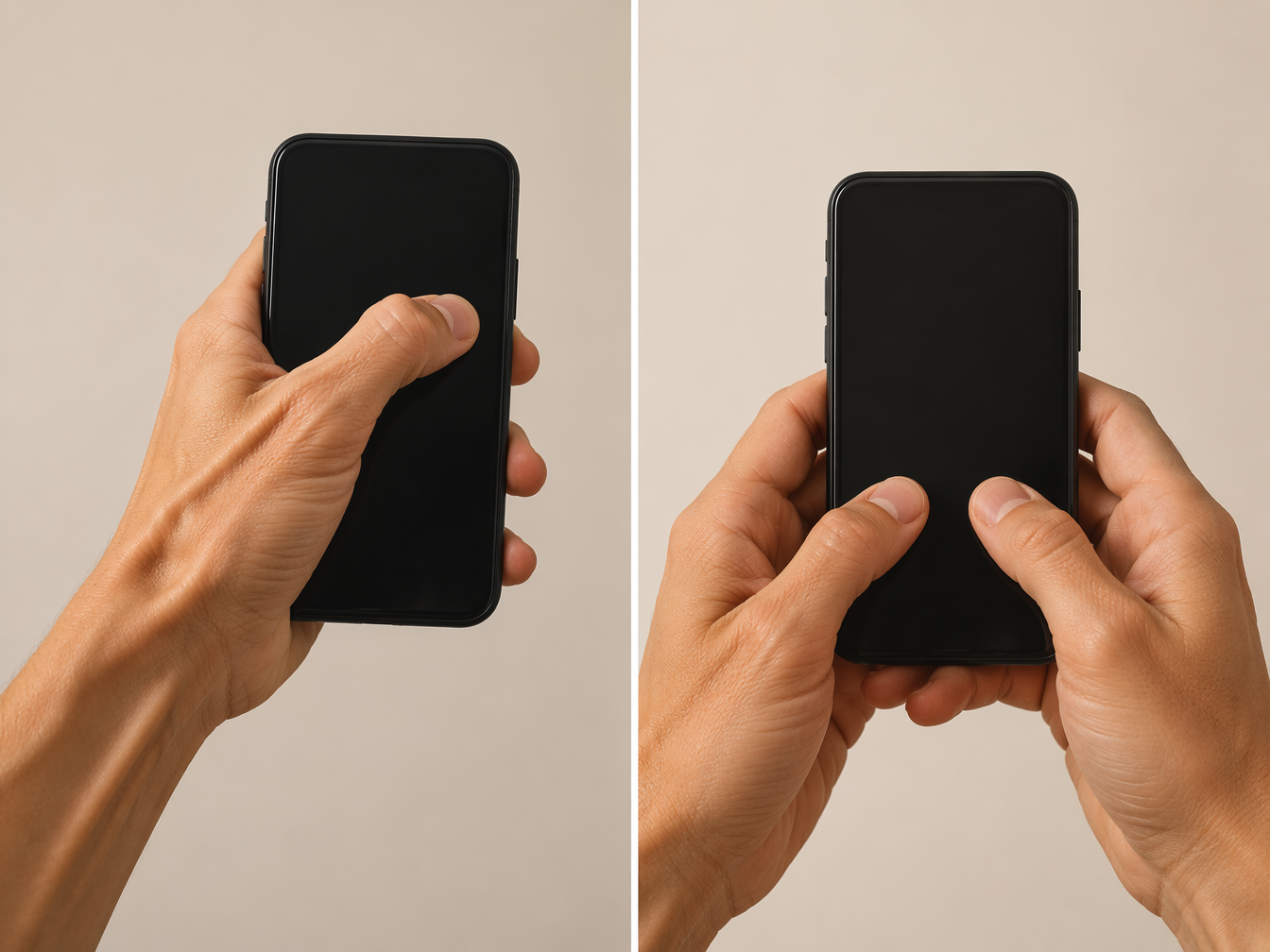
A phone grip accessory can help some people, but it is not a universal fix. Rokform’s ergonomic discussion describes fatigue arriving sooner with static one-handed grips and later with more supported two-handed use, but those timing claims come from a brand blog rather than peer-reviewed clinical testing.[3] Use them as practical observation, not as a law of the body.
The safer question is simple: where did the strain go? A pop socket may reduce the need to pinch the phone, yet leave a finger locked behind the device. A loop grip may spare the thumb but irritate a knuckle. A ring stand may feel stable while quietly changing wrist angle. If the accessory lets you hold the phone with less thumb stretch and without creating finger, knuckle, or wrist soreness, it is useful. If it only moves the pain, it is clutter.
| Phone habit | Lower-load swap | What to watch |
|---|---|---|
| One-handed typing with the thumb stretched across the screen | Two-handed hold or index-finger typing | Shoulders creeping up or wrist bending sharply |
| Long Slack or email replies on the phone | Dictate a rough reply, then edit lightly | Over-editing until the dictation saves no time |
| Scrolling while holding the phone in the same hand | Switch hands, support the phone, or rest it on a desk | Replacing thumb strain with wrist extension |
| Using a grip accessory all day | Test it only for tasks where it reduces stretch | Finger stiffness, knuckle pressure, or new wrist pain |
The point is not to find the perfect grip. It is to rotate load before your hand has to complain. If you can answer three messages with two hands, dictate the fourth, and read the next thread with the phone supported on a desk, the thumb no longer has to survive every task.
Use Voice-to-Text Where Thumb Typing Is Just Clerical Work
Voice dictation is most useful when it replaces repetitive input, not when it tries to become a personality transplant. You do not need to dictate every thought, and you do not need to believe claims that dictation will automatically make you several times faster. Speed depends on the task, your tolerance for editing, the noise around you, and how clearly you know what you want to say.
The best targets are phone tasks where the thumb is doing low-value labor:
- Quick replies: “Yes, that works for me. Please send the final version before noon.”
- Meeting follow-ups: dictate the rough note immediately, then clean it on a keyboard later.
- Idea capture: speak the messy version before it disappears.
- First drafts: use voice for the raw material, then edit with a larger keyboard.
- Internal updates: dictate status notes that do not require polished phrasing on the first pass.
Native dictation on iOS and Android is enough for many short replies. Google Docs Voice Typing can work well when the phone task should really become a document. Tools such as Wispr Flow may be useful for people who dictate often across apps, but this does not need to become a software procurement project. Start with the dictation button already on the keyboard and measure the only thing that matters: did it remove thumb typing without creating a bigger editing chore?
A practical pattern is to dictate in rough blocks. Say the answer once. Add punctuation only if it comes naturally. Then edit the first and last line before sending. For client-facing messages, that final check matters; for internal notes, the rough version is often enough. The productivity gain comes from choosing the right tolerance for polish, not from pretending every dictated sentence is ready to ship.
A 3-5 Minute Exercise Routine That Fits Between Work Blocks
Exercises are not there to punish the thumb into behaving. They are there to keep the hand moving through tolerable ranges and support recovery while you remove the repetitive load. Hinge Health and The Prehab Guys both provide exercise guidance for texting thumb, including movements such as thumb opposition, isometric thumb abduction, and tendon glides.[1][5] If an exercise increases sharp pain, numbness, tingling, or swelling, stop and get clinical guidance.
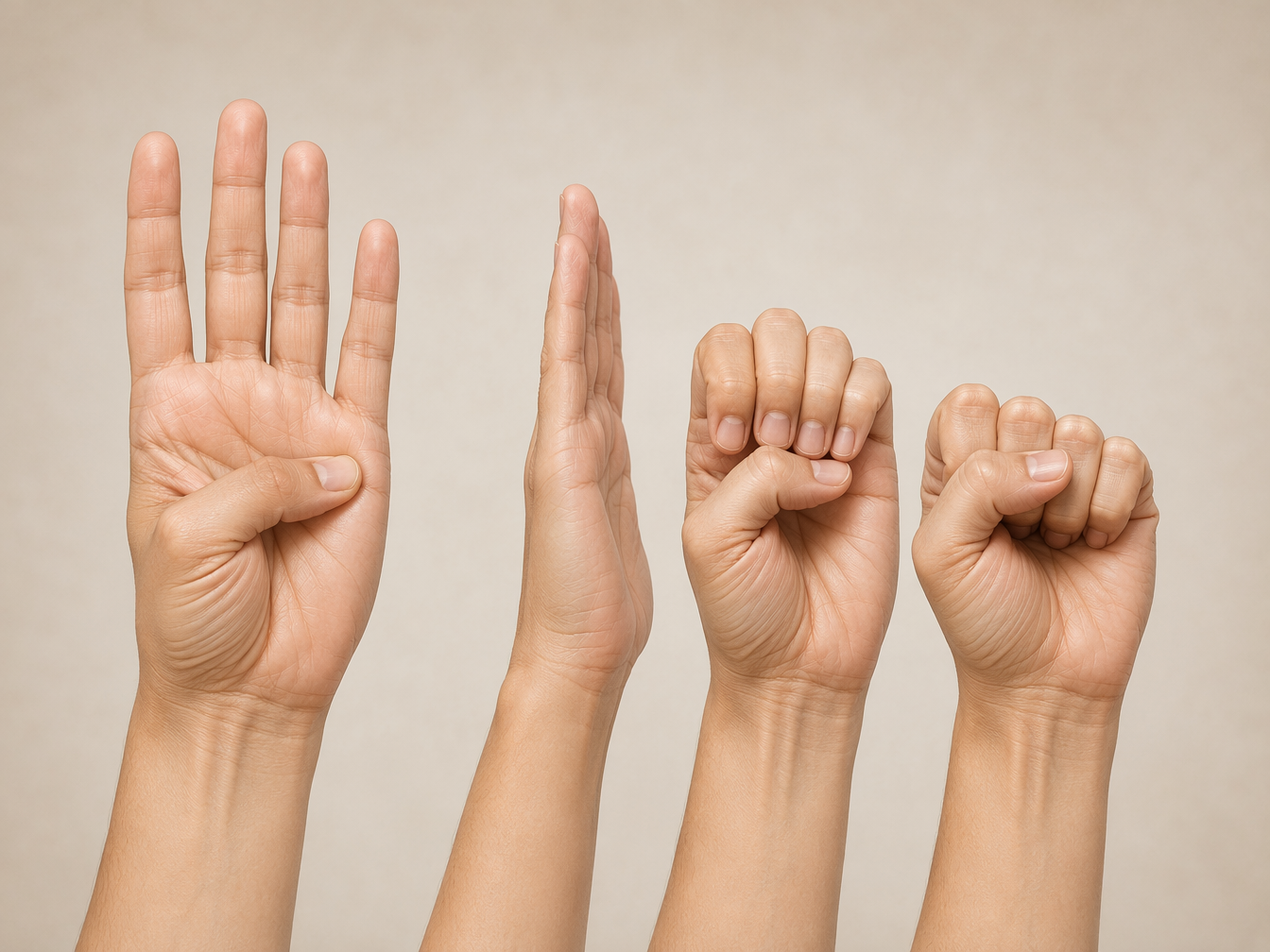
Thumb Opposition
Bring the thumb toward the fingers in a controlled, comfortable motion, often touching the thumb to each fingertip or toward the base of the pinky depending on the version you are following. Keep the motion gentle. This should feel like mobility work, not a test of how far you can force the joint.
Isometric Thumb Abduction
Place light resistance against the outside of the thumb and press outward without letting the thumb travel far. The “isometric” part matters: you are creating a controlled contraction, not repeatedly yanking the thumb through a painful arc. Keep the effort modest and steady.
Tendon Glides
Move the fingers and thumb through a sequence of open-hand and curled positions, following a demonstrated version from a clinical or rehab source. The goal is smooth motion through the hand, not speed. This is a good place to use a video demonstration rather than guessing from memory.
Put the routine where it will actually happen: after the first coffee, at the end of lunch, or before the last message sweep of the day. Three to five minutes once a day is easier to protect than a vague promise to “stretch more.” If you already use Pomodoro blocks, attach the routine to one break and use the shorter 20-second hand movement rule for the rest.
Build a Phone Workflow That Gives the Thumb Fewer Jobs
The best setup depends on which phone tasks are actually hurting you. Most people do not need to optimize everything. They need to identify the two or three phone behaviors that keep re-irritating the thumb and redesign those first.
| Work moment | Default thumb-heavy version | Lower-load productive version |
|---|---|---|
| Morning message triage | One-handed scroll, react, type, archive | Support the phone with two hands; dictate anything longer than one sentence |
| Client reply between meetings | Thumb-type under time pressure | Dictate a rough answer, edit names and commitments, send |
| Meeting note capture | Type fragments into a notes app | Record a dictated note immediately after the call |
| Evening cleanup | Scroll through every open thread on the couch | Move long replies to laptop; use phone only for triage and short confirmations |
| Reading long threads | Hold phone one-handed with thumb hovering | Rest phone on desk or lap and scroll with the other hand or an index finger |
A useful rule: the phone can stay in the workflow, but it does not have to be the place where every message is composed. Let the phone capture, triage, confirm, and dictate. Let the keyboard handle dense writing. That split protects the thumb and usually improves the quality of the work.
For Slack or Teams, consider a two-pass pattern. First pass: read, react, and dictate only urgent replies. Second pass: handle anything that needs careful wording from a keyboard. For email, use the phone for “yes/no/received” messages and defer explanation-heavy replies. For notes, dictate the raw observation immediately and clean it later only if it needs to be shared.
What Recovery Can Realistically Look Like
Recovery timelines are planning tools, not promises. Highbar Health gives clinician estimates that mild cases may improve in 2-4 weeks with consistent ergonomic changes and exercises, while chronic cases may take 6-12 weeks.[4] Individual timelines vary with workload, sleep, other hand-intensive activities, and whether the painful pattern actually changes.
For the first week, look for smaller signals before expecting the pain to vanish: fewer sharp twinges during typing, less soreness after a long message block, more confidence using the phone without guarding the thumb, or less need to switch hands awkwardly mid-call. Those are useful signs that the workload is moving in the right direction.
If nothing changes, the plan may be too polite. Check whether the thumb is still doing the same work under a new label. Dictating one message does not help much if the next hour is one-handed scrolling. A grip accessory does not count as relief if the thumb is still stretched across the screen. Exercises cannot outwork the exact motion that keeps provoking symptoms.
When to Stop Self-Managing and Get Help
A sore thumb after heavy phone use is not automatically an emergency. It is still worth taking seriously, especially when it starts changing how you work. Cedars-Sinai describes texting thumb as a real condition linked to irritation around the thumb tendons, and clinical sources commonly discuss conservative care before more invasive options.[7]
Get medical guidance if pain is severe, worsening, swollen, persistent despite conservative changes, or limiting normal function. Also get help sooner if you have numbness, tingling, weakness, a recent injury, or symptoms that do not match a simple overuse pattern.
Under medical guidance, next steps may include splints, NSAIDs, corticosteroid injections, or, in more persistent cases, surgical release of the first dorsal compartment.[7][8] Those options are not productivity hacks. They are clinical decisions for cases that need more than workflow repair.
For the next few weeks, the practical plan is narrow enough to execute: do the short exercise routine daily, change the grip before the thumb flares, use 20-second hand movement breaks during phone-heavy blocks, and dictate the messages that do not deserve thumb labor. Keep the phone as a work surface. Just stop making one irritated thumb carry the whole surface alone.
References
- Texting Thumb: Tips and Exercises, Hinge Health
- Smartphone use & hand pain study, PMC / BMC
- Phone Grips Are Destroying Your Grip Strength, Rokform
- Hand Pain From Holding a Phone, Highbar Health
- Text Thumb Exercises, The Prehab Guys
- How to Avoid Texting Thumb, Kaiser Permanente
- Ask a Doc: Texting Thumb, Cedars-Sinai
- What is Texting Thumb, New York Bone & Joint Specialists
Comments
Join the discussion with an anonymous comment.