
A ransomware attack reaches a team as a workday that suddenly stops behaving like a workday. Shared files will not open. The project board may be visible but unreliable. Someone is trying to send a client update, someone else is waiting on the latest pricing sheet, and the person who usually knows where everything lives is being told not to touch anything until IT says so.
That is the most direct answer to how ransomware attacks affect business productivity: they turn coordinated work into blocked dependencies. The first loss is access, but the larger loss is sequence. Work that normally moves from one person to another starts piling up at every handoff point.
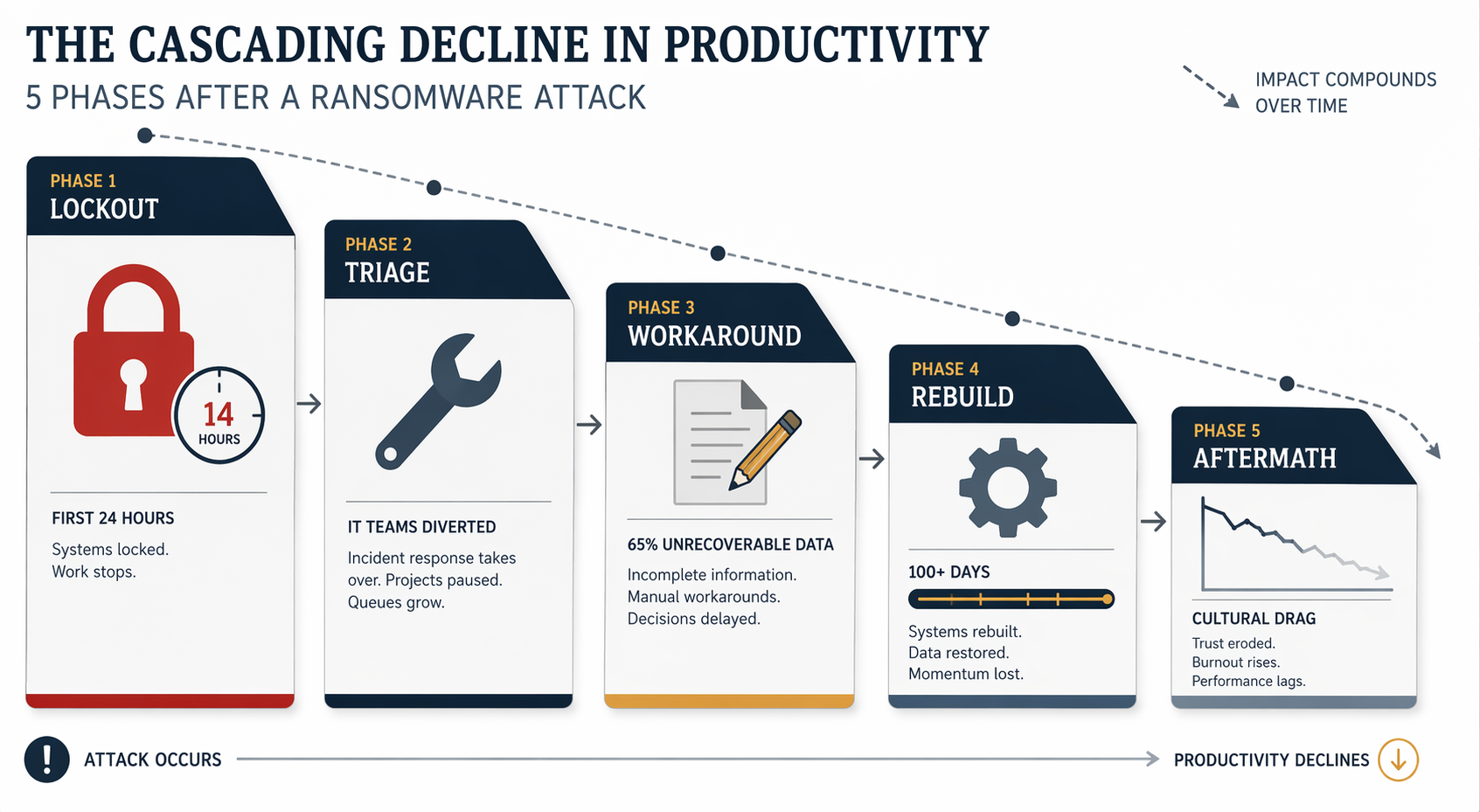
KnowBe4 research cited by Leapfrog Services describes a typical ransomware attack as affecting 22 users, with 14 work hours of downtime for each affected user.[1] That number is useful because it is small enough to picture. Twenty-two people is a sales pod, an operations team, a client services group, or the people needed to get a month-end report out the door. Fourteen hours is not just one missed afternoon; it is the calendar blocks that had approvals, replies, handoffs, reviews, and customer promises attached to them.
But even that visible downtime is only the center of the loss. The people whose files are locked are not the only ones who stop producing. Their managers wait for status. Finance waits for source documents. Clients wait for answers. IT stops doing ordinary IT work and becomes the only doorway through which every question must pass.

The first day: work stops, but decisions keep arriving
In the first 24 hours, the obvious productivity loss is lockout. People cannot open shared documents, use normal applications, or trust the files they can still see. A proposal that was ready for one more edit becomes unavailable. A customer issue that needs account history loses its trail. A manager who planned to approve three items now has to ask whether approving anything is safe.
The less visible problem is that business time does not pause while systems are frozen. Meetings stay on calendars. Customers still send emails. Payroll, billing, hiring, shipping, audits, renewals, and board updates may all keep moving toward deadlines. The team is not simply offline; it is offline while obligations continue to accumulate.
This is where productivity loss starts to multiply. If one account manager cannot reach CRM notes, a project lead may lose the context for a client call. If a shared drive is unavailable, legal review may stall. If the finance team cannot confirm which spreadsheet is clean, an executive may delay a decision that affects several departments. The blocked person is visible. The people waiting behind that person are harder to count.
| Phase | What breaks in the workday | Why the productivity loss keeps spreading |
|---|---|---|
| Lockout | People lose access to files, apps, or trusted versions of current work. | Meetings, approvals, customer replies, and handoffs keep arriving anyway. |
| Triage | IT shifts from normal support to containment and recovery decisions. | Every ordinary request now competes with emergency investigation. |
| Workaround | Teams use email, paper notes, memory, or duplicate files to keep moving. | Work continues, but with slower checks and weaker shared context. |
| Rebuild | Systems come back unevenly and historical data may be incomplete. | People spend weeks confirming, recreating, and correcting work. |
| Aftermath | Trust in tools, timelines, and staffing is damaged. | Caution, turnover, and repeat disruption can reduce output long after restoration. |
IT triage becomes the new bottleneck
Most teams understand that locked files slow work. Fewer understand what happens to the IT queue. In normal weeks, IT might be setting up new hires, fixing permissions, supporting software changes, monitoring systems, and answering routine help desk tickets. During a ransomware incident, that queue is effectively replaced by one question: what can safely be used?
That question is slower than it sounds. IT has to identify what was touched, what can be trusted, which accounts should be disabled, which machines need to stay offline, and whether backups are usable. It is not a simple restore button moment. Veeam’s 2026 ransomware research, summarized by StationX, reports that 96% of ransomware attacks target backup repositories and that 76% succeed in compromising them.[2]
For a manager waiting to get a department working again, that backup detail matters more than the technical label attached to it. It means the recovery team may not know yet whether yesterday’s files are clean, whether last week’s versions are usable, or whether restoring one system could reintroduce the same problem. While that uncertainty is being worked through, normal teams are left in a holding pattern.
The bottleneck also changes who can answer basic business questions. A department head may ask when the shared drive will return. A sales lead may ask whether a customer list can be exported. HR may need to know whether employee records are accessible. Each question may be reasonable, but together they turn IT into the central switchboard for the whole company. The more people ask for exceptions, estimates, and one-off approvals, the less uninterrupted time IT has to do the actual recovery work.
This phase is where productivity loss becomes harder to see on a dashboard. Some employees may appear available. Calendars may still show meetings. Chat may still work. Yet decisions are being deferred because the people with authority do not know which information is current, and the people with technical answers are buried in triage.
Manual workarounds keep the lights on and lower the ceiling
After the first shock, teams start improvising. They create temporary spreadsheets. They move updates into email threads. They ask people to write down what they remember from CRM, project boards, support tickets, or meeting notes. A few of these workarounds are necessary. None of them are free.
Manual work changes the shape of the day. A task that used to take one person five minutes now needs one person to reconstruct the information, another to check it, and a manager to decide whether the risk is acceptable. The team may still be producing, but each output carries extra handling. More time goes into confirming, retyping, reconciling, and explaining uncertainty.
The worst workarounds are built on missing context. Leapfrog reports, citing KnowBe4 research, that 65% of workstation data is unrecoverable on average during a ransomware event.[1] Workstation data is often where unofficial but operationally important material lives: a draft pricing model, a local copy of a customer history, a meeting recording, the spreadsheet someone uses before the numbers make it into the official system.
When that material is gone, the replacement is rarely equivalent. People rebuild from memory. They search old email. They ask colleagues to resend attachments. They recreate task lists from calendar invites. They may recover enough to keep moving, but the rebuilt version often has gaps: a missing caveat from a client call, an outdated assumption in a forecast, a decision that was made verbally and never copied into the new document.
This is the part many incident summaries compress into a line about “business continuity.” In practice, it is the stretch where team leads spend their day deciding which imperfect substitute is good enough. Can sales call customers without full account history? Can operations ship against a partial order list? Can finance approve expenses without the usual attachments? Can a project team keep a milestone if the decision log is incomplete?
The answer may be yes for some work, but each yes adds a review burden later. Temporary records have to be merged back into restored systems. Duplicate spreadsheets have to be compared. Customer promises made during the outage have to be checked against contracts, inventory, staffing, or budgets. A workaround that saves a day can create a week of cleanup if nobody clearly owns the reconciliation.
What managers should watch during the workaround phase
- Which decisions are being made from memory rather than records.
- Which temporary files or trackers are becoming unofficial systems of record.
- Which employees are acting as human bridges between broken tools.
- Which customer, finance, HR, or compliance commitments are being handled with incomplete information.
- Which cleanup tasks are being postponed because the team is focused on getting through the day.
Restoration is not the same as recovery
A system coming back online feels like the end of the incident because people can finally log in again. For productivity, it is usually the start of a different phase. The tools may return before the work is clean.
Sophos ransomware recovery data, summarized by StationX, puts full operational recovery at a median of more than 100 days.[3] That does not mean every employee is locked out for more than three months. It means the organization can spend that long operating below normal capacity while systems, data, processes, and confidence are rebuilt.
The rebuild phase is full of quiet, necessary work that rarely appears in the dramatic version of a ransomware story. Permissions have to be reset. Devices may need to be replaced or cleaned. Data has to be restored in the right order. Temporary files need to be reconciled with recovered records. Managers have to decide which recreated documents are reliable enough to keep and which must be reviewed again from scratch.
This creates a second productivity tax: expert attention is diverted from improvement to repair. The same people who normally build reports, automate workflows, onboard employees, maintain project templates, or improve customer processes are now validating old work. Their output may not look like downtime, but it is capacity that cannot be used for normal progress.
Rebuild also slows decisions because historical context is uneven. A team may have the current contract but not the negotiation notes. It may have the project plan but not the reason a deadline was moved. It may have a restored folder but not the local spreadsheet that explained how the numbers were prepared. Without that context, managers ask for more reviews, more signoffs, and more meetings. Caution is rational, but it consumes time.
The aftermath shows up as hesitation, staffing strain, and repeat disruption
When the visible crisis ends, the team still carries the memory of having worked without trustworthy tools. People become slower to delete duplicate files because they are afraid something may disappear again. Managers ask for extra exports. Employees keep side copies. Leaders delay process changes because the organization is still catching up. Some of that caution is understandable. Too much of it turns into permanent drag.
The business effects can also be more concrete than morale. Fortinet’s 2026 ransomware survey reports that 80% of organizations that pay the ransom are attacked again within 12 months.[4] That figure should not be read as a prediction for every company, and it applies specifically to organizations that pay. It does show why recovery planning cannot treat one incident as a sealed episode. A repeat attack restarts the same productivity cycle before the previous cleanup has fully faded.
Cybereason’s research on ransomware’s business impact reports that 29% of affected organizations were forced to lay off employees and 26% closed operations temporarily.[5] Those outcomes are not just financial abstractions. Layoffs remove institutional memory at the exact moment a company needs people who remember how work used to flow. Temporary closure interrupts customer habits, vendor routines, employee schedules, and internal momentum.
This is why large downtime estimates, such as the often-cited thousands of dollars per minute, can be both attention-grabbing and incomplete. They may help leaders grasp scale, but they do not explain where the work goes. The more useful question for a manager is narrower and more operational: which parts of the organization stop coordinating, which people become bottlenecks, and which missing records will force work to be done twice?
A productivity view of ransomware planning
Ransomware planning is often framed as whether systems can come back online. That matters, but it is not enough for the people trying to keep work moving. A productivity plan has to account for the days when the normal system of coordination is unavailable and the weeks when restored tools still do not contain everything the team needs.
The practical planning gap is usually found in ordinary questions. Which work must continue even if shared drives are offline? Which customer or employee records matter most in the first day? Who decides whether a temporary workaround is acceptable? Where will decisions made during the outage be logged so they can be reconciled later? Which team members should not become single points of failure because only they remember the missing context?
Those questions do not replace technical recovery. They make technical recovery usable for the rest of the business. If nobody knows which work should pause, which work should continue manually, and who owns the cleanup, productivity loss spreads through confusion even after the files start coming back.
Ransomware recovery is not one outage followed by restoration. It is a productivity debt made of interrupted work, diverted experts, degraded substitutes, missing context, and months of cautious behavior. Managers who plan only for system availability miss the harder operational question: how the team will keep commitments, preserve essential context, and reduce the long tail of rework after the ransom note is no longer the main problem.
References
- IT Leaders: 9 Things To Expect When Recovering From Ransomware, Leapfrog Services
- Veeam 2026 Ransomware Trends Report, StationX aggregation
- State of Ransomware 2026, StationX aggregation
- 2026 Ransomware Survey, Fortinet
- Ransomware Attacks and the True Cost to Business, Cybereason
Comments
Join the discussion with an anonymous comment.