
A cloud migration strategy improves enterprise productivity only if productivity is treated as a design constraint before anyone opens a migration factory dashboard. Cost models, landing zones, identity controls, and wave plans can all be technically correct while the service desk gets buried, release engineers wait on new approval paths, and application owners spend the next quarter rediscovering dependencies that were supposedly documented.
That is the planning failure worth fixing. In too many enterprise migrations, productivity is written as an expected benefit and measured, if at all, after the cutover. By then the useful questions are already late: which teams are slower, which handoffs increased, which tickets were created by the new operating model, and whether the hours saved from infrastructure work actually moved into faster delivery or better support.

The Missing Line In The Migration Plan
Conventional enterprise cloud plans tend to be strong where governance is visible. They classify workloads, estimate run costs, define security controls, name migration patterns, and assign dates to waves. Those are necessary. They are not enough to prove that the organization will work better on Monday morning after a successful move.
The productivity line has to be explicit. Before migration, leaders need to know how long releases take, how many avoidable tickets a workload generates, how many systems each administrator can support, how often incidents require specialist intervention, and how much engineering time disappears into environment setup, patching, access issues, and deployment coordination. Without that baseline, the enterprise can celebrate workload movement while losing the practical evidence that teams are better off.
The credible upside is real, but it needs context. AWS’s Cloud Value Framework article, citing Hackett Group benchmarks, reports 66% more virtual machines managed per administrator, 32% faster production releases, and a rise in infrastructure staff focused on innovation from 46% to 66% after cloud adoption; those are 2022-era benchmarks presented in an AWS migration and modernization context, not neutral proof that every enterprise will see the same lift [1]. McKinsey’s cloud research makes the stronger strategic point: value from cloud-enabled business innovation can be worth more than five times IT cost reduction alone, yet only 10% of companies had fully captured cloud’s potential value and 40% had seen no material value [2].
That gap is where productivity-first planning earns its place. Cloud capacity can reduce undifferentiated infrastructure work. It can also create a new backlog of access requests, tagging disputes, cost exceptions, failed deployments, and handoffs between teams that no longer agree on who owns what. A migration strategy should be judged by which of those outcomes it makes more likely.
A Four-Phase Framework For Productivity-First Migration
A productivity-first migration still has the familiar bones of enterprise execution. The difference is that each phase carries operating evidence, not just architecture evidence.
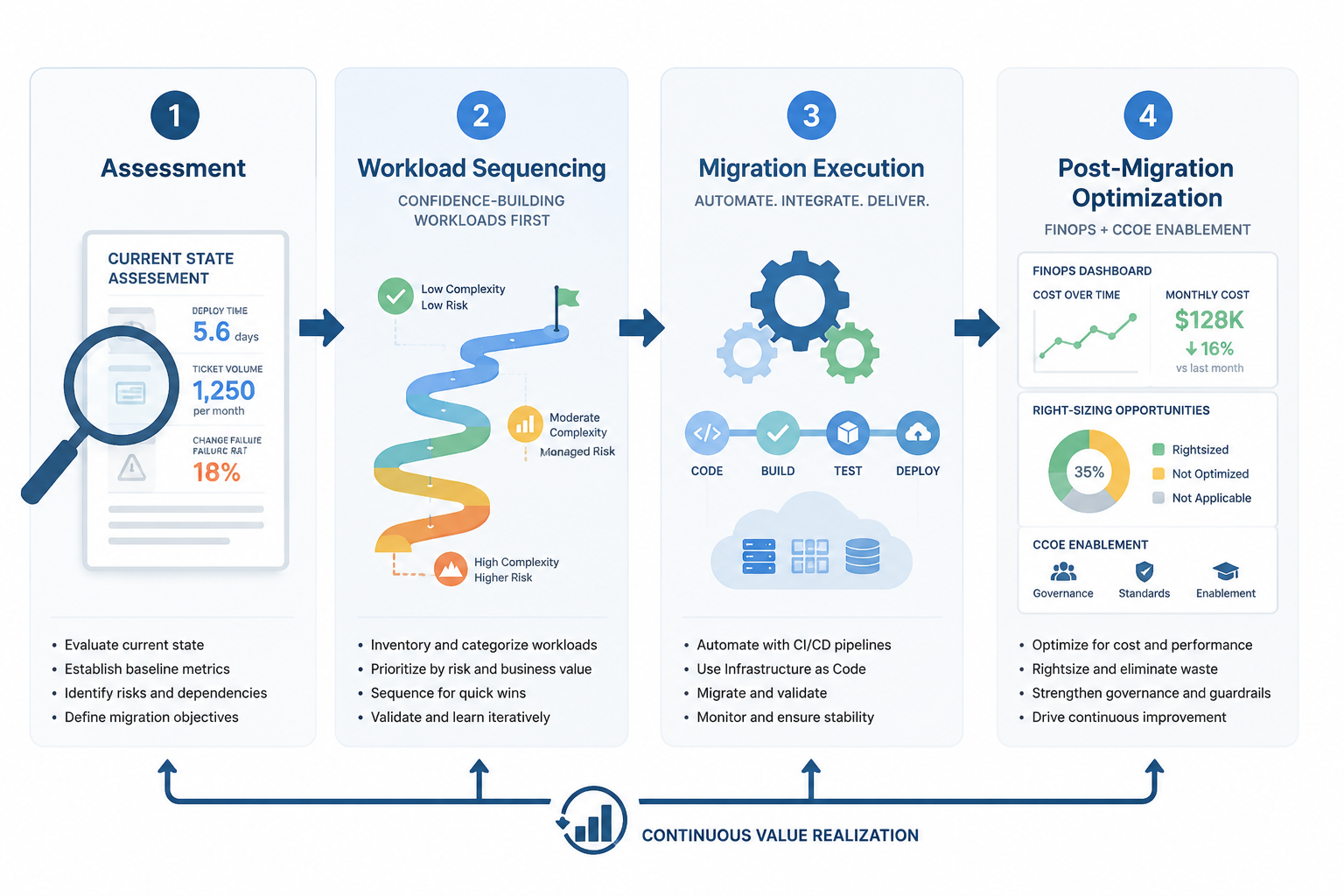
| Phase | Productivity Question | Evidence To Capture |
|---|---|---|
| Assessment | How do teams work today, and where is time being lost? | Deployment time, ticket volume, incident effort, admin-to-workload ratio, cycle time, handoffs |
| Workload sequencing | Which moves will build operating confidence instead of creating avoidable drag? | Dependency complexity, team readiness, support burden, release sensitivity, rollback risk |
| Migration execution | Which work should be automated, standardized, or moved to managed services? | Pipeline automation, runbook quality, environment creation time, cutover defects |
| Post-migration optimization | Where does saved time go after the workload is live? | Right-sizing actions, FinOps decisions, CCoE patterns, ticket reduction, faster delivery |
The table looks simple. The hard part is refusing to let the first two phases become paperwork. Assessment and sequencing are where most productivity claims are either made measurable or quietly converted into hope.
Phase 1: Build A Baseline Before The Migration Starts
A useful assessment does not begin with “is this workload suitable for cloud?” It begins with “what labor does this workload consume today?” The migration team needs enough operational detail to see whether cloud changes the work or merely relocates it.
For each material workload or application group, baseline the work that touches real teams. Measure the time from code complete to production. Count incidents and service requests by category, not just volume. Identify how often releases wait for infrastructure provisioning, access approval, security review, environment refresh, or manual deployment steps. Track how many virtual machines, databases, or platform services each administrator supports, but do not stop there; an impressive admin-to-resource ratio means little if application teams are opening more tickets to get ordinary work done.
- Release speed: lead time, deployment frequency, failed deployment recovery, and approval wait time.
- Operations load: incident volume, recurring ticket categories, escalation paths, and after-hours support burden.
- Platform effort: provisioning time, environment rebuild time, patching effort, backup and recovery work, and identity changes.
- Team capacity: share of infrastructure, operations, and application staff time spent on toil versus product-facing or improvement work.
- Knowledge-worker friction: delays caused by unavailable tools, unstable integrations, slow access changes, or unreliable business applications.
The last item matters because enterprise productivity is not confined to IT. A deployment that is faster for the platform team but creates login failures for sales operations, data latency for analysts, or broken integrations for finance has not improved productivity in any meaningful business sense. The support queue is not weather. It is often the earliest instrument panel showing whether the operating model is working.
Business-case benchmarks can help frame ambition, but they should not replace the baseline. Softobiz’s 2026 discussion of Nucleus Research data reports an average cloud migration return of $3.86 per dollar spent, with 78% of that return coming from eliminating on-premises costs; that is useful context for a financial case, but it says less about whether teams deploy faster or spend less time on avoidable operational work [3].

The Baseline Should Name Owners, Not Just Metrics
A metric without an owner becomes a slide. If deployment lead time is part of the baseline, release engineering needs to know which steps it can change. If access tickets are part of the baseline, identity and platform teams need an agreed service model. If application teams are expected to adopt new deployment patterns, they need time and support before their wave begins, not a training link after the cutover.
This is also where the enterprise should define what counts as redirected capacity. Fewer hours patching servers is only the first-order effect. The better question is whether that time moves into reliability engineering, automation, product delivery, architecture modernization, security hardening, or faster support resolution. If no one can say where the saved time will go, the productivity story is unfinished before the first workload moves.
Phase 2: Sequence Workloads Around Team Readiness
Migration sequencing is usually presented as a balance of technical dependency, business criticality, and risk. A productivity-first sequence adds another dimension: how much operating friction a workload will impose on the teams that must support it after it lands.
The first waves should build confidence without pretending that low-risk means irrelevant. Good early candidates tend to have clear ownership, limited external dependencies, manageable data movement, known support patterns, and teams willing to exercise the new platform model. They are not necessarily the smallest workloads. They are the workloads that can teach the organization how approvals, deployment automation, observability, incident response, cost ownership, and access management will actually work.
Complex migrations should wait until the operating path has been proven. A highly integrated application with brittle deployment windows and multiple support teams may be technically migratable, but moving it before the platform team has hardened templates, before the service desk understands new failure modes, or before application owners know the new escalation model is a good way to convert cloud migration into organizational drag.
| Move Earlier When | Move Later When |
|---|---|
| The application has a clear owner and a cooperative support team. | Ownership is split across teams that disagree on run responsibilities. |
| Dependencies are visible and testable before cutover. | Dependencies are assumed, undocumented, or discovered mainly during incidents. |
| Deployment and rollback can be rehearsed. | Release windows are rare, politically sensitive, or manual-heavy. |
| The workload can validate platform patterns other teams will reuse. | The workload requires exceptions that would distort the early platform model. |
| Support impact is measurable and acceptable. | Service desk scripts, monitoring, or escalation paths are not ready. |
The sequencing mistake to avoid is treating every wave as a transport problem. A wave is also a training event, a support-model test, and a governance rehearsal. If the first few migrations require heroic coordination, that is not evidence that the migration team is committed. It is evidence that the operating model is not yet repeatable.
Use Productivity Gates Between Waves
A cost or security gate asks whether the next wave is allowed to move. A productivity gate asks whether the organization has become better at moving. It should review what happened to deployment time, ticket categories, incident response, environment provisioning, and team availability in the previous wave. The point is not to stop the program at every inconvenience. The point is to keep repeated friction from becoming the new normal.
- Which tickets appeared only because teams did not understand the new platform model?
- Which manual cutover steps should be automated before the next wave?
- Which runbook gaps forced unnecessary escalation?
- Which application teams need enablement earlier than planned?
- Which security or cost controls slowed delivery because they were introduced too late?
This is where planning becomes kinder to the people who inherit the system. Platform teams get a chance to standardize before exceptions multiply. Service desk staff get scripts before call volume rises. Release engineers get fewer one-off deployment paths. Application owners get a clearer bargain: migrate into a model that has already learned from earlier work.
Phase 3: Execute With Automation Where Toil Is Predictable
Execution is where productivity gains can become visible, but only if the migration team resists manual repetition. Every recurring setup step, access pattern, deployment path, monitoring configuration, backup rule, and rollback action should be considered for automation or standardization before it becomes a ticket template.
Managed services can help when they remove undifferentiated work that the enterprise has no strategic reason to perform itself. Server maintenance, routine patching, database operations, scaling actions, and certain event-driven tasks may move away from application and infrastructure teams. That can improve productivity, but it is not automatic. If managed services introduce opaque failure modes, unfamiliar cost patterns, or approval bottlenecks, the work has changed shape rather than disappeared.
CI/CD pipelines, infrastructure as code, automated policy checks, and reusable environment templates are more than engineering preferences in this context. They are the control surface for productivity. They reduce waiting, make changes repeatable, and give release teams evidence when something fails. AWS’s cited benchmarks on faster releases are useful here because they connect cloud adoption to daily delivery capacity, not just infrastructure elasticity [1].
Generative AI belongs in the execution conversation, but it should not be sold as a settled cure. McKinsey estimates that generative AI can add 75 to 110 percentage points of incremental ROI to cloud programs and reduce migration cost and time by 40% [2]. In practice, the safer enterprise posture is to use AI-assisted tools to accelerate code analysis, documentation, test generation, dependency review, and remediation suggestions while keeping accountable engineers in the approval path.
Cutover Success Is Not The Same As Team Recovery
A technically clean cutover can still leave teams slower. The application is live, but monitoring dashboards are unfamiliar. The service desk can see the incident but not the right ownership group. Developers can deploy, but only after waiting on a manual security exception. Finance can see cloud spend, but no one can explain which tags are missing. These are not edge cases in enterprise operations; they are the ordinary places where migration value leaks.
For that reason, execution plans should include short stabilization windows with explicit productivity checks. Not a vague lessons-learned meeting. A review of ticket trends, failed changes, rollback causes, alert quality, deployment wait time, and team escalation load. If the same friction appears in two waves, it should be treated as a platform defect or operating-model defect, not as local team resistance.
Phase 4: Keep Productivity From Fading After Migration
Post-migration optimization is often framed as cost cleanup: right-size resources, remove idle capacity, tune reservations, and improve tagging. Those actions matter. They also create a governance rhythm that can protect productivity if the enterprise uses it well.
A mature Cloud Center of Excellence or FinOps function should not exist only to challenge spend. It should help teams choose standard patterns, reduce rework, remove approval ambiguity, and make platform decisions visible. Flexera’s 2025 State of the Cloud reporting found that 59% of organizations had a CCoE or FinOps team, which suggests that cloud operating governance is now a mainstream practice rather than a specialist add-on [4].
The question is what that function measures. If the dashboard is limited to cost variance, the productivity signal will be weak. It should also track deployment speed, recurring ticket categories, environment provisioning time, incident noise, manual approval queues, and the share of platform work that is reusable across teams. Right-sizing can lower spend; standardization can lower cognitive load.
There is case-level evidence that phased migration can improve team output when the operating approach is deliberate. Atlassian describes customer Fair as seeing a 25% to 50% productivity increase with a phased migration approach, but that should be read as a single customer example in a vendor context, not a universal outcome [5]. The useful lesson is narrower: staged movement, enablement, and platform familiarity can matter as much as the destination architecture.
Follow The Saved Time
The most revealing post-migration question is simple: where did the saved time go? If infrastructure staff are no longer spending the same hours on provisioning and patching, the enterprise should be able to show a corresponding increase somewhere else: more automation, faster releases, better reliability work, fewer escalations, cleaner developer experience, or more product-facing engineering.
McKinsey’s value-gap findings make this more than an operational preference. If innovation value can be several times larger than IT cost reduction, then treating migration as an infrastructure relocation project leaves the larger prize structurally under-managed [2]. Cost savings can justify part of the move. Productivity determines whether the organization is positioned to do anything better afterward.
What A Productivity-First Strategy Looks Like In The Plan
A cloud migration strategy for enterprise productivity does not need a separate inspirational workstream. It needs productivity built into the same artifacts that already govern migration decisions.
- The assessment includes operational baselines, not only application inventories and cost estimates.
- The wave plan accounts for team readiness, support impact, and repeatable learning, not only dependency maps.
- The execution plan funds automation and runbook quality before manual steps become permanent support load.
- The operating model assigns ownership for incidents, access, cost, deployment patterns, and platform exceptions.
- The optimization rhythm measures delivery, support, toil, and redirected capacity alongside cost.
This approach is less tidy than a migration diagram, but it is more honest about how enterprise work happens. Teams do not experience cloud as a target architecture. They experience it as a release path, a ticket queue, a dashboard, an access request, a budget conversation, and an incident at the worst possible hour.
A migration improves enterprise productivity when leaders can show that teams deploy faster, carry less operational toil, resolve fewer avoidable tickets, and redirect capacity toward higher-value work after the migration. Workloads moved is a completion metric. Better work is the outcome.
References
- AWS Cloud Value Framework – Staff Productivity (3/7) — AWS, 2022, https://aws.amazon.com/blogs/migration-and-modernization/unleashing-the-power-of-the-cloud-with-the-aws-cloud-value-framework-cvf-staff-productivity-3-7/
- In search of cloud value: Can generative AI transform cloud ROI? — McKinsey, https://www.mckinsey.com/capabilities/tech-and-ai/our-insights/in-search-of-cloud-value-can-generative-ai-transform-cloud-roi
- Cloud Migration ROI Statistics 2026 — Softobiz, 2026, https://softobiz.com/blogs/cloud-migration-roi-statistics/
- The Latest Cloud Computing Trends: Flexera 2025 State of the Cloud Report — Flexera, 2025, https://www.flexera.com/blog/finops/the-latest-cloud-computing-trends-flexera-2025-state-of-the-cloud-report/
- How to improve productivity in the cloud — Atlassian, https://www.atlassian.com/blog/platform/how-to-improve-productivity-in-the-cloud
Comments
Join the discussion with an anonymous comment.