
A ransomware attack usually does not begin with a dramatic breach. In a small business, it often begins with someone doing normal work too quickly: opening a vendor email, approving a file-share request, following a login prompt, or checking an invoice between meetings. Incident response firms cited by AlphaCIS describe phishing as the starting point for about 95% of successful ransomware attacks, a useful directional figure even if it should not be treated as a law of physics.[1] Verizon DBIR data cited by Huntress adds the part that should make every operations lead uncomfortable: users click phishing links in an average of 21 seconds.[2]
That is the practical starting point for how to prevent ransomware attacks in business when there is no security department. You are not trying to turn employees into forensic analysts. You are trying to build a work routine that gives ordinary people a fair chance to pause, verify, and report before one rushed action becomes encryption, downtime, and a recovery scramble.

The Human Firewall Is a Workflow, Not a Poster
Small teams already run on workflows. A customer refund has a path. A late invoice has a path. A hiring approval has a path. Ransomware prevention needs the same kind of path: not an annual reminder to “be careful,” but a repeatable sequence employees can use while they are still in the middle of their real jobs.
The practical human firewall has four moves: recognize, verify, report, and escalate. Recognition catches the suspicious moment. Verification gives the employee permission to check it through a separate channel. Reporting gets the signal out of a private inbox and into the open. Escalation makes sure someone acts on the report before the attacker gets another chance.
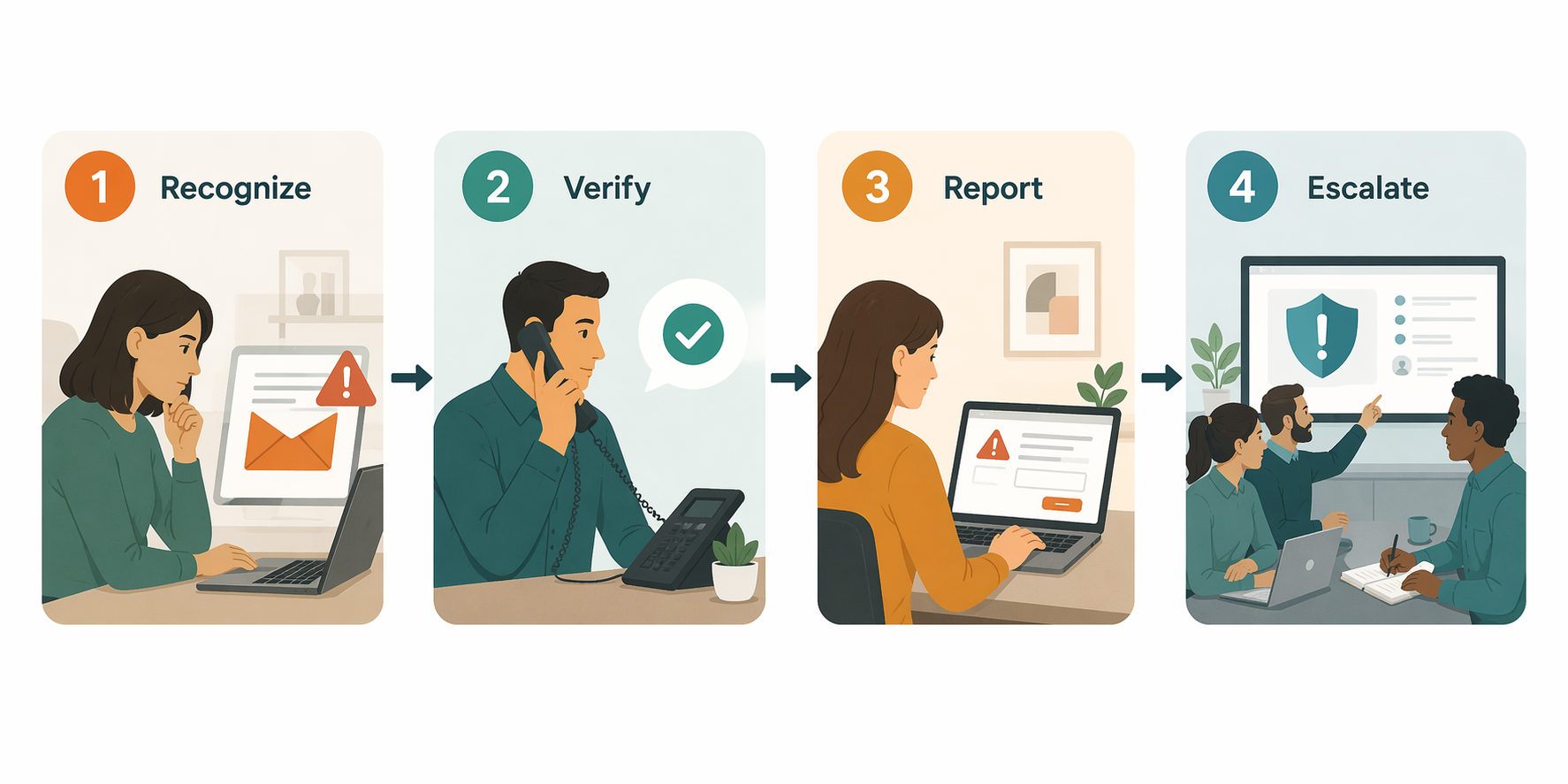
| Stage | What the employee does | What the business must define |
|---|---|---|
| Recognize | Notices a suspicious email, login prompt, attachment, payment request, file share, or calendar invite | The cues worth stopping for |
| Verify | Confirms the request through a second trusted channel | Which requests require confirmation and which channels count |
| Report | Sends the suspicious item to a known place without waiting to be certain | A low-friction reporting route and a no-blame expectation |
| Escalate | The assigned owner reviews, contains, and communicates next steps | Who responds, how fast, and what authority they have |
Recognition Has to Match the Work People Actually Do
Training fails when it treats phishing as a strange, obvious thing that arrives wearing a costume. Modern phishing works because it looks adjacent to real work. The fake message borrows urgency from a real invoice cycle. The fake login page appears after a real collaboration tool notification. The fake vendor request lands in the same inbox where actual vendors send actual problems.
Useful recognition training names the cues employees should stop for. A small business does not need a 70-slide cyber awareness deck to start. It needs shared language for the handful of moments that deserve a pause.
- A login prompt that arrives from an email or file-share link instead of from the employee’s normal bookmarked app.
- A payment, refund, payroll, bank-detail, or gift-card request that adds urgency or asks someone to bypass the usual approval path.
- A vendor message that uses a familiar name but an unfamiliar sending address, domain, or reply-to field.
- An attachment or compressed file that the employee was not expecting, especially when paired with pressure to open it quickly.
- A calendar invite, shared document, or collaboration notification that asks for credentials before showing the promised content.
The 21-second click window matters here because it explains why recognition cannot be a once-a-year event.[2] People do not click because they forgot every security principle they ever heard. They click because the message arrived inside a busy workstream, and the fastest path looked harmless. The training has to make the pause feel like part of the job, not an interruption of it.
That is where short, continuous simulations beat annual compliance theater. Adaptive Security reports that simulation programs can improve phishing resilience, but the useful takeaway is not that a vendor platform magically fixes behavior.[4] The useful takeaway is operational: frequent practice makes suspicious moments familiar before a real attacker supplies one.
For a small business, a good simulation program is modest. Send realistic test emails that resemble the company’s actual tools and workflows. Debrief quickly. Show the clue that mattered. Avoid leaderboards that turn mistakes into office gossip. If an employee clicks, the system should teach the next move, not create a permanent label.
Verification Turns Suspicion Into a Business Habit
Recognition without verification creates a bad middle ground. An employee feels uneasy, but the request still looks like it came from a customer, executive, vendor, or coworker. If the culture rewards speed above everything else, the employee will often continue rather than risk looking difficult.
The fix is not to tell people to “trust their gut.” The fix is to define which requests must be verified and how. Once that rule exists, the employee is not being paranoid or slow. They are following the operating procedure.
| Request type | Verification rule |
|---|---|
| Payment, wire, refund, payroll, or bank-detail change | Confirm through a known phone number, approved finance channel, or existing vendor contact record; never through the contact details inside the suspicious message. |
| Password reset or login prompt | Go directly to the app through a saved bookmark or password manager, not through the email link. |
| Unexpected file share or attachment | Ask the sender through a separate channel whether they intended to send it before opening or enabling anything. |
| Executive or manager urgency request | Verify in the company’s normal approval channel, even if the message says the person is unavailable. |
| Vendor account or invoice change | Route through the same approval process used for onboarding or changing vendor records. |
A second channel is the important part. Replying to the same email thread does not verify much if the attacker controls the thread or has spoofed the conversation well enough. Calling a known number, sending a Slack message to the known internal account, opening the app directly, or using an approved finance queue creates separation from the suspicious request.
This is where many small companies accidentally train employees to take risks. They say security matters, then reward the person who approves the urgent payment in five minutes. A workable human firewall changes the default: verification is expected for high-risk requests, and managers do not treat it as a personal insult when someone checks.
Reporting Should Feel Like Sending a Ticket, Not Confessing a Mistake
A phishing report is useful even when the employee is not sure. Especially then. The business needs to know that a suspicious message is circulating before the tenth person receives it, before someone enters credentials, before the attacker uses one mailbox to reach another.
The reporting path should be boring and obvious. A dedicated Slack channel, a shared security inbox, a ticket form, or a button in an email security tool can all work. The tool matters less than the rule: when something feels off, forward or submit it immediately, with no need to investigate first.
- Name the reporting destination in onboarding, team docs, and phishing simulation follow-ups.
- Let employees report with one short note, such as “unexpected invoice link” or “login prompt from file share.”
- Tell employees not to delete suspicious messages until the reviewer has what they need.
- Thank the first reporter publicly when appropriate, without naming anyone who clicked.
- Close the loop with a short response: safe, blocked, under review, or action required.
Silence is often a process problem, not a character problem. If employees believe reporting will trigger blame, they will wait until they are certain. If they believe only technical people are qualified to report, they will leave suspicious messages alone. If they never hear back after reporting, they will stop believing the action matters.
The cleanest rule is simple: report early, even if you clicked. A fast report after a click can still allow the business to reset credentials, revoke sessions, isolate a device, warn other employees, and block similar messages. Shame burns the minutes the company needs most.
Escalation Needs an Owner Before the First Bad Email Arrives
Small businesses often say “tell IT,” then remember they do not really have IT. Or they have an outside provider, a part-time admin, a technical founder, and a very capable office manager who knows where everything lives. That can work, but only if the response owner is named before the incident.
Escalation does not need to be elaborate. It needs to answer four questions: who reviews the report, what they are allowed to do, who they notify, and when they bring in outside help.
| Trigger | First response |
|---|---|
| Suspicious email reported, no click | Review headers and links if qualified, warn affected team, block sender or domain if available, and mark the message safe or unsafe. |
| Employee clicked a link but did not enter credentials | Check the destination, ask what opened, scan or isolate the device if needed, and warn other recipients. |
| Employee entered credentials | Reset the password, revoke active sessions, confirm MFA status, review mailbox rules, and check recent account activity. |
| Attachment opened or file executed | Disconnect the device from the network, preserve details, contact IT support or incident response, and avoid ad hoc cleanup. |
| Multiple employees received similar messages | Send a short internal alert with what to avoid, where to report, and what action is already underway. |
The person assigned to escalation should not need executive permission to take basic containment steps. If a reported message looks malicious, they should be able to warn the team. If credentials were entered, they should be able to force a reset or call the provider who can. If a device may have executed malware, they should be able to tell the employee to disconnect it and stop using it.
This is also where a small business should define its outside support line. If the company uses a managed service provider, cyber insurance hotline, legal counsel, or incident response firm, the contact details should be written into the escalation protocol. Looking for the right phone number during a ransomware event is a preventable delay.
MFA Is the Safety Net When Recognition Fails
No training program catches every bad message. Employees get tired. Attackers improve. A vendor account may be compromised, making a malicious email look more believable than the usual fake. That is why the human firewall needs a few technical guardrails around it.
Multi-factor authentication is the first one to deploy broadly. Microsoft data cited by AlphaCIS says MFA blocks 99.9% of automated attacks.[1] That figure applies to automated account attacks, not every ransomware path, but it explains why MFA belongs near the center of a small-business ransomware prevention plan. If an employee enters a password into a fake page, MFA can keep that mistake from becoming a mailbox takeover or cloud-drive compromise.
Start with the accounts that can hurt the business fastest: email, file storage, finance systems, payroll, remote access, password managers, administrator accounts, and any system connected to customer data. Require MFA for owners and executives too. Attackers do not care that the CEO finds extra prompts annoying.
MFA should not become an excuse to stop training. It is a backup control. The employee still needs to recognize a fake login prompt, report it, and tell someone if they approved a push notification they did not initiate. The process and the control support each other.
Backups and Endpoint Controls Still Matter, but They Do a Different Job
A human firewall is prevention, not a full recovery plan. Email filtering, endpoint protection, patching, least-privilege access, and secure backups still matter. They reduce what reaches employees, limit what an attacker can do, and give the business options if prevention fails.
Backups deserve special attention because they change the ransom decision. Coalition reports that 86% of policyholders with viable backups refused to pay ransom demands.[5] That does not mean backups make a ransomware incident cheap or painless. It means the company is less trapped when data can be restored without relying on the attacker.
For a small business, the backup question is not “Do we have backups somewhere?” It is “Can we restore the systems we need, from a clean copy, within a tolerable window?” Adaptive Security discusses the practitioner-used 3-2-1-1-0 backup approach and reports faster recovery comparisons for organizations using resilient backup practices, but that framework is best treated as an operating discipline rather than an official standard.[4]
The same practical test applies to endpoint tools and filters. If the tool blocks a malicious attachment, good. If it flags a suspicious login, better. But someone still has to receive the alert, understand its priority, and know what to do next. Tool buying without ownership just creates another inbox no one checks.
The Budget Case Is Really a Neglect Case
Small businesses are not ignoring ransomware because they think it sounds harmless. Programs.com cites U.S. Chamber of Commerce data showing that 60% of small businesses name cyber threats as a top concern, while only 48% have trained staff on cybersecurity.[3] That gap is the opportunity. The prevention layer is not exotic. It is simply underused.
Training is also one of the few controls a small company can improve without redesigning its entire technology stack. AlphaCIS estimates that a 25-person team can run annual training and phishing simulation programs in the rough range of $2,000 to $8,000, depending on platform and scope.[1] That is still real money for a small business, but it is a manageable budget line compared with the disruption of a ransomware event.
Recovery-cost comparisons need care because the numbers come from different methodologies and company sizes. Programs.com cites Sophos ransomware recovery figures, while AlphaCIS also references broader breach-cost framing that can reach into the millions.[1][3] The conservative lesson is not that every small business should expect the same bill as a large enterprise. The lesson is that prevention spending should be compared with downtime, emergency support, lost work, customer communication, legal review, and recovery labor—not just the ransom demand.
There is another budget reality that does not show up cleanly in software quotes. A small company already pays employees to make judgment calls all day. Teaching them when to pause, how to verify, and where to report improves the security value of work they are already doing. That makes the human firewall less like a new department and more like a safer operating rhythm.
A Simple 30-Day Rollout
The fastest useful rollout is not a giant policy rewrite. It is a month of tightening the moments where ransomware usually gets its opening.
- Name one owner for phishing reports and one backup owner for when that person is unavailable.
- Publish the verification rules for payments, password prompts, file shares, vendor changes, and executive urgency requests.
- Create one reporting destination and test it with a harmless internal example.
- Turn on MFA for email, cloud storage, finance, payroll, remote access, administrator accounts, and password managers.
- Run one short phishing simulation or tabletop exercise and debrief the cues, not the people.
- Review backup restore ownership: who can start a restore, which systems matter first, and when outside help is called.
The rollout should end with visible proof that reports go somewhere. If someone submits a suspicious message, respond. If a simulation catches a confusing cue, update the training. If a finance verification rule slows one payment by ten minutes, treat that as the system working, not as friction to remove.
What This Prevents Before Encryption Begins
The human firewall does not promise perfect prevention. It does something more useful for a small business: it creates multiple chances to interrupt the attack chain early. A suspicious email can be recognized before the click. A fake payment request can be verified before money moves. A stolen password can be contained before the mailbox becomes an attacker’s launchpad. A clicked link can be reported before the same message reaches the rest of the team.
That is why tools alone are the wrong center of gravity. Filters, MFA, backups, and endpoint controls all matter, but they work best when people know what they are supposed to do with the moment in front of them. Small businesses cannot buy their way out of ransomware risk with a stack of products no one owns. They can reduce exposure sharply by making every employee part of a simple, rehearsed detection-and-response loop.
References
- Ransomware Protection for Small Businesses: 2026 Guide — AlphaCIS
- Ransomware Statistics (2026): Attack Trends & Business Impact — Huntress
- The Latest Small Business Ransomware Statistics (2026) — Programs.com
- Ransomware Trends 2026 — Adaptive Security
- 10 Best Practices to Prevent Ransomware Attacks — Coalition
Comments
Join the discussion with an anonymous comment.