
The most painful moment in a personal knowledge management system rarely happens during capture. Capture feels productive. Linking feels intelligent. Tagging gives the archive a pleasing sense of order. The pain arrives later, when there is an article due, a workshop to prepare, a briefing deck to write, or a decision memo waiting, and the archive that looked so alive yesterday turns into 1,400 searchable fragments.
Chris Aldrich named this gap plainly in his call for model examples of Zettelkasten output processes: the community has plenty to say about collecting, connecting, and maintaining notes, but far less about using those notes to create published material.[1] That is the part many knowledge workers feel but struggle to diagnose. They do not lack notes. They lack a pipeline.
This is also where many PKM conversations become too tidy. A good archive matters. So do links, source notes, structure notes, and reliable retrieval. But none of those, by themselves, is the same as producing finished work. If you have already recognized the anti-pattern of collecting without output, the next question is not whether you chose the perfect framework. It is whether your system contains a repeatable way to move from archive to deliverable. That is the practical difference between a well-stocked note library and PKM maturity that ships decisions, writing, and revised mental models.
Capture, Connection, and Output Are Different Jobs
A note system has at least three kinds of work inside it. Capture preserves material before it disappears. Connection helps ideas find neighbors. Output turns selected material into something another person can use.
The trouble starts when one job is asked to impersonate another. A captured quote is not yet an argument. A linked cluster is not yet a chapter. A graph view is not yet a talk. Even a beautifully maintained Zettelkasten still needs a temporary project space where the writer can search, copy, cut, sequence, and eventually leave the note app.
The useful workflow is simple enough to hold in mind, but concrete enough to survive real work:
| Stage | What Happens | What Changes |
|---|---|---|
| Discovery | Find relevant notes through search, links, hub notes, structure notes, or highlighted summaries. | The archive becomes a candidate pool. |
| Assembly | Copy or gather promising notes into a project-specific sandbox. | Fragments become working material. |
| Pruning | Remove tangents, weak fragments, duplicates, and material that does not serve this output. | The pile becomes usable. |
| Outlining | Turn the remaining notes into claims, sections, and sequence. | Material becomes an argument. |
| Drafting | Move into a writing environment and complete the piece, deck, memo, or talk. | The outline becomes finished work. |
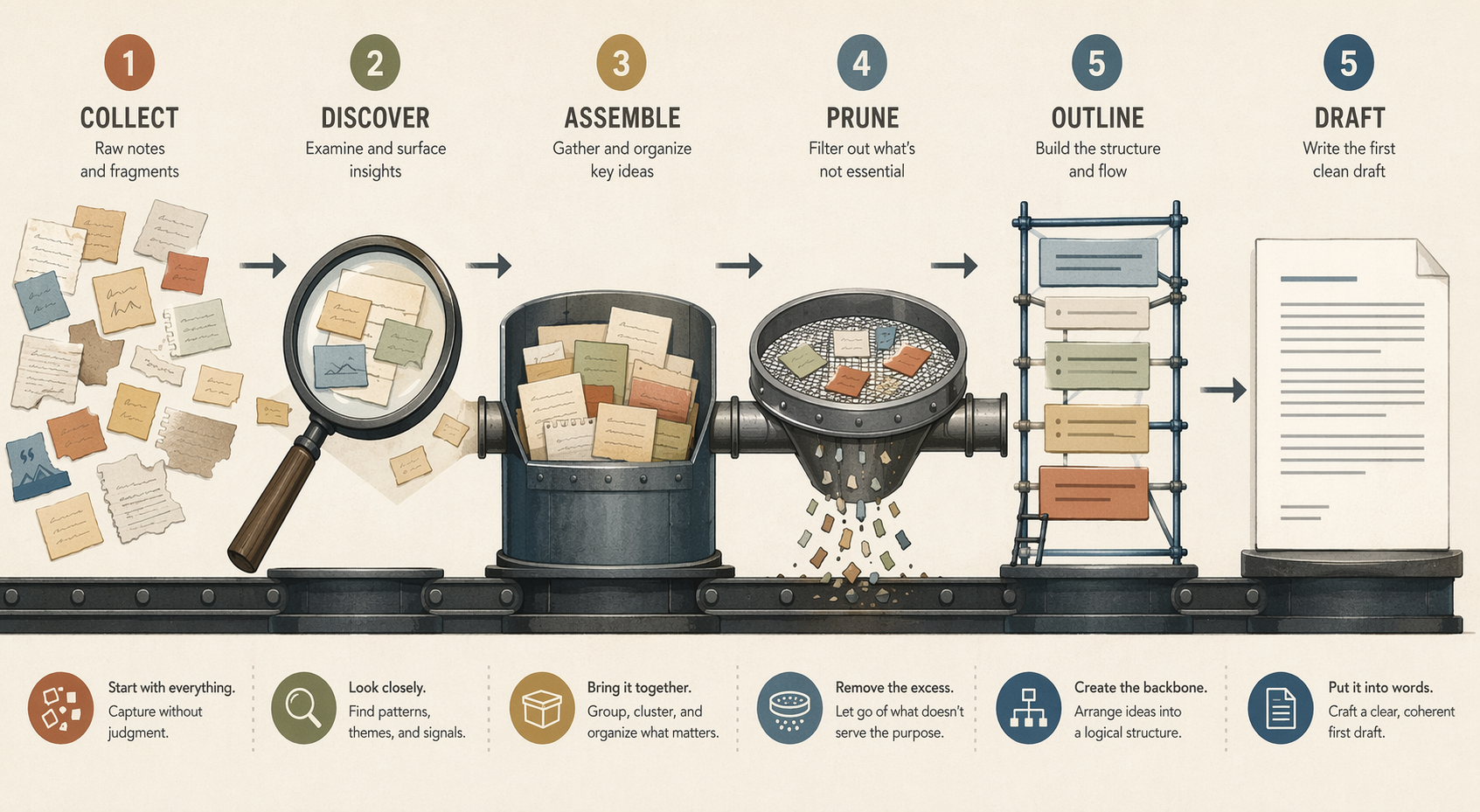
Discovery: Find the Notes That Are Already Trying to Become Something
Discovery is not browsing your archive until inspiration arrives. It is a bounded search for material that might serve a specific output: an article on pricing strategy, a client workshop on AI adoption, a chapter on intellectual humility, a board memo on a product decision.
This is where hub notes, structure notes, maps of content, saved searches, and heavily summarized notes earn their keep. Their value is not that they make the archive look organized. Their value is that they shorten the distance between a live project and the notes that can feed it.
Niklas Luhmann’s process is useful here, provided he is treated as a working model rather than a saint. The Zettelkasten.de introduction describes him starting from existing notes, following connections, collecting relevant cards, arranging them, filling gaps, and then writing.[2] Ernest Chiang’s account of Luhmann’s original method also emphasizes the distinction between bibliographic cards for sources and main cards for reformulated ideas, rather than the later three-part fleeting-literature-permanent note vocabulary many modern users inherit from other sources.[3]
That distinction matters less as historical trivia than as a working principle. Source management, thinking, and writing are not the same mode. Luhmann’s two boxes physically separated bibliographic information from his own reformulated ideas.[3] Digital tools make it easy to collapse those modes into one endless folder. Output becomes easier when the separation returns, even if the boxes are now folders, tags, databases, canvases, or linked markdown files.
Progressive summarization gives discovery another practical aid. Tiago Forte’s examples show a 373-word note reduced to about 181 words at one layer, then to roughly 60 words at a deeper layer, making the note faster to scan later.[4][5] Those numbers should be read as illustrative examples from Forte’s own method, not independent evidence that one summarization ratio works for everyone. Still, the operational point is sound: a note that exposes its useful center is easier to retrieve under deadline pressure.
Assembly: Create a Temporary Place Where the Work Can Get Ugly
Assembly is the stage most people skip because it feels like clerical work. It is not. Assembly is where the archive stops being a museum and starts becoming a bench.
Richard Carter’s chapter workflow is valuable because he shows the awkward middle instead of leaping from “I had notes” to “I wrote a chapter.” In his account of converting notes into a chapter, he gathers relevant notes into an assembly file, uses that file to see relationships, builds an outline in Obsidian with checkboxes, and then drafts in a separate writing app.[6]
The important event in Carter’s workflow is not that he had many notes. It is that three separate notes, once placed together in an assembly file, produced what he describes as a “lightbulb moment.”[6] That is synthesis in its least glamorous form: not lightning from nowhere, but proximity created on purpose.
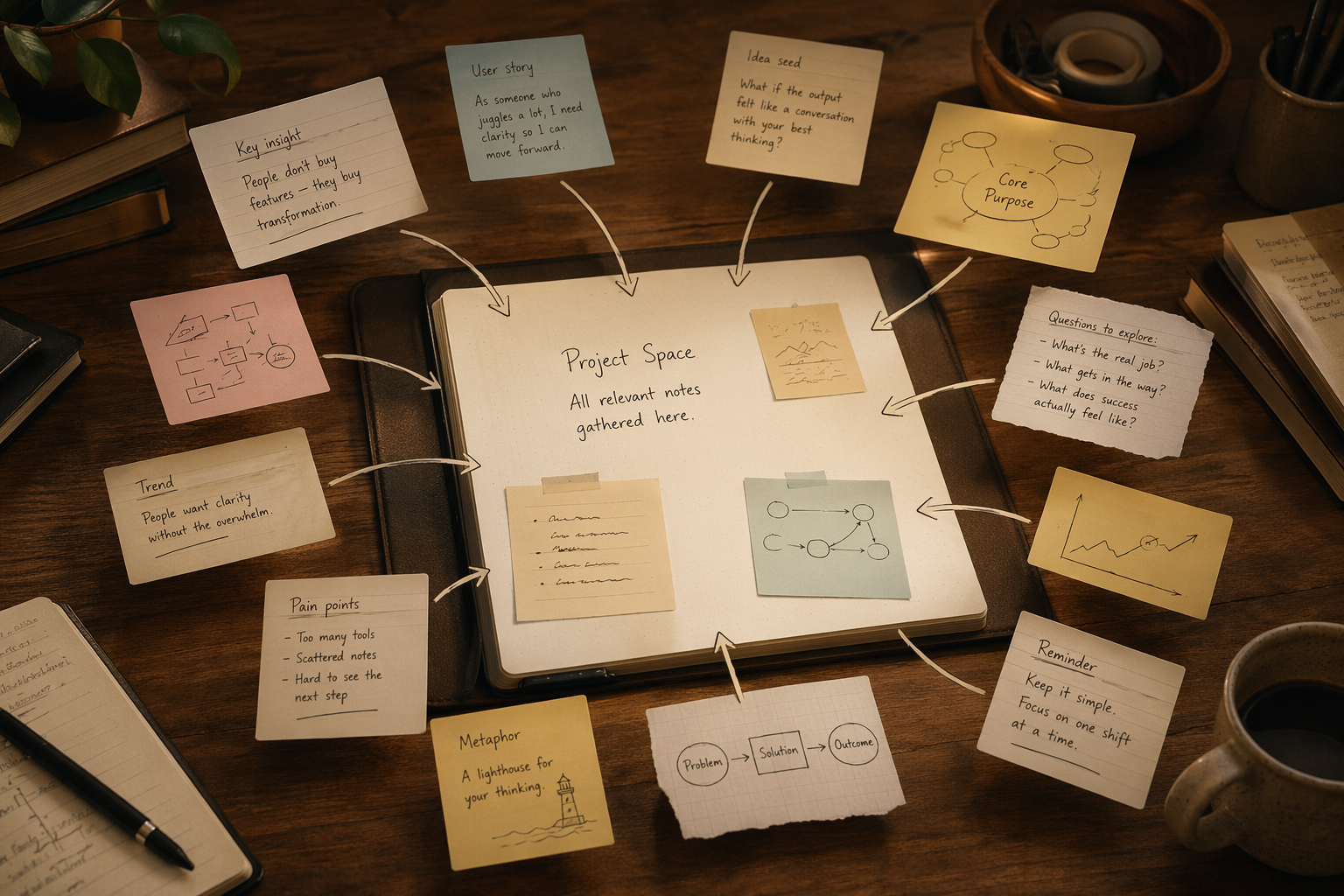
Bob Doto’s method for beginning a book project works in the same direction. He starts by searching his Zettelkasten for relevant notes, then copy-pastes them into a single sandbox file.[7] The copy-paste matters. It changes the note’s job. In the archive, the note belongs to a long-term knowledge system. In the sandbox, it has to audition for a particular project.
This temporary project space can be plain. It might be an Obsidian note, a Scrivener folder, a Notion page, a Google Doc, a markdown file, a canvas, or a pile of exported cards. The format matters less than the permission it gives you: duplicate notes without guilt, rearrange them brutally, write ugly bridge sentences, leave unresolved questions in brackets, and collect fragments that would make the main archive messy if they stayed there.
A project sandbox should usually contain four things:
- Copied or embedded notes that seem directly relevant to the output.
- Links back to original notes or sources, so evidence does not get detached from context.
- Rough headings, questions, or claims that begin to group the material.
- A visible parking area for promising tangents that probably do not belong.
This is also where a broader organizing method such as PARA can help without taking over the whole process. Forte describes PARA as organizing information by Projects, Areas, Resources, and Archives.[8] For output work, the key move is the project container. A note may live permanently in a resource archive, but a current article, talk, or deck deserves its own temporary operating room.
Pruning: Cut Until the Project Can Breathe
Assembly creates relief, then immediately creates a second problem: the sandbox is too full. This is normal. The first gathered pile is not an outline. It is a materials dump with better boundaries.
Pruning is where many note-takers hesitate because every fragment once felt worth saving. But the standard has changed. The question is no longer “Is this interesting?” The question is “Does this help this piece become clear, supported, and finishable?”
Matthias Melcher’s “Pruning for Output” is useful because it treats cutting as part of production, not as a betrayal of the archive. When collecting notes for a specific output, he argues for actively removing tangents: notes that may be interesting but are not well enough connected to the current project.[9] That distinction is the whole discipline. A tangent can remain valuable in the archive and still be wrong for today’s deliverable.
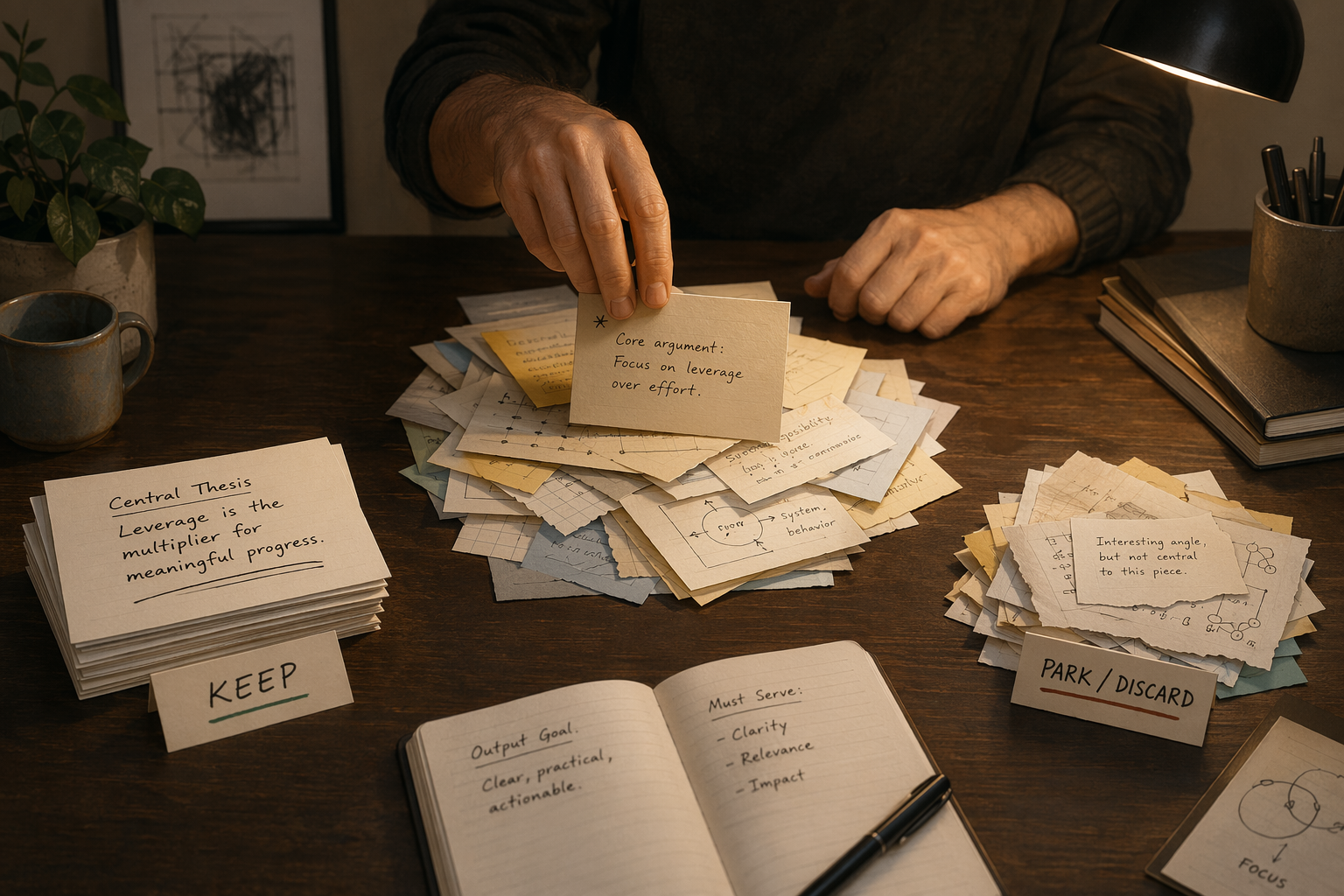
The best pruning pass is usually physical in spirit, even when it happens digitally. Move material. Separate it. Make a “keep” section and a “maybe later” section. Collapse duplicates. Delete copied excerpts that do not carry a claim, example, distinction, or usable evidence. If a note only says “this is important” but no longer shows why, it is not ready to carry weight in the current piece.
A practical pruning pass can use a few blunt tests:
- Keep it if it supports a likely claim, supplies evidence, sharpens a distinction, or gives the reader a concrete action.
- Move it aside if it belongs to a different article, later chapter, appendix, workshop exercise, or research question.
- Cut it from the sandbox if it is merely adjacent, emotionally beloved, or too underdeveloped to explain without another research session.
- Mark a gap if the project needs a point that the current archive does not yet support.
That last move is important. Pruning does not only reduce. It reveals. After the weak fragments are gone, you can see whether the project has enough support, whether one section is overfed, whether another section is only an opinion wearing a heading, and whether a promised conclusion has no bridge leading to it.
Outlining: Turn Notes into Claims
An outline is not a prettier sandbox. It is the moment when the material starts making commitments. A note can be suggestive, contradictory, or partial. An outline has to decide what the reader meets first, what depends on what, and which claims deserve space.
Carter’s workflow again gives the clearest example. After assembling notes for his chapter, he builds the chapter outline in Obsidian and uses checkboxes to track progress through sections.[6] This is a small detail with large consequences. The outline becomes a control surface. It shows what has been drafted, what remains unresolved, and where the note archive is still serving the project rather than swallowing it.
At this stage, the writer should stop asking, “What notes do I have?” and start asking, “What must this output do for its reader?” An article may need a clean sequence of explanation. A talk may need fewer points and stronger transitions. A deck may need decisions, evidence, and implications. A newsletter may need one argument with enough texture to be worth opening. A decision memo may need options, tradeoffs, and a recommendation.
The same assembled notes can produce different outlines because outputs are not containers of equal shape. This is why “turning notes into writing” is too vague. A note archive does not know whether the next use is a 900-word essay, a 45-minute workshop, a chapter section, or three slides for leadership. The outline imposes that form.
A useful outline line is usually a claim, not a topic label. “Progressive summarization” is a topic. “Summarized notes are easier to assemble under deadline pressure” is a claim. “Luhmann” is a topic. “Separate research, thinking, and drafting modes make output easier to sustain” is a claim. Claims expose the work still needed. Topic labels often hide it.
Drafting: Leave the Archive Before It Pulls You Back In
Drafting should not be performed inside the archive forever. At some point, the project needs a place built for finishing rather than referencing.
Carter is explicit about this boundary. He writes that it would be “asking for trouble to mix notes and their end-products in the same place,” and describes drafting in apps such as Ulysses or iA Writer while keeping the note system as reference.[6] That is not tool fussiness. It is mode protection.
The archive invites reopening. The draft requires closing. In the archive, every sentence can become a doorway to another note, source, tangent, or taxonomy repair. In a drafting environment, the writer has fewer excuses. The outline must become paragraphs. The slide title must become a decision. The workshop note must become an instruction that a participant can actually follow.
Aldrich’s own article-writing timeline shows what becomes possible when notes are already prepared for use: 5 minutes outlining, 15 minutes cutting and pasting notes into the outline, then 2 hours writing and editing, for 3.5 hours total.[1] The point is not that every good article should take 3.5 hours. The point is that the visible writing time was compressed because earlier note work had already made material discoverable and ready to assemble.
The Same Pipeline Works Beyond Books
Many documented examples come from book and chapter writers because long-form work makes the pipeline visible. But the mechanism is not limited to books. A newsletter issue, client briefing, internal strategy memo, slide deck, podcast outline, course module, research synthesis, or hiring decision can move through the same stages.
The scale changes; the transitions do not. For a five-slide deck, discovery may take ten minutes and assembly may mean dragging eight notes into a canvas. For a major chapter, discovery may involve structure notes, source trails, and several rounds of pruning. For a decision memo, outlining may matter more than drafting because the sequence of evidence, options, and tradeoffs carries the whole document.
This is also why framework debates have limited value at the last mile. Zettelkasten, PARA, CODE, Johnny Decimal, and other methods can all help different parts of a system. If you are still choosing among them, a PKM methodology comparison can clarify the fit. But once hundreds of notes already exist, the urgent question is more mechanical: can you discover relevant material, assemble it somewhere temporary, prune it, outline it, and draft it to completion?
A Note Archive Does Not Ship. A Pipeline Does.
Luhmann’s famous productivity is often invoked in PKM discussions, though even basic output figures differ across sources. Zettelkasten.de reports about 50 books and more than 600 articles, while Chiang reports 70 books and more than 400 articles.[2][3] The disagreement is a useful warning. The interesting lesson is not an exact heroic number. It is the repeatable movement from prepared thinking to arranged material to finished writing.
The same pattern appears in the modern workflows that are most worth imitating. Carter combines notes in an assembly file and sees a synthesis. Doto copy-pastes relevant Zettelkasten notes into a sandbox. Melcher cuts tangents so the current project can take shape. Aldrich’s compressed writing timeline depends on notes already arranged for use. Forte’s summarization layers make notes easier to scan when the output clock is running.[1][4][5][6][7][9]
None of this requires rebuilding your personal knowledge management system today. It does not require a new tagging scheme, a new graph view, or another capture rule. Pick one pending output. Create a project sandbox. Pull in the most relevant notes. Start pruning. That is where collecting ends and shipping begins.
References
- Call for Model Examples of Zettelkasten Output Processes — boffosocko.com, 2022
- Introduction to the Zettelkasten Method — zettelkasten.de
- Niklas Luhmann's Original Zettelkasten: Two Slip Boxes, Fixed Numbering, and Communication Partner — Ernest Chiang, 2025
- Progressive Summarization: A Practical Technique for Designing Discoverable Notes — Forte Labs
- Progressive Summarization II: Examples and Metaphors — Forte Labs
- Converting my notes into a chapter — richardcarter.com
- How I Start a Book Project Using a Zettelkasten — Bob Doto
- The PARA Method: The Simple System for Organizing Your Digital Life in Seconds — Forte Labs
- Pruning for Output — x28newblog.wordpress.com, 2022
Comments
Join the discussion with an anonymous comment.