
The fastest way to choose a notes app for Windows is to stop comparing feature grids and start with the moment the note is created. On the same Windows 11 laptop, two apps can both promise Markdown, sync, search, templates, and collaboration, yet one opens before the thought disappears while the other makes you stare at a white window, a spinner, or a half-loaded workspace.
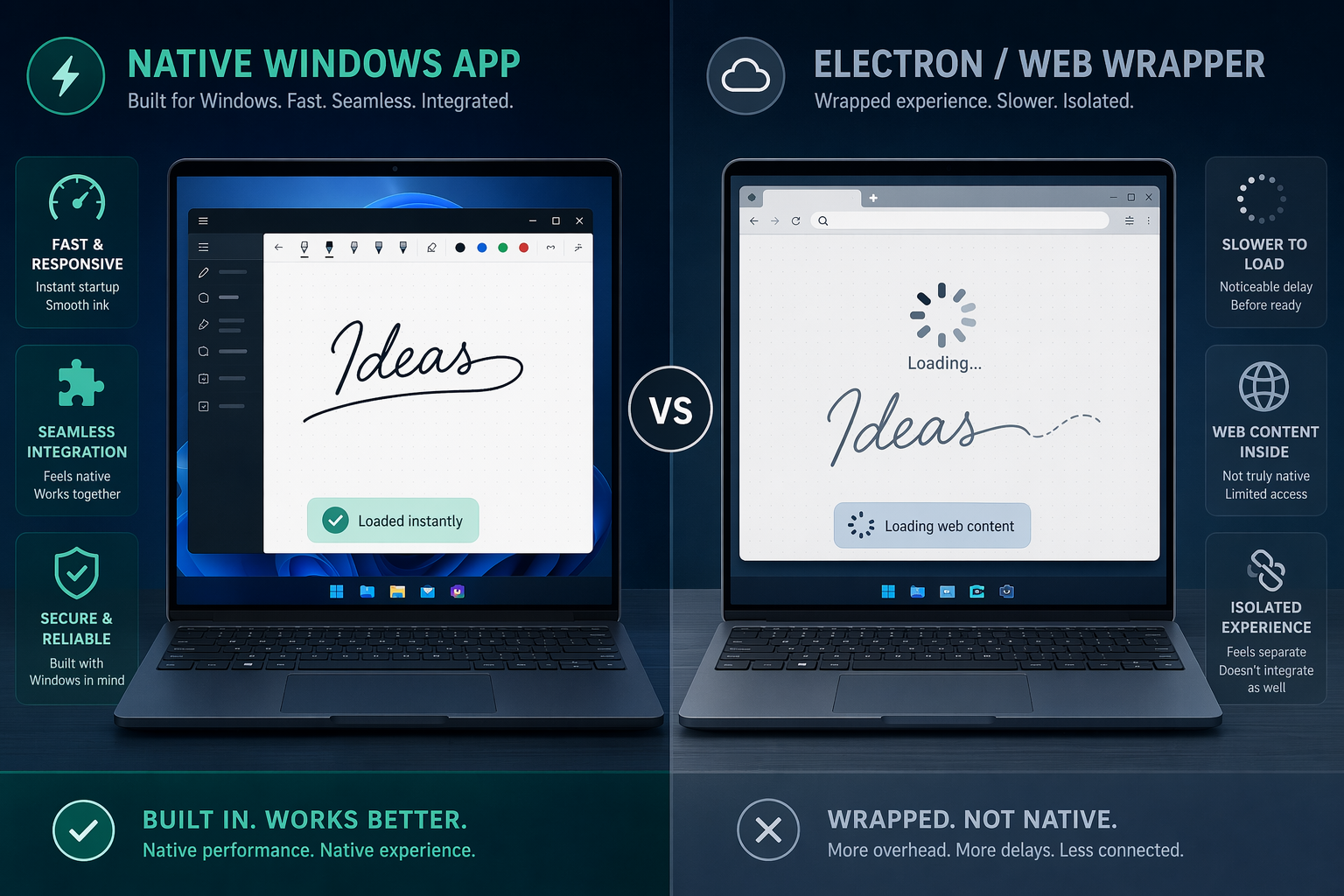
That gap is not imaginary. A native Windows app usually has an advantage where note-taking is most unforgiving: launch behavior, keyboard shortcut response, pen input, scrolling, and offline availability. Web-wrapper and Electron apps can still be excellent, especially for shared workspaces, but “available on Windows” is not the same as “built for the way Windows users actually take notes.”
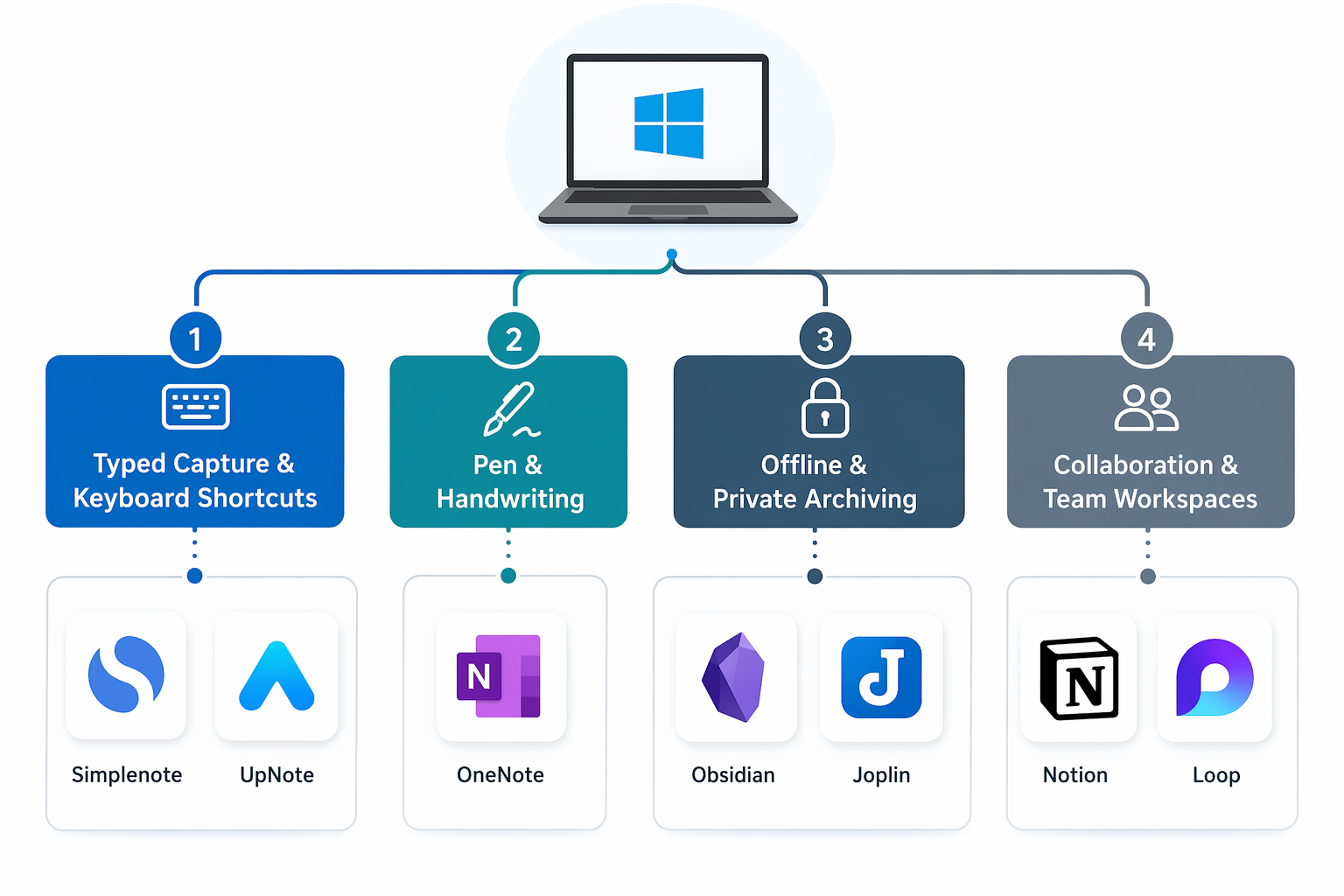
For 2026, the most dependable Windows choices fall into a few practical lanes. OneNote remains the free all-rounder and the default recommendation for handwriting on Windows; PCMag’s 2026 testing names it the best free all-round note-taking app, while noting its Microsoft 365 integration and broad feature set [1]. Obsidian is the unusual Electron app that earns a pass because it keeps plain Markdown files locally and stays light enough for serious knowledge work. Joplin is the better fit when open-source, encrypted archiving matters more than polish. Notion and Loop make sense when the note is really part of a team workspace. Simplenote and UpNote are for people who want speed without building a second operating system inside their note app.
What “native performance” changes in daily note-taking
Native performance does not mean an app must reject every modern web technology. It means the app behaves well at the points where Windows users feel friction immediately: opening a new note, moving between notebooks, searching, invoking shortcuts, writing with a pen, dragging images, and trusting the file will still be available when Wi-Fi drops.
That distinction matters most on Surface-style devices and corporate laptops because those machines often move between meetings, conference rooms, classrooms, trains, and locked-down networks. A notes app that works fine in a browser tab at a desk can feel much worse when the user is standing at a whiteboard trying to capture a diagram with a stylus.
Windows-specific testing and reviews repeatedly point to the same divide: native apps tend to feel quicker and more integrated, while heavier web-wrapper designs can introduce launch delays, scrolling stutter, and weaker pen behavior. MakeUseOf’s 2026 Windows-focused coverage frames the problem plainly: many note apps are cross-platform first and Windows-native second, which leaves users with apps that run on Windows without feeling made for it [2].
| Primary workflow | Best starting point | Why it fits Windows |
|---|---|---|
| Handwriting, diagrams, lecture notes, meeting annotation | OneNote | Native Windows quality, mature ink tools, strong Microsoft 365 integration |
| Local knowledge base, linked notes, Markdown vaults | Obsidian | Electron-based, but local-first and lightweight enough to stay responsive |
| Encrypted archive, open-source storage, flexible sync | Joplin | Local notes, end-to-end encryption, sync through common storage providers |
| Team docs, project spaces, shared databases | Notion or Microsoft Loop | Collaboration is the point, even if instant capture and pen support are weaker |
| Fast plain-text notes | Simplenote | Minimal interface, free sync, very low friction |
| Polished personal Markdown notes | UpNote | Good Windows app feel, simple organization, paid but inexpensive |
| Web clipping and large personal archive | Evernote | Strong capture tools, but heavier app and pricing caveats |
If you handwrite on Windows, start with OneNote
A handwriting app can have beautiful notebooks, covers, stickers, and PDF tools and still fail the Windows test if the pen feels delayed or the page fights your palm. For Windows pen users, OneNote is still the first app to try because it is mature, free, and built into the Microsoft ecosystem rather than bolted onto it. PCMag’s 2026 review describes OneNote as free, powerful, and especially strong for Microsoft users; the free Microsoft account storage allocation is 5 GB through OneDrive [1].
The practical advantage is not only that OneNote supports inking. Plenty of apps support inking in the checkbox sense. OneNote’s advantage is that handwriting, page navigation, lasso selection, drawing tools, and syncing across Windows devices feel like core behaviors. On a Surface Pro or pen-enabled Lenovo, that matters more than whether the template gallery is fashionable.
There are annoyances. The ribbon can feel cluttered, notebook organization is idiosyncratic, and people who want plain Markdown files will not enjoy the storage model. Copilot features also depend on Microsoft 365 availability rather than being part of the free baseline [1]. Still, if the workflow is lectures, patient rounds, lab sketches, design reviews, or PDF markup during meetings, OneNote is the least compromised starting point on Windows.
Why GoodNotes for Windows is a cautionary example
GoodNotes has a strong reputation in the iPad world, which makes its Windows experience easy to overestimate. The Windows version is often discussed as a web-wrapper-style app rather than a fully native Windows handwriting tool, and Windows-focused handwriting comparisons have criticized it for slower behavior and a less convincing pen experience than native alternatives [3].
That does not make GoodNotes useless on Windows. It does mean a pen-first buyer should test it on the actual device, with the actual stylus, in the actual capture situation. Write quickly near the edge of the screen. Rest your palm. Scroll during a lecture. Switch pages while someone is talking. If those actions feel like compromises, the app’s nicer notebook metaphor will not rescue it.
For local knowledge work, Obsidian is the Electron exception
Obsidian complicates any simple native-versus-web rule. It is Electron-based, but it behaves differently from many heavier workspace apps because the center of gravity is local Markdown files. Notes live in folders the user can inspect, back up, sync, search, and move without waiting for a remote workspace to load. PCMag and Zapier both place Obsidian among the strongest note apps for serious personal knowledge management, while highlighting its local Markdown approach and power-user depth [1][4].
The result is that Obsidian can feel faster than its architecture would suggest. It is not a native Windows handwriting tool, and it is not the app to choose if the main input method is a pen. But for typed notes, code snippets, daily logs, research notes, backlinks, and long-running projects, it respects the Windows user who wants files first and cloud services second.
The tradeoff is setup cost. Obsidian’s plugin ecosystem is enormous — PCMag cites more than 2,700 community plugins — and that power can become procrastination if the user spends more time tuning graph views than writing notes [1]. Sync and publishing are also not the same as free collaboration: Obsidian Sync is a paid service, with pricing cited at $5 per month in 2026 coverage [1].
Choose Obsidian when the archive is meant to last, when Markdown matters, and when the user is comfortable owning a folder of notes. Avoid it if the team needs shared databases, permissions, comments, and polished onboarding for non-technical collaborators.
Joplin is the quieter choice for encrypted, open-source notes
Joplin does not try to be a visual workspace, and that is part of its appeal. It is open-source, supports end-to-end encryption, and can sync through services such as Dropbox, OneDrive, and Nextcloud. PCMag rates Joplin 4.5 out of 5 in its 2026 testing, emphasizing its privacy and open-source strengths while acknowledging that the interface is less polished than more commercial competitors [1].
This is the app for the person who cares where the notes are, how they sync, and whether the archive can be moved without pleading with a vendor. It is also a sensible Windows choice for people who want Markdown, attachments, notebooks, clipping, and encryption without building an Obsidian plugin stack.
The cost is visual polish and social momentum. Joplin will not sell itself in a team demo the way Notion can. It also is not the best handwriting environment. But for private research notes, client notes, project logs, or long-term personal archives, its priorities are refreshingly clear.
Notion is useful on Windows when collaboration outranks capture speed
Notion is often the correct organizational choice and the wrong instant-capture choice. It is excellent at shared pages, lightweight databases, project hubs, team documentation, and structured workspaces. Zapier’s 2026 note-taking roundup continues to recommend Notion for people who want an all-in-one workspace rather than a simple notebook [4].
On Windows, the tradeoff is obvious in the moments that matter for quick notes. Notion’s desktop app is an Electron wrapper, and its offline support remains limited compared with local-first tools. When a user is trying to capture an idea between calls, a workspace that needs to load blocks, databases, comments, and remote state can feel heavier than a notebook should. Zapier lists Notion’s Team plan at $10 per user per month in its 2026 coverage, but pricing should be treated as volatile and checked before purchase [4].
That does not make Notion a bad Windows app. It makes it a specific kind of Windows app. If the “note” becomes a shared project page with owners, statuses, meeting notes, embedded docs, and reusable databases, Notion’s slower capture feel may be an acceptable price. If the note starts as handwriting, offline field notes, or private scratch text, it is usually the wrong first stop.
Simplenote and UpNote: small apps with fewer ways to get in your way
Simplenote is almost aggressively narrow: plain text, fast sync, no formatting-heavy workspace, no attachment system, no attempt to become a project management suite. That limitation is the feature. PCMag and Zapier both continue to treat Simplenote as a strong free option for simple, fast notes, while noting its plain-text constraints [1][4].
Use Simplenote for quick typed notes, lists, drafts, and cross-device scratchpads. Do not use it for lecture slides, screenshots, scanned receipts, image-heavy research, or anything that depends on rich formatting. It is a capture tool, not an archive cabinet.
UpNote sits one step up in comfort. It is more polished than Simplenote, supports Markdown-style writing, and is better suited to personal notebooks with tags and light organization. 2026 pricing coverage lists UpNote at $1.99 per month or $39.99 for a lifetime license, while also noting limits such as no OCR, no sketching, no collaboration, and a 20 MB maximum attachment size [4].
For a single Windows user who wants a pleasant personal notes app and does not need team features, UpNote is easy to like. For a pen user, a compliance-sensitive archive, or a collaborative documentation system, it is not the right lane.
Evernote still has a place, but the Windows case is narrower now
Evernote is strongest when the job is collecting and retrieving material: web clips, reference notes, receipts, PDFs, meeting notes, and a long-running personal archive. The web clipper remains a real advantage. The problem is that Evernote now has to be judged against faster, cheaper, and more local-feeling Windows alternatives.
PCMag’s 2026 testing describes Evernote as powerful but expensive, and current pricing coverage notes a sharply limited free plan, including 50 notes and 1 device, with paid plans starting at $14.99 per month [1][4]. Its modern app is also heavier than the leaner choices in this comparison. For users who already have years of material in Evernote and depend on its clipping workflow, staying may be rational. For a Windows user starting fresh, it is no longer the obvious default.
Loop belongs beside OneNote, not above it
Microsoft Loop is easy to misunderstand if it is treated as “the new OneNote.” It is better understood as a collaborative component layer inside the Microsoft work ecosystem. Loop components can move across places like Teams and Outlook, and the product is designed around shared, real-time work rather than personal notebook capture [5].
That makes Loop useful for agendas, project trackers, shared action items, and team planning. It is less compelling as a personal notes home, especially for handwriting or offline-first archiving. Quisitive’s comparison of Loop and OneNote draws this distinction clearly: OneNote remains the traditional notebook for broad personal and meeting notes, while Loop is oriented around collaborative, portable work components [5].
There is also an account constraint: Loop is primarily a work or school Microsoft account experience, and feature availability can change as Microsoft evolves the product [5]. If the organization already lives in Teams and Outlook, Loop can reduce copy-paste friction. If the user wants a dependable personal notebook on a Windows 2-in-1, OneNote is still the safer starting point.
How to choose without getting trapped by feature lists
The cleanest decision is to identify the first input method, not the final archive fantasy. Most people imagine a perfect future system with linked references, meeting templates, shared dashboards, clipped research, handwriting, OCR, and AI summaries. The daily reality is usually simpler: typed notes, pen notes, private archive, or team workspace.
- If the first input is handwriting, diagrams, or lecture annotation, start with OneNote. Only move elsewhere for a specialized need that OneNote clearly fails.
- If the first input is typed Markdown that should remain under your control, start with Obsidian. Choose Joplin instead if encryption and open-source sync are higher priorities than plugin depth.
- If the first input is a shared team page, start with Notion or Loop. Accept that you are choosing collaboration over the fastest possible capture.
- If the first input is a quick plain-text thought, start with Simplenote. Consider UpNote if you want a more polished personal notebook without adopting a full workspace.
- If the first input is a web page, receipt, or research clipping, Evernote may still earn consideration, but compare the price and app weight against your actual clipping volume.
Pricing is the least stable part of this decision. The prices cited here are from May–June 2026 sources and should be treated as last verified on June 26, 2026. That matters especially for Microsoft 365-linked features, Notion team plans, Evernote plan limits, and paid sync services, all of which can change faster than the underlying workflow tradeoffs.
A good Windows notes app is the one that disappears at the moment of capture. For pen-heavy work, that still points to OneNote. For a local knowledge base, Obsidian and Joplin are the serious choices. For shared team work, Notion and Loop are worth the performance tradeoff when collaboration is the job. For speed and simplicity, Simplenote and UpNote deserve more attention than their quieter marketing suggests.
References
- The Best Note-Taking Apps We've Tested for 2026, PCMag, May 2026.
- Finally, a note-taking app that feels like it was made for Windows, MakeUseOf, March 2026.
- 7 Best Handwritten Note-Taking Apps for Windows in 2026, Noteastic blog, 2026.
- The 7 best note taking apps in 2026, Zapier, December 2025.
- Microsoft Loop vs. OneNote, Quisitive.
Comments
Join the discussion with an anonymous comment.