
In the first hour of a network breach, productivity usually fails in small, practical ways before anyone has a clean technical answer. A sales coordinator cannot open files. A project manager is collecting half-confirmed updates in Slack. Someone asks whether payroll can still run. Someone else starts forwarding screenshots because they are trying to help. Meanwhile, the technical team is asking for the one thing operations rarely gives them during a crisis: fewer interruptions.
That is the missing piece in many breach response plans. They tell the organization how to contain, investigate, eradicate, and recover. They often say communication should be clear. They rarely say which work stops, which work can move to clean systems, who is allowed to speak for the company, who tells frontline teams what to do every hour, and how managers should keep people useful without letting them improvise unsafe fixes.
The productivity impact is not a soft side effect. The UK National Cyber Security Centre tells boards that cyber incidents can have a “huge impact” on cost, productivity, and reputation, and that good incident management restores business more quickly while minimizing financial losses.[1] IBM’s 2025 breach-cost figures, as summarized by DeepStrike, point in the same direction: lost business costs averaged $1.47 million, the largest single cost component, while the mean breach lifecycle was 241 days.[2] Those are enterprise survey benchmarks, not a forecast for every small team. Still, they confirm what managers see on the floor: the business damage grows when customers wait, employees stall, and nobody knows what “back to normal” means.
There is also a readiness gap. The UK government’s 2024 Cyber Security Breaches Survey reported that 55% of medium-sized businesses and 73% of large businesses had an incident response plan.[3] Even where plans exist, the practical productivity track is often thin: continue only approved work, use only approved channels, wait for named updates, and do not create a second incident while trying to keep the first one from hurting customers.

The Missing Productivity Track
A manager-friendly breach response plan does not ask non-specialists to decide whether a server is compromised, whether evidence has been preserved, or whether a system is safe to reconnect. Those decisions belong to the incident lead, security team, legal counsel, insurers, forensic specialists, and other designated responders.
The manager’s job is different: stop confusion from spreading through the business. That means translating security boundaries into working rules. If the incident lead says the shared drive is off-limits, managers need to know where approved work can continue. If email is untrusted, employees need a clean communication channel. If customer-facing teams are getting questions, they need an approved holding message instead of twenty improvised explanations.
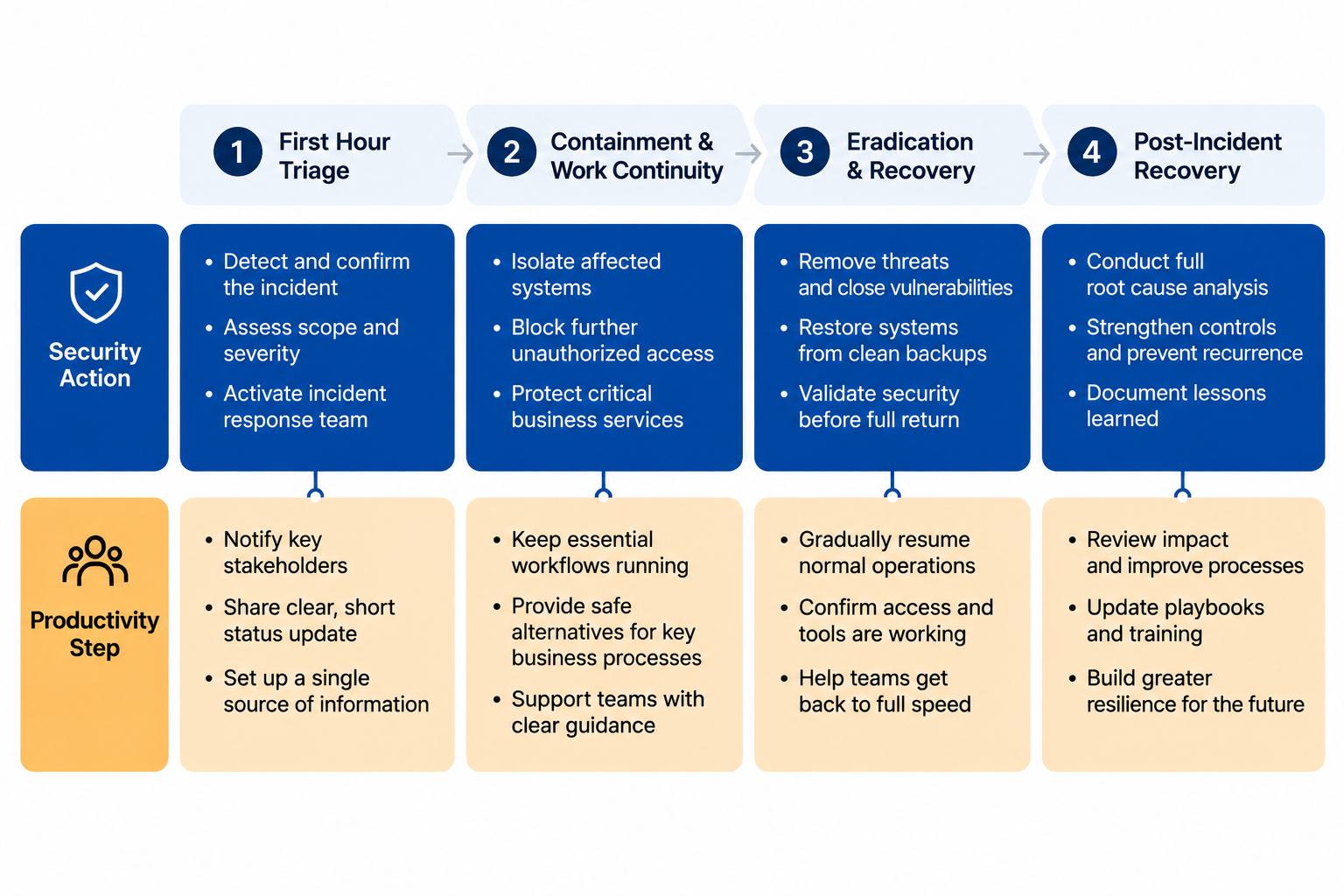
The useful operating model is dual-track: every security action gets a matching productivity-preservation step. It is not an official standard. It is a practical model built around established guidance on incident management, clean systems, role clarity, controlled communication, and staff welfare.
| Phase | Security action | Productivity-preservation step |
|---|---|---|
| 1. First-hour triage | Confirm the incident lead, isolate obvious affected systems, preserve evidence, and stop unsafe activity. | Pause risky work, name update channels, assign business coordinators, and define what teams may continue doing. |
| 2. Containment and work continuity | Separate affected assets, investigate scope, and keep clean systems clean. | Move only approved work to clean machines or clean accounts, reduce duplicate updates, and protect customer-facing workflows. |
| 3. Eradication and recovery | Remove attacker access, restore systems, validate recovery, and monitor for recurrence. | Sequence the return of work by business priority, tell teams what “recovered” means, and prevent premature reconnection. |
| 4. Post-incident recovery | Complete reviews, strengthen controls, and update response plans. | Repair backlog, debrief staff, address welfare impacts, and turn temporary workarounds into safer future procedures. |
Phase 1: First-Hour Triage
The first hour is not the time to chase perfect information. It is the time to stop avoidable damage. For non-security managers, that means slowing down the organization just enough to keep people from making the breach harder to contain.
Security responders need a clean chain of command. Sygnia’s incident response guidance emphasizes role clarity because confusion during an incident creates delay and poor coordination.[4] Portnox makes the same operational point from a productivity angle: incident response plans with well-defined roles help prevent “confusion or delays.”[5] The practical version is simple: one incident lead owns technical decisions; one business continuity lead owns work-priority decisions; one communications owner approves internal and external messages; each department has one coordinator who gathers questions instead of letting every employee interrupt responders.
- Name the incident lead before asking teams for updates.
- Freeze risky activity: file sharing, mass exports, password changes outside approved instructions, and ad hoc device swapping.
- Tell employees which channels are approved for incident updates and which channels are not trusted.
- Create one intake point for business-impact questions so responders are not answering the same question ten times.
- Separate urgent customer, payroll, safety, legal, and revenue-impacting work from work that can wait.
The key operational move is to define a temporary work state. “Business as usual” is usually false. “Everything stops” may be unnecessary and expensive. A better first-hour instruction sounds more like this: customer calls continue from approved phones; no one opens suspicious attachments; no one reconnects personal devices; shared folders are read-only or unavailable until cleared; department coordinators send questions through the incident room every 30 or 60 minutes, depending on severity.
Managers should resist the urge to translate technical uncertainty into vague reassurance. If the scope is unknown, say that the scope is unknown. If a system is offline because responders need to preserve evidence, say that. People can work inside constraints; they cannot work well inside rumors.
Phase 2: Containment and Work Continuity
Containment is where productivity pressure gets dangerous. Teams want access restored. Managers want to know whether deadlines still hold. Customers want answers. The worst response is to let every department build its own workaround while the security team is still trying to understand what happened.
The FTC’s breach response guide includes one unusually useful operational instruction: put clean machines online in place of affected ones.[6] That sentence is easy to underuse. It does not mean “grab any laptop and keep going.” It means work should move only to systems the incident lead has approved as clean, with accounts, permissions, logging, and communication channels that do not contaminate the investigation or reopen access for the attacker.
For a manager, the containment-period question is not “How do we get everyone back?” It is “Which work can safely continue on clean rails?” That may include taking customer calls without accessing sensitive records, processing urgent orders from a validated export, using a clean collaboration space for status updates, or assigning a small approved team to handle critical tasks while everyone else pauses dependent work.
| Operational decision | Safe version | Unsafe version |
|---|---|---|
| Communication | Use one approved channel and one approved update cadence. | Let employees forward screenshots, rumors, or customer claims across unverified channels. |
| Device replacement | Use machines cleared by the incident lead. | Ask staff to switch to personal devices without approval. |
| Customer work | Continue only tasks that do not require affected systems or unverified data. | Recreate records from memory or copy sensitive data into temporary tools. |
| Status reporting | Collect department impacts through named coordinators. | Invite every employee into the incident channel to ask for live updates. |
| Backlog handling | Prioritize legally, financially, or customer-critical work. | Treat all delayed work as equally urgent. |
Controlled communication deserves its own discipline. SecurityMetrics warns that employees can damage business reputation through uncontrolled communication during a breach.[7] That risk is not limited to public statements. A well-meaning account manager can overpromise to a client. A team lead can tell employees to use an unsafe workaround. A founder can send a reassuring note that later conflicts with the facts. The communications owner should provide short approved messages for employees, customers, vendors, and internal leaders, then update those messages as facts change.
Containment-period productivity also depends on saying what will not be done. Some projects should pause. Some reports should wait. Some internal meetings should be canceled so affected teams can focus on customer continuity, evidence preservation, and recovery support. During a breach, a manager who keeps every normal deadline alive is not preserving productivity; they are hiding priority decisions inside employee stress.
Phase 3: Eradication and Recovery
Recovery is where the word “back” causes trouble. Back online does not always mean safe for every user. Restored from backup does not always mean reconciled with current work. A password reset does not always mean the team can return to old habits. The incident lead should define technical recovery; business leaders should define the order in which work resumes.
IBM’s 2025 figures, again through DeepStrike’s summary, reported that containment within 200 days reduced resolution costs by 23%.[2] That does not prove every organization gets the same savings from faster recovery. It does make one point worth carrying into operations meetings: time matters, and disorganized work can stretch the incident tail. Every unclear handoff creates another queue. Every premature reconnection creates another risk review. Every department asking for special treatment slows the people trying to validate systems.
A useful recovery sequence starts with business dependency, not hierarchy. Payroll may matter before marketing analytics. Customer support may need limited access before the full sales team. Finance may need read-only access before write permissions return. The order should be visible, approved, and boring enough that managers stop lobbying responders in private.
- Define what “recovered” means for each system: available, validated, monitored, and approved for which users.
- Bring back teams in waves instead of opening access organization-wide.
- Reconcile work done during the outage before overwriting, importing, or deleting records.
- Keep temporary workarounds visible until they are retired or formally approved.
- Tell managers which controls are stricter than usual so they do not treat friction as failure.
This is also where non-security managers can help without touching forensic decisions. They can identify the work that must be reconciled, the customers who need proactive updates, the teams that are blocked by restored-but-not-yet-approved systems, and the temporary processes that are creating new risk. They can also keep executives from asking “are we back yet?” as if recovery is a single switch.
Phase 4: Post-Incident Recovery Is Still Part of the Incident
The incident is not over for employees just because the systems are stable. Backlogs remain. Customers may need explanations. Internal trust may be damaged. People who worked through nights and weekends may be running on adrenaline long after the security dashboard looks calmer.
The NCSC’s staff welfare guidance is unusually direct on this point: burnout “can lead to mistakes being made,” and putting staff welfare at the heart of incident response has direct security benefits because it reduces incident impact.[8] That is not a wellness add-on. Tired people skip checks, reuse risky shortcuts, miss signs of recurrence, and make poor judgment calls under pressure.
Enterprise Viewpoint described a European organization that lost 60% of its cyber staff after a four-month insider attack, with some team members reporting recurring nightmares 18 months after the incident.[9] That is a single case, not a frequency estimate. Its value is that it makes visible a cost that ordinary post-incident reviews can miss: the people most needed for recovery may be the same people the incident has exhausted.
The post-incident productivity plan should cover more than a lessons-learned meeting. It should remove obsolete workarounds, close temporary access, clear the backlog by priority, document decisions that were made under pressure, and ask which roles were overloaded. If one person became the unofficial translator between security, executives, customer support, and operations, that is not a heroic success pattern to repeat. It is a design flaw to fix.
Where Managers Should Stop
A productivity-first response is not a productivity-over-security response. If the incident lead says a system is isolated, managers should not negotiate with that boundary. If legal counsel controls notification language, teams should not freelance customer explanations. If forensic specialists need evidence preserved, employees should not clean up files, reinstall software, or reset accounts unless instructed.
The useful boundary is this: security specialists decide what is safe; managers decide how work is prioritized inside those safety limits. That division protects both sides. Responders get fewer interruptions and fewer unsafe workarounds. Employees get clearer instructions. Executives get a more honest picture of business impact than a stream of disconnected status updates.
A breach response plan is incomplete unless every security move has a matching productivity move. Isolate the affected system, and tell teams what work pauses. Put clean machines online, and define who may use them for which tasks. Restore services, and explain what “approved for use” means. Close the incident, and repair the operational damage it left behind. The standard is not constant motion. It is safe, useful work that does not create the next incident.
References
- Board Toolkit: Incident Planning, Response & Recovery, National Cyber Security Centre.
- IBM Cost of a Data Breach Report 2025, DeepStrike.
- Cyber Security Breaches Survey 2024, UK Government.
- 11 Incident Response Best Practices, Sygnia.
- A CISO's Guide to Balancing Cybersecurity and Productivity, Portnox.
- Data Breach Response: A Guide for Business, Federal Trade Commission.
- Incident Response: 10 Things to Do, SecurityMetrics.
- Putting Staff Welfare at the Heart of Incident Response, National Cyber Security Centre.
- After the Breach, Enterprise Viewpoint.
Comments
Join the discussion with an anonymous comment.