
The usual failure mode for ai tools for productivity is not that the tools do nothing. They often do exactly the thing you asked for. The problem starts around the thing.
You stop writing the brief, open an assistant, explain the context, revise the prompt, skim the output, ask for a cleaner version, copy it into the document, fix the formatting, rename the file, paste a summary into Slack, and then remind yourself what you were doing before the interruption. A ten-minute drafting task may have become a four-minute drafting task. The day still does not feel shorter.
That is the AI productivity paradox in its most ordinary form: task-level speed appears, but workflow-level savings leak away. One summary of implementation research reports that for every hour AI saves, organizations can spend 30 to 45 minutes in adjacent overhead during the first 6 to 12 months. The same discussion points to the coordination tax around modern knowledge work, including the finding that the average knowledge worker switches between apps more than 1,200 times per day.[1]

Those numbers should not be treated as a perfect forecast for one person using ChatGPT, Copilot, Notion AI, or a meeting assistant. The 30-to-45-minute overhead figure comes from organizational implementation contexts, where training, governance, integration, review, and adoption drag are heavier than they are for a solo worker. But the practical lesson translates cleanly: if every AI-assisted action creates another prompt, review, copy-paste, format check, tool switch, or explanation, the saved time has already been spent.
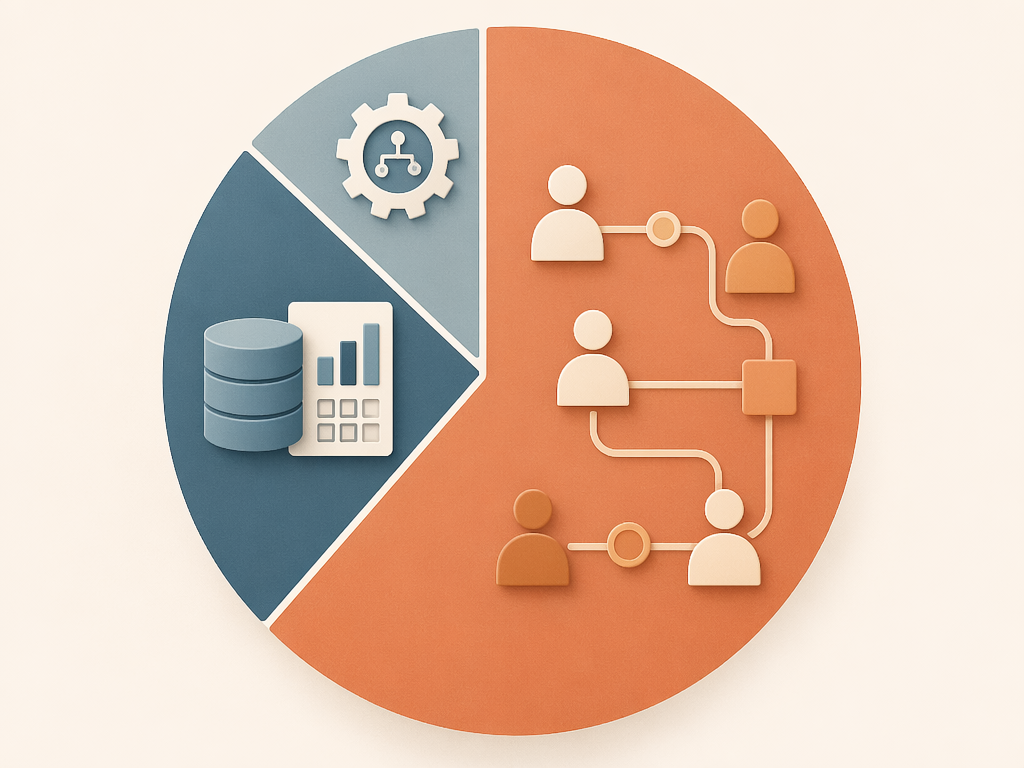
This is also why buying another assistant rarely fixes the feeling. BCG’s often-cited 10-20-70 framing says that only 10% of AI value comes from algorithms, 20% from technology and data, and 70% from people and process redesign; McKinsey’s 2025 state-of-AI coverage uses that rule to discuss why value depends less on models alone than on how work is changed around them.[2] For an individual or team lead, the translation is simple enough: the tool is probably not the whole problem. The path around the tool is.
Start with the workflow, not the assistant
Reactive AI use begins with a moment of friction: “I need help with this paragraph,” “I need this meeting summarized,” “I need a first draft,” “I need these notes cleaned up.” There is nothing wrong with that. It is often how people learn what a tool can do.
But reactive use has a ceiling. It speeds up isolated moments inside a process that may still be full of human handoffs. If the meeting assistant produces a transcript but someone still has to extract decisions, rewrite action items, assign owners, update the project board, notify stakeholders, and answer three clarification messages, then the meeting summary was only one stop in a longer route.
The better question is not “Which AI tool should I use here?” It is “What repeated workflow keeps returning to my desk, and where does human attention keep getting reinserted?”
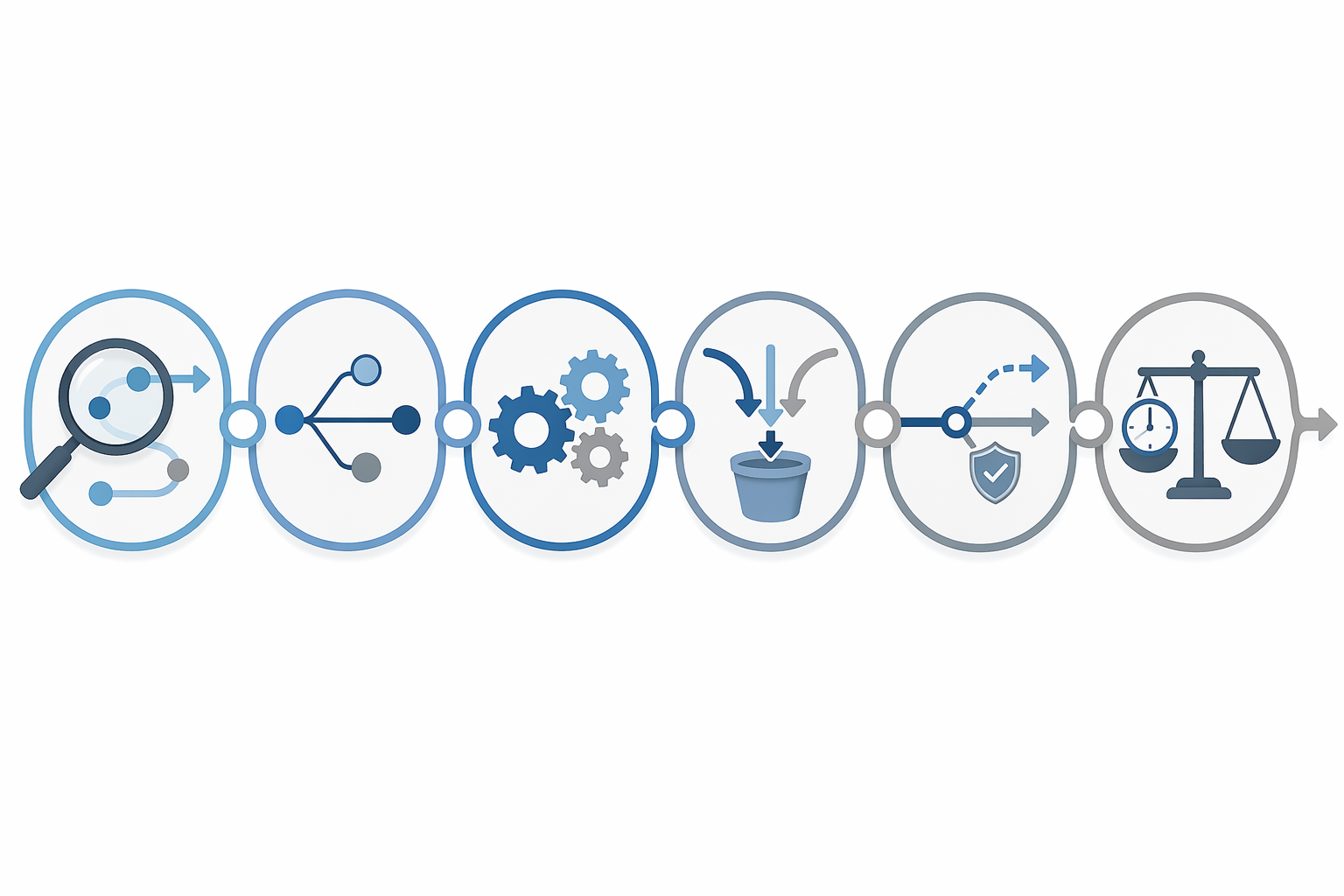
| Step | What changes |
|---|---|
| 1. Identify the repeated workflow | Choose a recurring path of work, not a random task. |
| 2. Map every handoff and review point | Make the hidden coordination work visible. |
| 3. Decide which steps AI can own in sequence | Group adjacent AI-suitable steps so the output keeps moving. |
| 4. Consolidate tools where possible | Reduce app switching and duplicate review. |
| 5. Design exception paths | Decide what happens when AI output is incomplete, risky, or ambiguous. |
| 6. Measure net time saved after the ramp period | Count prompt time, review time, rework, switching, and exception handling. |
1. Identify the repeated workflow that deserves redesign
Do not begin with your most annoying task. Begin with the repeated workflow that has enough volume to repay the redesign effort.
A workflow has a trigger, a sequence, and a finished state. “Summarize this call” is a task. “Turn every client call into decisions, assigned follow-ups, CRM notes, and a next-meeting agenda” is a workflow. “Draft a paragraph” is a task. “Convert a product update into a customer email, help-center note, internal sales brief, and launch checklist” is a workflow.
The workflow worth fixing usually has at least one of these traits:
- It repeats weekly or daily.
- It touches more than one tool or person.
- It creates cleanup work after the “main” task appears done.
- It has predictable inputs, such as meeting transcripts, tickets, briefs, customer notes, survey comments, or status updates.
- It has a clear finished state, such as a sent update, a closed ticket, a published note, or an approved decision log.
This first choice matters because one-off AI use is easy to overestimate. If a tool saves three minutes on a task you do twice a month, the gain will disappear into ordinary calendar noise. If it removes three handoffs from a workflow that runs every afternoon, the savings have somewhere to accumulate.
If you are not sure which workflow is worth auditing first, start with the place where work waits. Look for the draft that sits in someone’s inbox, the notes that wait for formatting, the meeting actions that wait to be assigned, the report that waits for a manager to reconcile five different updates. Waiting time is often a sign that the process depends on human translation between systems.
Readers who genuinely need to diagnose their largest bottleneck before redesigning the workflow can treat Match AI Tools to Your Productivity Bottleneck: A Diagnostic-First Guide as a separate detour. The redesign still begins with a recurring path of work, not a tool menu.
2. Map every handoff, including the tiny ones
Most AI workflow plans undercount labor because they only map the visible task. They write down “AI summarizes meeting” and skip the six actions that make the summary usable. That is where the saved time usually goes.
For one workflow, write the current path as it actually happens. Use verbs, not departments or apps. A realistic map might look like this:
- Meeting ends.
- Transcript is generated.
- Team lead opens the transcript.
- Team lead asks an AI assistant for a summary.
- Team lead checks whether the summary missed decisions.
- Team lead rewrites action items with owners.
- Action items are copied into a project board.
- A shorter version is posted in the team channel.
- A client-facing version is cleaned up and emailed.
- Someone later asks what changed, and the team lead reopens the transcript.
Now mark every point where a person has to interpret, move, approve, rename, reformat, or explain something. These are the handoffs that matter. They may be small enough that nobody complains about them individually, but together they decide whether AI created time or merely moved effort into thinner slices.
Include review points honestly. “Check AI output” is not a footnote; it is work. So is deciding whether a result is safe to send, whether a customer name is correct, whether an action item has the right owner, or whether a summary has turned a tentative discussion into a decision. The more judgment a workflow requires, the less likely it is that a single AI-generated artifact will close the loop.
This is also where enterprise numbers need careful translation. Industry analysis has noted a gap between impressive micro-level gains and slower organization-wide productivity improvement.[3] An individual worker may not carry the same integration burden as a large company, but the shape of the problem is familiar: local speed does not automatically become system speed.
A quick audit format
| Audit question | What to write down |
|---|---|
| What starts the workflow? | The trigger: a meeting ends, a ticket arrives, a brief is approved, a report is due. |
| What is the finished state? | The point where nobody needs to copy, explain, review, or move the work again. |
| Where does a person wait? | Approval, clarification, formatting, ownership assignment, stakeholder review. |
| Where does work move between tools? | Calendar, docs, chat, CRM, project board, email, spreadsheet, ticketing system. |
| Where does AI output need checking? | Facts, tone, policy, customer impact, numbers, names, ownership, decisions. |
| What rework commonly appears later? | Corrections, duplicate updates, missing context, wrong format, unclear next step. |
The goal is not to make a beautiful process diagram. It is to see the unpaid labor around the AI moment.
3. Decide which steps AI can own in sequence
Once the handoffs are visible, stop asking AI to help with one step at a time. Look for adjacent steps that can be handled as a sequence.
For the meeting workflow, the useful design is not “summarize transcript.” It may be:
- Extract decisions, open questions, risks, and action items from the transcript.
- Format action items with owner, due date if stated, and source quote or timestamp when available.
- Produce separate drafts for the project board, internal channel, and client email.
- Flag missing owners, unstated due dates, and decisions that sound uncertain.
- Prepare a short review queue for the team lead instead of a finished-looking summary that hides uncertainty.
That sequence changes the human role. The person is no longer pulling raw material through every format by hand. They are reviewing a structured package, resolving exceptions, and approving the outputs that should move forward.
The same pattern applies to other knowledge-work flows. A research workflow might move from source notes to claims, then to gaps, then to an outline, then to a fact-check queue. A support workflow might move from ticket text to category, likely answer, required account data, escalation risk, and draft response. A reporting workflow might move from raw updates to variance notes, executive summary, stakeholder-specific bullets, and unresolved questions.
The boundary is important: AI should own steps where the input is available, the output pattern is repeatable, and mistakes can be reviewed before they cause harm. It should not silently own decisions where accountability, policy, customer impact, or numerical accuracy require a named human reviewer.
This is where some early friction is normal. Microsoft’s Copilot rollout research has been reported as finding that employees needed at least 11 weeks to realize meaningful productivity gains.[3] That does not mean every individual workflow needs 11 weeks before it improves. It does mean the first few passes through a redesigned process are allowed to be clumsy. People are learning where prompts belong, which checks matter, and which handoffs should disappear.
4. Consolidate tools where the workflow keeps breaking
Tool selection comes after the workflow map because otherwise every shiny feature looks relevant. Once you know where work breaks, the tool question becomes narrower: which platform can carry the largest useful portion of this sequence with the fewest handoffs?
A good consolidation decision may be boring. If your documents, comments, permissions, and approvals already live in one suite, the best AI workflow may be the one that stays there. If the project board is the true system of record, the assistant that cannot update or structure work for that board may create more cleanup than it removes. If the meeting assistant produces beautiful summaries in a place nobody checks, it is not part of the workflow yet. It is a side output.
Use three tests before adding another AI app:
- Does it reduce the number of places a person must open, or does it add one?
- Can its output move directly into the next step, or does someone have to translate it?
- Does it preserve the context the next reviewer needs, or does it strip that context away?
For readers who are still choosing the stack itself, How to Choose Your AI Productivity Tools in 2026: A Role-Based Stack Framework is the better place for that decision. In this workflow design, fewer crossings usually matter more than more features.
5. Design the exception path before you automate the happy path
A workflow that only works when the AI output is perfect is not a workflow. It is a demo.
Before you rely on the sequence, decide what happens when the input is messy, the model is unsure, the source material conflicts, or the output affects a customer, budget, legal commitment, hiring decision, medical matter, security issue, or other sensitive area. Exception handling is not a pessimistic add-on. It is what keeps the process from dumping ambiguous work back onto the busiest person at the end of the chain.
A practical exception path answers four questions:
- What should the AI flag instead of trying to finish?
- Who reviews flagged items?
- What evidence should travel with the output so review is fast?
- When should the workflow stop rather than continue automatically?
For a meeting workflow, the AI might be instructed to mark action items as “owner missing,” “date missing,” or “decision unclear” instead of inventing certainty. For a customer-support workflow, it might draft a response only when the issue matches approved policy, and route everything else to a human queue with the relevant excerpts attached. For a reporting workflow, it might summarize commentary but refuse to calculate or restate figures unless the source data is present in the approved spreadsheet.
This is also the point where team leads should write the review rule plainly. “Check the output” is too vague. “Verify names, dates, owners, monetary figures, customer commitments, and any sentence presented as a final decision” is usable. A vague review rule sends people back through the whole artifact. A specific review rule tells them where to look.
If the workflow depends on no-code automations or routing rules, Cloud Workflow Automation Tools That Don’t Require a Developer can help with implementation options. The design question remains the same: what happens when the normal path should not continue?
6. Measure the full before-and-after workflow
Do not measure only the AI-assisted task. Measure the route from trigger to finished work.
| Before-and-after item | Count it because |
|---|---|
| Prompting time | A faster generated draft may still require repeated instruction. |
| Review time | AI output that looks polished can take longer to verify. |
| App switching | Moving between chat, docs, email, boards, CRM, and spreadsheets can consume the gain. |
| Formatting and copying | Manual transfer is often where small savings disappear. |
| Exception handling | Ambiguous cases need a named path, not invisible cleanup. |
| Rework | Bad summaries, wrong owners, or missing context create later drag. |
| Waiting time | A workflow is not faster if it still pauses at the same approval point. |
Run the redesigned workflow long enough to get past the first awkward attempts. The exact ramp period will vary by person, tool, and process; the Microsoft 11-week finding is a useful warning against judging too early, not a universal stopwatch.[3]
For a team, measure the person at the end of the chain, not only the person who gets the AI draft. If one analyst saves time generating summaries but the team lead spends the afternoon reconciling inconsistent formats, the workflow has not saved the team time. If a manager gets cleaner project updates but three contributors now spend extra effort feeding the system, the measurement is incomplete.
The same caution applies to broad adoption claims. BCG has reported that 74% of companies struggle to achieve and scale AI value, with only 26% moving beyond proof-of-concept; that enterprise pattern should not be used to declare that an individual worker cannot benefit from AI, but it does show how often promising pilots fail to become durable operating improvements.[2]
A simple standard for whether the workflow is working
After the ramp period, compare the old and new workflow side by side. Not the old task against the new task. The old workflow against the new workflow.
The redesigned version should have fewer human interruptions across the whole path. It should require fewer copy-paste moves, fewer format repairs, fewer “can you clarify?” messages, fewer duplicate summaries, fewer reopened source documents, and fewer moments where someone has to remember what happened three steps ago.
If the workflow has fewer interruptions and the saved time stays saved after the ramp period, the AI system is working. If the tool is fast but the process still depends on people prompting, checking, moving, renaming, posting, and explaining around it, then the tool may be impressive and the process may still be slow.
Comments
Join the discussion with an anonymous comment.