
If you have compared five note-taking tools and still do not know which personal knowledge management app you will actually open tomorrow, the problem is probably not discipline. It is fit.
A bad fit is expensive in small, daily ways. One 2026 PKM software guide cites knowledge workers losing 9.3 hours per week searching for information, and Kosmik’s 2026 roundup cites Atlassian’s finding that 80% of global workers experience information overload daily.[1][2] Those numbers are not a reason to build a more elaborate dashboard. They are a reminder that retrieval has to feel natural enough that you keep doing it after the new-app glow wears off.
So start somewhere less shiny: how do you usually make sense of information before an app gets involved?

A quick thinking-style check before you pick a tool
Treat this as a starting point, not a personality test. Most serious knowledge workers are hybrids. A graduate student may think visually while reading theory, then need a structured database for sources. A product manager may love networked notes but still need a linear project plan by Friday. The goal is not to label yourself forever; it is to notice which organization model reduces friction first.
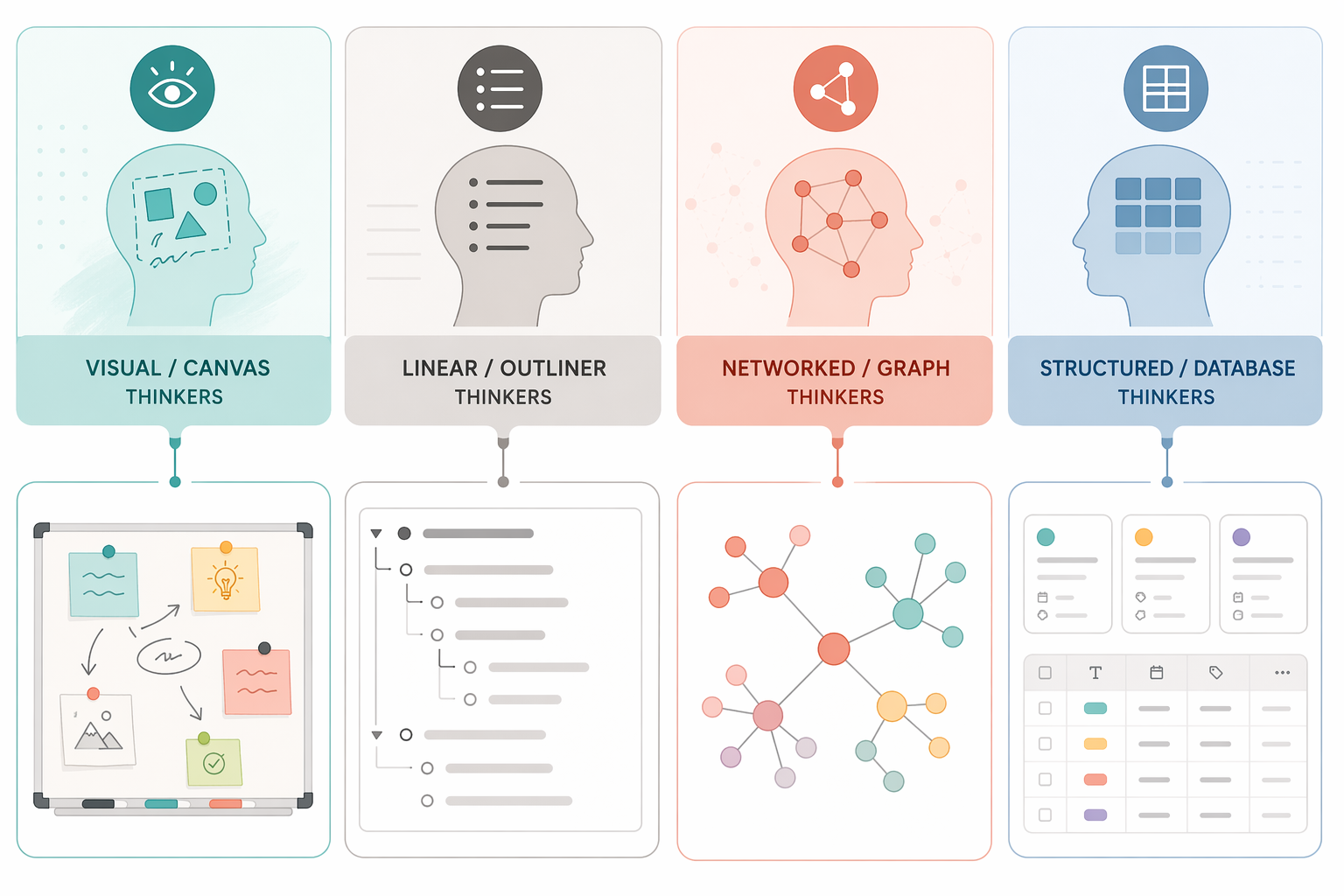
- When you are trying to understand a messy topic, do you first want to see the pieces spread out spatially? If yes, start with visual/canvas tools.
- When you are thinking through work, do you naturally make nested lists, steps, agendas, or bullets? If yes, start with linear/outliner tools.
- When an idea matters to you, do you immediately wonder what it connects to, contradicts, or develops from? If yes, start with networked/graph tools.
- When information feels safe only after it has a type, status, property, owner, date, or category, do you relax when it becomes sortable? If yes, start with structured/database tools.
If two answers felt equally true, choose the one that describes your retrieval behavior, not your capture behavior. Many people can dump notes into anything. The test is where you would willingly go back to find, compare, and reuse them.
| If your thinking starts with… | Your tool should make this easy | Start by looking at |
|---|---|---|
| Spatial arrangement | Canvas, clustering, visual grouping | Heptabase, Kosmik |
| Sequence and hierarchy | Outlines, bullets, daily flow, expandable structure | Logseq, Tana |
| Associations between ideas | Backlinks, graph navigation, local note networks | Obsidian, Roam |
| Objects and properties | Databases, typed notes, tables, filtered views | Notion, Capacities, Anytype |
Visual thinkers: choose a canvas before you choose a filing system
Visual thinkers often do not know what a note means until they can place it near other notes. The unit of thought is not always the page; it may be a cluster, a board, a map, or a relationship that becomes obvious only when several fragments sit in the same field of view.
This is where canvas-first tools earn their keep. Kosmik is described in current PKM roundups as a visual-first app built around multimedia canvases, and Heptabase is repeatedly positioned around visual knowledge mapping rather than conventional folders.[2] These tools make sense when your work involves comparing readings, arranging research fragments, storyboarding ideas, planning essays, mapping product concepts, or collecting visual references alongside text.
The usual mismatch happens when a visual thinker chooses a database app because everyone else’s template looks productive. They capture diligently for a week, then avoid the system because every thought has to become a row, a property, or a page before it can breathe. A canvas tool lowers that early tax: put the thing on the board, move it near related things, and let structure appear gradually.
There is still maintenance work. A board can become a junk drawer with zoom controls. If you choose Heptabase or Kosmik, decide what a board is for before you make twenty of them: one board per research question, one per course, one per project phase, or one per long-running theme. Visual freedom needs a small rule about boundaries.
Pricing should also stay visible. Kosmik’s 2026 roundup lists Heptabase at $8.99 per month with no free plan.[2] Because PKM pricing has been volatile across late-2025 and 2026 sources, check the official pricing page before treating any figure as permanent.
Linear thinkers: use an outliner that keeps motion visible
Linear thinkers often process information by ordering it: first this, then that; main point, supporting point; task, subtask; question, answer. They may enjoy connections later, but they usually need a clean path through the material before they can work with it.
Outliners fit this rhythm because they let thoughts stay movable without turning every note into a blank document. Logseq is one of the clearest starting points here: current tool guides describe it as free and open-source, with an outlining model that works well for daily notes, bullets, and linked blocks.[2][3] It is a good candidate if you like the feel of working from a journal, class notes, meeting notes, or a running research log.
Tana is more ambitious. ToolFinder describes its supertag system as a way to turn notes into typed objects, while its pricing is listed as a free tier with 500 AI credits, Plus at $8 per month, and Pro at $14 per month.[3] That makes Tana interesting for people who begin in outlines but eventually want structure: a meeting note can become a project, a person, a source, or a task without leaving the flow of bullets.
The mismatch for linear thinkers is usually premature graph worship. A graph can look intelligent while the next action remains buried. If your work depends on shipping drafts, finishing literature reviews, preparing lectures, running meetings, or tracking decisions, an outliner gives your notes a spine. You can still link ideas. You just do not have to make the network the center of the room.
Networked thinkers: Obsidian is powerful, but know what you are signing up for
Networked thinkers trust relationships. They want to know how today’s note connects to last month’s article, an old argument, a quote from a book, a project that stalled, or a question that keeps returning. For them, a good personal knowledge management app should make linking cheap and resurfacing meaningful.
Obsidian deserves its popularity in this category, but it is also easy to misunderstand. Current PKM guides emphasize that Obsidian is free for personal use, stores notes as local Markdown files, offers paid Sync listed at $4 per month, and has a large plugin ecosystem; Storyflow’s 2026 guide cites more than 2,000 plugins.[3][4] Those details matter because Obsidian is not merely another note app with backlinks. It is closer to a local text-based workspace that can become many different systems depending on how you configure it.
That flexibility is the gift and the trap. Local Markdown is reassuring if you care about portability and long-term access. Plugins can add task management, spaced repetition, kanban boards, calendars, database-like views, writing environments, and publishing workflows. They can also turn your knowledge system into a weekend home-renovation project that never quite becomes livable.
Start Obsidian simply if you choose it: daily notes if you need a capture surface, a small set of folders if they help, backlinks for meaningful relationships, and tags only when you know how you will retrieve them. The graph view is useful when it reveals clusters you can act on; it is decoration when it merely proves that you have made many notes.
Roam still belongs in this conversation even if newer 2026 roundups spend more attention on newer tools. Its block-based linking influenced much of the modern PKM category, and it can still suit people who want networked thinking without managing local files or plugins. The tradeoff is that Obsidian gives more control over files and customization, while Roam offers a more opinionated linked-notes environment.
If you have already abandoned Obsidian once, that does not automatically mean you are bad at PKM. It may mean you installed someone else’s system. Networked tools work best when links emerge from real reuse: a concept you cite often, a question that keeps reappearing, a source that changes how you read other sources.
Structured thinkers: databases are not overkill if you actually use the fields
Structured thinkers feel calmer when information has properties. A book has an author, status, topic, and usefulness rating. A project has an owner, deadline, area, next action, and archive state. A source is not just a note; it is an object with metadata.
Notion is the obvious starting point for many people in this group because its databases, pages, templates, and views make information feel sortable. Storyflow’s May 2026 guide lists Notion’s free tier as generous, Plus at $10 per user per month, and AI bundled at $18 per user per month on Business.[4] Notion pricing and AI packaging have changed often enough that this should be treated as a source-date snapshot, not a permanent promise.
Notion fits best when the shape of your work is already somewhat structured: reading databases, content calendars, CRM-like relationship notes, course dashboards, project hubs, research trackers, or team-adjacent personal work. It is less pleasant when every fleeting thought has to be filed before it can be written down. If capture feels slow, pair Notion with a faster inbox or keep the first database deliberately plain.
Capacities and Anytype are worth considering if you like structured information but want something that feels more object-centered than page-and-table centered. Kosmik’s 2026 roundup lists Capacities with free unlimited objects and Pro at $9.99 per month, and Anytype as free up to 1GB while in beta.[2] Anytype’s beta status matters: the long-term pricing and product shape may change, so it is sensible to verify current terms before building a large archive there.
The structured-thinker failure mode is building the administrative state before there is any knowledge to administer. A database with fourteen properties can feel like control on Monday and clerical work by Thursday. Add fields only when they change a decision: what to read next, what to cite, what to review, what to archive, what to act on.
What if you are a hybrid?
Hybrid use is normal. The mistake is trying to satisfy every part of your mind on day one.
- Visual plus structured: use a canvas for sensemaking and a database for commitments, sources, or deliverables. Do not force the canvas to become a task manager.
- Networked plus linear: keep linked notes for concepts and an outline or project list for execution. A beautiful graph will not tell you what is due next.
- Structured plus linear: choose a database tool only if it lets you see work as a simple next-action list when you are tired.
- Visual plus networked: choose tools that let you move between spatial clusters and durable links, but set a review habit so old boards do not become abandoned murals.
If this four-style model does not quite catch your situation, a workflow-based comparison can help. The retrieval-focused angle in Good Note-Taking Apps Start with How You Retrieve, Not What They Offer is especially useful for people who capture easily but lose trust in search later.
The method layer: PARA, Zettelkasten, and CODE are not interchangeable decorations
Once a tool starts to fit, a method can make it steadier. The order matters. If you choose a method first and then force it into a hostile app, you may end up maintaining a diagram of productivity rather than a working system.
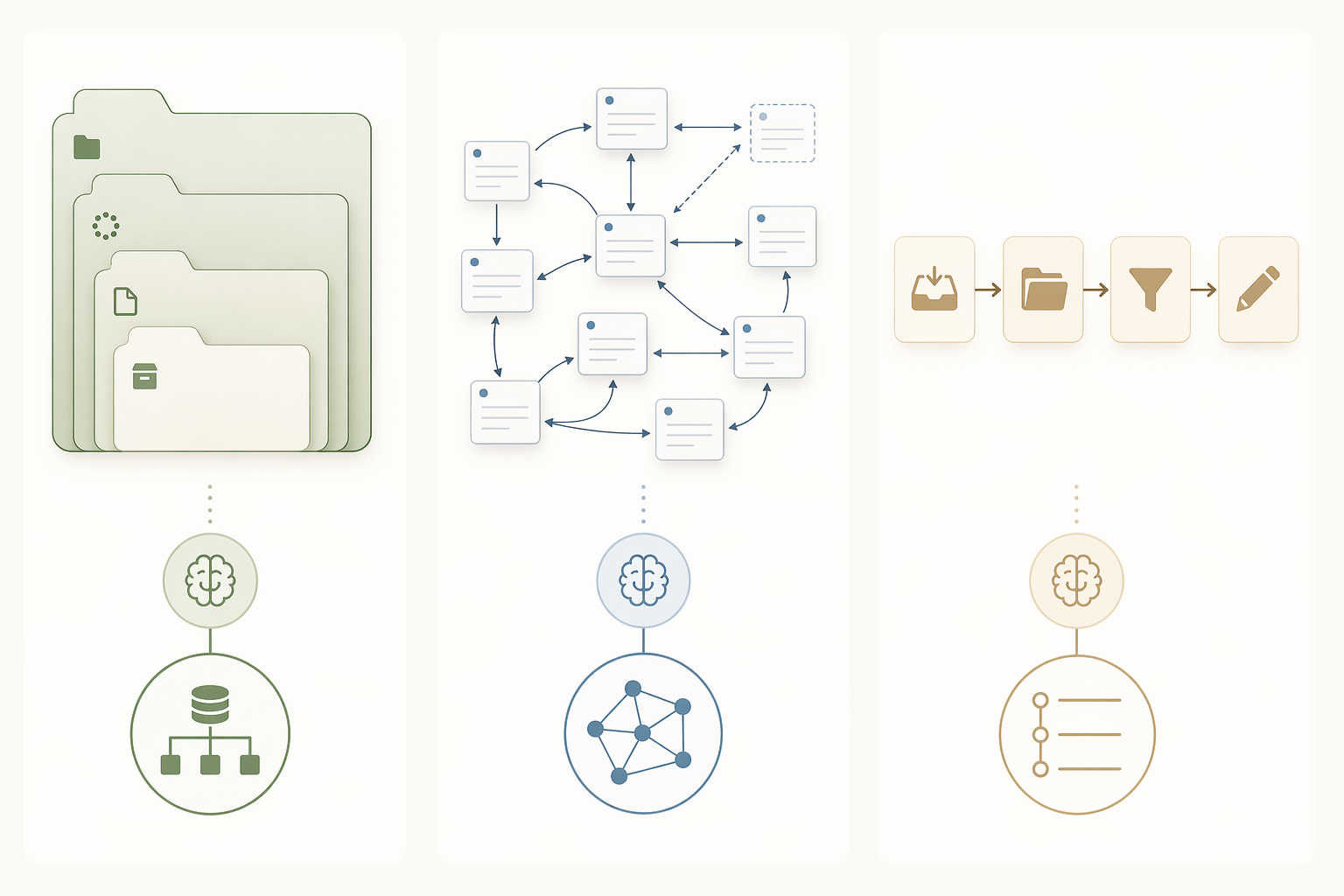
PARA—Projects, Areas, Resources, Archives—usually feels easiest for structured/database thinkers because it asks a practical question: what is this information for right now? Atlas’s 2026 guide frames PARA as one of the major PKM methods, and it maps naturally onto tools such as Notion or Capacities where projects, areas, and resources can become databases, objects, or filtered views.[5] PARA can work in Obsidian or other tools too, but database tools make the sorting logic more visible.
Zettelkasten fits networked thinkers because it rewards small, durable notes connected over time. Atlas summarizes the often-cited Niklas Luhmann case: roughly 90,000 notes over 30 years, associated with more than 70 books and 400 articles.[5] The useful lesson is not that a slip-box magically creates scholarship. It is that linked atomic notes can compound when each note is written clearly enough to meet future notes. Obsidian and Roam make that linking behavior easier than tools whose default model is a table or folder tree.
CODE—Capture, Organize, Distill, Express—works well for linear or action-oriented users because it describes movement from input to output. Atlas presents CODE as a core Building a Second Brain workflow, and it can be used across many apps.[5] Outliners make the sequence especially visible: capture the raw material, organize it under a project or question, distill the important points, then turn them into a memo, paper, lesson, proposal, or decision.
For a deeper method comparison after you have chosen a tool, see PARA, Zettelkasten, and Building a Second Brain: Three Layers, One PKM System. The better time to read that is after you know whether your daily workspace wants to be a canvas, outline, graph, or database.
Where AI helps, and where it just adds fog
AI features are useful when they reduce a real maintenance burden. ToolFinder, Kosmik, and Atlas all discuss AI-assisted PKM features such as tagging, summarization, semantic search, or AI-native workflows in tools including Tana, Reflect, and Kosmik.[2][3][5] That can matter if manual tagging is the point where your system always collapses.
The suspicious version is AI marketed as a substitute for an organization model. If the app can summarize everything but you still do not know where ideas belong, what you trust, what you are building, or how you will retrieve material under pressure, the friction has only moved. Semantic search can help you find the note. It cannot decide whether your work wants a board, an outline, a graph, or a database.
A practical choice rule
Choose the personal knowledge management app whose default organization model matches how you already make sense of information:
- If you need to see ideas in space, start with Heptabase or Kosmik.
- If you think in sequence, bullets, and nested structure, start with Logseq or Tana.
- If meaning comes from relationships between notes, start with Obsidian or Roam.
- If information becomes useful when it is typed, filtered, and sorted, start with Notion, Capacities, or Anytype.
Then use the smallest version of that system for a few weeks. One capture place. One retrieval habit. One method layer only if it solves a problem you can name. Prices and AI bundles should be checked on official pages before you commit, especially for newer tools and beta products, but the larger decision should not begin with the pricing grid. It should begin with the shape your thinking keeps trying to take.
References
- The Best Personal Knowledge Management Software, Tools & Apps (2026 Guide) — GoLinks
- 15 Best Personal Knowledge Management Apps (Free and Paid) — Kosmik
- Best PKM Apps in 2026 – Knowledge Management Tools — Tool Finder
- The 12 Best Knowledge Management Tools in 2026 (Tested) — Storyflow, May 2026
- Personal Knowledge Management (2026): The Honest Guide — Atlas
Comments
Join the discussion with an anonymous comment.