
If you land at DFW with one usable hour and a laptop already warm in your bag, the best American Airlines lounge is not automatically the closest one. For meetings, walk to the current Admirals Club in Terminal C, because its Executive Center has five conference rooms: two seating 14 people, two seating 6, and one seating 4.[1] For quiet solo work, Terminal B is the better bet because of its tucked-away cubicle workstations, plus one 6-person conference room.[1][2] If you qualify for the Flagship Lounge in Terminal D, that is the strongest individual workspace at DFW, with partitioned workstations, power at nearly every seat, counters facing the tarmac, and a business center with a computer and printer.[2][3]
There is no universal winner. The lounge that saves a client call may be the wrong lounge for two hours of quiet spreadsheet work. The lounge with the best desks may be irrelevant if your ticket or status does not get you through the door. And Terminal D, despite being the international terminal, is not the easy productivity pick if you only have regular Admirals Club access.
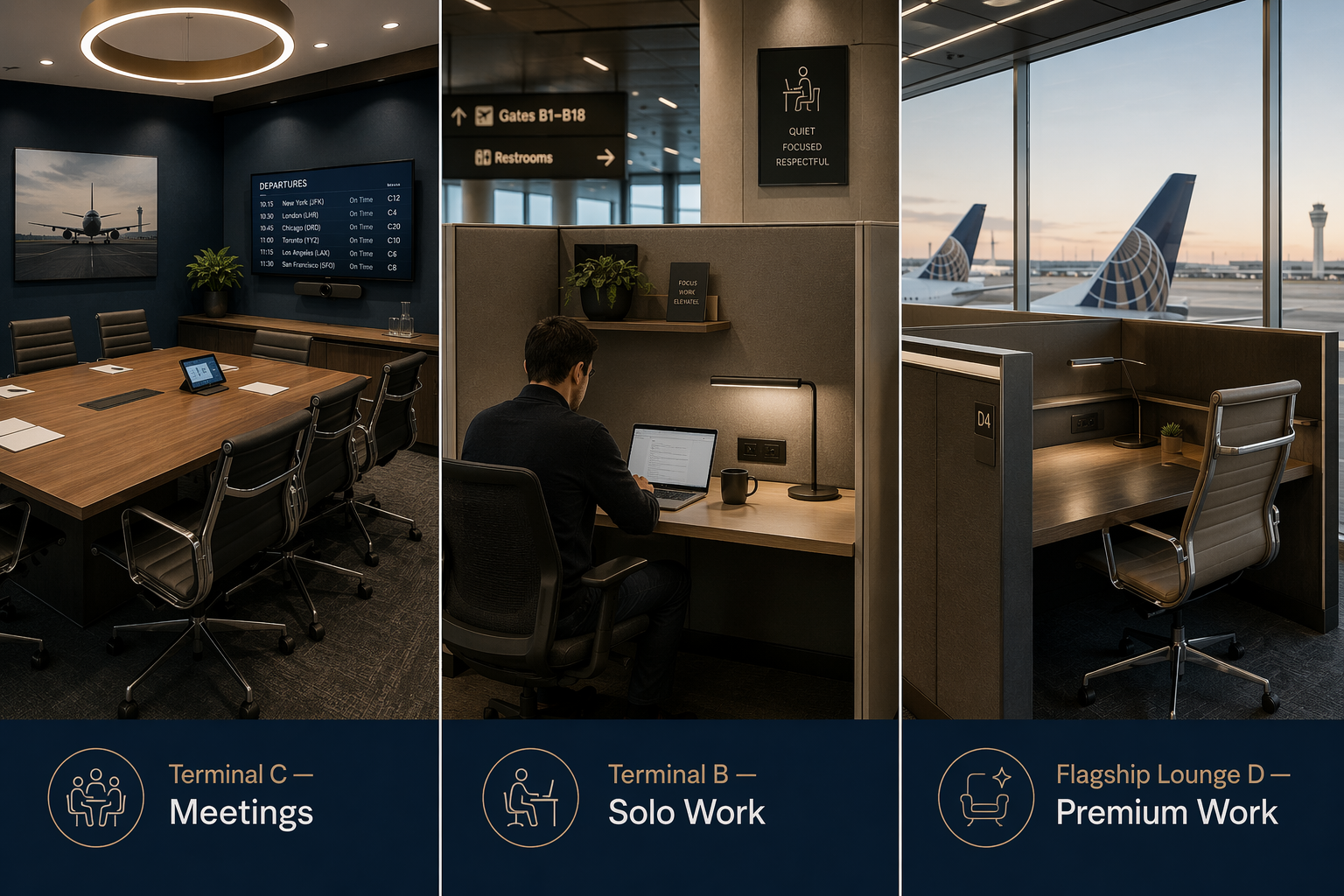
Quick Verdict by Work Need
| If you need to... | Go here | Why it works | Main catch |
|---|---|---|---|
| Run a scheduled meeting or semi-private call | Terminal C Admirals Club | Five conference rooms in the Executive Center | Room availability and reservation rules are not detailed publicly |
| Do solo deep work | Terminal B Admirals Club | Tucked-away cubicles and a quieter workstation feel | Only one conference room |
| Use the best individual workstations | Terminal D Flagship Lounge | Partitioned workstations, strong power access, tarmac counters, business center | Stricter access than a regular Admirals Club |
| Stay close to an early Terminal A flight | Terminal A Admirals Club | Conference rooms, showers, and the earliest opening time | Less compelling than Terminal C for meeting space |
| Use a regular lounge in Terminal D | Terminal D Admirals Club | Convenient for D gates | No conference rooms |
| Use a newer-feeling Admirals Club in Terminal E | Terminal E Admirals Club | Useful if your flight is nearby | No conference rooms and a later opening time |
Terminal C Is the Meeting Lounge, Not Just the Middle-of-the-Airport Lounge
The current Terminal C Admirals Club is the easiest recommendation when your work involves other people. Five conference rooms is not a small amenity difference; it changes what you can attempt during a layover. The official room breakdown is specific: two rooms seat 14, two rooms seat 6, and one room seats 4.[1] At an airport where many lounge “work areas” are really just armchairs near outlets, that is the clearest hard productivity advantage in the DFW Admirals Club network.
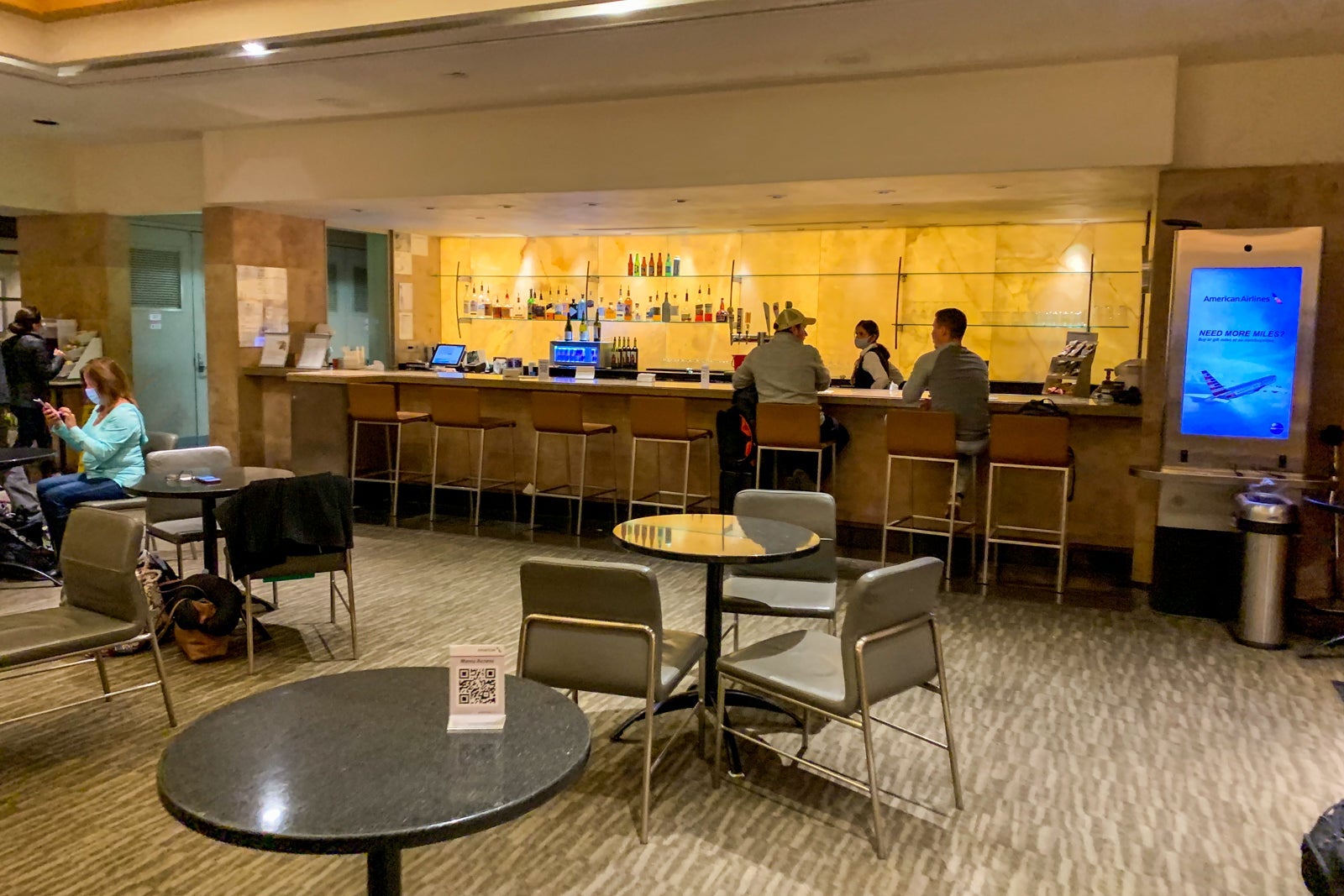
That matters most for calls where background noise is not just annoying but expensive: a client presentation, a legal review, an internal escalation, a hiring conversation, or a project readout where half the team is waiting for you to stop sounding like you are standing next to a boarding group. Even if a room is not guaranteed, Terminal C gives you more shots at a real door than any other American lounge at DFW.
The caveat is availability. The published amenities identify the rooms and capacities, but they do not spell out a universal reservation policy or guarantee that a room will be open when you arrive.[1] If the meeting is truly immovable, treat Terminal C as your best DFW option inside the Admirals Club system, not as a confirmed office booking. Arrive early enough to ask the staff, and have headphones ready in case every room is already in use.
Terminal C also makes geographic sense for many American connections because it sits in the thick of DFW’s American operation. That is not the same as saying it is always worth crossing the airport. If your next gate is already in Terminal C, this is the first lounge I would try for meeting-heavy work. If you are coming from another terminal with a moderate layover, it can still be worth the Skylink ride. If boarding starts soon, the conference-room advantage may not overcome the time cost of moving.
Terminal B Is the Better Solo Work Hideout
Terminal B is where I would go when the work is solitary and unforgiving: reconcile a deck, clear a backlog, write notes after a meeting, or sit through a camera-off call where what you really need is a stable seat, a plug, and fewer people drifting behind your screen. The Points Guy specifically called out tucked-away quiet cubicles at the Terminal B Admirals Club, and the official amenities list one 6-person conference room.[1][2]
A cubicle sounds unglamorous until you are trying to work at an airport. A little side shielding can matter more than a nicer bar, especially when the task is concentration rather than hospitality. The value is not that Terminal B has the biggest footprint or the flashiest design. It is that the setup gives solo travelers a better chance to disappear into the work for a while.
The limitation is obvious: Terminal B is not the meeting-space champion. One conference room helps, but it does not compete with Terminal C’s five-room Executive Center. If you only need to speak briefly, Terminal B can work. If you have a formal meeting where a door is the difference between professional and chaotic, Terminal C is the better target.
The Terminal D Flagship Lounge Has the Best Work Setup, If You Can Actually Enter
The Flagship Lounge in Terminal D is the workspace I would choose if access were not part of the question. It is not just “premium” in the usual lounge-review sense. It has 23,130 square feet, 350 seats, partitioned workstations with dividers, power outlets at nearly every seat, counters along tarmac-view windows, and a business center with a computer and printer.[3] The Points Guy also called it the best working space among DFW lounge options.[2]
That combination solves several airport-work problems at once. Partitioned stations reduce the feeling that your laptop is open to the whole room. Broad power availability lowers the risk of staking out a chair only to realize your battery will not make it to boarding. Window counters are useful for shorter work sprints when you do not need to unpack your whole bag. A printer is not exciting until someone sends a document that still has to be handled on paper.
But the Flagship Lounge should not be casually lumped in with the Admirals Clubs. Access is tighter. The relevant access paths include a qualifying Flagship ticket, Oneworld Emerald status, or Admirals Club membership paired with an eligible international business or first class ticket.[1][3] That is a very different situation from being a domestic traveler with basic Admirals Club access through membership, a card benefit, or a day pass.
So the right recommendation is conditional: if you qualify and you need individual workstations, use the Terminal D Flagship Lounge. If you do not qualify, do not build your layover plan around it. The best workspace in the airport is not useful when it sits behind an access rule you cannot meet.
Do Not Confuse the Terminal D Admirals Club With the Flagship Lounge
Terminal D is where a lot of travelers expect the best business setup because it handles international flying and sits next to the Flagship Lounge. The regular Terminal D Admirals Club does not back up that assumption for productivity. American’s official amenities list no conference rooms for the Terminal D Admirals Club.[1]
That does not make it useless. If your flight is in Terminal D and you need a seat, Wi-Fi, a drink, and a calmer place than the gate, it can still do the basic lounge job. The problem is task fit. For a traveler trying to protect a call or reserve semi-private meeting space, Terminal D’s regular Admirals Club is weaker than Terminal C and less appealing than Terminal B for focused solo work.
This is the point where lounge names can mislead people. “Terminal D” and “Flagship” sound like the productivity answer; only one of them has the workstation evidence to justify that confidence, and it is the one with the stricter door policy.
The Other Admirals Clubs: Useful, But More Situational
Terminal A
Terminal A is a credible fallback, especially for early departures. American lists conference rooms and showers there, and Terminal A has the earliest published Admirals Club opening time at DFW, 4 a.m.[1] If your flight is nearby and you need to clean up before a workday or take a smaller meeting, it can be the practical choice.
I would not cross DFW specifically for Terminal A if the work problem is “I need the best chance at a room.” Terminal C has the stronger conference-room inventory. Terminal A is best treated as a good same-terminal or near-terminal option, not the airport-wide productivity target.
Terminal E
Terminal E is newer-feeling and can be perfectly useful if your gate is nearby, but it is not where I would send someone who specifically asked for the American Airlines Admirals Club at DFW best airport lounge for productivity. The official amenities do not list conference rooms for Terminal E, and it opens later than the others, at 6 a.m.[1]
That later opening matters for early work. A lounge can have decent seating and still fail the traveler who needs to send a deck before the first flight wave. If Terminal E is convenient, use it. If the task requires a room, a door, or a more proven workstation setup, look elsewhere.
Access Rules Can Decide the Lounge Before Amenities Do
Before you ride Skylink for a better desk, make sure you can enter the lounge you are targeting. Admirals Club access can come through a day pass, annual membership, or the Citi / AAdvantage Executive World Elite Mastercard. American lists a one-day pass at $79 or 7,900 miles, and annual membership at $750 to $850, depending on status tier.[1]
Those access paths are not the same as Flagship Lounge access. A traveler who can enter a regular Admirals Club may still be turned away from the Flagship Lounge unless the itinerary or status qualifies under Flagship and Oneworld rules.[1][3] That distinction is the difference between a useful recommendation and a wasted walk.
Hours also matter more than lounge roundups usually admit. American’s DFW Admirals Club hours vary by terminal: Terminal A opens at 4 a.m., while Terminal E opens at 6 a.m.; all listed DFW Admirals Clubs close at 10:15 p.m.[1] If you are connecting at the edges of the day, the “best” lounge may simply be the one open when your laptop needs to be open.
Wi-Fi and Skylink: Good Enough to Consider Moving, Not a Reason to Wander
DFW’s airport-wide connectivity is reassuring. Stacker, using Ookla data, reported DFW public Wi-Fi at 127.26 Mbps, placing it among the fastest major U.S. airports for free Wi-Fi.[4] That number should be read carefully: it is not a lounge-specific speed test, and it does not prove that every corner of every Admirals Club will perform the same way.
Still, it reduces one worry. If your work is typical laptop work rather than a bandwidth-heavy upload, the bigger productivity differences at DFW are more likely to be seating, noise, privacy, power, and access than the basic existence of usable airport internet.
Skylink also makes selective lounge-hopping realistic when the layover is long enough. DFW’s train system is commonly described in lounge guides as running about every 2 minutes, with trips between the farthest terminals taking about 5 to 7 minutes.[5] That can justify moving from, say, Terminal D to Terminal C if you have a meeting and enough buffer before boarding.
It does not justify recreational wandering on a tight connection. Add the walk to the station, the wait, the ride, the walk to the lounge, the check-in line, and the return trip to your gate. If the usable work window shrinks to 25 minutes, stay close unless the nearby lounge is truly unusable for the task.
How I Would Choose on a Real DFW Layover
For a scheduled meeting with outside participants, I would start with Terminal C. The five-room Executive Center gives it the best odds of solving the actual problem: getting behind a door. If Terminal C is far from your next gate, the decision depends on how much time you have before boarding and how bad the meeting would be from an open lounge seat.
For solo work, I would favor Terminal B over Terminal C unless I specifically needed a conference room. Quiet cubicles are not glamorous, but they are exactly the kind of infrastructure that lets one traveler turn a connection into a real work block.
For eligible premium international travelers, I would use the Terminal D Flagship Lounge for individual work, especially if power access, a partition, a printer, or a tarmac-facing counter would make the next hour easier. If I did not qualify for Flagship access, I would not treat the regular Terminal D Admirals Club as a substitute for that workspace.
For early departures, gate proximity starts to matter more. Terminal A’s 4 a.m. opening and listed conference rooms make it more useful than a ranking chart might suggest. Terminal E’s later opening and lack of conference rooms make it more of a convenience lounge than a productivity destination.
The 2026 Caveat: Terminal C Is About to Become a Moving Target
The biggest reason to keep this judgment flexible is American’s newly announced Terminal C project. On July 20, 2026, American Airlines announced a next-generation premium experience at DFW that includes a 37,000-square-foot Admirals Club near the Terminal C Skylink station. American described it as the largest Admirals Club in its network and said it will include dedicated areas for work and relaxation.[6]
That is a serious development for productivity travelers, especially because the location near Skylink could make Terminal C even more logical for connections across the airport. But the announcement does not give an opening date, desk count, conference-room count, printer setup, or detailed workstation layout.[6] Until those details exist, the current Terminal C lounge remains the meeting-room pick because of its known five-room Executive Center, not because of assumptions about the future club.
For now, choose by task and access level: Terminal C for meetings, Terminal B for quiet solo work, the Terminal D Flagship Lounge for eligible travelers who want the strongest individual workstation setup, and the nearest open Admirals Club when time is too tight to move. The next Terminal C club may reset the answer, but today the fanciest-sounding or closest lounge is not automatically the best place to get real work done.
References
- Dallas Fort Worth International Airport (DFW) — Admirals Club locations and amenities — American Airlines
- The best lounges at DFW Airport: Admirals Clubs, Centurion and more — The Points Guy
- American Flagship Lounge at DFW: What To Expect [2026 Review] — Upgraded Points
- 10 Major US Airports With the Fastest Free Wi-Fi (DFW: 127.26 Mbps) — Stacker via Ookla
- Your Complete Guide to the Best Airport Lounges at DFW (Ranked by Terminal) — The Lounge Guide
- American unveils next-generation premium experience at DFW, featuring largest-ever Admirals Club lounge — American Airlines Newsroom, July 20, 2026
Comments
Join the discussion with an anonymous comment.