
The easiest way to waste Apple Intelligence is to turn it on once, assume the system will figure out the rest, and keep doing the real work somewhere else. That is also, apparently, a common way to use it: one January 2026 survey, cited by TimingApp from AppleInsider, said fewer than 30% of eligible users actively engaged with Apple Intelligence beyond the initial setup flow. Treat that number as directional rather than definitive, because the underlying methodology is not independently verified, but it matches the everyday pattern: the feature is enabled, the workflow is not.[1]
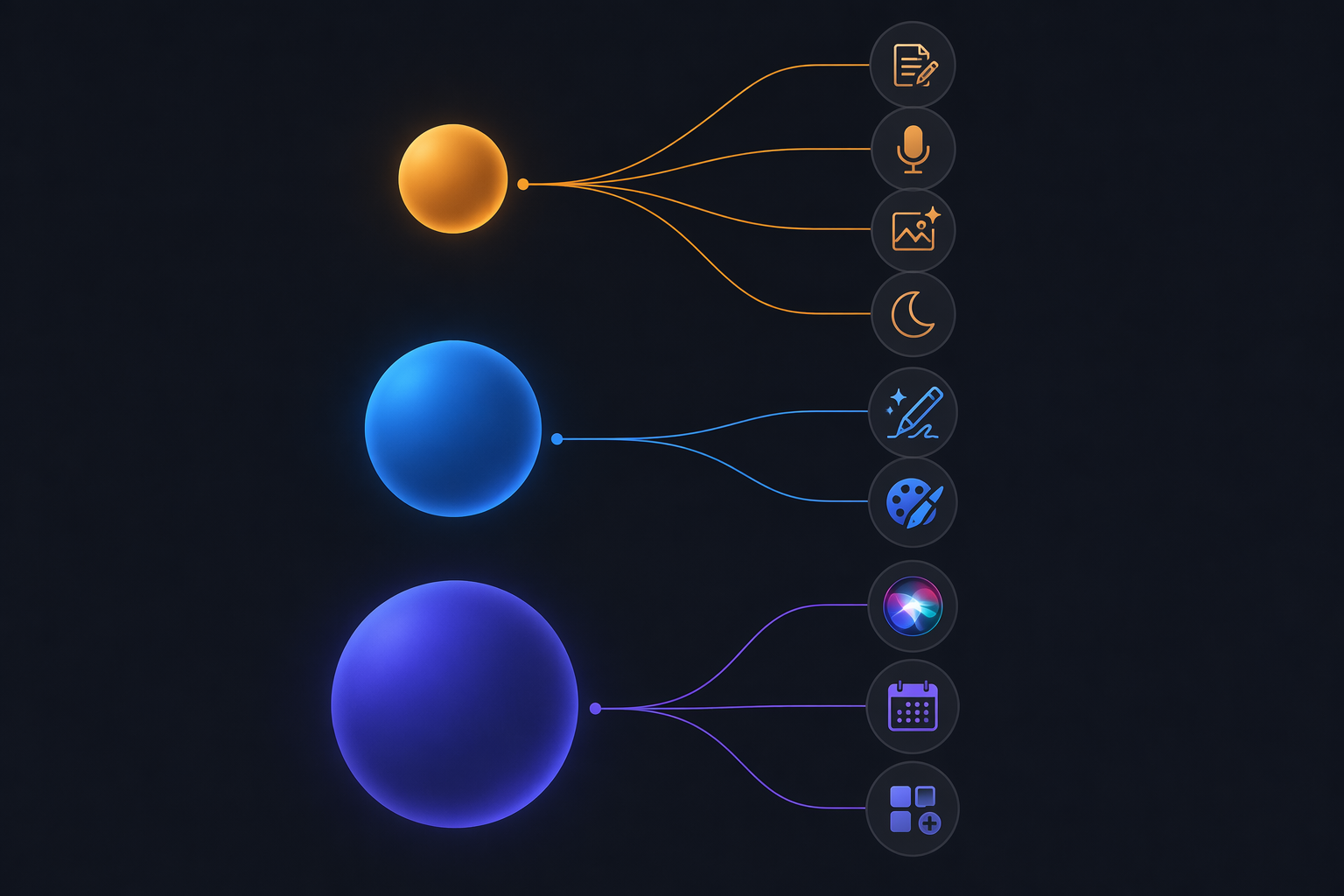
For practical purposes, Apple AI is not one assistant. It is a routing system. Some work happens on the device. Some work goes to ChatGPT only when you approve it. Some of the most ambitious Siri work is tied to a Google Gemini model running inside Apple’s Private Cloud Compute infrastructure, with availability still constrained by rollout timing and hardware requirements.[2][3][4]

The useful map: three models, three jobs
The productivity question is not “which Apple AI partner is best?” It is “which system should handle this task right now?” A private rewrite of a client paragraph, a speculative first draft, and a multi-app Siri request do not belong in the same bucket.
| Layer | Best used for | Typical workday tasks | What to remember |
|---|---|---|---|
| Apple on-device model | Private, immediate, offline productivity | Rewrite a sentence, summarize selected text, clean up a photo, search device content, reduce notification noise | Designed for local work; Apple’s on-device Foundation Model is described as roughly 3B parameters |
| ChatGPT integration | Creative generation and broader world-knowledge requests | Compose longer drafts, try Image Playground’s Any Style, ask complex questions Apple’s own models cannot answer | Opt-in per request; Apple does not send requests automatically |
| Gemini-powered Siri | Advanced reasoning, planning, on-screen awareness, and multi-app actions | Ask Siri to reason across context, plan a sequence, or act across apps | Reported as a custom Gemini model inside Private Cloud Compute; rollout and hardware access are not universal |
This map matters more than the partnership gossip. The reported Google deal size, the branding choices, and the benchmark chatter may be interesting, but they do not help you finish a document at 4:40 p.m. The routing does.
Use Apple’s own model when the work is private, small, and already on your device
Apple’s on-device model is the layer you should reach for first when the job is sitting in front of you: a paragraph in Mail, a note from a meeting, a photo in your library, a dictated thought, or a search across your own files. Apple described Apple Intelligence as bringing AI capabilities into everyday experiences across iPhone, iPad, and Mac, and TimingApp describes its on-device Foundation Model as roughly 3B parameters.[2][1]
That size is not the impressive part. The useful part is the boundary. For local tasks such as Writing Tools, Dictation, Photos Clean Up, Spotlight AI search, and Reduce Interruptions Focus, the point is speed, privacy, and lower friction. You do not need to decide whether a pasted paragraph should leave your device if the rewrite can happen where the paragraph already lives.[1][2]
Writing Tools are for editing, not outsourcing judgment
The most boring Apple Intelligence feature is also one of the most useful: select text, then proofread, rewrite, or summarize it. This is where many people still detour into a browser tab for work the operating system can already start. The better habit is to use Apple’s Writing Tools for local cleanup before you decide whether a bigger model is necessary.
- Use Proofread when the thought is right but the surface is messy.
- Use Rewrite when the sentence needs a different tone for a recipient.
- Use Summarize when you need a fast handle on selected text, not a full research answer.
- Move to ChatGPT only when you need generation, outside knowledge, or a larger conceptual transformation.
A useful test: if you would be uncomfortable pasting the text into a random web tool, try the on-device route first. That does not make the output automatically correct, but it does keep the first pass close to the source material and away from unnecessary disclosure.
Dictation, Photos, Spotlight, and Focus are not side quests
Productivity gains often come from removing little handoffs. Dictation turns half-formed thoughts into text without opening a dedicated app. Photos Clean Up removes distractions from images you already intend to use. Spotlight AI search helps when you remember the idea but not the filename. Reduce Interruptions Focus filters attention when the problem is not writing faster, but stopping the device from interrupting the work.[1][2]
None of these requires treating AI as a separate destination. That is the advantage of Apple’s local layer: it works best when it disappears into the place where the task already started.
Use ChatGPT when you are asking for creation, range, or outside knowledge
ChatGPT enters Apple Intelligence at the moment Apple’s own models are not the right tool. Apple describes ChatGPT access as integrated into Siri and Writing Tools, with user control over when it is used; the integration is not supposed to silently send every hard question to OpenAI.[3]
That opt-in moment is easy to miss. If you ask for something beyond Apple’s local model, Apple can ask whether you want to use ChatGPT. The decision point is the feature, not a nuisance. It tells you the task has moved from private local assistance into a broader model request.
Compose is where ChatGPT stops being a chatbot tab
Compose via ChatGPT is the feature to use when a blank page is the bottleneck. Apple’s Writing Tools can help reshape existing text; Compose is for producing a fuller first draft from a prompt. EnkiAI identifies GPT-5 as the ChatGPT model used as of macOS 26, and describes Apple’s OpenAI arrangement through revenue-sharing with user data obfuscated.[4]
In a workday, that means ChatGPT is better suited to tasks such as drafting a client-friendly explanation from rough notes, creating several alternate openings for a proposal, outlining a presentation, or turning a messy set of bullets into a coherent email. The risk is also obvious: generation can sound finished before it is checked. Treat the output as draft material, not as delegated authority.
Image Playground’s Any Style belongs in the creative bucket
Image Playground is not where you solve a scheduling problem or summarize a dense report. Its ChatGPT-linked “Any Style” generation belongs to the creative side of the system: quick concept art, visual exploration, social graphics, or internal mockups when polish is less important than direction.[4]
For most professionals, the productivity value is not that every image becomes publishable. It is that a visual placeholder no longer requires a separate tool, a stock-image hunt, or a long explanation to a designer before the idea is ready for review.
Complex questions should not be forced through the local model
There is no prize for making the smallest model answer the broadest question. If you are asking for background knowledge, alternatives, comparisons, or a synthesis that reaches beyond content already on your device, ChatGPT is usually the more natural Apple Intelligence partner. Apple’s own system design reflects that distinction by asking before using ChatGPT for requests it cannot handle alone.[3]
The practical habit is simple: local model for text you already have; ChatGPT for text or ideas you need generated. That boundary will not cover every edge case, but it prevents the most common mistake: treating Apple Intelligence as weak because you never allowed it to call the model built for the task.
Use Gemini-powered Siri for planning and actions, but check whether you actually have it
The most ambitious Apple AI productivity story is not a prettier rewrite button. It is Siri understanding context, seeing what is on screen, reasoning through a request, and taking actions across apps. According to Kavout’s analysis of the reported Apple-Google partnership, Apple is using a custom Gemini model of roughly 1.2T parameters inside Apple’s Private Cloud Compute infrastructure for next-generation Siri capabilities; the same analysis describes the reported deal as about $1B per year, while noting that the arrangement has been reported rather than officially confirmed by Apple or Google.[5]
That last caveat matters. It is reasonable to plan around Gemini-powered Siri as a direction of travel. It is not reasonable to assume every Apple device in your bag already has every advanced Siri feature described in partnership coverage.
What Gemini changes when it is available
Apple’s local model is useful for tight, bounded tasks. Gemini-powered Siri is aimed at jobs with more moving parts: reasoning, planning, on-screen awareness, and multi-app agentic actions. Those are the capabilities tied to the next-generation Siri layer, with Google unable to train on user data and no Google branding exposed to users.[5]
This is the layer that could change the shape of a workday. Instead of asking an assistant to rewrite one sentence, you ask it to connect context: the email you are viewing, the calendar slot you need, the file you mentioned yesterday, and the message that should go to a colleague. That is a different class of productivity problem because the assistant is no longer just editing an object; it is coordinating a sequence.
A hypothetical example makes the distinction clear. Local Writing Tools can polish a meeting note. ChatGPT can draft a follow-up email from your rough prompt. A mature multi-app Siri workflow would be the place to ask: “Use the notes from this meeting, find the next open slot with Alex, and prepare a short follow-up with the decision points.” That example is illustrative, not a claim that every device can perform that exact chain today.
The hardware and rollout limits are not footnotes
The strongest Gemini-powered Siri features are not described as universally available. Reported limits include phased rollout through late 2026 and hardware requirements for top-tier capabilities, including iPhone 17 Pro / A19 with 12GB RAM and M3 or later Mac. If your device falls outside those requirements, the correct productivity tip is not to keep toggling settings and blaming yourself.[5]
This is where Apple’s slow, privacy-heavy approach can frustrate normal users. The privacy architecture may be sensible, but the product experience still has to tell people what is running locally, what is going through Private Cloud Compute, what is going to ChatGPT, and what their device simply cannot do yet.
A workday routing guide
If you only remember one operational rule, use the smallest capable layer first. Not because small models are morally better, but because unnecessary handoffs cost time, attention, and sometimes privacy.
| Task | Start with | Change approach when |
|---|---|---|
| Proofread an email | Apple Writing Tools | You need a new argument, new structure, or a more creative draft |
| Summarize selected notes | Apple Writing Tools | You need outside context or a synthesized brief from multiple sources |
| Draft a proposal section | ChatGPT Compose | You need Siri to connect the draft to files, calendar, or messages |
| Create a quick visual concept | Image Playground with ChatGPT Any Style | You need production design or brand review |
| Find a photo or file by memory | Spotlight AI search or Photos search | You need reasoning across apps rather than retrieval |
| Plan a follow-up across calendar, notes, and messages | Gemini-powered Siri if available | Your device or region does not support the advanced Siri layer yet |
The table also explains why the phrase “Apple AI partnership productivity tips” can be misleading if it collapses everything into one assistant. The partner is not the workflow. The workflow is the decision about which layer gets the job.
For documents
Start where the document is. In Mail, Notes, Pages, or any app that exposes Writing Tools, select the specific text that needs work. Use local proofread or rewrite for grammar, tone, length, and clarity. If you are still shaping the idea itself, then call ChatGPT through Compose rather than repeatedly asking a local rewrite tool to invent substance.
This prevents a common failure mode: using a generative model for a confidential paragraph that only needed copyediting, then using a lightweight rewrite tool for a blank-page task that needs imagination.
For meetings
For meeting prep, the first layer is usually local: summarize notes, clean up bullets, dictate thoughts, and reduce notification noise while you are preparing. If you need a fuller agenda, a diplomatic phrasing of a hard point, or alternative ways to explain a decision, ChatGPT is the better fit.
For follow-up, Gemini-powered Siri becomes relevant only if your device has the advanced Siri features needed to reason across context and act across apps. Until then, do not confuse the previewed direction with a dependable workflow.
For photos, files, and search
Use Apple’s device-level features first. Search for the file, note, or image in the system that already indexes it. Use Photos Clean Up when the deliverable is blocked by a distracting object. These are not glamorous features, but they save the kind of small time blocks that disappear from a day without ever becoming a calendar item.
Move beyond local search when the task stops being retrieval and becomes reasoning. “Find the photo from the conference” is a local search problem. “Use that conference photo style to draft three campaign concepts” is closer to ChatGPT. “Attach the right photo to the follow-up message and schedule the send after the meeting” belongs to the future-facing Siri action layer, subject to availability.
What to configure before you judge it
A fair test of Apple Intelligence starts with configuration. If ChatGPT is not approved when needed, and advanced Siri features are unavailable on your device, then you are not testing the full multi-partner system. You are testing the local layer and calling it the whole product.
- Confirm Apple Intelligence is enabled on each device you actually use for work.
- Check whether ChatGPT integration is available and decide when you are comfortable approving it.
- Practice the opt-in flow with a low-risk prompt before you need it under deadline.
- Check whether your iPhone or Mac supports the advanced Siri features being discussed, rather than assuming a software update is enough.
- Keep private editing, creative drafting, and multi-app action requests mentally separate.
The goal is not to become an AI systems architect. It is to stop sending every task through the same mental door.
The partnerships that matter less during your workday
Apple’s AI ecosystem is broader than the three layers most U.S. knowledge workers will touch. Secondary analyses note Apple partnerships with Alibaba and Baidu for the China market and use of Anthropic models internally for developer code efficiency.[4]
Those details matter for Apple’s global and internal strategy. They matter less when you are choosing how to summarize notes, draft a memo, search a Mac, or ask Siri to coordinate a task. For that daily decision, the practical map is still Apple local model, ChatGPT, and Gemini-powered Siri.
Where the promise still outruns the product
There are three reasons to stay cautious. First, the under-30% engagement figure is useful as a warning sign, not as a settled measurement of user behavior. Second, the reported Google deal details, including the roughly $1B annual figure, have been described through secondary reporting rather than confirmed directly by Apple or Google. Third, the most interesting Siri capabilities are rolling out in phases and depend on hardware many users may not own.[1][5]
That does not make the system useless. It makes the advice narrower: use the Apple model aggressively for private local work, approve ChatGPT deliberately for creative and broader requests, and treat Gemini-powered Siri as a powerful layer to verify on your actual devices before building habits around it.
If you work inside Apple devices, the highest-leverage move in Q3 2026 is not memorizing which company won which model benchmark. It is learning which model Apple is likely routing to at the moment of work, configuring the integrations you are willing to use, and noticing when a promised feature is still only promised for your setup.
References
- [Updated March 2026] Apple Intelligence Mac: Features & How to Get — TimingApp
- Apple Intelligence brings powerful AI capabilities into everyday experiences — Apple Newsroom, June 8, 2026
- Apple Intelligence and Siri — Apple
- Apple AI Partnerships 2025: Inside the Ecosystem Strategy — EnkiAI
- Apple and Google AI Partnership 2026: Everything You Need to Know About Gemini-Powered Siri — Kavout
Comments
Join the discussion with an anonymous comment.