
The useful difference between AI assistants and AI agents shows up in the unglamorous part of a workday: after the draft exists.
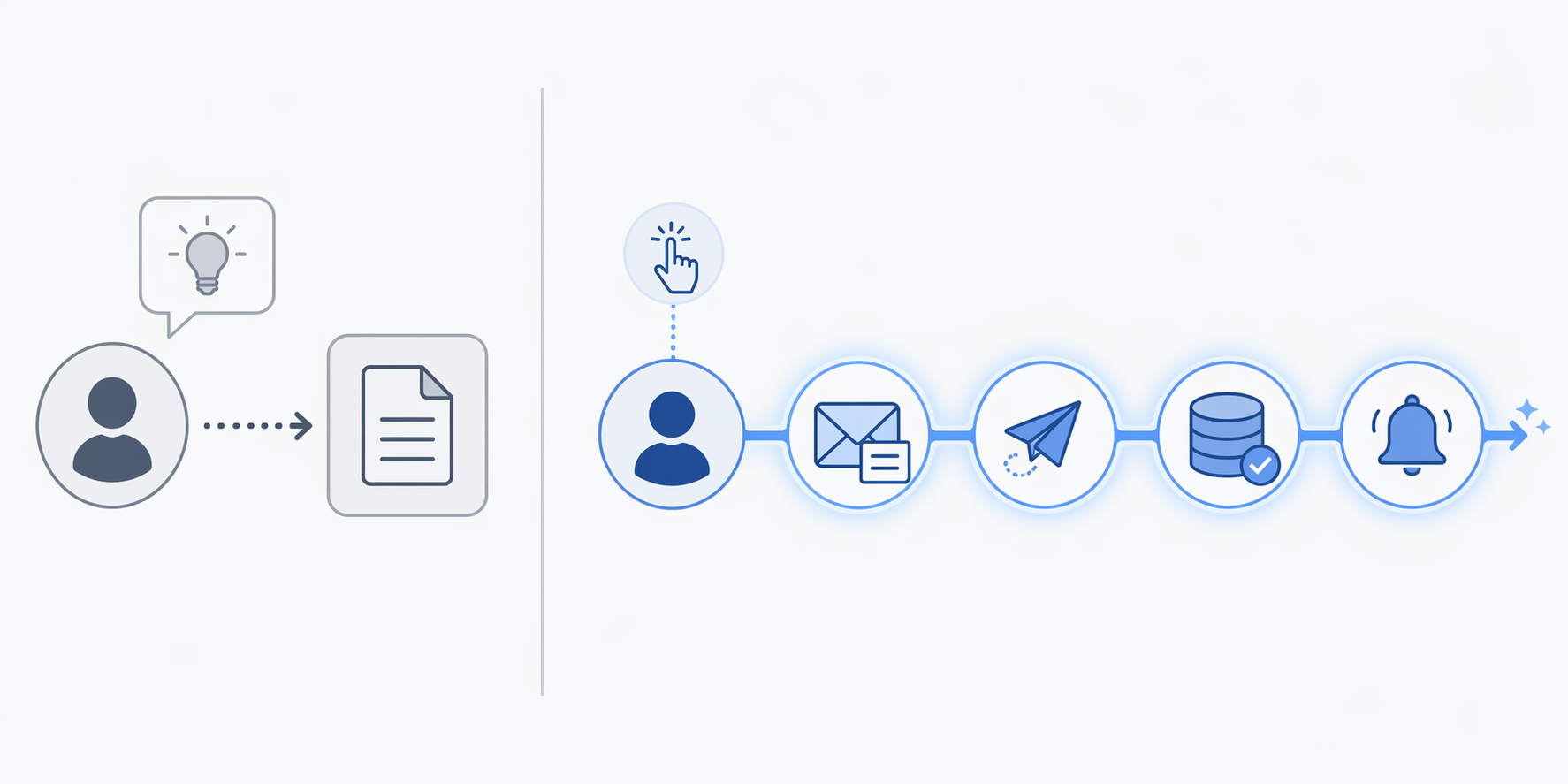
An assistant can help write the customer email, summarize the ticket history, or suggest the next reply. The person still copies the answer into the right system, sends it, updates the CRM, creates the reminder, and checks whether anything else was supposed to happen. An agent is meant to carry more of that chain: draft the email, send it under the right conditions, update the customer record, and trigger the follow-up without making a human reassemble the workflow step by step.
That is why the agent shift matters for AI productivity apps in 2026. The question is no longer only, “Can this tool help me write, summarize, or brainstorm faster?” It is becoming, “Can this tool take responsibility for a bounded workflow without creating a new review queue?”
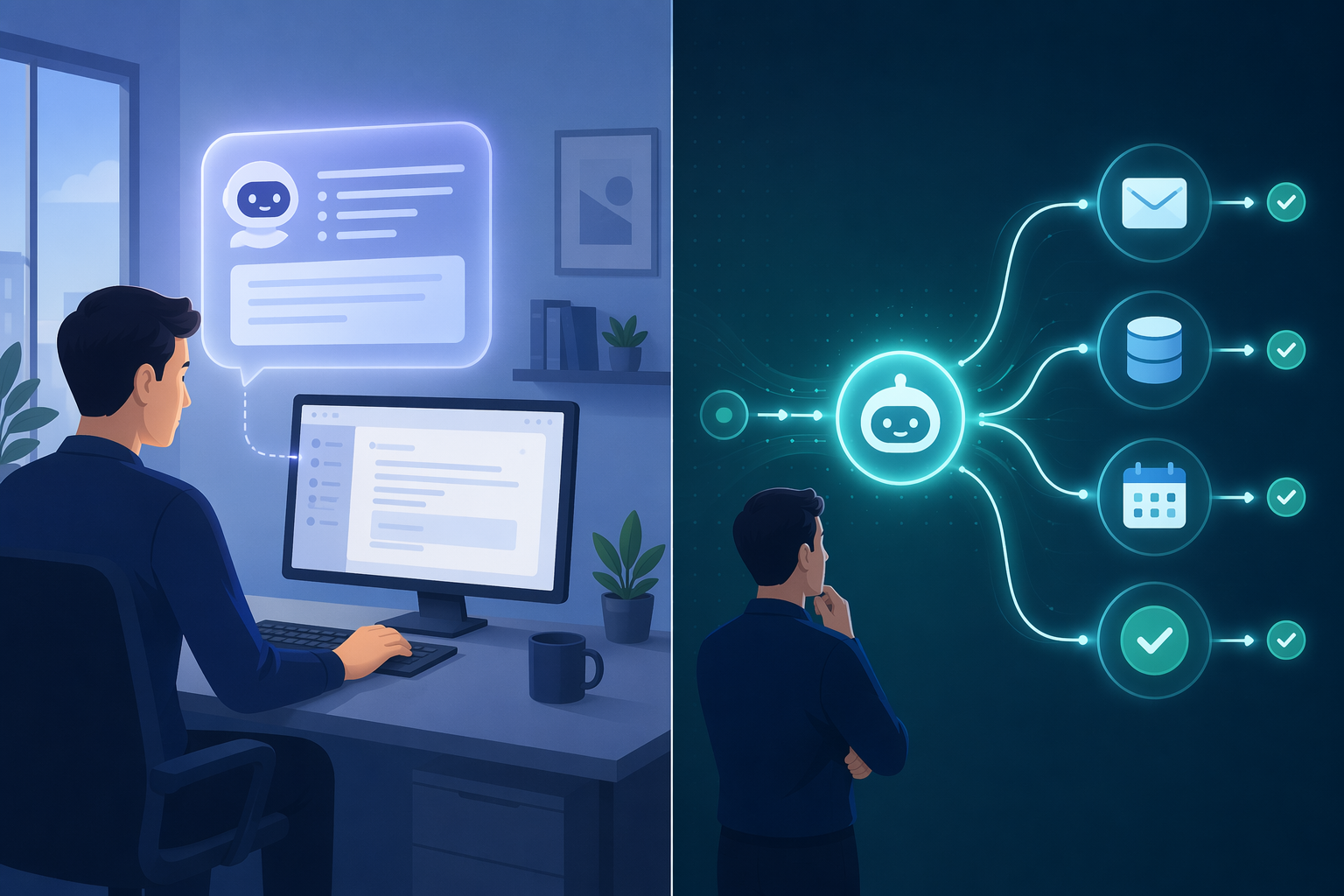
The agent promise is not smarter text. It is fewer handoffs.
Most knowledge workers already understand the assistant pattern. You ask a model to turn meeting notes into action items, rewrite a proposal, compare two drafts, or pull themes out of a long thread. The output may be excellent, but the work usually returns to you at the moment of execution. You decide where it goes, who receives it, which field gets updated, and whether the downstream task actually happened.
Agents move the center of gravity from content generation to workflow completion. That sounds abstract until it is placed inside an ordinary stack: inbox, ticketing system, CRM, calendar, shared docs, issue tracker, chat. An agent becomes useful when it can cross at least some of those seams with permission, context, and a defined stopping point.
| Work moment | AI assistant behavior | AI agent behavior |
|---|---|---|
| Customer reply | Drafts or improves the message | Drafts, sends if conditions are met, logs the exchange, and schedules follow-up |
| Meeting notes | Summarizes decisions and action items | Creates tasks, assigns owners, updates the project record, and flags unresolved items |
| Support triage | Suggests a classification or response | Classifies, routes, escalates, and records the decision path |
| Operations alert | Explains a likely cause | Groups related alerts, recommends or initiates the next action, and reduces repeated manual review |
The table is not a maturity ladder every tool has already climbed. It is a buying distinction. A productivity app that adds an assistant may still leave the worker as the router of last resort. A productivity app that adds a credible agent should remove a specific handoff, decision, or status-update loop.
Why every productivity vendor is suddenly talking about agents
The market pressure is real enough to notice. Gartner has forecast that AI agents could disrupt $58 billion in productivity software by 2027 and that 40% of enterprise applications will include task-specific AI agents by 2026.[1] Forecasts are not adoption data, but they explain the product-roadmap behavior: if your app handles tasks, records, approvals, or messages, “agentic” features are now hard to ignore.
This is why agents are appearing inside suites that already own the work surface. The embedded route is attractive because the agent does not have to invent a workflow from scratch. It can sit where the tickets, customer records, documents, alerts, or approvals already live. That matters more than the branding. A generic agent that needs constant copying and prompting is just another tab with better vocabulary.
There is a quieter reason embedded agents are more plausible than standalone agent platforms for many workers in 2026: permissions and review already have a home. The project-management tool knows who owns the task. The CRM knows the customer record. The service desk knows escalation rules. The monitoring system knows alert history. When an agent works inside that environment, its autonomy can be narrower and more inspectable.
The adoption reality is still uneven
The same year that makes agents feel inevitable also makes them easy to overbuy. Deloitte has reported that fewer than 25% of organizations have successfully scaled agentic AI to production, and that more than 40% of agentic AI projects could face cancellation by 2027.[2] Those figures should not be read as proof that agents do not work. They should be read as a warning that a demo and a production workflow are different artifacts.
A demo can show an agent booking a meeting, responding to a customer, or updating a record. Production has to answer duller questions. What happens when the customer is angry? Who approves a refund? Which accounts are excluded? How does the agent handle missing fields? Where is the audit trail? Who gets paged when it acts on stale information? These are not objections to autonomy. They are the conditions under which autonomy stops being theater.
For an individual or team choosing AI productivity apps, this means the smart question is not whether a product has “agents.” It is whether the agent is attached to a recurring workflow with clear inputs, outputs, permissions, and review points. If those boundaries are vague, the supervision work usually moves back to the human.
Where agents are already showing the right shape
The strongest examples are not broad claims about digital employees. They are narrower cases where the agent is attached to a repeated operational pattern.
Alert triage: fewer items waiting for human sorting
Microsoft’s Azure case study on Ecolab describes a site reliability engineering workflow in which Azure SRE Agent reduced daily SRE alerts from about 30 to fewer than 10.[3] The important part is not the brand name or the model label. It is the workflow shape: alerts arrive repeatedly, many require similar triage, and humans pay a switching cost each time they decide what deserves attention.
In that kind of environment, an agent does not need to become a universal operator to be useful. It needs to reduce the number of items a responsible person must manually inspect before doing the higher-stakes work. A support lead, SRE, or operations manager can understand the value immediately: fewer noisy decisions at the front of the queue changes the day even if humans still own escalation and judgment.
This is also the right way to read the evidence. The Ecolab example comes from a vendor-published case study, so it should be treated as proof that the workflow pattern can work under favorable conditions, not as neutral proof that every alerting environment will see the same result.[3]
Transactional decisions: faster responses inside a bounded process
Danfoss offers a second useful shape. In a partner-published account, the company automated 80% of transactional customer decisions with AI agents and reduced response time from 42 hours to near real-time.[4] Again, the practical lesson is in the boundary. “Transactional customer decisions” suggests a process where many requests follow known rules, draw on known data, and can be completed or escalated according to defined conditions.
That is where agents are easier to trust than in open-ended knowledge work. The agent is not being asked to decide company strategy or invent a policy. It is being asked to move repeated decisions through a known path faster than a queue of humans can. The productivity gain is not merely that the model writes well. It is that the customer decision stops waiting for someone to open the next tab.
This case also needs the same caution as the Ecolab example. It is a real implementation described in a partner context, not an independent audit of agent ROI across industries. It is most useful as a pattern to look for: high-volume, rule-shaped, repetitive decisions with measurable waiting time before and after.[4]
How this should change your productivity stack decisions
The practical move in Q2 2026 is not to abandon assistants. They are still useful for drafting, analysis, synthesis, and exploration. The shift is that assistants should no longer be the only AI capability you look for when comparing productivity tools. If two apps both summarize meetings, the better question may be which one can turn the accepted action items into assigned tasks, linked records, calendar holds, or follow-up reminders with a reviewable trail.
Start with the parts of your current stack where work gets stuck between systems. A few examples are enough to expose the pattern:
- A support queue where humans repeatedly classify, route, and escalate similar tickets.
- A sales or client-service workflow where follow-ups are drafted but not logged, scheduled, or tied back to the record.
- A project workflow where meeting decisions become action items but never reliably become tracked work.
- An operations workflow where alerts, exceptions, or approvals pile up because someone has to sort the same categories every day.
Those are better candidates than open-ended “make me more productive” use cases. A bounded agent should have a recognizable trigger, a limited action set, access only to the systems it needs, and a clear point where it either completes the work or asks for review. If a vendor cannot describe those boundaries plainly, the feature may be impressive without being ready to carry your workflow.
Prefer agents inside the tools that already hold the work
For most knowledge workers and small teams, the safer default is to watch for embedded, task-specific agents in tools they already use. That might mean an agent inside the help desk, CRM, docs suite, calendar, project tracker, code environment, or monitoring platform. The agent’s advantage comes partly from context. It can see the record, use the tool’s permissions, and leave evidence where the next person will look.
Standalone agent platforms may make sense for teams with the engineering capacity, governance model, and workflow ownership to connect systems safely. But for many buyers evaluating AI productivity apps in 2026, “standalone” should not sound automatically more advanced. It can also mean more integration work, more permission design, more exception handling, and more places for the human to verify what happened.
Ask what supervision work the agent removes
A useful agent should reduce a concrete burden. It might reduce alerts that require triage, customer decisions waiting in a queue, manual status updates after a meeting, or repetitive routing in a service desk. If it mainly creates a new stream of suggested actions someone must inspect one by one, it may still be an assistant wearing agent language.
The review point should be designed, not improvised. Some actions can be logged after completion. Some require approval before execution. Some should only be recommended, never performed automatically. The right level depends on the workflow, not on the vendor’s confidence. Sending a reminder and approving a customer exception do not carry the same risk.
The buying rule for 2026
AI agents are real enough to affect how productivity software should be evaluated. They are not mature enough to make agent-chasing a sensible default. The useful middle position is to favor apps that add bounded agentic workflows to places where work already happens.
When comparing AI productivity apps, give extra weight to tools that can show a specific workflow before and after: what the human used to do, what the agent now does, what still requires approval, and where the record of action lives. Be more skeptical when the pitch centers on general autonomy without naming the queue, handoff, permission, or review burden being reduced.
In 2026, the better productivity stack is not necessarily the one with the most ambitious agent demo. It is the one that lets limited autonomy land in the right places: repetitive decisions, obvious handoffs, and workflows where the cost of waiting is already visible.
Comments
Join the discussion with an anonymous comment.