
Most abandoned PKM attempts do not fail at retrieval. They fail before retrieval has anything to work with. You pick an app, watch six setup videos, build a clever folder tree, copy someone’s template, rename everything twice, and then the first busy Tuesday arrives. A stray idea appears between meetings. You do not know where it belongs. So you put it nowhere.
That is the real starting point for a personal knowledge management system: not a theory of knowledge, not a perfect app stack, but the moment when capturing one messy thought has to be easier than ignoring it.
There are workplace-scale reasons to care about this. GoLinks, citing McKinsey research on “The Social Economy,” repeats the often-quoted estimate that workers spend 9.3 hours per week searching for information, but that number belongs to a broader workplace collaboration context and should not be treated as a guaranteed personal productivity loss for every individual note-taker.[1] Still, the smaller personal version is familiar enough: the book quote you cannot find, the meeting decision buried in chat, the idea you remember having but cannot reconstruct.
The next 30 days are not about building the perfect knowledge base. They are about becoming someone who opens the tool every day, captures without dread, and keeps enough order that yesterday’s notes are not already compost.

Why beginners stall before the system starts working
Sébastien Dubois’s list of common PKM mistakes is useful because it names the behaviors that show up right when beginners think they are “being serious.” The Overthinker tries to understand the whole landscape before writing the first useful note. The Tool Hopper moves from one app to another because the current app has started to feel too ordinary. The Complexity Monster keeps adding folders, tags, dashboards, queries, and templates until capturing a note feels like filling out paperwork.[2]
Those patterns are common enough in PKM communities that people sometimes talk as if beginner abandonment has a known percentage. Treat that carefully. The “most people quit” claim is an observed community pattern, not a cleanly measured law. The more useful point is simpler: a system that asks for too many decisions too early will lose to a blank inbox, a Notes app scratchpad, or doing nothing.
If you want the broader failure analysis, save why most personal knowledge management systems fail for later. Do not read it before doing tomorrow’s capture. That would be very on-brand for the Overthinker.
The 30-day map
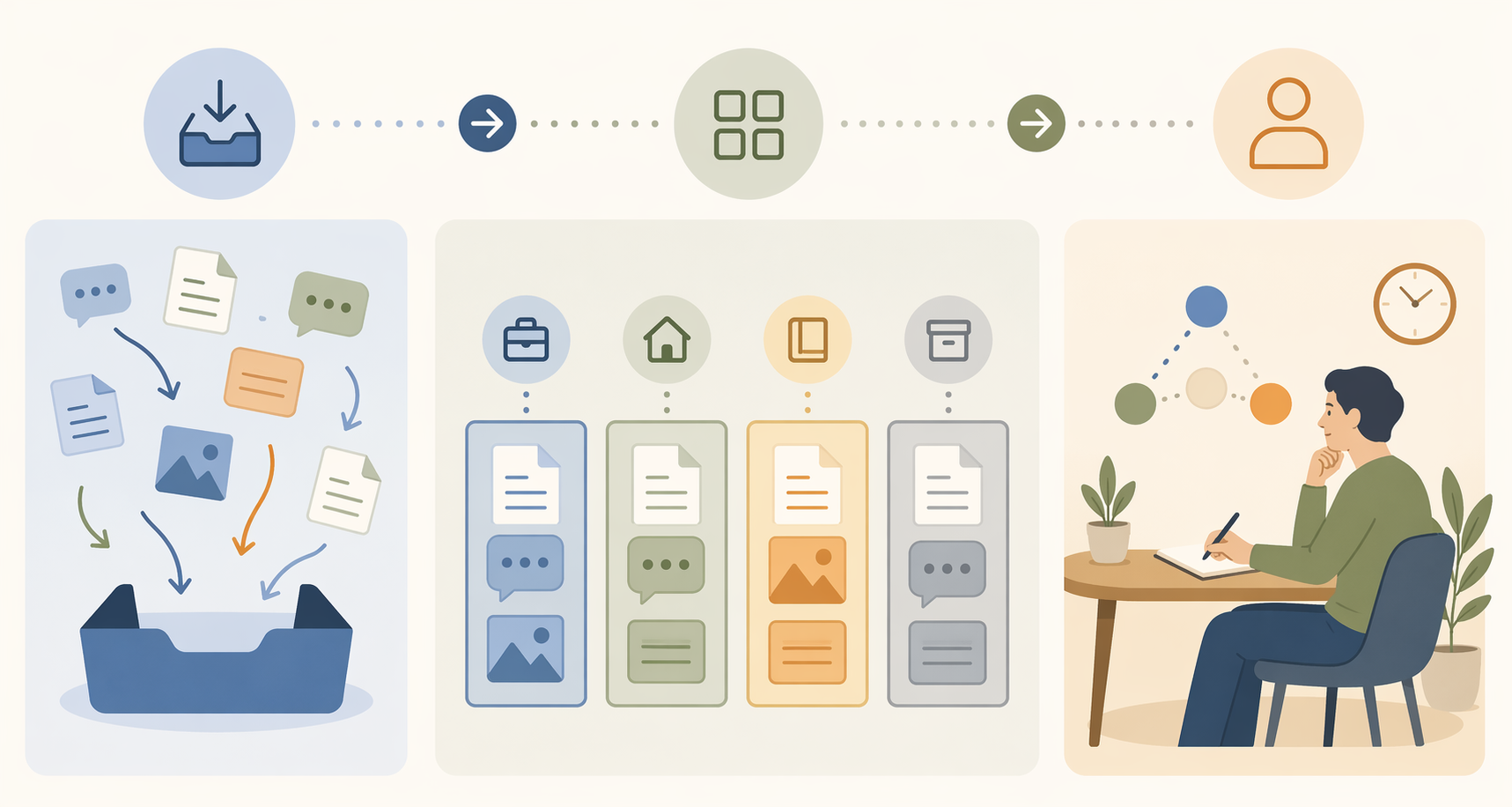
The order matters. Atlas’s 2026 PKM guide describes a phased starter workflow that begins with capture, then adds structure, then moves into refinement.[3] That is the right shape for a beginner because structure is much easier to design after you have actual material. Before that, you are mostly decorating an empty house.
| Days | Main job | What success looks like |
|---|---|---|
| 1–2 | Pick one tool | One place is ready to receive notes |
| 3–7 | Capture 30–50 starter notes | Messy volume exists; organizing is deliberately postponed |
| 8–14 | Add PARA | Four top-level homes: Projects, Areas, Resources, Archives |
| 15–21 | Open the tool daily | At least three captures per day: one thing read, one thing done, one thing thought |
| 22–30 | Review once per week | Re-file, link, archive, and surface one actionable idea |
| Month 2+ | Let retrieval compound | The system starts paying you back because it has enough material and a maintenance rhythm |
This article is intentionally more prescriptive than a framework-neutral guide. If you would rather compare approaches before committing, use this framework-agnostic 30-day PKM guide. If you want the shortest path from zero to working, stay here and use PARA as the default spine.
Days 1–2: Pick a tool without turning it into a hobby
For the first two days, your only job is to choose one place where notes will land. Not the forever app. Not the app that expresses your entire philosophy of cognition. One place.
- Choose Obsidian if you care about local files, privacy, portability, and future extensibility.
- Choose Notion if you want structured pages, databases, collaboration, and a more visual workspace.
- Choose Apple Notes if friction has killed your previous attempts and you already live on Apple devices.
That is enough. If you genuinely need a deeper tool decision, open digital note-taking apps by work style or PKM apps vs. note-taking apps after you have made a provisional choice. The danger in Days 1–2 is not choosing the wrong tool. It is spending the whole week auditioning tools and calling that progress.
Set up exactly one inbox or default capture location. Name it “Inbox” if your tool supports folders. Pin it if you can. Put the app on your phone’s first screen or your computer dock. Then stop configuring.
Days 3–7: Capture 30–50 notes before organizing anything
This is the part most beginners want to skip because it feels untidy. Do not skip it. A personal knowledge management system needs raw material before it needs architecture. During Days 3–7, your goal is 30–50 starter notes. They can be ugly, short, uneven, and inconsistently titled.
A valid starter note can be any of these:
- A quote from an article with one sentence about why it matters
- A meeting decision you might need later
- A rough idea for a project
- A question you keep circling
- A lesson from something that went wrong
- A link with two lines explaining what you expect to use it for
Do not tag. Do not make subfolders. Do not write permanent-note prose. Do not ask whether the note is “atomic enough.” Put every note into the inbox. The win is not elegance; the win is reducing the distance between having a thought and storing it somewhere you will actually revisit.
Matthias Frank’s beginner guidance is useful here because it gives permission to start plainly: done is better than perfect, especially when the alternative is another pristine setup with no notes inside it.[4] That advice can sound obvious until you are staring at a half-built dashboard and wondering whether your book notes need five properties or seven.
The Overthinker usually appears in this window. You will feel an urge to research naming conventions, metadata, daily notes, backlinks, maps of content, and whether your system should be object-oriented. Write those questions into the inbox as notes. Then continue capturing.
A five-day capture rhythm
| Day | Minimum target | Good sources |
|---|---|---|
| Day 3 | 5 notes | Open tabs, recent meetings, saved messages |
| Day 4 | 5–8 notes | Articles, podcasts, book highlights |
| Day 5 | 5–8 notes | Work decisions, project ideas, questions |
| Day 6 | 8–12 notes | Anything you would normally leave in chat, email, or memory |
| Day 7 | 7–17 notes | Loose ends from the week |
If you end Day 7 with 30 messy notes, you are ahead of the person with a beautiful empty dashboard.
Days 8–14: Add PARA as the filing spine
Now you are allowed to organize, but only with four top-level categories: Projects, Areas, Resources, and Archives. PARA is useful for beginners because it turns “Where does this go?” into a smaller decision. The method’s four-part structure is widely presented as Projects for active outcomes, Areas for ongoing responsibilities, Resources for reference material, and Archives for inactive items.[5]

Create these four folders or sections:
- Projects: work with a finish line. Examples: launch the portfolio, prepare the Q3 planning memo, choose a new CRM.
- Areas: responsibilities that continue. Examples: health, team management, finances, professional development.
- Resources: useful reference material with no current deadline. Examples: writing advice, leadership articles, recipes, market research.
- Archives: inactive projects, old references, and anything you do not want cluttering the active system.
Then sort the notes you captured in Days 3–7. Do this quickly. If a note supports a current outcome, put it in Projects. If it relates to a responsibility you maintain, put it in Areas. If it is interesting or useful but not active, put it in Resources. If it is no longer relevant, archive it.
Do not add subfolders yet. This is where the Complexity Monster usually walks in wearing a productivity hoodie. It will suggest that “Resources” needs twelve nested categories before you can continue. It does not. A slightly crowded Resources folder is less dangerous than a folder tree that makes every capture feel like a sorting exam.
Tags can wait too. Tags are useful once you know what patterns recur in your real notes. Before that, they are guesses. Beginners often create tags for the person they imagine becoming rather than the information they actually collect.
The Day 10 tool-hopping urge
Around the middle of the month, the first tool will start to feel imperfect. Obsidian will seem too plain or too fiddly. Notion will feel too structured or too slow for quick capture. Apple Notes will feel insufficiently serious. This is normal. It is also exactly the wrong time to migrate.
Write a note called “Tool complaints.” Put every irritation there. At the end of 30 days, review it. Some complaints will be real. Some will be boredom wearing a systems-design costume. If you want to understand what separates a PKM app from a regular note app, read what makes a personal knowledge management app after the month is complete.
Days 15–21: Make opening the tool automatic
By Day 15, the system has enough material to feel real and enough structure to stop feeling like a junk drawer. Now the main job changes: open it every day for a week.
Use a three-note minimum:
- One thing read: a quote, link, idea, or summary from something you consumed.
- One thing done: a decision, task outcome, meeting result, or finished step.
- One thing thought: a question, connection, worry, hypothesis, or observation.
Three notes a day is small enough to survive a crowded calendar. That is the point. A system that only works on your most reflective Sunday is not yet a system; it is a weekend project.
You can capture more than three, but do not raise the minimum. Minimums are for tired days. They protect the habit from your best-day optimism.
The order of operations is still capture first, sort second. If you are rushing, put the note in the inbox. If you have ten extra seconds, file it into PARA. If you have a minute, add one link to a related note. Never require the full version of the workflow before allowing the basic version to count.
What to do when you miss a day
Do not backfill seven fake notes to repair the streak. Open the tool the next day and capture one real thing. A missed day is not a failed system. The abandoned-system spiral usually starts when one miss becomes evidence that the whole setup is broken and needs redesigning.
If you miss repeatedly, lower the friction before changing the method. Put a shortcut on your home screen. Use voice dictation. Keep one inbox note open. Move capture closer to where thoughts already happen.
Days 22–30: Add the weekly review
The weekly review is where a starter PKM system stops being a pile. Set a 30-minute timer once during Days 22–30. Do not turn this into an afternoon ceremony.
- Empty the inbox: move each note into Projects, Areas, Resources, or Archives.
- Rename only the notes whose titles are too vague to recognize later.
- Link a few obvious pairs. Do not force a graph.
- Archive inactive material so the active system stays light.
- Surface one actionable idea: a task, question, project improvement, or decision you can use next week.
That last step matters. A knowledge base earns trust when it gives something back. It does not need to produce a life-changing insight in Month 1. It only needs to prove that reviewing notes can change what you do next.
A hypothetical example: during review, you find three separate notes about clients asking the same onboarding question. The actionable idea is not “build a client education knowledge hub.” That may come later. For now, it is “write one reusable answer and add it to the onboarding checklist.” This is the right scale for a first month.
What not to add in the first 30 days
Customization is not forbidden. It is postponed until you have enough captured material to customize around. The first month is a bad time to build elaborate dashboards because you do not yet know what your real retrieval problems are.
- Do not build more than four top-level PARA folders.
- Do not install plugins unless one solves a problem you encountered more than once.
- Do not create a large tag taxonomy.
- Do not migrate tools mid-month.
- Do not judge the system by how impressive it looks in screenshots.
The beginner system should feel almost disappointingly plain. That plainness is protective. It gives the capture habit room to become normal before the design habit starts asking for weekends.
Month 2+: Let the system get smarter after it survives
After 30 days, you can start improving the system based on evidence. If you repeatedly search for the same kind of material, add a tag. If one project has too many notes, create a project page or index. If Resources becomes crowded, split it carefully. If you keep finding useful connections, build more deliberate links.
This is also the better time to read about higher-level PKM design. The three levels of personal knowledge management is useful once you have a working base to improve. Without that base, advanced concepts tend to become another way to delay capture.
A realistic 30-day outcome is around 100 notes, a daily capture habit, a PARA filing structure, and one weekly review rhythm. Not mastery. Not a complete second brain. A working personal knowledge management system that you can open tomorrow morning and trust enough to use.
Tomorrow morning, choose the tool, create the inbox, and capture the first five notes. Leave the beautiful system for later.
References
- Best Personal Knowledge Management Software 2026, GoLinks.
- 12 Common Personal Knowledge Management Mistakes, dsebastien.net.
- Personal Knowledge Management (2026): The Honest Guide, Atlas Workspace.
- Personal Knowledge Management for Beginners, Matthias Frank.
- PARA Method comparison page, Matt Giaro.
Comments
Join the discussion with an anonymous comment.