
Most teams already automate the movement of information. The harder problem is a judgment: which lead deserves a call, which customer looks likely to churn, which invoice deserves a second look. That is where machine learning for automation becomes useful. AutoML tools automate the training pipeline — preprocessing, feature engineering, model selection, hyperparameter tuning, and deployment — so people with limited ML experience can still build predictive models [1].

That does not mean every workflow needs a model. A Zap, Make scenario, or n8n flow is still the right answer when the task is just routing, copying, enriching, or notifying. The split matters because AI workflow tools and AutoML solve different parts of the same problem: one category builds predictions, the other moves those predictions into Slack, Gmail, Sheets, and CRMs.
How AutoML changes the middle of the workflow
The useful version of AutoML is not a black box that magically replaces judgment. It is a pipeline with fewer manual steps. You collect usable historical data, define the prediction target, let the platform train and compare models, test whether the output is trustworthy enough for the decision, and then deploy the score or label into the systems your team already uses. For a small operation, that can mean a churn flag in a CRM, an anomaly score on an invoice sheet, or a lead ranking sent to Slack before a human reviews it.
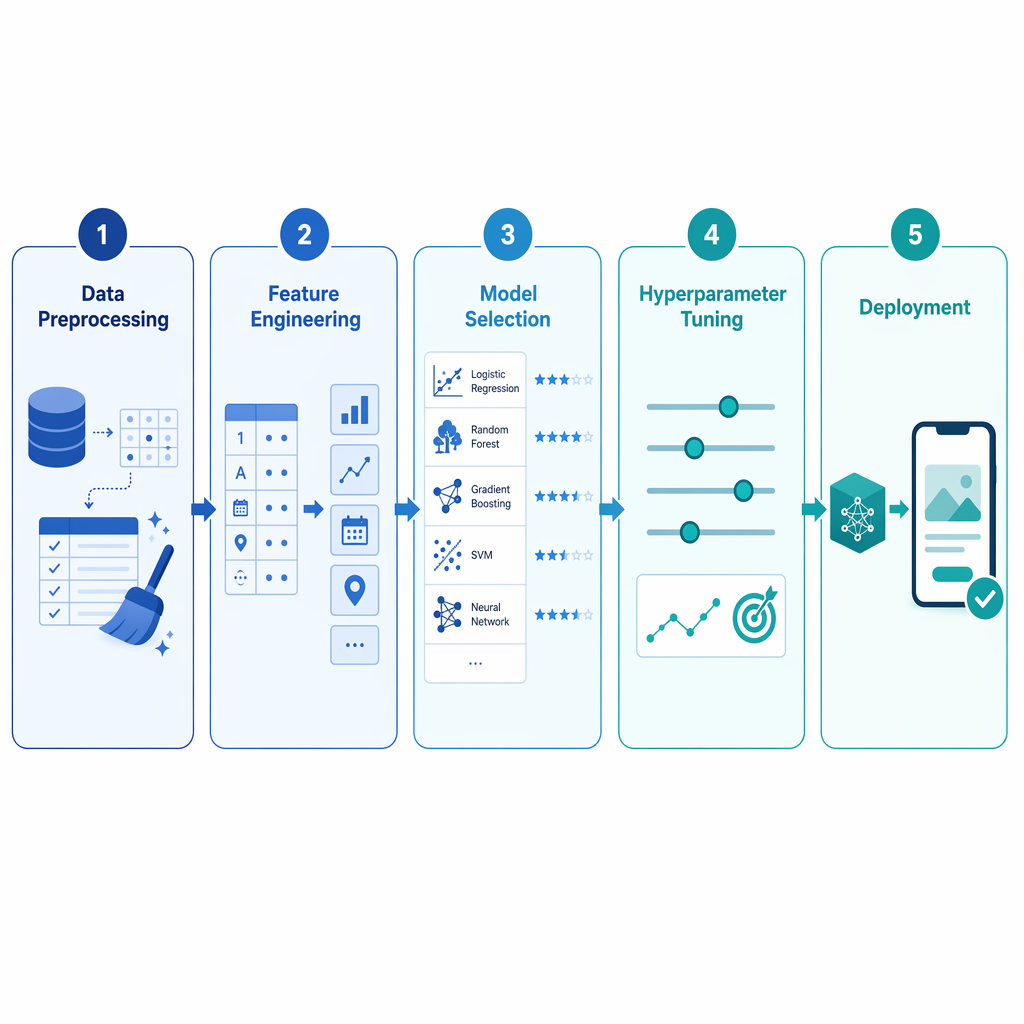
That pipeline is the reason AutoML is different from ordinary no-code automation. A workflow tool can move the result, but it does not create the result. Once the model is trained, the operational work becomes familiar again: route the score, add a human review step where the decision has consequences, and make sure someone owns the automation after the demo ends.
Match the tool to the shape of the decision
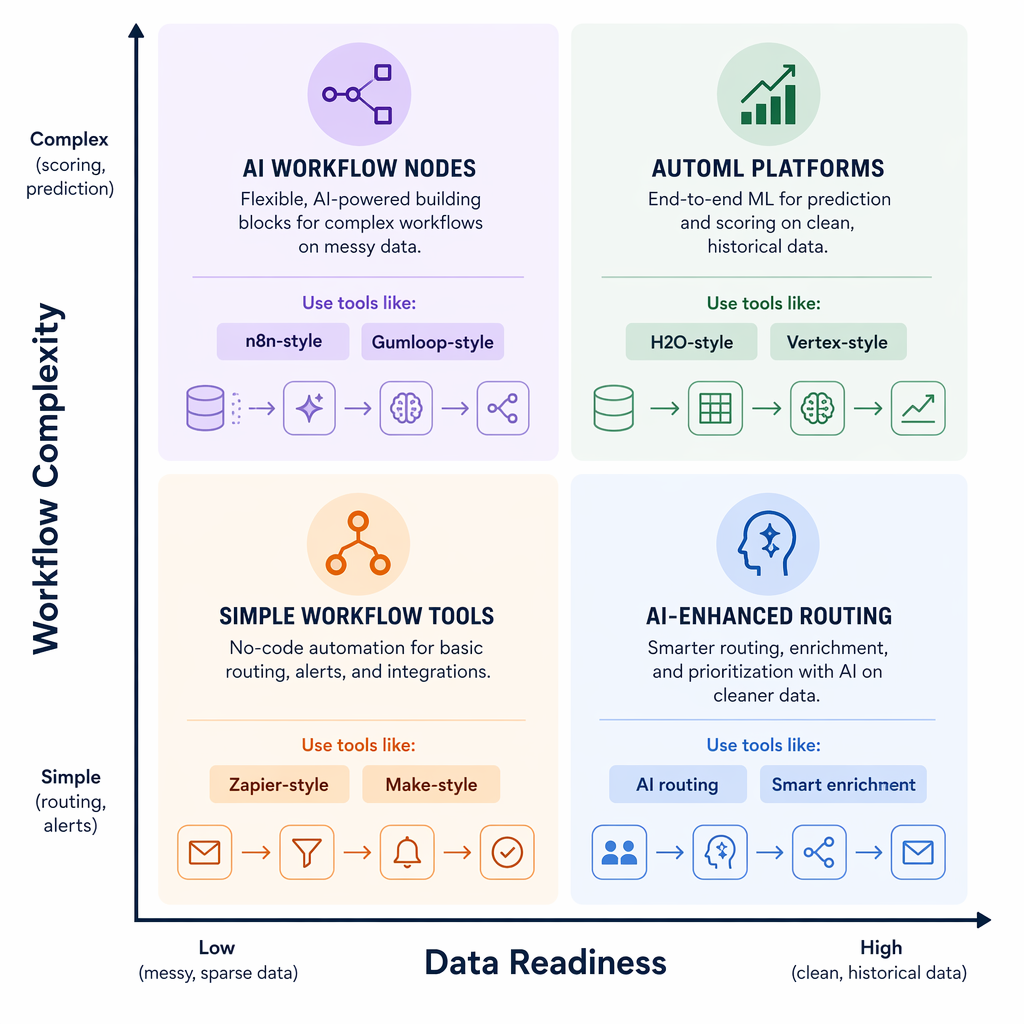
| Situation | Data readiness | Better fit | What that usually means |
|---|---|---|---|
| You mainly need app-to-app routing, enrichment, or AI-assisted sorting | Little or no labeled history | Zapier AI, Make AI modules, n8n AI nodes, or Gumloop | Use the workflow layer first when the job is moving work, not predicting outcomes. |
| You already have past outcomes and can name the decision you want to predict | Historical labels exist and are reasonably clean | AutoML plus a workflow tool | Train the score first, then push it into Slack, Gmail, Sheets, or a CRM. |
| You want more control over ownership, hosting, or the automation stack | Moderate operational comfort | n8n or another self-hostable workflow tool | This is useful when the inherited automation matters as much as the first build. |
| Your team already works inside AWS, Azure, or Google Cloud | A cloud pipeline already exists | SageMaker Autopilot, Azure AutoML, or Vertex AI AutoML | The setup is often smoother, but the tradeoff is deeper ecosystem lock-in. |
TechTarget's comparison is useful because it separates tools by fit and limitation instead of treating every AutoML product as interchangeable: cloud-native options such as Vertex AI AutoML, Azure AutoML, and SageMaker Autopilot suit teams already living in those ecosystems, while DataRobot, Dataiku, and H2O are aimed at different levels of maturity and control [2].
G2's 2026 roundup is a reminder not to confuse visibility with suitability. Dataiku appears with a 4.4/5 score and 58% enterprise customers, which signals adoption and maturity, not whether a 6-person team should adopt it next week [3].
Pricing and adoption signals to read cautiously
On the workflow side, public entry prices are easy to find: n8n has a free self-hosted tier and cloud plans from $20/month, Make starts from $9/month, Zapier from $19.99/month, and Gumloop advertises a free tier with 5,000 credits per month [6][7]. Those figures are useful for estimating entry cost, but they are not a full cost model once you add extra seats, usage, or the time needed to maintain the flow.
Enterprise AutoML pricing is usually less transparent. DataRobot and Dataiku often sell through sales conversations, so public numbers tend to be directional rather than contract-level. Market-size claims should be treated the same way: one 2026 estimate puts the global machine learning market at $91.31 billion in 2025 and $1.88 trillion by 2035, with MLaaS growing at a 35.58% CAGR [4].
Survey numbers need even more care. Aristral's reconciliation of UK AI adoption data shows how much definitions change the headline: ONS reports 23%, DSIT reports 16%, BCC reports 54% of businesses actively using AI in 2026, and only 11% of SMEs use AI extensively for operations [5]. That spread is a warning not to overread any single adoption percentage as proof that a small team should move next week.
The practical question is narrower: is the data behind one recurring decision stable enough to label, review, and score? If the answer is no, a workflow tool may still save time without pretending to predict. If the answer is yes, AutoML can turn past outcomes into a score that a workflow tool can deliver to the right place.
For a solo operator or small team, the safest path is to start with one repeatable decision, use records you already trust, test whether the score changes action, and only then wire the prediction back into Slack, Gmail, Sheets, or a CRM. When the work is mostly routing, stay with AI workflow tools. When the work needs prediction, add AutoML. When both are true, use both.
References
- Machine Learning for Automation: Exploring AutoML Tools and Applications — Coursera
- Compare 7 top AutoML tools for machine learning workflows — TechTarget
- 8 Best Machine Learning Tools in 2026 — G2
- ML Statistics 2026 — Itransition
- 60+ AI automation data points — Aristral
- 9 best AI workflow automation tools in 2026 — n8n
- 10 best AI workflow automation tools I'm using in 2026 — Gumloop