
The Gap Between Your Plan and Your Day
Most people end the week having completed only about half of what they planned. According to Reclaim.ai's Task Management Trends Report, only 53.5% of planned tasks actually get finished each week. That gap isn't usually a motivation problem or a skills problem — it's a structure problem. Tasks sit on an open-ended to-do list with no assigned time, and the day fills up with whatever arrives first.
Interruptions make it worse. Research from UC Irvine finds that recovering from a single context switch takes an average of 23 minutes. Multiply that across a typical knowledge-work day and the compounding cost becomes the real explanation for why focused output feels so hard to sustain.
Time blocking addresses both problems directly. Instead of maintaining a list of tasks and deciding in the moment what to work on, you assign each task or category of work a dedicated calendar slot. The block becomes the commitment — not just the intention. This guide covers 10 specific techniques for doing that well, from foundational methods to approaches that have emerged as best practices in 2026. It's written for people who have tried and abandoned time blocking before, not only those starting from scratch.
Why Time Blocking Actually Works: The Research
Time blocking isn't popular because it sounds organized. It works because it targets four specific cognitive and behavioral mechanisms that undermine unstructured work.
- Implementation intention. When you decide not just what to do but when and where you'll do it, follow-through rates rise substantially. This effect has been replicated across 94 separate studies on plan-making — people who write down a specific time and place for a task are significantly more likely to act on it than those who rely on a general intention.
- Context-switching cost. That 23-minute recovery figure isn't a one-off disruption — it compounds. Three interruptions in a morning can consume more than an hour of productive capacity without a single extra task being added to the list. Blocking time creates a structural barrier against task-hopping.
- Decision fatigue. The quality of decisions degrades as the day progresses. Choosing what to work on is itself a decision. Pre-planned blocks eliminate that choice in the moment — the decision was made earlier, when cognitive resources were higher.
- The planning fallacy. Kahneman and Tversky documented that people consistently underestimate how long tasks will take — by 20 to 50% on average. Timeboxing (one of the 10 techniques below) directly counters this by imposing a hard end to a task regardless of completion, which forces more realistic scoping over time.
Understanding these mechanisms matters because it explains why the techniques below work — and why skipping the structural elements (like buffer blocks) causes the whole system to collapse.
The Four Block Types You Need to Know First
Before applying any specific technique, it helps to understand the four categories that every time-blocked day is built from. Each has a different cognitive demand and a different role in the day's architecture.
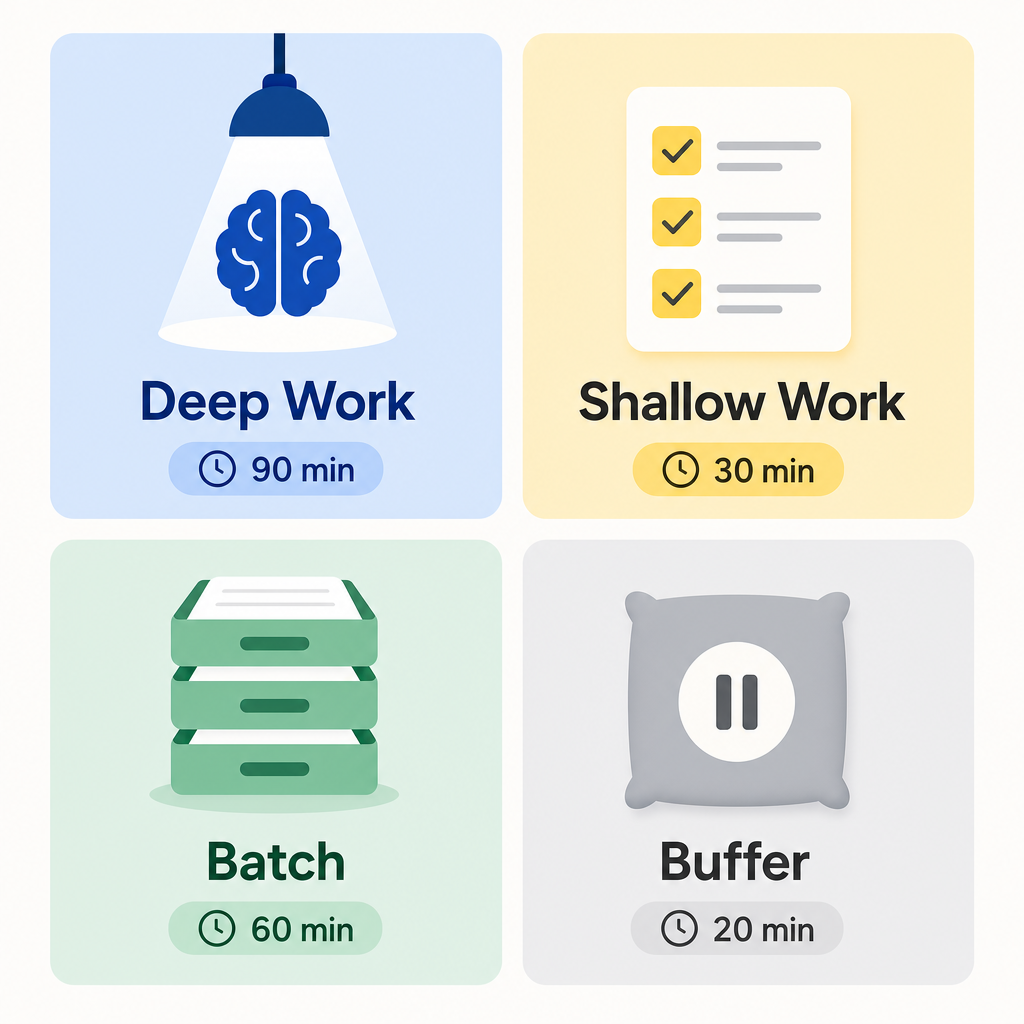
- Deep Work blocks (60–120 minutes): Reserved for cognitively demanding tasks that require sustained focus — writing, analysis, complex problem-solving, coding. These blocks should be protected from meetings and notifications.
- Shallow Work blocks (30–60 minutes): Lower-intensity tasks that still require attention — responding to routine messages, filling out forms, light administrative work. These can be scheduled during lower-energy periods.
- Batch blocks (20–45 minutes): Dedicated windows for processing similar tasks together — email triage, approvals, Slack replies, expense reports. Grouping similar tasks into one window reduces the switching overhead that occurs when you handle them individually throughout the day.
- Buffer blocks (30 minutes, 2–3 times per day): Deliberately empty time built into the schedule to absorb overruns, unexpected requests, and transitions. These are not wasted time — they are load-bearing. Skipping them is the single most common reason time-blocking systems break down by midweek.
The 10 Time-Blocking Techniques
1. Classic Time Blocking
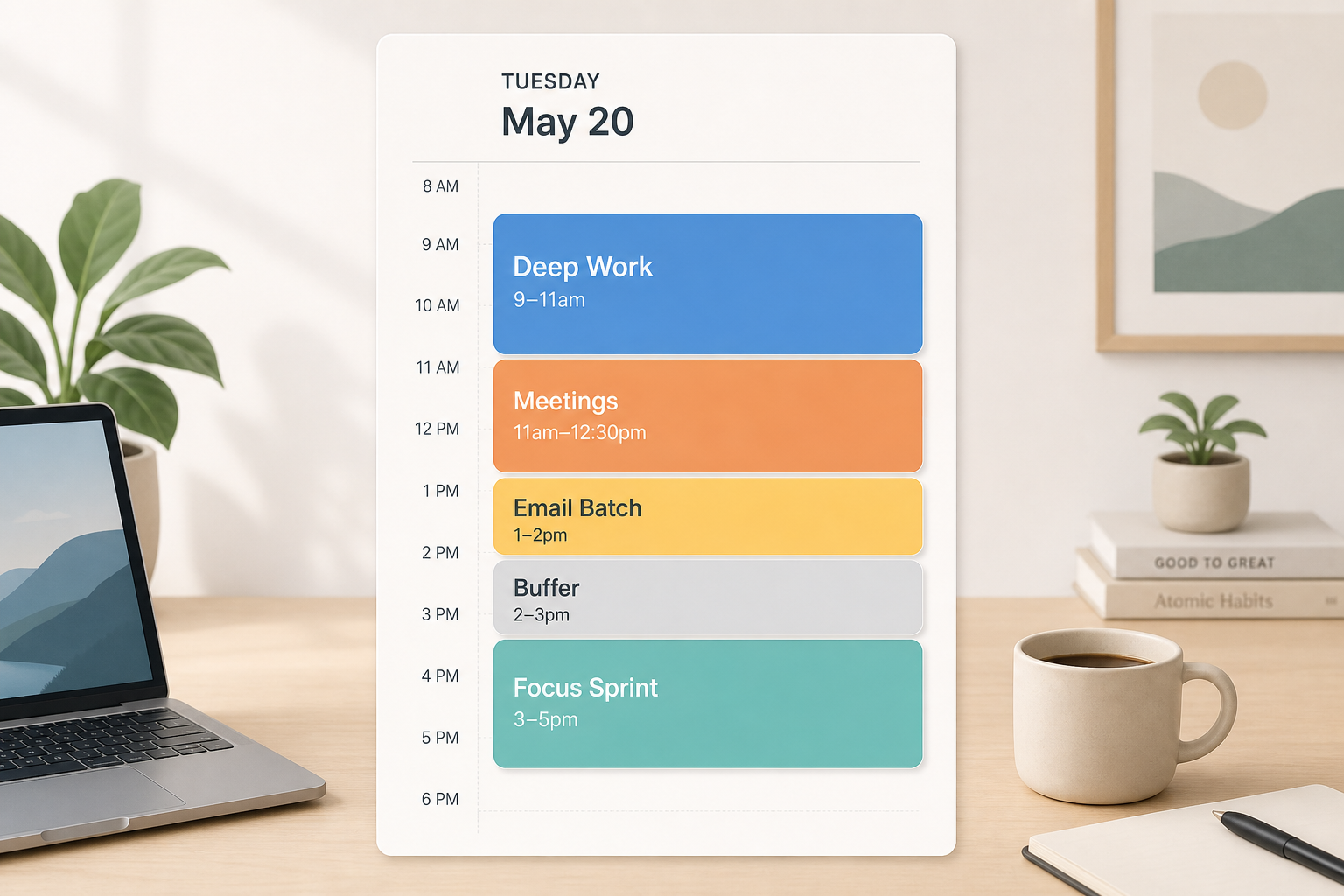
Assign specific tasks to named calendar slots before the day begins. Instead of a to-do list you work through in order, each task has a reserved window — "Draft project proposal, 9–10:30am" rather than "work on proposal (sometime today)."
- At the end of each day (or the start), review your task list and open your calendar.
- Assign each task a specific start time and end time based on realistic estimates — then add 25% to each estimate.
- Label each block with the actual task name, not a vague category like "Work."
- Treat the block as a commitment. When the block ends, you move on regardless of completion status.
Best for: Makers and knowledge workers with predictable, project-driven work.
Tool tip: In Google Calendar, create a separate calendar called "Time Blocks" and use a distinct color. This keeps blocks visually separate from meetings without cluttering your main calendar.
2. Task Batching
Group similar tasks together into a single dedicated window rather than handling them as they arrive. Checking email once in the morning and once after lunch is more efficient than responding to each message within minutes of receipt.
The American Psychological Association has noted that switching between task types can consume up to 40% of productive time. Batching eliminates those micro-switches by keeping your brain in the same mode for an extended period.
- Identify the recurring task types in your week — email, approvals, Slack messages, scheduling, expense reports.
- Create dedicated batch windows for each category (e.g., two 20-minute email windows per day).
- During batch windows, process only that task type. Outside those windows, close the app.
Best for: Anyone with high-volume communication or approval workflows — managers, team leads, remote workers.
Tool tip: In Todoist, use labels (e.g., @email, @approvals) to pre-tag tasks by batch category, then filter by label when a batch window opens.
3. Timeboxing
Timeboxing is often confused with time blocking, but the mechanism is different. Time blocking says "I'll work on the proposal from 10 to 12." Timeboxing says "I'm giving this exactly 90 minutes, then I move on — regardless of where it stands."
The distinction matters. Timeboxing directly targets the planning fallacy and perfectionism by imposing a hard stop. Parkinson's Law — work expands to fill available time — is counteracted by making the available time finite and non-negotiable.
- Define the task and set a fixed time limit before you start — not after you've been working for a while.
- Set a timer. When it goes off, stop and assess: is the task complete, or does it need another box?
- If incomplete, decide whether to schedule a second timebox or ship what you have. Do not silently extend the box.
Best for: Perfectionists, writers, researchers, and anyone who routinely underestimates task duration.
Tool tip: Todoist's scheduling view lets you assign a specific duration to a task. Pair this with a physical timer or a browser extension to enforce the hard stop.
4. Pomodoro Sprints Within Blocks
Rather than replacing time blocking, the Pomodoro Technique works inside it. You schedule a 90-minute deep work block, then structure that block as three 25-minute focused intervals separated by 5-minute breaks. The block provides the protected time; the Pomodoro intervals provide the internal rhythm.
A review of 32 studies on structured interval work found lower fatigue and better sustained motivation compared to uninterrupted work sessions of the same length. The short breaks restore attention without fully breaking the work context.
- Schedule a deep work block of 60–120 minutes on your calendar.
- Within that block, work in 25-minute intervals with a 5-minute break after each.
- After four intervals, take a longer break (15–30 minutes) before the next block.
- Use the break for physical movement, not screen-based tasks.
Best for: Students, writers, and anyone who struggles to maintain focus through long unbroken work sessions.
Tool tip: A simple kitchen timer works as well as any app. If you prefer digital, Toggl Track lets you log Pomodoro intervals and see how many you actually complete per day.
5. Day Theming
Assign each day of the week a single dominant category of work. Monday is for planning and strategy. Tuesday and Wednesday are for deep project work. Thursday is for meetings and collaboration. Friday is for review and administrative tasks. The specific themes vary by role, but the principle is the same: avoid cross-category context switching across a full day.
This approach is most effective for people managing multiple projects or roles simultaneously. Jack Dorsey famously used day theming to run two companies at once — each day had a single focus area that both organizations knew in advance.
- List the major categories of work in your role (e.g., strategy, execution, communication, admin, learning).
- Map each category to a day of the week based on meeting patterns and energy rhythms.
- Communicate your theme schedule to collaborators so they can route requests to the right day.
- Accept that theme days won't be pure — the goal is a dominant focus, not a sealed chamber.
Best for: Managers, founders, and anyone with multi-project or multi-team responsibilities.
Tool tip: In Notion, create a weekly planner database with a "Day Theme" property. Filter tasks by theme to surface what belongs on each day.
6. Energy-Matched Scheduling
Not all hours are equal. Cognitive performance varies by as much as 9 to 40% depending on time of day, according to research on ultradian rhythms and attention. Most people have a peak mental clarity window of 2 to 4 hours — typically in the mid-morning for early risers, or late morning for those who start slower. Placing your most demanding work in that window and administrative tasks outside it can yield 3 to 4 times the output per hour compared to fragmented, energy-mismatched scheduling.
- Track your energy on a 1–5 scale at two-hour intervals for one to two weeks. Note when you feel sharpest and when you feel slowest.
- Identify your peak window (typically 2–4 hours after waking for most people).
- Reserve that window exclusively for deep work blocks. Do not schedule meetings, email, or administrative tasks during it.
- Schedule shallow work, batch tasks, and meetings during your known low-energy periods.
Best for: Knowledge workers with flexible schedules — researchers, writers, developers, consultants.
Tool tip: Reclaim.ai can analyze your calendar patterns and automatically suggest optimal times for deep work based on your historical meeting load and task completion data.
7. Buffer Block Architecture
Buffer blocks deserve their own technique entry because most people treat them as optional and then wonder why their schedule collapses by Tuesday. Buffer block architecture means deliberately building 30-minute gaps into the schedule at least twice daily — typically mid-morning and after lunch — and treating them as protected time, not open invitations for additional tasks.
The function of buffer blocks is to absorb overruns, unexpected requests, transition time between tasks, and the inevitable surprise that arrives before 11am. A schedule without buffers has no slack — one disruption creates a cascade that invalidates the rest of the day.
- Place a 30-minute buffer block mid-morning (around 10:30am) and one after lunch (around 2pm).
- For high-meeting days, add a third buffer at the end of the afternoon.
- Do not fill buffer blocks with tasks in advance. They exist to absorb what the day brings.
- If a buffer block goes unused, treat it as a bonus — use it for a short walk or a brief review of the next block's task.
Best for: Everyone. Buffer blocks are not role-specific — they are structural.
8. Micro-Task Batching
Micro-task batching is a refinement of standard task batching designed for the specific overhead created by very short tasks — Slack replies, quick approvals, one-line email responses, form completions. These tasks each take 1 to 3 minutes, but handling them on arrival creates constant micro-interruptions that fragment attention across the day.
The approach: capture micro-tasks in a dedicated queue rather than acting on them immediately, then process the entire queue in 2 to 3 dedicated 30-minute blocks per day. This has become a standard practice for async and remote workers in 2026, where the volume of short-form communication has increased significantly.
- Create a "micro-task inbox" — a section in your task manager, a Notion database, or a simple notes page.
- When a micro-task arrives outside a batch window, log it in the inbox rather than handling it immediately.
- Schedule 2–3 dedicated 30-minute micro-task batch windows per day (e.g., 9:00am, 1:00pm, 4:30pm).
- During each window, work through the inbox sequentially. Close it when the window ends.
Best for: Remote workers, async-first teams, and anyone whose workday involves high volumes of short-form communication.
Tool tip: In Obsidian, a Daily Notes template with a dedicated "Micro-task inbox" section works well. In Notion, a filtered database view with a "Micro" tag surfaces these tasks during batch windows.
9. AI-Assisted Auto-Scheduling
For professionals spending 15 or more hours per week in meetings, manually blocking time becomes a daily renegotiation. AI scheduling tools like Reclaim.ai and Motion address this by reading your task list and calendar patterns, then automatically protecting blocks for deep work and high-priority tasks — rescheduling them when meetings get added rather than leaving them to be crushed.
In 2026, these tools have become reliable enough that many calendar-heavy professionals use them as their primary scheduling layer. The tradeoff is that setup requires connecting your task manager and calendar, and the tool's suggestions improve over time as it learns your patterns.
- Connect your task manager (Todoist, Asana, Linear) and calendar (Google Calendar, Outlook) to the AI scheduler.
- Set priorities and estimated durations on your tasks — the AI uses these signals to decide what to protect and when.
- Define your "no-meeting" windows and peak focus hours in the tool's settings.
- Review the auto-scheduled blocks each morning and override anything that doesn't fit your actual priorities for the day.
Best for: Managers and senior individual contributors with 15+ meeting hours per week and complex task dependencies.
Tool tip: Reclaim.ai's "Habits" feature can auto-protect recurring blocks (e.g., a daily focus hour) and defend them against meeting encroachment automatically.
10. Async-First Blocking
Async-first blocking treats communication itself as a scheduled activity rather than a continuous background layer. Instead of being available for messages, pings, and replies throughout the day, you designate 2 to 3 explicit communication windows — and treat everything outside those windows as protected time by default.
This has become an emerging norm for distributed teams where the expectation of real-time responsiveness creates a permanent low-grade interruption layer. By making communication windows explicit and visible to teammates, async-first blocking sets expectations without requiring individual negotiation for each focus session.
- Identify 2–3 daily windows for communication (e.g., 9:00–9:30am, 12:30–1:00pm, 4:00–4:30pm).
- Block these windows visibly on your calendar and communicate them to your team.
- Outside these windows, close Slack, pause email notifications, and treat interruptions as you would during a deep work block.
- Set an auto-responder or status message indicating when you'll next be in a communication window.
Best for: Remote workers, distributed teams, and anyone whose primary collaboration happens asynchronously.
Tool tip: In Slack, use the "Do Not Disturb" schedule feature to enforce communication windows automatically. Pair with a Google Calendar status block so teammates see your availability without needing to ask.
Which Technique Fits Your Role
Not every technique works equally well across every role. The table below maps the four most common knowledge-work profiles to the techniques most suited to each, along with a brief reason why.
| Role | Top Techniques | Why It Fits |
|---|---|---|
| Maker (writer, developer, designer, researcher) | Classic Time Blocking, Energy-Matched Scheduling, Pomodoro Sprints Within Blocks | Makers need extended, uninterrupted focus windows. Energy-matching maximizes output during peak hours; Pomodoro maintains momentum within those blocks. |
| Manager (team lead, director, project manager) | Day Theming, Task Batching, AI-Assisted Auto-Scheduling | Managers face fragmented calendars and high communication volume. Day theming reduces cross-category switching; AI scheduling defends focus time against meeting creep. |
| Reactive Worker (support, ops, account manager) | Buffer Block Architecture, Async-First Blocking, Micro-Task Batching | Reactive roles can't protect long focus blocks, but they can batch communication and build structural slack. Buffer blocks absorb the unpredictable without collapsing the day. |
| Student | Timeboxing, Pomodoro Sprints Within Blocks, Classic Time Blocking | Students benefit from hard task-end constraints to counter perfectionism and procrastination. Timeboxing and Pomodoro work well with the variable block lengths of an academic schedule. |
Tool Integration: Making Time Blocking Work With Your Stack
Time blocking doesn't require a specific app. The technique works with a paper planner, a digital calendar, a task manager, or an AI scheduler — the right choice depends on how your work is organized and how many meetings you navigate each week.
| Tool | Best for | Key time-blocking feature | Limitation |
|---|---|---|---|
| Google Calendar | Anyone with a Google Workspace account and calendar-centric workflow | Create a separate 'Time Blocks' calendar; use color-coding by block type; Focus Time feature (Workspace accounts) auto-declines meetings during protected blocks | No native task manager; requires a separate app for task capture |
| Notion | Knowledge workers who manage projects and tasks in Notion | Label-based task batching using database properties; calendar sync via third-party integrations; daily planner templates | No native calendar blocking; requires integration with Google Calendar for block visibility |
| Obsidian | PKM-focused users who plan in daily notes | Daily Notes templates with time-block sections; task plugins for batch queues; no calendar sync natively | No visual calendar view; works best as a planning layer rather than a scheduling layer |
| Todoist | Task-first planners who want to schedule tasks into calendar slots | Task scheduling with start times and durations; Google Calendar sync; label-based batching | Calendar blocking requires the Google Calendar integration to be active |
| Reclaim.ai | Professionals with 15+ meeting hours/week who need automated block protection | AI auto-schedules deep work and habits around meetings; defends blocks when calendar shifts; task sync from Todoist, Asana, Linear | Requires setup time and task manager integration; works best with well-labeled, prioritized task lists |
| Motion | Managers and teams who want AI-driven daily schedule optimization | Auto-builds a daily schedule from tasks and meetings; reschedules dynamically when priorities change | Less control over manual block placement; can feel opaque if you prefer to plan manually |
| Paper planner | Anyone who wants zero notifications and full flexibility | Complete freedom in block design; no app switching; forces deliberate manual planning | No reminders, no sync with digital calendar, no automatic rescheduling |
5 Common Time-Blocking Mistakes (And How to Fix Them)
Most people who abandon time blocking don't fail because the method is wrong — they fail because of one of five predictable structural errors. If you've tried time blocking before and it didn't stick, one of these is probably the reason.
- Overscheduling every minute. A fully packed schedule has no capacity to absorb the unexpected. The fix: apply the 50–70% rule — block only 50 to 70% of your available hours. The remaining time is your structural slack. A schedule that looks "underutilized" at 8am is a schedule that survives until 5pm.
- Vague block labels. A block labeled "Work" or "Project" doesn't tell you what to do when the block starts, which creates a decision-making moment exactly when you should be focused. The fix: label blocks with the specific task — "Draft Q2 intro section" not "Writing." If you can't name the task, the block isn't ready to be scheduled.
- Ignoring energy patterns. Scheduling a deep work block during your known afternoon slump, then wondering why you can't focus, is a structural mismatch. The fix: track your energy for one to two weeks, identify your peak window, and protect it for your most cognitively demanding work. Schedule meetings and administrative tasks during low-energy periods.
- Skipping buffer blocks. This is the most common cause of system collapse. One overrun pushes every subsequent block back, and by midday the schedule is fiction. The fix: build two to three 30-minute buffer blocks into every day and treat them as non-negotiable. They are not free time — they are the mechanism that keeps the rest of the schedule intact.
- Treating one bad day as proof the system failed. A disrupted day is not a failed system — it's a normal day. The fix: use a 5-minute replan protocol. When a significant disruption hits, pause and do three things: assess how much time remains in the day, identify the one to three highest-priority tasks that still need to happen, and create a simplified revised plan for the remaining hours. This takes five minutes and prevents the all-or-nothing spiral that kills most systems.
Frequently Asked Questions
How long should a time block be?
It depends on the block type. Deep work blocks are most effective at 60 to 120 minutes — long enough to reach sustained focus, short enough to remain realistic. Batch blocks work well at 20 to 45 minutes. Buffer blocks are typically 30 minutes. Micro-task batch windows run 25 to 30 minutes. Avoid scheduling deep work blocks longer than 2 hours without a break — the research on sustained attention suggests diminishing returns beyond that point.
What's the real difference between time blocking and timeboxing?
Time blocking assigns a window to work on something. Timeboxing assigns a fixed duration to complete something — and you stop when the time is up, regardless of where the task stands. Time blocking is about scheduling; timeboxing is about imposing a constraint. You can use both together: block 90 minutes for a task, then timebox each sub-task within that block.
How do I time-block when my job is mostly reactive?
Reactive roles can still use time blocking — the key is blocking the reactive work itself. Schedule explicit "response windows" for incoming requests, rather than treating your entire day as available. Even 30 minutes of protected deep work per day is more than zero. Buffer Block Architecture and Async-First Blocking (techniques 7 and 10) are specifically designed for high-interruption roles.
How do I adapt time blocking for ADHD?
Shorter blocks work better than long ones — 25 to 45 minutes rather than 90-minute deep work sessions. Pomodoro Sprints (technique 4) are particularly effective because the built-in breaks reduce the mental cost of staying on task. Visual calendars with strong color-coding help make the structure concrete. Avoid scheduling more than two deep work blocks per day; over-scheduling is a common ADHD trap. Build in more buffer blocks than you think you need.
What do I do if I miss a block?
You don't start over — you replan. Use the 5-minute replan protocol described in the mistakes section: assess remaining time, identify your top priorities, create a simplified plan for the rest of the day. Missing a block is not a system failure; it's information about whether your estimates are realistic or your schedule has too little slack.
How do I start if I've tried and abandoned time blocking before?
Start with one block, not a full schedule. Choose the single most important task for tomorrow, assign it a specific 60-minute slot on your calendar, and treat that slot as a meeting with yourself. Don't redesign your entire day. Once that habit is stable — usually after a week or two — add a second block. Complexity added before the habit is formed is the most common reason previous attempts didn't stick.
Do I need a specific app to make time blocking work?
No. A paper planner works. A blank Google Calendar works. The technique is independent of the tool. That said, if you have a high meeting load (15+ hours per week), an AI scheduling tool like Reclaim.ai or Motion will save you significant manual rescheduling effort. For most people starting out, the simplest available tool is the right tool.
How many techniques should I use at once?
Two to three, at most, when you're starting out. Classic Time Blocking plus Buffer Block Architecture covers the majority of use cases. Add a third technique — Task Batching, Pomodoro Sprints, or Async-First Blocking — once the first two are stable. Trying to implement all 10 simultaneously is a reliable way to abandon all of them.
Start With One Block Tomorrow
The research is clear on one thing: the gap between intending to do something and actually doing it closes significantly when you assign it a specific time. That's the entire mechanism behind time blocking — not discipline, not motivation, just a structural decision made in advance.
You don't need to rebuild your calendar tonight. Pick one technique from this list that fits your role and your current pain point. Schedule one block for tomorrow. Name it specifically. Protect it. See what happens.
Comments
Join the discussion with an anonymous comment.