
Why Your Notes Are a Graveyard
Picture this: you're working on an article about decision fatigue and you remember reading something relevant months ago — a sharp observation about cognitive load from a book you annotated carefully. You open your notes app. There are 340 saved items. You search. You scroll. You find a clipping with no context, no connection to anything else, and no explanation of why you saved it. The idea is there, technically, but it's useless. You write the article without it.
This is the collector's trap: the habit of saving information as a substitute for thinking about it. Most note-taking systems reward capture. They make it frictionless to clip, highlight, and file. What they don't do is force you to process what you've saved, connect it to what you already know, or articulate why it matters. The result is a graveyard of ideas — technically preserved, practically dead.
The Zettelkasten method is a direct answer to this failure mode. It doesn't make saving easier — it makes thinking mandatory. And that's precisely what makes it different from every other note-taking approach.
What Is the Zettelkasten Method?
A Zettelkasten is a personal tool for thinking and writing — not a filing system, not a searchable archive, and not a second brain in the storage sense of that phrase. The German word means "slip box," a reference to the physical card index used by sociologist Niklas Luhmann across a 40-year academic career. By the time he died in 1998, Luhmann had produced 70 books, over 400 scholarly articles, and approximately 90,000 handwritten index cards — each linked to others through a numbering system that functioned as a paper-based hypertext. He credited the system itself as a thinking partner, not merely a storage device.
The physical numbering system is historical context, not a prescription. What matters is the principle it embodied: instead of organizing notes into categories, Luhmann built a web of thoughts. Each card was connected to others through explicit links, and those connections were where the thinking happened. The Zettelkasten didn't store his ideas — it generated new ones by forcing him to articulate how each idea related to everything else he'd written.
The difference to other systems is that you create a web of thoughts instead of notes of arbitrary size and form, and emphasize connection, not collection.
Three Non-Negotiable Principles
Three principles separate a genuine Zettelkasten from a well-organized notes folder. Ignore any one of them and you're back to a sophisticated version of the collector's trap.
- Atomicity. Each note captures exactly one idea — not one topic, not one chapter summary, not one article's worth of highlights. One idea. And it must be written in your own words. This isn't a stylistic preference; it has a cognitive basis. Reformulating an idea forces elaborative processing — you have to understand it well enough to explain it, which encodes it more deeply than passive re-reading (a principle supported by Craik and Lockhart's 1972 research on levels of processing). The extra effort of putting something in your own words is a desirable difficulty that pays dividends later.
- Explicit-context linking. When you link one note to another, you must write a sentence explaining why the link exists. Not just a pointer — a reason. "See also: Note 42" is navigational noise. "This connects to Note 42 because both describe how attention narrows under time pressure, which challenges the assumption in Note 17 that expertise eliminates cognitive load" is knowledge creation. The explanation is where the thinking lives. Without it, a link is just a shortcut that leads nowhere meaningful.
- Personal thinking tool design. A Zettelkasten is built for one person's thinking, not for sharing, not for a team wiki, and not for a searchable reference database. This matters because it changes how you write. Notes don't need to be polished or comprehensive — they need to be useful to your future self, written with enough context that you'll understand them six months from now without re-reading the source.
The Four Note Types: From Capture to Insight
The Zettelkasten method uses four note types, each serving a distinct stage in the processing pipeline. The easiest way to understand them is to follow a single reading through all four stages.
Imagine a UX researcher named Priya reading a paper on cognitive load theory during her lunch break. She's working on a project about onboarding flow complexity and this paper feels relevant.
- Fleeting note. Priya jots a quick note in her phone: "Cognitive load — intrinsic vs. extraneous load distinction. Extraneous load = bad design, not hard content. Relevant to onboarding." This is a fleeting note — a raw capture, not meant to last. It's a reminder to process the idea properly later, nothing more. Fleeting notes are disposable. Their only job is to prevent ideas from evaporating before you have time to think about them.
- Literature note. That evening, Priya opens the paper and writes a literature note: "Sweller (1988) distinguishes intrinsic cognitive load (inherent complexity of the material) from extraneous load (complexity added by poor instructional design). Key claim: extraneous load can be reduced by design choices without changing the underlying content's difficulty. Source: Sweller, J. (1988). Cognitive load during problem solving." She writes it in her own words, includes the source reference, and notes her reaction: "This reframes our onboarding problem — the issue might not be that the product is complex, but that we're presenting complexity badly." A literature note is your personal response to a source, not a summary of it.
- Permanent note. The next morning, Priya extracts one atomic idea from her literature note and writes a permanent note: "Extraneous cognitive load is a design problem, not a content problem. When users struggle with onboarding, the instinct is to simplify the product — but the real lever is often the presentation layer. Reducing unnecessary steps, visual noise, and decision points can lower extraneous load without changing what the product does. Link to [Note on progressive disclosure]: both describe strategies for managing cognitive load at the interface level, not the feature level." This note is self-contained, written in her own words, and linked to at least one other note with an explicit reason. It could be understood without the source. This is the core unit of the Zettelkasten.
- Structure note. Six months later, Priya notices she has fourteen permanent notes touching on cognitive load, progressive disclosure, information hierarchy, and mental models. She creates a structure note: a map of that cluster, with links to each note and a brief description of how they relate. The structure note isn't planned in advance — it emerges when the cluster becomes dense enough to need an overview. It can eventually become the skeleton of an article, a research proposal, or a presentation.

The Daily and Weekly Workflow
The Zettelkasten method lives or dies on habit, not on setup. The four-stage processing cycle — capture, elaborate, link, review — needs to become a routine, not a project.
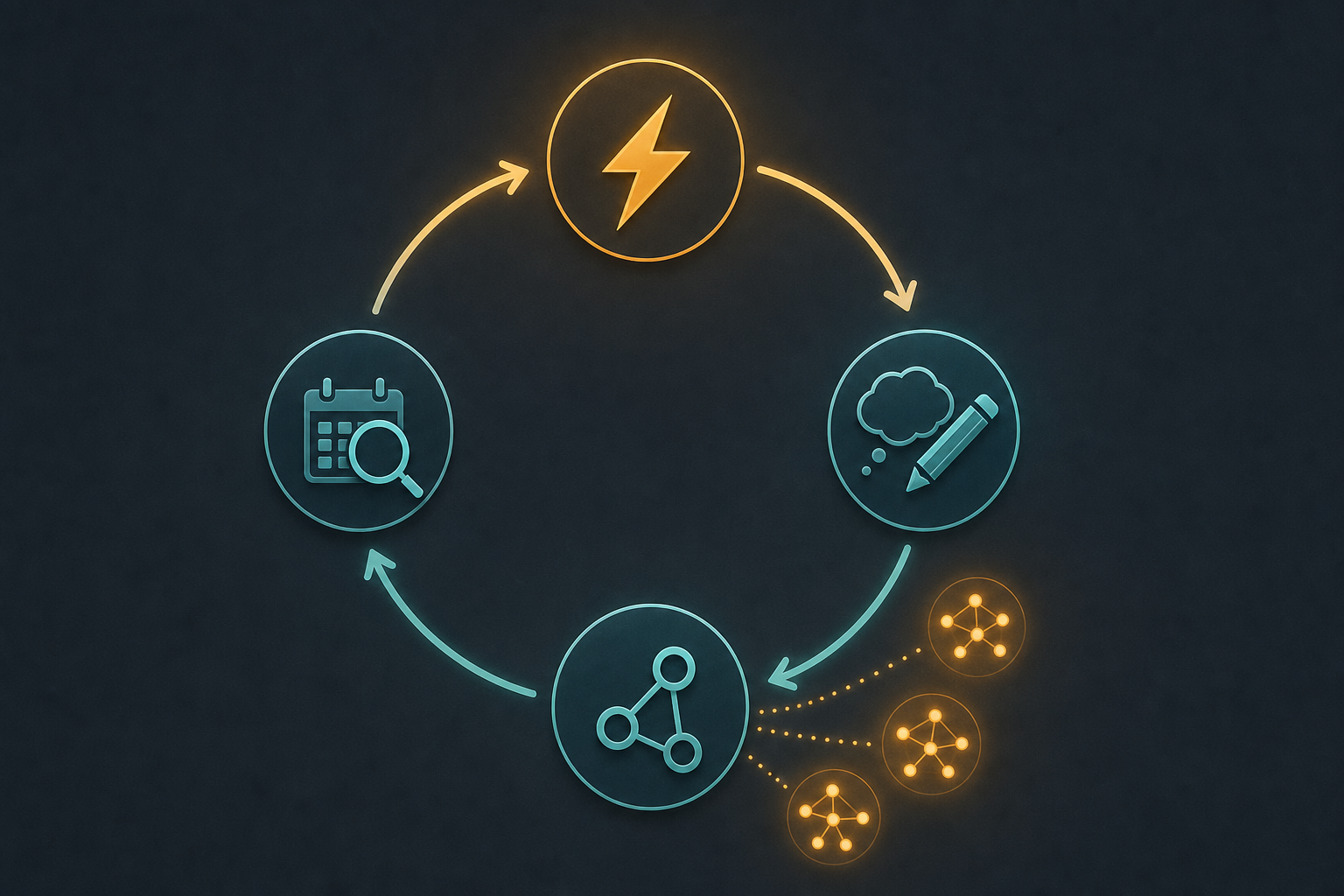
- Capture (throughout the day). Collect fleeting notes wherever ideas surface — a phone note, a voice memo, a margin annotation. Keep the friction low. These are temporary and will be processed later.
- Elaborate (daily, 15–20 minutes). Convert fleeting notes into literature notes and literature notes into permanent notes. Write in your own words. Aim for completeness in each note, not volume. Three well-linked permanent notes in a session is a success. Thirty poorly written, unlinked notes is a setback.
- Link (during elaboration). Every permanent note should connect to at least one existing note. Search your existing notes before writing a new one — this is where you discover what you already know. Write the reason for each link explicitly. If you can't explain why two notes connect, the connection isn't ready yet.
- Review (weekly, 20–30 minutes). Browse recent permanent notes. Look for clusters forming around recurring themes. When a cluster feels dense enough, create or update a structure note to map it. The review habit is what separates a living knowledge network from a write-once archive.
Five Beginner Mistakes (and How to Fix Each One)
- The collector's trap. Saving articles, highlights, and clippings without ever processing them into permanent notes. The fix: before creating a permanent note, ask yourself one question — "What would I use this for?" If you can't answer it, don't write the note yet. Return to it when you can.
- Over-atomizing. Splitting ideas so finely that each note loses the context needed to make it meaningful. "Cognitive load exists" is not a useful atomic note. "Extraneous cognitive load is reducible through design without changing content difficulty" is. The fix: one complete idea, not one isolated sentence.
- Tool obsession. Spending hours configuring plugins, designing templates, and perfecting folder structures before writing a single permanent note. The fix: if you've spent more than two hours on setup before writing your first note, you're procrastinating. The system only works when you use it. Start with one note.
- Never reviewing. Writing notes and never returning to them, which recreates the graveyard problem inside a more sophisticated container. The fix: block 20–30 minutes weekly for review. Make it non-negotiable. The review session is when the system starts generating value — you see patterns, notice gaps, and create structure notes that become the seeds of real output.
- Category creep. Adding folders, tags, and hierarchies that recreate the filing cabinet you were trying to escape. The fix: let structure emerge from connections, not from upfront planning. If you find yourself creating a folder before you have any notes to put in it, stop. Folders are for files. The Zettelkasten is for ideas.
Which Digital Tool Should You Use?
The honest answer: it matters less than you think. Any tool that supports linking between individual notes can host a Zettelkasten. That said, four tools come up consistently for good reasons.
| Tool | Key Strengths | Trade-offs | Best For |
|---|---|---|---|
| Obsidian | Free, local files, strong bidirectional linking, large plugin ecosystem, graph view | Steeper initial learning curve; plugins require some configuration | Knowledge workers who want full data ownership and long-term flexibility |
| Logseq | Free, open source, outline-based interface, built-in spaced repetition | Outline structure can conflict with atomic note philosophy for some users | Writers and researchers comfortable with block-based thinking |
| The Archive | Plain-text, software-agnostic, minimal and fast | Paid (one-time), fewer features by design, macOS only | Purists who want a tool that won't change their files |
| Notion | Accessible, low barrier to entry, good for beginners | Weaker native note-to-note linking; database structure can encourage category creep | Beginners who already use Notion and want to experiment before committing to a dedicated tool |
The critical point: starting with an imperfect tool today beats waiting for the perfect setup indefinitely. If you already use one of these tools, start there. You can always migrate notes later — migrating a habit is harder.
Zettelkasten, PARA, and GTD: Three Layers, Not Three Competitors
One of the most common misconceptions about the Zettelkasten is that adopting it means abandoning other productivity systems. It doesn't. The three most popular PKM frameworks solve different problems and operate at different layers of your workflow.
| System | Primary Layer | What It Solves | What It Doesn't Solve |
|---|---|---|---|
| Zettelkasten | Thinking and writing | Turning ideas into a compounding knowledge network | Task management, file organization, project execution |
| PARA | Organization and execution | Structuring files, projects, and reference material by actionability | Generating insights or connecting ideas across domains |
| GTD | Action and task management | Capturing and processing tasks, commitments, and next actions | Knowledge development, idea connection, or long-form writing |
In practice, the three systems layer cleanly. GTD handles your task inbox and next-action lists. PARA organizes your files, project folders, and reference material — for a full breakdown of how PARA works, see How to Use the PARA Method to Organize Your Digital Life. The Zettelkasten handles the thinking layer — the ideas, insights, and evolving understanding that feeds your actual writing and creative output.
If you've encountered the Second Brain framework from Tiago Forte, the relationship is similar: the Second Brain method's CODE and PARA structure handles capture, organization, and distillation across all your digital information, while the Zettelkasten handles the deeper elaboration and connection of ideas you want to develop over time. They're compatible, not competing.
Who Should Use Zettelkasten — and Who Should Skip It
- Try it if: you read or learn regularly and feel those ideas aren't accumulating into anything useful. You write — articles, reports, research, or long-form anything — and want your notes to feed that writing rather than sitting unused. You're a knowledge worker, researcher, writer, or student whose work involves developing ideas over time, not just managing tasks.
- Try it if: you've tried conventional note-taking and found that your notes are either too granular to be useful (bullet-point summaries you never return to) or too dense to be searchable (long documents you can't navigate). The Zettelkasten's atomic structure solves both problems.
- Skip it if: your primary problem is task management. The Zettelkasten is not a to-do list, a project tracker, or a calendar system. If you're drowning in commitments rather than ideas, start with Getting Things Done instead.
- Skip it if: your primary problem is file organization — a chaotic desktop, an unmanageable Downloads folder, or project files spread across five apps. That's a PARA problem, not a Zettelkasten problem.
- Skip it if: you don't have a regular reading or learning habit. The Zettelkasten is a processing system, not a motivation system. It requires a consistent input stream of ideas to process. Without that, you'll build an elaborate structure with nothing to put in it.
How to Start in Two Weeks: A Low-Commitment Experiment
You don't need to commit to a full system overhaul to find out whether the Zettelkasten method fits your workflow. Run a two-week minimum viable experiment instead.
- Pick one source you've read recently. A book chapter, a long article, a research paper — something you found genuinely interesting and thought had ideas worth keeping.
- Process it through all four note types. Write fleeting notes as you re-read or recall it. Convert those into literature notes in your own words with source references. Extract three atomic ideas and write three permanent notes, each self-contained and each linked to at least one other note you already have (or to each other).
- Do this for two weeks. Three permanent notes per week, each linked. That's six notes total. At the end of two weeks, review them. Ask: did the linking process surface any connections you hadn't noticed? Did writing in your own words change how you understood the ideas? Did reviewing the notes feel different from re-reading highlights?
- Evaluate honestly. If the process felt like it was generating something — new connections, new questions, clearer thinking — continue. If it felt like bureaucratic overhead with no payoff, it may not be the right system for your current workflow. That's a valid outcome.
The Zettelkasten doesn't promise to make note-taking effortless. It promises something more valuable: that the effort you put in compounds. Each note you write and link makes the next one easier to connect, the next insight easier to find, and the next piece of writing easier to draft. That's the difference between a graveyard and a knowledge network.
Comments
Join the discussion with an anonymous comment.