
What Is GTD and Why It Still Matters
David Allen published Getting Things Done in 2001. A revised edition followed in 2015, updating the methodology for a world of smartphones and always-on communication. More than two decades later, the system remains the most widely practiced individual productivity framework among knowledge workers — not because it is trendy, but because it is grounded in how the human mind actually handles unfinished work.
The core promise of GTD is straightforward: move every open commitment, task, and idea out of your head and into a trusted external system. Once your mind is no longer responsible for holding and tracking those items, it is free to focus on the work in front of you. Allen describes this state as a mind like water — a mind that responds to each input in proportion, without the background hum of competing reminders.
That promise has held up because the problem it solves has not changed. Knowledge workers in 2026 carry more open loops than ever — across email, Slack, project tools, personal commitments, and ambient obligations. GTD does not eliminate that load. It gives you a reliable method for externalizing it so your attention can be fully present on what you are actually doing.
There is an inverse relationship between things on your mind and those things getting done. — David Allen
The Cognitive Science Behind GTD: Open Loops and the Zeigarnik Effect
GTD's effectiveness is not a matter of opinion or habit-hack folklore. It has a specific psychological mechanism behind it, identified nearly a century before Allen wrote his book.
In 1927, Soviet psychologist Bluma Zeigarnik demonstrated that people remember interrupted or incomplete tasks far more vividly than completed ones. The brain treats unfinished work as a high-priority item and keeps it active in working memory — surfacing it at inconvenient moments, consuming attention even when you are not consciously thinking about it. This is the Zeigarnik effect, and it explains why a forgotten errand intrudes on a conversation, or why you wake at 3 a.m. remembering an email you did not send.
Every unresolved commitment in your life — a bill to pay, a project to start, a conversation to have — is an open loop. Your mind holds it open until it is either completed or formally parked somewhere it trusts. The critical word is trusts. Writing something on a sticky note does not close the loop if your mind suspects the sticky note will be lost. Writing it into a system you review reliably does close it.
This is the domain of cognitive offloading — the well-documented phenomenon in which externalizing information to a reliable medium frees up mental resources for other work. A 2008 paper in Long Range Planning by Heylighen and Vidal at the Free University of Brussels found that recent insights in psychology and cognitive science directly support GTD's recommendations. GTD can be understood as a systematic application of distributed cognition — the idea that the mind extends into the tools and records we use.
Allen's martial-arts metaphor captures the end state: water responds to a small object with a small splash, to a large object with a large splash, then returns immediately to stillness. A mind freed from holding competing items can respond to each input appropriately — without residual anxiety from everything else on the list.
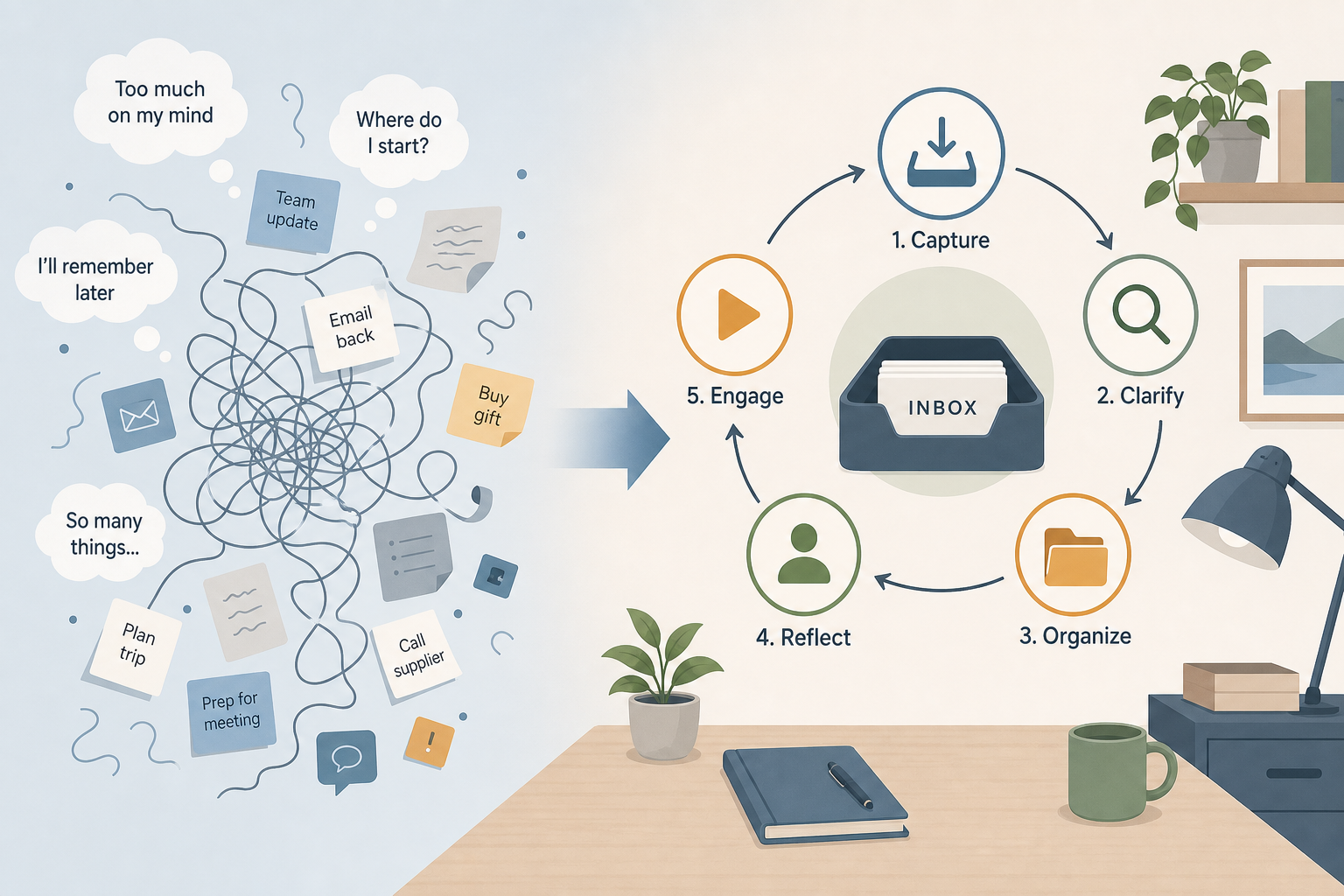
The Five-Step GTD Workflow in Depth
GTD is organized around five steps, each targeting a distinct cognitive bottleneck. Understanding what each step is solving — not just what it does — is what separates practitioners who make the system stick from those who abandon it after two weeks.
Step 1: Capture — Fighting Forgetting
Capture means collecting everything that has your attention — tasks, ideas, commitments, things that bother you, things you want to do someday — into a collection tool you trust. The tool can be a physical inbox tray, a notes app, a voice recorder, or any combination, as long as you process it regularly.
The capture step has one rule: get it out of your head and into the system immediately. Do not try to decide what to do with it at the moment of capture. That is the next step's job. The goal here is simply to stop relying on memory to hold things.
Step 2: Clarify — Fighting Ambiguity
Clarify is where you process each item in your inbox and make a specific decision about what it means and what, if anything, you will do about it. This is the most cognitively demanding step, and skipping it is the most common way GTD systems collapse into cluttered inboxes.
The clarify step follows a strict decision tree. For every item, the first question is: Is it actionable?
- If no: it is either trash (delete it), something to incubate in a Someday/Maybe list, or reference material to file.
- If yes: define the very next physical action required. Then decide: does it take less than two minutes? Do it now. Can someone else do it? Delegate it and note it on your Waiting For list. Otherwise, defer it to your task system.
- If achieving the outcome requires more than one action: it is a project. Add it to your project list and identify the single next action that moves it forward.
The two-minute rule is one of GTD's most practical heuristics. If an action takes less than two minutes to complete, doing it immediately costs less time and attention than deferring and re-processing it later.
Step 3: Organize — Fighting Retrieval Cost
Organize means parking clarified items in the right places so you can find and act on them without friction. GTD uses several distinct lists for this purpose, and keeping them separate is essential.
- Next Actions list: Single, concrete physical actions organized by context (the tool, location, or person required to do them — @computer, @phone, @errands, @person-name). Context lists let you batch actions by situation rather than scanning everything every time.
- Projects list: Every outcome requiring more than one action step. Not a task list — a project list. Each project must have at least one identified next action on your Next Actions list at all times.
- Calendar: Sacred territory. Only items that must happen on a specific date or time belong here. Do not use the calendar as a general reminder system — it dilutes its signal value.
- Waiting For list: Everything you are waiting on from someone else. Reviewed weekly so nothing falls through the cracks.
- Someday/Maybe list: Ideas and projects you are not committing to now but do not want to lose. Reviewed periodically — not ignored.
- Reference system: A searchable home for material that is not actionable but may be useful later. This is explicitly not part of GTD's action system — it is a filing system.
Step 4: Reflect — Fighting Trust Decay
Reflect means reviewing your system regularly to keep it current and trustworthy. The daily review is a quick scan of your calendar and next actions. The weekly review is a thorough pass through every list — and it is the single most important habit in GTD. Without it, the system drifts, your mind stops trusting it, and the open loops migrate back into your head.
The weekly review is treated in full in its own section below, because it deserves more than a bullet point.
Step 5: Engage — Fighting Overwhelm
Engage means choosing what to do right now from your trusted system and doing it with full attention. GTD proposes four criteria for selecting the next action in any given moment:
- Context: what can you actually do given where you are and what tools you have?
- Time available: how long do you have before the next commitment?
- Energy: what does your current mental and physical state allow?
- Priority: given the above, what produces the most value right now?
The engage step is where the system pays off. Because you have already captured, clarified, and organized everything, you are not making a decision from memory under pressure. You are choosing from a curated, current list — which is a fundamentally different and less stressful cognitive task.
The GTD Clarify Flowchart: How to Process Every Item
The clarify step is where most GTD beginners stall. The decision tree looks simple in the abstract but requires deliberate practice before it becomes automatic. Walking through it with real examples makes the logic concrete.
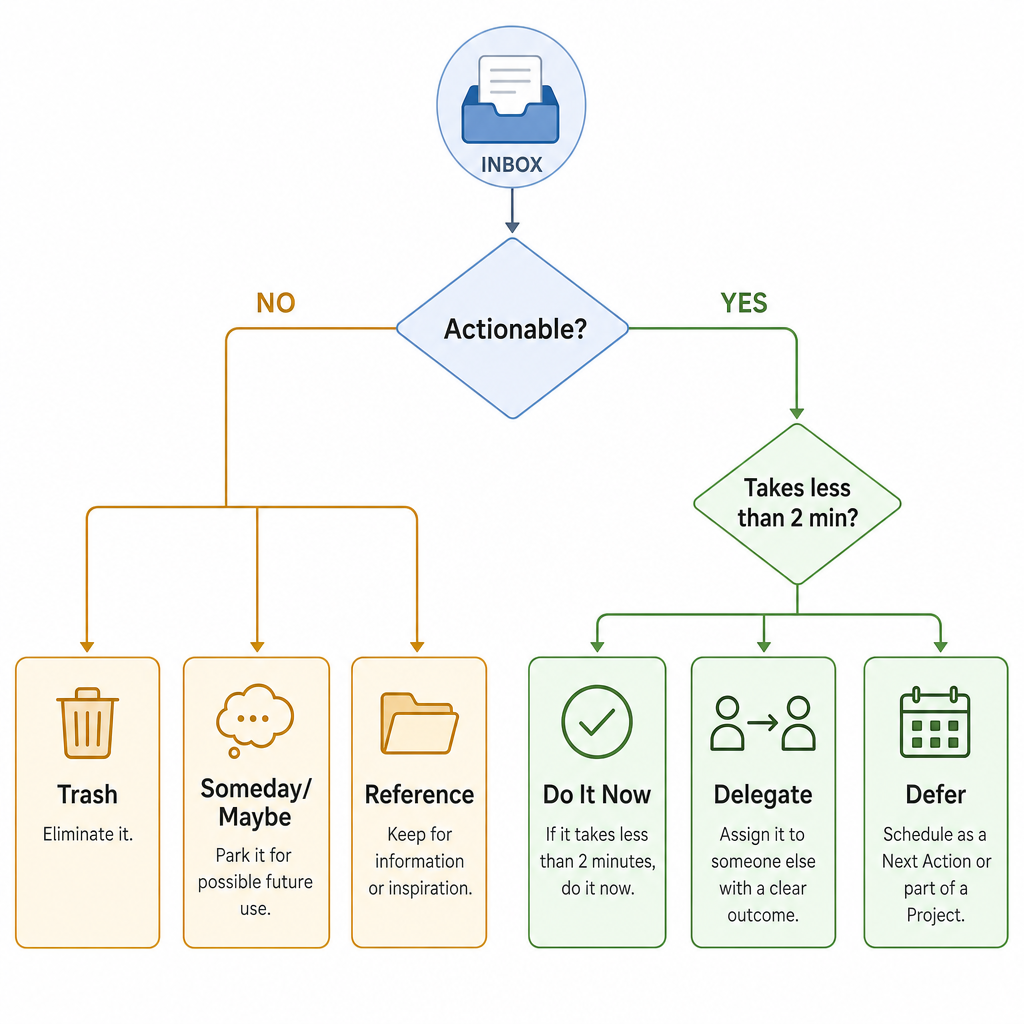
Take a concrete example: your inbox contains the item "New laptop." Walk through the tree:
- Is it actionable? Yes — you intend to buy one.
- Does it require more than one action? Yes — research models, check budget, compare prices, order. It is a project.
- Add "New laptop" to your Projects list. Identify the next action: "Research MacBook Pro vs. Dell XPS — 20 minutes, @computer." Add that to your Next Actions list.
Now a different item: "Read the article Sarah sent." Is it actionable? Only if you decide to read it. If yes and it takes under two minutes, read it now. If it takes longer, defer it to a @reading context list. If you decide you will never read it, trash it. If it might be useful someday, file it in reference.
A project, in GTD's definition, is any outcome requiring more than one action step. That includes things that feel small. "Schedule dentist appointment" is a project if it involves finding the number, calling, and confirming. Identifying the actual next physical action — "Find dentist phone number" — is what makes it executable.
The 6 Horizons of Focus: Connecting Daily Tasks to Life Purpose
GTD is often described as a task-management system, which undersells it. The methodology includes a framework for connecting ground-level actions to long-term purpose — the 6 Horizons of Focus.
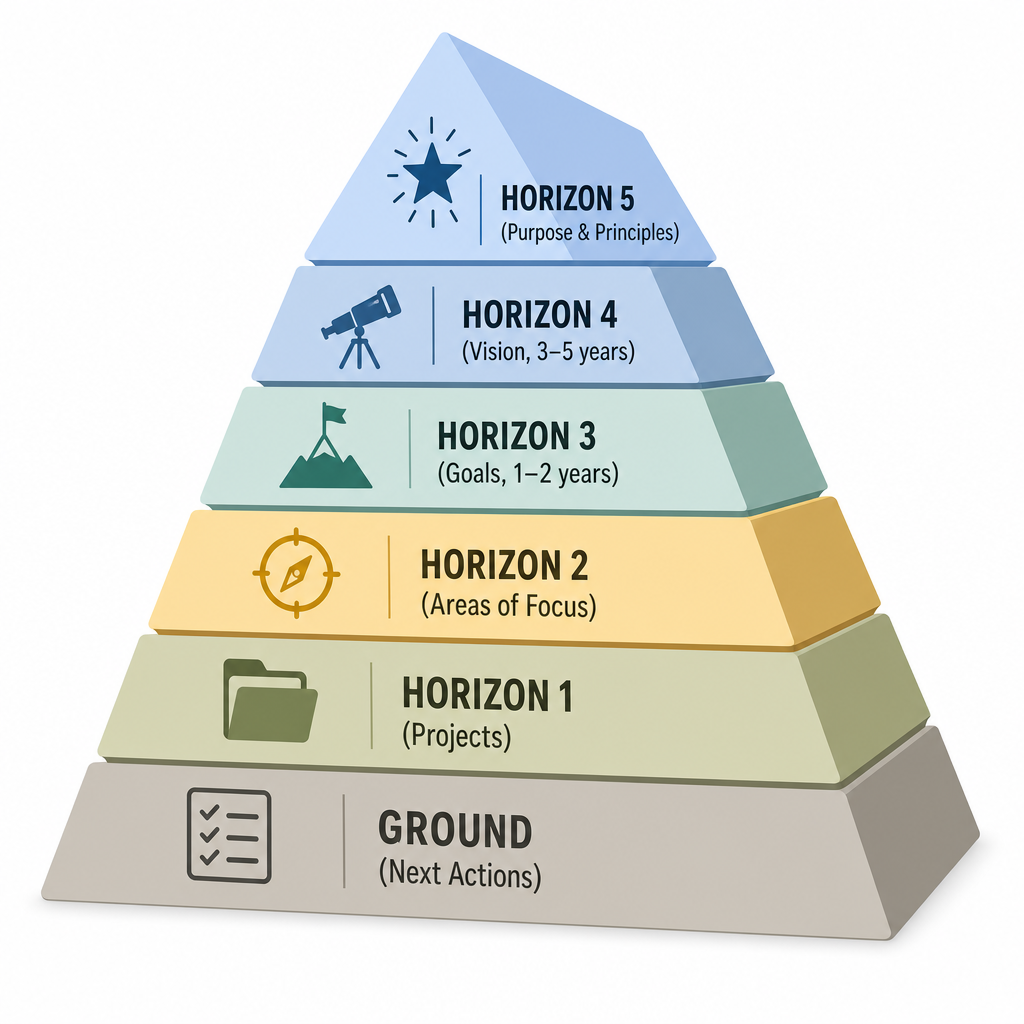
- Ground — Next Actions: The physical actions you could do right now. The operational layer.
- Horizon 1 — Current Projects: All outcomes you are committed to completing in the near term, each requiring multiple actions.
- Horizon 2 — Areas of Focus: The ongoing responsibilities and roles you maintain — health, finances, career, relationships. These generate projects but are not projects themselves.
- Horizon 3 — Goals (1–2 years): Specific outcomes you want to achieve in the next one to two years.
- Horizon 4 — Vision (3–5 years): Longer-term direction — where you want your career, life, and work to be heading.
- Horizon 5 — Purpose and Principles: The why behind everything — your core values and life mission.
Unlike top-down goal frameworks that ask you to start with life purpose and cascade down to daily tasks, GTD works bottom-up. Allen's reasoning is practical: if your ground-level actions are not under control, you cannot think clearly about higher altitudes. Trying to define your five-year vision while your inbox is overflowing is a recipe for vague aspirations that never translate into action.
The horizons serve as a periodic sanity check. During the weekly review, a quick scan upward — are my current projects actually serving my goals and areas of focus? — catches the trap of being efficiently busy on the wrong things. You can be executing GTD flawlessly at the ground level and still be working on projects that do not serve anything you actually care about.
The Weekly Review: The Load-Bearing Habit of GTD
David Allen calls the weekly review the critical success factor of GTD — and the evidence from practitioners supports that characterization. The weekly review is not a nice-to-have ritual. It is the mechanism by which your mind learns to trust the system. Without it, the Zeigarnik effect reasserts itself: your brain stops believing the system is current and starts holding open loops internally again.
The trust-decay timeline is predictable. Skip the weekly review for two weeks and the system starts drifting — projects accumulate without next actions, the inbox fills, the calendar loses its signal value. Skip for four weeks and the system is effectively dead weight: you are maintaining lists you do not trust and ignoring the review because it feels overwhelming to catch up. Starting over is often easier than rehabilitating a neglected system.
The Complete Weekly Review Checklist
| Stage | Action | Purpose |
|---|---|---|
| Get Clear | Process all inboxes to zero — email, physical tray, notes app, voicemail | Close the capture loop; nothing new enters the system unprocessed |
| Get Clear | Review the past week's calendar entries | Catch any follow-ups, commitments, or reference material from past meetings |
| Get Clear | Review the upcoming two weeks on the calendar | Identify preparation needed; move anything off the calendar that no longer applies |
| Get Current | Review every project on your Projects list | Confirm each project has at least one next action; add any that are missing |
| Get Current | Review your Next Actions lists by context | Remove completed items; add any new actions surfaced during project review |
| Get Current | Review the Waiting For list | Follow up on anything overdue; remove anything resolved |
| Get Creative | Review the Someday/Maybe list | Promote anything now relevant; delete anything that has lost its energy |
| Get Creative | Scan higher horizons briefly | Check that current projects align with goals and areas of focus |
A thorough weekly review takes 45 to 90 minutes for an established system. Beginners should budget 25 to 30 minutes for the first several sessions — the review gets faster as the system matures and fewer items require significant processing.
Choosing Your GTD Tool Stack: Principles Before Apps
GTD was designed to be tool-agnostic. Allen originally described the system using paper folders and index cards. The methodology works with any tools that meet a specific set of functional requirements. Understanding those requirements first prevents the common mistake of choosing an app and then trying to retrofit GTD into it.
What Any GTD Tool Stack Must Provide
- A reliable inbox: A single, trusted capture point you process regularly. It does not matter whether it is a notes app, a voice recorder, or a physical tray — it matters that you trust it and empty it.
- Project and context lists: The ability to maintain a Projects list and organize next actions by context (tag, label, or folder). These must be separate — a single undifferentiated to-do list is not a GTD system.
- A separate calendar: Dedicated to date- and time-specific commitments only. Do not mix task management and calendar in the same tool unless the tool explicitly keeps them visually and functionally distinct.
- A recurring review reminder: A scheduled, non-skippable prompt for the weekly review. This can be a calendar block, a recurring task, or an alarm — whatever you will actually act on.
- Cross-device sync: Your capture tool must be available wherever you are. An idea captured on your phone must appear in your desktop system without manual transfer.
The Three-Tool Rule
Collapse your tool stack to three components: one capture surface, one task manager, and one calendar. Adding tools beyond these three typically adds friction rather than capability. Six apps is not GTD — it is app collecting.
| Tool | GTD Role | Best For |
|---|---|---|
| Things 3 | Task manager with Areas, Projects, and context tags; orthodox GTD implementation | Mac/iOS users who want a polished, opinionated GTD setup |
| OmniFocus | Task manager with deep context, perspective, and forecast features | Power users who need granular control over complex project portfolios |
| Todoist | Cross-platform task manager with labels for context, project hierarchy, and filters | Users who need GTD across Mac, Windows, Android, and iOS |
| Notion | Flexible workspace; requires deliberate GTD structure to be built manually | PKM-native users who want GTD integrated with their notes and reference system |
| Obsidian | Local-first PKM; GTD requires plugin setup (Tasks, Dataview) and manual discipline | Users who prioritize local data ownership and want GTD alongside a Zettelkasten |
Where AI Fits in a GTD System in 2026
AI-assisted capture has become genuinely useful at steps 1 and 3. Voice-to-text capture with near-instant transcription lowers the friction of getting items into the inbox. AI routing — automatically tagging an item as a project vs. a reference item vs. a next action — can reduce the time spent in the organize step for high-volume inboxes.
However, human judgment remains irreplaceable at clarify, reflect, and engage. The clarify step requires understanding context, intent, and priority that AI cannot reliably infer. The weekly review requires honest self-assessment of what is actually moving forward. The engage step requires situational awareness — your energy, your context, your real priorities — that no algorithm can substitute for.
Five Common GTD Failure Modes (and How to Fix Them)
Most GTD beginners who abandon the system in the first month do so for predictable reasons. Understanding these failure modes before you start is the most effective way to avoid them.
Failure Mode 1: Capturing Too Little
Many beginners use GTD only for work tasks and continue holding personal commitments in their head. The problem: personal items produce the same cognitive load as professional ones. "Call mom back" consumes working memory just as reliably as "submit expense report." A partial capture system provides partial relief at best.
The fix: do a complete mind sweep at the start. Write down everything — professional, personal, household, social, financial, health. Get it all into the inbox before you start processing. The initial capture session often takes two to three hours and is one of the most immediately relieving experiences in GTD.
Failure Mode 2: Over-Organizing on Day One
A common beginner pattern: spend the weekend building an elaborate system — 30 context tags, nested project folders, color-coded categories — without capturing a single real task. The system looks impressive and contains nothing useful.
The fix: start with the minimum viable structure. Three to five contexts (@computer, @phone, @errands, @waiting, @home) are sufficient for most people. Add contexts only when you discover you actually need them. Complexity added before the system contains real data is premature optimization.
Failure Mode 3: Skipping the Weekly Review
This is the single most common GTD failure point. The weekly review is time-consuming, requires honest self-assessment, and is easy to skip when the week is busy. But skipping it is precisely what makes the system untrustworthy — and an untrustworthy system is one you stop using.
The fix: schedule it as a fixed calendar block, not an intention. Treat it with the same non-negotiability as a client meeting. If 60 minutes feels daunting, start with 25 minutes and do a partial review — even an incomplete review is far better than no review.
Failure Mode 4: Confusing Projects with Tasks
"Find a new job" is not a task. It is a project with potentially 30 sub-steps: update resume, research companies, reach out to contacts, prepare for interviews, and so on. When projects appear on the next actions list as single items, they never get done — because you cannot sit down and "do" a project. You can only do the next action.
The fix: during the weekly review, scan your next actions list for any item you have been avoiding. Ask whether it is actually a project. If it requires more than one step to complete, move it to the Projects list and identify the single next physical action that would move it forward.
Failure Mode 5: Treating Someday/Maybe as a Graveyard
The Someday/Maybe list is supposed to be a holding area for ideas you are not committing to yet — not a permanent archive of abandoned intentions. When it fills with items that have generated no energy or action in months, it becomes a source of low-grade guilt rather than a useful incubation space.
The fix: review the Someday/Maybe list monthly with explicit permission to delete. If an idea has not generated any energy or relevance in six months, delete it without guilt. The list should feel like a possibility space, not a to-do list you are too embarrassed to abandon.
GTD and Other Frameworks: How GTD, PARA, and Building a Second Brain Fit Together
One of the most persistent sources of confusion for knowledge workers is whether to use GTD, PARA, Zettelkasten, or Building a Second Brain — as if these were competing systems requiring a choice. They are not. Each framework solves a genuinely different problem, and understanding the boundary between them is more useful than comparing them.
| Framework | Core Problem It Solves | Primary Output |
|---|---|---|
| GTD | Managing actions and commitments — what you need to do | A trusted system for executing tasks and projects without mental overhead |
| PARA | Organizing reference information for action — where things live | A four-folder structure (Projects, Areas, Resources, Archive) that maps to actionability |
| Zettelkasten | Generating and connecting ideas over time | A network of linked atomic notes that surfaces unexpected connections |
| Building a Second Brain | Turning accumulated knowledge into tangible output | A system for capturing, organizing, distilling, and expressing ideas (CODE method) |
The most important relationship for GTD practitioners on a PKM-focused site is the one between GTD and PARA. GTD's most common failure mode among knowledge workers is using the system to store reference material — articles to read, research notes, meeting summaries — alongside actionable tasks. This creates an unmanageable mix that makes the system slow and untrustworthy.
PARA solves this problem directly. Its four folders (Projects, Areas, Resources, Archive) provide a home for reference material that is organized by actionability rather than topic. When you combine GTD and PARA, GTD handles what you need to do and PARA handles what you need to know — and the boundary between them is clear.
Your mind is for having ideas, not holding them. — David Allen, as cited by Tiago Forte at the opening of Building a Second Brain
Forte's Building a Second Brain opens with Allen's quote because the two systems share the same foundational insight: your brain should not be used as storage. BASB's CODE method (Capture, Organize, Distill, Express) maps directly onto three of GTD's five steps in intent — the key divergence is that BASB focuses on knowledge expression and creative output rather than task execution.
Zettelkasten sits further from GTD's domain — it is a method for generating and connecting ideas through atomic, linked notes, and is less useful for daily task execution. If your work involves sustained intellectual output (research, writing, analysis), a Zettelkasten complements GTD by giving your ideas a home that is separate from your action system.
Your 7-Day GTD Quick-Start Plan
The most common reason people never start GTD is the sense that doing it properly requires a significant upfront investment. The following plan distributes that investment across seven days in sessions of 30 to 60 minutes each. By Day 7, you will have a functioning system and your first weekly review behind you.
| Days | Focus | Key Actions |
|---|---|---|
| Days 1–2 | Full mind sweep and capture | Write down every open loop — professional, personal, household, financial, health, social. Do not organize. Do not clarify. Just get it all out. Aim for 100+ items. Use whatever capture tool you have available. |
| Days 3–4 | Clarify and organize the inbox | Process each captured item through the clarify decision tree. Create your Projects list. Set up three to five context lists. Move date-specific items to your calendar. File non-actionable reference material separately. |
| Days 5–6 | Use the system daily | Each morning, scan your calendar and next actions list. Choose what to work on using the four criteria: context, time, energy, priority. Add new captures throughout the day. Do not skip the clarify step — process the inbox at least once per day. |
| Day 7 | First weekly review | Run the full weekly review checklist: clear all inboxes, scan calendar backward and forward, review every project for a next action, check Waiting For, skim Someday/Maybe, do a brief horizons check. Budget 30–45 minutes for this first session. |
After Day 7, the system's survival depends entirely on the weekly review. Schedule the next one before you close out Day 7. The system will not be perfect — projects will be missing next actions, the Someday/Maybe list will be rough, the context structure will need adjustment. That is expected. The weekly review is precisely the mechanism for finding and fixing those gaps over time.
- Do not wait until the system is perfect before using it. An imperfect system you actually use is worth more than a perfect system you are still designing.
- Do not add new tools or complexity in the first two weeks. Use what you have. Optimize the structure only after you have real data about how you actually work.
- Do not judge the system by how it feels on Day 3. The cognitive relief of GTD becomes noticeable after the first complete weekly review, when your mind begins to trust the system enough to let go of the open loops it has been holding.
Comments
Join the discussion with an anonymous comment.